SpringAMQP是Spring对 RabbitMQ 的整合启动器,相当于mybatis对于mysql。
RabbitMQ发送与接收流程
| 发送 | 接收 |
|---|---|
| 1. 建立 connection | 1. 建立 connection |
| 2. 创建 channel | 2. 创建 channel |
| 3. 利用 channel 声明队列 | 3. 利用 channel 声明队列 |
| 4. 利用 channel 向队列发送消息 | 4. 定义 consumer 的消费行为 handleDelivery() |
| 5. 利用 channel 将消费者与队列绑定 |
RabbitMQ发送与接收示例代码
发送示例代码:
java
package cn.itcast.mq.helloworld;

import com.rabbitmq.client.Channel;
import com.rabbitmq.client.Connection;
import com.rabbitmq.client.ConnectionFactory;
import org.junit.Test;

import java.io.IOException;
import java.util.concurrent.TimeoutException;

public class PublisherTest {
    @Test
    public void testSendMessage() throws IOException, TimeoutException {
        // 1.建立连接
        ConnectionFactory factory = new ConnectionFactory();
        // 1.1.设置连接参数,分别是:主机名、端口号、vhost、用户名、密码
        factory.setHost("127.0.0.1");
        factory.setPort(5672);
        factory.setVirtualHost("/");
        factory.setUsername("xin");
        factory.setPassword("123");
        // 1.2.建立连接
        Connection connection = factory.newConnection();

        // 2.创建通道Channel
        Channel channel = connection.createChannel();

        // 3.创建队列
        String queueName = "simple.queue";
        channel.queueDeclare(queueName, false, false, false, null);

        // 4.发送消息
        String message = "hello, rabbitmq!";
        channel.basicPublish("", queueName, null, message.getBytes());
        System.out.println("发送消息成功:【" + message + "】");

        // 5.关闭通道和连接
        channel.close();
        connection.close();

    }
}
接收示例代码:
java
package cn.itcast.mq.helloworld;

import com.rabbitmq.client.*;

import java.io.IOException;
import java.util.concurrent.TimeoutException;

public class ConsumerTest {

    public static void main(String[] args) throws IOException, TimeoutException {
        // 1.建立连接
        ConnectionFactory factory = new ConnectionFactory();
        // 1.1.设置连接参数,分别是:主机名、端口号、vhost、用户名、密码
        factory.setHost("127.0.0.1");
        factory.setPort(5672);
        factory.setVirtualHost("/");
        factory.setUsername("itcast");
        factory.setPassword("123321");
        // 1.2.建立连接
        Connection connection = factory.newConnection();

        // 2.创建通道Channel
        Channel channel = connection.createChannel();

        // 3.创建队列
        String queueName = "simple.queue";
        channel.queueDeclare(queueName, false, false, false, null);

        // 4.订阅消息
        channel.basicConsume(queueName, true, new DefaultConsumer(channel){
            @Override
            public void handleDelivery(String consumerTag, Envelope envelope,
                                       AMQP.BasicProperties properties, byte[] body) throws IOException {
                // 5.处理消息
                String message = new String(body);
                System.out.println("接收到消息:【" + message + "】");
            }
        });
        System.out.println("等待接收消息。。。。");
    }
}
引入依赖
AMQP依赖,包含RabbitMQ,一般引用到父工程。
XML
<dependency>
    <groupId>org.springframework.boot</groupId>
    <artifactId>spring-boot-starter-amqp</artifactId>
</dependency>
application.yml配置
XML
spring:
  rabbitmq:
    host: 127.0.0.1
    port: 5672
    username: itcast
    password: 123321
    virtual-host: /
发送示例,前提队列必须存在。
java
@RunWith(SpringRunner.class)
@SpringBootTest
public class SpringAMQPTest {

    @Autowired
    private RabbitTemplate rabbitTemplate;

    @Test
    public void testSend() {
        String queueName = "simple.queue";
        String message = "hello spring amqp";
        rabbitTemplate.convertAndSend(queueName, message);
    }
}
消费预取限制
如果不限制 prefetch,RabbitMQ 会提前把多条消息推给消费者。
处理快的消费者和处理慢的消费者,可能都会先各自拿到一批未处理完的消息。
这样就会导致消息分配不均,慢消费者手里也压着消息,影响整体吞吐。
设置:"prefetch = 1":谁处理完得快,谁更快拿到下一条,处理能力强的消费者会消费更多消息。任务重、处理慢、每条耗时差异大:prefetch=1 很合适。
任务轻、处理快、追求吞吐:可以适当调大 prefetch。
java
spring:
  rabbitmq:
    host: 127.0.0.1
    port: 5672
    username: itcast
    password: 123321
    virtual-host: /
    listener:
      simple:
        prefetch: 1
FanoutExchange
FanoutExchange是RabbitMQ 中的一种交换机类型,作用是:将发送到交换机的消息广播到所有与该交换机绑定的队列。只要队列绑定到了这个交换机,就能收到消息,适合做 广播、通知、群发 这类场景。
绑定交换机与队列
SpringAMQP会自动把下面的四个注册成 Spring 容器里的 Bean,默认情况下Spring AMQP会尝试把它声明到 RabbitMQ 服务器上。
import org.springframework.amqp.core.Binding;
import org.springframework.amqp.core.BindingBuilder;
import org.springframework.amqp.core.FanoutExchange;
import org.springframework.amqp.core.Queue;
java
@Configuration
public class FanoutConfig {

    @Bean
    public FanoutExchange fanoutExchange() {
        return new FanoutExchange("itcast.fanout");
    }

    @Bean
    public Queue fanoutQueue1() {
        return new Queue("fanout.queue1");
    }

    @Bean
    public Queue fanoutQueue2() {
        return new Queue("fanout.queue2");
    }

    @Bean
    public Binding fanoutBinding(Queue fanoutQueue1, FanoutExchange fanoutExchange) {
        return BindingBuilder.bind(fanoutQueue1).to(fanoutExchange);
    }

    @Bean
    public Binding fanoutBinding2(Queue fanoutQueue2, FanoutExchange fanoutExchange) {
        return BindingBuilder.bind(fanoutQueue2).to(fanoutExchange);
    }
}
向交换机发送信息
java
@RunWith(SpringRunner.class)
@SpringBootTest
public class SpringAMQPTest {

    @Autowired
    private RabbitTemplate rabbitTemplate;

    @Test
    public void testSend() {
        String queueName = "simple.queue";
        String message = "hello spring amqp";
        for (int i = 0; i < 150; i++) {
            rabbitTemplate.convertAndSend(queueName, message + " " + i + "  " + LocalTime.now());
        }
    }

    @Test
    public void testSendExchange() {
        String exchangeName = "itcast.fanout";
        String message = "hello,every one";
        rabbitTemplate.convertAndSend(exchangeName, "", message);
    }
}
从队列接收信息
java
@Component
public class SpringRabbitListener {

    @RabbitListener(queues = "fanout.queue1")
    public void listenSimpleQueue(String str) throws InterruptedException {
        System.out.println("收到:" + str);

    }

    @RabbitListener(queues = "fanout.queue2")
    public void listenSimpleQueue2(String str) throws InterruptedException {
        System.out.println("收到2--------------:" + str);
    }
}
DirectExchange
DirectExchange是RabbitMQ 中的一种交换机类型,它会根据消息的routingKey(路由键),将消息精确路由到对应的队列。
也就是说
- 队列如果绑定了 red
- 生产者发送消息时指定的 routingKey 也是 red
- 那么这条消息就会被路由到这个队列
- 如果 routingKey 不匹配,则消息不会进入该队列
@RabbitListener
在 SpringAMQP中,可以通过 @RabbitListener 注解完成以下几件事:
- 监听指定队列
- 声明队列
- 声明交换机
- 声明队列和交换机之间的绑定关系
- 指定绑定时使用的 routingKey
如果 RabbitMQ 中对应的交换机、队列、绑定关系原本不存在,SpringAMQP在启动时会自动声明。
如果已经存在,并且参数一致,一般不会重复创建,也不会报错;
如果已经存在但参数不一致,则可能在启动时抛出异常。
因为@RabbitListener这里确实把两类职责揉到了一起了:
- 监听:这是消费者职责
- 声明队列 / 交换机 / 绑定:这是 MQ 基础设施职责
而 @RabbitListener(bindings = @QueueBinding(...)) 看起来像是:"消费者顺手把基础设施也给建了"
所以第一次看会觉得别扭。
声明绑定与监听示例
java
@RabbitListener(
        bindings = @QueueBinding(
                value = @Queue(name = "direct.queue1"),
                exchange = @Exchange(name = "itcast.direct", type = ExchangeTypes.DIRECT),
                key = {"red", "blue"}
        )
)
public void listenerQueue1(String msg) {
    System.out.println("消费者queue1收到:" + msg);
}
发送示例
java
@RunWith(SpringRunner.class)
@SpringBootTest
public class SpringAMQPTest {

    @Autowired
    private RabbitTemplate rabbitTemplate;

    @Test
    public void testS() {
        String exchangeName = "itcast.direct";
        String message = "hello,every yellow";
        rabbitTemplate.convertAndSend(exchangeName, "yellow", message);
    }
}
TopicExchange
Topic类型的Exchange与Direct相比,都是可以根据RoutingKey把消息路由到不同的队列。只不过Topic类型Exchange可以让队列在绑定Routing key 的时候使用通配符。
Routingkey 一般都是有一个或多个单词组成,多个单词之间以"."分割,例如: item.insert
通配符规则:
#:匹配一个或多个词
*:匹配不多不少恰好1个词
举例:
item.#:能够匹配item.spu.insert 或者 item.spu
item.*:只能匹配item.spu
图示:
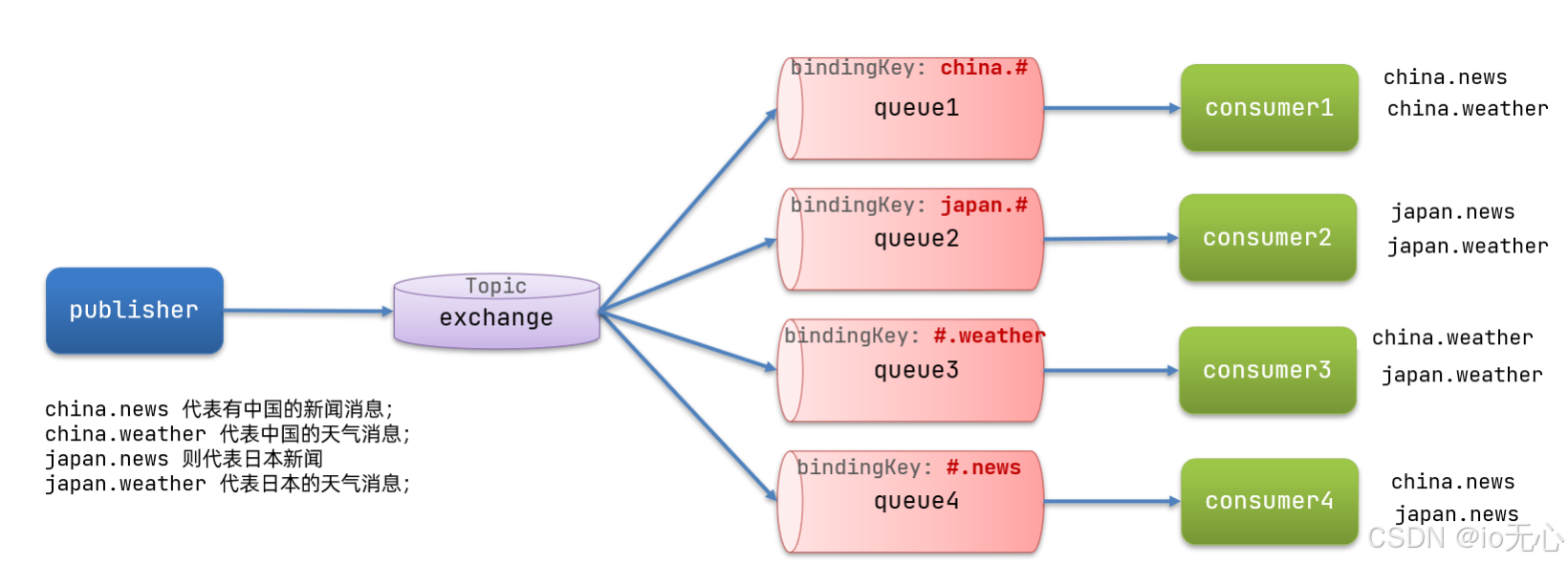
解释:
-
Queue1:绑定的是
china.#,因此凡是以china.开头的routing key都会被匹配到。包括china.news和china.weather -
Queue2:绑定的是
#.news,因此凡是以.news结尾的routing key都会被匹配。包括china.news和japan.news
发送示例
java
@RabbitListener(
        bindings = @QueueBinding(
                value = @Queue(name = "topic.queue1"),
                exchange = @Exchange(name = "itcast.topic", type = ExchangeTypes.TOPIC),
                key = "chine.#"
        )
)
public void listenerTopicQueue1(String msg) {
    System.out.println("消费者queue1收到中国:" + msg);
}

@RabbitListener(
        bindings = @QueueBinding(
                value = @Queue(name = "topic.queue2"),
                exchange = @Exchange(name = "itcast.topic", type = ExchangeTypes.TOPIC),
                key = "#.news"
        )
)
public void listenerTopicQueue2(String msg) {
    System.out.println("消费者queue2收到新闻:" + msg);
}
接收示例
java
@RunWith(SpringRunner.class)
@SpringBootTest
public class SpringAMQPTest {

    @Autowired
    private RabbitTemplate rabbitTemplate;

    @Test
    public void testT() {
        String exchangeName = "itcast.topic";
        String message = "hello,every topic";
        rabbitTemplate.convertAndSend(exchangeName, "美国.news", message);
    }

    @Test
    public void testT() {
        String exchangeName = "itcast.topic";
        String message = "hello,every topic";
        rabbitTemplate.convertAndSend(exchangeName, "china.建筑", message);
    }

}
消息转换器
可以使用JSON方式来做序列化和反序列化。
XML
 <dependency>
     <groupId>com.fasterxml.jackson.dataformat</groupId>
     <artifactId>jackson-dataformat-xml</artifactId>
     <version>2.9.10</version>
 </dependency>
配置消息转换器。
在启动类中添加一个Bean即可:
java
 @Bean
 public MessageConverter jsonMessageConverter(){
     return new Jackson2JsonMessageConverter();
 }
发送示例:
java
@RunWith(SpringRunner.class)
@SpringBootTest
public class SpringAMQPTest {

    @Autowired
    private RabbitTemplate rabbitTemplate;

    @Test
    public void testX() {
        HashMap<String, String> map = new HashMap<>();
        map.put("Li", "新新");
        map.put("Yi", "一一");
        rabbitTemplate.convertAndSend("fanout.xin", map);
    }
}
接收示例:
java
@RabbitListener(queues = "fanout.xin")
public void listenSimpleQueueXin(Map<String, String> map) {
    System.out.println("收到:" + map);
}