一、问题概述
在写 WebRTC 一对一通话的 demo 时,发现主叫在通话中,主叫有较大概率看不到远端画面,但被叫通常正常。通话提示已连接,本地视频正常显示。
二、根本原因
ICE 候选与 SDP 时序不一致: ICE 候选收集与 SDP 交换是并行的,由于网络延迟的不确定性,ICE candidate 可能先于 remote description 到达,导致候选被丢弃。
三、核心解决方案
方案一:时机调整(根本解决办法)
核心思想:等待 ICE 候选收集完成后再发送 offer/answer,让 SDP 包含完整连接信息。
ts
// 等待 ICE 候选收集完成的工具函数
const waitForIceGatheringComplete = (pc: RTCPeerConnection): Promise<void> => {
return new Promise((resolve) => {
// 如果已经完成,直接 resolve
if (pc.iceGatheringState === 'complete') {
resolve();
return;
}
// 监听 ICE 收集状态变化
const checkState = () => {
if (pc.iceGatheringState === 'complete') {
pc.removeEventListener('icegatheringstatechange', checkState);
resolve();
}
};
pc.addEventListener('icegatheringstatechange', checkState);
});
};
// 创建 offer 并等待 ICE 收集完成后再发送
const createOffer = async (pc: RTCPeerConnection) => {
const offer = await pc.createOffer();
await pc.setLocalDescription(offer);
// 关键:等待 ICE 收集完成
await waitForIceGatheringComplete(pc);
sendSignaling({ type: 'offer', payload: pc.localDescription });
};
// 创建 answer 并等待 ICE 收集完成后再发送
const createAnswer = async (pc: RTCPeerConnection) => {
const answer = await pc.createAnswer();
await pc.setLocalDescription(answer);
// 关键:等待 ICE 收集完成
await waitForIceGatheringComplete(pc);
sendSignaling({ type: 'answer', payload: pc.localDescription });
};效果对比:
| 状态 | 行为 |
|---|---|
| 修改前 | setLocalDescription() → 立即发送 → ICE 候选陆续发送(可能丢失) |
| 修改后 | setLocalDescription() → 等待 ICE 完成 → 发送包含完整 ICE 的 SDP |
方案二:ICE 候选缓存(兜底处理)
核心思想:当 remote description 未就绪时,缓存候选者,待就绪后再添加。
ts
// ICE 候选管理器接口
interface IceCandidateManager {
addIceCandidate: (candidate: RTCIceCandidateInit) => Promise<void>;
flushPendingCandidates: () => Promise<void>;
}
// 创建 ICE 候选管理器实例
const createIceCandidateManager = (pc: RTCPeerConnection): IceCandidateManager => {
// 待处理的候选队列
const pendingCandidates: RTCIceCandidateInit[] = [];
return {
// 添加候选:如果 remoteDescription 未就绪则缓存
addIceCandidate: async (candidate) => {
if (!pc.remoteDescription) {
// remoteDescription 未就绪,缓存候选
pendingCandidates.push(candidate);
return;
}
await pc.addIceCandidate(candidate);
},
// 刷新缓存:将所有缓存的候选依次添加
flushPendingCandidates: async () => {
for (const candidate of pendingCandidates) {
await pc.addIceCandidate(candidate);
}
// 清空缓存队列
pendingCandidates.length = 0;
},
};
};
// 初始化 PeerConnection
const setupPeerConnection = () => {
const pc = new RTCPeerConnection(config);
const iceManager = createIceCandidateManager(pc);
// ICE 候选事件:发送给信令服务器
pc.onicecandidate = (event) => {
if (event.candidate) {
sendSignaling({ type: 'candidate', payload: event.candidate });
}
};
return { pc, iceManager };
};
// 处理信令消息
const handleSignalingMessage = async (message: SignalingMessage, { pc, iceManager }: { pc: RTCPeerConnection; iceManager: IceCandidateManager }) => {
switch (message.type) {
case 'offer':
case 'answer':
// 设置 remoteDescription 后刷新缓存的候选
await pc.setRemoteDescription(message.payload);
await iceManager.flushPendingCandidates();
break;
case 'candidate':
await iceManager.addIceCandidate(message.payload);
break;
}
};四、最佳实践:两者结合
为什么需要结合
| 方案 | 作用 | 价值 |
|---|---|---|
| 时机调整 | 从根源减少 candidate 先于 remoteDesc 到达的概率 | 治本 |
| 缓存机制 | 处理网络不确定性导致的乱序 | 兜底 |
网络特性决定必须两者结合:
- 局域网内:时序可控,可能不需要缓存
- 互联网/跨地域:网络延迟不可预测,时机调整不能 100% 解决问题
- 防御性编程:即使时序正确,也要防止极端情况
完整流程图
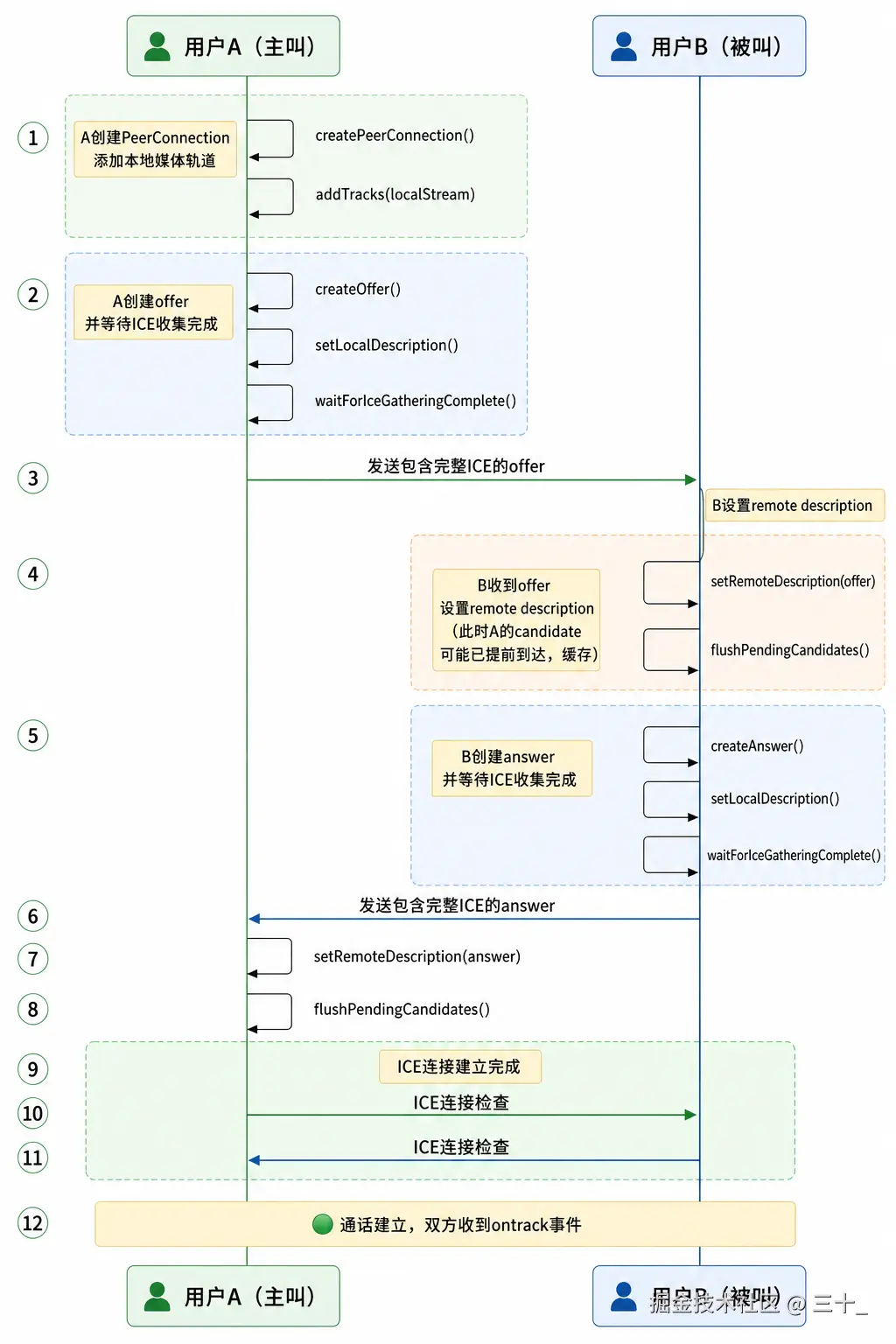
五、关键检查点
排查 checklist
- 检查 ICE candidate 和 SDP 的时序
- 检查 remote description 设置时机
- 检查
ontrack是否触发 - 检查 MediaStream 是否正确绑定到 video 元素
最小日志集
ts
// ICE 候选事件日志
pc.addEventListener('icecandidate', (event) => {
if (event.candidate) {
// 候选发送时记录
console.log('[ICE] candidate已发送:', event.candidate.candidate.substring(0, 50));
} else {
// 候选收集完成时记录(event.candidate 为 null 表示收集结束)
console.log('[ICE] candidate收集完成');
}
});
// 远端流接收日志
pc.ontrack = (event) => {
console.log('[Track] ontrack触发, stream:', event.streams[0]?.id);
};
// 连接状态变化日志
pc.onconnectionstatechange = () => {
console.log('[Connection] 连接状态:', pc.connectionState);
};六、主流三方库实现参考
业界标准实现方式
"时机调整 + 缓存机制" 是 WebRTC 开发的标准最佳实践,被以下主流库广泛采用:
| 库名称 | 时机调整实现 | 缓存机制实现 | 说明 |
|---|---|---|---|
| libwebrtc | PeerConnection::SetLocalDescription 后等待 ICE 完成 |
PendingRemoteCandidates 队列 |
Google 官方实现 |
| simple-peer | signal 事件等待 iceComplete |
_pendingCandidates 数组 |
轻量级 WebRTC 封装 |
| peerjs | _negotiate 中等待 ICE |
_pendingCandidates 队列 |
流行的 WebRTC SDK |
| twilio-video | createOffer/Answer 等待 ICE |
内部候选缓冲机制 | Twilio 官方 SDK |
| agora-rtc-sdk | 自动等待 ICE 收集 | 候选缓存队列 | 声网 SDK |
核心实现模式
1. libwebrtc 实现要点:
scss
// 等待 ICE 收集完成
while (pc->ice_gathering_state() != kIceGatheringComplete) {
  // 等待状态变化
}
// 发送包含完整 ICE 的 SDP
SendSdp(pc->local_description());
kotlin
// 监听 ICE 收集状态变化
this._pc.onicegatheringstatechange = () => {
  // ICE 收集完成时触发 signal 事件
  if (this._pc.iceGatheringState === 'complete') {
    this._emit('signal', this._pc.localDescription);
  }
};
// 缓存候选
this._pendingCandidates.push(candidate);
七、经验总结
- SDP 和 ICE 是并行过程,不要假设它们的时序
- 网络延迟不可预测,要增加防御性编程