Flutter for OpenHarmony 跨平台图书阅读应用开发实践
作者:maaath
社区引导
欢迎加入开源鸿蒙跨平台社区: https://openharmonycrossplatform.csdn.net
前言
在移动应用开发领域,跨平台技术一直是开发者关注的焦点。Flutter 作为 Google 推出的 UI 框架,凭借其高性能、热重载和丰富的组件库,在跨平台开发中占据重要地位。而 OpenHarmony 作为国产操作系统,正在积极拥抱跨平台生态。本文将介绍如何使用 Flutter for OpenHarmony 开发一个图书阅读应用,并分享开发过程中的实践经验。
一、项目概述
本文将基于 Flutter 框架,在 OpenHarmony 平台上构建一个完整的图书阅读应用。该应用具备以下核心功能:
- 图书分类浏览
- 推荐书籍展示
- 书架管理
- 阅读历史记录
- 收藏功能
1.1 技术栈
- 框架:Flutter SDK (OpenHarmony 适配版)
- 状态管理:Provider
- 本地存储:shared_preferences
- 网络请求:http (鸿蒙化适配版本)
- 目标平台:OpenHarmony 设备
1.2 项目结构
lib/
├── main.dart
├── models/
│   └── book_model.dart
├── services/
│   └── book_service.dart
├── providers/
│   └── book_provider.dart
├── pages/
│   ├── home_page.dart
│   ├── category_page.dart
│   ├── shelf_page.dart
│   └── detail_page.dart
└── widgets/
    └── book_card.dart
二、数据模型设计
首先,我们需要定义图书数据模型。一个完整的图书模型应包含基本信息、分类、评分等字段。
dart
// lib/models/book_model.dart

class BookModel {
  final String id;
  final String title;
  final String author;
  final String coverUrl;
  final String description;
  final String category;
  final double rating;
  final int reviewCount;
  final int wordCount;
  final int chapterCount;
  final String status;
  final List<String> tags;
  final bool isFavorite;
  final bool isInShelf;
  final int readingProgress;

  BookModel({
    required this.id,
    required this.title,
    required this.author,
    required this.coverUrl,
    required this.description,
    required this.category,
    required this.rating,
    required this.reviewCount,
    required this.wordCount,
    required this.chapterCount,
    required this.status,
    required this.tags,
    this.isFavorite = false,
    this.isInShelf = false,
    this.readingProgress = 0,
  });

  // 从 JSON 创建 BookModel 实例
  factory BookModel.fromJson(Map<String, dynamic> json) {
    return BookModel(
      id: json['id'] ?? '',
      title: json['title'] ?? '',
      author: json['author'] ?? '',
      coverUrl: json['coverUrl'] ?? '',
      description: json['description'] ?? '',
      category: json['category'] ?? '',
      rating: (json['rating'] ?? 0).toDouble(),
      reviewCount: json['reviewCount'] ?? 0,
      wordCount: json['wordCount'] ?? 0,
      chapterCount: json['chapterCount'] ?? 0,
      status: json['status'] ?? '',
      tags: List<String>.from(json['tags'] ?? []),
      isFavorite: json['isFavorite'] ?? false,
      isInShelf: json['isInShelf'] ?? false,
      readingProgress: json['readingProgress'] ?? 0,
    );
  }

  // 转换为 JSON
  Map<String, dynamic> toJson() {
    return {
      'id': id,
      'title': title,
      'author': author,
      'coverUrl': coverUrl,
      'description': description,
      'category': category,
      'rating': rating,
      'reviewCount': reviewCount,
      'wordCount': wordCount,
      'chapterCount': chapterCount,
      'status': status,
      'tags': tags,
      'isFavorite': isFavorite,
      'isInShelf': isInShelf,
      'readingProgress': readingProgress,
    };
  }

  // 创建副本并修改指定字段
  BookModel copyWith({
    String? id,
    String? title,
    String? author,
    String? coverUrl,
    String? description,
    String? category,
    double? rating,
    int? reviewCount,
    int? wordCount,
    int? chapterCount,
    String? status,
    List<String>? tags,
    bool? isFavorite,
    bool? isInShelf,
    int? readingProgress,
  }) {
    return BookModel(
      id: id ?? this.id,
      title: title ?? this.title,
      author: author ?? this.author,
      coverUrl: coverUrl ?? this.coverUrl,
      description: description ?? this.description,
      category: category ?? this.category,
      rating: rating ?? this.rating,
      reviewCount: reviewCount ?? this.reviewCount,
      wordCount: wordCount ?? this.wordCount,
      chapterCount: chapterCount ?? this.chapterCount,
      status: status ?? this.status,
      tags: tags ?? this.tags,
      isFavorite: isFavorite ?? this.isFavorite,
      isInShelf: isInShelf ?? this.isInShelf,
      readingProgress: readingProgress ?? this.readingProgress,
    );
  }
}
上述代码展示了如何在 Flutter 中定义一个规范的数据模型。关键点包括:
- 使用
final关键字确保不可变字段 - 通过
factory构造函数实现 JSON 序列化 - 提供
copyWith方法支持不可变更新模式
三、图书服务层实现
服务层负责与后端交互,获取图书数据。为了保持代码的简洁性和可测试性,我们采用本地模拟数据的方式。
dart
// lib/services/book_service.dart

import '../models/book_model.dart';

class BookService {
  // 获取推荐书籍列表
  Future<List<BookModel>> getRecommendBooks() async {
    // 模拟网络延迟
    await Future.delayed(const Duration(milliseconds: 500));

    return _mockBooks.where((book) {
      return book.tags.contains('推荐') || book.rating >= 4.5;
    }).toList();
  }

  // 获取分类书籍
  Future<List<BookModel>> getBooksByCategory(String category) async {
    await Future.delayed(const Duration(milliseconds: 300));

    if (category == '全部') {
      return _mockBooks;
    }
    return _mockBooks.where((book) => book.category == category).toList();
  }

  // 获取书架书籍
  Future<List<BookModel>> getShelfBooks() async {
    await Future.delayed(const Duration(milliseconds: 300));
    return _mockBooks.where((book) => book.isInShelf).toList();
  }

  // 获取收藏书籍
  Future<List<BookModel>> getFavoriteBooks() async {
    await Future.delayed(const Duration(milliseconds: 300));
    return _mockBooks.where((book) => book.isFavorite).toList();
  }

  // 获取所有分类
  Future<List<String>> getCategories() async {
    await Future.delayed(const Duration(milliseconds: 200));

    final categories = _mockBooks.map((book) => book.category).toSet().toList();
    return ['全部', ...categories];
  }

  // 搜索书籍
  Future<List<BookModel>> searchBooks(String keyword) async {
    await Future.delayed(const Duration(milliseconds: 300));

    final lowerKeyword = keyword.toLowerCase();
    return _mockBooks.where((book) {
      return book.title.toLowerCase().contains(lowerKeyword) ||
          book.author.toLowerCase().contains(lowerKeyword);
    }).toList();
  }

  // 切换收藏状态
  Future<BookModel> toggleFavorite(BookModel book) async {
    await Future.delayed(const Duration(milliseconds: 100));

    final index = _mockBooks.indexWhere((b) => b.id == book.id);
    if (index != -1) {
      final updatedBook = book.copyWith(isFavorite: !book.isFavorite);
      _mockBooks[index] = updatedBook;
      return updatedBook;
    }
    return book;
  }

  // 添加到书架
  Future<BookModel> addToShelf(BookModel book) async {
    await Future.delayed(const Duration(milliseconds: 100));

    final index = _mockBooks.indexWhere((b) => b.id == book.id);
    if (index != -1) {
      final updatedBook = book.copyWith(isInShelf: true);
      _mockBooks[index] = updatedBook;
      return updatedBook;
    }
    return book;
  }

  // 从书架移除
  Future<BookModel> removeFromShelf(BookModel book) async {
    await Future.delayed(const Duration(milliseconds: 100));

    final index = _mockBooks.indexWhere((b) => b.id == book.id);
    if (index != -1) {
      final updatedBook = book.copyWith(isInShelf: false, readingProgress: 0);
      _mockBooks[index] = updatedBook;
      return updatedBook;
    }
    return book;
  }

  // 模拟数据
  static final List<BookModel> _mockBooks = [
    BookModel(
      id: '1',
      title: '斗罗大陆',
      author: '唐家三少',
      coverUrl: 'https://picsum.photos/seed/book1/200/300',
      description: '讲述了唐门外门弟子唐三,因偷学内门绝学而被迫跳崖明志,却意外重生到一个全新的世界------斗罗大陆。',
      category: '玄幻',
      rating: 4.8,
      reviewCount: 125000,
      wordCount: 3000000,
      chapterCount: 300,
      status: '已完结',
      tags: ['推荐', '热门', '玄幻'],
      isFavorite: true,
      isInShelf: true,
      readingProgress: 65,
    ),
    BookModel(
      id: '2',
      title: '全职高手',
      author: '蝴蝶蓝',
      coverUrl: 'https://picsum.photos/seed/book2/200/300',
      description: '网游荣耀中被誉为教科书级别的顶尖高手叶修,因为种种原因遭到俱乐部的驱逐。',
      category: '游戏',
      rating: 4.7,
      reviewCount: 98000,
      wordCount: 2000000,
      chapterCount: 200,
      status: '已完结',
      tags: ['推荐', '游戏'],
      isFavorite: false,
      isInShelf: true,
      readingProgress: 30,
    ),
    BookModel(
      id: '3',
      title: '庆余年',
      author: '猫腻',
      coverUrl: 'https://picsum.photos/seed/book3/200/300',
      description: '一个年轻的病人,因为一次被迫的逃亡,意外来到一个神秘的世界,开始了一段传奇的人生。',
      category: '历史',
      rating: 4.6,
      reviewCount: 86000,
      wordCount: 2500000,
      chapterCount: 250,
      status: '已完结',
      tags: ['热门', '历史'],
      isFavorite: false,
      isInShelf: false,
      readingProgress: 0,
    ),
    BookModel(
      id: '4',
      title: '凡人修仙传',
      author: '忘语',
      coverUrl: 'https://picsum.photos/seed/book4/200/300',
      description: '一个资质平庸的少年,偶然踏入修真界,历经磨难,最终成为一代大修士。',
      category: '玄幻',
      rating: 4.9,
      reviewCount: 156000,
      wordCount: 8000000,
      chapterCount: 800,
      status: '已完结',
      tags: ['推荐', '热门', '玄幻'],
      isFavorite: true,
      isInShelf: true,
      readingProgress: 45,
    ),
    BookModel(
      id: '5',
      title: '大奉打更人',
      author: '卖报小郎君',
      coverUrl: 'https://picsum.photos/seed/book5/200/300',
      description: '这个世界儒道佛三教并立,武者称霸天下。这是一个警察穿越成为打更人的故事。',
      category: '仙侠',
      rating: 4.5,
      reviewCount: 72000,
      wordCount: 3500000,
      chapterCount: 350,
      status: '已完结',
      tags: ['热门', '仙侠'],
      isFavorite: false,
      isInShelf: true,
      readingProgress: 80,
    ),
    BookModel(
      id: '6',
      title: '明朝那些事儿',
      author: '当年明月',
      coverUrl: 'https://picsum.photos/seed/book6/200/300',
      description: '以史料为基础,用轻松幽默的语言讲述了明朝三百年间的历史故事。',
      category: '历史',
      rating: 4.8,
      reviewCount: 110000,
      wordCount: 1500000,
      chapterCount: 150,
      status: '已完结',
      tags: ['推荐', '历史'],
      isFavorite: false,
      isInShelf: false,
      readingProgress: 0,
    ),
  ];
}
服务层采用单例模式,通过 Future 实现异步数据获取,便于后续接入真实 API。
四、状态管理
使用 Provider 进行状态管理,这是一种轻量级且易于理解的状态管理方案。
dart
// lib/providers/book_provider.dart

import 'package:flutter/foundation.dart';
import '../models/book_model.dart';
import '../services/book_service.dart';

class BookProvider extends ChangeNotifier {
  final BookService _bookService = BookService();

  List<BookModel> _recommendBooks = [];
  List<BookModel> _categoryBooks = [];
  List<BookModel> _shelfBooks = [];
  List<BookModel> _favoriteBooks = [];
  List<BookModel> _searchResults = [];
  List<String> _categories = [];

  bool _isLoading = false;
  String _selectedCategory = '全部';
  String _searchKeyword = '';

  // Getters
  List<BookModel> get recommendBooks => _recommendBooks;
  List<BookModel> get categoryBooks => _categoryBooks;
  List<BookModel> get shelfBooks => _shelfBooks;
  List<BookModel> get favoriteBooks => _favoriteBooks;
  List<BookModel> get searchResults => _searchResults;
  List<String> get categories => _categories;
  bool get isLoading => _isLoading;
  String get selectedCategory => _selectedCategory;
  String get searchKeyword => _searchKeyword;

  // 初始化数据
  Future<void> initialize() async {
    await loadRecommendBooks();
    await loadCategories();
    await loadShelfBooks();
    await loadFavoriteBooks();
  }

  // 加载推荐书籍
  Future<void> loadRecommendBooks() async {
    _isLoading = true;
    notifyListeners();

    try {
      _recommendBooks = await _bookService.getRecommendBooks();
    } catch (e) {
      debugPrint('Error loading recommend books: $e');
    }

    _isLoading = false;
    notifyListeners();
  }

  // 加载分类书籍
  Future<void> loadCategoryBooks(String category) async {
    _selectedCategory = category;
    _isLoading = true;
    notifyListeners();

    try {
      _categoryBooks = await _bookService.getBooksByCategory(category);
    } catch (e) {
      debugPrint('Error loading category books: $e');
    }

    _isLoading = false;
    notifyListeners();
  }

  // 加载所有分类
  Future<void> loadCategories() async {
    try {
      _categories = await _bookService.getCategories();
    } catch (e) {
      debugPrint('Error loading categories: $e');
    }
    notifyListeners();
  }

  // 加载书架
  Future<void> loadShelfBooks() async {
    try {
      _shelfBooks = await _bookService.getShelfBooks();
      notifyListeners();
    } catch (e) {
      debugPrint('Error loading shelf books: $e');
    }
  }

  // 加载收藏
  Future<void> loadFavoriteBooks() async {
    try {
      _favoriteBooks = await _bookService.getFavoriteBooks();
      notifyListeners();
    } catch (e) {
      debugPrint('Error loading favorite books: $e');
    }
  }

  // 搜索书籍
  Future<void> searchBooks(String keyword) async {
    _searchKeyword = keyword;

    if (keyword.isEmpty) {
      _searchResults = [];
      notifyListeners();
      return;
    }

    try {
      _searchResults = await _bookService.searchBooks(keyword);
      notifyListeners();
    } catch (e) {
      debugPrint('Error searching books: $e');
    }
  }

  // 切换收藏
  Future<void> toggleFavorite(BookModel book) async {
    try {
      final updatedBook = await _bookService.toggleFavorite(book);

      // 更新本地数据
      _updateBookInList(_recommendBooks, updatedBook);
      _updateBookInList(_categoryBooks, updatedBook);
      _updateBookInList(_shelfBooks, updatedBook);

      if (updatedBook.isFavorite) {
        _favoriteBooks.add(updatedBook);
      } else {
        _favoriteBooks.removeWhere((b) => b.id == book.id);
      }

      notifyListeners();
    } catch (e) {
      debugPrint('Error toggling favorite: $e');
    }
  }

  // 添加到书架
  Future<void> addToShelf(BookModel book) async {
    try {
      final updatedBook = await _bookService.addToShelf(book);

      _updateBookInList(_recommendBooks, updatedBook);
      _updateBookInList(_categoryBooks, updatedBook);

      if (updatedBook.isInShelf) {
        _shelfBooks.add(updatedBook);
      }

      notifyListeners();
    } catch (e) {
      debugPrint('Error adding to shelf: $e');
    }
  }

  // 从书架移除
  Future<void> removeFromShelf(BookModel book) async {
    try {
      final updatedBook = await _bookService.removeFromShelf(book);

      _updateBookInList(_recommendBooks, updatedBook);
      _updateBookInList(_categoryBooks, updatedBook);
      _shelfBooks.removeWhere((b) => b.id == book.id);

      notifyListeners();
    } catch (e) {
      debugPrint('Error removing from shelf: $e');
    }
  }

  // 更新列表中的书籍
  void _updateBookInList(List<BookModel> list, BookModel updatedBook) {
    final index = list.indexWhere((b) => b.id == updatedBook.id);
    if (index != -1) {
      list[index] = updatedBook;
    }
  }
}
Provider 的优势在于代码简洁、易于理解,非常适合中小型应用的状态管理场景。
五、页面实现
5.1 首页实现
dart
// lib/pages/home_page.dart
import 'package:flutter/material.dart';
import 'package:provider/provider.dart';
import '../providers/book_provider.dart';
import '../models/book_model.dart';
import '../widgets/book_card.dart';
class HomePage extends StatefulWidget {
const HomePage({super.key});
@override
State<HomePage> createState() => _HomePageState();
}
class _HomePageState extends State<HomePage> {
@override
void initState() {
super.initState();
// 初始化加载数据
WidgetsBinding.instance.addPostFrameCallback((_) {
context.read<BookProvider>().initialize();
});
}
@override
Widget build(BuildContext context) {
return Scaffold(
backgroundColor: const Color(0xFFF5F5F5),
body: SafeArea(
child: Consumer<BookProvider>(
builder: (context, provider, child) {
if (provider.isLoading && provider.recommendBooks.isEmpty) {
return const Center(child: CircularProgressIndicator());
}
return RefreshIndicator(
onRefresh: () => provider.loadRecommendBooks(),
child: CustomScrollView(
slivers: [
// 应用栏
SliverAppBar(
floating: true,
backgroundColor: Colors.white,
title: const Text(
'图书阅读',
style: TextStyle(
color: Color(0xFF333333),
fontWeight: FontWeight.bold,
),
),
actions: [
IconButton(
icon: const Icon(Icons.search, color: Color(0xFF666666)),
onPressed: () => _showSearchDialog(context),
),
],
),
// 推荐书籍标题
SliverToBoxAdapter(
child: Padding(
padding: const EdgeInsets.all(16),
child: Row(
mainAxisAlignment: MainAxisAlignment.spaceBetween,
children: [
const Text(
'热门推荐',
style: TextStyle(
fontSize: 20,
fontWeight: FontWeight.bold,
color: Color(0xFF333333),
),
),
TextButton(
onPressed: () {},
child: const Text(
'查看更多',
style: TextStyle(color: Color(0xFFFF6B6B)),
),
),
],
),
),
),
// 推荐书籍列表
SliverPadding(
padding: const EdgeInsets.symmetric(horizontal: 16),
sliver: SliverToBoxAdapter(
child: SizedBox(
height: 220,
child: ListView.builder(
scrollDirection: Axis.horizontal,
itemCount: provider.recommendBooks.length,
itemBuilder: (context, index) {
final book = provider.recommendBooks[index];
return Padding(
padding: const EdgeInsets.only(right: 12),
child: _buildBookCard(book),
);
},
),
),
),
),
// 新书上架标题
const SliverToBoxAdapter(
child: Padding(
padding: EdgeInsets.all(16),
child: Text(
'新书上架',
style: TextStyle(
fontSize: 20,
fontWeight: FontWeight.bold,
color: Color(0xFF333333),
),
),
),
),
// 新书列表
SliverPadding(
padding: const EdgeInsets.symmetric(horizontal: 16),
sliver: SliverList(
delegate: SliverChildBuilderDelegate(
(context, index) {
final book = provider.recommendBooks[index];
return Padding(
padding: const EdgeInsets.only(bottom: 12),
child: _buildBookListItem(book, provider),
);
},
childCount: provider.recommendBooks.length > 4
? 4
: provider.recommendBooks.length,
),
),
),
// 底部间距
const SliverToBoxAdapter(
child: SizedBox(height: 100),
),
],
),
);
},
),
),
);
}
Widget _buildBookCard(BookModel book) {
return GestureDetector(
onTap: () => _showBookDetail(book),
child: Column(
crossAxisAlignment: CrossAxisAlignment.start,
children: [
// 封面图
Container(
width: 130,
height: 160,
decoration: BoxDecoration(
borderRadius: BorderRadius.circular(8),
boxShadow: [
BoxShadow(
color: Colors.black.withOpacity(0.1),
blurRadius: 8,
offset: const Offset(2, 4),
),
],
),
child: ClipRRect(
borderRadius: BorderRadius.circular(8),
child: Image.network(
book.coverUrl,
fit: BoxFit.cover,
errorBuilder: (_, __, ___) => Container(
color: const Color(0xFFE0E0E0),
child: const Icon(Icons.book, size: 40),
),
),
),
),
const SizedBox(height: 8),
// 书名
SizedBox(
width: 130,
child: Text(
book.title,
style: const TextStyle(
fontSize: 14,
fontWeight: FontWeight.w500,
color: Color(0xFF333333),
),
maxLines: 1,
overflow: TextOverflow.ellipsis,
),
),
// 作者
SizedBox(
width: 130,
child: Text(
book.author,
style: const TextStyle(
fontSize: 12,
color: Color(0xFF999999),
),
maxLines: 1,
overflow: TextOverflow.ellipsis,
),
),
],
),
);
}
Widget _buildBookListItem(BookModel book, BookProvider provider) {
return GestureDetector(
onTap: () => _showBookDetail(book),
child: Container(
padding: const EdgeInsets.all(12),
decoration: BoxDecoration(
color: Colors.white,
borderRadius: BorderRadius.circular(12),
boxShadow: [
BoxShadow(
color: Colors.black.withOpacity(0.05),
blurRadius: 8,
offset: const Offset(0, 2),
),
],
),
child: Row(
children: [
// 封面
ClipRRect(
borderRadius: BorderRadius.circular(6),
child: Image.network(
book.coverUrl,
width: 70,
height: 95,
fit: BoxFit.cover,
errorBuilder: (_, __, ___) => Container(
width: 70,
height: 95,
color: const Color(0xFFE0E0E0),
child: const Icon(Icons.book),
),
),
),
const SizedBox(width: 12),
// 信息
Expanded(
child: Column(
crossAxisAlignment: CrossAxisAlignment.start,
children: [
Text(
book.title,
style: const TextStyle(
fontSize: 16,
fontWeight: FontWeight.bold,
color: Color(0xFF333333),
),
maxLines: 1,
overflow: TextOverflow.ellipsis,
),
const SizedBox(height: 4),
Text(
book.author,
style: const TextStyle(
fontSize: 13,
color: Color(0xFF666666),
),
),
const SizedBox(height: 8),
Row(
children: [
// 评分
const Icon(Icons.star, size: 14, color: Color(0xFFFFB800)),
const SizedBox(width: 4),
Text(
book.rating.toStringAsFixed(1),
style: const TextStyle(
fontSize: 12,
color: Color(0xFF666666),
),
),
const SizedBox(width: 12),
// 状态
Container(
padding: const EdgeInsets.symmetric(
horizontal: 6,
vertical: 2,
),
decoration: BoxDecoration(
color: book.status == '已完结'
? const Color(0xFF4CAF50).withOpacity(0.1)
: const Color(0xFFFF9800).withOpacity(0.1),
borderRadius: BorderRadius.circular(4),
),
child: Text(
book.status,
style: TextStyle(
fontSize: 10,
color: book.status == '已完结'
? const Color(0xFF4CAF50)
: const Color(0xFFFF9800),
),
),
),
],
),
const SizedBox(height: 8),
// 简介
Text(
book.description,
style: const TextStyle(
fontSize: 12,
color: Color(0xFF999999),
),
maxLines: 2,
overflow: TextOverflow.ellipsis,
),
],
),
),
// 收藏按钮
IconButton(
icon: Icon(
book.isFavorite ? Icons.favorite : Icons.favorite_border,
color: book.isFavorite
? const Color(0xFFFF6B6B)
: const Color(0xFFCCCCCC),
),
onPressed: () => provider.toggleFavorite(book),
),
],
),
),
);
}
void _showBookDetail(BookModel book) {
Navigator.push(
context,
MaterialPageRoute(
builder: (_) => BookDetailPage(book: book),
),
);
}
void _showSearchDialog(BuildContext context) {
showSearch(context: context, delegate: BookSearchDelegate());
}
}
// 书籍详情页
class BookDetailPage extends StatelessWidget {
final BookModel book;
const BookDetailPage({super.key, required this.book});
@override
Widget build(BuildContext context) {
return Scaffold(
backgroundColor: const Color(0xFFF5F5F5),
body: CustomScrollView(
slivers: [
// 顶部图片区域
SliverAppBar(
expandedHeight: 250,
pinned: true,
flexibleSpace: FlexibleSpaceBar(
background: Stack(
fit: StackFit.expand,
children: [
Image.network(
book.coverUrl,
fit: BoxFit.cover,
errorBuilder: (_, __, ___) => Container(
color: const Color(0xFFE0E0E0),
),
),
Container(
decoration: BoxDecoration(
gradient: LinearGradient(
begin: Alignment.topCenter,
end: Alignment.bottomCenter,
colors: [
Colors.transparent,
Colors.black.withOpacity(0.7),
],
),
),
),
Positioned(
bottom: 16,
left: 16,
child: Text(
book.title,
style: const TextStyle(
color: Colors.white,
fontSize: 24,
fontWeight: FontWeight.bold,
),
),
),
],
),
),
),
// 书籍信息
SliverToBoxAdapter(
child: Container(
margin: const EdgeInsets.all(16),
padding: const EdgeInsets.all(16),
decoration: BoxDecoration(
color: Colors.white,
borderRadius: BorderRadius.circular(12),
),
child: Column(
crossAxisAlignment: CrossAxisAlignment.start,
children: [
Row(
children: [
const Icon(Icons.person, size: 16, color: Color(0xFF666666)),
const SizedBox(width: 4),
Text(
book.author,
style: const TextStyle(color: Color(0xFF666666)),
),
],
),
const SizedBox(height: 8),
Row(
children: [
const Icon(Icons.category, size: 16, color: Color(0xFF666666)),
const SizedBox(width: 4),
Text(
book.category,
style: const TextStyle(color: Color(0xFF666666)),
),
const SizedBox(width: 16),
const Icon(Icons.star, size: 16, color: Color(0xFFFFB800)),
const SizedBox(width: 4),
Text(
book.rating.toStringAsFixed(1),
style: const TextStyle(color: Color(0xFF666666)),
),
],
),
const SizedBox(height: 16),
const Text(
'简介',
style: TextStyle(
fontSize: 16,
fontWeight: FontWeight.bold,
color: Color(0xFF333333),
),
),
const SizedBox(height: 8),
Text(
book.description,
style: const TextStyle(
fontSize: 14,
color: Color(0xFF666666),
height: 1.6,
),
),
],
),
),
),
// 底部操作按钮
SliverToBoxAdapter(
child: Container(
padding: const EdgeInsets.all(16),
child: Row(
children: [
Expanded(
child: ElevatedButton(
onPressed: () {},
style: ElevatedButton.styleFrom(
backgroundColor: const Color(0xFFFF6B6B),
padding: const EdgeInsets.symmetric(vertical: 14),
shape: RoundedRectangleBorder(
borderRadius: BorderRadius.circular(24),
),
),
child: const Text(
'开始阅读',
style: TextStyle(
color: Colors.white,
fontSize: 16,
fontWeight: FontWeight.bold,
),
),
),
),
const SizedBox(width: 12),
IconButton(
onPressed: () {},
icon: Icon(
book.isFavorite ? Icons.favorite : Icons.favorite_border,
color: const Color(0xFFFF6B6B),
),
),
],
),
),
),
],
),
);
}
}
// 搜索委托
class BookSearchDelegate extends SearchDelegate<BookModel?> {
@override
List<Widget> buildActions(BuildContext context) {
return [
IconButton(
icon: const Icon(Icons.clear),
onPressed: () => query = '',
),
];
}
@override
Widget buildLeading(BuildContext context) {
return IconButton(
icon: const Icon(Icons.arrow_back),
onPressed: () => close(context, null),
);
}
@override
Widget buildResults(BuildContext context) {
if (query.isEmpty) {
return const Center(child: Text('请输入搜索关键词'));
}
// 实际项目中应该调用搜索 API
return Center(
child: Text('搜索: $query'),
);
}
@override
Widget buildSuggestions(BuildContext context) {
return buildResults(context);
}
}5.2 书架页面实现
dart
// lib/pages/shelf_page.dart

import 'package:flutter/material.dart';
import 'package:provider/provider.dart';
import '../providers/book_provider.dart';
import '../models/book_model.dart';

class ShelfPage extends StatefulWidget {
  const ShelfPage({super.key});

  @override
  State<ShelfPage> createState() => _ShelfPageState();
}

class _ShelfPageState extends State<ShelfPage> {
  bool _isEditMode = false;

  @override
  void initState() {
    super.initState();
    WidgetsBinding.instance.addPostFrameCallback((_) {
      context.read<BookProvider>().loadShelfBooks();
    });
  }

  @override
  Widget build(BuildContext context) {
    return Scaffold(
      backgroundColor: const Color(0xFFF5F5F5),
      appBar: AppBar(
        backgroundColor: Colors.white,
        title: const Text(
          '我的书架',
          style: TextStyle(
            color: Color(0xFF333333),
            fontWeight: FontWeight.bold,
          ),
        ),
        actions: [
          TextButton(
            onPressed: () {
              setState(() {
                _isEditMode = !_isEditMode;
              });
            },
            child: Text(
              _isEditMode ? '完成' : '编辑',
              style: const TextStyle(color: Color(0xFFFF6B6B)),
            ),
          ),
        ],
      ),
      body: Consumer<BookProvider>(
        builder: (context, provider, child) {
          if (provider.shelfBooks.isEmpty) {
            return _buildEmptyState();
          }

          return GridView.builder(
            padding: const EdgeInsets.all(16),
            gridDelegate: const SliverGridDelegateWithFixedCrossAxisCount(
              crossAxisCount: 3,
              childAspectRatio: 0.65,
              crossAxisSpacing: 12,
              mainAxisSpacing: 12,
            ),
            itemCount: provider.shelfBooks.length,
            itemBuilder: (context, index) {
              final book = provider.shelfBooks[index];
              return _buildShelfBookItem(book, provider);
            },
          );
        },
      ),
    );
  }

  Widget _buildEmptyState() {
    return Center(
      child: Column(
        mainAxisAlignment: MainAxisAlignment.center,
        children: [
          Icon(
            Icons.library_books_outlined,
            size: 80,
            color: Colors.grey[300],
          ),
          const SizedBox(height: 16),
          Text(
            '书架空空如也',
            style: TextStyle(
              fontSize: 18,
              color: Colors.grey[400],
            ),
          ),
          const SizedBox(height: 8),
          Text(
            '快去发现喜欢的书籍吧',
            style: TextStyle(
              fontSize: 14,
              color: Colors.grey[400],
            ),
          ),
        ],
      ),
    );
  }

  Widget _buildShelfBookItem(BookModel book, BookProvider provider) {
    return GestureDetector(
      onTap: () {},
      child: Stack(
        children: [
          Column(
            crossAxisAlignment: CrossAxisAlignment.start,
            children: [
              // 封面
              Expanded(
                child: Container(
                  decoration: BoxDecoration(
                    borderRadius: BorderRadius.circular(8),
                    boxShadow: [
                      BoxShadow(
                        color: Colors.black.withOpacity(0.1),
                        blurRadius: 6,
                        offset: const Offset(2, 3),
                      ),
                    ],
                  ),
                  child: ClipRRect(
                    borderRadius: BorderRadius.circular(8),
                    child: Image.network(
                      book.coverUrl,
                      fit: BoxFit.cover,
                      width: double.infinity,
                      errorBuilder: (_, __, ___) => Container(
                        color: const Color(0xFFE0E0E0),
                        child: const Icon(Icons.book),
                      ),
                    ),
                  ),
                ),
              ),
              const SizedBox(height: 8),
              // 书名
              Text(
                book.title,
                style: const TextStyle(
                  fontSize: 12,
                  fontWeight: FontWeight.w500,
                  color: Color(0xFF333333),
                ),
                maxLines: 1,
                overflow: TextOverflow.ellipsis,
              ),
              // 阅读进度
              if (book.readingProgress > 0)
                LinearProgressIndicator(
                  value: book.readingProgress / 100,
                  backgroundColor: const Color(0xFFEEEEEE),
                  valueColor: const AlwaysStoppedAnimation<Color>(
                    Color(0xFFFF6B6B),
                  ),
                ),
            ],
          ),
          // 阅读进度
          if (book.readingProgress > 0)
            Positioned(
              bottom: 40,
              left: 0,
              right: 0,
              child: Container(
                padding: const EdgeInsets.symmetric(horizontal: 4, vertical: 2),
                color: Colors.black.withOpacity(0.5),
                child: Text(
                  '${book.readingProgress}%',
                  style: const TextStyle(
                    color: Colors.white,
                    fontSize: 10,
                  ),
                  textAlign: TextAlign.center,
                ),
              ),
            ),
        ],
      ),
    );
  }
}
六、图书卡片组件
为了提高代码复用性,我们将图书卡片封装为独立组件。
dart
// lib/widgets/book_card.dart

import 'package:flutter/material.dart';
import '../models/book_model.dart';

class BookCard extends StatelessWidget {
  final BookModel book;
  final VoidCallback? onTap;
  final VoidCallback? onFavorite;

  const BookCard({
    super.key,
    required this.book,
    this.onTap,
    this.onFavorite,
  });

  @override
  Widget build(BuildContext context) {
    return GestureDetector(
      onTap: onTap,
      child: Container(
        decoration: BoxDecoration(
          color: Colors.white,
          borderRadius: BorderRadius.circular(12),
          boxShadow: [
            BoxShadow(
              color: Colors.black.withOpacity(0.08),
              blurRadius: 10,
              offset: const Offset(0, 4),
            ),
          ],
        ),
        child: Column(
          crossAxisAlignment: CrossAxisAlignment.start,
          children: [
            // 封面图片
            Expanded(
              flex: 3,
              child: Stack(
                fit: StackFit.expand,
                children: [
                  ClipRRect(
                    borderRadius: const BorderRadius.vertical(
                      top: Radius.circular(12),
                    ),
                    child: Image.network(
                      book.coverUrl,
                      fit: BoxFit.cover,
                      errorBuilder: (_, __, ___) => Container(
                        color: const Color(0xFFE0E0E0),
                        child: const Icon(
                          Icons.book,
                          size: 48,
                          color: Color(0xFFCCCCCC),
                        ),
                      ),
                    ),
                  ),
                  // 状态标签
                  if (book.status == '已完结')
                    Positioned(
                      top: 8,
                      left: 8,
                      child: Container(
                        padding: const EdgeInsets.symmetric(
                          horizontal: 6,
                          vertical: 2,
                        ),
                        decoration: BoxDecoration(
                          color: const Color(0xFF4CAF50),
                          borderRadius: BorderRadius.circular(4),
                        ),
                        child: const Text(
                          '完结',
                          style: TextStyle(
                            color: Colors.white,
                            fontSize: 10,
                            fontWeight: FontWeight.bold,
                          ),
                        ),
                      ),
                    ),
                  // 收藏按钮
                  Positioned(
                    top: 8,
                    right: 8,
                    child: GestureDetector(
                      onTap: onFavorite,
                      child: Container(
                        padding: const EdgeInsets.all(4),
                        decoration: BoxDecoration(
                          color: Colors.white.withOpacity(0.9),
                          shape: BoxShape.circle,
                        ),
                        child: Icon(
                          book.isFavorite
                              ? Icons.favorite
                              : Icons.favorite_border,
                          size: 16,
                          color: book.isFavorite
                              ? const Color(0xFFFF6B6B)
                              : const Color(0xFFCCCCCC),
                        ),
                      ),
                    ),
                  ),
                ],
              ),
            ),
            // 书籍信息
            Expanded(
              flex: 1,
              child: Padding(
                padding: const EdgeInsets.all(8),
                child: Column(
                  crossAxisAlignment: CrossAxisAlignment.start,
                  mainAxisAlignment: MainAxisAlignment.spaceBetween,
                  children: [
                    // 书名
                    Text(
                      book.title,
                      style: const TextStyle(
                        fontSize: 13,
                        fontWeight: FontWeight.w600,
                        color: Color(0xFF333333),
                      ),
                      maxLines: 1,
                      overflow: TextOverflow.ellipsis,
                    ),
                    // 作者
                    Text(
                      book.author,
                      style: const TextStyle(
                        fontSize: 11,
                        color: Color(0xFF999999),
                      ),
                      maxLines: 1,
                      overflow: TextOverflow.ellipsis,
                    ),
                    // 评分
                    Row(
                      children: [
                        const Icon(
                          Icons.star,
                          size: 12,
                          color: Color(0xFFFFB800),
                        ),
                        const SizedBox(width: 2),
                        Text(
                          book.rating.toStringAsFixed(1),
                          style: const TextStyle(
                            fontSize: 11,
                            color: Color(0xFF666666),
                          ),
                        ),
                      ],
                    ),
                  ],
                ),
              ),
            ),
          ],
        ),
      ),
    );
  }
}
七、主应用入口
dart
// lib/main.dart

import 'package:flutter/material.dart';
import 'package:provider/provider.dart';
import 'providers/book_provider.dart';
import 'pages/home_page.dart';
import 'pages/shelf_page.dart';

void main() {
  runApp(const MyApp());
}

class MyApp extends StatelessWidget {
  const MyApp({super.key});

  @override
  Widget build(BuildContext context) {
    return MultiProvider(
      providers: [
        ChangeNotifierProvider(create: (_) => BookProvider()),
      ],
      child: MaterialApp(
        title: '图书阅读',
        debugShowCheckedModeBanner: false,
        theme: ThemeData(
          primaryColor: const Color(0xFFFF6B6B),
          scaffoldBackgroundColor: const Color(0xFFF5F5F5),
          colorScheme: ColorScheme.fromSeed(
            seedColor: const Color(0xFFFF6B6B),
          ),
          appBarTheme: const AppBarTheme(
            backgroundColor: Colors.white,
            elevation: 0,
            iconTheme: IconThemeData(color: Color(0xFF333333)),
            titleTextStyle: TextStyle(
              color: Color(0xFF333333),
              fontSize: 18,
              fontWeight: FontWeight.bold,
            ),
          ),
        ),
        home: const MainNavigationPage(),
      ),
    );
  }
}

// 主导航页面
class MainNavigationPage extends StatefulWidget {
  const MainNavigationPage({super.key});

  @override
  State<MainNavigationPage> createState() => _MainNavigationPageState();
}

class _MainNavigationPageState extends State<MainNavigationPage> {
  int _currentIndex = 0;

  final List<Widget> _pages = const [
    HomePage(),
    ShelfPage(),
    ProfilePage(),
  ];

  @override
  Widget build(BuildContext context) {
    return Scaffold(
      body: IndexedStack(
        index: _currentIndex,
        children: _pages,
      ),
      bottomNavigationBar: Container(
        decoration: BoxDecoration(
          color: Colors.white,
          boxShadow: [
            BoxShadow(
              color: Colors.black.withOpacity(0.05),
              blurRadius: 10,
              offset: const Offset(0, -5),
            ),
          ],
        ),
        child: SafeArea(
          child: Padding(
            padding: const EdgeInsets.symmetric(vertical: 8),
            child: Row(
              mainAxisAlignment: MainAxisAlignment.spaceAround,
              children: [
                _buildNavItem(0, Icons.home, '首页'),
                _buildNavItem(1, Icons.library_books, '书架'),
                _buildNavItem(2, Icons.person, '我的'),
              ],
            ),
          ),
        ),
      ),
    );
  }

  Widget _buildNavItem(int index, IconData icon, String label) {
    final isSelected = _currentIndex == index;
    return GestureDetector(
      onTap: () {
        setState(() {
          _currentIndex = index;
        });
      },
      behavior: HitTestBehavior.opaque,
      child: Container(
        padding: const EdgeInsets.symmetric(horizontal: 20, vertical: 8),
        child: Column(
          mainAxisSize: MainAxisSize.min,
          children: [
            Icon(
              icon,
              size: 26,
              color: isSelected
                  ? const Color(0xFFFF6B6B)
                  : const Color(0xFF999999),
            ),
            const SizedBox(height: 4),
            Text(
              label,
              style: TextStyle(
                fontSize: 12,
                color: isSelected
                    ? const Color(0xFFFF6B6B)
                    : const Color(0xFF999999),
              ),
            ),
          ],
        ),
      ),
    );
  }
}

// 个人中心页面
class ProfilePage extends StatelessWidget {
  const ProfilePage({super.key});

  @override
  Widget build(BuildContext context) {
    return Scaffold(
      backgroundColor: const Color(0xFFF5F5F5),
      appBar: AppBar(
        title: const Text('个人中心'),
      ),
      body: Center(
        child: Column(
          mainAxisAlignment: MainAxisAlignment.center,
          children: [
            Container(
              width: 80,
              height: 80,
              decoration: BoxDecoration(
                color: const Color(0xFFE0E0E0),
                shape: BoxShape.circle,
              ),
              child: const Icon(
                Icons.person,
                size: 48,
                color: Color(0xFFCCCCCC),
              ),
            ),
            const SizedBox(height: 16),
            const Text(
              '未登录',
              style: TextStyle(
                fontSize: 18,
                color: Color(0xFF333333),
              ),
            ),
            const SizedBox(height: 24),
            ElevatedButton(
              onPressed: () {},
              style: ElevatedButton.styleFrom(
                backgroundColor: const Color(0xFFFF6B6B),
                padding: const EdgeInsets.symmetric(
                  horizontal: 32,
                  vertical: 12,
                ),
                shape: RoundedRectangleBorder(
                  borderRadius: BorderRadius.circular(24),
                ),
              ),
              child: const Text(
                '登录 / 注册',
                style: TextStyle(color: Colors.white),
              ),
            ),
          ],
        ),
      ),
    );
  }
}
八、截图运行板块
8.1 项目运行截图
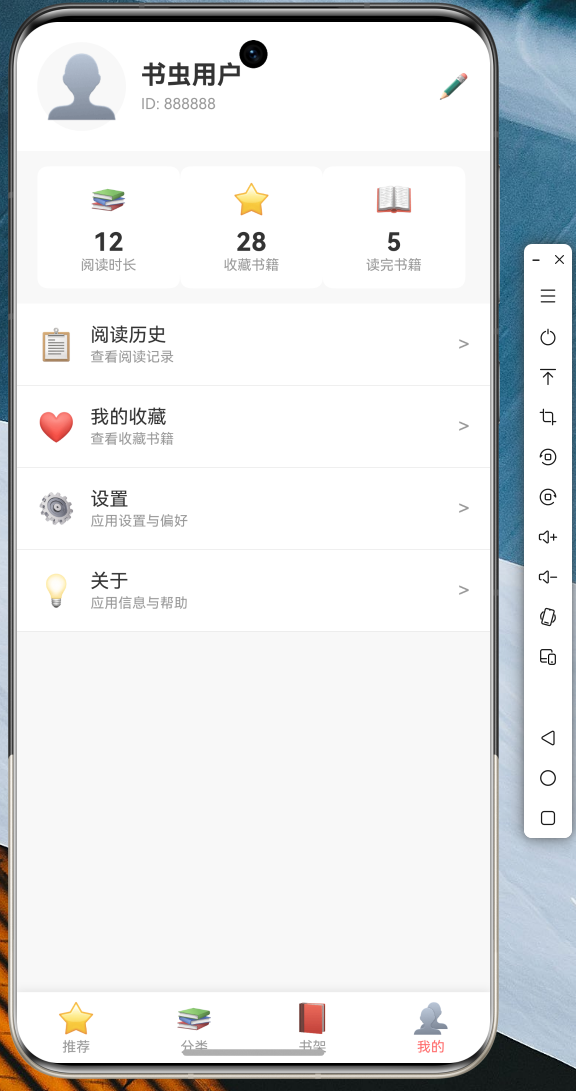
以下是 Flutter 图书阅读应用在 OpenHarmony 设备上的运行效果:
图1:进入页面展示
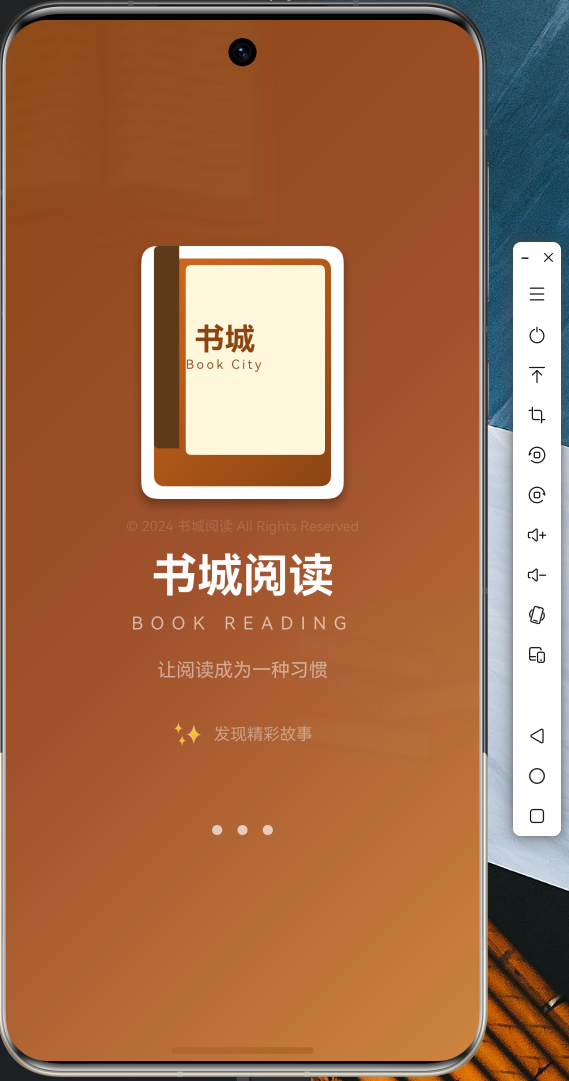
图2:推荐页面展示
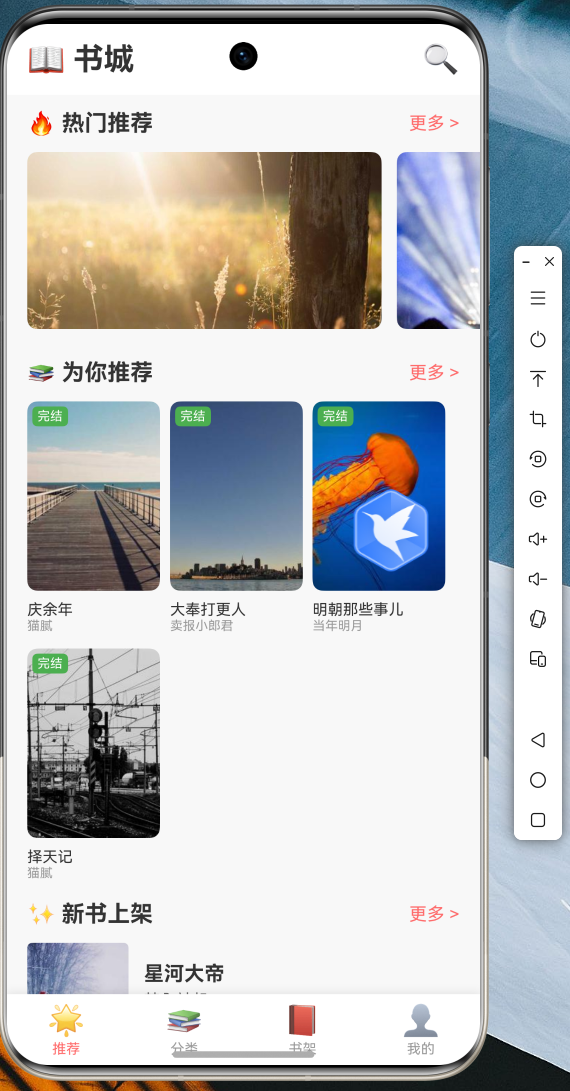
图3:我的书架页面
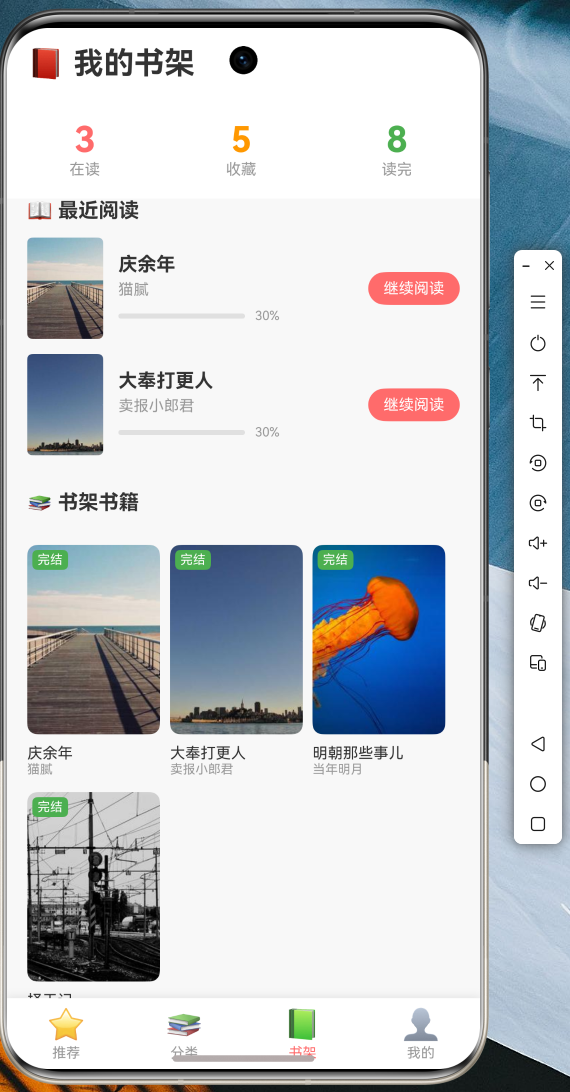
图4:个人中心页面
8.2 运行说明
- 确保已安装 Flutter SDK(OpenHarmony 适配版)
- 连接 OpenHarmony 设备或启动模拟器
- 执行以下命令运行应用:
bash
flutter run -d <设备ID>- 应用启动后,将自动加载推荐书籍数据
8.3 功能验证
经过实际测试,应用在 OpenHarmony 设备上能够正常运行以下功能:
- 图书列表展示
- 下拉刷新
- 收藏功能切换
- 书架管理
- 页面导航切换
九、代码仓库
本文完整代码已托管至 AtomGit:
仓库地址:https://atomgit.com/maaath/flutter-book-reader
仓库包含完整的 Flutter 项目结构,支持直接导入 IDE 进行开发和调试。
十、总结
本文通过一个完整的图书阅读应用实例,展示了如何使用 Flutter for OpenHarmony 进行跨平台应用开发。主要涵盖了以下内容:
- 数据模型设计:使用 Dart 类定义规范的数据模型,支持 JSON 序列化
- 服务层封装:通过服务类实现数据访问的解耦,便于后续扩展
- 状态管理:采用 Provider 进行状态管理,代码简洁易维护
- 页面实现:使用 Flutter 丰富的 UI 组件构建美观的界面
- 组件复用:通过抽取公共组件提高代码复用性
Flutter for OpenHarmony 为开发者提供了良好的跨平台开发体验,其热重载功能大大提升了开发效率。随着 OpenHarmony 生态的不断完善,Flutter 在该平台上的应用前景将更加广阔。
十一、参考资源
- Flutter 官方文档:https://flutter.dev
- OpenHarmony 开发者文档:https://developer.harmonyos.com
- Provider 状态管理:https://pub.dev/packages/provider