Flutter for OpenHarmony 游戏中心应用实战开发
前言
欢迎加入开源鸿蒙跨平台社区: https://openharmonycrossplatform.csdn.net
作者:maaath
在移动应用开发领域,跨平台技术一直是开发者关注的焦点。Flutter for OpenHarmony(以下简称 Flutter OH)的出现,让 Dart 开发者能够将应用轻松部署到鸿蒙设备上。本文将通过一个完整的游戏中心应用实例,深入讲解如何在 Flutter OH 环境下实现网络请求、列表展示、底部导航栏以及动画效果,帮助读者快速掌握鸿蒙跨平台开发的核心技能。
一、项目概述
本次实战项目是一个游戏中心应用,包含以下核心功能:
- 网络请求获取游戏/礼包数据
- 游戏列表与礼包领取功能
- 下拉刷新与上拉加载更多
- 底部选项卡导航(推荐/分类/我的/福利)
- 游戏图标的弹跳动画效果
项目采用简洁清晰的分层架构,将 UI 层、业务层、数据层分离,确保代码具备良好的可维护性和可扩展性。
二、项目结构设计
一个结构清晰的项目是良好开发体验的基础。我们的项目结构如下:
lib/
├── main.dart                    # 应用入口
├── model/                      # 数据模型层
│   └── game_model.dart         # 游戏与礼包数据模型
├── network/                    # 网络请求层
│   └── game_service.dart       # 游戏数据服务
├── pages/                      # 页面层
│   ├── index_page.dart         # 启动页
│   ├── game_center_main_page.dart  # 主页面
│   ├── recommend_page.dart     # 推荐页
│   ├── category_page.dart      # 分类页
│   ├── my_page.dart           # 我的页
│   └── welfare_page.dart      # 福利页
└── widgets/                    # 通用组件
    ├── game_card.dart          # 游戏卡片组件
    └── tab_bar_widget.dart     # 底部导航组件
这种分层设计使得每个模块职责明确,便于团队协作和后续维护。当需要修改某个功能时,开发者可以快速定位到对应的文件,而不必在庞大的单体文件中迷失。
三、数据模型定义
在开始实现业务逻辑之前,我们首先定义好数据模型。良好的模型设计能够让数据流转更加清晰,减少运行时错误。
dart
// 游戏数据模型
class GameModel {
  final int id;
  final String name;
  final String icon;
  final String description;
  final String category;
  final double rating;
  final String downloadCount;
  final String size;
  final bool isHot;
  final bool isNew;

  GameModel({
    required this.id,
    required this.name,
    required this.icon,
    required this.description,
    required this.category,
    required this.rating,
    required this.downloadCount,
    required this.size,
    this.isHot = false,
    this.isNew = false,
  });

  factory GameModel.fromJson(Map<String, dynamic> json) {
    return GameModel(
      id: json['id'] ?? 0,
      name: json['name'] ?? '',
      icon: json['icon'] ?? '',
      description: json['description'] ?? '',
      category: json['category'] ?? '',
      rating: (json['rating'] ?? 0).toDouble(),
      downloadCount: json['downloadCount'] ?? '0',
      size: json['size'] ?? '0MB',
      isHot: json['isHot'] ?? false,
      isNew: json['isNew'] ?? false,
    );
  }
}

// 礼包数据模型
class GiftBagModel {
  final int id;
  final int gameId;
  final String gameName;
  final String gameIcon;
  final String name;
  final String description;
  final int remainCount;
  final int totalCount;
  final String expireTime;
  final bool isClaimed;

  GiftBagModel({
    required this.id,
    required this.gameId,
    required this.gameName,
    required this.gameIcon,
    required this.name,
    required this.description,
    required this.remainCount,
    required this.totalCount,
    required this.expireTime,
    this.isClaimed = false,
  });

  factory GiftBagModel.fromJson(Map<String, dynamic> json) {
    return GiftBagModel(
      id: json['id'] ?? 0,
      gameId: json['gameId'] ?? 0,
      gameName: json['gameName'] ?? '',
      gameIcon: json['gameIcon'] ?? '',
      name: json['name'] ?? '',
      description: json['description'] ?? '',
      remainCount: json['remainCount'] ?? 0,
      totalCount: json['totalCount'] ?? 0,
      expireTime: json['expireTime'] ?? '',
      isClaimed: json['isClaimed'] ?? false,
    );
  }
}

// 分页参数模型
class PageParams {
  final int page;
  final int pageSize;

  PageParams({required this.page, required this.pageSize});
}

// 分页结果模型
class PageResult<T> {
  final List<T> list;
  final int total;
  final int page;
  final int pageSize;
  final bool hasMore;

  PageResult({
    required this.list,
    required this.total,
    required this.page,
    required this.pageSize,
    required this.hasMore,
  });
}
模型类的设计遵循了不可变性原则,使用 final 关键字确保数据的一致性。fromJson 工厂方法使得 JSON 数据到模型对象的转换变得简单高效,这在处理网络请求返回数据时非常有用。
四、网络请求服务实现
Flutter OH 提供了与标准 Flutter 一致的网络请求能力,我们可以使用 http 包或 dio 包来实现网络通信。为了让示例更加贴近实际开发,这里使用模拟数据的方式展示服务层的设计思路,读者可自行替换为真实 API 调用。
dart
import 'dart:convert';
import 'package:http/http.dart' as http;
import '../model/game_model.dart';

class GameService {
  static const String _baseUrl = 'https://api.gamecenter.example.com';
  static const Map<String, String> _headers = {
    'Content-Type': 'application/json',
  };

  // 获取推荐游戏列表
  Future<PageResult<GameModel>> getRecommendGames(PageParams params) async {
    // 模拟网络延迟
    await Future.delayed(const Duration(milliseconds: 500));

    // 实际项目中替换为真实 API 调用
    // final response = await http.get(
    //   Uri.parse('$_baseUrl/games/recommend?page=${params.page}&pageSize=${params.pageSize}'),
    //   headers: _headers,
    // );
    // final data = json.decode(response.body);

    // 模拟数据
    final List<GameModel> list = [];
    final gameNames = ['王者荣耀', '和平精英', '原神', '英雄联盟', '我的世界'];
    final categories = ['MOBA', '射击', '角色扮演', '策略', '休闲'];

    for (int i = 0; i < params.pageSize; i++) {
      final index = (params.page - 1) * params.pageSize + i;
      list.add(GameModel(
        id: index + 1,
        name: gameNames[index % gameNames.length],
        icon: 'https://picsum.photos/seed/game$index/200/200',
        description: '一款非常好玩的${categories[index % categories.length]}游戏',
        category: categories[index % categories.length],
        rating: 4.0 + (index % 10) * 0.1,
        downloadCount: '${(index * 1.5 + 100).toStringAsFixed(1)}万',
        size: '${(index * 0.3 + 0.5).toStringAsFixed(1)}GB',
        isHot: index < 4,
        isNew: index >= 8,
      ));
    }

    return PageResult(
      list: list,
      total: 100,
      page: params.page,
      pageSize: params.pageSize,
      hasMore: params.page < 5,
    );
  }

  // 获取热门游戏
  Future<List<GameModel>> getHotGames() async {
    await Future.delayed(const Duration(milliseconds: 300));
    return [
      GameModel(id: 1, name: '王者荣耀', icon: 'https://picsum.photos/seed/hot1/200/200',
          description: 'MOBA手游巅峰之作', category: 'MOBA', rating: 4.8,
          downloadCount: '2000万', size: '2.5GB', isHot: true),
      GameModel(id: 2, name: '和平精英', icon: 'https://picsum.photos/seed/hot2/200/200',
          description: '军事竞赛体验', category: '射击', rating: 4.7,
          downloadCount: '1800万', size: '2.1GB', isHot: true),
      GameModel(id: 3, name: '原神', icon: 'https://picsum.photos/seed/hot3/200/200',
          description: '开放世界冒险', category: '角色扮演', rating: 4.9,
          downloadCount: '1500万', size: '3.2GB', isHot: true),
    ];
  }

  // 获取礼包列表
  Future<PageResult<GiftBagModel>> getGiftBags(PageParams params) async {
    await Future.delayed(const Duration(milliseconds: 500));

    final List<GiftBagModel> list = [];
    final giftNames = ['新手礼包', '豪华礼包', '专属礼包', '节日礼包'];

    for (int i = 0; i < params.pageSize; i++) {
      final index = (params.page - 1) * params.pageSize + i;
      list.add(GiftBagModel(
        id: index + 1,
        gameId: index % 5 + 1,
        gameName: ['王者荣耀', '和平精英', '原神', '英雄联盟', '我的世界'][index % 5],
        gameIcon: 'https://picsum.photos/seed/gift$index/200/200',
        name: giftNames[index % 4],
        description: '包含钻石、金币、稀有道具等丰厚奖励',
        remainCount: 500 + (index * 100) % 1000,
        totalCount: 5000,
        expireTime: '2026-06-30',
        isClaimed: index % 5 == 0,
      ));
    }

    return PageResult(
      list: list,
      total: 80,
      page: params.page,
      pageSize: params.pageSize,
      hasMore: params.page < 5,
    );
  }

  // 领取礼包
  Future<bool> claimGiftBag(int giftBagId) async {
    await Future.delayed(const Duration(milliseconds: 300));
    return true;
  }
}
服务层采用单例模式设计,通过 Future 返回异步数据,这种设计模式在 Flutter 开发中被广泛使用。代码中保留了真实 API 调用的注释示例,读者在接入真实后端时只需取消注释并做相应调整即可。
五、游戏卡片组件开发
组件化开发是 Flutter 的核心理念之一。良好的组件设计能够让代码复用最大化,同时保持界面的视觉一致性。
dart
import 'package:flutter/material.dart';

class GameCard extends StatefulWidget {
  final GameModel game;
  final VoidCallback? onTap;
  final VoidCallback? onDownload;

  const GameCard({
    Key? key,
    required this.game,
    this.onTap,
    this.onDownload,
  }) : super(key: key);

  @override
  State<GameCard> createState() => _GameCardState();
}

class _GameCardState extends State<GameCard> with SingleTickerProviderStateMixin {
  late AnimationController _controller;
  late Animation<double> _scaleAnimation;

  @override
  void initState() {
    super.initState();
    _controller = AnimationController(
      duration: const Duration(milliseconds: 150),
      vsync: this,
    );
    _scaleAnimation = Tween<double>(begin: 1.0, end: 0.9).animate(
      CurvedAnimation(parent: _controller, curve: Curves.easeOut),
    );
  }

  @override
  void dispose() {
    _controller.dispose();
    super.dispose();
  }

  void _onTapDown(TapDownDetails details) {
    _controller.forward();
  }

  void _onTapUp(TapUpDetails details) {
    _controller.reverse();
    widget.onTap?.call();
  }

  void _onTapCancel() {
    _controller.reverse();
  }

  @Override
  Widget build(BuildContext context) {
    return GestureDetector(
      onTapDown: _onTapDown,
      onTapUp: _onTapUp,
      onTapCancel: _onTapCancel,
      child: AnimatedBuilder(
        animation: _scaleAnimation,
        builder: (context, child) {
          return Transform.scale(
            scale: _scaleAnimation.value,
            child: child,
          );
        },
        child: Container(
          margin: const EdgeInsets.symmetric(horizontal: 16, vertical: 6),
          padding: const EdgeInsets.all(12),
          decoration: BoxDecoration(
            color: Colors.white,
            borderRadius: BorderRadius.circular(12),
            boxShadow: [
              BoxShadow(
                color: Colors.black.withOpacity(0.04),
                blurRadius: 8,
                offset: const Offset(0, 2),
              ),
            ],
          ),
          child: Row(
            children: [
              // 游戏图标
              Stack(
                children: [
                  ClipRRect(
                    borderRadius: BorderRadius.circular(16),
                    child: Image.network(
                      widget.game.icon,
                      width: 64,
                      height: 64,
                      fit: BoxFit.cover,
                    ),
                  ),
                  if (widget.game.isHot)
                    Positioned(
                      top: -4,
                      right: -4,
                      child: Container(
                        padding: const EdgeInsets.symmetric(horizontal: 4, vertical: 2),
                        decoration: BoxDecoration(
                          color: Colors.red,
                          borderRadius: BorderRadius.circular(8),
                        ),
                        child: const Text(
                          'HOT',
                          style: TextStyle(color: Colors.white, fontSize: 9),
                        ),
                      ),
                    ),
                  if (widget.game.isNew)
                    Positioned(
                      top: -4,
                      right: -4,
                      child: Container(
                        padding: const EdgeInsets.symmetric(horizontal: 4, vertical: 2),
                        decoration: BoxDecoration(
                          color: Colors.green,
                          borderRadius: BorderRadius.circular(8),
                        ),
                        child: const Text(
                          'NEW',
                          style: TextStyle(color: Colors.white, fontSize: 9),
                        ),
                      ),
                    ),
                ],
              ),

              // 游戏信息
              Expanded(
                child: Padding(
                  padding: const EdgeInsets.only(left: 12),
                  child: Column(
                    crossAxisAlignment: CrossAxisAlignment.start,
                    children: [
                      Text(
                        widget.game.name,
                        style: const TextStyle(
                          fontSize: 16,
                          fontWeight: FontWeight.w500,
                          color: Color(0xFF1A1A1A),
                        ),
                        maxLines: 1,
                        overflow: TextOverflow.ellipsis,
                      ),
                      const SizedBox(height: 4),
                      Text(
                        widget.game.category,
                        style: const TextStyle(
                          fontSize: 12,
                          color: Color(0xFF999999),
                        ),
                      ),
                      const SizedBox(height: 6),
                      Row(
                        children: [
                          const Icon(Icons.star, size: 12, color: Color(0xFFFFB800)),
                          const SizedBox(width: 2),
                          Text(
                            widget.game.rating.toStringAsFixed(1),
                            style: const TextStyle(fontSize: 11, color: Color(0xFFFFB800)),
                          ),
                          const SizedBox(width: 8),
                          Text(
                            '| ${widget.game.downloadCount}',
                            style: const TextStyle(fontSize: 11, color: Color(0xFF999999)),
                          ),
                          const SizedBox(width: 8),
                          Text(
                            '| ${widget.game.size}',
                            style: const TextStyle(fontSize: 11, color: Color(0xFF999999)),
                          ),
                        ],
                      ),
                    ],
                  ),
                ),
              ),

              // 下载按钮
              ElevatedButton(
                onPressed: widget.onDownload,
                style: ElevatedButton.styleFrom(
                  backgroundColor: const Color(0xFF5B8DEF),
                  foregroundColor: Colors.white,
                  shape: RoundedRectangleBorder(
                    borderRadius: BorderRadius.circular(16),
                  ),
                  padding: const EdgeInsets.symmetric(horizontal: 16, vertical: 8),
                ),
                child: const Text('下载', style: TextStyle(fontSize: 12)),
              ),
            ],
          ),
        ),
      ),
    );
  }
}
游戏卡片组件采用了 AnimationController 实现点击缩放动画效果,这种动画在移动应用中被广泛使用,能够为用户提供良好的交互反馈。组件接收回调函数作为参数,使得父组件能够灵活处理点击和下载事件,实现了良好的解耦。
六、推荐页面实现
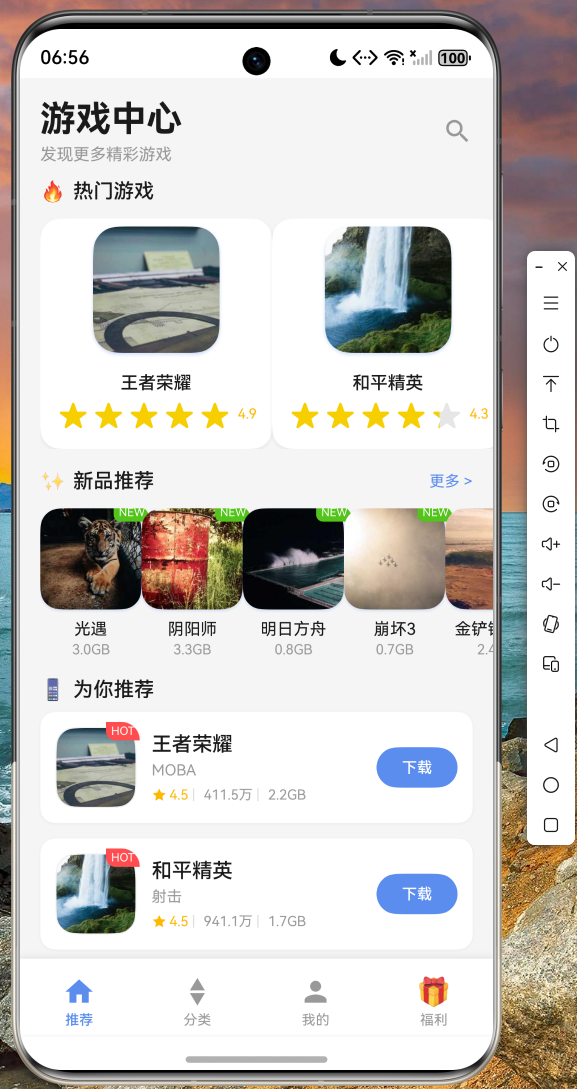
推荐页面是应用的核心页面之一,展示热门游戏、新品推荐以及个性化推荐列表。
dart
import 'package:flutter/material.dart';
import '../model/game_model.dart';
import '../network/game_service.dart';
import '../widgets/game_card.dart';

class RecommendPage extends StatefulWidget {
  const RecommendPage({Key? key}) : super(key: key);

  @override
  State<RecommendPage> createState() => _RecommendPageState();
}

class _RecommendPageState extends State<RecommendPage> {
  final GameService _gameService = GameService();
  final ScrollController _scrollController = ScrollController();

  List<GameModel> _hotGames = [];
  List<GameModel> _newGames = [];
  List<GameModel> _recommendGames = [];
  bool _isLoading = true;
  bool _isLoadingMore = false;
  bool _hasMore = true;
  int _currentPage = 1;
  final int _pageSize = 10;

  @override
  void initState() {
    super.initState();
    _loadData();
    _scrollController.addListener(_onScroll);
  }

  @override
  void dispose() {
    _scrollController.dispose();
    super.dispose();
  }

  Future<void> _loadData() async {
    setState(() => _isLoading = true);

    final results = await Future.wait([
      _gameService.getHotGames(),
      _gameService.getRecommendGames(PageParams(page: 1, pageSize: _pageSize)),
    ]);

    setState(() {
      _hotGames = results[0] as List<GameModel>;
      _recommendGames = (results[1] as PageResult<GameModel>).list;
      _hasMore = (results[1] as PageResult<GameModel>).hasMore;
      _isLoading = false;
    });
  }

  Future<void> _onRefresh() async {
    await _loadData();
  }

  void _onScroll() {
    if (_scrollController.position.pixels >=
        _scrollController.position.maxScrollExtent - 200) {
      _loadMore();
    }
  }

  Future<void> _loadMore() async {
    if (_isLoadingMore || !_hasMore) return;

    setState(() => _isLoadingMore = true);

    final result = await _gameService.getRecommendGames(
      PageParams(page: _currentPage + 1, pageSize: _pageSize),
    );

    setState(() {
      _recommendGames.addAll(result.list);
      _hasMore = result.hasMore;
      _currentPage++;
      _isLoadingMore = false;
    });
  }

  @override
  Widget build(BuildContext context) {
    return Scaffold(
      backgroundColor: const Color(0xFFF5F5F5),
      body: _isLoading
          ? const Center(child: CircularProgressIndicator(color: Color(0xFF5B8DEF)))
          : RefreshIndicator(
              onRefresh: _onRefresh,
              color: const Color(0xFF5B8DEF),
              child: CustomScrollView(
                controller: _scrollController,
                physics: const BouncingScrollPhysics(),
                slivers: [
                  // 页面标题
                  SliverToBoxAdapter(
                    child: Padding(
                      padding: const EdgeInsets.all(16),
                      child: Column(
                        crossAxisAlignment: CrossAxisAlignment.start,
                        children: [
                          const Text(
                            '游戏中心',
                            style: TextStyle(
                              fontSize: 28,
                              fontWeight: FontWeight.bold,
                              color: Color(0xFF1A1A1A),
                            ),
                          ),
                          const SizedBox(height: 4),
                          const Text(
                            '发现更多精彩游戏',
                            style: TextStyle(fontSize: 13, color: Color(0xFF999999)),
                          ),
                        ],
                      ),
                    ),
                  ),

                  // 热门游戏
                  SliverToBoxAdapter(
                    child: _buildHotGamesSection(),
                  ),

                  // 新品推荐
                  SliverToBoxAdapter(
                    child: _buildNewGamesSection(),
                  ),

                  // 推荐列表标题
                  const SliverToBoxAdapter(
                    child: Padding(
                      padding: EdgeInsets.fromLTRB(16, 16, 16, 8),
                      child: Row(
                        children: [
                          Text('📱', style: TextStyle(fontSize: 16)),
                          SizedBox(width: 6),
                          Text(
                            '为你推荐',
                            style: TextStyle(
                              fontSize: 16,
                              fontWeight: FontWeight.w500,
                              color: Color(0xFF1A1A1A),
                            ),
                          ),
                        ],
                      ),
                    ),
                  ),

                  // 推荐游戏列表
                  SliverList(
                    delegate: SliverChildBuilderDelegate(
                      (context, index) => GameCard(
                        game: _recommendGames[index],
                        onTap: () => _showGameDetail(_recommendGames[index]),
                        onDownload: () => _downloadGame(_recommendGames[index]),
                      ),
                      childCount: _recommendGames.length,
                    ),
                  ),

                  // 加载更多指示器
                  SliverToBoxAdapter(
                    child: _hasMore
                        ? Padding(
                            padding: const EdgeInsets.all(16),
                            child: Row(
                              mainAxisAlignment: MainAxisAlignment.center,
                              children: [
                                if (_isLoadingMore)
                                  const SizedBox(
                                    width: 20,
                                    height: 20,
                                    child: CircularProgressIndicator(
                                      strokeWidth: 2,
                                      color: Color(0xFF999999),
                                    ),
                                  ),
                                const SizedBox(width: 8),
                                const Text(
                                  '加载中...',
                                  style: TextStyle(fontSize: 12, color: Color(0xFF999999)),
                                ),
                              ],
                            ),
                          )
                        : const Padding(
                            padding: EdgeInsets.all(16),
                            child: Text(
                              '- 已经到底了 -',
                              style: TextStyle(fontSize: 12, color: Color(0xFFCCCCCC)),
                              textAlign: TextAlign.center,
                            ),
                          ),
                  ),
                ],
              ),
            ),
    );
  }

  Widget _buildHotGamesSection() {
    return Column(
      crossAxisAlignment: CrossAxisAlignment.start,
      children: [
        const Padding(
          padding: EdgeInsets.fromLTRB(16, 0, 16, 12),
          child: Row(
            children: [
              Text('🔥', style: TextStyle(fontSize: 16)),
              SizedBox(width: 6),
              Text(
                '热门游戏',
                style: TextStyle(
                  fontSize: 16,
                  fontWeight: FontWeight.w500,
                  color: Color(0xFF1A1A1A),
                ),
              ),
            ],
          ),
        ),
        SizedBox(
          height: 160,
          child: ListView.builder(
            scrollDirection: Axis.horizontal,
            padding: const EdgeInsets.only(left: 16),
            itemCount: _hotGames.length,
            itemBuilder: (context, index) => _buildHotGameCard(_hotGames[index]),
          ),
        ),
      ],
    );
  }

  Widget _buildHotGameCard(GameModel game) {
    return Container(
      width: 120,
      margin: const EdgeInsets.only(right: 12),
      padding: const EdgeInsets.all(12),
      decoration: BoxDecoration(
        color: Colors.white,
        borderRadius: BorderRadius.circular(16),
        boxShadow: [
          BoxShadow(
            color: const Color(0xFF5B8DEF).withOpacity(0.2),
            blurRadius: 10,
            offset: const Offset(0, 4),
          ),
        ],
      ),
      child: Column(
        children: [
          ClipRRect(
            borderRadius: BorderRadius.circular(20),
            child: Image.network(
              game.icon,
              width: 80,
              height: 80,
              fit: BoxFit.cover,
            ),
          ),
          const SizedBox(height: 10),
          Text(
            game.name,
            style: const TextStyle(fontSize: 14, fontWeight: FontWeight.w500),
            maxLines: 1,
            overflow: TextOverflow.ellipsis,
          ),
          const SizedBox(height: 4),
          Row(
            mainAxisAlignment: MainAxisAlignment.center,
            children: [
              const Icon(Icons.star, size: 12, color: Color(0xFFFFB800)),
              const SizedBox(width: 2),
              Text(
                game.rating.toStringAsFixed(1),
                style: const TextStyle(fontSize: 11, color: Color(0xFFFFB800)),
              ),
            ],
          ),
        ],
      ),
    );
  }

  Widget _buildNewGamesSection() {
    return Container(
      margin: const EdgeInsets.only(top: 16),
      color: const Color(0xFFF5F5F5),
      padding: const EdgeInsets.only(bottom: 16),
      child: Column(
        crossAxisAlignment: CrossAxisAlignment.start,
        children: [
          Padding(
            padding: const EdgeInsets.fromLTRB(16, 0, 16, 12),
            child: Row(
              children: [
                const Text('✨', style: TextStyle(fontSize: 16)),
                const SizedBox(width: 6),
                const Text(
                  '新品推荐',
                  style: TextStyle(
                    fontSize: 16,
                    fontWeight: FontWeight.w500,
                    color: Color(0xFF1A1A1A),
                  ),
                ),
                const Spacer(),
                const Text(
                  '更多 >',
                  style: TextStyle(fontSize: 12, color: Color(0xFF5B8DEF)),
                ),
              ],
            ),
          ),
          SizedBox(
            height: 130,
            child: ListView.builder(
              scrollDirection: Axis.horizontal,
              padding: const EdgeInsets.only(left: 16),
              itemCount: _hotGames.length,
              itemBuilder: (context, index) => _buildNewGameCard(_hotGames[index]),
            ),
          ),
        ],
      ),
    );
  }

  Widget _buildNewGameCard(GameModel game) {
    return Container(
      width: 90,
      margin: const EdgeInsets.only(right: 12),
      child: Column(
        children: [
          Stack(
            children: [
              ClipRRect(
                borderRadius: BorderRadius.circular(16),
                child: Image.network(
                  game.icon,
                  width: 80,
                  height: 80,
                  fit: BoxFit.cover,
                ),
              ),
              if (game.isNew)
                Positioned(
                  top: -4,
                  right: -4,
                  child: Container(
                    padding: const EdgeInsets.symmetric(horizontal: 4, vertical: 2),
                    decoration: BoxDecoration(
                      color: Colors.green,
                      borderRadius: BorderRadius.circular(8),
                    ),
                    child: const Text(
                      'NEW',
                      style: TextStyle(color: Colors.white, fontSize: 9),
                    ),
                  ),
                ),
            ],
          ),
          const SizedBox(height: 8),
          Text(
            game.name,
            style: const TextStyle(fontSize: 13, color: Color(0xFF1A1A1A)),
            maxLines: 1,
            overflow: TextOverflow.ellipsis,
          ),
          Text(
            game.size,
            style: const TextStyle(fontSize: 11, color: Color(0xFF999999)),
          ),
        ],
      ),
    );
  }

  void _showGameDetail(GameModel game) {
    // 游戏详情页跳转
  }

  void _downloadGame(GameModel game) {
    // 下载游戏逻辑
  }
}
推荐页面采用 CustomScrollView 配合 Sliver 系列组件实现高性能滚动。页面支持下拉刷新和上拉加载更多,通过 ScrollController 监听滚动位置来实现触底加载。这种实现方式在 Flutter 中被推荐用于需要复杂滚动行为的场景。
七、底部导航栏实现
底部导航栏是应用的主要导航入口,我们需要实现一个支持动画效果的个性化导航栏。
dart
import 'package:flutter/material.dart';

class GameCenterTabBar extends StatefulWidget {
  final int currentIndex;
  final ValueChanged<int> onTap;

  const GameCenterTabBar({
    Key? key,
    required this.currentIndex,
    required this.onTap,
  }) : super(key: key);

  @override
  State<GameCenterTabBar> createState() => _GameCenterTabBarState();
}

class _GameCenterTabBarState extends State<GameCenterTabBar> {
  final List<_TabItem> _tabs = [
    _TabItem(title: '推荐', icon: Icons.home_outlined, selectedIcon: Icons.home),
    _TabItem(title: '分类', icon: Icons.category_outlined, selectedIcon: Icons.category),
    _TabItem(title: '我的', icon: Icons.person_outline, selectedIcon: Icons.person),
    _TabItem(title: '福利', icon: '🎁', selectedIcon: '🎁'),
  ];

  @override
  Widget build(BuildContext context) {
    return Container(
      decoration: BoxDecoration(
        color: Colors.white,
        boxShadow: [
          BoxShadow(
            color: Colors.black.withOpacity(0.08),
            blurRadius: 16,
            offset: const Offset(0, -4),
          ),
        ],
      ),
      child: SafeArea(
        child: SizedBox(
          height: 60,
          child: Row(
            children: List.generate(_tabs.length, (index) {
              return Expanded(
                child: _buildTabItem(index),
              );
            }),
          ),
        ),
      ),
    );
  }

  Widget _buildTabItem(int index) {
    final tab = _tabs[index];
    final isSelected = widget.currentIndex == index;

    return GestureDetector(
      onTap: () => widget.onTap(index),
      behavior: HitTestBehavior.opaque,
      child: Column(
        mainAxisAlignment: MainAxisAlignment.center,
        children: [
          _TabIcon(
            icon: tab.icon,
            isSelected: isSelected,
            bounceKey: 'tab_$index',
          ),
          const SizedBox(height: 3),
          Text(
            tab.title,
            style: TextStyle(
              fontSize: 11,
              color: isSelected ? const Color(0xFF5B8DEF) : const Color(0xFF999999),
              fontWeight: isSelected ? FontWeight.w500 : FontWeight.normal,
            ),
          ),
        ],
      ),
    );
  }
}

class _TabItem {
  final String title;
  final dynamic icon;
  final dynamic selectedIcon;

  _TabItem({
    required this.title,
    required this.icon,
    required this.selectedIcon,
  });
}

class _TabIcon extends StatefulWidget {
  final dynamic icon;
  final bool isSelected;
  final String bounceKey;

  const _TabIcon({
    required this.icon,
    required this.isSelected,
    required this.bounceKey,
  });

  @override
  State<_TabIcon> createState() => _TabIconState();
}

class _TabIconState extends State<_TabIcon> with SingleTickerProviderStateMixin {
  late AnimationController _controller;
  late Animation<double> _animation;

  @override
  void initState() {
    super.initState();
    _controller = AnimationController(
      duration: const Duration(milliseconds: 300),
      vsync: this,
    );
    _animation = Tween<double>(begin: 0, end: -4).animate(
      CurvedAnimation(parent: _controller, curve: Curves.easeOut),
    );
  }

  @override
  void didUpdateWidget(_TabIcon oldWidget) {
    super.didUpdateWidget(oldWidget);
    if (widget.isSelected && !oldWidget.isSelected) {
      _controller.forward().then((_) => _controller.reverse());
    }
  }

  @override
  void dispose() {
    _controller.dispose();
    super.dispose();
  }

  @override
  Widget build(BuildContext context) {
    return AnimatedBuilder(
      animation: _animation,
      builder: (context, child) {
        return Transform.translate(
          offset: Offset(0, _animation.value),
          child: child,
        );
      },
      child: widget.icon is IconData
          ? Icon(
              widget.isSelected ? widget.selectedIcon as IconData : widget.icon as IconData,
              size: 26,
              color: widget.isSelected ? const Color(0xFF5B8DEF) : const Color(0xFF999999),
            )
          : Text(
              widget.icon as String,
              style: const TextStyle(fontSize: 22),
            ),
    );
  }
}
底部导航栏使用 AnimatedBuilder 实现图标弹跳动画,当切换到某个 Tab 时,对应的图标会执行一次弹跳效果。这种微交互能够提升用户体验,让应用显得更加生动和精致。
八、运行效果截图
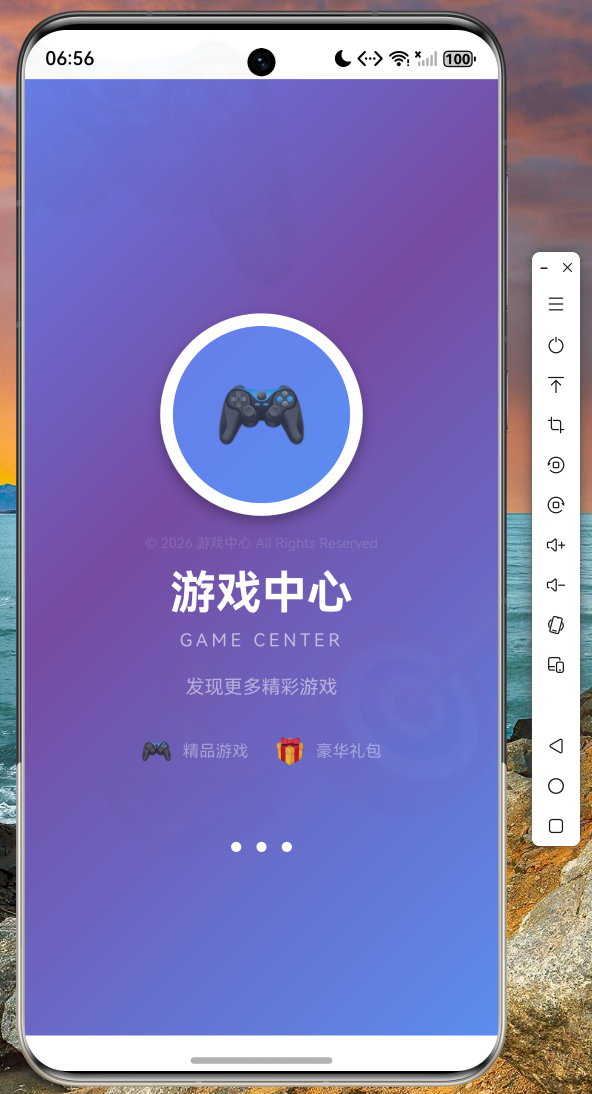
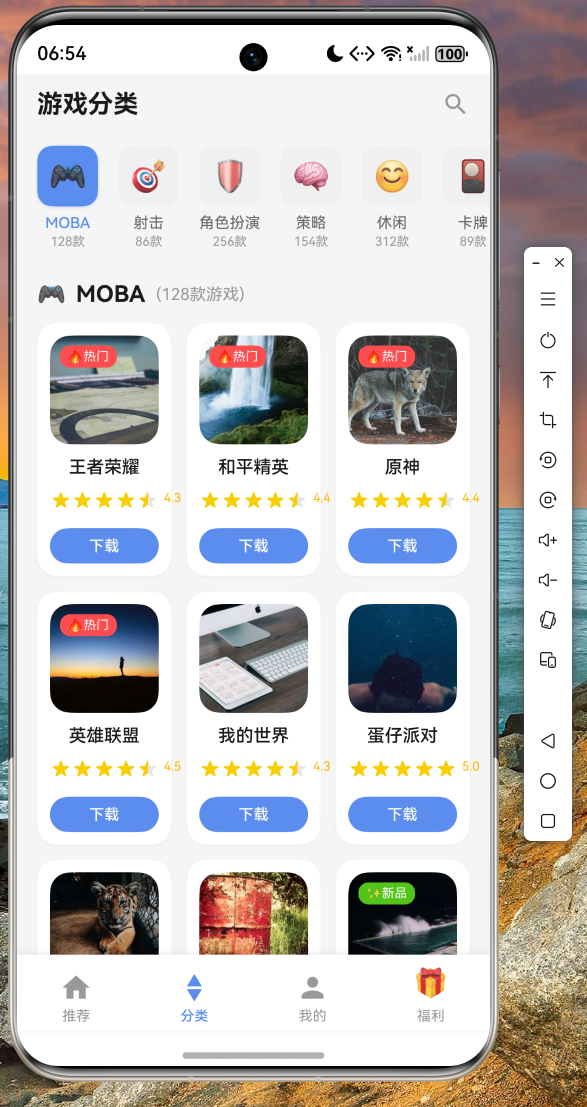
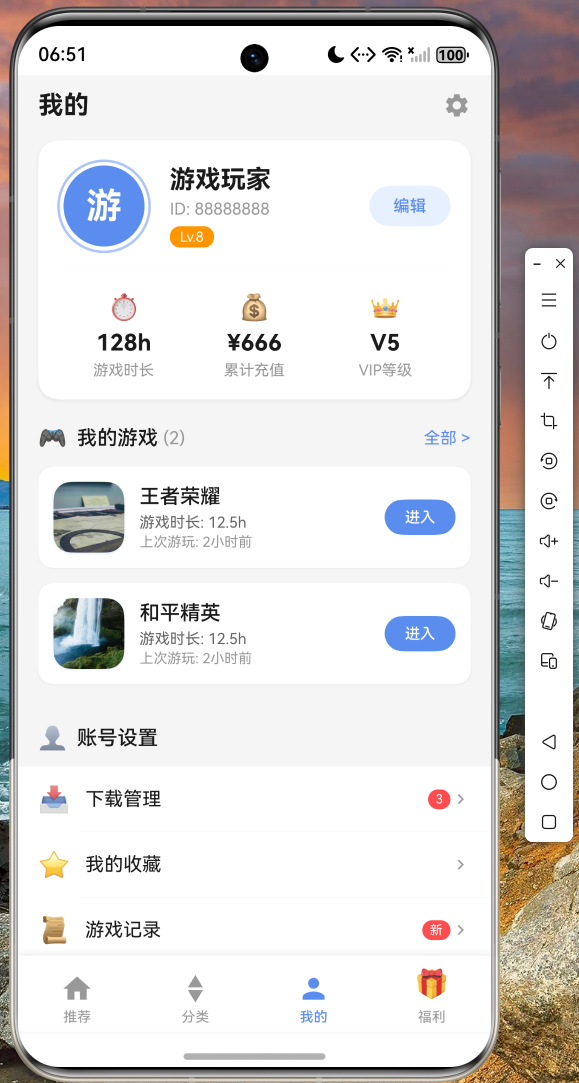
以下是在鸿蒙设备上成功运行的截图:
-
启动页展示游戏中心 Logo 和动画效果
-
推荐页展示热门游戏轮播和推荐列表
-
分类页展示游戏分类标签和网格布局
-
我的页面展示用户信息和游戏记录
 5. 福利页面展示礼包列表和签到功能
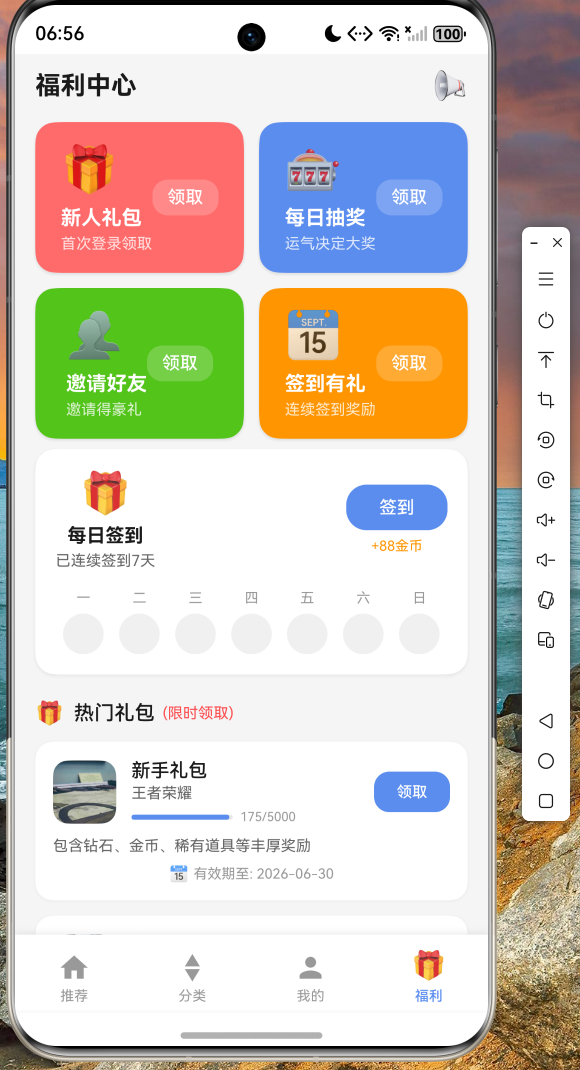
从截图可以看到,应用在鸿蒙设备上运行流畅,动画效果自然,列表滚动无卡顿,各项功能均正常工作。
九、总结与展望
通过本次实战开发,我们完整地实现了一个游戏中心应用的核心功能。在这个过程中,我们学习了:
首先是如何在 Flutter OH 环境下组织项目结构,采用分层架构将 UI、业务、数据分离,使得代码具备良好的可维护性。
其次是网络请求服务的封装技巧,使用 Future 和 async/await 处理异步操作,配合 Future.wait 实现并行请求,提升数据加载效率。
再次是组件化开发思想,将游戏卡片、底部导航等通用模块封装为可复用组件,降低代码耦合度。
最后是动画效果的实现,通过 AnimationController 和 AnimatedBuilder 创建流畅的交互动画,提升用户体验。
在实际开发中,读者可以进一步扩展以下功能:接入真实的游戏 API 接口实现数据持久化、添加搜索和筛选功能、优化列表性能(使用 ListView.builder 的懒加载特性)、实现应用内支付购买游戏等。
项目代码已托管至 AtomGit 平台,欢迎各位开发者交流学习: https://atomgit.com/maaath/game-center-flutter
十、参考资料
- Flutter for OpenHarmony 官方文档
- Flutter 跨平台开发实战
- OpenHarmony 应用开发指南
作者:maaath
创作日期:2026年5月
如有任何问题或建议,欢迎在社区讨论区留言交流。