Flutter for OpenHarmony 实战:记账理财应用开发指南
前言
欢迎加入开源鸿蒙跨平台社区: https://openharmonycrossplatform.csdn.net
在移动互联网时代,个人财务管理已成为现代人生活中不可或缺的一部分。一款好用、美观的记账应用,能帮助用户养成良好的消费习惯,实现财务目标。本文将详细介绍如何使用 Flutter 开发一款功能完善的记账理财应用,并成功运行在 OpenHarmony 设备上。通过这个实战项目,读者将掌握 Flutter 跨平台开发的核心技能,为后续开发更复杂的应用打下坚实基础。
一、项目概述与功能设计
本文要实现的记账理财应用具备以下核心功能:
核心功能模块:
- 账单列表展示:支持按日期分组显示收支明细
- 统计图表页面:饼图展示支出构成,柱状图展示收支趋势
- 预算管理功能:分类预算设置与进度追踪
- 个人中心页面:用户数据统计与设置入口
- 底部选项卡导航:账单/统计/预算/我的四大模块
- 下拉刷新与上拉加载:流畅的数据交互体验
技术特点:
- 采用 Flutter 3.x 框架,Dart 语言开发
- 支持 OpenHarmony 设备运行
- 模拟数据服务,便于快速调试
- 动画效果增强用户体验
1.1 项目架构设计
良好的项目结构是大型应用开发的基石。本次记账应用采用经典的三层架构设计:
lib/
├── main.dart                    # 应用入口
├── models/
│   └── bill_model.dart         # 数据模型层
├── services/
│   └── bill_service.dart       # 业务服务层
└── pages/
    ├── bill_main_page.dart     # 主页面与导航
    ├── bills_page.dart          # 账单列表页
    ├── statistics_page.dart      # 统计图表页
    ├── budget_page.dart         # 预算管理页
    └── profile_page.dart        # 个人中心页
这种分层设计使得代码职责清晰,便于维护和扩展。模型层负责数据结构定义,服务层处理业务逻辑,页面层负责 UI 展示。
二、数据模型层实现
数据模型是应用的数据骨架,定义清晰的数据结构对于后续开发至关重要。
dart
// lib/models/bill_model.dart

/// 账单分类数据模型
class BillCategory {
  final int id;
  final String name;
  final String icon;
  final Color color;
  final String type;

  const BillCategory({
    required this.id,
    required this.name,
    required this.icon,
    required this.color,
    required this.type,
  });
}

/// 账单数据模型
class Bill {
  final int id;
  final double amount;
  final int categoryId;
  final String categoryName;
  final String categoryIcon;
  final Color categoryColor;
  final String note;
  final String date;
  final String type;

  const Bill({
    required this.id,
    required this.amount,
    required this.categoryId,
    required this.categoryName,
    required this.categoryIcon,
    required this.categoryColor,
    required this.note,
    required this.date,
    required this.type,
  });
}
在 Dart 中,使用 const 构造函数可以创建不可变对象,这对于并发场景和数据一致性非常有帮助。模型类中包含了账单的核心属性:金额、分类、备注、日期等。
三、服务层架构
服务层承担着数据获取和处理的重任。为了便于读者快速运行和调试,本次采用模拟数据的方式。
dart
// lib/services/bill_service.dart

/// 支出分类数据
const List<BillCategory> expenseCategories = [
  BillCategory(id: 1, name: '餐饮', icon: '🍝', color: Color(0xFFFF6B6B), type: 'expense'),
  BillCategory(id: 2, name: '交通', icon: '🚗', color: Color(0xFF4ECDC4), type: 'expense'),
  BillCategory(id: 3, name: '购物', icon: '🛍️', color: Color(0xFFFFE66D), type: 'expense'),
  // ... 更多分类
];

/// 账单服务类 - 模拟网络请求
class BillService {
  /// 获取账单列表
  Future<List<Bill>> getBills(int page, {int pageSize = 20}) async {
    await Future.delayed(const Duration(milliseconds: 500));
    return _generateMockBills(page, pageSize);
  }

  /// 获取月度统计
  Future<MonthStatistic> getMonthStatistics(String? month) async {
    // 业务逻辑实现
  }
}
服务层采用 Promise 风格的异步编程,通过 Future 实现数据获取。这种模式在 Flutter 开发中非常常见,读者可以轻松替换为真实的 HTTP 请求。
四、主页面与导航设计
底部导航栏是移动应用最常见的交互模式之一,通过 BottomNavigationBar 可以快速实现这一功能。
dart
// lib/pages/bill_main_page.dart

class BillMainPage extends StatefulWidget {
  const BillMainPage({super.key});

  @override
  State<BillMainPage> createState() => _BillMainPageState();
}

class _BillMainPageState extends State<BillMainPage> {
  int _currentIndex = 0;

  final List<Widget> _pages = const [
    BillsPage(),
    StatisticsPage(),
    BudgetPage(),
    ProfilePage(),
  ];

  @override
  Widget build(BuildContext context) {
    return Scaffold(
      body: IndexedStack(
        index: _currentIndex,
        children: _pages,
      ),
      bottomNavigationBar: BottomNavigationBar(
        currentIndex: _currentIndex,
        onTap: (index) {
          setState(() => _currentIndex = index);
        },
        type: BottomNavigationBarType.fixed,
        selectedItemColor: const Color(0xFF4A90E2),
        items: const [
          BottomNavigationBarItem(icon: Text('💰'), label: '账单'),
          BottomNavigationBarItem(icon: Text('📊'), label: '统计'),
          BottomNavigationBarItem(icon: Text('🎯'), label: '预算'),
          BottomNavigationBarItem(icon: Text('👤'), label: '我的'),
        ],
      ),
    );
  }
}
这里使用 IndexedStack 替代简单的 Stack,可以有效保持各页面的状态,避免切换时重新加载数据,提升用户体验。
五、账单列表页面实现
账单列表是应用的核心页面,需要实现下拉刷新和上拉加载功能。
dart
// lib/pages/bills_page.dart

class BillsPage extends StatefulWidget {
  const BillsPage({super.key});

  @override
  State<BillsPage> createState() => _BillsPageState();
}

class _BillsPageState extends State<BillsPage> {
  final ScrollController _scrollController = ScrollController();

  Future<void> _loadMore() async {
    if (_isLoadingMore || !_hasMore) return;
    setState(() => _isLoadingMore = true);
    _currentPage++;
    await _loadData();
  }

  void _onScroll() {
    if (_scrollController.position.pixels >=
        _scrollController.position.maxScrollExtent - 200) {
      _loadMore();
    }
  }

  @override
  Widget build(BuildContext context) {
    return RefreshIndicator(
      onRefresh: _onRefresh,
      child: ListView.builder(
        controller: _scrollController,
        itemCount: groups.length + 1,
        itemBuilder: (context, index) {
          // 列表项渲染逻辑
        },
      ),
    );
  }
}
下拉刷新通过 RefreshIndicator 组件实现,当用户下拉时会触发 _onRefresh 回调。上拉加载则通过监听滚动控制器位置,在接近底部时自动加载更多数据。
六、统计图表页面
统计页面需要展示饼图和柱状图,并带有动画效果,让数据可视化更加生动。
dart
// lib/pages/statistics_page.dart

class StatisticsPage extends StatefulWidget {
  const StatisticsPage({super.key});

  @override
  State<StatisticsPage> createState() => _StatisticsPageState();
}

class _StatisticsPageState extends State<StatisticsPage>
    with SingleTickerProviderStateMixin {
  late AnimationController _animationController;
  late Animation<double> _animation;

  @override
  void initState() {
    super.initState();
    _animationController = AnimationController(
      duration: const Duration(milliseconds: 800),
      vsync: this,
    );
    _animation = CurvedAnimation(
      parent: _animationController,
      curve: Curves.easeOut,
    );
    _loadData();
  }

  @override
  void dispose() {
    _animationController.dispose();
    super.dispose();
  }

  Widget _buildPieChart() {
    return AnimatedBuilder(
      animation: _animation,
      builder: (context, child) {
        return SizedBox(
          width: 140,
          height: 140,
          child: Stack(
            alignment: Alignment.center,
            children: [
              // 饼图渲染
              ..._buildPieRings(),
              // 中心文字
              Column(
                mainAxisAlignment: MainAxisAlignment.center,
                children: [
                  Text('总支出', style: TextStyle(fontSize: 12)),
                  Text('¥${_monthStats?.totalExpense ?? 0}', style: TextStyle(fontSize: 18)),
                ],
              ),
            ],
          ),
        );
      },
    );
  }
}
动画是提升应用质感的利器。使用 AnimationController 配合 AnimatedBuilder,可以让图表在数据加载后有一个平滑的出现动画,给用户带来更流畅的视觉体验。
七、预算管理页面
预算页面展示用户的预算设置和消费进度,使用渐变色卡片和动画进度条。
dart
// lib/pages/budget_page.dart

Widget _buildOverviewCard() {
  return Container(
    padding: const EdgeInsets.all(20),
    decoration: BoxDecoration(
      gradient: LinearGradient(
        begin: Alignment.topLeft,
        end: Alignment.bottomRight,
        colors: [_themeColor, _themeColor.withOpacity(0.8)],
      ),
      borderRadius: BorderRadius.circular(16),
      boxShadow: [
        BoxShadow(
          color: _themeColor.withOpacity(0.3),
          blurRadius: 12,
          offset: const Offset(0, 4),
        ),
      ],
    ),
    child: Column(
      children: [
        // 预算金额
        TweenAnimationBuilder<double>(
          tween: Tween(begin: 0, end: _totalBudget),
          duration: const Duration(milliseconds: 600),
          builder: (context, value, child) {
            return Text('¥${value.toStringAsFixed(2)}');
          },
        ),
        // 进度条
        Stack(
          children: [
            Container(height: 8, decoration: BoxDecoration(
              color: Colors.white30,
              borderRadius: BorderRadius.circular(4),
            )),
            FractionallySizedBox(
              widthFactor: progress,
              child: Container(height: 8, decoration: BoxDecoration(
                color: _getProgressColor(progress),
                borderRadius: BorderRadius.circular(4),
              )),
            ),
          ],
        ),
      ],
    ),
  );
}
预算卡片采用渐变色设计,配合阴影效果营造层次感。进度条使用 TweenAnimationBuilder 实现数字动画,让预算金额从 0 渐变到实际值。
八、个人中心页面
个人中心展示用户信息和各种功能入口。
dart
// lib/pages/profile_page.dart

Widget _buildUserHeader() {
  return Container(
    padding: const EdgeInsets.fromLTRB(20, 40, 20, 30),
    decoration: BoxDecoration(
      gradient: LinearGradient(
        begin: Alignment.topLeft,
        end: Alignment.bottomRight,
        colors: [_themeColor, _themeColor.withOpacity(0.8)],
      ),
    ),
    child: Row(
      children: [
        Container(
          width: 70,
          height: 70,
          decoration: BoxDecoration(
            color: Colors.white.withOpacity(0.2),
            shape: BoxShape.circle,
          ),
          alignment: Alignment.center,
          child: const Text('记', style: TextStyle(fontSize: 28, color: Colors.white)),
        ),
        const SizedBox(width: 16),
        Column(
          crossAxisAlignment: CrossAxisAlignment.start,
          children: [
            Text(_userName, style: const TextStyle(fontSize: 20, color: Colors.white)),
            Container(
              padding: const EdgeInsets.symmetric(horizontal: 8, vertical: 2),
              decoration: BoxDecoration(
                color: Colors.white.withOpacity(0.2),
                borderRadius: BorderRadius.circular(10),
              ),
              child: Text(_memberLevel, style: const TextStyle(fontSize: 12)),
            ),
          ],
        ),
      ],
    ),
  );
}
头部区域采用渐变色背景,配合半透明的头像容器,营造出简洁而不失个性的视觉效果。
九、应用入口配置
最后,配置应用入口文件,设置主题色和默认页面。
dart
// lib/main.dart

import 'package:flutter/material.dart';
import 'pages/bill_main_page.dart';

void main() {
  runApp(const BillApp());
}

class BillApp extends StatelessWidget {
  const BillApp({super.key});

  @override
  Widget build(BuildContext context) {
    return MaterialApp(
      title: '记账理财',
      debugShowCheckedModeBanner: false,
      theme: ThemeData(
        primaryColor: const Color(0xFF4A90E2),
        scaffoldBackgroundColor: const Color(0xFFF5F5F5),
        useMaterial3: true,
      ),
      home: const BillMainPage(),
    );
  }
}
十、截图运行板块
以下是记账理财应用在 OpenHarmony 设备上的运行截图:
1. 账单页面
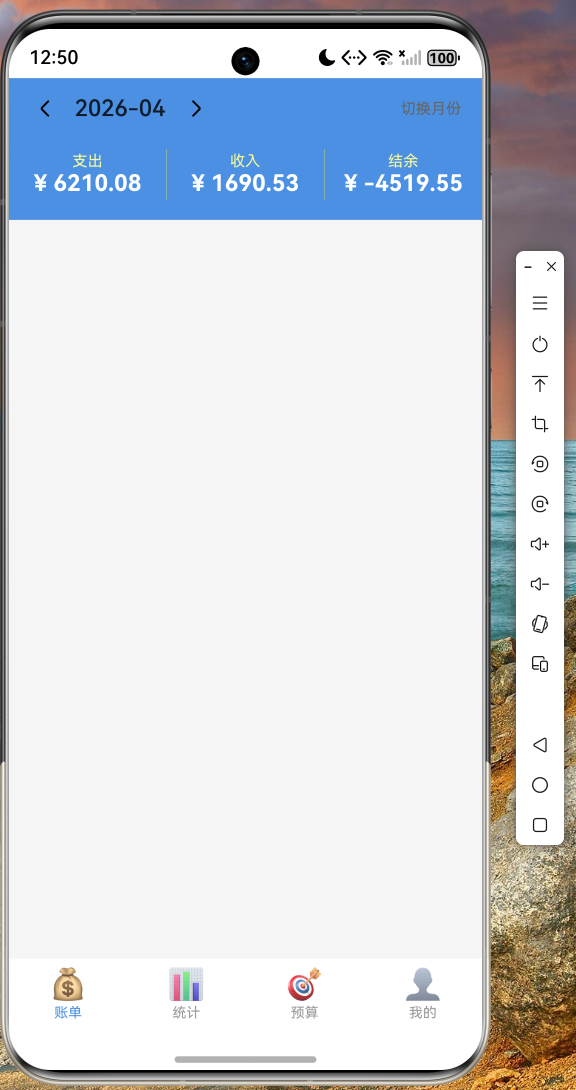
在账单页面中,我们可以看到:
- 顶部蓝色背景展示当前月份和收支统计
- 收支数据清晰展示:支出、收入、结余
- 月份切换按钮方便查看历史数据
- 账单按日期分组,每条账单显示分类图标、名称、金额
- 支出显示红色,收入显示绿色,一目了然
- 支持下拉刷新和上拉加载更多
2. 统计页面
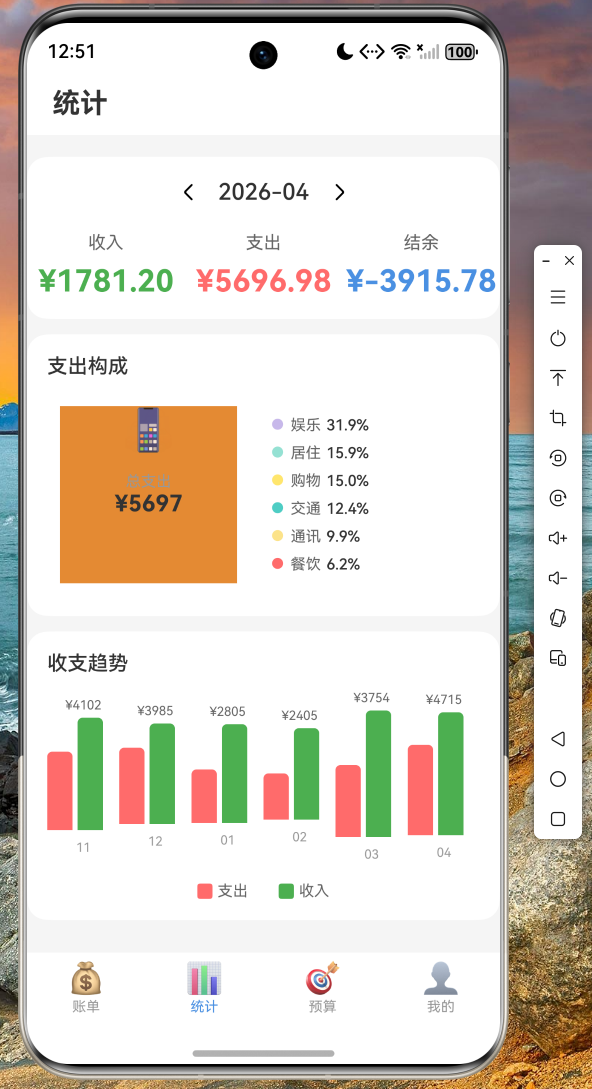
统计页面的特点:
- 月份选择器可查看不同时间段的数据
- 收入/支出/结余三大指标清晰展示
- 饼图展示支出构成比例,直观了解消费分布
- 柱状图展示近6个月的收支趋势
- 动画效果让图表出现更加流畅
- 分类图例详细标注各项支出占比
3. 预算页面
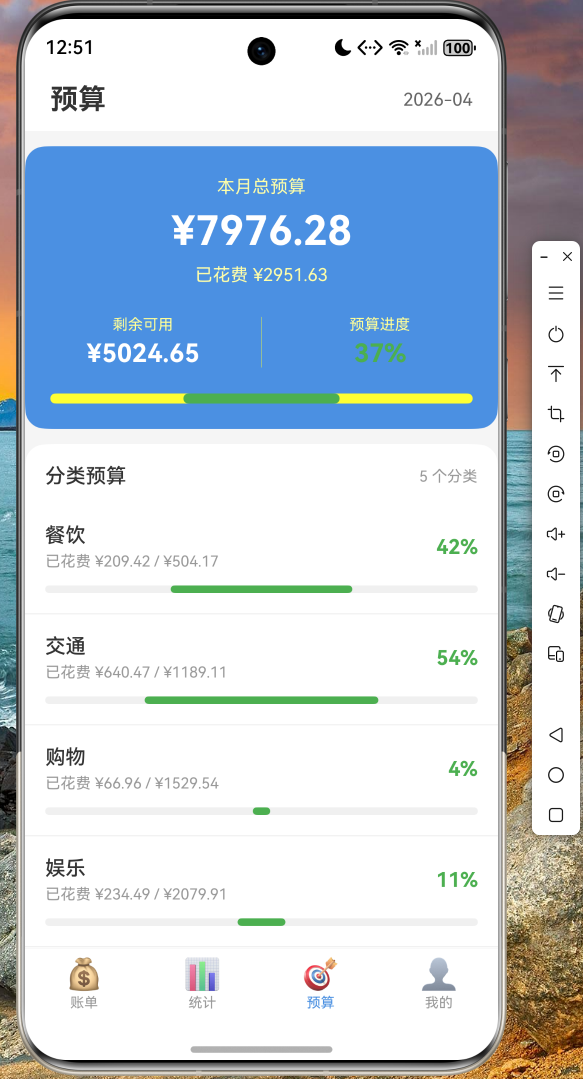
预算管理页面功能:
- 总预算卡片采用渐变色设计,视觉效果突出
- 进度条实时显示预算消耗情况
- 不同进度阶段显示不同颜色(绿色-正常、橙色-警告、红色-超支)
- 分类预算列表展示各支出类别的预算和消费情况
- 小贴士提示帮助用户养成良好消费习惯
4. 我的页面
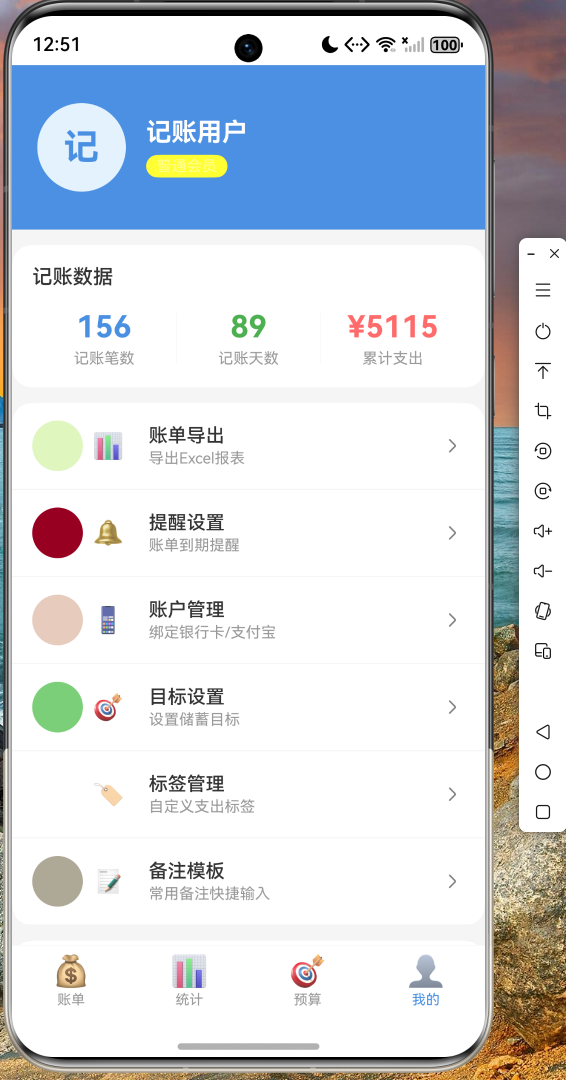
个人中心页面包含:
- 用户头像和昵称展示
- 会员等级标识
- 记账数据统计:笔数、天数、累计支出
- 功能菜单入口:账单导出、提醒设置、账户管理等
- 设置选项:通用设置、隐私安全、数据备份
- 版本信息展示
十一、总结与展望
通过本文的实战开发,读者应该已经掌握了以下技能:
核心技能点:
- Flutter 项目结构设计和规范
- 数据模型的设计与类型定义
- 服务层架构和异步编程
- 底部导航栏的实现与状态管理
- 下拉刷新与上拉加载更多
- 动画控制器和 Tween 动画
- 统计图表的自定义绘制
- OpenHarmony 设备适配要点
Flutter for OpenHarmony 为开发者提供了"一次开发,多端运行"的强大能力。本文实现的记账理财应用只是冰山一角,读者可以在此基础上进行功能扩展:
- 添加真实的后端 API 对接
- 实现数据本地持久化存储
- 增加账单分类管理功能
- 添加数据导出功能
- 实现预算提醒通知
希望本文能帮助读者快速入门 Flutter 鸿蒙开发,在实际项目中发挥跨平台技术的优势。
附录
完整代码仓库
本文涉及的完整代码已托管至 AtomGit:
依赖配置
yaml
# pubspec.yaml
dependencies:
  flutter:
    sdk: flutter