事前准备
IDEA: 2022.02
JDK: 11
Maven: 3.8.6
1 创建项目
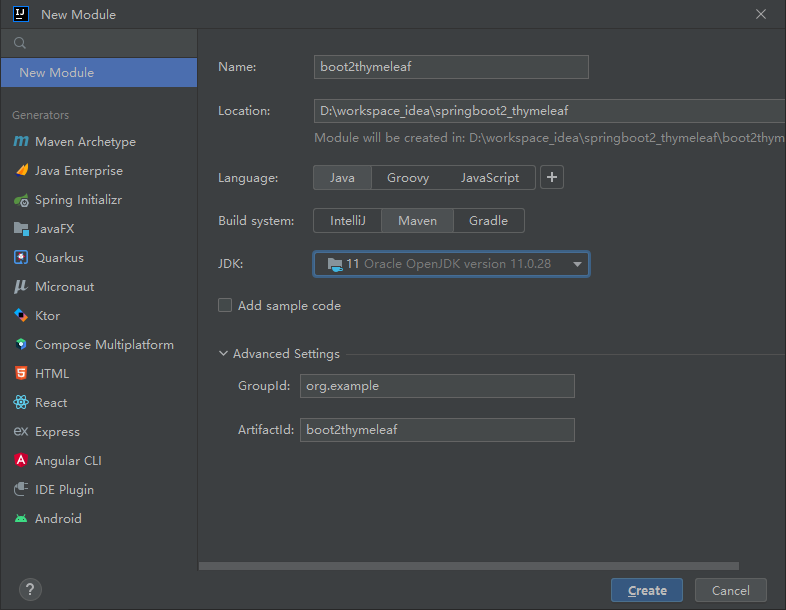
1.1 项目创建
IDEA > File > New > Module..
1.2 环境设置
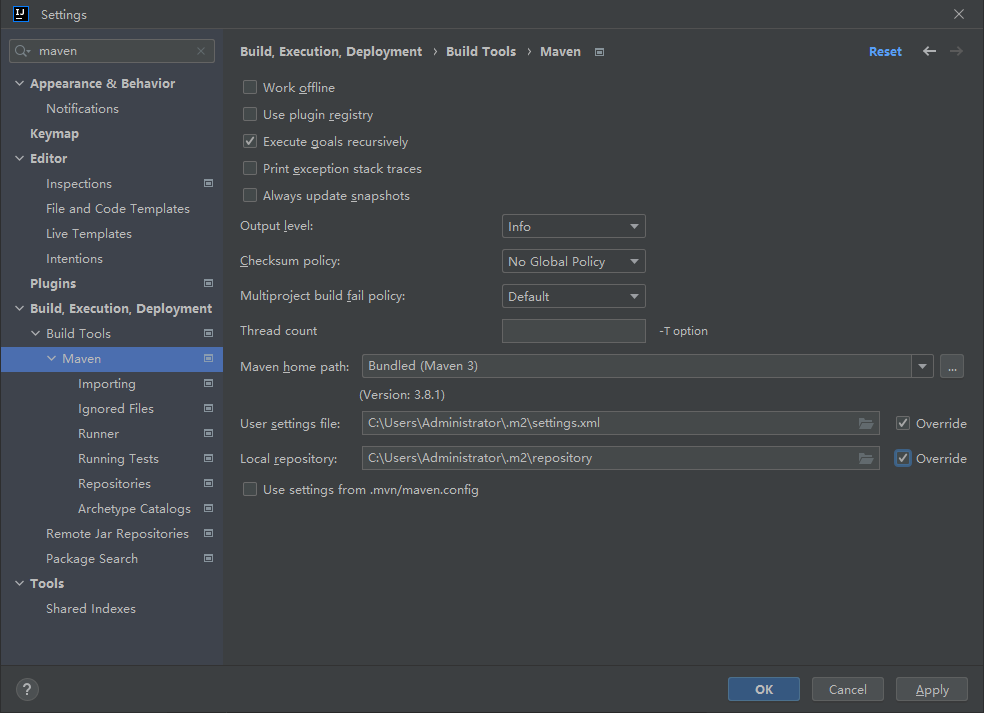
1.2.1 Maven设置
File > Settings > 搜Maven > 设置
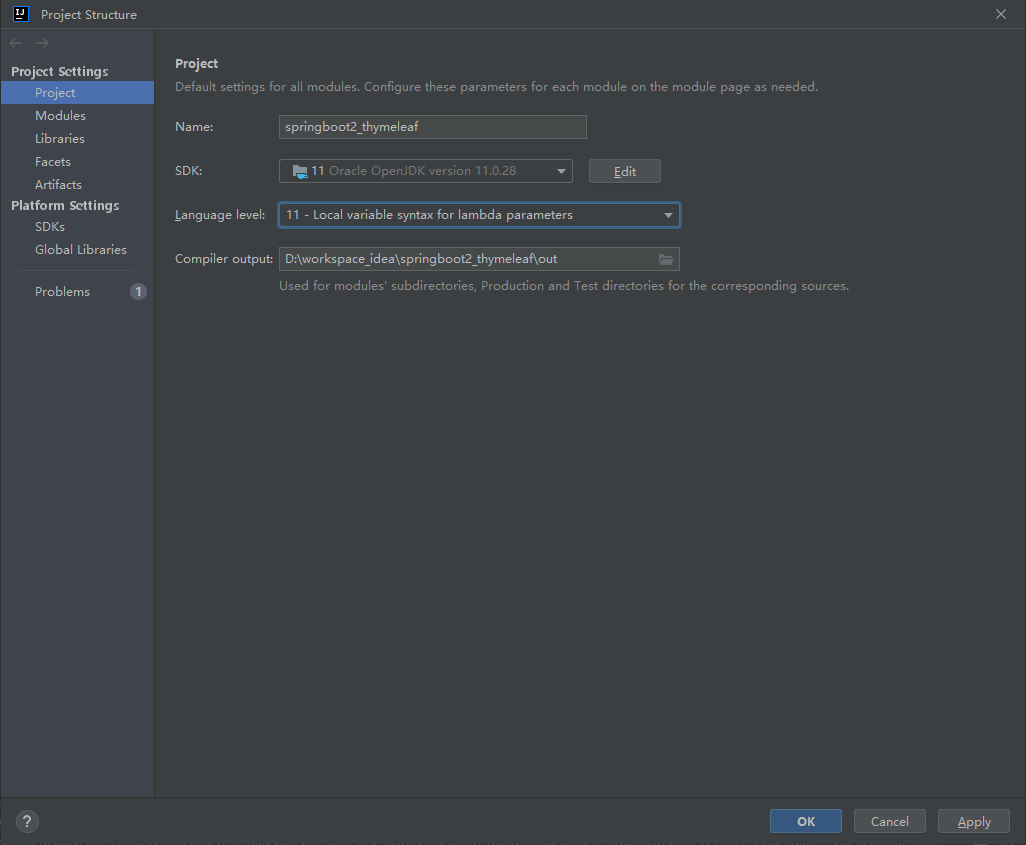
1.2.2 JDK设置
File > Project Structure... > Project > SDK (注释:Springboot2要求JDK8-11)
1.3 添加依赖
XML
    <packaging>jar</packaging>
    <parent>
        <groupId>org.springframework.boot</groupId>
        <artifactId>spring-boot-starter-parent</artifactId>
        <version>2.3.1.RELEASE</version>
        <relativePath/>
    </parent>
    <dependencies>
        <dependency>
            <groupId>org.springframework.boot</groupId>
            <artifactId>spring-boot-starter-web</artifactId>
        </dependency>
    </dependencies>
1.4 创建启动类
java
package com.example;

import org.springframework.boot.SpringApplication;
import org.springframework.boot.autoconfigure.SpringBootApplication;

@SpringBootApplication
public class Boot2ThymeleafApplication {
    public static void main(String[] args) {
        SpringApplication.run(Boot2ThymeleafApplication.class, args);
    }
}
2 过滤器
略:参照Springboot2.x+JSP项目创建-CSDN博客
3 拦截器
略:参照Springboot2.x+JSP项目创建-CSDN博客
4 控制器
java
package com.example.controller;

import org.springframework.stereotype.Controller;
import org.springframework.web.bind.annotation.RequestMapping;

import javax.servlet.http.HttpServletRequest;

@Controller
@RequestMapping("/v1")
public class SampleController {
    @RequestMapping("/sample")
    public String sample(HttpServletRequest req) {
        req.setAttribute("hello", "hello thymeleaf");
        return "sample";
    }
}
5 前端页面
5.1 添加依赖
XML
<dependency>
    <groupId>org.springframework.boot</groupId>
    <artifactId>spring-boot-starter-thymeleaf</artifactId>
</dependency>
5.2 更改配置
application.properties
XML
spring.thymeleaf.cache = true
spring.thymeleaf.encoding = UTF-8
spring.thymeleaf.mode = HTML5
#视图解析器
spring.thymeleaf.prefix = classpath:/templates/
spring.thymeleaf.suffix = .html
5.3 创建Thymeleaf页面
src/main/resources/templates/sample.html
html
<!DOCTYPE html>
<html lang="en" xmlns:th="http://www.thymeleaf.org">
<head>
    <meta charset="UTF-8"/>
    <title>sample page</title>
</head>
<body>
<div th:text="${hello}">Sample page</div>
</body>
</html>
6 数据库
6.1 创建数据库
连接数据库: mysql -hlocalhost -P3306 -uroot -proot
创建数据库: create database springboot2;
切换数据库: use springboot2;
创建数据库表: create table user(username varchar(20) primary key, password varchar(100) not null);
插入数据:insert into user values('zhangsan', '123456');
6.2 MySQL数据库连接
6.2.1 添加依赖
pom.xml
XML
        <dependency><!-- MySQL驱动 -->
            <groupId>mysql</groupId>
            <artifactId>mysql-connector-java</artifactId>
        </dependency>
        <dependency><!-- JDBC连接 -->
            <groupId>org.springframework.boot</groupId>
            <artifactId>spring-boot-starter-jdbc</artifactId>
        </dependency>
6.2.2 配置连接信息
application.properties
XML
# 数据库连接信息
spring.datasource.url=jdbc:mysql://localhost:3306/springboot2?serverTimezone=UTC
spring.datasource.username=root
spring.datasource.password=root
6.3 Druid数据源
6.3.1 添加依赖
pom.xml
XML
        <dependency>
            <groupId>com.alibaba</groupId>
            <artifactId>druid-spring-boot-starter</artifactId>
            <version>1.2.16</version>
        </dependency>
6.3.2 配置信息
application.properties
XML
# 数据源
spring.datasource.type=com.alibaba.druid.pool.DruidDataSource
# 初始化大小
spring.datasource.druid.initial-size=5
# 最小空闲数
spring.datasource.druid.min-idle=5
# 最大连接数
spring.datasource.druid.max-active=20
6.4 JPA持久层框架
6.4.1 添加依赖
pom.xml
XML
<dependency>
    <groupId>org.springframework.boot</groupId>
    <artifactId>spring-boot-starter-data-jpa</artifactId>
</dependency>
6.4.2 配置信息
application.properties
XML
# JPA
spring.jpa.database=mysql
# JPA数据平台
spring.jpa.database-platform=org.hibernate.dialect.MySQL5InnoDBDialect
# 显示控制台SQL
spring.jpa.show-sql=true
# 自动更新表结构
spring.jpa.hibernate.ddl-auto=update
6.5 业务代码获取数据
6.5.1 Controller
java
package com.example.controller;

import com.example.pojo.User;
import com.example.service.UserService;
import org.springframework.beans.factory.annotation.Autowired;
import org.springframework.stereotype.Controller;
import org.springframework.ui.Model;
import org.springframework.web.bind.annotation.RequestMapping;

import javax.servlet.http.HttpServletRequest;

@Controller
@RequestMapping("/v2")
public class UserController {
    @Autowired
    private UserService userService;

    @RequestMapping("/user")
    public String user(Model model){
        return "user";
    }
    @RequestMapping("/getUser")
    public String getUser(HttpServletRequest req){
        String username = req.getParameter("username");
        if (username == null || "".equals(username)) {
            return "user";
        }
        User user = userService.getUserById(username);
        if (user != null) {
            req.setAttribute("password", user.getPassword());
        }
        return "user";
    }
}
6.5.2 Service
java
package com.example.service;

import com.example.pojo.User;

public interface UserService {
    User getUserById(String username);
}
java
package com.example.service;

import com.example.dao.UserRepository;
import com.example.pojo.User;
import org.springframework.beans.factory.annotation.Autowired;
import org.springframework.stereotype.Service;

import java.util.Optional;

@Service
public class UserServiceImpl implements UserService{
    @Autowired
    private UserRepository repository;
    @Override
    public User getUserById(String username) {
        Optional<User> user = repository.findById(username);
        if(user.isPresent()) {
            return user.get();
        }
        return null;
    }
}
6.5.3 Pojo
java
package com.example.pojo;

import javax.persistence.Column;
import javax.persistence.Entity;
import javax.persistence.Id;

@Entity(name="user")
public class User {
    @Id
    private String username;
    @Column(name="password")
    private String password;

    public String getUsername() {
        return username;
    }
    public void setUsername(String username) {
        this.username = username;
    }
    public String getPassword() {
        return password;
    }
    public void setPassword(String password) {
        this.password = password;
    }
}
6.5.4 Repository接口
java
package com.example.dao;

import com.example.pojo.User;
import org.springframework.data.jpa.repository.JpaRepository;

public interface UserRepository extends JpaRepository<User, String> {
}
6.5.5 Thymeleaf
src/main/resources/templates/user.html
html
<!DOCTYPE html>
<html lang="en" xmlns:th="http://www.thymeleaf.org">
<head>
    <meta charset="UTF-8">
    <title>Insert title here</title>
</head>
<body>

<br/>
Spring boot2 User page<br/>
<form name="form1" action="/v2/getUser" method="post">
    <input type="text" name="username" />
    <button>查询密码</button>
</form>
<div th:text="${password}"></div>
</body>
</html>
7 异常处理
application.properties
html
# 关闭 Spring Boot 默认的 Whitelabel 错误页面
server.error.whitelabel.enabled=false
7.1 异常处理(Controller)
java
package com.example.controller;

import org.springframework.stereotype.Controller;
import org.springframework.web.bind.annotation.ExceptionHandler;
import org.springframework.web.bind.annotation.RequestMapping;

import javax.servlet.http.HttpServletRequest;

@Controller
@RequestMapping("/v1")
public class TestExceptionController {

    @RequestMapping("/exceptionHome")
    public String home() {
        return "exceptionHome";
    }
    @RequestMapping("/exceptionTest")
    public String exceptionTest(HttpServletRequest req) {
        String param = req.getParameter("param");
        String[] params = param.split(",");
        for (int i=0; i<10; i++){
            String str = params[i]; //NullPointerException
            System.out.println(Integer.valueOf(str)); // NumberFormatException
        }
        return "exceptionHome";
    }

    @ExceptionHandler(value={NullPointerException.class})
    public String xxxExceptionHandle(HttpServletRequest req, Exception e) {
        req.setAttribute("msg", e.getMessage());
        return "error";
    }


}
7.2 全局异常处理
java
package com.example.exception;

import org.springframework.ui.Model;
import org.springframework.web.bind.annotation.ControllerAdvice;
import org.springframework.web.bind.annotation.ExceptionHandler;

import javax.servlet.http.HttpServletRequest;

@ControllerAdvice
public class BusinessException {
    @ExceptionHandler(value={NumberFormatException.class})
    public String xxxExceptionHandle(Model model, Exception e) {
        model.addAttribute("msg", e.getMessage());
        return "error";
    }
    @ExceptionHandler(value={Exception.class})
    public String xxxExceptionHandle(HttpServletRequest req, Exception e) {
        req.setAttribute("msg", e.getMessage());
        return "error";
    }
}
7.3 异常画面
7.3.1 异常画面
src/main/resources/templates/error.html
html
<!DOCTYPE html>
<html lang="en" xmlns:th="http://www.thymeleaf.org">
<head>
    <meta charset="UTF-8">
    <title>Insert title here</title>
</head>
<body>
<br/>
Spring boot2 Error Page<br/>
<div th:text="${msg}"></div>
</body>
</html>
7.3.2 异常测试画面
src/main/resources/templates/exceptionHome.html
html
<!DOCTYPE html>
<html lang="en" xmlns:th="http://www.thymeleaf.org">
<head>
    <meta charset="UTF-8">
    <title>Insert title here</title>
</head>
<body>
Spring boot2 Test Exception Page<br/>
<form name="form1" action="/v1/exceptionTest" method="post">
    <input type="text" name="param" />
    <button>异常测试</button>
</form>
</body>
</html>
8 认证授权
8.1 添加依赖
XML
<dependency>
    <groupId>org.springframework.boot</groupId>
    <artifactId>spring-boot-starter-security</artifactId>
</dependency>
8.2 数据做成
8.2.1 创建表
CREATE Table authority_user (username varchar(20), authkey varchar(20), authname varchar(20), primary key(username, authkey));
8.2.2 添加数据
insert into user values ('lisi', '123456')
insert into authority_user values ('zhangsan','admin','admin'),('zhangsan','user','user'),('lisi', 'user','user');
8.3 认证
8.3.1 业务认证
(1) UserDetailsService封装
java
package com.example.service;

import org.springframework.beans.factory.annotation.Autowired;
import org.springframework.security.core.authority.SimpleGrantedAuthority;
import org.springframework.security.core.userdetails.User;
import org.springframework.security.core.userdetails.UserDetails;
import org.springframework.security.core.userdetails.UserDetailsService;
import org.springframework.security.core.userdetails.UsernameNotFoundException;
import org.springframework.stereotype.Service;

import java.util.List;
import java.util.stream.Collectors;

@Service
public class UserDetailsServiceImpl implements UserDetailsService {
    @Autowired
    private LoginService service;

    @Override
    public UserDetails loadUserByUsername(String username) throws UsernameNotFoundException {
        com.example.pojo.User user = service. getUser(username);
        List<String> authorities = service.getAuthority(username);
        List<SimpleGrantedAuthority> list = authorities.stream()
                .map(authority -> new SimpleGrantedAuthority(authority))
                .collect(Collectors.toList());
        if ( user != null ) {
            return new User(user.getUsername(), user.getPassword(), list);
        } else {
            throw new UsernameNotFoundException("当前用户不存在");
        }
    }
}
(2) service
java
package com.example.service;

import com.example.pojo.User;

import java.util.List;

public interface LoginService {
    User getUser(String username);
    List<String> getAuthority(String username);
}
java
package com.example.service;

import com.example.dao.LoginRepository;
import com.example.dao.UserRepository;
import com.example.pojo.User;
import org.springframework.beans.factory.annotation.Autowired;
import org.springframework.stereotype.Service;

import java.util.List;

@Service
public class LoginServiceImpl implements LoginService{
    @Autowired
    private UserRepository userRepository;
    @Autowired
    private LoginRepository loginRepository;

    public User getUser(String username) {
        return userRepository.findById(username).orElse(null);
    }
    public List<String> getAuthority(String username) {
        return loginRepository.getAuthority(username);
    }
}
(3) repository
java
package com.example.dao;

import com.example.pojo.AuthorityUser;
import com.example.pojo.AuthorityUserKey;
import org.springframework.data.jpa.repository.Query;
import org.springframework.data.repository.Repository;

import java.util.List;

public interface LoginRepository extends Repository<AuthorityUser, AuthorityUserKey> {
    @Query("SELECT authname FROM authority_user WHERE username = ?1")
    List<String> getAuthority(String username);
}
8.3.2 认证配置类
java
package com.example.config;

import com.example.service.UserDetailsServiceImpl;
import org.springframework.beans.factory.annotation.Autowired;
import org.springframework.context.annotation.Bean;
import org.springframework.security.config.annotation.authentication.builders.AuthenticationManagerBuilder;
import org.springframework.security.config.annotation.web.builders.HttpSecurity;
import org.springframework.security.config.annotation.web.configuration.EnableWebSecurity;
import org.springframework.security.config.annotation.web.configuration.WebSecurityConfigurerAdapter;
import org.springframework.security.crypto.bcrypt.BCryptPasswordEncoder;
import org.springframework.security.crypto.password.PasswordEncoder;

@EnableWebSecurity
public class WebSecurityConfig  extends WebSecurityConfigurerAdapter {
    @Bean
    public PasswordEncoder passwordEncoder() {
        return new BCryptPasswordEncoder();
    }
    @Autowired
    private UserDetailsServiceImpl service;

    @Override
    protected void configure(AuthenticationManagerBuilder auth) throws Exception {
        auth.userDetailsService(service).passwordEncoder(passwordEncoder());
    }
}
8.4 授权
8.4.1 授权配置类
java
@EnableWebSecurity
public class WebSecurityConfig  extends WebSecurityConfigurerAdapter {
    ...
    @Override
    protected void configure(HttpSecurity http) throws Exception {
        http.csrf().disable();// 临时关闭,否则http请求无效

        http.authorizeRequests()
                .antMatchers("/v1").hasRole("admin")
                .antMatchers("/v2").hasRole("user")
                .antMatchers("/index","/password", "/updatePassword").permitAll()
                .anyRequest().authenticated();
        http.formLogin()
                .defaultSuccessUrl("/index")
                .failureUrl("/error");
        http.logout()
                .logoutUrl("/logout")
                .logoutSuccessUrl("/");
    }
}
8.4.2 授权登录后首页
(1) controller
java
package com.example.controller;

import org.springframework.stereotype.Controller;
import org.springframework.web.bind.annotation.RequestMapping;

@Controller
public class LoginController {
    @RequestMapping("/index")
    public String index(){
        return "index";
    }
}
(2) 页面
index.html
html
<!DOCTYPE html>
<html><head><meta charset="UTF-8"><title>Sample Page</title></head>
<body>Spring2.3.1 登录成功 首页</body>
<form name="form1" action="/logout" method="post">
    <button>退出登录</button>
</form>
</html>
8.5 数据加密
8.5.1 加密业务
(1) controller
java
package com.example.controller;

import com.example.service.PasswordService;
import org.springframework.beans.factory.annotation.Autowired;
import org.springframework.stereotype.Controller;
import org.springframework.web.bind.annotation.PostMapping;
import org.springframework.web.bind.annotation.RequestMapping;

import javax.servlet.http.HttpServletRequest;

@Controller
public class PasswordController {

    @Autowired
    private PasswordService service;

    @RequestMapping("/password")
    public String password(){
        return "password";
    }

    @RequestMapping("/updatePassword")
    public String changePassword(HttpServletRequest req){
        String username = req.getParameter("username");
        String password = req.getParameter("password");
        if (username == null || "".equals(username)) {
            req.setAttribute("msg", "请输入用户名");
            return "password";
        }
        if (password == null || "".equals(password)) {
            req.setAttribute("msg", "请输入密码");
            return "password";
        }
        int isOk = service.changePassword(username, password);
        if (isOk > 0){
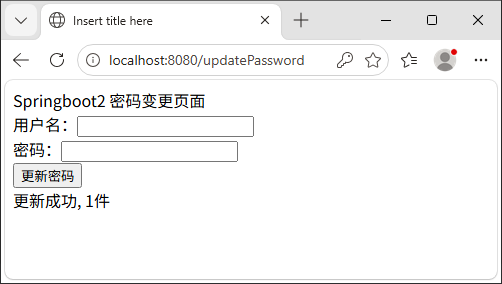
            req.setAttribute("msg", "更新成功, "+ isOk +"件");
        } else {
            req.setAttribute("msg", "更新失败");
        }
        return "password";
    }

}
(2) service
java
package com.example.service;

public interface PasswordService {
    int changePassword(String username, String password);
}
java
package com.example.service;

import com.example.dao.PasswordRepository;
import org.springframework.beans.factory.annotation.Autowired;
import org.springframework.security.crypto.password.PasswordEncoder;
import org.springframework.stereotype.Service;

@Service
public class PasswordServiceImpl implements PasswordService{
    @Autowired
    private PasswordRepository repository;
    @Autowired
    private PasswordEncoder passwordEncoder;

    @Override
    public int changePassword(String username, String password) {
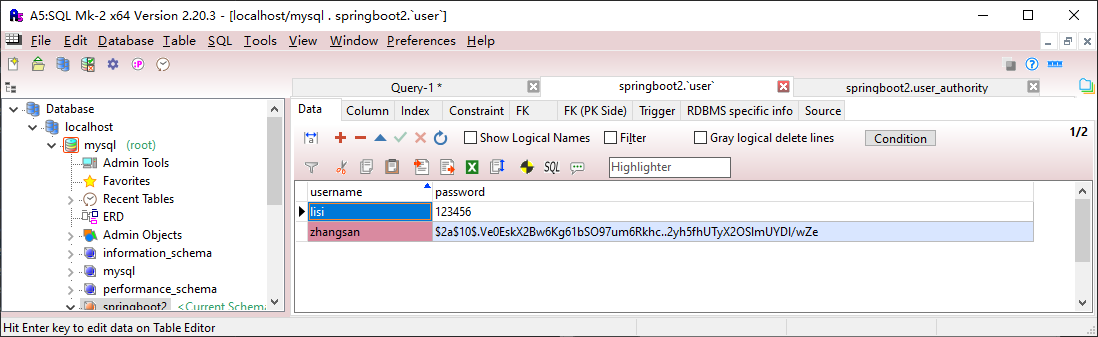
        String newPassword = passwordEncoder.encode(password);
        return repository.updatePassword(username, newPassword);
    }
}
(3) repository
java
package com.example.dao;

import com.example.pojo.User;
import org.springframework.data.jpa.repository.Modifying;
import org.springframework.data.jpa.repository.Query;
import org.springframework.data.repository.Repository;
import org.springframework.transaction.annotation.Transactional;

public interface PasswordRepository extends Repository<User, String> {
    @Transactional
    @Modifying
    @Query("UPDATE user SET password = ?2 WHERE username = ?1")
    public int updatePassword(String username, String password);
}
(4) 页面
src/main/resources/templates/password.html
html
<!DOCTYPE html>
<html lang="en" xmlns:th="http://www.thymeleaf.org">
<html>
<head><meta charset="UTF-8"><title>Insert title here</title></head>
<body>
Springboot2 密码变更页面<br/>
<form name="form1" action="/updatePassword" method="post">
    用户名:<input type="text" name="username" /><br/>
    密码:<input type="password" name="password" /><br/>
    <button>更新密码</button>
</form>
<div th:text="${msg}"></div>
</body>
</html>
8.5.2 加密操作
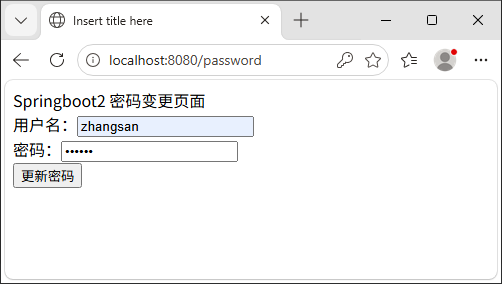
8.6 登录验证
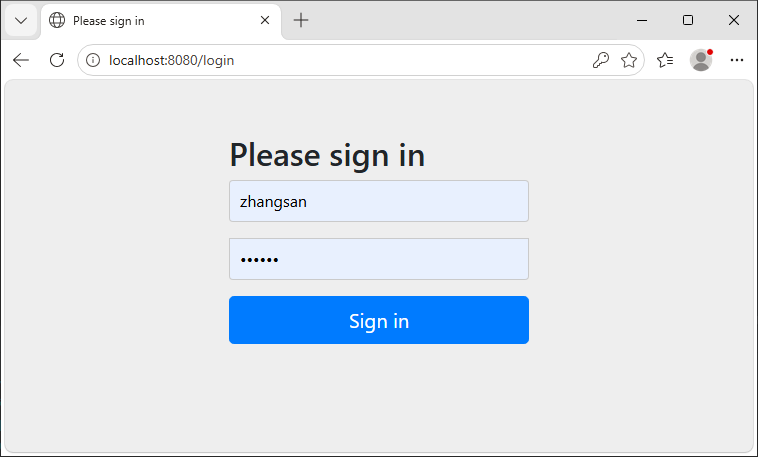
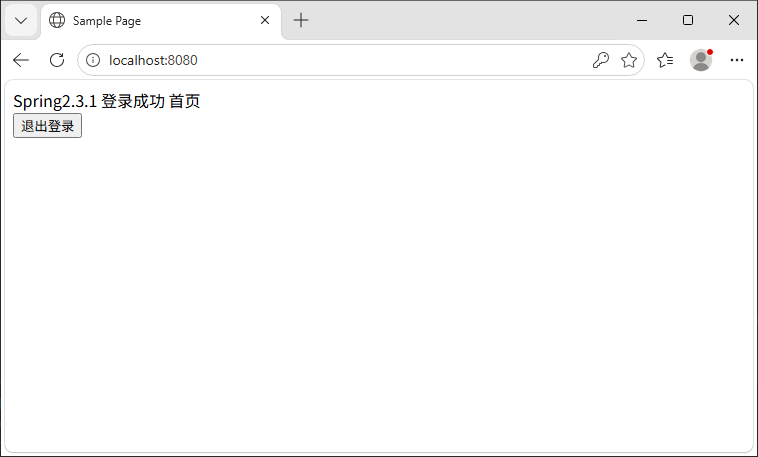
9 其它功能
9.1 文件上传
略:参照Springboot2.x+JSP项目创建-CSDN博客