简介
本文以Make Pong Game in Godot | gameidea为蓝本撰写。如果你对rust、godot等内容比较生疏或感到疑惑,可以先阅读godot-rust入门文档。
本文搭建在godot-rust(gdext)创建项目的基础之上,如果你对该部分内容感到生疏,可以先阅读这部分内容,为接下来的操作做好准备。出于连贯性考虑,本文将省略一些基础性操作,这些操作可以在godot-rust(gdext)你的第一个2D游戏这个系列中看到,可以从这个系列中了解相关内容。
注意,本文使用的godot版本为4.6.2,godot-rust(gdext)版本为0.5.1,相关的版本变化可能会导致一些内容失效。
本文所有操作均在Windows11环境下进行。
本文工程资源和相关素材可以在这里(pong-lab)可以获取。
正文
创建Ball
rust
// ball.rs
use std::f32::consts::PI;

use godot::{
    classes::{
        IRigidBody2D, InputEvent, InputEventMouseButton, InputEventMouseMotion,
        PhysicsDirectBodyState2D, PhysicsServer2D, RigidBody2D, VisibleOnScreenNotifier2D,
        physics_server_2d::BodyState,
    },
    global::MouseButton,
    prelude::*,
};

use crate::{
    brick::Brick,
    state::{State, Stateful},
};

#[derive(GodotClass)]
#[class(init, base=RigidBody2D)]
pub struct Ball {
    base: Base<RigidBody2D>,

    state: BallState,

    #[init(node = "Arrow")]
    arrow: OnReady<Gd<Node2D>>, // 瞄准箭头

    aim_offset: real, // 瞄准时鼠标偏移

    #[init(node = "VisibleOnScreenNotifier2D")]
    notifier: OnReady<Gd<VisibleOnScreenNotifier2D>>,

    #[init(val = None)]
    direction_cache: Option<Vector2>, // 速度方向缓存
}

#[godot_api]
impl IRigidBody2D for Ball {
    fn ready(&mut self) {
        self.arrow.hide(); // 默认箭头隐藏

        self.signals()
            .ball_launch()
            .connect_self(Self::on_ball_launch);

        self.notifier
            .signals()
            .screen_exited()
            .connect_other(&*self, Self::on_screen_exited);

        self.signals().body_entered().connect(Self::on_body_entered);

        self.on_state_enter(); // 手动调用一次进入状态
    }

    fn input(&mut self, event: Gd<InputEvent>) {
        if self.state != BallState::Aiming { // 仅当瞄准时处理输入
            return;
        }

        match event.try_cast::<InputEventMouseMotion>() {
            Ok(motion) => { // 鼠标左右移动瞄准箭头
                self.aim_offset = (self.aim_offset + motion.get_relative().x * 0.005)
                    .clamp(-Self::OFFSET_CLAMP, Self::OFFSET_CLAMP);
            }
            Err(event) => match event.try_cast::<InputEventMouseButton>() {
                Ok(button) => {
                    if button.get_button_index() == MouseButton::LEFT {
                        self.signals().ball_launch().emit(); // 鼠标左键发射
                    }
                }
                _ => {}
            },
        }
    }

    fn integrate_forces(&mut self, state: Option<Gd<PhysicsDirectBodyState2D>>) {
        let Some(mut state) = state else {
            return;
        };

        if self.state != BallState::Active {
            return;
        }

        let velocity = state.get_linear_velocity();

        let speed = velocity.length();
        // 速度钳制,始终为Self::SPEED
        if (speed - Self::SPEED).abs() > Self::EPSILON {
            state.set_linear_velocity(velocity.normalized() * Self::SPEED);
        }
    }

    fn process(&mut self, _delta: f32) {
        if let BallState::Aiming = self.state {
            self.arrow.set_rotation(self.aim_offset); // 渲染瞄准箭头旋转
        }
    }
}

#[godot_api]
impl Ball {
    const OFFSET_CLAMP: real = PI / 3.0; // 60度
    const EPSILON: real = 0.001;         // 设定极小值
    const SPEED: real = 800.0;           // 恒定速度

    #[signal]
    pub fn ball_launch();

    #[signal]
    pub fn ball_out_screen();

    fn on_ball_launch(&mut self) {
        self.transition_to(BallState::Active);
    }

    fn on_screen_exited(&mut self) {
        self.transition_to(BallState::Frozen);
        self.signals().ball_out_screen().emit();
    }

    fn on_body_entered(node: Gd<Node>) {
        let Ok(brick) = node.try_cast::<Brick>() else {
            return;
        };

        brick.signals().hitted().emit();
    }

    pub fn aiming_position(&mut self) {
        let position = Vector2::new(640.0, 680.0);

        self.base_mut().set_global_position(position);

        let mut t = self.base().get_transform();
        t.origin = position;
        // 重置物理引擎相关数据
        PhysicsServer2D::singleton().body_set_state(
            self.base().get_rid(),
            BodyState::TRANSFORM,
            &t.to_variant(),
        );
        // 手动刷新物理引擎
        self.base_mut().reset_physics_interpolation();
    }
}

#[derive(PartialEq, Default, Clone, Copy)]
pub enum BallState {
    #[default]
    Frozen,
    Aiming,
    Active,
}

impl State for BallState {}

impl Stateful for Ball {
    type S = BallState;

    fn on_state_enter(&mut self) {
        match self.state() {
            BallState::Frozen => {
                let mut base_mut = self.base_mut();
                base_mut.call_deferred("set_sleeping", &[true.to_variant()]);
                base_mut.call_deferred("set_freeze_enabled", &[true.to_variant()]);
            }
            BallState::Aiming => {
                self.direction_cache = None;
                self.arrow.show();
            }
            BallState::Active => {
                let direction_cache = self.direction_cache.take(); // 消费掉缓存速度方向

                match direction_cache {
                    Some(direction) => { // 有原速度方向则按原速度方向运动
                        let new_velocity = direction * Self::SPEED;
                        self.base_mut().set_linear_velocity(new_velocity);
                    }
                    None => { // 没有原速度方向则使用瞄准方向运动
                        let new_velocity =
                            Vector2::UP.rotated(std::mem::take(&mut self.aim_offset)) * Self::SPEED;
                        self.base_mut().set_linear_velocity(new_velocity);
                    }
                }

                let mut base_mut = self.base_mut();
                base_mut.set_sleeping(false);
                base_mut.set_freeze_enabled(false);
            }
        }
    }

    fn on_state_exit(&mut self) {
        match self.state() {
            BallState::Frozen => {}
            BallState::Aiming => {
                self.arrow.hide();
            }
            BallState::Active => {
                let velocity = self.base().get_linear_velocity();
                if velocity == Vector2::ZERO {
                    return;
                }
                self.direction_cache = Some(velocity.normalized()); // 缓存速度方向

                self.base_mut()
                    .call_deferred("set_linear_velocity", &[Vector2::ZERO.to_variant()]);
            }
        }
    }

    fn set_state(&mut self, new_state: Self::S) {
        self.state = new_state;
    }

    fn state(&self) -> Self::S {
        self.state
    }
}Ball采用RigidBody2D可以最大程度利用godot的物理引擎,当然我们也可以用其他节点来手动控制。- 由于采用了
RigidBody2D,如果对Ball的运动手工介入,要和物理引擎"抢权限",godot特意提供了integrate_forces()函数来介入物理运动;必要的时候需要进一步使用PhysicsServer2D::singleton()来修改物理引擎确保介入一致性,比如我们将Ball传送到发射位置。 - 由于
Brick采用了StaticBody2D,其本身没有提供on_body_entered(),因此需要在Ball中来唤起Brick的碰撞信号,这也是on_body_entered()的原因。 - 通过
call_deferred()调用函数,可以避免物理引擎在计算时发生冲突。这些冲突发生后,可以在godot界面中直接观察到报错信息。
编译rust后,回到godot 编辑界面,创建Ball场景
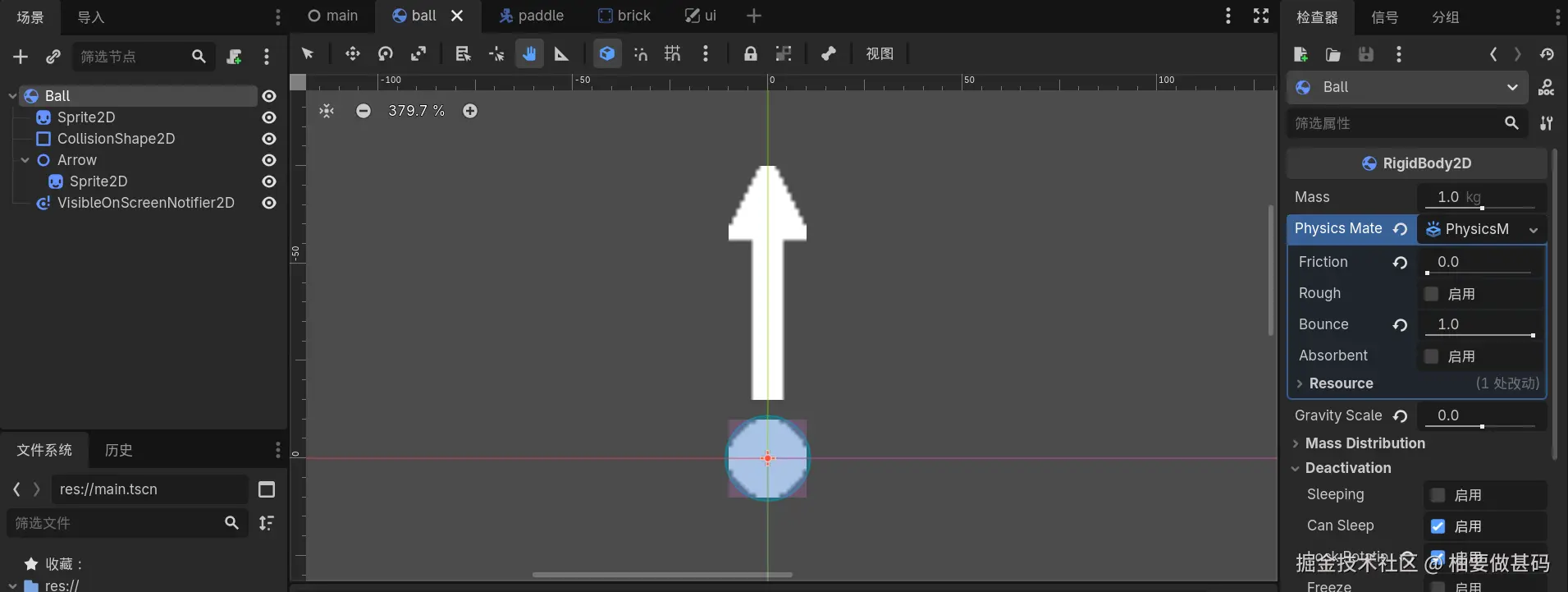
同样,使用Sprite2D来展示视觉部分,将ball.png拖入。CollisionShape2D中使用CircleShape2D,并调整好其大小。创建一个Node2D并命名为Arrow,为Arrow创建一个Sprite2D的子节点,将arrow.png拖入其中,这就是我们的发射箭头。最后为Ball添加VisibleOnScreenNotifier2D子节点。
选中Ball,做一些变更
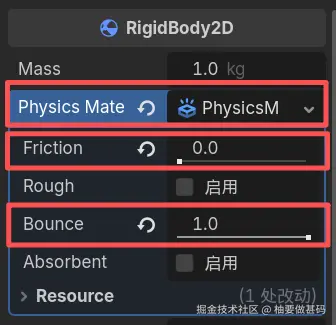
- 检查器 > RigidBody2D > PhysicalMaterial : 新建
PhysicalMaterial - 点击你创建的
PhysicalMaterial,Friction :0.0、Bounce :1.0
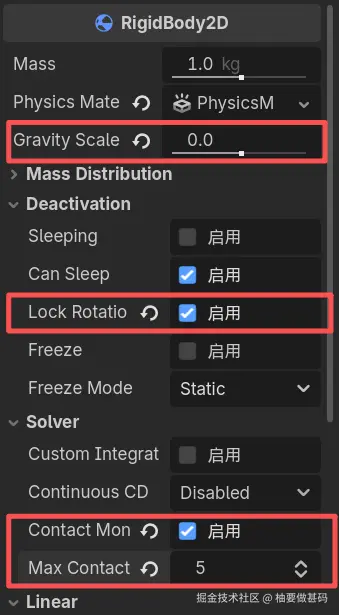
- 检查器 > RigidBody2D > Gravity Scale :
0.0 - 检查器 > RigidBody2D > Deactivation > Lock Rotation : 启用
- 检查器 > RigidBody2D > Solver > Contact Monitor : 启用
- 检查器 > RigidBody2D > Solver > Max Contacts Reported :
5
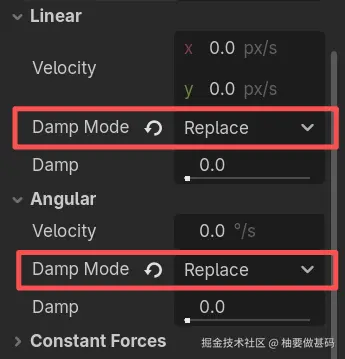
- 检查器 > RigidBody2D > Linear > Damp Mode :
Replace - 检查器 > RigidBody2D > Angular > Damp Mode :
Replace
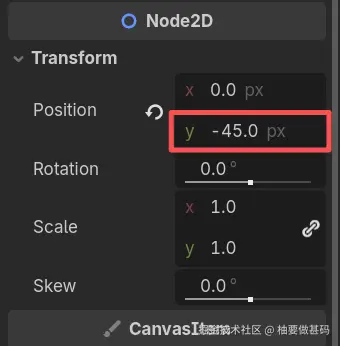
选中Arrow的Sprite2D子节点,把箭头向上挪动45,注意 ,要选中Sprite2D这个子节点,而不是Arrow自己。