背景
相信不少朋友在使用 <math xmlns="http://www.w3.org/1998/Math/MathML"> git \text{git} </math>git 时,都对以下三种 <math xmlns="http://www.w3.org/1998/Math/MathML"> git reset \text{git reset} </math>git reset 命令的区别产生过疑惑。
bash
git reset --soft <commit>
git reset --mixed <commit> (和 git reset <commit> 效果相同)
git reset --hard <commit>
本文会探讨它们的区别。
要点
如果将 <math xmlns="http://www.w3.org/1998/Math/MathML"> HEAD \text{HEAD} </math>HEAD/暂存区/工作目录 都看作树 🌲(即,文件的集合),在不同的 <math xmlns="http://www.w3.org/1998/Math/MathML"> git reset \text{git reset} </math>git reset 命令中,对应的树是否会被更新可以这样总结 ⬇️
| <math xmlns="http://www.w3.org/1998/Math/MathML"> HEAD \text{HEAD} </math>HEAD 🌲 是否会被更新 | 暂存区( <math xmlns="http://www.w3.org/1998/Math/MathML"> Index \text{Index} </math>Index) 🌲 是否会被更新 | 工作目录 🌲 是否会被更新 | |
|---|---|---|---|
git reset --soft <commit> |
是 | 否 | 否 |
git reset --mixed <commit> 或 git reset <commit> |
是 | 是 | 否 |
git reset --hard <commit> |
是 | 是 | 是 |
正文
参考 7.7 Git 工具 - 重置揭密 一文的描述,我们可以将以下三者想象成三棵树 🌲(这里的树 🌲 是指文件的集合,而不是指数据结构中的树)
- <math xmlns="http://www.w3.org/1998/Math/MathML"> HEAD \text{HEAD} </math>HEAD (可以将它简单理解为当前分支的最近一次 <math xmlns="http://www.w3.org/1998/Math/MathML"> commit \text{commit} </math>commit 的指针或者引用)🌲
- 暂存区(即, <math xmlns="http://www.w3.org/1998/Math/MathML"> Index \text{Index} </math>Index)🌲
- 工作目录 🌲
代码
我们可以用代码验证不同选项的 <math xmlns="http://www.w3.org/1998/Math/MathML"> git reset \text{git reset} </math>git reset 命令的效果。请将以下代码保存为 <math xmlns="http://www.w3.org/1998/Math/MathML"> main.sh \text{main.sh} </math>main.sh
bash
## Prepare a temp dir for our test
TEST_DIR=temp_git_test_dir
if [[ -d "${TEST_DIR}" ]];
then
rm -rf "${TEST_DIR}"
fi
mkdir "${TEST_DIR}"
cd "${TEST_DIR}"
git init
function append() {
echo "$1" >> f.txt
}
function add_and_commit() {
git add f.txt
git commit -m "$1"
}
## Prepare for the 1st commit
append "1st line"
add_and_commit "1st commit"
## Prepare for the 2nd commit
append "2nd line"
add_and_commit "2nd commit"
## Prepare for the 3rd commit
append "3rd line"
add_and_commit "3rd commit"
## Prepare for the 4th commit
append "4th line"
add_and_commit "4th commit"
通过执行下方的命令就可以运行 <math xmlns="http://www.w3.org/1998/Math/MathML"> main.sh \text{main.sh} </math>main.sh ⬇️
bash
bash main.sh
使用 <math xmlns="http://www.w3.org/1998/Math/MathML"> --soft \text{{-}{-}soft} </math>--soft 选项
我们把 <math xmlns="http://www.w3.org/1998/Math/MathML"> HEAD \text{HEAD} </math>HEAD 视为一个指针或者引用,那么 git reset --soft <commit> 命令的作用就是 ⬇️
- 将 <math xmlns="http://www.w3.org/1998/Math/MathML"> HEAD \text{HEAD} </math>HEAD 指向
<commit>所对应的位置
运行完 <math xmlns="http://www.w3.org/1998/Math/MathML"> main.sh \text{main.sh} </math>main.sh 之后,当前目录中会多出一个 temp_git_test_dir 目录。在当前目录执行 tree temp_git_test_dir 命令后,应该可以看到如下的内容
text
temp_git_test_dir
└── f.txt
1 directory, 1 file
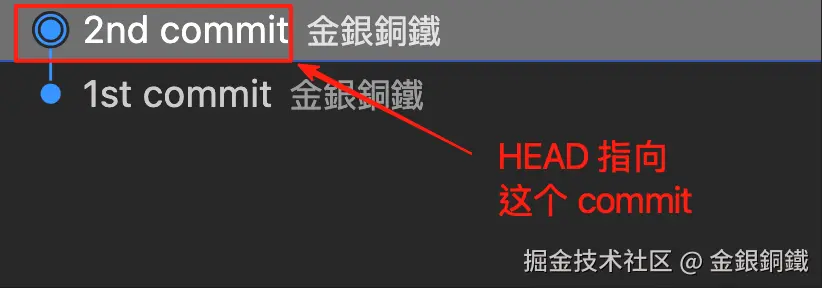
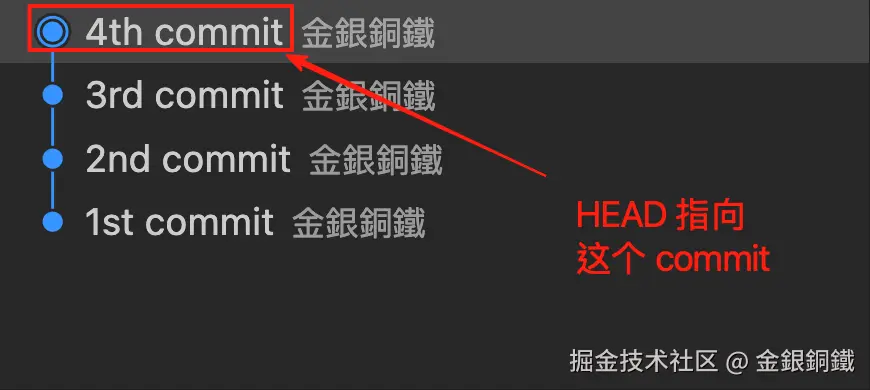
通过执行 cd temp_git_test_dir 命令就可以切换到 temp_git_test_dir 目录。不难验证,现在 <math xmlns="http://www.w3.org/1998/Math/MathML"> HEAD \text{HEAD} </math>HEAD 的位置如下图所示 ⬇️ (下图是借助 Visual Studio Code 而生成的)
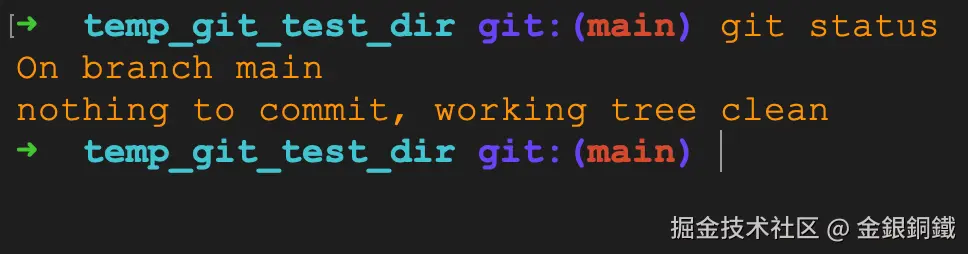
通过查看 <math xmlns="http://www.w3.org/1998/Math/MathML"> git status \text{git status} </math>git status 命令的执行结果,可以知道以下三棵树 🌲 当前的内容是一样的 ⬇️
- 工作目录 🌲
- 暂存区(即, <math xmlns="http://www.w3.org/1998/Math/MathML"> Index \text{Index} </math>Index)🌲
- <math xmlns="http://www.w3.org/1998/Math/MathML"> HEAD \text{HEAD} </math>HEAD 🌲

现在我们执行以下命令 ⬇️(HEAD~2 表示当前 <math xmlns="http://www.w3.org/1998/Math/MathML"> HEAD \text{HEAD} </math>HEAD 的上一个 <math xmlns="http://www.w3.org/1998/Math/MathML"> commit \text{commit} </math>commit 的上一个 <math xmlns="http://www.w3.org/1998/Math/MathML"> commit \text{commit} </math>commit)
bash
git reset --soft HEAD~2
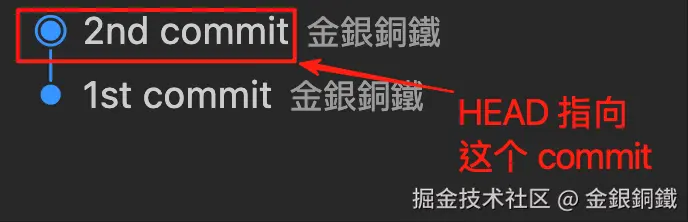
执行命令后, <math xmlns="http://www.w3.org/1998/Math/MathML"> HEAD \text{HEAD} </math>HEAD 会有对应的变化 ⬇️

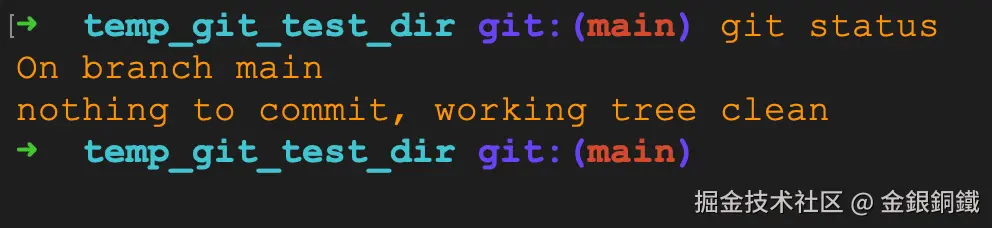
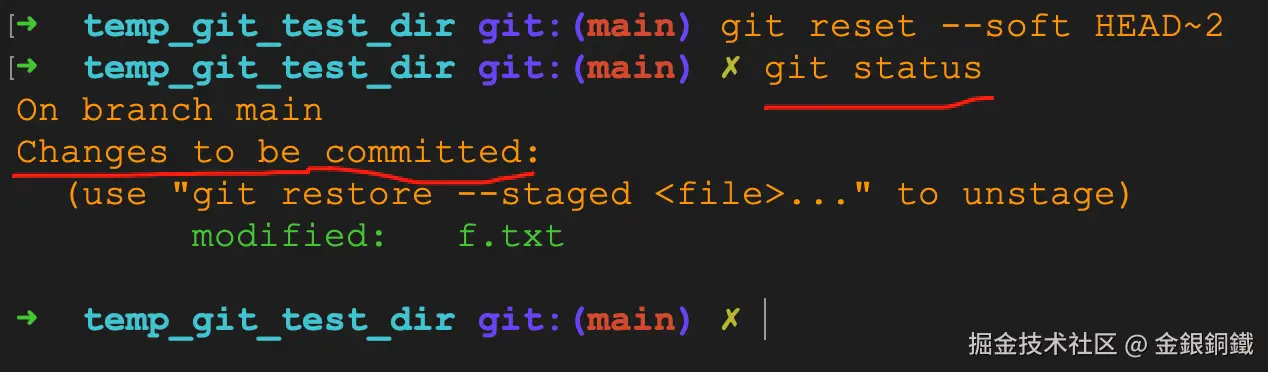
通过查看 <math xmlns="http://www.w3.org/1998/Math/MathML"> git status \text{git status} </math>git status 命令的执行结果,可以知道 工作目录 和 暂存区 的内容是一样的 ⬇️
小结
git reset --soft <commit> 会将 <math xmlns="http://www.w3.org/1998/Math/MathML"> HEAD \text{HEAD} </math>HEAD 指向 <commit> 所对应的 <math xmlns="http://www.w3.org/1998/Math/MathML"> commit \text{commit} </math>commit。但是 暂存区 和 工作目录 的内容都不受影响。
| 哪棵树 🌲 | 执行 git reset --soft <commit> 命令后 有变化吗? |
会变成什么? |
|---|---|---|
| <math xmlns="http://www.w3.org/1998/Math/MathML"> HEAD \text{HEAD} </math>HEAD 🌲 | 有 | 变为指向 <commit> 对应的 <math xmlns="http://www.w3.org/1998/Math/MathML"> commit \text{commit} </math>commit |
| 暂存区(即, <math xmlns="http://www.w3.org/1998/Math/MathML"> Index \text{Index} </math>Index)🌲 | 没有 | - |
| 工作目录 🌲 | 没有 | - |
使用 <math xmlns="http://www.w3.org/1998/Math/MathML"> --mixed \text{{-}{-}mixed} </math>--mixed 选项
说明: git reset <commit> 和 git reset --mixed <commit> 的作用相同。
我们把 <math xmlns="http://www.w3.org/1998/Math/MathML"> HEAD \text{HEAD} </math>HEAD 视为一个指针或者引用,那么 git reset --mixed <commit> 命令的作用是
- 将 <math xmlns="http://www.w3.org/1998/Math/MathML"> HEAD \text{HEAD} </math>HEAD 指向
<commit>所对应的位置 - 用更新后的 <math xmlns="http://www.w3.org/1998/Math/MathML"> HEAD \text{HEAD} </math>HEAD 来更新 暂存区 (暂存区的内容会和最新的 <math xmlns="http://www.w3.org/1998/Math/MathML"> HEAD \text{HEAD} </math>HEAD 相同)
运行完 <math xmlns="http://www.w3.org/1998/Math/MathML"> main.sh \text{main.sh} </math>main.sh 之后,当前目录中会多出一个 temp_git_test_dir 目录。在当前目录执行 tree temp_git_test_dir 命令后,应该可以看到如下的内容
text
temp_git_test_dir
└── f.txt
1 directory, 1 file
通过执行 cd temp_git_test_dir 命令就可以切换到 temp_git_test_dir 目录。不难验证,现在 <math xmlns="http://www.w3.org/1998/Math/MathML"> HEAD \text{HEAD} </math>HEAD 的位置如下图所示 ⬇️ (下图是借助 Visual Studio Code 而生成的)
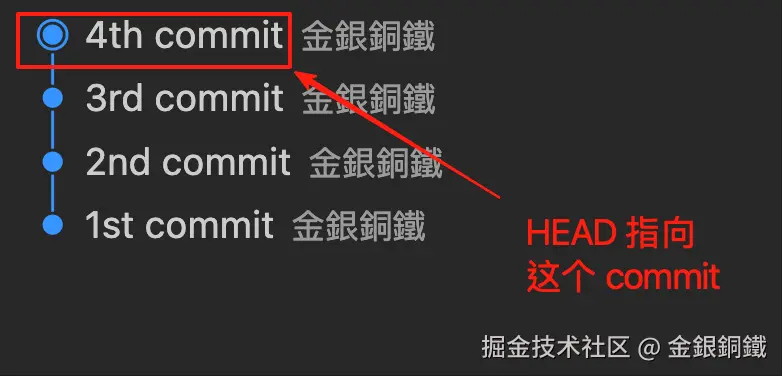
通过查看 <math xmlns="http://www.w3.org/1998/Math/MathML"> git status \text{git status} </math>git status 命令的执行结果,可以知道以下三棵树 🌲 当前的内容是一样的 ⬇️
- 工作目录 🌲
- 暂存区(即, <math xmlns="http://www.w3.org/1998/Math/MathML"> Index \text{Index} </math>Index)🌲
- <math xmlns="http://www.w3.org/1998/Math/MathML"> HEAD \text{HEAD} </math>HEAD 🌲

现在我们执行以下命令 ⬇️(HEAD~2 表示当前 <math xmlns="http://www.w3.org/1998/Math/MathML"> HEAD \text{HEAD} </math>HEAD 的上一个 <math xmlns="http://www.w3.org/1998/Math/MathML"> commit \text{commit} </math>commit 的上一个 <math xmlns="http://www.w3.org/1998/Math/MathML"> commit \text{commit} </math>commit)
bash
git reset --mixed HEAD~2
执行命令后, <math xmlns="http://www.w3.org/1998/Math/MathML"> HEAD \text{HEAD} </math>HEAD 会有对应的变化 ⬇️

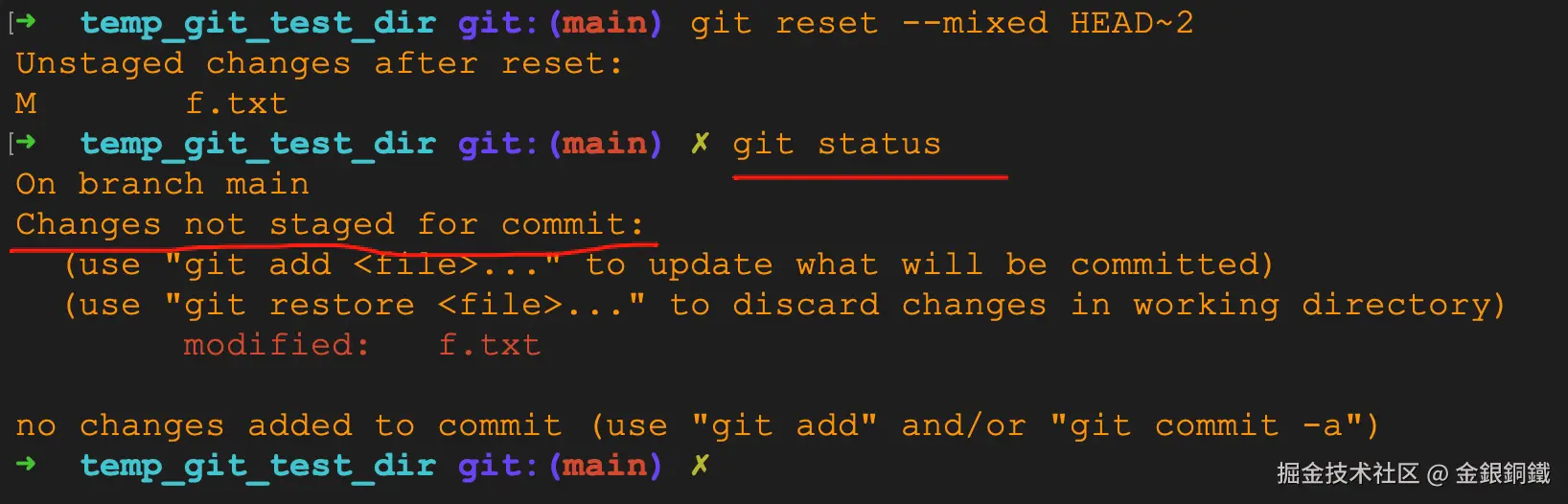
通过查看 <math xmlns="http://www.w3.org/1998/Math/MathML"> git status \text{git status} </math>git status 命令的执行结果,可以知道 <math xmlns="http://www.w3.org/1998/Math/MathML"> HEAD \text{HEAD} </math>HEAD 和 暂存区 的内容是一样的 (但是工作目录的内容和它们不同) ⬇️

小结
git reset --mixed <commit> 会将 <math xmlns="http://www.w3.org/1998/Math/MathML"> HEAD \text{HEAD} </math>HEAD 指向 <commit> 所对应的 <math xmlns="http://www.w3.org/1998/Math/MathML"> commit \text{commit} </math>commit,并让 暂存区 的内容与最新的 <math xmlns="http://www.w3.org/1998/Math/MathML"> HEAD \text{HEAD} </math>HEAD 相同。工作目录 的内容不受影响。
| 哪棵树 🌲 | 执行 git reset --mixed <commit> 命令后 有变化吗? |
会变成什么? |
|---|---|---|
| <math xmlns="http://www.w3.org/1998/Math/MathML"> HEAD \text{HEAD} </math>HEAD 🌲 | 有 | 变为指向 <commit> 对应的 <math xmlns="http://www.w3.org/1998/Math/MathML"> commit \text{commit} </math>commit |
| 暂存区(即, <math xmlns="http://www.w3.org/1998/Math/MathML"> Index \text{Index} </math>Index)🌲 | 有 | 内容会和最新的 <math xmlns="http://www.w3.org/1998/Math/MathML"> HEAD \text{HEAD} </math>HEAD 相同 |
| 工作目录 🌲 | 没有 | - |
使用 <math xmlns="http://www.w3.org/1998/Math/MathML"> --hard \text{{-}{-}hard} </math>--hard 选项
我们把 <math xmlns="http://www.w3.org/1998/Math/MathML"> HEAD \text{HEAD} </math>HEAD 视为一个指针或者引用,那么 git reset --hard <commit> 命令的作用是
- 将 <math xmlns="http://www.w3.org/1998/Math/MathML"> HEAD \text{HEAD} </math>HEAD 指向
<commit>所对应的位置 - 用更新后的 <math xmlns="http://www.w3.org/1998/Math/MathML"> HEAD \text{HEAD} </math>HEAD 来更新 暂存区 (暂存区的内容会和最新的 <math xmlns="http://www.w3.org/1998/Math/MathML"> HEAD \text{HEAD} </math>HEAD 相同)
- 用更新后的 <math xmlns="http://www.w3.org/1998/Math/MathML"> HEAD \text{HEAD} </math>HEAD 来更新工作目录(工作目录中,所有已被追踪的文件,其内容会和最新的 <math xmlns="http://www.w3.org/1998/Math/MathML"> HEAD \text{HEAD} </math>HEAD 中的内容相同)
运行完 <math xmlns="http://www.w3.org/1998/Math/MathML"> main.sh \text{main.sh} </math>main.sh 之后,当前目录中会多出一个 temp_git_test_dir 目录。在当前目录执行 tree temp_git_test_dir 命令后,应该可以看到如下的内容
text
temp_git_test_dir
└── f.txt
1 directory, 1 file
通过执行 cd temp_git_test_dir 命令就可以切换到 temp_git_test_dir 目录。不难验证,现在 <math xmlns="http://www.w3.org/1998/Math/MathML"> HEAD \text{HEAD} </math>HEAD 的位置如下图所示 ⬇️ (下图是借助 Visual Studio Code 而生成的)

通过查看 <math xmlns="http://www.w3.org/1998/Math/MathML"> git status \text{git status} </math>git status 命令的执行结果,可以知道以下三棵树 🌲 当前的内容是一样的 ⬇️
- 工作目录 🌲
- 暂存区(即, <math xmlns="http://www.w3.org/1998/Math/MathML"> Index \text{Index} </math>Index)🌲
- <math xmlns="http://www.w3.org/1998/Math/MathML"> HEAD \text{HEAD} </math>HEAD 🌲

现在我们执行以下命令 ⬇️(HEAD~2 表示当前 <math xmlns="http://www.w3.org/1998/Math/MathML"> HEAD \text{HEAD} </math>HEAD 的上一个 <math xmlns="http://www.w3.org/1998/Math/MathML"> commit \text{commit} </math>commit 的上一个 <math xmlns="http://www.w3.org/1998/Math/MathML"> commit \text{commit} </math>commit)
bash
git reset --hard HEAD~2
执行命令后, <math xmlns="http://www.w3.org/1998/Math/MathML"> HEAD \text{HEAD} </math>HEAD 会有对应的变化 ⬇️

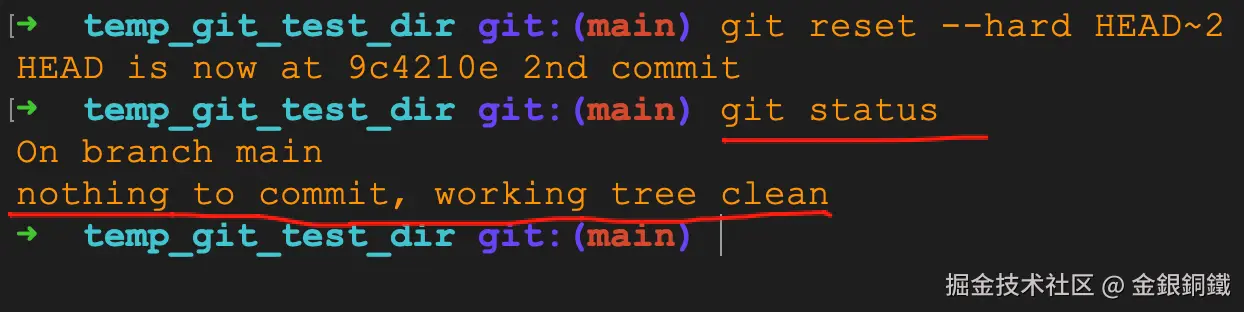
通过查看 <math xmlns="http://www.w3.org/1998/Math/MathML"> git status \text{git status} </math>git status 命令的执行结果,可以知道以下三者的内容相同
- <math xmlns="http://www.w3.org/1998/Math/MathML"> HEAD \text{HEAD} </math>HEAD
- 暂存区
- 工作目录

小结
git reset --hard <commit> 会将 <math xmlns="http://www.w3.org/1998/Math/MathML"> HEAD \text{HEAD} </math>HEAD 指向 <commit> 所对应的 <math xmlns="http://www.w3.org/1998/Math/MathML"> commit \text{commit} </math>commit,并让 暂存区 的内容与最新的 <math xmlns="http://www.w3.org/1998/Math/MathML"> HEAD \text{HEAD} </math>HEAD 相同。工作目录 中已被追踪的文件,也会变得和最新的 <math xmlns="http://www.w3.org/1998/Math/MathML"> HEAD \text{HEAD} </math>HEAD 相同。
| 哪棵树 🌲 | 执行 git reset --hard <commit> 命令后 有变化吗? |
会变成什么? |
|---|---|---|
| <math xmlns="http://www.w3.org/1998/Math/MathML"> HEAD \text{HEAD} </math>HEAD 🌲 | 有 | 变为指向 <commit> 对应的 <math xmlns="http://www.w3.org/1998/Math/MathML"> commit \text{commit} </math>commit |
| 暂存区(即, <math xmlns="http://www.w3.org/1998/Math/MathML"> Index \text{Index} </math>Index)🌲 | 有 | 内容会和最新的 <math xmlns="http://www.w3.org/1998/Math/MathML"> HEAD \text{HEAD} </math>HEAD 相同 |
| 工作目录 🌲 | 有 | 对所有已被追踪的文件而言,工作目录的内容和最新的 <math xmlns="http://www.w3.org/1998/Math/MathML"> HEAD \text{HEAD} </math>HEAD 相同 |
参考资料
关于 <math xmlns="http://www.w3.org/1998/Math/MathML"> git reset \text{git reset} </math>git reset 命令的更多介绍,可以参考以下两个链接(两个链接来自同一个网站,第一个链接的内容是简体中文,第二个链接的内容是英文)