🎮 Python+Pygame 实现《超级冒险岛》- 完整技术解析
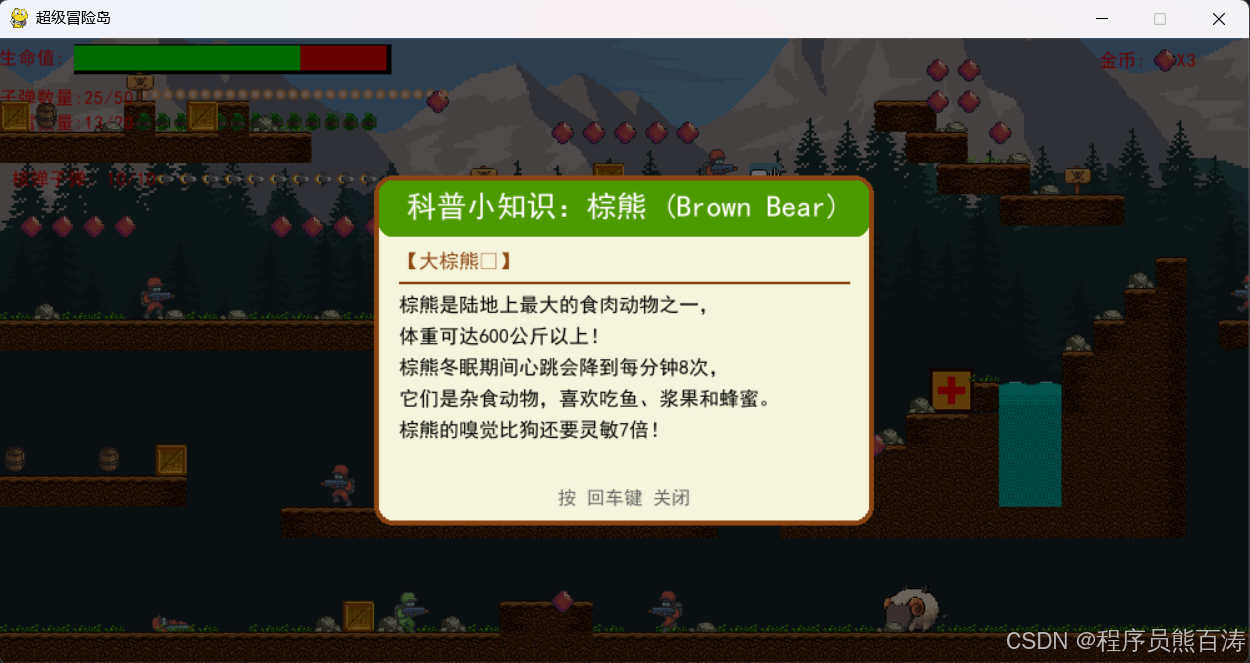
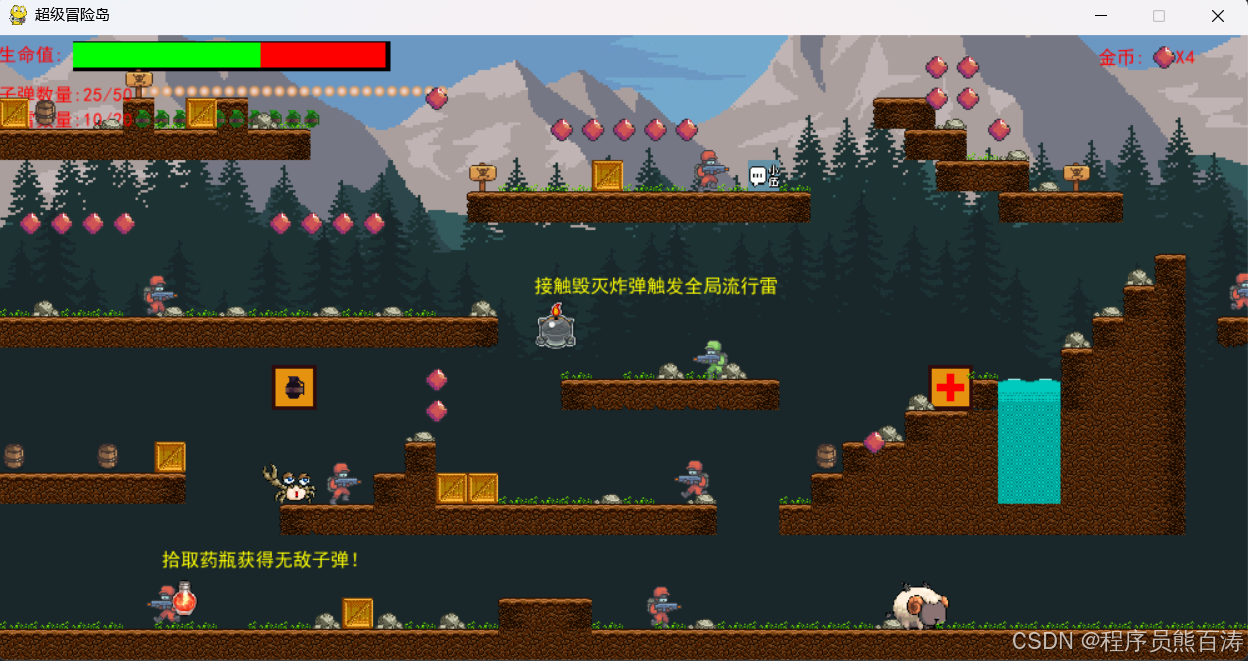
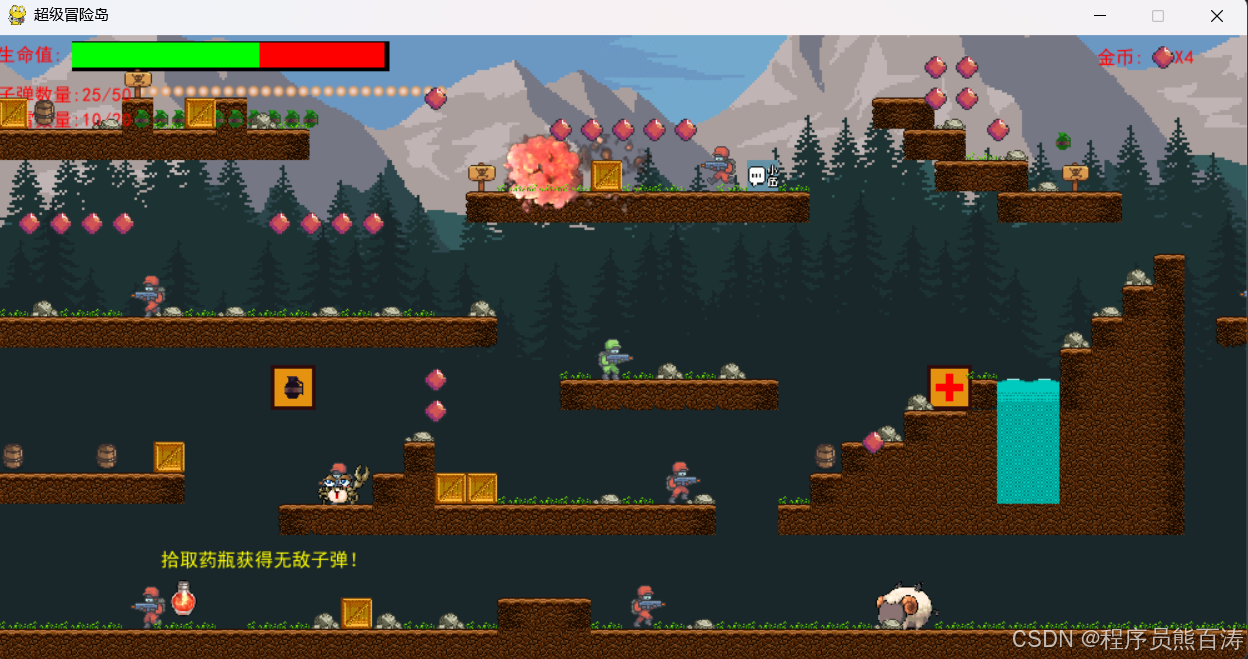
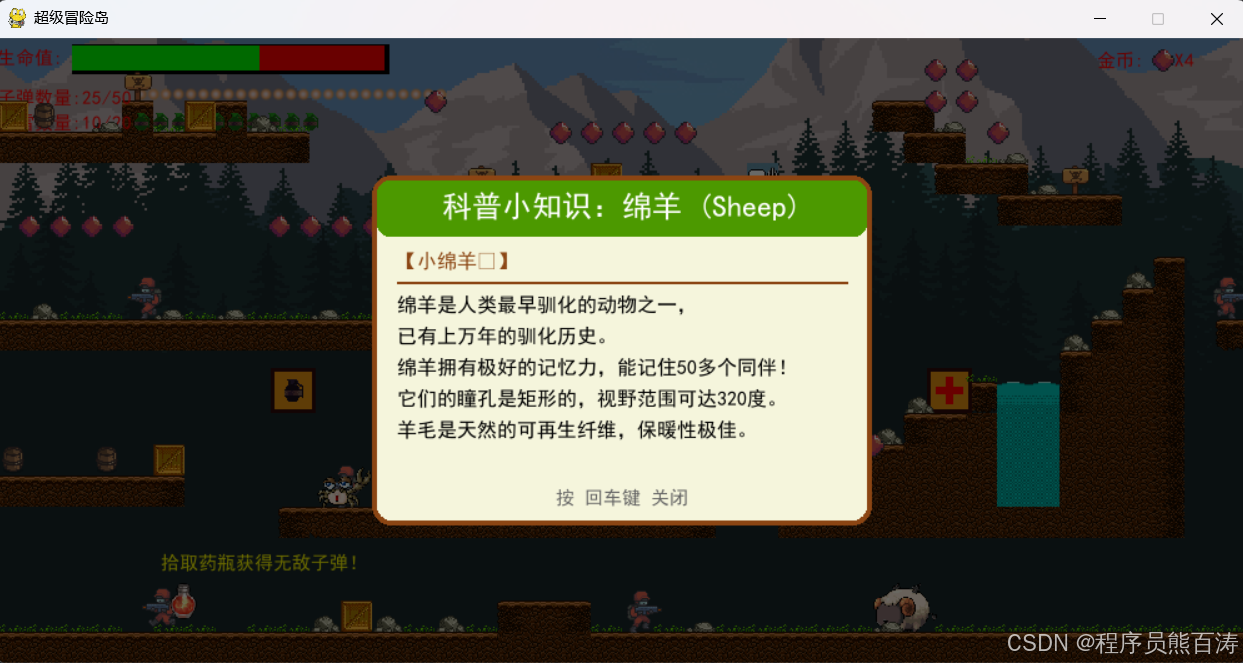
一个融合科普教育元素的横版卷轴射击游戏,涵盖游戏开发核心技术栈!游戏实现了玩家的移动、射击、投掷手雷 的打击实现以及多元素的补给装备特效,为了增加乐趣也实现了点击怪物可以弹出科普知识卡片交互以及实现了关卡的自定义无限乐趣闯关!
📋 项目概览
| 项目信息 | 内容 |
|---|---|
| 项目名称 | 动物科普大冒险 |
| 开发技术 | Python 3.10 + Pygame |
| 游戏类型 | 横版卷轴冒险射击游戏 |
| 核心文件 | Main.py (游戏主程序)、levelset.py (关卡编辑器) |
项目结构一览
程陈/
├── Main.py              # 🎯 游戏主程序 (核心)
├── levelset.py          # 🎨 关卡地图编辑器
├── button.py            # 🔘 可复用按钮组件
├── jieZhen.py           # 📽️ GIF动图处理工具
├── img/                 # 🖼️ 所有游戏图像资源
│   ├── player/          # 玩家角色动画
│   ├── enemy/           # 敌人角色动画
│   ├── animal1-4/       # 动物角色动画
│   ├── tile/            # 地图瓦片 (29种)
│   ├── background/       # 背景图层
│   ├── icons/           # 道具图标
│   └── Nuclearexplosion/ # 核爆炸序列帧
├── audio/               # 🔊 音效资源
│   ├── bg.mp3           # 背景音乐
│   ├── shot.wav         # 射击音效
│   ├── grenade.wav      # 手雷音效
│   └── ...              # 多种游戏音效
├── ceshi/               # 🧪 测试资源 (GIF动图)
└── *.csv                # 📍 关卡地图数据
🚀 第一部分:游戏引擎核心架构
1.1 Pygame 初始化与游戏窗口
python
import pygame
import mixer  # 音频混合器

pygame.init()
mixer.init()

SCREEN_WIDTH = 1000
SCREEN_HEIGHT = int(SCREEN_WIDTH * 0.50)  # 16:8 宽高比
screen = pygame.display.set_mode((SCREEN_WIDTH, SCREEN_HEIGHT))
pygame.display.set_caption("超级冒险岛")

clock = pygame.time.Clock()
FPS = 60  # 目标帧率
🎯 技术要点:
mixer.init()单独初始化音频系统- 使用
clock.tick(FPS)控制游戏帧率,保证不同电脑上的统一体验 - 屏幕高度根据宽度按比例计算,保持一致的视觉风格
1.2 游戏主循环
python
run = True
while run:
    clock.tick(FPS)  # 控制帧率

    for event in pygame.event.get():
        if event.type == pygame.QUIT:
            run = False

        # 键盘事件处理
        if event.type == pygame.KEYDOWN:
            if event.key == pygame.K_LEFT:
                moving_left = True
            if event.key == pygame.K_RIGHT:
                moving_right = True
            if event.key == pygame.K_SPACE:
                shoot = True
            if event.key == pygame.K_g:
                grenade = True

        if event.type == pygame.KEYUP:
            if event.key == pygame.K_LEFT:
                moving_left = False
            if event.key == pygame.K_RIGHT:
                moving_right = False
            # ... 更多按键松开处理

    # 游戏逻辑更新
    player.update()
    enemy_group.update()
    bullet_group.update()

    # 绘制
    draw_bg()
    world.draw()
    player.draw()
    enemy_group.draw(screen)
    pygame.display.update()

pygame.quit()
🎭 第二部分:角色动画系统
2.1 角色类基类设计
python
class Soldier(pygame.sprite.Sprite):
    def __init__(self, char_type, x, y, scale, speed, ammo, grenades):
        super().__init__()
        self.char_type = char_type      # 角色类型标识
        self.speed = speed
        self.ammo = ammo                # 弹药数量
        self.grenades = grenades         # 手雷数量
        self.health = 200
        self.max_health = 200

        self.direction = 1              # 面向方向 (1=右, -1=左)
        self.vel_y = 0                  # 垂直速度
        self.jump = False               # 跳跃状态
        self.in_air = True              # 是否在空中
        self.flip = False               # 翻转图像

        self.animation_list = []        # 动画帧列表
        self.frame_index = 0            # 当前帧索引
        self.action = 0                 # 当前动作状态
        self.update_time = pygame.time.get_ticks()

        # 加载角色动画
        animation_types = ["Idle", "Run", "Jump", "Death"]
        for animation in animation_types:
            temp_list = []
            num_of_frames = len(os.listdir(f"img/{char_type}/{animation}"))
            for i in range(num_of_frames):
                img = pygame.image.load(
                    f"img/{char_type}/{animation}/{i}.png"
                ).convert_alpha()
                img = pygame.transform.scale(
                    img,
                    (int(img.get_width() * scale), int(img.get_height() * scale))
                )
                temp_list.append(img)
            self.animation_list.append(temp_list)

        self.image = self.animation_list[self.action][self.frame_index]
        self.rect = self.image.get_rect()
        self.rect.center = (x, y)
🎯 动画系统设计亮点:
| 特性 | 实现方式 | 作用 |
|---|---|---|
| 多动作支持 | 字典映射动作类型 | Idle/Run/Jump/Death 四种状态 |
| 帧动画 | 列表存储序列帧 | 流畅的角色动画效果 |
| 动态缩放 | transform.scale |
统一不同角色的尺寸 |
| Alpha通道 | convert_alpha() |
支持透明PNG图像 |
2.2 动画状态机
python
def update_animation(self):
    ANIMATION_COOLDOWN = 100  # 帧间隔(毫秒)

    self.image = self.animation_list[self.action][self.frame_index]

    # 死亡动画特殊处理:停在最后一帧
    if self.action == 3 and self.frame_index >= len(self.animation_list[self.action]) - 1:
        self.frame_index = len(self.animation_list[self.action]) - 1
    elif pygame.time.get_ticks() - self.update_time > ANIMATION_COOLDOWN:
        self.update_time = pygame.time.get_ticks()
        self.frame_index += 1

    if self.frame_index >= len(self.animation_list[self.action]) and self.action != 3:
        self.frame_index = 0

def update_action(self, new_action):
    """切换动作状态"""
    if new_action != self.action:
        self.action = new_action
        self.frame_index = 0
        self.update_time = pygame.time.get_ticks()
🎮 第三部分:物理系统与运动
3.1 重力与跳跃系统
python
GRAVITY = 0.75
SCROLL_THRESH = 200  # 滚动阈值

def move(self, moving_left, moving_right):
    dx = 0
    dy = 0
    screen_scroll = 0

    # 水平移动
    if moving_left:
        dx = -self.speed
        self.flip = True
        self.direction = -1
    if moving_right:
        dx = self.speed
        self.flip = False
        self.direction = 1

    # 跳跃物理
    if self.jump and not self.in_air:
        self.vel_y = self.base_jump_vel  # -18
        self.jump = False
        self.in_air = True

    # 重力应用
    self.vel_y += GRAVITY
    if self.vel_y > 10:
        self.vel_y = 10  # 终端速度限制
    dy += self.vel_y

    # 碰撞检测(详见下一节)
    for tile in world.obstacle_list:
        if tile[1].colliderect(self.rect.x + dx, self.rect.y, self.width, self.height):
            dx = 0
        if tile[1].colliderect(self.rect.x, self.rect.y + dy, self.width, self.height):
            if self.vel_y < 0:
                self.vel_y = 0
                dy = tile[1].bottom - self.rect.top
            elif self.vel_y >= 0:
                self.vel_y = 0
                self.in_air = False
                dy = tile[1].top - self.rect.bottom

    # 屏幕滚动处理
    if self.char_type == "player":
        if (self.rect.right > SCREEN_WIDTH - SCROLL_THRESH and
            bg_scroll < world.level_length * TILE_SIZE - SCREEN_WIDTH):
            self.rect.x -= dx
            screen_scroll = -dx

    self.rect.x += dx
    self.rect.y += dy

    return screen_scroll
🎯 物理系统核心公式:
位置更新: y += vel_y
重力加速度: vel_y += GRAVITY
终端速度: if vel_y > 10: vel_y = 10
跳跃初速度: vel_y = -18 (负值向上)
3.2 视差滚动背景
python
def draw_bg():
    screen.fill(BG)  # 背景色填充
    width = sky_img.get_width()

    # 多层视差滚动
    for x in range(5):
        # 远景层 - 最慢
        screen.blit(sky_img, ((x * width) - bg_scroll * 0.5, 0))
        # 中景层1
        screen.blit(mountain_img,
                   ((x * width) - bg_scroll * 0.6,
                    SCREEN_HEIGHT - mountain_img.get_height() - 300))
        # 中景层2
        screen.blit(pine1_img,
                   ((x * width) - bg_scroll * 0.7,
                    SCREEN_HEIGHT - pine1_img.get_height() - 150))
        # 近景层 - 最快
        screen.blit(pine2_img,
                   ((x * width) - bg_scroll * 0.8,
                    SCREEN_HEIGHT - pine2_img.get_height()))
视差系数对照表:
| 图层 | 滚动系数 | 视觉效果 |
|---|---|---|
| 天空 | 0.5 | 极慢,产生深度感 |
| 远山 | 0.6 | 慢速 |
| 背景树 | 0.7 | 中速 |
| 前景树 | 0.8 | 快速 |
💥 第四部分:武器与战斗系统
4.1 子弹系统
python
class Bullet(pygame.sprite.Sprite):
    def __init__(self, x, y, direction, is_nuke=False):
        super().__init__()
        self.direction = direction
        self.is_nuke = is_nuke

        # 普通子弹 vs 核弹子弹
        if is_nuke:
            self.image = nuke_bullet_img
            self.damage = NUKE_BULLET_DAMAGE  # 250伤害
        else:
            self.image = bullet_img
            self.damage = 50  # 普通伤害

        self.image = pygame.transform.scale(self.image, (20, 20))
        self.rect = self.image.get_rect()
        self.rect.center = (x, y)

    def update(self):
        self.rect.x += (self.direction * 10)  # 子弹移动

        # 超出屏幕则销毁
        if self.rect.right < 0 or self.rect.left > SCREEN_WIDTH:
            self.kill()
4.2 手雷系统
python
class Grenade(pygame.sprite.Sprite):
    def __init__(self, x, y, direction):
        super().__init__()
        self.image = grenade_img
        self.rect = self.image.get_rect()
        self.rect.center = (x, y)
        self.direction = direction

        self.vel_y = -10  # 抛射初速度
        self.speed = 7
        self.gravity = 0.5
        self.explosion_dist = 100  # 爆炸半径

    def update(self):
        self.vel_y += self.gravity
        self.rect.x += self.direction * self.speed
        self.rect.y += self.vel_y

        # 爆炸检测
        if abs(self.vel_y) < 0.1:  # 落地
            self.explode()

    def explode(self):
        grenade_fx.play()  # 爆炸音效
        explosion = Explosion(self.rect.x, self.rect.y, 1.5)
        explosion_group.add(explosion)

        # 范围内的敌人受伤
        for enemy in enemy_group:
            if math.hypot(enemy.rect.x - self.rect.x,
                          enemy.rect.y - self.rect.y) < self.explosion_dist:
                enemy.health -= 100

        self.kill()
4.3 核弹子弹特效
python
# 核弹子弹参数
NUKE_BULLET_DAMAGE = 250      # 5倍普通伤害
NUKE_BULLET_MAX = 10          # 弹容量

# 核弹命中效果
if bullet.is_nuke:
    nuke_explosion_fx.play()
    # 创建大型核爆动画
    nuke_exp = NukeExplosion(bullet.rect.x, bullet.rect.y, 3.0)
    nuke_explosion_group.add(nuke_exp)
🤖 第五部分:敌人AI系统
5.1 AI行为状态机
python
def ai(self):
    if self.alive and player.alive:
        # 待机随机转换
        if not self.idling and random.randint(1, 100) == 1:
            self.update_action(0)  # Idle
            self.idling = True

        # 视野检测
        if self.vision.colliderect(player.rect):
            self.update_action(0)
            self.shoot()
        else:
            # 距离检测 - 远程攻击
            now_time = pygame.time.get_ticks()
            distance = math.hypot(
                abs(self.rect.centerx - player.rect.centerx),
                abs(self.rect.centery - player.rect.centery)
            )

            if distance < TILE_SIZE * 5 and self.grenades > 0:
                if now_time - self.grenade_time > random.randint(2000, 3000):
                    grenade = Grenade(self.rect.centerx, self.rect.centery,
                                     self.direction)
                    grenade_group.add(grenade)
                    self.grenades -= 1
                    self.grenade_time = now_time

            # 巡逻行为
            if not self.idling:
                ai_moving_right = self.direction == 1
                ai_moving_left = not ai_moving_right
                self.move(ai_moving_left, ai_moving_right)
                self.update_action(1)  # Run
                self.move_counter += 1

                # 巡逻转向
                if self.move_counter > TILE_SIZE:
                    self.direction *= -1
                    self.move_counter *= -1
5.2 AI决策流程图
┌─────────────────────────────────────────┐
│              敌人AI主循环               │
└─────────────────────────────────────────┘
                    │
                    ▼
┌─────────────────────────────────────────┐
│         检测玩家是否在视野内?            │
└─────────────────────────────────────────┘
          │                  │
         Yes                 No
          │                  │
          ▼                  ▼
┌─────────────────┐    ┌─────────────────────┐
│  停止移动       │    │ 距离 < 5格?        │
│  射击玩家       │    └─────────────────────┘
└─────────────────┘         │         │
                            Yes       No
                             │         │
                             ▼         ▼
                    ┌──────────────┐  ┌──────────────┐
                    │ 投掷手雷     │  │ 巡逻移动     │
                    │ (随机延迟)   │  │ 计时转向     │
                    └──────────────┘  └──────────────┘
🎁 第六部分:道具与物品系统
6.1 道具盒子类
python
class ItemBox(pygame.sprite.Sprite):
    def __init__(self, x, y, item_type):
        super().__init__()
        self.item_type = item_type
        self.image = item_boxes[item_type]
        self.rect = self.image.get_rect()
        self.rect.midtop = (x + TILE_SIZE // 2, y + (TILE_SIZE - self.image.get_height()))

    def update(self):
        # 碰撞检测
        if pygame.sprite.collide_mask(self, player):
            if self.item_type == "Health":
                player.health += 50
                if player.health > player.max_health:
                    player.health = player.max_health
                heal_fx.play()

            elif self.item_type == "Ammo":
                player.ammo += 15
                if player.ammo > player.max_ammo:
                    player.ammo = player.max_ammo

            elif self.item_type == "Grenade":
                player.grenades += 5
                if player.grenades > player.max_grenades:
                    player.grenades = player.max_grenades

            self.kill()  # 拾取后消失
6.2 金币收集系统
python
class Coin(pygame.sprite.Sprite):
    def __init__(self, x, y):
        super().__init__()
        self.image = coin_img
        self.rect = self.image.get_rect()
        self.rect.midtop = (x + TILE_SIZE // 2, y + (TILE_SIZE - self.image.get_height()))

    def update(self):
        if pygame.sprite.collide_mask(self, player):
            coin_fx.play()
            global player_coin
            player_coin += 1
            self.kill()
📚 第七部分:科普教育系统
7.1 科普卡片数据结构
python
SCIENCE_INFO = {
    "animal1": {
        "name": "小绵羊🐏",
        "title": "绵羊 (Sheep)",
        "content": [
            "绵羊是人类最早驯化的动物之一,",
            "已有上万年的驯化历史。",
            "绵羊拥有极好的记忆力,能记住50多个同伴!",
            "它们的瞳孔是矩形的,视野范围可达320度。",
            "羊毛是天然的可再生纤维,保暖性极佳。"
        ]
    },
    "animal2": {
        "name": "小浣熊🦝",
        "title": "浣熊 (Raccoon)",
        "content": [
            "浣熊因其\"洗食物\"的行为而得名,",
            "但其实它们是在水中寻找食物。",
            "浣熊的前爪非常灵活,能打开瓶盖和门锁,",
            "被称为\"自然界的小偷\"。",
            "它们是杂食动物,几乎什么都吃。"
        ]
    },
    # ... 更多动物
}
7.2 科普卡片UI绘制
python
def draw_science_card(animal_type):
    info = SCIENCE_INFO[animal_type]

    card_width = 400
    card_height = 280
    card_x = (SCREEN_WIDTH - card_width) // 2
    card_y = (SCREEN_HEIGHT - card_height) // 2

    # 半透明遮罩
    overlay = pygame.Surface((SCREEN_WIDTH, SCREEN_HEIGHT), pygame.SRCALPHA)
    overlay.fill((0, 0, 0, 150))
    screen.blit(overlay, (0, 0))

    # 卡片背景
    pygame.draw.rect(screen, (245, 245, 220),
                    (card_x, card_y, card_width, card_height),
                    border_radius=15)
    pygame.draw.rect(screen, (139, 69, 19),
                    (card_x, card_y, card_width, card_height),
                    4, border_radius=15)

    # 标题栏
    pygame.draw.rect(screen, (76, 153, 0),
                    (card_x + 4, card_y + 4, card_width - 8, 45),
                    border_radius=10)

    title_text = f"科普小知识:{info['title']}"
    title_surface = title_font.render(title_text, True, WHITE)
    screen.blit(title_surface,
               (card_x + (card_width - title_surface.get_width()) // 2,
                card_y + 12))

    # 内容逐行绘制
    y_offset = card_y + 95
    for line in info['content']:
        line_surface = science_font.render(line, True, BLACK)
        screen.blit(line_surface, (card_x + 20, y_offset))
        y_offset += 25

    # 关闭提示
    close_text = "按 回车键 关闭"
    close_surface = font.render(close_text, True, (100, 100, 100))
    screen.blit(close_surface,
               (card_x + (card_width - close_surface.get_width()) // 2,
                card_y + card_height - 30))
🎨 第八部分:关卡编辑器
8.1 编辑器界面布局
python
SCREEN_WIDTH = 1000
SCREEN_HEIGHT = 600
LOWER_MARGIN = 100      # 底部工具栏
SIDE_MARGIN = 300        # 右侧选择区
TILE_SIZE = SCREEN_HEIGHT // ROWS  # 瓦片尺寸
MAX_COLS = 150           # 最大列数
8.2 地图数据存储
python
# 地图使用CSV格式存储
world_data = []
for row in range(ROWS):
    r = [-1] * MAX_COLS  # -1 表示空白
    world_data.append(r)

# 保存为CSV
def save_level():
    with open(f'level{level}_data.csv', 'w', newline='') as f:
        writer = csv.writer(f)
        for row in world_data:
            writer.writerow(row)

# 加载CSV
def load_level():
    with open(f'level{level}_data.csv', 'r') as f:
        reader = csv.reader(f)
        for row in reader:
            world_data.append(list(map(int, row)))
8.3 瓦片放置系统
python
def draw_world():
    for y, row in enumerate(world_data):
        for x, tile in enumerate(row):
            if tile >= 0:
                screen.blit(img_list[tile],
                           (x * TILE_SIZE - scroll, y * TILE_SIZE))

# 鼠标点击放置瓦片
def place_tile(pos):
    x = (pos[0] + scroll) // TILE_SIZE
    y = pos[1] // TILE_SIZE

    if 0 <= x < MAX_COLS and 0 <= y < ROWS:
        world_data[y][x] = current_tile
🔊 第九部分:音频系统
9.1 Pygame Mixer 音频配置
python
pygame.mixer.music.load("audio/bg.mp3")
pygame.mixer.music.set_volume(0.3)
pygame.mixer.music.play(-1, 0.0, 3000)  # 循环播放,3000ms淡入

# 音效加载
jump_fx = pygame.mixer.Sound("audio/jump.wav")
jump_fx.set_volume(0.5)

shot_fx = pygame.mixer.Sound("audio/shot.wav")
shot_fx.set_volume(0.9)

grenade_fx = pygame.mixer.Sound("audio/grenade.wav")
grenade_fx.set_volume(0.9)

skill_fx = pygame.mixer.Sound("audio/skill.wav")
skill_fx.set_volume(0.7)
9.2 音效触发示例
python
def shoot(self):
    if self.shoot_cooldown == 0 and self.ammo > 0:
        self.shoot_cooldown = 20
        bullet = Bullet(...)
        bullet_group.add(bullet)
        self.ammo -= 1

        if is_nuke_bullet:
            nuke_shot_fx.play()  # 核弹音效
        else:
            shot_fx.play()       # 普通射击音效
📊 第十部分:游戏状态管理
10.1 游戏状态变量
python
# 游戏流程状态
start_game = False
start_intro = False
level = 1
MAX_LEVELS = 3

# 画面滚动
screen_scroll = 0
bg_scroll = 0

# 玩家交互状态
moving_left = False
moving_right = False
shoot = False
grenade = False
grenade_thrown = False
10.2 关卡切换
python
def reset_level():
    global is_invincible, player_coin, is_nuke_bullet, nuke_bullet_count
    global show_science_card, science_card_shown

    # 清空所有精灵组
    enemy_group.empty()
    bullet_group.empty()
    grenade_group.empty()
    explosion_group.empty()
    item_box_group.empty()
    decoration_group.empty()
    water_group.empty()
    exit_group.empty()
    coin_group.empty()

    # 重置游戏状态
    is_invincible = False
    player_coin = 0
    is_nuke_bullet = False
    nuke_bullet_count = 0
    show_science_card = False
    science_card_shown = {}

    # 重新加载地图数据
    data = []
    for row in range(ROWS):
        r = [-1] * COLS
        data.append(r)
    return data
🛠️ 第十一部分:核心代码模块分析
11.1 按钮组件 (button.py)
python
class Button():
    def __init__(self, x, y, image, scale):
        width = image.get_width()
        height = image.get_height()
        self.image = pygame.transform.scale(
            image,
            (int(width * scale), int(height * scale))
        )
        self.rect = self.image.get_rect()
        self.rect.topleft = (x, y)
        self.clicked = False

    def draw(self, surface):
        action = False
        pos = pygame.mouse.get_pos()

        # 鼠标悬停检测
        if self.rect.collidepoint(pos):
            # 鼠标点击检测
            if pygame.mouse.get_pressed()[0] == 1 and not self.clicked:
                action = True
                self.clicked = True

        # 鼠标松开重置
        if pygame.mouse.get_pressed()[0] == 0:
            self.clicked = False

        surface.blit(self.image, (self.rect.x, self.rect.y))
        return action
11.2 GIF动图处理 (jieZhen.py)
python
from PIL import Image, ImageSequence

class GameGifSprite():
    def __init__(self, image_name, speed=1):
        pillow_image = Image.open(image_name)
        index = 0

        # 解帧GIF
        for frame in ImageSequence.all_frames(pillow_image):
            frame.save(f"./ceshi/judge/{index}.png", quality=100)
            index = index + 1
📈 项目部分运行截图
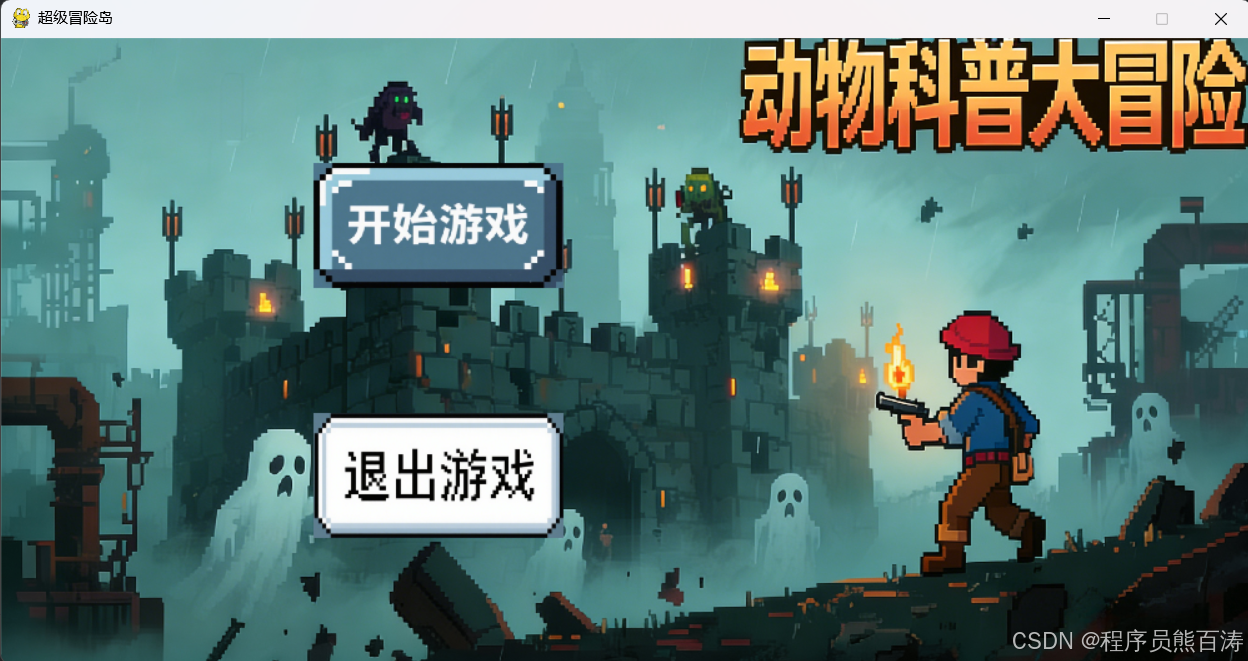
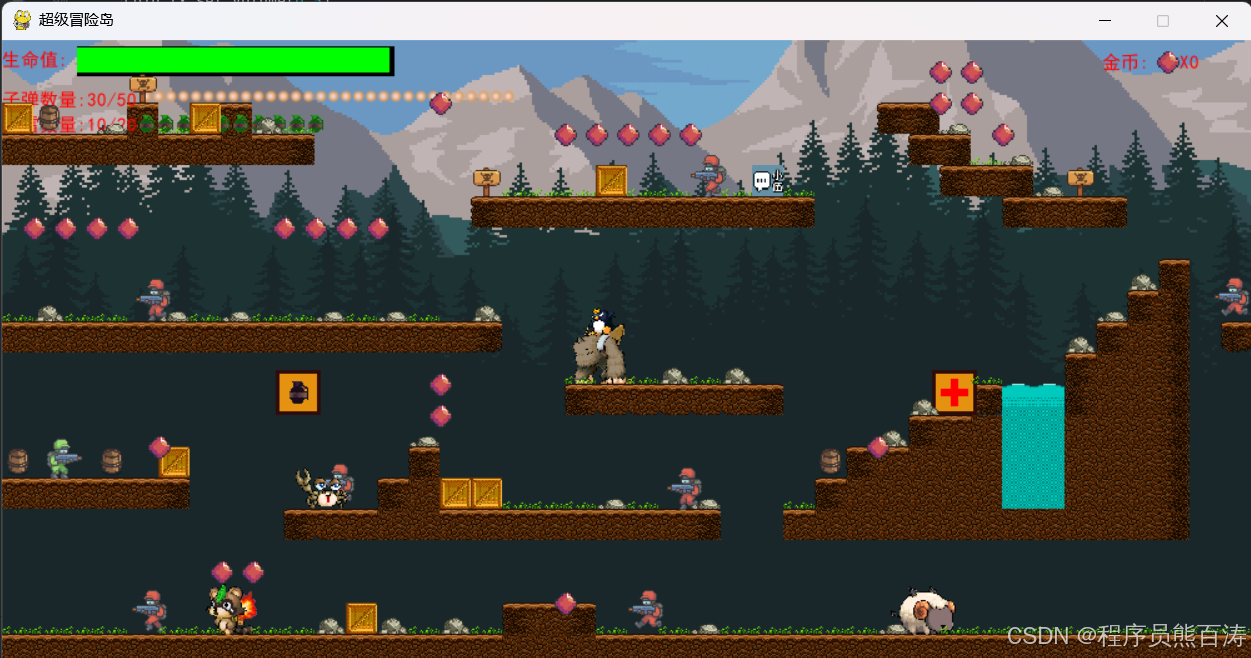
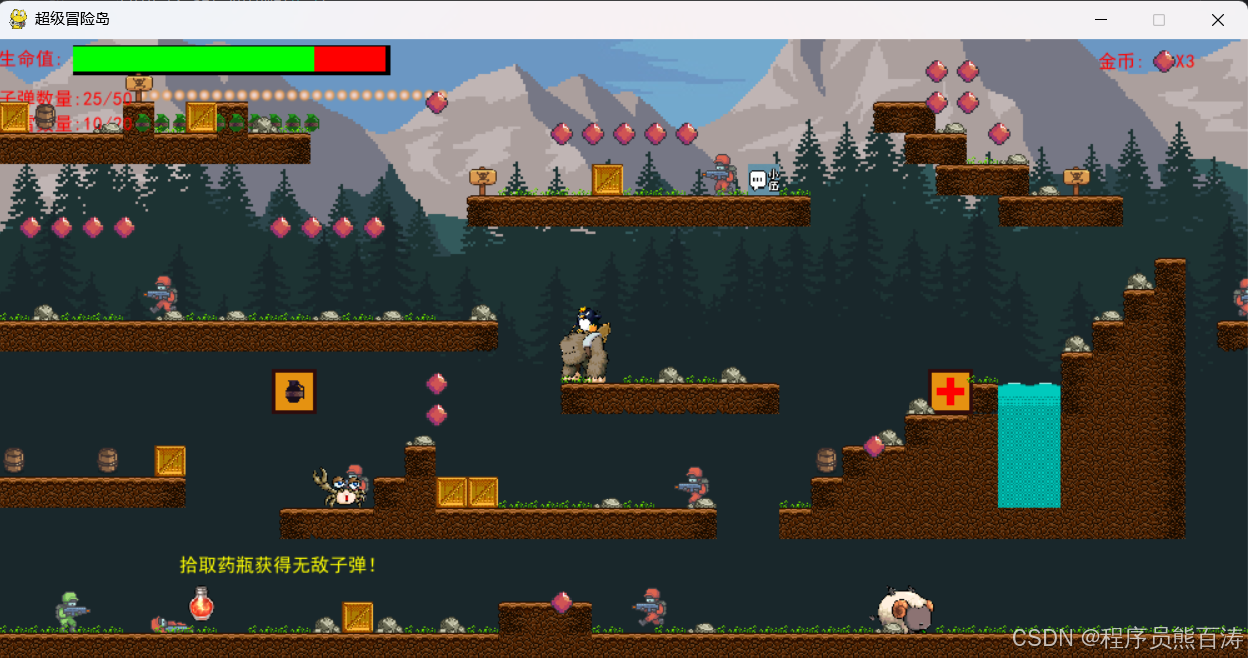
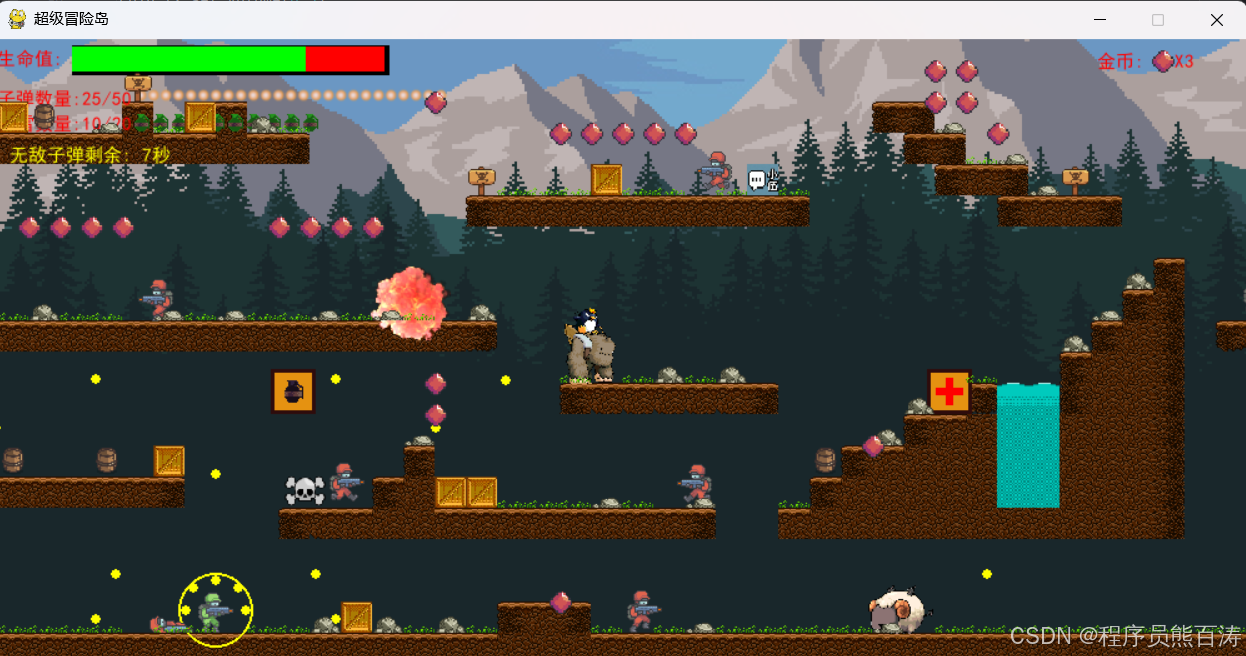
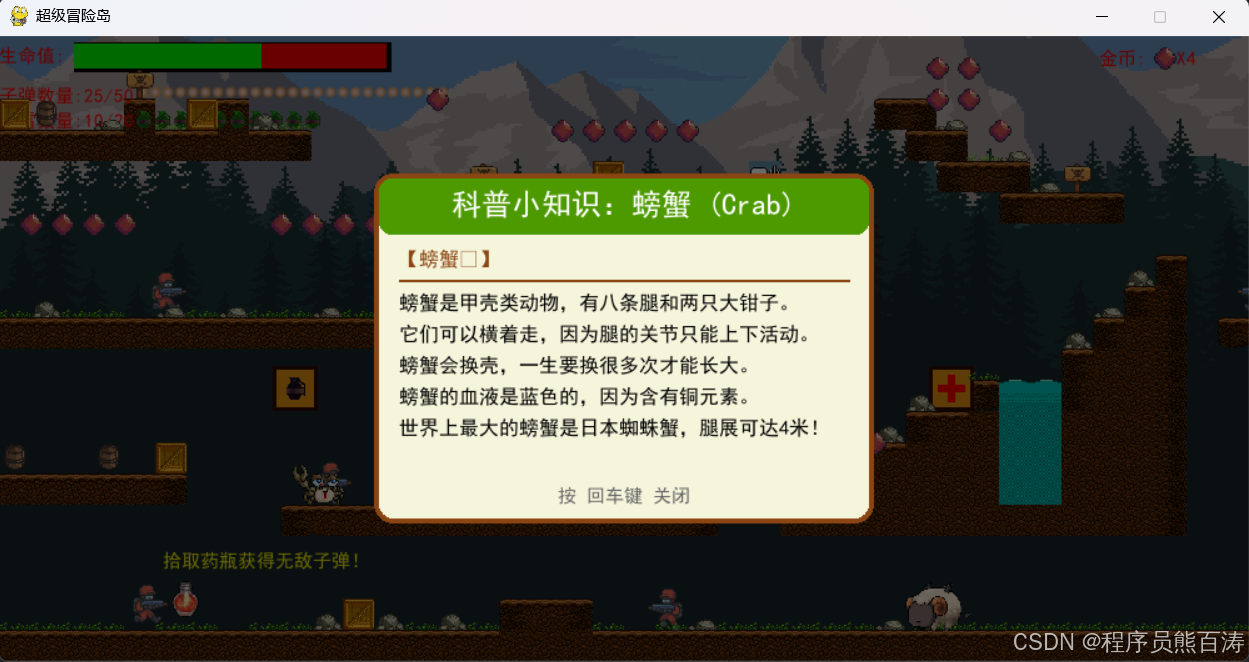
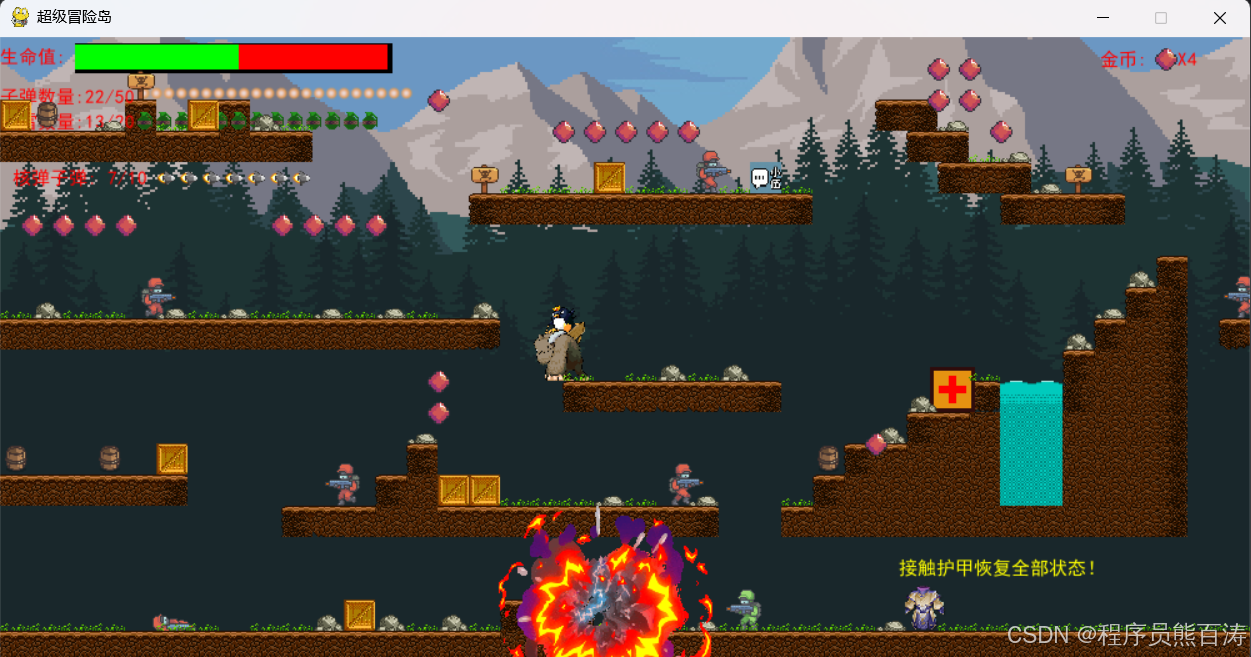
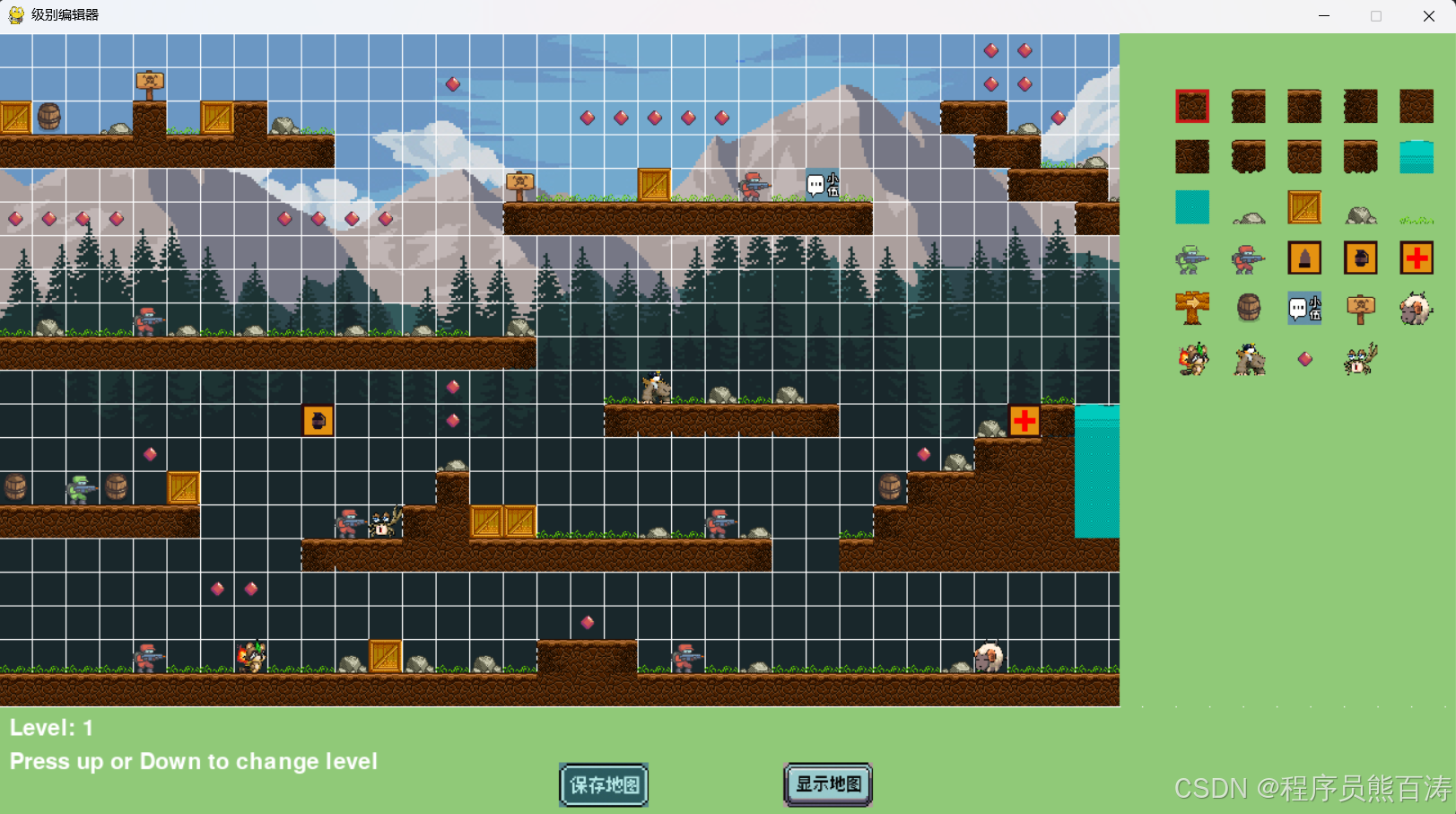
💡 项目技术亮点总结
技术栈
| 分类 | 技术 | 应用场景 |
|---|---|---|
| 游戏引擎 | Pygame | 窗口、渲染、输入 |
| 音频处理 | pygame.mixer | 背景音乐、音效 |
| 图像处理 | PIL/Pillow | GIF动图解帧 |
| 数据存储 | CSV | 关卡地图数据 |
| 图形渲染 | pygame.transform | 角色缩放、翻转 |
核心设计模式
- 面向对象 - 角色、子弹、道具均继承
pygame.sprite.Sprite - 精灵组管理 - 使用
pygame.sprite.Group管理同类实体 - 状态机 - 角色动画状态、敌人AI状态
- 游戏循环 - 统一的更新/渲染/输入处理流程
教育教学价值
- 游戏化学习 - 融合动物科普知识
- 可视化管理 - 配套关卡编辑器降低创作门槛
- 循序渐进 - 3个递进难度的关卡
- 反馈机制 - 音效、视觉特效、正向激励
🎯 总结
本项目展示了使用 Python + Pygame 开发商业级横版射击游戏的完整技术路径:
- ✅ 完整的游戏引擎架构
- ✅ 流畅的角色动画系统
- ✅ 真实的物理模拟
- ✅ 智能的敌人AI
- ✅ 丰富的道具与战斗系统
- ✅ 教育与娱乐的完美结合
💡 学习建议 :建议先从
Main.py的游戏循环开始理解,依次深入角色类、碰撞系统、关卡编辑器,逐步掌握游戏开发的核心思想。
祝你学习愉快! 🚀