本地VS Code 因为网络环境问题,必须设置SSH才能玩
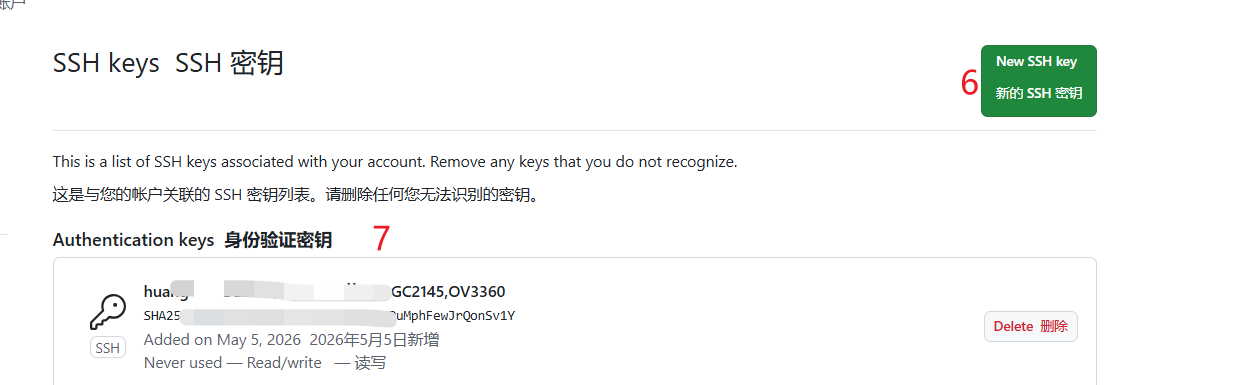
以下是记录设置SSH步骤 跟做做即可完成。本地推送到远端或者拉去
注意远端有更改 必须先拉下来合并才能推送上去。
你本地电脑里的代码 = 版本 A
GitHub 云端的代码 = 版本 B
B 比 A 新!
Git 的安全规则是:
你不能直接把旧版本推上去覆盖新版本!
它怕你不小心把别人写的代码、云端新文件全部删掉,所以强制拦着你。
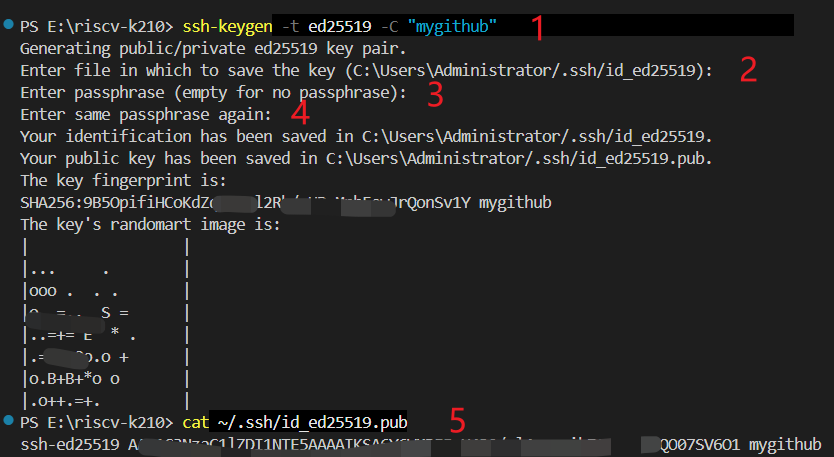
PS E:\riscv-k210> ssh-keygen -t ed25519 -C "mygithub"
Generating public/private ed25519 key pair.
Enter file in which to save the key (C:\Users\Administrator/.ssh/id_ed25519):
Enter passphrase (empty for no passphrase):
Enter same passphrase again:
Your identification has been saved in C:\Users\Administrator/.ssh/id_ed25519.
Your public key has been saved in C:\Users\Administrator/.ssh/id_ed25519.pub.
The key fingerprint is:
SHA256:9B5OpifiHCoKd=UPuMphFewJrQonSv1Y mygithub
The key's randomart image is:
| |
|... . |
|ooo . . . |
|o .=... S = |
|...=+= E * . |
|.=+= |
|o.B=o |
|.o++.=+. |
PS E:\riscv-k210> cat ~/.ssh/id_ed25519.pub
ssh-ed25519 AAAAC3NzaC1lZDI1NTE5A====U439/gl4nunwih7CJScNl1QO07SV6O1 mygithub
PS E:\riscv-k210> ssh -T git@github.com
Warning: Permanently added the ECDSA host key for IP address '20.205.243.166' to the list of known hosts.
Hi yuzi40277738! You've successfully authenticated, but GitHub does not provide shell access.