文章目录
需求
在点击按钮进行提交表单时,需要先实现表单校验再走手机号获取功能
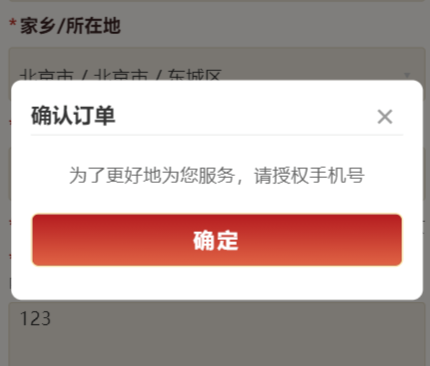
分析
我们知道open-type="getPhoneNumber"该属性只能在button上加
原先想法
javascript
<view class="submit-btn">
  <button
    id="phoneBtn"
    class="hidden-btn"
    open-type="getPhoneNumber"
    bindgetphonenumber="onGetPhoneNumber"
    bindtap="checkFormThenGetPhone"
    catchtap="true"
  >
    <text class="submit-btn-text">立即云寄</text>
  </button>
</view>
javascript
// 1. 点击按钮 → 先校验表单
  checkFormThenGetPhone() {
    // 防重复提交
    if (this.data.submitting) return;

    // 必填项校验
    if (!this.data.isAnonymous && !this.data.name.trim()) {
      wx.showToast({ title: '请输入姓名', icon: 'none' });
      return;
    }
    if (!this.data.region.length) {
      wx.showToast({ title: '请选择家乡/所在地', icon: 'none' });
      return;
    }
    if (!this.data.birthday) {
      wx.showToast({ title: '请选择出生日期', icon: 'none' });
      return;
    }
    if (!this.data.gender) {
      wx.showToast({ title: '请选择性别', icon: 'none' });
      return;
    }
    if (!this.data.wish.trim()) {
      wx.showToast({ title: '请填写云寄心愿', icon: 'none' });
      return;
    }

    // ======================
    // 表单校验通过!手动触发获取手机号
    // ======================
    wx.createSelectorQuery()
      .select('#phoneBtn')
      .node()
      .exec((res) => {
        const btn = res[0].node;
        btn.click();
      });
  },

  // 2. 获取手机号成功 → 自动提交表单
  async onGetPhoneNumber(e) {
    try {
      // 标记提交中
      this.setData({ submitting: true });

      // 校验用户是否授权
      if (!e?.detail || e.detail.errMsg !== 'getPhoneNumber:ok') {
        wx.showToast({ title: '取消授权', icon: 'none' });
        this.setData({ submitting: false });
        return;
      }

      // 获取凭证
      const phoneCode = e.detail.code;
      const { code: loginCode } = await wx.login();

      if (!phoneCode || !loginCode) {
        wx.showToast({ title: '获取凭证失败', icon: 'none' });
        this.setData({ submitting: false });
        return;
      }

      // 登录后端
      const resp = await weixinMiniAppLogin(phoneCode, loginCode, 'default');
      if (!resp || resp.code !== 0) {
        wx.showToast({ title: resp?.msg || '登录失败', icon: 'none' });
        this.setData({ submitting: false });
        return;
      }

      // 登录成功 → 保存用户信息
      const userInfo = await getUserInfo();
      const info = await getSocialUser(socialType);
      wx.setStorageSync('user', userInfo.data);
      wx.setStorageSync('openId', info.data.openid);

      // ======================
      // ✅ 登录成功 → 提交表单
      // ======================
      await this.submitRealForm();

    } catch (err) {
      console.log('登录异常:', err);
      wx.showToast({ title: '登录失败,请重试', icon: 'none' });
      this.setData({ submitting: false });
    }
  },

  // 3. 真正提交表单的方法
  async submitRealForm() {
    try {
      // 组装表单
      const formData = {
        name: this.data.isAnonymous ? '匿名' : this.data.name,
        isAnonymous: this.data.isAnonymous,
        region: this.data.region,
        birthday: this.data.birthday,
        gender: this.data.gender,
        wish: this.data.wish,
        plan: this.data.selectedPlan,
        audioFilePath: this.data.audioFilePath,
        attachmentPath: this.data.attachmentPath,
      };

      // 提交接口
      const res = await createPrayOrder(formData);
      console.log('提交成功:', res);

      wx.showToast({ title: '提交成功', icon: 'success' });

      // 提交成功后返回
      setTimeout(() => {
        wx.navigateBack({ delta: 1 });
      }, 1500);

    } catch (err) {
      console.error('提交失败:', err);
      wx.showToast({ title: '提交失败,请重试', icon: 'none' });
    } finally {
      this.setData({ submitting: false });
    }
  },
修改后的想法
- 校验必填项
- 系统登录校验
- 弹出小程序获取手机号获取的功能
- 套餐购买
- 支付
javascript
  onPurchase() {
    this.closeModal()
    // ***必填项校验***
    if (!this.data.isAnonymous && !this.data.name.trim()) {
      wx.showToast({ title: '请输入姓名', icon: 'none' });
      return;
    }
    if (!this.data.region.length) {
      wx.showToast({ title: '请选择家乡/所在地', icon: 'none' });
      return;
    }
    if (!this.data.birthday) {
      wx.showToast({ title: '请选择出生日期', icon: 'none' });
      return;
    }
    if (!this.data.gender) {
      wx.showToast({ title: '请选择性别', icon: 'none' });
      return;
    }
    if (!this.data.wish.trim()) {
      wx.showToast({ title: '请填写内容', icon: 'none' });
      return;
    }
    // ***校验套餐***
    const { packageInfo, isPurchaseLocked } = this.data
    // 支付流程锁:仅在弹窗确认后加锁,但若已锁定则直接拦截后续触发
    if (isPurchaseLocked) {
      return
    }
    // ***登录校验***
    const user = wx.getStorageSync('user') || {}
    if (!user || !user.mobile || user.mobile === '未绑定手机号') {
      this.setData({ showModalLogin: true })
      return
    }

    // ***确认购买***
    wx.showModal({
      title: '确认购买',
      content: `确认购买 ${packageInfo.name || '无人机自动拍摄'}?\n价格:¥${packageInfo.price || 0.01}`,
      success: async res => {
        if (!res.confirm) {
          return
        }
        if (this.data.isPurchaseLocked) {
          return
        }

        this.setData({ isPurchaseLocked: true })

        try {
          const payRes = await createAndPayOrder(this)
          wx.showToast({ title: '支付成功', icon: 'success' })

          const data = (payRes && payRes.data) || {}
          const now = Date.now()
          const firstItem = (data.items && data.items[0]) || {}
          const amount =
            typeof data.payPrice === 'number' ? data.payPrice / 100 : 0
          const orderTime = Number(data.createTime) || now
          const orderTimeText = formatTime(orderTime)
          const validityPeriod = formatTime(
            orderTime + 30 * 24 * 60 * 60 * 1000
          )
          const id = String(data.id)
          const title = firstItem.spuName || ''
          const pickUpStoreId = data.pickUpStoreId
          console.log(data,id,title,pickUpStoreId);
          // ===ToDo:支付完成后的跳转===
          // 1. 清空页面表单信息
          this.setData({
            name: '',
            isAnonymous: false,
            region: [],
            regionText: '',
            birthday: '',
            gender: '',
            wish: '',
            wishLength: 0,
            recordState: 'idle',
            recordDuration: 0,
            audioFilePath: '',
            isPlaying: false,
            attachmentPath: '',
            photoUrl: '',
            resultText: '',
            isRecording: false,
            // 重置购买锁,允许再次购买
            isPurchaseLocked: false
          });
          // 支付成功后,直接发起跳转,避免跳转前窗口期重复触发
          await new Promise(resolve => {
            wx.switchTab({
              url: '/pages/live/live'
            });
          })
        } catch (err) {
          console.error('下单/支付失败', err)
          wx.showToast({ title: err.message || '支付失败', icon: 'none' })
          this.setData({ isPurchaseLocked: false })
        }
      },
    })

  },
javascript
async onGetPhoneNumber(e) {
    try {
      // 校验用户是否授权
      if (!e?.detail || e.detail.errMsg !== 'getPhoneNumber:ok') {
        wx.showToast({ title: '取消授权', icon: 'none' });
        return;
      }

      // 获取凭证
      const phoneCode = e.detail.code;
      const { code: loginCode } = await wx.login();

      if (!phoneCode || !loginCode) {
        wx.showToast({ title: '获取凭证失败', icon: 'none' });
        return;
      }

      // 登录后端
      const resp = await weixinMiniAppLogin(phoneCode, loginCode, 'default', socialType);
      if (!resp || resp.code !== 0) {
        wx.showToast({ title: resp?.msg || '登录失败', icon: 'none' });
        return;
      }

      // 登录成功 → 保存用户信息
      const userInfo = await getUserInfo();
      const info = await getSocialUser(socialType);
      wx.setStorageSync('user', userInfo.data);
      wx.setStorageSync('openId', info.data.openid);

      // ======================
      // ✅ 登录成功 → 提交表单
      // ======================
      await this.onPurchase();

    } catch (err) {
      console.log('登录异常:', err);
      wx.showToast({ title: '登录失败,请重试', icon: 'none' });
    }
  },
整体代码
1. wxml
javascript
<!-- pages/pray/pray.wxml -->
<navigation-bar title="飞达" back="{{false}}" color="#FFF5D0" background="transparent"></navigation-bar>
<scroll-view class="page-scroll" scroll-y="true" enhanced="true" show-scrollbar="false">
  <view class="pray-img"></view>
  <view class="page-container">
    <!-- ===== 表单卡片区 ===== -->
    <view class="form-card">
      <!-- 1. 姓名 -->
      <view class="field-section">
        <view class="field-header">
          <text class="field-label">您的姓名</text>
          <view class="anonymous-toggle" bindtap="onAnonymousToggle">
            <view class="checkbox-box {{isAnonymous ? 'checked' : ''}}">
              <text wx:if="{{isAnonymous}}" class="checkbox-tick">✓</text>
            </view>
            <text class="anonymous-text">匿名</text>
          </view>
        </view>
        <input class="field-input" placeholder="请输入姓名" placeholder-class="input-placeholder" value="{{name}}" bindinput="onNameInput" disabled="{{isAnonymous}}" />
      </view>
      <!-- 2. 家乡/所在地 -->
      <view class="field-section">
        <view class="field-header">
          <text class="field-label"><text class="required">*</text>家乡/所在地</text>
        </view>
        <picker mode="region" value="{{region}}" bindchange="onRegionChange">
          <view class="picker-display">
            <text class="picker-text {{regionText ? '' : 'placeholder'}}">
              {{regionText || '请选择地区'}}
            </text>
            <text class="picker-arrow">▾</text>
          </view>
        </picker>
      </view>
      <!-- 3. 出生日期 -->
      <view class="field-section">
        <view class="field-header">
          <text class="field-label"><text class="required">*</text>出生日期</text>
        </view>
        <picker mode="date" value="{{birthday}}" start="1920-01-01" end="2026-12-31" bindchange="onBirthdayChange">
          <view class="picker-display">
            <text class="picker-text {{birthday ? '' : 'placeholder'}}">
              {{birthday || '请选择日期'}}
            </text>
            <text class="picker-icon">📅</text>
          </view>
        </picker>
      </view>
      <!-- 4. 性别 -->
      <view class="field-section">
        <view class="field-header">
          <text class="field-label"><text class="required">*</text>性别</text>
          <view class="gender-options">
            <view class="gender-item" data-value="male" bindtap="onGenderChange">
              <view class="radio-circle {{gender === 'male' ? 'selected' : ''}}">
                <view wx:if="{{gender === 'male'}}" class="radio-dot"></view>
              </view>
              <text class="gender-text">男</text>
            </view>
            <view class="gender-item" data-value="female" bindtap="onGenderChange">
              <view class="radio-circle {{gender === 'female' ? 'selected' : ''}}">
                <view wx:if="{{gender === 'female'}}" class="radio-dot"></view>
              </view>
              <text class="gender-text">女</text>
            </view>
          </view>
        </view>
      </view>
      <!-- 5. 语音转文字 -->
      <view class="field-section" wx:if="{{1==0}}">
        <view class="field-header">
          <text class="field-label">
            <text class="required">*</text>语音转文字
          </text>
          <!-- 未录音状态 -->
          <view wx:if="{{recordState === 'idle'}}" class="audio-record-area" bindtap="startRecording">
            <text class="mic-icon">🎙</text>
          </view>
          <!-- 录音中状态 -->
          <view wx:elif="{{recordState === 'recording'}}" class="audio-record-area recording" bindtap="stopRecording">
            <view class="recording-pulse"></view>
            <text class="recording-duration">{{recordDuration}}s</text>
          </view>
          <!-- 已录音状态 -->
          <view wx:else class="audio-recorded-area">
            <view class="audio-play-btn" bindtap="toggleAudio">
              <text class="play-icon-text">{{isPlaying ? '⏸' : '▶'}}</text>
            </view>
            <text class="recorded-duration">{{recordDuration}}s</text>
            <view class="re-record-btn" bindtap="reRecord">
              <text class="re-record-text">重录</text>
            </view>
          </view>
        </view>
      </view>
      <!-- 6. 飞达/内容 -->
      <view class="field-section">
        <view class="field-header">
          <text class="field-label"><text class="required">*</text>内容<text class="field-note"> 内容将通过AI审核,请保持真诚善良</text></text>
        </view>
        <textarea class="field-textarea" placeholder="在这里写下您的内容,字数在300字内..." placeholder-class="input-placeholder" maxlength="300" value="{{wish}}" bindinput="onWishInput" />
        <!-- <view class="audio-record-area"  bindtouchstart="startRecord" bindtouchend="stopRecord">
          <text class="mic-icon">{{isRecording ? '⏹️' : '🎤'}}  {{isRecording ? '松开停止' : '长按语音转文字'}} <text class="record-time" wx:if="{{isRecording}}">{{recordDuration}}s</text></text>
        </view> -->
      </view>
      <!-- 7. 上传附件 -->
      <view class="field-section last">
        <view class="field-header">
          <text class="field-label">上传附件(可选)</text>
        </view>
        <view wx:if="{{!attachmentPath}}" class="upload-area" bindtap="onUploadImage">
          <text class="upload-text">+ 上传手写内容,支持小于2M</text>
        </view>
        <view wx:else class="preview-area">
          <image class="preview-image" src="{{attachmentPath}}" mode="aspectFill" />
          <view class="remove-btn" bindtap="onRemoveImage">
            <text class="remove-icon">×</text>
          </view>
        </view>
      </view>
    </view>
    <!-- ===== 服务套餐卡片 ===== -->
    <view class="section-divider">
      <text class="divider-text">服务选择</text>
      <block wx:for="{{plans}}" wx:key="key">
        <view class="plan-card {{selectedPlanId === item.key ? 'selected' : ''}}" data-plan="{{item.key}}" bindtap="onPlanSelect">
          <view class="plan-header">
            <text class="plan-name {{selectedPlanId === item.key ? 'active' : ''}}">{{item.name}}</text>
            <text class="{{selectedPlanId === item.key ? 'plan-price' : ''}}">¥{{item.price}}</text>
          </view>
          <view class="plan-features">
            <view class="feature-item" wx:for="{{item.content}}" wx:for-item="feat" wx:key="*this">
              <icon class="service-icon-check" type="success" size="14" color="#C89A5A"/>
              <text class="feature-text {{selectedPlanId === item.key ? 'feature-text-active' : ''}}">{{feat}}</text>
            </view>
          </view>
        </view>
      </block>
    <!-- ===== 提示信息 ===== -->
    <view class="notice-bar">
      <text class="notice-icon">ⓘ</text>
      <text class="notice-text">投放统一安排于每日晚间(00:00-01:00)订单打印后无法退单</text>
    </view>
    </view>
    <!-- 底部占位,防止被固定按钮遮挡 -->
    <view class="bottom-placeholder"></view>
  </view>
</scroll-view>
<!-- ===== 底部固定按钮栏 ===== -->
<view class="bottom-bar">
  <view class="price-text">¥<text class="price-text-active">{{currentPlan.price || 0}}</text></view>
  <view class="submit-btn {{isPurchaseLocked ? 'purchase-btn-disabled' : ''}}" bindtap="onPurchase">
    <text class="submit-btn-text">{{isPurchaseLocked ? '支付处理中...' : '立即飞达'}}</text>
  </view>
</view>
<!-- 弹窗 -->
<view class="custom-modal" wx:if="{{showModalLogin}}">
  <!-- 遮罩层:点击遮罩可以关闭弹窗 -->
  <view class="modal-mask" bindtap="closeModal"></view>

  <!-- 弹窗内容区域 -->
  <view class="modal-content">
    <view class="modal-header">
      <text class="modal-title">确认订单</text>
      <text class="modal-close" bindtap="closeModal">×</text>
    </view>

    <view class="modal-body">
      <text class="modal-desc">为了更好地为您服务,请授权手机号</text>
        <button
          id="phoneBtn"
          open-type="getPhoneNumber"
          bindgetphonenumber="onGetPhoneNumber"
          class="hidden-btn"
        ><text class="submit-btn-text">确定</text></button>
    </view>
  </view>
</view>
2. js
javascript
// 引入微信同声传译插件
const plugin = requirePlugin('WechatSI')
// 获取全局唯一的语音识别管理器
const manager = plugin.getRecordRecognitionManager()
const { DictApi } = require('../../api/dict')
const { socialType } = require('../../utils/auth')
const { formatTime, parseDictListToKV } = require('../../utils/util')

const {
  fetchProductList,
  fetchProductDetail,
  createTradeOrder,
  submitPayOrder,
  getPayOrder,
  getPayOrderDetail,
} = require('../../api/prayApi');
const {
  weixinMiniAppLogin,
  getUserInfo,
  getSocialUser,
} = require('../../api/loginApi')
const { uploadAvatar } = require('../../api/mineApi')


async function loadDetail(ctx, id) {
  try {
    const res = await fetchProductDetail(id)
    const detail = res?.data || {}
    const name = detail.name
    const price = detail.price
    const description = detail.description || ''
    const introduction = detail.introduction || ''
    const img = detail.picUrl
    const sildeImgs = (detail.sliderPicUrls || []).map(url => ({
      url,
      isVideo: typeof url === 'string' && url.toLowerCase().endsWith('.mp4'),
    }))
    const content = detail.content
    const availableTimeInfo = detail.availableTimeInfo
    const tourMethod = detail.tourMethod
    const verificationMethod = detail.verificationMethod
    const validTime = detail.validTime

    const dictKV = ctx.data.dictKV
    const tourMethodKV = dictKV['product_tour_method'] || {}
    const verificationMethodKV = dictKV['product_verification_method'] || {}

    const tourMethodText = tourMethodKV[tourMethod] || ''
    const verificationMethodText =
      verificationMethodKV[verificationMethod] || ''

    const validTimeText = formatTime(validTime)

    ctx.setData({
      _spuDetail: detail,
      'packageInfo.name': name,
      'packageInfo.price': price / 100,
      'packageInfo.description': description,
      'packageInfo.content': content,
      'packageInfo.img': img,
      'packageInfo.sildeImgs': sildeImgs,
      'packageInfo.introduction': introduction,
      'packageInfo.availableTimeInfo': availableTimeInfo,
      'packageInfo.tourMethod': tourMethod,
      'packageInfo.verificationMethod': verificationMethod,
      'packageInfo.validTime': validTime,
      'packageInfo.tourMethodText': tourMethodText,
      'packageInfo.verificationMethodText': verificationMethodText,
      'packageInfo.validTimeText': validTimeText,
      'packageInfo.pickUpStoreName': detail.pickUpStoreName,
    })
  } catch (err) {
    console.error('获取商品详情失败', err)
  }
}

async function createAndPayOrder(ctx) {
  const detail = ctx.data._spuDetail || {}
  const skuList = detail.skus || []
  const sku = skuList[0] || { id: detail.skuId, socialType: socialType }

  const user = wx.getStorageSync('user') || {}
  const receiverMobile = user.mobile || '13800000000'
  const receiverName = user.nickname || '游客'
  const openid = wx.getStorageSync('openId')
  let createdOrderId = ''
  const payload = {
    order:{
      deliveryType: 2,
      items: [
        {
          skuId: sku?.id,
          count: 1,
          socialType: socialType,
        },
      ],
      pickUpStoreId: detail.pickUpStoreId,
      pointStatus: false,
      receiverMobile,
      receiverName,
    },
    wishInfo:{
      name: ctx.data.isAnonymous ? '匿名' : ctx.data.name,
      isAnonymous: ctx.data.isAnonymous?1:0,
      areaName: ctx.data.region[ctx.data.region.length - 1],
      birthday: ctx.data.birthday,
      sex: ctx.data.gender === 'male' ? 1 : 2,
      wishContent: ctx.data.wish,
      photoUrl: ctx.data.photoUrl,
    }
  }

  const cRes = await createTradeOrder(payload)
  const orderId = cRes?.data?.payOrderId
  if (!orderId) {
    throw new Error('创建订单失败')
  }
  createdOrderId = String(orderId)
  // 创建成功后,先查询一次订单信息/状态
  await getPayOrder(orderId, true)

  const payPayload = {
    id: orderId,
    channelCode: 'wx_wish',
    channelExtras: { openid },
    openid,
  }
  const pRes = await submitPayOrder(payPayload)
  const { code } = pRes
  if (code !== 0) {
    throw new Error('购买失败')
  }
  const payData = pRes?.data || {}

  const params = JSON.parse(payData.displayContent)
  const payParams = {
    timeStamp: params.timeStamp,
    nonceStr: params.nonceStr,
    package: params.packageValue,
    signType: params.signType,
    paySign: params.paySign,
  }

  let orderDetail = null
  await new Promise((resolve, reject) => {
    wx.requestPayment({
      ...payParams,
      success: async () => {
        if (createdOrderId) {
          try {
            const res = await getPayOrder(createdOrderId, true)
            orderDetail = await getPayOrderDetail(
              res?.data?.merchantOrderId,
              true
            )
          } catch (err) {
            console.error('获取订单详情失败', err)
          }
        }
        resolve()
      },
      fail: reject,
    })
  })

  return orderDetail
}

// pages/pray/pray.js
Page({
  data: {
    packageInfo: {
      id: '',
      name: '',
      price: 0,
      description: '',
      videoUrl: '',
      videoStates: {
        img1: false,
        img2: false,
      },
    },
    _spuDetail: null,
    dictKV: {},
    isFullScreen: false,
    isPurchaseLocked: false, // 防止重复点击购买按钮
    // 表单字段
    name: '',
    isAnonymous: false,
    region: [],
    regionText: '',
    birthday: '',
    gender: '',
    wish: '',
    wishLength: 0,

    // 录音
    recordState: 'idle', // 'idle' | 'recording' | 'recorded'
    recordDuration: 0,
    audioFilePath: '',
    isPlaying: false,

    // 附件
    attachmentPath: '',
    photoUrl: '',

    // 服务选择
    selectedPlanId: '',
    currentPlan: {},
    plans: [],

    showModalLogin: false, // 控制弹窗显示
    // ====语音转文字====
    // 录音状态:false-未录音,true-正在录音
    isRecording: false,
    // 识别结果文本
    resultText: '',
    // 录音时长(秒)
    recordDuration: 0,
    // 定时器ID
    timer: 0
  },

  // 录音管理器和音频播放器实例
  recorderManager: null,
  innerAudioContext: null,
  recordTimer: null,

  onLoad() {
    this._initRecorder();
    this._initAudioPlayer();
    this.initRecordManager()
    this.getPackageData() // 商品列表
  },

  onUnload() {
    if (this.recordTimer) {
      clearInterval(this.recordTimer);
    }
    if (this.innerAudioContext) {
      this.innerAudioContext.destroy();
    }
    // 页面卸载时停止录音并清除定时器
    if (this.data.isRecording) {
      manager.stop()
    }
    if (this.data.timer) {
      clearInterval(this.data.timer)
    }
  },

  // ===== 初始化 =====

   /**
    * 初始化录音管理器
  */
  initRecordManager() {
    // 识别中事件
    manager.onRecognize = (res) => {
      console.log('实时识别结果:', res.result)
      this.setData({
        resultText: res.result
      })
    }
    // 识别结束事件
    manager.onStop = (res) => {
      console.log('识别结束:', res)
      let text = res.result

      // 处理可能的空结果
      if (!text) {
        wx.showToast({
          title: '未识别到内容',
          icon: 'none',
          duration: 2000
        })
        text = ''
      } else {
        // 将识别结果添加到内容中
        this.setData({
          wish: this.data.wish + text,
          wishLength: (this.data.wish + text).length
        })
      }

      this.setData({
        resultText: text,
        isRecording: false,
        recordDuration: 0
      })

      // 清除定时器
      if (this.data.timer) {
        clearInterval(this.data.timer)
      }
    }
    // 识别错误事件
    manager.onError = (err) => {
      console.error('识别错误:', err)
      wx.showToast({
        title: '识别失败: ' + err.errMsg,
        icon: 'none',
        duration: 3000
      })
      this.setData({
        isRecording: false,
        recordDuration: 0
      })

      if (this.data.timer) {
        clearInterval(this.data.timer)
      }
    }
  },
  _initRecorder() {
    this.recorderManager = wx.getRecorderManager();

    this.recorderManager.onStart(() => {
      this.setData({ recordState: 'recording', recordDuration: 0 });
      this.recordTimer = setInterval(() => {
        this.setData({ recordDuration: this.data.recordDuration + 1 });
      }, 1000);
    });

    this.recorderManager.onStop((res) => {
      if (this.recordTimer) {
        clearInterval(this.recordTimer);
        this.recordTimer = null;
      }
      if (res.tempFilePath) {
        this.setData({
          recordState: 'recorded',
          audioFilePath: res.tempFilePath,
        });
      }
    });

    this.recorderManager.onError((err) => {
      if (this.recordTimer) {
        clearInterval(this.recordTimer);
        this.recordTimer = null;
      }
      this.setData({ recordState: 'idle', recordDuration: 0 });
      wx.showToast({ title: '录音失败', icon: 'none' });
      console.error('录音错误:', err);
    });
  },

  _initAudioPlayer() {
    this.innerAudioContext = wx.createInnerAudioContext();

    this.innerAudioContext.onEnded(() => {
      this.setData({ isPlaying: false });
    });

    this.innerAudioContext.onError((err) => {
      this.setData({ isPlaying: false });
      wx.showToast({ title: '播放失败', icon: 'none' });
      console.error('播放错误:', err);
    });
  },

  // ===== 表单事件 =====

  onNameInput(e) {
    this.setData({ name: e.detail.value });
  },

  onAnonymousToggle() {
    const isAnonymous = !this.data.isAnonymous;
    this.setData({
      isAnonymous,
      name: isAnonymous ? '' : this.data.name,
    });
  },

  onRegionChange(e) {
    const region = e.detail.value;
    this.setData({
      region,
      regionText: region.join(' / '),
    });
  },

  onBirthdayChange(e) {
    this.setData({ birthday: e.detail.value });
  },

  onGenderChange(e) {
    const value = e.currentTarget.dataset.value;
    this.setData({ gender: value });
  },

  // ===== 录音事件 =====

  startRecording() {
    wx.getSetting({
      success: (res) => {
        if (res.authSetting['scope.record'] === false) {
          wx.showModal({
            title: '需要录音权限',
            content: '请在设置中允许录音权限',
            success: (modalRes) => {
              if (modalRes.confirm) {
                wx.openSetting();
              }
            },
          });
          return;
        }

        wx.authorize({
          scope: 'scope.record',
          success: () => {
            this.recorderManager.start({
              duration: 60000,
              sampleRate: 16000,
              numberOfChannels: 1,
              encodeBitRate: 96000,
              format: 'mp3',
            });
          },
          fail: () => {
            wx.showToast({ title: '请授权录音权限', icon: 'none' });
          },
        });
      },
    });
  },

  stopRecording() {
    this.recorderManager.stop();
    console.log(this.data.audioFilePath,this.innerAudioContext)
  },

  toggleAudio() {
    if (this.data.isPlaying) {
      this.innerAudioContext.stop();
      this.setData({ isPlaying: false });
    } else {
      if (!this.data.audioFilePath) return;
      this.innerAudioContext.src = this.data.audioFilePath;
      console.log(this.data.audioFilePath,this.innerAudioContext.src)
      this.innerAudioContext.play();
      this.setData({ isPlaying: true });
    }
  },

  reRecord() {
    if (this.data.isPlaying) {
      this.innerAudioContext.stop();
    }
    this.setData({
      recordState: 'idle',
      recordDuration: 0,
      audioFilePath: '',
      isPlaying: false,
    });
  },

  // ===== 内容输入 =====

  onWishInput(e) {
    const wish = e.detail.value;
    this.setData({ wish, wishLength: wish.length });
  },

  // ===== 图片上传 =====

  onUploadImage() {
    wx.chooseMedia({
      count: 1,
      mediaType: ['image'],
      sourceType: ['album', 'camera'],
      success: (res) => {
        const tempFilePath = res.tempFiles[0].tempFilePath;
        this.setData({ attachmentPath: tempFilePath });
        wx.showLoading({ title: '上传中...' })
        uploadAvatar(tempFilePath)
          .then(fileUrl => {
            this.setData({ photoUrl: fileUrl })
          })
          .catch(err => {
            console.error(err)
            wx.hideLoading()
            wx.showToast({ title: '上传失败', icon: 'none' })
          })
          .finally(() => {
            wx.hideLoading()
            wx.showToast({ title: '上传成功', icon: 'success' })
          })
      },
    });
  },

  onRemoveImage() {
    this.setData({ attachmentPath: '', photoUrl: '' });
  },

  // ===== 套餐选择 =====
  async loadDicts() {
      const types = [
        'product_verification_method', // 核销方式
        'product_tour_method', // 观览方式
        'product_shoot_method', // 拍摄方式
      ]
      return Promise.all(types.map(type => DictApi(type)))
        .then(list => {
          const dictKV = {}
          list.forEach((res, idx) => {
            const type = types[idx]
            const dataList = (res && res.data) || res || []
            dictKV[type] = parseDictListToKV(dataList)
          })
          this.setData({ dictKV })
        })
        .catch(() => {})
    },
  async onPlanSelect(e) {
    const packageId = e.currentTarget.dataset.plan;
    this.setData({ selectedPlanId: packageId, currentPlan: this.data.plans.find(p => p.key === packageId) });
    // 拉取商品详情
    await this.loadDicts()
    loadDetail(this, packageId)
  },

  // ===== 提交验证 =====

  onPurchase() {
    this.closeModal()
    // ***必填项校验***
    if (!this.data.isAnonymous && !this.data.name.trim()) {
      wx.showToast({ title: '请输入姓名', icon: 'none' });
      return;
    }
    if (!this.data.region.length) {
      wx.showToast({ title: '请选择家乡/所在地', icon: 'none' });
      return;
    }
    if (!this.data.birthday) {
      wx.showToast({ title: '请选择出生日期', icon: 'none' });
      return;
    }
    if (!this.data.gender) {
      wx.showToast({ title: '请选择性别', icon: 'none' });
      return;
    }
    if (!this.data.wish.trim()) {
      wx.showToast({ title: '请填写内容', icon: 'none' });
      return;
    }
    // ***校验套餐***
    const { packageInfo, isPurchaseLocked } = this.data
    // 支付流程锁:仅在弹窗确认后加锁,但若已锁定则直接拦截后续触发
    if (isPurchaseLocked) {
      return
    }
    // ***登录校验***
    const user = wx.getStorageSync('user') || {}
    if (!user || !user.mobile || user.mobile === '未绑定手机号') {
      this.setData({ showModalLogin: true })
      return
    }

    // ***确认购买***
    wx.showModal({
      title: '确认购买',
      content: `确认购买 ${packageInfo.name || '无人机自动拍摄'}?\n价格:¥${packageInfo.price || 0.01}`,
      success: async res => {
        if (!res.confirm) {
          return
        }
        if (this.data.isPurchaseLocked) {
          return
        }

        this.setData({ isPurchaseLocked: true })

        try {
          const payRes = await createAndPayOrder(this)
          wx.showToast({ title: '支付成功', icon: 'success' })

          const data = (payRes && payRes.data) || {}
          const now = Date.now()
          const firstItem = (data.items && data.items[0]) || {}
          const amount =
            typeof data.payPrice === 'number' ? data.payPrice / 100 : 0
          const orderTime = Number(data.createTime) || now
          const orderTimeText = formatTime(orderTime)
          const validityPeriod = formatTime(
            orderTime + 30 * 24 * 60 * 60 * 1000
          )
          const id = String(data.id)
          const title = firstItem.spuName || ''
          const pickUpStoreId = data.pickUpStoreId
          console.log(data,id,title,pickUpStoreId);
          // ===ToDo:支付完成后的跳转===
          // 1. 清空页面表单信息
          this.setData({
            name: '',
            isAnonymous: false,
            region: [],
            regionText: '',
            birthday: '',
            gender: '',
            wish: '',
            wishLength: 0,
            recordState: 'idle',
            recordDuration: 0,
            audioFilePath: '',
            isPlaying: false,
            attachmentPath: '',
            photoUrl: '',
            resultText: '',
            isRecording: false,
            // 重置购买锁,允许再次购买
            isPurchaseLocked: false
          });
          // 支付成功后,直接发起跳转,避免跳转前窗口期重复触发
          await new Promise(resolve => {
            wx.switchTab({
              url: '/pages/live/live'
            });
          })
        } catch (err) {
          console.error('下单/支付失败', err)
          wx.showToast({ title: err.message || '支付失败', icon: 'none' })
          this.setData({ isPurchaseLocked: false })
        }
      },
    })

  },
  closeModal() {
    this.setData({ showModalLogin: false })
  },
  async onGetPhoneNumber(e) {
    try {
      // 校验用户是否授权
      if (!e?.detail || e.detail.errMsg !== 'getPhoneNumber:ok') {
        wx.showToast({ title: '取消授权', icon: 'none' });
        return;
      }

      // 获取凭证
      const phoneCode = e.detail.code;
      const { code: loginCode } = await wx.login();

      if (!phoneCode || !loginCode) {
        wx.showToast({ title: '获取凭证失败', icon: 'none' });
        return;
      }

      // 登录后端
      const resp = await weixinMiniAppLogin(phoneCode, loginCode, 'default', socialType);
      if (!resp || resp.code !== 0) {
        wx.showToast({ title: resp?.msg || '登录失败', icon: 'none' });
        return;
      }

      // 登录成功 → 保存用户信息
      const userInfo = await getUserInfo();
      const info = await getSocialUser(socialType);
      wx.setStorageSync('user', userInfo.data);
      wx.setStorageSync('openId', info.data.openid);

      // ======================
      // ✅ 登录成功 → 提交表单
      // ======================
      await this.onPurchase();

    } catch (err) {
      console.log('登录异常:', err);
      wx.showToast({ title: '登录失败,请重试', icon: 'none' });
    }
  },

  // ===== 语音转文字 =====
  startRecord() {
      // 检查录音权限
      wx.getSetting({
        success: (res) => {
          if (!res.authSetting['scope.record']) {
            // 申请录音权限
            wx.authorize({
              scope: 'scope.record',
              success: () => {
                this.startRecording()
              },
              fail: () => {
                wx.showModal({
                  title: '权限不足',
                  content: '需要录音权限才能使用语音识别功能,请在设置中开启',
                  confirmText: '去设置',
                  success: (modalRes) => {
                    if (modalRes.confirm) {
                      wx.openSetting()
                    }
                  }
                })
              }
            })
          } else {
            // this.startRecording()
          }
        }
      })
  },

  /**
  * 实际开始录音的逻辑
  */
  startRecording() {
    // 重置结果
    this.setData({
      resultText: '',
      isRecording: true,
      recordDuration: 0
    })

    // 开始录音
    manager.start({
      lang: 'zh_CN', // 使用简体中文作为默认语言
      duration: 60000 // 最长录音时间,单位ms
    })

    // 开始计时
    const timer = setInterval(() => {
      this.setData({
        recordDuration: this.data.recordDuration + 1
      })
    }, 1000)

    this.setData({ timer })
  },

  /**
  * 停止录音
  */
  stopRecord() {
    if (this.data.isRecording) {
      manager.stop()
    }
  },

  /**
  * 页面显示时更新 tabBar 选中状态
  */
  onShow() {
    if (typeof this.getTabBar === 'function' && this.getTabBar()) {
      this.getTabBar().setData({
        selected: 1
      });
    }
  },
  // 获取套餐接口
  async getPackageData() {
    try {
      // 你的接口请求
      const res = await fetchProductList({socialType:36});
      const list = res.data?.list || [];
      let plans = [];
      if (list.length) {
        plans = list.map(item => ({
          ...item,
          key: item.id,
          name: item.name,
          content: item.content.split(','),
          price: item.price / 100
        })) || []
        this.setData({
          plans: plans || [],
        });
        this.onPlanSelect({currentTarget:{dataset:{plan:plans[0].key}}});
      }
    } catch (err) {
      console.log('获取套餐失败', err)
    } finally {
    }
  },
});
3. wxss
javascript
/* pages/pray/pray.wxss */

/* ===== 页面基础 ===== */
page {
  height: calc(100% - 180rpx);
  display: flex;
  flex-direction: column;
  background-color: #F8F2E9;
  background-image: url('https://www.dkifly.com/ifly-api/admin-api/infra/file/29/get/wxMiniProDefault/feiyuan/bg-pray.jpg');
  background-repeat: no-repeat;
  background-size: cover;
  /* background: url('https://www.dkifly.com/ifly-api/admin-api/infra/file/29/get/wxMiniProDefault/feiyuan/bg-pray.jpg') no-repeat center center / cover; */
}

.page-scroll {
  flex: 1;
  overflow-y: hidden;
}

.pray-img{
  width: 532rpx;
  height: 150rpx;
  background: url("https://www.dkifly.com/ifly-api/admin-api/infra/file/29/get/wxMiniProDefault/feiyuan/pray.png") no-repeat center center;
  background-size: cover;
  flex-shrink: 0;
  margin: 0 auto;
  margin-bottom: 10rpx;
  margin-top: 20rpx;
}
.page-container {
  padding: 24rpx 49rpx 0;
  box-sizing: border-box;
}

/* ===== 表单卡片 ===== */
.form-card {
  background: #FFFCF8;
  border-radius: 20rpx 20rpx 20rpx 20rpx;
  padding: 32rpx 24rpx;
  box-shadow: 0 4rpx 20rpx rgba(0, 0, 0, 0.08);
  margin-bottom: 8rpx;
}

/* ===== 字段通用 ===== */
.field-section {
  margin-bottom: 16rpx;
}

.field-section.last {
  margin-bottom: 0;
}

.field-header {
  display: flex;
  flex-direction: row;
  align-items: center;
  margin-bottom: 16rpx;
}

.field-label {
  font-weight: bold;
  font-size: 28rpx;
  color: #3A2020;
}

.required {
  color: #C82920;
  margin-right: 4rpx;
}

.field-note {
  font-weight: 400;
  font-size: 24rpx;
  color: #767676;
  display: block;
}

/* ===== 输入框 ===== */
.field-input {
  height: 80rpx;
  background: #F4EDE3;
  border-radius: 6rpx 6rpx 6rpx 6rpx;
  border: 2rpx solid #E8DECA;
  padding: 0 14rpx;
  font-size: 28rpx;
  color: #767676;
  font-weight: 400;
  box-sizing: border-box;
}

.input-placeholder {
  color: #CCCCCC;
  font-size: 28rpx;
}

/* ===== Picker 选择器 ===== */
.picker-display {
  height: 80rpx;
  line-height: 7rpx;
  background: #F4EDE3;
  border-radius: 6rpx 6rpx 6rpx 6rpx;
  border: 2rpx solid #E8DECA;
  padding: 0 14rpx;
  display: flex;
  flex-direction: row;
  align-items: center;
  justify-content: space-between;
  box-sizing: border-box;
}

.picker-text {
  font-size: 28rpx;
  color: #333333;
}

.picker-text.placeholder {
  color: #CCCCCC;
}

.picker-arrow {
  font-size: 28rpx;
  color: #CCCCCC;
}

.picker-icon {
  font-size: 32rpx;
}

/* Picker 暗色模式适配 */
/* @media (prefers-color-scheme: dark) {
  .picker-display {
    background-color: #1E1E1E;
    border-color: #3A3A3A;
  }

  .picker-text {
    color: #E0E0E0;
  }

  .picker-text.placeholder {
    color: #666666;
  }

  .picker-arrow {
    color: #666666;
  }
} */

/* ===== 匿名 Checkbox ===== */
.anonymous-toggle {
  display: flex;
  flex-direction: row;
  align-items: center;
  margin-left: auto;
}

.checkbox-box {
  width: 32rpx;
  height: 32rpx;
  border-radius: 4rpx 4rpx 4rpx 4rpx;
  border: 2rpx solid #3A2020;
  display: flex;
  align-items: center;
  justify-content: center;
  margin-right: 8rpx;
}

.checkbox-box.checked {
  background-color: #C82920;
  border-color: #C82920;
}

.checkbox-tick {
  font-size: 20rpx;
  color: #FFFFFF;
  line-height: 1;
}

.anonymous-text {
  font-size: 26rpx;
  color: #666666;
}

/* ===== 性别 Radio ===== */
.gender-options {
  display: flex;
  flex-direction: row;
  align-items: center;
  margin-left: auto;
}

.gender-item {
  display: flex;
  flex-direction: row;
  align-items: center;
  margin-left: 32rpx;
}

.radio-circle {
  width: 32rpx;
  height: 32rpx;
  border-radius: 50%;
  border: 2rpx solid #D0C8BC;
  display: flex;
  align-items: center;
  justify-content: center;
  margin-right: 8rpx;
}

.radio-circle.selected {
  border-color: #C82920;
}

.radio-dot {
  width: 18rpx;
  height: 18rpx;
  border-radius: 50%;
  background-color: #C82920;
}

.gender-text {
  font-size: 28rpx;
  color: #333333;
}

/* ===== 录音区域 ===== */
.audio-record-area {
  flex: 1;
  height: 62rpx;
  border-radius: 36rpx;
  display: flex;
  flex-direction: row;
  align-items: center;
  justify-content: center;
  background-color: #FAFAFA;
  background-image: url('https://www.dkifly.com/ifly-api/admin-api/infra/file/29/get/wxMiniProDefault/feiyuan/voiceToText.jpg');
  background-repeat: no-repeat;
  /* background-size: contain; */
  background-position: center center;
  margin-top: 16rpx;
  font-weight: bold;
  font-size: 28rpx;
  color: #3A2020;
  width: 100%;
}

.audio-record-area.recording {
  border-color: #C82920;
  background-color: #FFF5F5;
}

.mic-icon {
  font-size: 30rpx;
}

.recording-pulse {
  width: 20rpx;
  height: 20rpx;
  border-radius: 50%;
  background-color: #C82920;
  margin-right: 12rpx;
  animation: pulse 1s ease-in-out infinite;
}

@keyframes pulse {
  0%, 100% { opacity: 1; transform: scale(1); }
  50% { opacity: 0.5; transform: scale(1.3); }
}

.recording-duration {
  font-size: 26rpx;
  color: #C82920;
  font-weight: 500;
}

.audio-recorded-area {
  flex: 1;
  height: 72rpx;
  margin-left: 16rpx;
  border-radius: 36rpx;
  border: 1rpx solid #E8DDD0;
  display: flex;
  flex-direction: row;
  align-items: center;
  padding: 0 16rpx;
  background-color: #FAFAFA;
}

.audio-play-btn {
  width: 48rpx;
  height: 48rpx;
  border-radius: 50%;
  background-color: #C82920;
  display: flex;
  align-items: center;
  justify-content: center;
  margin-right: 12rpx;
}

.play-icon-text {
  font-size: 20rpx;
  color: #FFFFFF;
}

.recorded-duration {
  font-size: 26rpx;
  color: #666666;
  flex: 1;
}

.re-record-btn {
  padding: 8rpx 20rpx;
  border-radius: 24rpx;
  border: 1rpx solid #C82920;
}

.re-record-text {
  font-size: 22rpx;
  color: #C82920;
}

/* ===== Textarea 内容 ===== */
.field-textarea {
  width: 100%;
  min-height: 160rpx;
  background: #F4EDE3;
  border-radius: 6rpx 6rpx 6rpx 6rpx;
  border: 2rpx solid #E8DECA;
  padding: 0 14rpx;
  font-size: 28rpx;
  color: #333333;
  box-sizing: border-box;
  line-height: 1.6;
}

/* ===== 上传区域 ===== */
.upload-area {
  min-height: 120rpx;
  border-radius: 6rpx 6rpx 6rpx 6rpx;
  border: 2rpx dashed #946F32;
  display: flex;
  align-items: center;
  justify-content: center;
  background-color: #FAFAFA;
}

.upload-text {
  font-weight: 400;
  font-size: 28rpx;
  color: #946F32;
}

.preview-area {
  position: relative;
  width: 100%;
  border-radius: 12rpx;
  overflow: hidden;
}

.preview-image {
  width: 100%;
  height: 320rpx;
  border-radius: 12rpx;
  display: block;
}

.remove-btn {
  position: absolute;
  top: 12rpx;
  right: 12rpx;
  width: 48rpx;
  height: 48rpx;
  border-radius: 50%;
  background-color: rgba(0, 0, 0, 0.5);
  display: flex;
  align-items: center;
  justify-content: center;
}

.remove-icon {
  font-size: 32rpx;
  color: #FFFFFF;
  line-height: 1;
}

/* ===== 分割线 ===== */
.section-divider {
  align-items: center;
  padding: 19rpx;
  margin-top: 20rpx;
  background: #FFFCF8;
  border-radius: 20rpx 20rpx 20rpx 20rpx;
}

.divider-text {
  font-weight: bold;
  font-size: 36rpx;
  color: #3A2020;
  white-space: nowrap;
  margin-bottom: 16rpx;
}

/* ===== 服务套餐卡片 ===== */
.plan-card {
  background: #FFFCF8;
  border-radius: 20rpx 20rpx 20rpx 20rpx;
  padding: 28rpx;
  margin-bottom: 20rpx;
  border: 2rpx solid #E8DDD0;
  box-shadow: 0 2rpx 12rpx rgba(0, 0, 0, 0.05);
}

.plan-card.selected {
  border-color: #D4AF37;
  box-shadow: 0 4rpx 16rpx rgba(212, 175, 55, 0.2);
}

.plan-header {
  display: flex;
  flex-direction: row;
  align-items: center;
  justify-content: space-between;
  margin-bottom: 16rpx;
  color: #3A2020;
}

.plan-name {
 font-weight: bold;
  font-size: 36rpx;
}

.plan-name.active {
  font-weight: bold;
  font-size: 36rpx;
  color: #946F32;
}

.plan-price {
  font-weight: 400;
  font-size: 36rpx;
  color: #946F32;
}

.plan-features {
  display: flex;
  flex-direction: row;
  flex-wrap: wrap;
  padding: 0 40rpx;
}

.feature-item {
  display: flex;
  flex-direction: row;
  align-items: center;
  margin-right: 24rpx;
  margin-bottom: 12rpx;
  width: 40%;
}


.feature-text {
  font-weight: 400;
  color: #3A2020;
  font-size: 24rpx;
  margin-left: 15rpx;
}
.feature-text-active {
  color: #946F32;
}

/* ===== 提示信息 ===== */
.notice-bar {
  display: flex;
  flex-direction: row;
  align-items: flex-start;
  padding: 0rpx 10rpx;
}

.notice-icon {
  font-weight: 600;
  font-size: 46rpx;
  color: #F2675B;
  margin-right: 12rpx;
  flex-shrink: 0;
}

.notice-text {
  font-weight: 600;
  font-size: 26rpx;
  color: #F2675B;
  line-height: 1.6;
}

/* ===== 底部占位 ===== */
.bottom-placeholder {
  height: 44rpx;
}

/* ===== 底部按钮栏 ===== */
.bottom-bar {
  padding: 16rpx 49rpx;
  /* padding-bottom: calc(16rpx + env(safe-area-inset-bottom)); */
  background: #FEFBF3;
  box-shadow: 0rpx 6rpx 30rpx 1rpx rgba(0,0,0,0.05);
      display: flex;
    justify-content: space-between;
}

.submit-btn {
  width: 428rpx;
  height: 114rpx;
  background: url("https://www.dkifly.com/ifly-api/admin-api/infra/file/29/get/wxMiniProDefault/feiyuan/start-pray.jpg") no-repeat center center;
  background-size: cover;
  display: flex;
  align-items: center;
  justify-content: center;
}
.price-text {
  display: flex;
  text-align: center;
  align-items: center;
  font-weight: bold;
  color: #896A33;
}
.price-text-active{
  font-size: 48rpx;

}
.submit-btn-text {
  font-size: 32rpx;
  font-weight: bold;
  color: #FFFFFF;
  letter-spacing: 4rpx;
}


/* 弹窗容器 */
.custom-modal {
  position: fixed;
  z-index: 9999;
  top: 0;
  left: 0;
  right: 0;
  bottom: 0;
  display: flex;
  align-items: center;
  justify-content: center;
}

/* 遮罩层 */
.modal-mask {
  position: absolute;
  top: 0;
  left: 0;
  width: 100%;
  height: 100%;
  background-color: rgba(0, 0, 0, 0.5); /* 半透明黑色 */
}

/* 弹窗主体 */
.modal-content {
  position: relative;
  width: 80%;
  max-width: 600rpx;
  background-color: #fff;
  border-radius: 16rpx;
  padding: 30rpx;
  box-sizing: border-box;
  text-align: center;
  z-index: 10000;
  animation: fadeIn 0.3s ease-out;
}

/* 弹窗头部 */
.modal-header {
  display: flex;
  justify-content: space-between;
  align-items: center;
  margin-bottom: 20rpx;
  border-bottom: 1px solid #eee;
  padding-bottom: 10rpx;
}

.modal-title {
  font-size: 32rpx;
  font-weight: bold;
  color: #333;
}

.modal-close {
  font-size: 48rpx;
  color: #999;
  line-height: 30rpx;
  padding: 0 10rpx;
}

/* 弹窗内容 */
.modal-body {
  padding: 20rpx 0;
  display: flex;
  flex-direction: column;
  align-items: center;
}

.modal-desc {
  display: block;
  font-size: 28rpx;
  color: #666;
  margin-bottom: 40rpx;
}

.hidden-btn {
  background: linear-gradient( 0deg, #EC6346 0%, #BF1920 100%);
  border-radius: 12rpx 12rpx 12rpx 12rpx;
  border: 2rpx solid #FFE6AC;
  color: #fff;
  width: 100% !important;
  height: 80rpx;
  display: flex;
  justify-content: center;
  align-items: center;
}