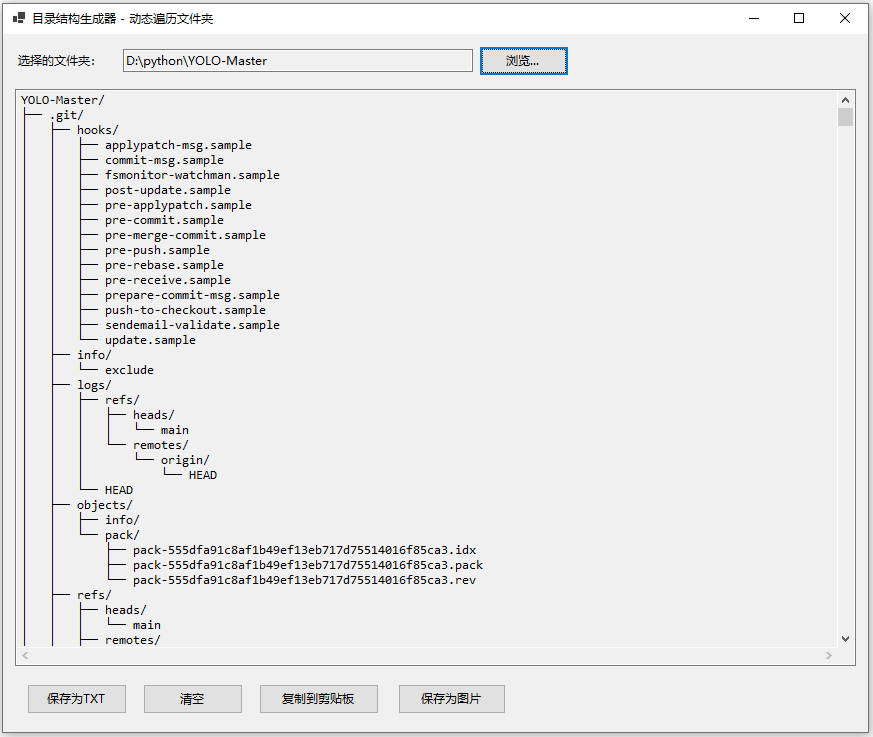
using System;
using System.IO;
using System.Text;
using System.Drawing;
using System.Drawing.Imaging;
using System.Windows.Forms;

namespace DirectoryStructureGenerator
{
    public partial class Form1 : Form
    {
        public Form1()
        {
            InitializeComponent();
        }

        private void btnBrowse_Click(object sender, EventArgs e)
        {
            using (FolderBrowserDialog folderDialog = new FolderBrowserDialog())
            {
                folderDialog.Description = "请选择要遍历的文件夹";
                folderDialog.ShowNewFolderButton = false;

                if (folderDialog.ShowDialog() == DialogResult.OK)
                {
                    txtFolderPath.Text = folderDialog.SelectedPath;
                    GenerateStructure(folderDialog.SelectedPath);
                }
            }
        }

        private void GenerateStructure(string folderPath)
        {
            try
            {
                string structure = GenerateTreeStructure(folderPath);
                textBoxDisplay.Text = structure;
            }
            catch (Exception ex)
            {
                MessageBox.Show($"生成目录结构失败:{ex.Message}", "错误", MessageBoxButtons.OK, MessageBoxIcon.Error);
            }
        }

        private string GenerateTreeStructure(string folderPath)
        {
            StringBuilder sb = new StringBuilder();
            DirectoryInfo dir = new DirectoryInfo(folderPath);
            sb.AppendLine($"{dir.Name}/");
            BuildTree(dir, sb, "");
            return sb.ToString();
        }

        private void BuildTree(DirectoryInfo dir, StringBuilder sb, string indent)
        {
            DirectoryInfo[] subDirs = dir.GetDirectories();
            FileInfo[] files = dir.GetFiles();
            int totalItems = subDirs.Length + files.Length;
            int currentIndex = 0;

            foreach (DirectoryInfo subDir in subDirs)
            {
                currentIndex++;
                bool isLast = (currentIndex == totalItems);
                string prefix = isLast ? "└── " : "├── ";
                sb.AppendLine($"{indent}{prefix}{subDir.Name}/");
                string childIndent = indent + (isLast ? "    " : "│   ");
                BuildTree(subDir, sb, childIndent);
            }

            foreach (FileInfo file in files)
            {
                currentIndex++;
                bool isLast = (currentIndex == totalItems);
                string prefix = isLast ? "└── " : "├── ";
                sb.AppendLine($"{indent}{prefix}{file.Name}");
            }
        }

        private void btnSave_Click(object sender, EventArgs e)
        {
            if (string.IsNullOrEmpty(textBoxDisplay.Text))
            {
                MessageBox.Show("没有可保存的内容,请先选择文件夹!", "提示", MessageBoxButtons.OK, MessageBoxIcon.Warning);
                return;
            }

            SaveFileDialog saveFileDialog = new SaveFileDialog();
            saveFileDialog.Filter = "文本文件|*.txt|所有文件|*.*";
            saveFileDialog.Title = "保存目录结构";
            saveFileDialog.FileName = "directory_structure.txt";

            if (saveFileDialog.ShowDialog() == DialogResult.OK)
            {
                try
                {
                    File.WriteAllText(saveFileDialog.FileName, textBoxDisplay.Text, Encoding.UTF8);
                    MessageBox.Show("文件保存成功!", "提示", MessageBoxButtons.OK, MessageBoxIcon.Information);
                }
                catch (Exception ex)
                {
                    MessageBox.Show($"保存失败:{ex.Message}", "错误", MessageBoxButtons.OK, MessageBoxIcon.Error);
                }
            }
        }

        private void btnClear_Click(object sender, EventArgs e)
        {
            textBoxDisplay.Clear();
            txtFolderPath.Clear();
        }

        private void btnCopy_Click(object sender, EventArgs e)
        {
            if (!string.IsNullOrEmpty(textBoxDisplay.Text))
            {
                Clipboard.SetText(textBoxDisplay.Text);
                MessageBox.Show("已复制到剪贴板!", "提示", MessageBoxButtons.OK, MessageBoxIcon.Information);
            }
            else
            {
                MessageBox.Show("没有可复制的内容!", "提示", MessageBoxButtons.OK, MessageBoxIcon.Warning);
            }
        }

        // 新增:保存为图片
        private void btnSaveImage_Click(object sender, EventArgs e)
        {
            if (string.IsNullOrEmpty(textBoxDisplay.Text))
            {
                MessageBox.Show("没有可保存的内容,请先选择文件夹!", "提示", MessageBoxButtons.OK, MessageBoxIcon.Warning);
                return;
            }

            SaveFileDialog saveImageDialog = new SaveFileDialog();
            saveImageDialog.Filter = "PNG图片|*.png|JPEG图片|*.jpg|BMP图片|*.bmp";
            saveImageDialog.Title = "保存目录结构为图片";
            saveImageDialog.FileName = "directory_structure.png";

            if (saveImageDialog.ShowDialog() == DialogResult.OK)
            {
                try
                {
                    string text = textBoxDisplay.Text;
                    Font font = textBoxDisplay.Font;

                    using (Bitmap measureBmp = new Bitmap(1, 1))
                    using (Graphics g = Graphics.FromImage(measureBmp))
                    {
                        g.TextRenderingHint = System.Drawing.Text.TextRenderingHint.AntiAliasGridFit;
                        string[] lines = text.Split(new[] { "\r\n", "\n" }, StringSplitOptions.None);
                        float lineHeight = font.GetHeight(g);
                        int totalHeight = (int)(lineHeight * lines.Length) + 10;

                        float maxWidth = 0;
                        foreach (string line in lines)
                        {
                            SizeF lineSize = g.MeasureString(line, font, int.MaxValue, StringFormat.GenericTypographic);
                            if (lineSize.Width > maxWidth)
                                maxWidth = lineSize.Width;
                        }
                        int totalWidth = (int)maxWidth + 20;

                        using (Bitmap bitmap = new Bitmap(totalWidth, totalHeight))
                        using (Graphics drawG = Graphics.FromImage(bitmap))
                        {
                            drawG.Clear(Color.White);
                            drawG.TextRenderingHint = System.Drawing.Text.TextRenderingHint.AntiAliasGridFit;
                            float y = 5;
                            foreach (string line in lines)
                            {
                                drawG.DrawString(line, font, Brushes.Black, 10, y, StringFormat.GenericTypographic);
                                y += lineHeight;
                            }

                            string ext = Path.GetExtension(saveImageDialog.FileName).ToLower();
                            ImageFormat format = ImageFormat.Png;
                            if (ext == ".jpg" || ext == ".jpeg")
                                format = ImageFormat.Jpeg;
                            else if (ext == ".bmp")
                                format = ImageFormat.Bmp;

                            bitmap.Save(saveImageDialog.FileName, format);
                        }
                    }

                    MessageBox.Show("图片保存成功!", "提示", MessageBoxButtons.OK, MessageBoxIcon.Information);
                }
                catch (Exception ex)
                {
                    MessageBox.Show($"保存图片失败:{ex.Message}", "错误", MessageBoxButtons.OK, MessageBoxIcon.Error);
                }
            }
        }
    }
}
namespace DirectoryStructureGenerator
{
    partial class Form1
    {
        private System.ComponentModel.IContainer components = null;
        private System.Windows.Forms.TextBox textBoxDisplay;
        private System.Windows.Forms.Button btnSave;
        private System.Windows.Forms.Button btnClear;
        private System.Windows.Forms.Button btnCopy;
        private System.Windows.Forms.Panel panelButtons;
        private System.Windows.Forms.Button btnBrowse;
        private System.Windows.Forms.TextBox txtFolderPath;
        private System.Windows.Forms.Label lblFolderPath;

        protected override void Dispose(bool disposing)
        {
            if (disposing && (components != null))
            {
                components.Dispose();
            }
            base.Dispose(disposing);
        }

        private void InitializeComponent()
        {
            textBoxDisplay = new TextBox();
            btnSave = new Button();
            btnClear = new Button();
            btnCopy = new Button();
            panelButtons = new Panel();
            btnBrowse = new Button();
            txtFolderPath = new TextBox();
            lblFolderPath = new Label();
            btnSaveImage = new Button();
            panelButtons.SuspendLayout();
            SuspendLayout();
            //
            // textBoxDisplay
            //
            textBoxDisplay.Anchor = AnchorStyles.Top | AnchorStyles.Bottom | AnchorStyles.Left | AnchorStyles.Right;
            textBoxDisplay.Font = new Font("Consolas", 10F);
            textBoxDisplay.Location = new Point(12, 55);
            textBoxDisplay.Multiline = true;
            textBoxDisplay.Name = "textBoxDisplay";
            textBoxDisplay.ReadOnly = true;
            textBoxDisplay.ScrollBars = ScrollBars.Both;
            textBoxDisplay.Size = new Size(560, 360);
            textBoxDisplay.TabIndex = 1;
            textBoxDisplay.WordWrap = false;
            //
            // btnSave
            //
            btnSave.Location = new Point(12, 12);
            btnSave.Name = "btnSave";
            btnSave.Size = new Size(100, 30);
            btnSave.TabIndex = 0;
            btnSave.Text = "保存为TXT";
            btnSave.UseVisualStyleBackColor = true;
            btnSave.Click += btnSave_Click;
            //
            // btnClear
            //
            btnClear.Location = new Point(128, 12);
            btnClear.Name = "btnClear";
            btnClear.Size = new Size(100, 30);
            btnClear.TabIndex = 1;
            btnClear.Text = "清空";
            btnClear.UseVisualStyleBackColor = true;
            btnClear.Click += btnClear_Click;
            //
            // btnCopy
            //
            btnCopy.Location = new Point(244, 12);
            btnCopy.Name = "btnCopy";
            btnCopy.Size = new Size(120, 30);
            btnCopy.TabIndex = 2;
            btnCopy.Text = "复制到剪贴板";
            btnCopy.UseVisualStyleBackColor = true;
            btnCopy.Click += btnCopy_Click;
            //
            // panelButtons
            //
            panelButtons.Anchor = AnchorStyles.Bottom | AnchorStyles.Left | AnchorStyles.Right;
            panelButtons.Controls.Add(btnSaveImage);
            panelButtons.Controls.Add(btnCopy);
            panelButtons.Controls.Add(btnClear);
            panelButtons.Controls.Add(btnSave);
            panelButtons.Location = new Point(12, 421);
            panelButtons.Name = "panelButtons";
            panelButtons.Size = new Size(560, 50);
            panelButtons.TabIndex = 2;
            //
            // btnBrowse
            //
            btnBrowse.Location = new Point(476, 12);
            btnBrowse.Name = "btnBrowse";
            btnBrowse.Size = new Size(90, 30);
            btnBrowse.TabIndex = 2;
            btnBrowse.Text = "浏览...";
            btnBrowse.UseVisualStyleBackColor = true;
            btnBrowse.Click += btnBrowse_Click;
            //
            // txtFolderPath
            //
            txtFolderPath.Location = new Point(120, 15);
            txtFolderPath.Name = "txtFolderPath";
            txtFolderPath.ReadOnly = true;
            txtFolderPath.Size = new Size(350, 23);
            txtFolderPath.TabIndex = 0;
            //
            // lblFolderPath
            //
            lblFolderPath.AutoSize = true;
            lblFolderPath.Location = new Point(12, 18);
            lblFolderPath.Name = "lblFolderPath";
            lblFolderPath.Size = new Size(92, 17);
            lblFolderPath.TabIndex = 1;
            lblFolderPath.Text = "选择的文件夹:";
            lblFolderPath.TextAlign = ContentAlignment.MiddleRight;
            //
            // btnSaveImage
            //
            btnSaveImage.Location = new Point(383, 12);
            btnSaveImage.Name = "btnSaveImage";
            btnSaveImage.Size = new Size(108, 30);
            btnSaveImage.TabIndex = 3;
            btnSaveImage.Text = "保存为图片";
            btnSaveImage.UseVisualStyleBackColor = true;
            btnSaveImage.Click += btnSaveImage_Click;
            //
            // Form1
            //
            AutoScaleDimensions = new SizeF(7F, 17F);
            AutoScaleMode = AutoScaleMode.Font;
            ClientSize = new Size(584, 481);
            Controls.Add(panelButtons);
            Controls.Add(textBoxDisplay);
            Controls.Add(btnBrowse);
            Controls.Add(lblFolderPath);
            Controls.Add(txtFolderPath);
            MinimumSize = new Size(600, 520);
            Name = "Form1";
            Text = "目录结构生成器 - 动态遍历文件夹";
            panelButtons.ResumeLayout(false);
            ResumeLayout(false);
            PerformLayout();
        }

        private Button btnSaveImage;
    }
}