一、基础概述
1、什么是动态SQL?
简单说:动态SQL就是根据条件自动拼接SQL语句。
为什么要用动态SQL?
举个例子:查询用户列表时,用户可能只输入用户名,也可能同时输入用户名和手机号,还可能什么都不输入。如果不用动态SQL,你就得写多个方法:
java
// 不用动态SQL,要写多个方法
List<User> listAll();                           // 查全部
List<User> listByName(String userName);         // 按用户名查
List<User> listByPhone(String phone);           // 按手机号查
List<User> listByNameAndPhone(String userName, String phone); // 按用户名和手机号查
用动态SQL,只需要一个方法:
java
// 用动态SQL,一个方法搞定
List<User> list(UserQueryDto query);
2、动态SQL能解决什么问题?
| 问题 | 动态SQL解决方案 |
|---|---|
| 条件不确定 | 根据参数有无动态拼接条件 |
| SQL拼接繁琐 | 自动处理AND、OR、逗号等 |
| 代码冗余 | 一个SQL搞定多种情况 |
二、常用动态SQL标签
1、if标签 - 条件判断
最常用的标签! 用于判断参数是否满足条件。
基本语法
xml
<if test="判断条件">
    SQL语句
</if>
使用示例
xml
<select id="list" resultType="User">
    SELECT * FROM t_user
    <where>
        <!-- 如果userName不为空,就拼接这个条件 -->
        <if test="userName != null and userName != ''">
            AND user_name = #{userName}
        </if>
        <!-- 如果phone不为空,就拼接这个条件 -->
        <if test="phone != null and phone != ''">
            AND phone = #{phone}
        </if>
        <!-- 如果status不为空,就拼接这个条件 -->
        <if test="status != null">
            AND status = #{status}
        </if>
    </where>
</select>
不同类型的判断方式
| 类型 | 判断方式 | 示例 |
|---|---|---|
| Integer类型 | 只判断null | <if test="status != null"> |
| String类型 | 判断null和空串 | <if test="name != null and name != ''"> |
| List类型 | 判断null和size | <if test="list != null and list.size() > 0"> |
| Boolean类型 | 直接判断 | <if test="isDelete"> |
新人注意:Integer类型判断时不要加空字符串判断!值为0时会被误判为空。
xml
<!-- 错误:Integer类型加了空字符串判断 -->
<if test="status != null and status != ''">
    AND status = #{status}
</if>
<!-- 当status=0时,这个条件不会生效! -->

<!-- 正确:Integer类型只判断null -->
<if test="status != null">
    AND status = #{status}
</if>
2、where标签 - 智能处理WHERE
where标签的作用:
- 自动添加WHERE关键字
- 自动去除多余的AND或OR
使用示例
xml
<select id="list" resultType="User">
    SELECT * FROM t_user
    <where>
        <if test="userName != null and userName != ''">
            AND user_name = #{userName}
        </if>
        <if test="phone != null and phone != ''">
            AND phone = #{phone}
        </if>
    </where>
</select>
效果说明:
| 情况 | 生成的SQL |
|---|---|
| 两个条件都有 | SELECT * FROM t_user WHERE user_name = ? AND phone = ? |
| 只有userName | SELECT * FROM t_user WHERE user_name = ? |
| 条件都为空 | SELECT * FROM t_user |
注意: where标签会自动去掉第一个AND,所以if里面的AND写在前面没问题。
3、set标签 - 智能处理UPDATE
set标签的作用:
- 自动添加SET关键字
- 自动去除多余的逗号
使用示例
xml
<update id="update">
    UPDATE t_user
    <set>
        <if test="userName != null and userName != ''">
            user_name = #{userName},
        </if>
        <if test="phone != null and phone != ''">
            phone = #{phone},
        </if>
        <if test="email != null and email != ''">
            email = #{email},
        </if>
    </set>
    WHERE id = #{id}
</update>
效果: 只更新传入的字段,没传的不更新。
4、choose/when/otherwise - 多选一
类似Java的switch-case,只执行第一个满足条件的分支。
使用示例
xml
<select id="query" resultType="User">
    SELECT * FROM t_user WHERE 1=1
    <choose>
        <when test="userName != null and userName != ''">
            AND user_name = #{userName}
        </when>
        <when test="phone != null and phone != ''">
            AND phone = #{phone}
        </when>
        <otherwise>
            AND status = 1
        </otherwise>
    </choose>
</select>
效果说明:
- 如果userName有值,只按userName查
- 如果userName没值但phone有值,只按phone查
- 如果都没有,就查status=1的数据
5、foreach标签 - 遍历集合
用于批量操作:批量插入、批量更新、IN查询等。
基本语法
xml
<foreach collection="集合名" item="元素名" separator="分隔符" open="开始符号" close="结束符号">
    #{元素名}
</foreach>| 属性 | 说明 |
|---|---|
| collection | 集合参数名 |
| item | 遍历时每个元素的变量名 |
| separator | 元素之间的分隔符 |
| open | 以什么开始 |
| close | 以什么结束 |
使用场景
(1)IN查询
xml
<select id="listByIds" resultType="User">
    SELECT * FROM t_user WHERE id IN
    <foreach collection="ids" item="id" separator="," open="(" close=")">
        #{id}
    </foreach>
</select>生成的SQL:SELECT * FROM t_user WHERE id IN (1, 2, 3)
(2)批量插入
xml
<insert id="insertBatch">
    INSERT INTO t_user (user_name, phone, status)
    VALUES
    <foreach collection="list" item="user" separator=",">
        (#{user.userName}, #{user.phone}, #{user.status})
    </foreach>
</insert>
(3)批量更新
xml
<update id="updateBatch">
    <foreach collection="list" item="user" separator=";">
        UPDATE t_user
        <set>
            <if test="user.userName != null">
                user_name = #{user.userName},
            </if>
            <if test="user.phone != null">
                phone = #{user.phone},
            </if>
        </set>
        WHERE id = #{user.id}
    </foreach>
</update>
6、trim标签 - 自定义处理
更灵活地处理前缀后缀。
使用示例
xml
<!-- 等价于where标签 -->
<trim prefix="WHERE" prefixOverrides="AND">
    <if test="userName != null and userName != ''">
        AND user_name = #{userName}
    </if>
    <if test="phone != null and phone != ''">
        AND phone = #{phone}
    </if>
</trim>

<!-- 等价于set标签 -->
<trim prefix="SET" suffixOverrides=",">
    <if test="userName != null and userName != ''">
        user_name = #{userName},
    </if>
    <if test="phone != null and phone != ''">
        phone = #{phone},
    </if>
</trim>
三、实际工作中的使用场景
1、查询列表(最常用)
xml
<select id="list" resultType="UserVo">
    SELECT * FROM t_user
    <where>
        <if test="userName != null and userName != ''">
            AND user_name LIKE CONCAT('%', #{userName}, '%')
        </if>
        <if test="phone != null and phone != ''">
            AND phone = #{phone}
        </if>
        <if test="status != null">
            AND status = #{status}
        </if>
        <if test="startTime != null">
            AND cr_time >= #{startTime}
        </if>
        <if test="endTime != null">
            AND cr_time <= #{endTime}
        </if>
    </where>
    ORDER BY cr_time DESC
</select>
2、动态更新
xml
<update id="updateSelective">
    UPDATE t_user
    <set>
        <if test="userName != null and userName != ''">
            user_name = #{userName},
        </if>
        <if test="phone != null">
            phone = #{phone},
        </if>
        <if test="email != null">
            email = #{email},
        </if>
        up_time = NOW(),
    </set>
    WHERE id = #{id}
</update>
3、动态插入
xml
<insert id="insertSelective">
    INSERT INTO t_user
    <trim prefix="(" suffix=")" suffixOverrides=",">
        <if test="userName != null">
            user_name,
        </if>
        <if test="phone != null">
            phone,
        </if>
        <if test="email != null">
            email,
        </if>
        cr_time,
    </trim>
    <trim prefix="VALUES (" suffix=")" suffixOverrides=",">
        <if test="userName != null">
            #{userName},
        </if>
        <if test="phone != null">
            #{phone},
        </if>
        <if test="email != null">
            #{email},
        </if>
        NOW(),
    </trim>
</insert>
四、新人常见错误
1、Integer类型判断错误
xml
<!-- 错误:Integer类型加了空字符串判断 -->
<if test="status != null and status != ''">
    AND status = #{status}
</if>

<!-- 正确 -->
<if test="status != null">
    AND status = #{status}
</if>
2、忘记加AND或逗号
xml
<!-- 错误:忘记加AND -->
<where>
    <if test="userName != null">
        user_name = #{userName}  <!-- 少了AND -->
    </if>
    <if test="phone != null">
        AND phone = #{phone}
    </if>
</where>

<!-- 正确:第一个条件也要加AND,where标签会自动去掉 -->
<where>
    <if test="userName != null">
        AND user_name = #{userName}
    </if>
    <if test="phone != null">
        AND phone = #{phone}
    </if>
</where>
3、批量操作没处理好
xml
<!-- 错误:批量插入格式不对 -->
<insert id="insertBatch">
    INSERT INTO t_user (user_name, phone) VALUES
    <foreach collection="list" item="user">
        (#{user.userName}, #{user.phone})  <!-- 没有分隔符 -->
    </foreach>
</insert>

<!-- 正确:加上separator -->
<insert id="insertBatch">
    INSERT INTO t_user (user_name, phone) VALUES
    <foreach collection="list" item="user" separator=",">
        (#{user.userName}, #{user.phone})
    </foreach>
</insert>
4、foreach没有判空
新人常见错误!如果list为空,
<foreach>不会生成任何内容,SQL就会变成不合法的语法,直接报错。
xml
<!-- 错误:没有判空,list为空时SQL变成 INSERT INTO t_user (user_name, phone) VALUES  ← 后面啥都没有,语法错误! -->
<insert id="insertBatch">
    INSERT INTO t_user (user_name, phone) VALUES
    <foreach collection="list" item="user" separator=",">
        (#{user.userName}, #{user.phone})
    </foreach>
</insert>

<!-- 错误:同样的问题,list为空时SQL变成 WHERE id IN  ← 后面没有值,语法错误! -->
<select id="listByIds" resultType="User">
    SELECT * FROM t_user WHERE id IN
    <foreach collection="ids" item="id" separator="," open="(" close=")">
        #{id}
    </foreach>
</select>
正确做法:在Service层判空,list为空时不调用Mapper方法:
java
@Override
public void insertBatch(List<UserDto> userList) {
    // 在Service层判空,避免传空集合到Mapper
    if (CollectionUtils.isEmpty(userList)) {
        return;
    }
    // 分批处理,每批不超过1000条
    int batchSize = 1000;
    for (int i = 0; i < userList.size(); i += batchSize) {
        int end = Math.min(i + batchSize, userList.size());
        userMapper.insertBatch(userList.subList(i, end));
    }
}
总结:
<foreach>一定要配合判空使用。建议在Service层判断,集合为空直接return或抛异常,不要让空集合传到Mapper里。
五、新人避坑指南
| 坑 | 正确做法 |
|---|---|
| Integer判断加空字符串 | Integer只判断null |
| String判断只判断null | 还要判断空字符串 |
| 第一个if条件不加AND | 要加AND,where标签会自动去掉 |
| set里最后没逗号 | 要加逗号,set标签会自动去掉 |
| foreach没写separator | 批量操作要加分隔符 |
| foreach没有判空 | 在Service层判空,集合为空时不调用Mapper,避免SQL语法错误 |
| 复制粘贴不改参数名 | 仔细检查参数名是否正确 |
六、调试技巧
1、开启SQL日志
MyBatis项目:
yaml
# application.yml
mybatis:
  configuration:
    log-impl: org.apache.ibatis.logging.stdout.StdOutImpl
MyBatis-Plus项目:
yaml
# application.yml
mybatis-plus:
  configuration:
    log-impl: org.apache.ibatis.logging.stdout.StdOutImpl
注意区分: MyBatis和MyBatis-Plus只是配置前缀不同,一个是
mybatis:,一个是mybatis-plus:。看看项目用的是哪个就配哪个。
开启日志后,控制台会打印实际执行的SQL,检查是否符合预期。
2、使用MyBatis Log Free插件(推荐)
在IDEA中安装 MyBatis Log Free 插件,可以把MyBatis日志中带
?占位符的SQL直接还原成完整的、可执行的SQL,复制到Navicat里直接运行排查问题。
安装方式: IDEA → Settings → Plugins → 搜索 MyBatis Log Free → Install
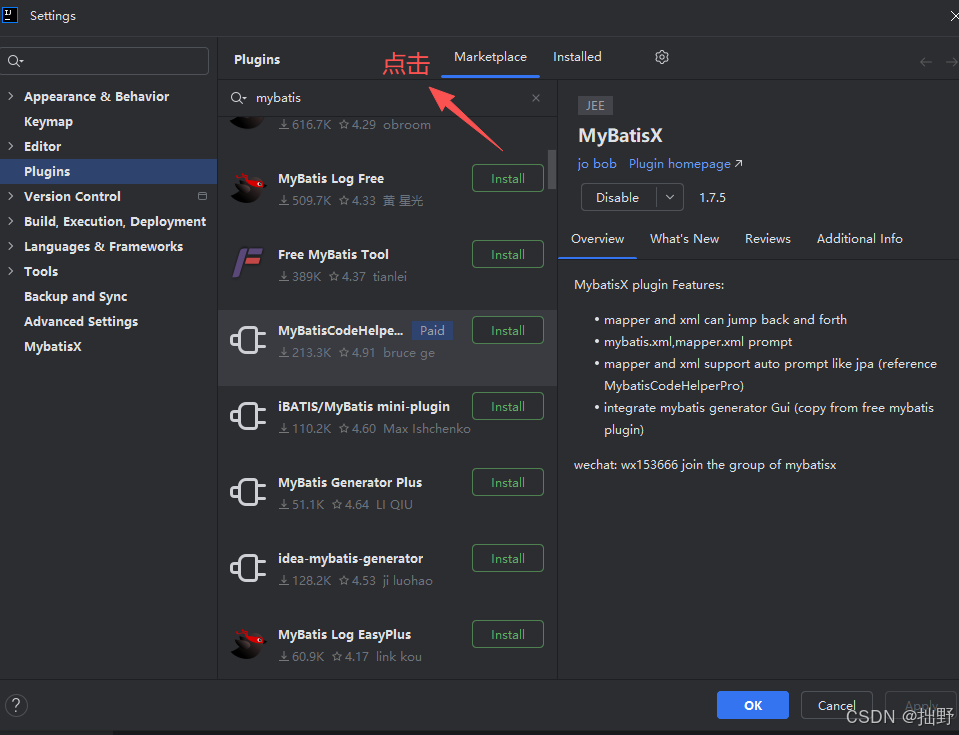
如果安装失败:
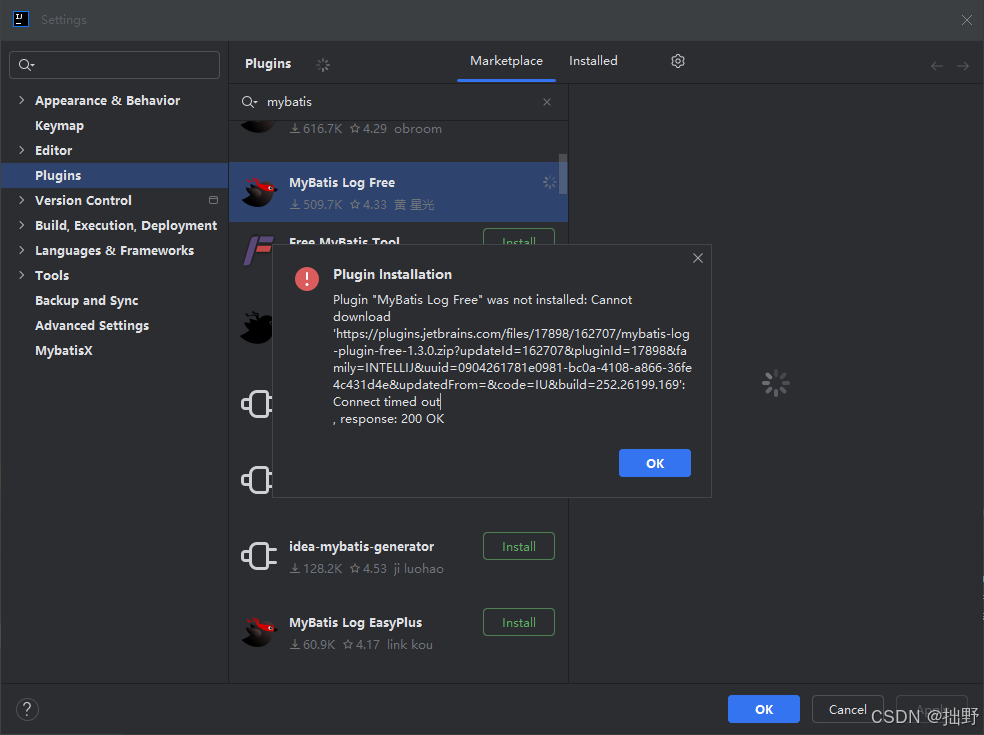
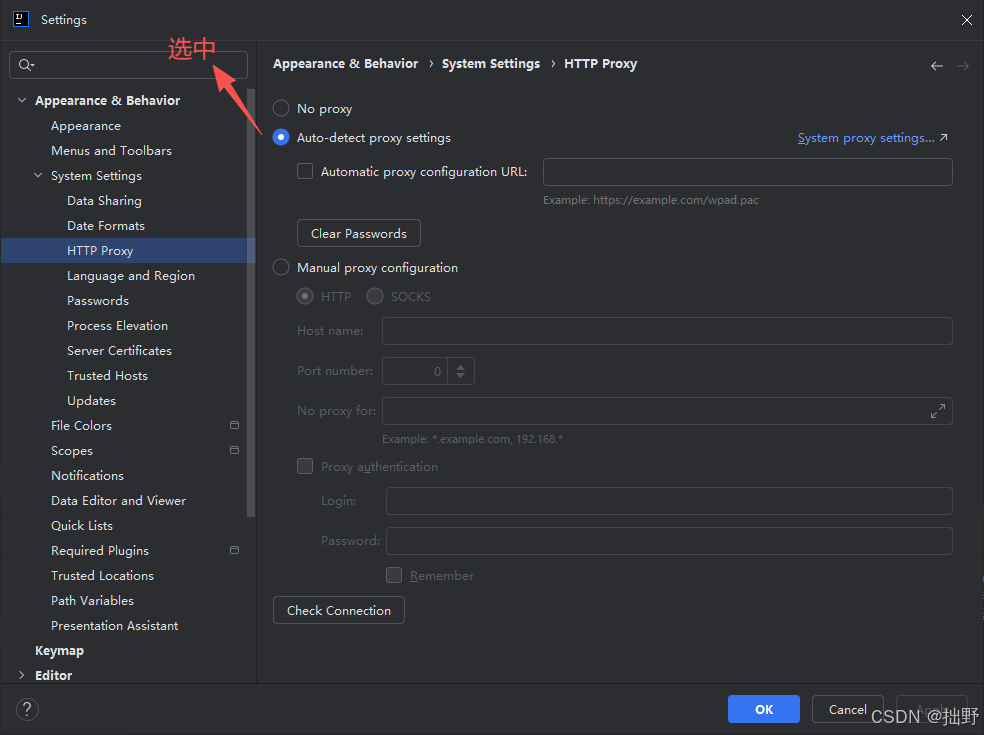
在 Appearance & Behavior->System Settings->HTTP Proxy 路径中勾选 Auto-detect proxy settings 后再重新 install 插件 MyBatis Log Free
使用步骤:
-
开启SQL日志(上面的第1步)
-
调用接口后,控制台会打印类似这样的日志:
==> Preparing: SELECT * FROM t_user WHERE user_name = ? AND status = ? ==> Parameters: 张三(String), 1(Integer) -
打开IDEA底部的 MyBatis Log Free 面板(Tools → MyBatis Log Free)
-
插件会自动还原成完整SQL:
sqlSELECT * FROM t_user WHERE user_name = '张三' AND status = 1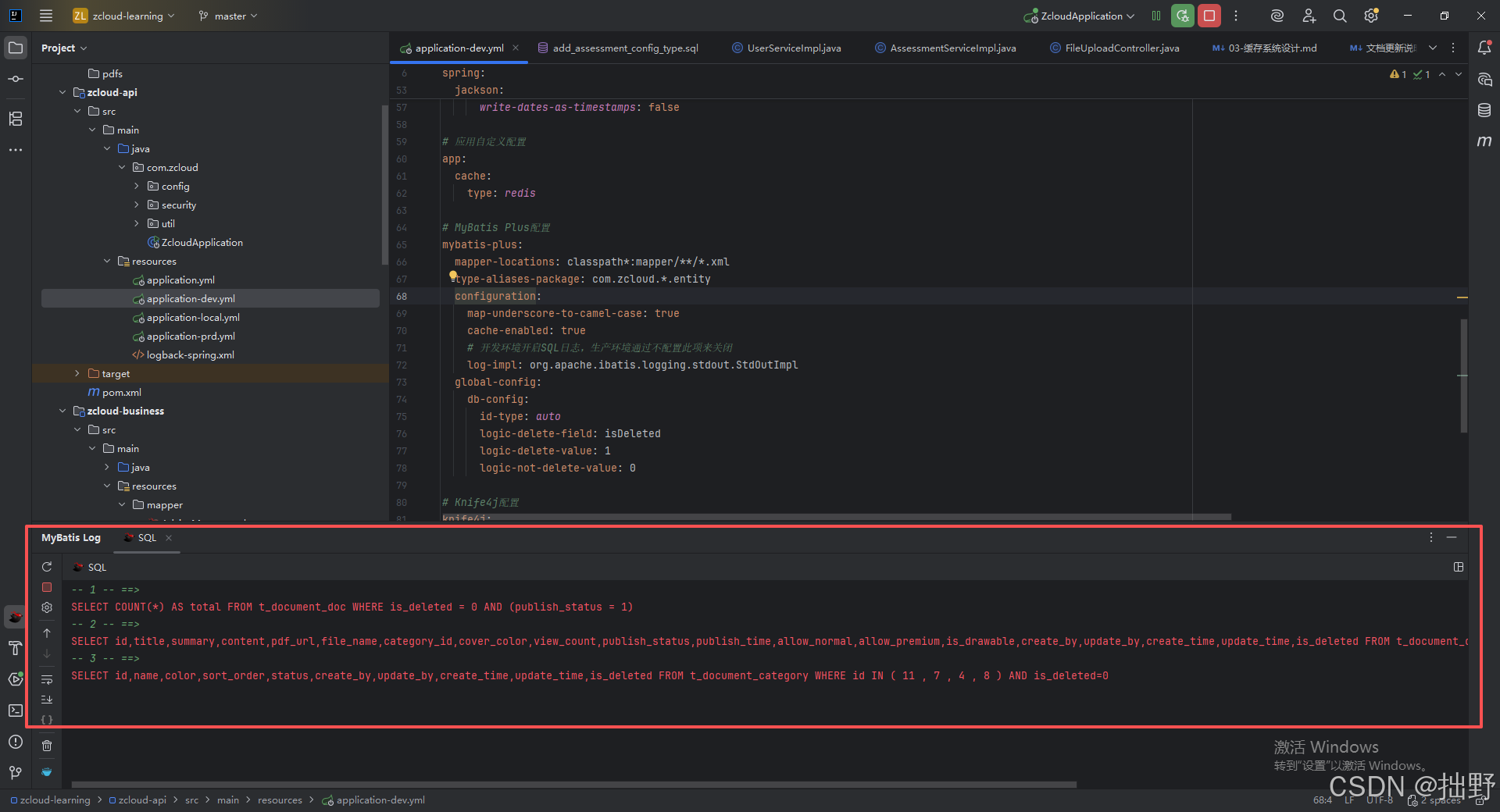
-
复制这条SQL,直接粘贴到Navicat执行,排查数据和条件是否正确
新人必装! 不装这个插件的话,你需要手动把
?和参数一一对应替换,参数多了很容易搞错。有了这个插件一键还原,效率提升很多。
七、终极建议
工作中90%的动态SQL就是if + where的组合,把这个练熟就够了。
遇到不确定的情况,开启SQL日志,看实际生成的SQL是什么样的,然后调整。