在 Linux C 系统编程中,获取系统数据文件和信息主要通过两类方式:一是直接读取特定的系统文件(如 /proc 和 /etc 目录下的文件),二是调用标准的系统库函数(如 pwd.h、time.h 等)。
口令文件
"口令文件"通常指的是 /etc/passwd,但现代 Linux 为了安全,将真正的加密口令(密码)剥离到了 /etc/shadow 文件中。
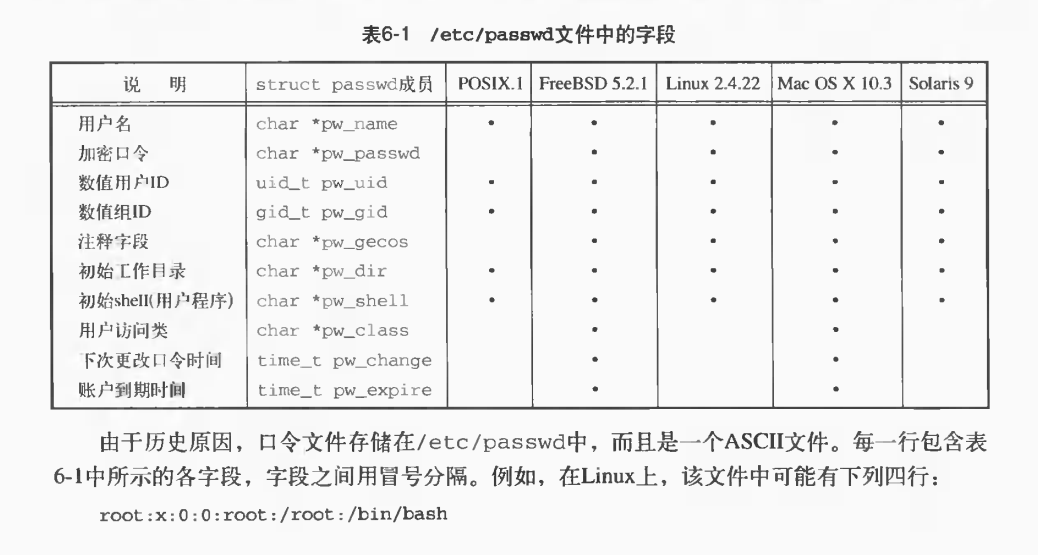
在 Linux C 系统编程中,处理口令文件主要涉及读取用户基本信息以及进行用户认证。以下是详细的解析:
1. 核心口令文件解析
-
/etc/passwd(用户基本信息文件)- 密码占位符 :在现代系统中通常显示为
x,表示真正的加密密码被存放在/etc/shadow中。 - 用户ID (UID):0 代表超级管理员(root),1-99 通常为系统预设账号,500/1000 以上为普通用户。
- 密码占位符 :在现代系统中通常显示为
-
这是一个 ASCII 文本文件,所有用户都可以读取。每一行代表一个用户,由 7 个冒号
:分隔的字段组成:
登录名:密码占位符:用户ID(UID):组ID(GID):注释信息:主目录:登录Shell -
/etc/shadow(阴影口令文件)出于安全考虑,真正的加密口令及密码老化信息(如上次修改时间、有效期等)被存放在此文件中。该文件通常只有 root 用户或特定的认证程序(如
login、passwd)才有权限读取。
2. C 语言中的口令文件操作
在 C 语言中,系统提供了标准的库函数和结构体来安全地读取这些文件,而无需手动解析文本。
-
读取
/etc/passwd-
头文件 :
#include <pwd.h> -
核心结构体 :
struct passwdstruct passwd { char *pw_name; // 用户名 char *pw_passwd; // 密码占位符(通常为 "x") uid_t pw_uid; // 用户ID gid_t pw_gid; // 组ID char *pw_gecos; // 注释信息(如真实姓名) char *pw_dir; // 用户主目录 char *pw_shell; // 登录Shell }; -
常用函数 :
getpwnam(const char *name):根据用户名查找并返回passwd结构体指针。getpwuid(uid_t uid):根据用户ID查找。getpwent()/setpwent()/endpwent():用于逐条遍历整个口令文件。
-
-
读取
/etc/shadow-
头文件 :
#include <shadow.h> -
核心结构体 :
struct spwdstruct spwd { char *sp_namp; // 用户名 char *sp_pwdp; // 加密后的口令字符串 long sp_lstchg; // 上次更改密码距 Epoch 的天数 long sp_min; // 密码最短有效天数 long sp_max; // 密码最长有效天数 // ... 其他密码老化相关字段 }; -
常用函数 :
getspnam(const char *name):根据用户名获取阴影口令记录(通常需要 root 权限)。
-
3. 实战:简单的用户密码验证逻辑
由于 Linux 采用单向加密算法,验证密码的唯一方法是将用户输入的密码用同样的算法加密,然后与 /etc/shadow 中存储的密文进行比对。
以下是一个简化的 C 语言密码验证逻辑示例:
#include <stdio.h>
#include <pwd.h>
#include <shadow.h>
#include <string.h>
#include <unistd.h>

// 假设 username 为要验证的用户名,input_pass 为用户输入的明文密码
int verify_user(const char *username, const char *input_pass) {
    struct spwd *spw;
    char *encrypted_input;

    // 1. 获取该用户在 /etc/shadow 中的记录
    spw = getspnam(username);
    if (spw == NULL) {
        return -1; // 用户不存在或无权限读取 shadow 文件
    }

    // 2. 提取 shadow 中存储的加密密码的前段作为 salt (盐值)
    // crypt 函数会自动识别 salt 并采用对应的加密算法
    char salt[128];
    strncpy(salt, spw->sp_pwdp, 127);
    salt[127] = '\0';

    // 3. 将用户输入的明文密码使用相同的 salt 进行加密
    encrypted_input = crypt(input_pass, salt);

    // 4. 比对加密后的结果与 shadow 文件中存储的密文
    if (strcmp(encrypted_input, spw->sp_pwdp) == 0) {
        return 0; // 密码验证成功
    } else {
        return 1; // 密码错误
    }
}
(注:在编译包含 crypt() 函数的程序时,通常需要加上 -lcrypt 选项来链接加密库。)
如果你正在编写需要获取当前登录用户信息,或者进行特定用户权限切换的程序,可以基于上述结构体和函数进行扩展。
系统标识
在 Linux 环境下进行 C 语言系统编程时,"系统标识"通常包含三个不同维度的概念:操作系统发行版信息 、系统内核与架构信息 ,以及主机唯一标识(机器指纹)。
1. 获取操作系统发行版信息(如 Ubuntu, CentOS)
在 C 程序中,最标准且兼容性最好的方法是直接读取 /etc/os-release 文件。这是一个纯文本的键值对文件,几乎所有现代 Linux 发行版都遵循此规范。
#include <stdio.h>
#include <stdlib.h>
#include <string.h>

void get_os_info() {
    FILE *fp = fopen("/etc/os-release", "r");
    if (!fp) {
        perror("Failed to open /etc/os-release");
        return;
    }

    char line[256];
    while (fgets(line, sizeof(line), fp)) {
        // 提取发行版名称和版本号
        if (strncmp(line, "PRETTY_NAME=", 12) == 0 || strncmp(line, "VERSION_ID=", 11) == 0) {
            // 去除末尾换行符和双引号
            char *p = strchr(line, '\n'); if (p) *p = 0;
            p = strchr(line, '"'); if (p) memmove(line, p + 1, strlen(p));
            p = strrchr(line, '"'); if (p) *p = 0;
            printf("%s\n", line);
        }
    }
    fclose(fp);
}
注:虽然也可以通过 lsb_release -a 命令获取,但在 C 代码中解析文件比调用外部命令更高效、更稳定。
2. 获取系统内核与架构信息
Linux 提供了标准的系统调用 uname(),可以获取当前操作系统的内核名称、版本、主机名以及硬件架构(如 x86_64)。
#include <stdio.h>
#include <sys/utsname.h>

void get_kernel_info() {
    struct utsname buf;
    if (uname(&buf) == 0) {
        printf("系统名称: %s\n", buf.sysname);      // 例如 Linux
        printf("主机名:   %s\n", buf.nodename);     // 网络上的主机名
        printf("内核版本: %s\n", buf.release);      // 例如 5.4.0-150-generic
        printf("硬件架构: %s\n", buf.machine);      // 例如 x86_64
    }
}
3. 获取主机唯一标识(用于设备识别/授权)
在交换机或服务器集群中,经常需要获取唯一的机器指纹。在 C 语言中,通常通过读取 Linux 虚拟文件系统(/sys 或 /proc)来获取:
-
系统 UUID(推荐) :读取
/sys/class/dmi/id/product_uuid。这是由主板 BIOS/UEFI 提供的系统级唯一标识,通常终身不变。 -
MAC 地址 :读取
/sys/class/net/eth0/address(网卡名根据实际情况变化)。常作为设备标识的备选方案。#include <stdio.h>
void get_system_uuid() {
FILE *fp = fopen("/sys/class/dmi/id/product_uuid", "r");
if (fp) {
char uuid[64] = {0};
if (fgets(uuid, sizeof(uuid), fp)) {
printf("系统 UUID: %s", uuid); // 自带换行符
}
fclose(fp);
} else {
// 在部分容器或云主机中可能没有权限,需要 root 权限
perror("Failed to read UUID (try running with sudo)");
}
}
4. 编译时的系统宏标识
如果你需要在代码中根据操作系统进行条件编译(例如区分 Linux 和 Windows 平台的底层适配),可以使用 C 语言预定义的宏:
#ifdef __linux__
    // 这段代码只会在 Linux 环境下编译
    printf("当前编译环境为 Linux\n");
#elif _WIN32
    // 这段代码只会在 Windows 环境下编译
    printf("当前编译环境为 Windows\n");
#endif
这些接口和文件路径在 Linux 系统编程中非常通用,能够帮助你准确获取到所需的各类系统标识信息。
时间和日期例程
在 Linux C 语言编程中,处理时间和日期主要依赖于标准库 <time.h>。
1. 基础时间获取与格式化输出
在 Linux C 中获取当前时间,最标准的流程是:先通过 time() 获取时间戳(自 Unix 纪元以来的秒数),再通过 localtime() 将其转换为包含年、月、日等字段的 struct tm 结构体,最后提取并格式化输出。
⚠️ 核心避坑指南 :
struct tm 结构体中的成员有特定的偏移量:
-
tm_year:表示的是"当前年份 - 1900",所以输出时必须 +1900。 -
tm_mon:表示的月份范围是 0-11,所以输出时必须 +1。#include <stdio.h>
#include <time.h>int main() {
// 1. 获取当前时间戳 (time_t 类型)
time_t raw_time;
time(&raw_time);// 2. 将时间戳转换为本地时间结构体 (struct tm) struct tm *time_info = localtime(&raw_time); // 3. 提取年月日时分秒并格式化输出 // 注意 tm_year 需要 +1900,tm_mon 需要 +1 printf("当前本地时间: %d-%02d-%02d %02d:%02d:%02d\n", time_info->tm_year + 1900, time_info->tm_mon + 1, time_info->tm_mday, time_info->tm_hour, time_info->tm_min, time_info->tm_sec); return 0;}
2. 多线程环境下的线程安全例程
在开发高性能日志系统或网络服务时,普通的 localtime() 和 gmtime() 是非线程安全的(它们内部使用了静态缓冲区)。在多线程并发调用时,极易导致数据竞争或时间错乱。
最佳实践 :使用带 _r 后缀的线程安全版本,如 localtime_r() 或 gmtime_r()。
#include <stdio.h>
#include <time.h>

void thread_safe_time() {
    time_t now = time(NULL);
    struct tm time_buf; // 提前分配好结构体内存

    // 使用线程安全的 localtime_r,将结果存入 time_buf
    localtime_r(&now, &time_buf);

    printf("线程安全时间: %d-%02d-%02d %02d:%02d:%02d\n",
           time_buf.tm_year + 1900,
           time_buf.tm_mon + 1,
           time_buf.tm_mday,
           time_buf.tm_hour,
           time_buf.tm_min,
           time_buf.tm_sec);
}
3. 时间戳与字符串的相互转换
在解析配置文件或生成日志文件名时,经常需要在"时间字符串"和"时间戳"之间进行转换。
-
字符串转时间戳 :使用
strptime()解析字符串,再通过mktime()转为时间戳。 -
时间戳转字符串 :使用
strftime()进行高度自定义的格式化输出。#include <stdio.h>
#include <time.h>
#include <string.h>int main() {
// --- 场景1:将特定时间字符串转为时间戳 ---
const char *time_str = "2026-05-08 19:30:00";
struct tm target_tm = {0}; // 必须初始化为0,避免垃圾数据
time_t timestamp;// 按指定格式解析字符串 if (strptime(time_str, "%Y-%m-%d %H:%M:%S", &target_tm) != NULL) { timestamp = mktime(&target_tm); // 转换为时间戳 printf("字符串 \"%s\" 对应的时间戳: %ld\n", time_str, (long)timestamp); } // --- 场景2:将时间戳格式化为自定义字符串(如日志文件名) --- time_t now = time(NULL); struct tm *now_info = localtime(&now); char filename[64]; // 格式化为 20260508_195737 这样的格式 strftime(filename, sizeof(filename), "%Y%m%d_%H%M%S", now_info); printf("生成的日志文件名前缀: %s.log\n", filename); return 0;}
4. 高精度时间获取(微秒/纳秒级)
普通的 time() 函数精度只能到秒。在底层驱动调试、性能压测或计算代码执行耗时时,需要更高精度的时钟。
在 Linux 下,推荐使用 clock_gettime(),并指定 CLOCK_REALTIME(获取带微秒/纳秒的系统真实时间)或 CLOCK_MONOTONIC(单调递增时钟,不受系统时间手动调整影响,适合计算耗时)。
#include <stdio.h>
#include <time.h>
#include <sys/time.h> // 兼容旧版 gettimeofday

int main() {
    struct timespec ts;

    // 获取高精度系统时间(纳秒级精度)
    clock_gettime(CLOCK_REALTIME, &ts);

    printf("高精度时间戳: %ld 秒, %ld 纳秒\n", ts.tv_sec, ts.tv_nsec);

    // 换算为微秒(常用于日志系统的时间戳)
    long long micro_seconds = ts.tv_sec * 1000000LL + ts.tv_nsec / 1000;
    printf("当前微秒级时间戳: %lld\n", micro_seconds);

    return 0;
}
(注:编译包含 clock_gettime 的代码时,在某些老旧的 Linux 环境下可能需要加上 -lrt 链接参数,如 gcc test.c -o test -lrt。)
附:常用时间格式化符号速查表
在使用 strftime() 或 strptime() 时,以下格式符号最为常用:
| 符号 | 含义 | 示例 |
|---|---|---|
%Y |
完整年份 | 2026 |
%m |
月份 (01-12) | 05 |
%d |
日期 (01-31) | 08 |
%H |
小时 (00-23) | 19 |
%M |
分钟 (00-59) | 57 |
%S |
秒 (00-60) | 37 |
%s |
Unix时间戳(秒) | 1778299057 |