本文探讨基于openeuler2403sp3的容器,打包django运行环境镜像。
一、当前环境
1、操作系统:BigCloud Enterprise Linux 8.6
2、已完成docker环境安装和openeuler-24.03-lts-sp3镜像导入
bash
[root@localhost opt]# docker images|grep euler
Emulate Docker CLI using podman. Create /etc/containers/nodocker to quiet msg.
docker.io/library/openeuler-24.03-lts-sp3              latest         588b0fc53316  4 months ago    179 MB
二、准备容器
1、创建容器并进入容器环境
bash
[root@localhost opt]# docker run -itd --restart=always --name myweb docker.io/library/openeuler-24.03-lts-sp3:latest
Emulate Docker CLI using podman. Create /etc/containers/nodocker to quiet msg.
f7091997d17821ee93cf056e27b3dd32eb1e657d07061e689c0fc2deabf0bb4f
[root@localhost opt]# docker exec -it myweb /bin/bash
Emulate Docker CLI using podman. Create /etc/containers/nodocker to quiet msg.


Welcome to 5.10.134-12.2.el8.bclinux.x86_64

System information as of time:  Wed May  6 14:22:56 CST 2026

System load:    1.28
Memory used:    2.7%
Swap used:      0%
Usage On:       2%
Users online:   0


[root@f7091997d178 /]#
2、安装python包
bash
[root@f7091997d178 /]# yum install python
OS                                                                                                                    107 kB/s | 2.8 MB     00:27
everything                                                                                                            601 kB/s |  16 MB     00:27
EPOL                                                                                                                  226 kB/s | 5.9 MB     00:26
debuginfo                                                                                                             172 kB/s | 4.5 MB     00:26
source                                                                                                                 69 kB/s | 1.8 MB     00:26
update                                                                                                                                                                                                                          620 kB/s |  17 MB     00:28
update-source                                                                                                                                                                                                                    68 kB/s | 1.8 MB     00:26
Dependencies resolved.
================================================================================================================================================================================================================================================================
 Package                                                                   Architecture                                         Version                                                              Repository                                            Size
================================================================================================================================================================================================================================================================
Installing:
 python3-unversioned-command                                               x86_64                                               3.11.6-28.oe2403sp3                                                  update                                               6.8 k
Upgrading:
 python3                                                                   x86_64                                               3.11.6-28.oe2403sp3                                                  update                                                10 M

Transaction Summary
================================================================================================================================================================================================================================================================
Install  1 Package
Upgrade  1 Package

Total download size: 10 M
Is this ok [y/N]: y
Downloading Packages:
(1/2): python3-unversioned-command-3.11.6-28.oe2403sp3.x86_64.rpm                                                                                                     669  B/s | 6.8 kB     00:10
(2/2): python3-3.11.6-28.oe2403sp3.x86_64.rpm                                                                                                                         991 kB/s |  10 MB     00:10
------------------------------------------------------------------------------------------------------------------------------------------------------------------------------------------------------
Total                                                                                                                                                                 667 kB/s |  10 MB     00:15
retrieving repo key for update unencrypted from http://repo.openeuler.org/openEuler-24.03-LTS-SP3/OS/x86_64/RPM-GPG-KEY-openEuler
update                                                                                                                                                                191  B/s | 3.0 kB     00:15
Importing GPG key 0xB675600B:
 Userid     : "openeuler <openeuler@compass-ci.com>"
 Fingerprint: 8AA1 6BF9 F2CA 5244 010D CA96 3B47 7C60 B675 600B
 From       : http://repo.openeuler.org/openEuler-24.03-LTS-SP3/OS/x86_64/RPM-GPG-KEY-openEuler
Is this ok [y/N]: y
Key imported successfully
Running transaction check
Transaction check succeeded.
Running transaction test
Transaction test succeeded.
Running transaction
  Preparing        :                                                                                                                                                                              1/1
  Upgrading        : python3-3.11.6-28.oe2403sp3.x86_64                                                                                                                                           1/3
  Installing       : python3-unversioned-command-3.11.6-28.oe2403sp3.x86_64                                                                                                                       2/3
  Cleanup          : python3-3.11.6-20.oe2403sp3.x86_64                                                                                                                                           3/3
  Running scriptlet: python3-3.11.6-20.oe2403sp3.x86_64                                                                                                                                           3/3
  Verifying        : python3-unversioned-command-3.11.6-28.oe2403sp3.x86_64                                                                                                                       1/3
  Verifying        : python3-3.11.6-28.oe2403sp3.x86_64                                                                                                                                           2/3
  Verifying        : python3-3.11.6-20.oe2403sp3.x86_64                                                                                                                                           3/3

Upgraded:
  python3-3.11.6-28.oe2403sp3.x86_64
Installed:
  python3-unversioned-command-3.11.6-28.oe2403sp3.x86_64

Complete!
3、安装python3-pip包
bash
[root@f7091997d178 /]# yum install python3-pip
Last metadata expiration check: 0:03:24 ago on Wed May  6 14:26:45 2026.
Dependencies resolved.
======================================================================================================================================================================================================
 Package                                              Architecture                             Version                                                 Repository                                Size
======================================================================================================================================================================================================
Installing:
 python3-pip                                          noarch                                   23.3.1-10.oe2403sp3                                     update                                   3.4 M
Installing dependencies:
 python3-setuptools                                   noarch                                   68.0.0-2.oe2403sp3                                      OS                                       1.6 M

Transaction Summary
======================================================================================================================================================================================================
Install  2 Packages

Total download size: 4.9 M
Installed size: 22 M
Is this ok [y/N]: y
Downloading Packages:
(1/2): python3-pip-23.3.1-10.oe2403sp3.noarch.rpm                                                                                                                     320 kB/s | 3.4 MB     00:10
(2/2): python3-setuptools-68.0.0-2.oe2403sp3.noarch.rpm                                                                                                               144 kB/s | 1.6 MB     00:11
------------------------------------------------------------------------------------------------------------------------------------------------------------------------------------------------------
Total                                                                                                                                                                 235 kB/s | 4.9 MB     00:21
Running transaction check
Transaction check succeeded.
Running transaction test
Transaction test succeeded.
Running transaction
  Preparing        :                                                                                                                                                                              1/1
  Installing       : python3-setuptools-68.0.0-2.oe2403sp3.noarch                                                                                                                                 1/2
  Installing       : python3-pip-23.3.1-10.oe2403sp3.noarch                                                                                                                                       2/2
  Running scriptlet: python3-pip-23.3.1-10.oe2403sp3.noarch                                                                                                                                       2/2
  Verifying        : python3-setuptools-68.0.0-2.oe2403sp3.noarch                                                                                                                                 1/2
  Verifying        : python3-pip-23.3.1-10.oe2403sp3.noarch                                                                                                                                       2/2

Installed:
  python3-pip-23.3.1-10.oe2403sp3.noarch                                                         python3-setuptools-68.0.0-2.oe2403sp3.noarch

Complete!
[root@f7091997d178 /]#
4、用pip安装django包,然后退出容器
bash
[root@f7091997d178 /]# pip3 install django
Collecting django
  Downloading django-5.2.14-py3-none-any.whl.metadata (4.1 kB)
Collecting asgiref>=3.8.1 (from django)
  Downloading asgiref-3.11.1-py3-none-any.whl.metadata (9.3 kB)
Collecting sqlparse>=0.3.1 (from django)
  Downloading sqlparse-0.5.5-py3-none-any.whl.metadata (4.7 kB)
Downloading django-5.2.14-py3-none-any.whl (8.3 MB)
   ━━━━━━━━━━━━━━━━━━━━━━━━━━━━━━━━━━━━━━━━ 8.3/8.3 MB 11.3 MB/s eta 0:00:00
Downloading asgiref-3.11.1-py3-none-any.whl (24 kB)
Downloading sqlparse-0.5.5-py3-none-any.whl (46 kB)
   ━━━━━━━━━━━━━━━━━━━━━━━━━━━━━━━━━━━━━━━━ 46.1/46.1 kB 17.2 MB/s eta 0:00:00
Installing collected packages: sqlparse, asgiref, django
Successfully installed asgiref-3.11.1 django-5.2.14 sqlparse-0.5.5
WARNING: Running pip as the 'root' user can result in broken permissions and conflicting behaviour with the system package manager. It is recommended to use a virtual environment instead: https://pip.pypa.io/warnings/venv

[root@f7091997d178 /]# exit
5、传入提前编译好的mysqlclient的whl包
bash
[root@localhost opt]# docker cp mysqlclient-2.2.8-cp311-cp311-linux_x86_64.whl myweb:/opt
Emulate Docker CLI using podman. Create /etc/containers/nodocker to quiet msg.
[root@localhost opt]#
6、重新进入容器,用pip安装本地的mysqlclient包
bash
[root@localhost opt]# docker exec -it myweb /bin/bash
Emulate Docker CLI using podman. Create /etc/containers/nodocker to quiet msg.


Welcome to 5.10.134-12.2.el8.bclinux.x86_64

System information as of time:  Wed May  6 14:33:58 CST 2026

System load:    1.35
Memory used:    2.7%
Swap used:      0%
Usage On:       2%
Users online:   0


[root@f7091997d178 /]# cd /opt
[root@f7091997d178 opt]# ll
total 80
-rw-r--r-- 1 root root 80877 May  6 14:15 mysqlclient-2.2.8-cp311-cp311-linux_x86_64.whl
[root@f7091997d178 opt]# pip install ./mysqlclient-2.2.8-cp311-cp311-linux_x86_64.whl
Processing ./mysqlclient-2.2.8-cp311-cp311-linux_x86_64.whl
Installing collected packages: mysqlclient
Successfully installed mysqlclient-2.2.8
WARNING: Running pip as the 'root' user can result in broken permissions and conflicting behaviour with the system package manager. It is recommended to use a virtual environment instead: https://pip.pypa.io/warnings/venv
7、安装gunicorn
bash
[root@f7091997d178 /]# pip install gunicorn
Collecting gunicorn
  Downloading gunicorn-26.0.0-py3-none-any.whl.metadata (5.4 kB)
Collecting packaging (from gunicorn)
  Downloading packaging-26.2-py3-none-any.whl.metadata (3.5 kB)
Downloading gunicorn-26.0.0-py3-none-any.whl (212 kB)
   ━━━━━━━━━━━━━━━━━━━━━━━━━━━━━━━━━━━━━━━━ 212.0/212.0 kB 1.1 MB/s eta 0:00:00
Downloading packaging-26.2-py3-none-any.whl (100 kB)
   ━━━━━━━━━━━━━━━━━━━━━━━━━━━━━━━━━━━━━━━━ 100.2/100.2 kB 5.8 MB/s eta 0:00:00
Installing collected packages: packaging, gunicorn
Successfully installed gunicorn-26.0.0 packaging-26.2
WARNING: Running pip as the 'root' user can result in broken permissions and conflicting behaviour with the system package manager. It is recommended to use a virtual environment instead: https://pip.pypa.io/warnings/venv
[root@f7091997d178 /]#
8、验证安装情况
bash
[root@f7091997d178 /]# pip list
Package     Version
----------- -------
asgiref     3.11.1
Django      5.2.14
gpg         1.21.0
gunicorn    26.0.0
libcomps    0.1.19
mysqlclient 2.2.8
packaging   26.2
pip         23.3.1
rpm         4.18.2
setuptools  68.0.0
sqlparse    0.5.5
[root@f7091997d178 /]#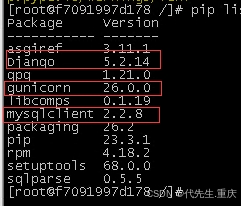
9、安装mysql-devel
bash
[root@f7091997d178 /]# dnf install mysql-devel
OS 350 B/s | 1.8 kB 00:05
everything 359 B/s | 1.8 kB 00:05
EPOL 387 B/s | 2.0 kB 00:05
debuginfo 357 B/s | 1.8 kB 00:05
source 346 B/s | 1.8 kB 00:05
update 351 B/s | 1.8 kB 00:05
update-source 345 B/s | 1.8 kB 00:05
Dependencies resolved.
======================================================================================================================================================================================================
Package Architecture Version Repository Size
======================================================================================================================================================================================================
Installing:
mysql-devel x86_64 8.0.46-1.oe2403sp3 update 96 k
Installing dependencies:
mysql-common x86_64 8.0.46-1.oe2403sp3 update 27 k
mysql-config x86_64 8.0.46-1.oe2403sp3 update 7.6 k
mysql-libs x86_64 8.0.46-1.oe2403sp3 update 1.2 M
openssl-devel x86_64 1:3.0.12-31.oe2403sp3 OS 4.7 M
pkgconf x86_64 1.9.5-2.oe2403sp3 OS 60 k
zlib-devel x86_64 1.2.13-4.oe2403sp3 OS 91 k
zstd-devel x86_64 1.5.5-3.oe2403sp3 OS 345 k
Transaction Summary
======================================================================================================================================================================================================
Install 8 Packages
Total download size: 6.6 M
Installed size: 23 M
Is this ok [y/N]: y
Downloading Packages:
(1/8): pkgconf-1.9.5-2.oe2403sp3.x86_64.rpm 5.6 kB/s | 60 kB 00:10
(2/8): zlib-devel-1.2.13-4.oe2403sp3.x86_64.rpm 8.4 kB/s | 91 kB 00:10
(3/8): mysql-common-8.0.46-1.oe2403sp3.x86_64.rpm 126 kB/s | 27 kB 00:00
(4/8): zstd-devel-1.5.5-3.oe2403sp3.x86_64.rpm 1.1 MB/s | 345 kB 00:00
(5/8): mysql-config-8.0.46-1.oe2403sp3.x86_64.rpm 6.0 kB/s | 7.6 kB 00:01
(6/8): mysql-devel-8.0.46-1.oe2403sp3.x86_64.rpm 75 kB/s | 96 kB 00:01
(7/8): mysql-libs-8.0.46-1.oe2403sp3.x86_64.rpm 3.7 MB/s | 1.2 MB 00:00
(8/8): openssl-devel-3.0.12-31.oe2403sp3.x86_64.rpm 354 kB/s | 4.7 MB 00:13
------------------------------------------------------------------------------------------------------------------------------------------------------------------------------------------------------
Total 278 kB/s | 6.6 MB 00:24
Running transaction check
Transaction check succeeded.
Running transaction test
Transaction test succeeded.
Running transaction
Preparing : 1/1
Installing : pkgconf-1.9.5-2.oe2403sp3.x86_64 1/8
Installing : openssl-devel-1:3.0.12-31.oe2403sp3.x86_64 2/8
Installing : zlib-devel-1.2.13-4.oe2403sp3.x86_64 3/8
Installing : zstd-devel-1.5.5-3.oe2403sp3.x86_64 4/8
Installing : mysql-config-8.0.46-1.oe2403sp3.x86_64 5/8
Installing : mysql-common-8.0.46-1.oe2403sp3.x86_64 6/8
Installing : mysql-libs-8.0.46-1.oe2403sp3.x86_64 7/8
Installing : mysql-devel-8.0.46-1.oe2403sp3.x86_64 8/8
Running scriptlet: mysql-devel-8.0.46-1.oe2403sp3.x86_64 8/8
Verifying : openssl-devel-1:3.0.12-31.oe2403sp3.x86_64 1/8
Verifying : pkgconf-1.9.5-2.oe2403sp3.x86_64 2/8
Verifying : zlib-devel-1.2.13-4.oe2403sp3.x86_64 3/8
Verifying : zstd-devel-1.5.5-3.oe2403sp3.x86_64 4/8
Verifying : mysql-common-8.0.46-1.oe2403sp3.x86_64 5/8
Verifying : mysql-config-8.0.46-1.oe2403sp3.x86_64 6/8
Verifying : mysql-devel-8.0.46-1.oe2403sp3.x86_64 7/8
Verifying : mysql-libs-8.0.46-1.oe2403sp3.x86_64 8/8
Installed:
mysql-common-8.0.46-1.oe2403sp3.x86_64 mysql-config-8.0.46-1.oe2403sp3.x86_64 mysql-devel-8.0.46-1.oe2403sp3.x86_64 mysql-libs-8.0.46-1.oe2403sp3.x86_64 openssl-devel-1:3.0.12-31.oe2403sp3.x86_64
pkgconf-1.9.5-2.oe2403sp3.x86_64 zlib-devel-1.2.13-4.oe2403sp3.x86_64 zstd-devel-1.5.5-3.oe2403sp3.x86_64
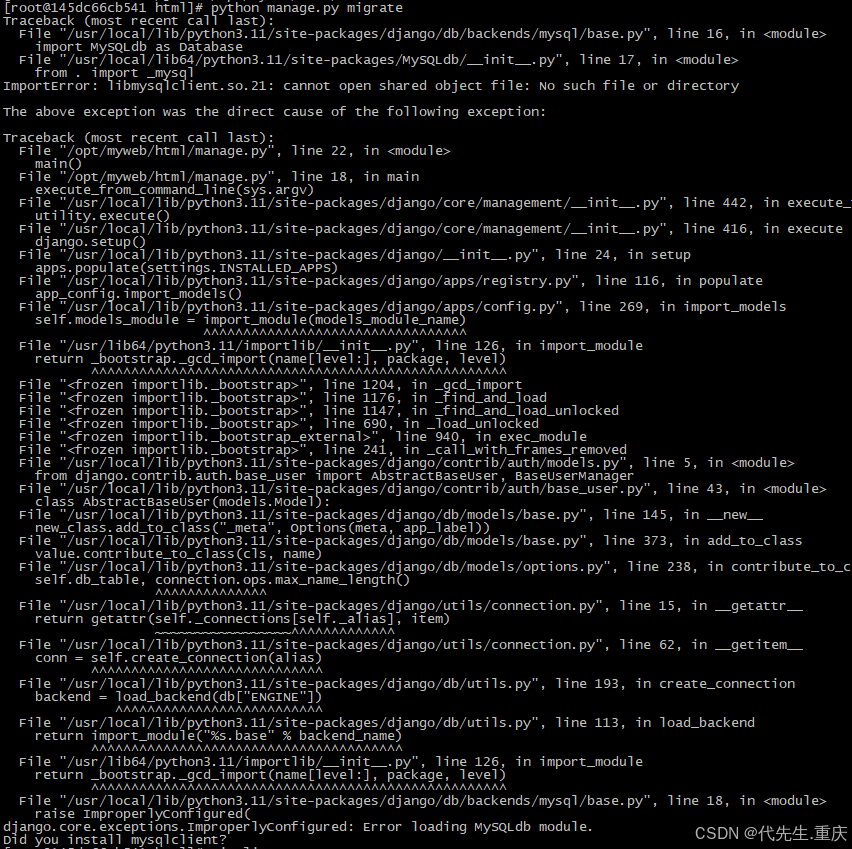
Complete!解决运行 migrate 命令时出现系统缺少 libmysqlclient.so.21 这个共享库文件的报错。
三、打包分发容器
1、打包容器为新镜像
bash
[root@localhost ~]# docker commit -a "daijianbing"  myweb django-5.2.14-withmysqlclient-py3-oe2403sp3
Emulate Docker CLI using podman. Create /etc/containers/nodocker to quiet msg.
Getting image source signatures
Copying blob 60d1b08a9795 skipped: already exists
Copying blob b1471400c183 done
Copying config f5d1c0fc99 done
Writing manifest to image destination
Storing signatures
f5d1c0fc9932f07f3070b7fd07dd2859dd6c8f5d68fef3d3373fbd456ba29986
2、将新镜像存为文件用于内网分发
bash
[root@localhost opt]# docker save -o django-5.2.14-withmysqlclient-py3-oe2403sp3.tar localhost/django-5.2.14-withmysqlclient-py3-oe2403sp3
Emulate Docker CLI using podman. Create /etc/containers/nodocker to quiet msg.
Copying blob 60d1b08a9795 done
Copying blob b1471400c183 done
Copying config f5d1c0fc99 done
Writing manifest to image destination
Storing signatures
[root@localhost opt]# ll django-5.2.14-withmysqlclient-py3-oe2403sp3.tar
-rw-r--r-- 1 root root 453230080 5月   8 16:10 django-5.2.14-withmysqlclient-py3-oe2403sp3.tar
至此,基于OE2403SP3的最小化django+mysqlclient容器封包完成。