目录
-
- 摘要
- 一、索引概述
-
- [1.1 什么是索引](#1.1 什么是索引)
- [1.2 DolphinDB索引类型](#1.2 DolphinDB索引类型)
- [1.3 索引优势](#1.3 索引优势)
- 二、分区索引
-
- [2.1 分区索引原理](#2.1 分区索引原理)
- [2.2 分区索引使用](#2.2 分区索引使用)
- [2.3 分区索引优化](#2.3 分区索引优化)
- 三、排序列索引
-
- [3.1 排序列索引原理](#3.1 排序列索引原理)
- [3.2 创建排序列索引](#3.2 创建排序列索引)
- [3.3 排序列索引使用](#3.3 排序列索引使用)
- [3.4 多列排序](#3.4 多列排序)
- 四、位图索引
-
- [4.1 位图索引原理](#4.1 位图索引原理)
- [4.2 创建位图索引](#4.2 创建位图索引)
- [4.3 位图索引使用](#4.3 位图索引使用)
- 五、索引选择策略
-
- [5.1 索引选择决策](#5.1 索引选择决策)
- [5.2 索引选择建议](#5.2 索引选择建议)
- [5.3 组合索引设计](#5.3 组合索引设计)
- 六、索引维护
-
- [6.1 查看索引](#6.1 查看索引)
- [6.2 索引性能监控](#6.2 索引性能监控)
- [6.3 索引重建](#6.3 索引重建)
- 七、索引优化实战
-
- [7.1 工业物联网索引设计](#7.1 工业物联网索引设计)
- [7.2 多租户索引设计](#7.2 多租户索引设计)
- 八、总结
- 参考资料
摘要
本文深入讲解DolphinDB索引设计。从索引原理到类型选择,从索引创建到维护管理,从查询优化到最佳实践,全面介绍如何通过索引提升查询性能。通过丰富的代码示例,帮助读者掌握索引设计的核心技能。
一、索引概述
1.1 什么是索引
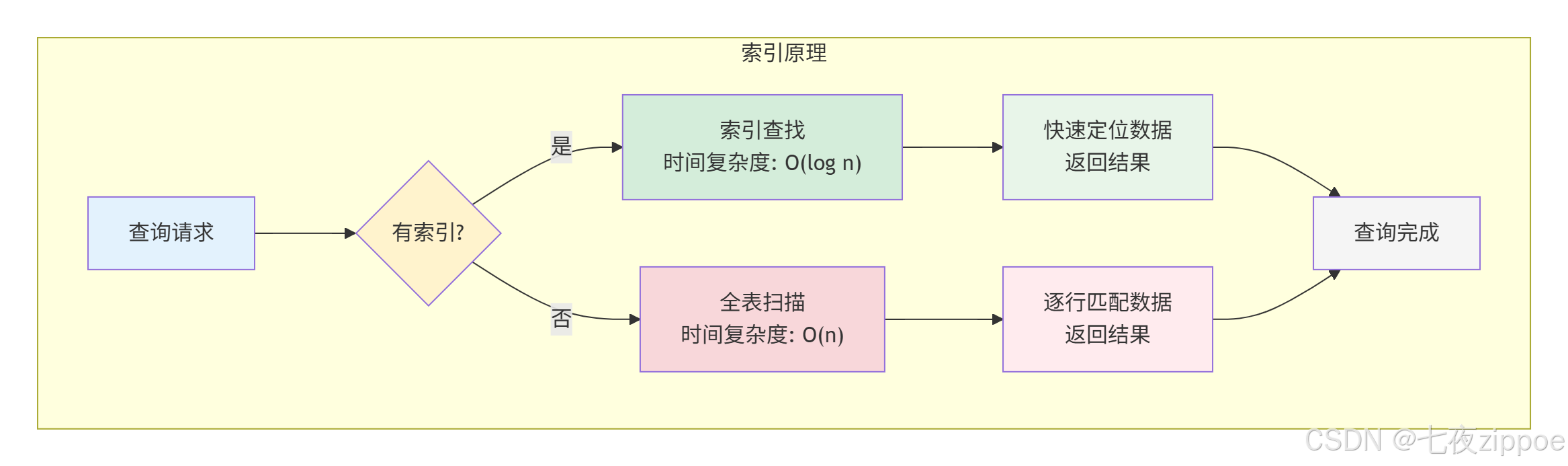
索引是数据库中用于加速查询的数据结构,类似于书籍的目录:
1.2 DolphinDB索引类型
| 索引类型 | 说明 | 适用场景 |
|---|---|---|
| 分区索引 | 分区列自动索引 | 分区查询 |
| 排序列索引 | 排序列索引 | 范围查询 |
| 位图索引 | 位图索引 | 低基数列 |
1.3 索引优势
| 优势 | 说明 |
|---|---|
| 加速查询 | 减少数据扫描量 |
| 加速排序 | 利用索引顺序 |
| 加速聚合 | 利用索引分组 |
二、分区索引
2.1 分区索引原理
分区索引是DolphinDB自动为分区列创建的索引:
分区索引
匹配
匹配
分区1
数据块1
分区2
数据块2
分区3
数据块3
查询条件
分区匹配
2.2 分区索引使用
python
// 创建分区表
db = database("dfs://partition_index_db", VALUE, 1..100)
schema = table(1:0, `device_id`timestamp`temperature`humidity,
               [INT, TIMESTAMP, DOUBLE, DOUBLE])
db.createPartitionedTable(schema, `sensor_data, `device_id)

// 插入数据
t = table(
    take(1..100, 100000) as device_id,
    take(now(), 100000) as timestamp,
    rand(20.0..30.0, 100000) as temperature,
    rand(40.0..60.0, 100000) as humidity
)
loadTable("dfs://partition_index_db", "sensor_data").append!(t)

// 分区索引自动生效
t = loadTable("dfs://partition_index_db", "sensor_data")

// 查询1:精确匹配分区(快)
timer select count(*) from t where device_id = 50

// 查询2:IN条件(快)
timer select count(*) from t where device_id in [1, 2, 3]

// 查询3:范围查询(快)
timer select count(*) from t where device_id between 1 and 10
2.3 分区索引优化
python
// 分区索引优化建议

// 1. 查询条件包含分区列
select * from t where device_id = 1 and temperature > 25  // 好

// 2. 避免函数包装分区列
select * from t where device_id + 1 = 2  // 索引失效

// 3. 避免类型转换
select * from t where string(device_id) = "1"  // 索引失效
三、排序列索引
3.1 排序列索引原理
排序列索引是DolphinDB为排序列创建的索引,支持高效的范围查询:
排序列索引
数据写入
按排序列排序
创建索引块
范围查询加速
3.2 创建排序列索引
python
// 创建带排序列的分区表
db = database("dfs://sort_index_db", VALUE, 1..100)
schema = table(1:0, `device_id`timestamp`temperature`humidity,
               [INT, TIMESTAMP, DOUBLE, DOUBLE])

// 指定排序列
db.createPartitionedTable(schema, `sensor_data, `device_id, `timestamp)

// 插入数据
t = table(
    take(1..100, 100000) as device_id,
    2024.01.01T00:00:00 + take(0..99999, 100000) * 1000 as timestamp,
    rand(20.0..30.0, 100000) as temperature,
    rand(40.0..60.0, 100000) as humidity
)
loadTable("dfs://sort_index_db", "sensor_data").append!(t)
3.3 排序列索引使用
python
t = loadTable("dfs://sort_index_db", "sensor_data")

// 范围查询利用排序索引
timer select * from t
where device_id = 1
and timestamp between 2024.01.01T00:00:00 and 2024.01.01T01:00:00

// 时间窗口查询
timer select * from t
where device_id = 1
and timestamp >= 2024.01.01T00:00:00
and timestamp < 2024.01.01T01:00:00

// 查看执行计划
explain select * from t
where device_id = 1
and timestamp between 2024.01.01T00:00:00 and 2024.01.01T01:00:00
3.4 多列排序
python
// 多列排序
db = database("dfs://multi_sort_db", VALUE, 1..100)
schema = table(1:0, `device_id`timestamp`temperature`humidity,
               [INT, TIMESTAMP, DOUBLE, DOUBLE])

// 指定多列排序
db.createPartitionedTable(schema, `sensor_data, `device_id,
                          `timestamp`temperature)

// 查询利用多列排序
t = loadTable("dfs://multi_sort_db", "sensor_data")
select * from t
where device_id = 1
and timestamp between 2024.01.01T00:00:00 and 2024.01.01T01:00:00
and temperature between 20 and 25
四、位图索引
4.1 位图索引原理
位图索引使用位图表示列值,适合低基数列:
位图索引
状态列
在线: 10101
离线: 01010
故障: 00000
查询: 状态=在线
位图AND运算
快速定位
4.2 创建位图索引
python
// 创建带状态列的表
db = database("dfs://bitmap_db", VALUE, 1..100)
schema = table(1:0, `device_id`timestamp`status`temperature,
               [INT, TIMESTAMP, SYMBOL, DOUBLE])
db.createPartitionedTable(schema, `sensor_data, `device_id)

// 插入数据
t = table(
    take(1..100, 100000) as device_id,
    take(now(), 100000) as timestamp,
    take(`online`offline`error, 100000) as status,
    rand(20.0..30.0, 100000) as temperature
)
loadTable("dfs://bitmap_db", "sensor_data").append!(t)

// SYMBOL类型自动使用位图索引
4.3 位图索引使用
python
t = loadTable("dfs://bitmap_db", "sensor_data")

// 位图索引加速低基数列查询
timer select count(*) from t where status = `online

// 多条件查询
timer select count(*) from t
where device_id = 1 and status = `online

// IN查询
timer select count(*) from t
where status in [`online, `offline]
五、索引选择策略
5.1 索引选择决策
低基数
<100
高基数
>100
范围查询
精确查询
选择索引类型
列基数
位图索引
查询模式
排序列索引
分区索引
组合策略
分区 + 排序
分区 + 位图
5.2 索引选择建议
| 列类型 | 基数 | 查询模式 | 推荐索引 |
|---|---|---|---|
| 设备ID | 高 | 精确匹配 | 分区索引 |
| 时间戳 | 高 | 范围查询 | 排序列索引 |
| 状态 | 低 | 精确匹配 | 位图索引 |
| 地区 | 中 | 精确匹配 | 分区/位图 |
5.3 组合索引设计
python
// 组合索引设计示例
db = database("dfs://combo_index_db", COMPO,
    [RANGE, 2024.01.01..2024.12.31,  // 时间分区
     VALUE, 1..100])                  // 设备分区

schema = table(1:0,
    `device_id`timestamp`status`temperature`humidity,
    [INT, TIMESTAMP, SYMBOL, DOUBLE, DOUBLE])

// 排序列 + SYMBOL位图
db.createPartitionedTable(schema, `sensor_data,
                          `timestamp`device_id,  // 分区列
                          `timestamp)            // 排序列

// 查询优化
t = loadTable("dfs://combo_index_db", "sensor_data")

// 利用所有索引
select * from t
where date(timestamp) = 2024.01.15  // 分区裁剪
and device_id = 50                   // 分区裁剪
and status = `online                 // 位图索引
六、索引维护
6.1 查看索引
python
// 查看表结构(包含索引信息)
t = loadTable("dfs://sort_index_db", "sensor_data")
schema(t)

// 查看分区方案
db = database("dfs://sort_index_db")
db.partitionSchema()
6.2 索引性能监控
python
// 索引使用效果对比
def compareIndexPerformance() {
    t = loadTable("dfs://sort_index_db", "sensor_data")

    // 使用索引
    timer {
        select count(*) from t
        where device_id = 1
        and timestamp between 2024.01.01T00:00:00 and 2024.01.01T01:00:00
    }

    // 不使用索引(模拟)
    timer {
        select count(*) from t
        where temperature > 25
    }
}

compareIndexPerformance()
6.3 索引重建
python
// 索引自动维护,通常无需手动重建

// 如果需要重新排序
// 可以重新写入数据
t = loadTable("dfs://sort_index_db", "sensor_data")
data = select * from t

// 删除旧表
dropTable(database("dfs://sort_index_db"), "sensor_data")

// 重新创建并写入
db = database("dfs://sort_index_db")
db.createPartitionedTable(schema, `sensor_data, `device_id, `timestamp)
loadTable("dfs://sort_index_db", "sensor_data").append!(data)
七、索引优化实战
7.1 工业物联网索引设计
python
// 工业物联网数据索引设计
db = database("dfs://iot_index_db", COMPO,
    [RANGE, 2024.01.01..2024.12.31,  // 时间分区
     HASH, [INT, 100]])               // 设备哈希

// 设备数据表
schema = table(1:0,
    `device_id`timestamp`temperature`humidity`pressure`status`alarm,
    [INT, TIMESTAMP, DOUBLE, DOUBLE, DOUBLE, SYMBOL, BOOL])

// 排序列:timestamp
// SYMBOL列:status(自动位图索引)
db.createPartitionedTable(schema, `device_data, `timestamp`device_id, `timestamp)

// 查询优化
t = loadTable("dfs://iot_index_db", "device_data")

// 查询1:时间范围 + 设备(分区裁剪 + 排序索引)
select * from t
where date(timestamp) = 2024.01.15
and device_id = 50
and timestamp between 2024.01.15T00:00:00 and 2024.01.15T01:00:00

// 查询2:时间范围 + 状态(分区裁剪 + 位图索引)
select * from t
where date(timestamp) = 2024.01.15
and status = `online

// 查询3:告警查询(分区裁剪 + 位图索引)
select * from t
where date(timestamp) = 2024.01.15
and alarm = true
7.2 多租户索引设计
python
// 多租户数据索引设计
tenants = `tenant_001`tenant_002`tenant_003`tenant_004`tenant_005
db = database("dfs://tenant_index_db", COMPO,
    [VALUE, tenants,                  // 租户分区
     RANGE, 2024.01.01..2024.12.31])  // 时间分区

// 订单表
schema = table(1:0,
    `tenant_id`order_id`timestamp`user_id`amount`status,
    [SYMBOL, STRING, TIMESTAMP, STRING, DOUBLE, SYMBOL])

// 排序列:timestamp
// SYMBOL列:tenant_id, status(自动位图索引)
db.createPartitionedTable(schema, `orders, `tenant_id`timestamp, `timestamp)

// 查询优化
t = loadTable("dfs://tenant_index_db", "orders")

// 租户数据隔离查询
select * from t
where tenant_id = `tenant_001
and date(timestamp) = 2024.01.15
and status = `completed
八、总结
本文详细介绍了DolphinDB索引设计:
- 索引原理:加速查询的数据结构
- 分区索引:分区列自动索引
- 排序列索引:范围查询加速
- 位图索引:低基数列优化
- 索引选择:根据列基数和查询模式选择
- 索引维护:查看索引、性能监控
思考题:
- 如何选择合适的索引类型?
- 排序列索引适合什么场景?
- 如何设计多列组合索引?