参考界面
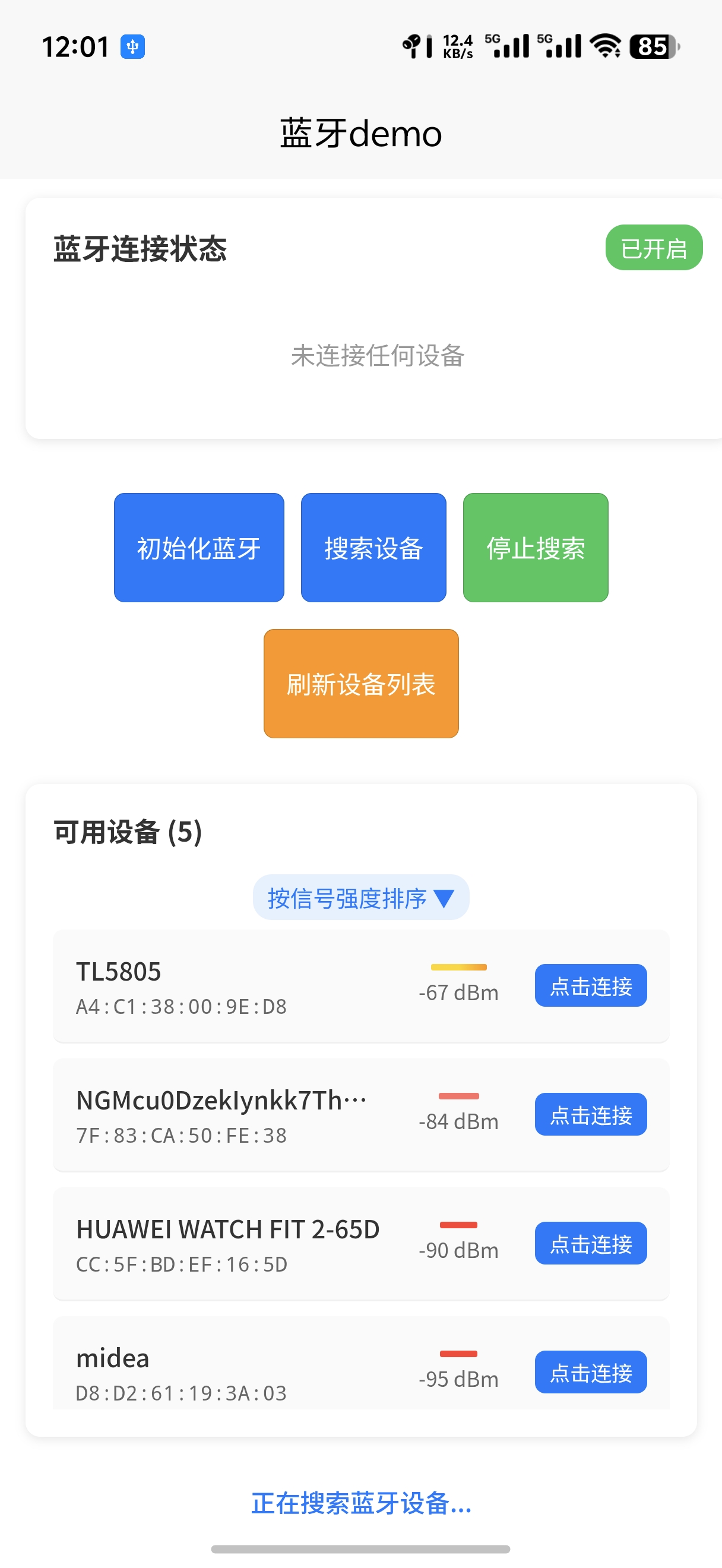
注意在manifest.json里在 安卓打包配置里permissions里配置蓝牙模块
javascript
					"<uses-permission android:name=\"android.permission.BLUETOOTH\"/>",
					//蓝牙管理权限
					"<uses-permission android:name=\"android.permission.BLUETOOTH_ADMIN\"/>",
					// 蓝牙配对权限
					"<uses-permission android:name=\"android.permission.BLUETOOTH_PRIVILEGED\"/>",
					"<uses-permission android:name=\"android.permission.ACCESS_FINE_LOCATION\"/>",
					"<uses-permission android:name=\"android.permission.ACCESS_COARSE_LOCATION\"/>",
					//用于使用蓝牙扫描附件其他的蓝牙设备 Android 12
					"<uses-permission android:name=\"android.permission.BLUETOOTH_SCAN\"/>",
					//用于允许当前的设备被其他的蓝牙设备所发现 Android 12
					"<uses-permission android:name=\"android.permission.BLUETOOTH_ADVERTISE\"/>",
					//用于连接之前已经配对过的蓝牙设备 Android 12
					"<uses-permission android:name=\"android.permission.BLUETOOTH_CONNECT\"/>"
以下是参考代码
html
<template>
	<view class="content" :class="{ 'landscape': isLandscape }">
	<view class="text-area">
			<text class="title">{{title}}</text>
		</view>

		<!-- 蓝牙状态显示 -->
		<view class="bluetooth-section">
			<view class="status-card">
				<view class="status-header">
					<text class="status-title">蓝牙连接状态</text>
					<view class="status-indicator" :class="bluetoothStatus">
						{{ getStatusText(bluetoothStatus) }}
					</view>
				</view>

				<view class="device-info" v-if="connectedDevice">
					<text class="info-label">已连接设备:</text>
					<text class="info-value">{{ connectedDevice.name }}</text>
					<text class="info-label">设备ID:</text>
					<text class="info-value">{{ connectedDevice.deviceId }}</text>
				</view>

				<view class="no-device" v-else>
					<text class="no-device-text">未连接任何设备</text>
				</view>
			</view>

			<!-- 操作按钮 -->
			<view class="action-buttons" :class="{ 'landscape-buttons': isLandscape }">
				<button class="btn" @click="initBluetooth" :disabled="loading">
					{{ loading ? '操作中...' : '初始化蓝牙' }}
				</button>

				<button class="btn" @click="startBluetoothDiscovery" :disabled="!bluetoothAvailable">
					搜索设备
				</button>

				<button class="btn btn-secondary" @click="stopBluetoothDiscovery" :disabled="!isDiscovering">
					停止搜索
				</button>
				<!-- 添加刷新按钮 -->
				<button class="btn btn-refresh" @click="refreshDevices" :disabled="loading">
					刷新设备列表
				</button>

				<!-- <button class="btn btn-danger" @click="closeBluetooth" :disabled="!bluetoothAvailable">
			  	关闭蓝牙
			  </button> -->
			</view>

			<!-- 服务信息 -->
			<view class="service-section" v-if="services.length > 0">
				<view class="service-card">
					<text class="section-title">设备服务信息</text>

					<view class="service-info">
						<text class="info-label">服务数量:</text>
						<text class="info-value">{{ services.length }} 个</text>

						<text class="info-label">当前服务:</text>
						<text class="info-value">{{ currentServiceId }}</text>

						<text class="info-label">特征值数量:</text>
						<text class="info-value">{{ characteristics.length }} 个</text>
					</view>
				</view>
			</view>

			<!-- 数据通信 -->
			<view class="communication-section" v-if="deviceConnected">
				<view class="communication-card">
					<text class="section-title">数据通信</text>

					<!-- 发送数据 -->
					<view class="send-section">
						<text class="input-label">发送数据:</text>
						<view class="input-group">
							<input class="data-input" v-model="sendData" placeholder="输入要发送的数据" />
							<button class="btn btn-send" @click="sendDataToDevice">发送</button>
						</view>
					</view>

					<!-- 接收数据 -->
					<view class="receive-section">
						<view class="receive-header">
							<text class="receive-title">接收数据 (最近50条)</text>
							<text class="receive-count">{{ receivedData.length }} 条</text>
						</view>

						<scroll-view class="receive-scroll" scroll-y>
							<view v-for="(item, index) in receivedData" :key="index" class="data-item">
								<text class="data-time">{{ item.timestamp }}</text>
								<text class="data-content">{{ item.data }}</text>
							</view>
						</scroll-view>
					</view>
				</view>
			</view>
			<!-- 设备列表 -->
			<!-- 设备列表 -->
			<view class="devices-list" v-if="devices.length > 0">
				<text class="list-title">可用设备 ({{ devices.length }})</text>
				<view class="sort-info">
					<text class="sort-text">按信号强度排序 ▼</text>
				</view>
				<scroll-view class="devices-scroll" scroll-y>
					<view v-for="device in devices" :key="device.deviceId" class="device-item"
						@click="connectToDevice(device)">
						<view class="device-main">
							<text class="device-name">{{ device.name || '未知设备' }}</text>
							<text class="device-id">{{ device.deviceId }}</text>
						</view>
						<view class="device-rssi">
							<view class="rssi-indicator" :class="getRSSILevel(device.RSSI)"></view>
							<text class="rssi-text">{{ getRSSIDisplay(device.RSSI) }}</text>
						</view>
						<view class="connect-indicator" :class="{ 'connected': device.connected }">
							{{ device.connected ? '已连接' : '点击连接' }}
						</view>
					</view>
				</scroll-view>
			</view>

			<!-- 连接状态提示 -->
			<view class="connection-status" v-if="connectionStatus">
				<text :class="['status-text', connectionStatus.type]">
					{{ connectionStatus.message }}
				</text>
			</view>
		</view>
	</view>
</template>

<script>
export default {
	data() {
		return {
			bluetoothStatus: 'unavailable',
			bluetoothAvailable: false,
			isDiscovering: false,
			devices: [],
			connectedDevice: null,
			loading: false,
			connectionStatus: null,
			isLandscape: false, // 添加横屏状态
			windowHeight: 0,
			windowWidth: 0,
			// 新增蓝牙服务相关数据
			services: [], // 设备服务列表
			characteristics: [], // 特征值列表
			currentServiceId: '', // 当前选择的服务ID
			currentCharacteristicId: '', // 当前选择的特征值ID
			notifyEnabled: false, // 是否开启通知
			deviceConnected: false, // 设备连接状态
			receivedData: [], // 接收到的数据
			sendData: '' // 要发送的数据
		}
	},
	onLoad() {
		this.initBluetooth();
		this.checkBluetoothStatus();
		this.checkScreenOrientation(); // 检查初始屏幕方向
		this.startOrientationListener(); // 开始监听屏幕方向变化
		// 添加权限检查
		this.checkAndRequestPermissions();
	},
	onUnload() {
		// 页面卸载时关闭蓝牙
		this.closeBluetooth();
	},
	methods: {
		// 获取信号强度显示文本
		getRSSIDisplay(rssi) {
			if (rssi === null || rssi === undefined) return '未知';
			return `${rssi} dBm`;
		},

		// 获取信号强度等级
		getRSSILevel(rssi) {
			if (rssi === null || rssi === undefined) return 'unknown';

			if (rssi >= -50) return 'excellent'; // 优秀
			if (rssi >= -60) return 'good'; // 良好
			if (rssi >= -70) return 'fair'; // 一般
			if (rssi >= -80) return 'weak'; // 较弱
			return 'very-weak'; // 很弱
		},

		// 刷新设备列表
		async refreshDevices() {
			this.loading = true;
			try {
				// 清空当前列表
				this.devices = [];

				// 重新获取已配对设备
				await this.getPairedDevices();

				// 重新开始搜索
				if (this.bluetoothAvailable && !this.isDiscovering) {
					await this.startBluetoothDiscovery();
				}

				this.connectionStatus = {
					message: '设备列表已刷新',
					type: 'success'
				};
			} catch (error) {
				console.error('刷新设备列表失败:', error);
			} finally {
				this.loading = false;
			}
		},
		// 检查并请求权限
		async checkAndRequestPermissions() {
			try {
				// 检查位置权限(蓝牙扫描需要)
				const result = await uni.authorize({
					scope: 'scope.location'
				});
				console.log('位置权限授权结果:', result);

				// 对于 Android 12+,还需要蓝牙扫描权限
				// if (uni.getSystemInfoSync().platform === 'android') {
				// 	// 尝试请求蓝牙相关权限
				// 	await this.requestBluetoothPermissions();
				// }

			} catch (error) {
				console.log('权限授权失败或用户拒绝:', error);
				// 可以在这里引导用户去设置页面开启权限
				// this.showPermissionGuide();
			}
		},

		// 请求蓝牙权限
		async requestBluetoothPermissions() {
			return new Promise((resolve, reject) => {
				// 这里可以使用原生插件或自定义方式请求权限
				// 暂时使用提示方式
				uni.showModal({
					title: '蓝牙权限提示',
					content: '应用需要蓝牙权限来扫描和连接设备,请确保已授予相关权限',
					showCancel: false,
					success: resolve,
					fail: reject
				});
			});
		},
		async getConnectedDevices() {
			try {
				const res = await uni.getConnectedBluetoothDevices({
					services: [] // 空数组表示获取所有已连接设备
				});

				console.log('已连接的蓝牙设备:', res.devices);

				if (res.devices && res.devices.length > 0) {
					// 处理已连接的设备
					res.devices.forEach(device => {
						// 更新设备列表中的连接状态
						this.devices = this.devices.map(d => {
							if (d.deviceId === device.deviceId) {
								return {
									...d,
									connected: true
								};
							}
							return d;
						});

						// 设置当前连接设备
						this.connectedDevice = {
							name: device.name,
							deviceId: device.deviceId
						};
					});

					// 排序设备列表
					this.sortDevicesByRSSI();
				} else {
					console.log('没有已连接的设备');
					this.connectedDevice = null;
				}
			} catch (err) {
				console.error('获取已连接设备失败:', err);
				// 如果API不支持,尝试使用其他方法
				this.fallbackGetConnectedDevices();
			}
		},

		// 备选方法:通过设备列表筛选已连接设备
		fallbackGetConnectedDevices() {
			uni.getBluetoothDevices({
				success: (res) => {
					const connectedDevices = res.devices.filter(device => {
						// 这里可以根据实际需求判断设备是否已连接
						// 有些平台可能没有明确的连接状态标识
						return device.connected || this.isDeviceConnected(device.deviceId);
					});

					if (connectedDevices.length > 0) {
						const device = connectedDevices[0];
						this.connectedDevice = {
							name: device.name,
							deviceId: device.deviceId
						};

						// 更新设备列表连接状态
						this.devices = this.devices.map(d => {
							if (d.deviceId === device.deviceId) {
								return {
									...d,
									connected: true
								};
							}
							return d;
						});

						// 排序设备列表
						this.sortDevicesByRSSI();
					}
				}
			});
		},
		// 检查设备是否已连接
		isDeviceConnected(deviceId) {
			// 这里可以添加您的设备连接判断逻辑
			return this.connectedDevice && this.connectedDevice.deviceId === deviceId;
		},

		// 检查屏幕方向
		checkScreenOrientation() {
			const res = uni.getSystemInfoSync();
			this.windowHeight = res.windowHeight;
			this.windowWidth = res.windowWidth;
			this.isLandscape = res.windowWidth > res.windowHeight;
		},

		// 监听屏幕方向变化
		startOrientationListener() {
			uni.onWindowResize((res) => {
				this.windowHeight = res.size.windowHeight;
				this.windowWidth = res.size.windowWidth;
				this.isLandscape = res.size.windowWidth > res.size.windowHeight;
			});
		},

		// 在页面卸载时取消监听
		beforeDestroy() {
			uni.offWindowResize();
		},
		// 检查蓝牙状态
		async checkBluetoothStatus() {
			try {
				const res = await uni.getBluetoothAdapterState();
				console.log('蓝牙适配器状态:', res);
				this.bluetoothStatus = res.available ? 'enabled' : 'disabled';
				this.bluetoothAvailable = res.available;
				this.isDiscovering = res.discovering;
			} catch (error) {
				console.error('获取蓝牙状态失败:', error);
				this.bluetoothStatus = 'unavailable';
				this.bluetoothAvailable = false;
			}
		},

		// 初始化蓝牙
		async initBluetooth() {
			this.loading = true;
			this.connectionStatus = {
				message: '正在初始化蓝牙...',
				type: 'info'
			};

			try {
				// 先检查权限
				await this.checkAndRequestPermissions();

				// 打开蓝牙适配器
				await uni.openBluetoothAdapter();

				this.connectionStatus = {
					message: '蓝牙初始化成功',
					type: 'success'
				};

				this.bluetoothStatus = 'enabled';
				this.bluetoothAvailable = true;

				// 开始监听蓝牙状态变化
				this.startBluetoothListeners();

				// 先获取已连接设备,再开始搜索
				await this.getConnectedDevices();

				// 如果已经有连接设备,就不需要搜索了
				if (!this.connectedDevice) {
					setTimeout(() => {
						this.startBluetoothDiscovery();
					}, 1000);
				}

			} catch (error) {
				console.error('蓝牙初始化失败:', error);
				this.handleBluetoothError(error);

				// 如果是权限问题,提示用户
				if (error.errCode === 10013) {
					this.showPermissionGuide();
				}
			} finally {
				this.loading = false;
			}
		},

		// 开始监听蓝牙事件
		startBluetoothListeners() {
			// 蓝牙适配器状态变化
			uni.onBluetoothAdapterStateChange((res) => {
				console.log('蓝牙适配器状态变化:', res);
				this.bluetoothAvailable = res.available;
				this.isDiscovering = res.discovering;
				this.bluetoothStatus = res.available ? 'enabled' : 'disabled';
				this.getConnectedDevices();
			});

			// 发现新设备 - 增强日志
			uni.onBluetoothDeviceFound((res) => {
				// console.log('发现新设备详情:', res.devices);

				// 过滤设备,包括经典蓝牙设备
				const filteredDevices = res.devices.filter(device => {

					return device.deviceId && (device.name || device.localName);
				});

				// console.log('过滤后的设备:', filteredDevices);
				this.addOrUpdateDevices(filteredDevices);
			});

			// 蓝牙连接状态变化
			uni.onBLEConnectionStateChange((res) => {
				console.log('蓝牙连接状态变化:', res);
				this.handleConnectionStateChange(res);
			});
		},
		// 添加或更新设备列表,并按信号强度排序
		addOrUpdateDevices(newDevices) {
			newDevices.forEach(newDevice => {
				const existingIndex = this.devices.findIndex(d => d.deviceId === newDevice.deviceId);
				if (existingIndex > -1) {
					// 更新现有设备信息,保留连接状态
					this.devices[existingIndex] = {
						...this.devices[existingIndex],
						...newDevice
					};
				} else {
					// 添加新设备
					this.devices.push({
						...newDevice,
						connected: false
					});
				}
			});

			// 按信号强度排序,信号最强的排在最上面
			this.sortDevicesByRSSI();
		},

		// 按信号强度排序设备
		sortDevicesByRSSI() {
			this.devices.sort((a, b) => {
				// 处理 RSSI 值为 null 或 undefined 的情况
				const rssiA = a.RSSI !== null && a.RSSI !== undefined ? a.RSSI : -999;
				const rssiB = b.RSSI !== null && b.RSSI !== undefined ? b.RSSI : -999;

				// RSSI 值越大表示信号越强,所以降序排列
				return rssiB - rssiA;
			});
		},

		// 开始搜索设备
		async startBluetoothDiscovery() {
			if (!this.bluetoothAvailable) {
				this.connectionStatus = {
					message: '蓝牙未初始化或不可用',
					type: 'error'
				};
				return;
			}

			try {
				// 清空设备列表
				this.devices = [];

				this.connectionStatus = {
					message: '正在搜索蓝牙设备...',
					type: 'info'
				};

				// 先获取已配对设备
				await this.getPairedDevices();

				// 开始搜索新设备
				await uni.startBluetoothDevicesDiscovery({
					allowDuplicatesKey: true, // 改为 true 以获取更多设备
					interval: 1000, // 缩短间隔
					powerLevel: 'high' // 高功率扫描
				});

				this.isDiscovering = true;
				this.connectionStatus = {
					message: '正在搜索蓝牙设备...',
					type: 'info'
				};

				// 30秒后自动停止搜索(给更多时间)
				setTimeout(() => {
					this.stopBluetoothDiscovery();
				}, 30000);

			} catch (error) {
				console.error('开始搜索失败:', error);
				this.connectionStatus = {
					message: `搜索失败: ${error.errMsg || error.message}`,
					type: 'error'
				};
			}
		},
		// 获取已配对设备
		async getPairedDevices() {
			return new Promise((resolve) => {
				uni.getBluetoothDevices({
					success: (res) => {
						console.log('已配对设备:', res.devices);
						if (res.devices && res.devices.length > 0) {
							// 过滤出有效的设备
							const validDevices = res.devices.filter(device =>
								device.name && device.deviceId
							);
							this.addOrUpdateDevices(validDevices);
						}
						resolve();
					},
					fail: (err) => {
						console.error('获取已配对设备失败:', err);
						resolve();
					}
				});
			});
		},

		// 停止搜索设备
		async stopBluetoothDiscovery() {
			try {
				await uni.stopBluetoothDevicesDiscovery();
				this.isDiscovering = false;
				this.connectionStatus = {
					message: '已停止搜索设备',
					type: 'info'
				};
			} catch (error) {
				console.error('停止搜索失败:', error);
			}
		},

		// 连接到设备
		async connectToDevice(device) {
			if (device.connected) {
				this.connectionStatus = {
					message: '设备已连接',
					type: 'info'
				};
				return;
			}

			this.loading = true;
			this.connectionStatus = {
				message: `正在连接 ${device.name || '设备'}...`,
				type: 'info'
			};

			try {
				// 创建蓝牙连接
				await uni.createBLEConnection({
					deviceId: device.deviceId,
					timeout: 10000
				});

				this.connectionStatus = {
					message: '连接成功,正在发现服务...',
					type: 'info'
				};

				// 等待一段时间让连接稳定
				await new Promise(resolve => setTimeout(resolve, 500));

				// 获取蓝牙设备服务
				await this.getBLEDeviceServices(device.deviceId);

				this.deviceConnected = true;

				// 更新设备连接状态
				this.updateDeviceConnectionStatus(device.deviceId, true);

			} catch (error) {
				console.error('连接设备失败:', error);
				this.connectionStatus = {
					message: `连接失败: ${error.errMsg || error.message}`,
					type: 'error'
				};
				this.updateDeviceConnectionStatus(device.deviceId, false);
			} finally {
				this.loading = false;
			}
		},
		// 获取蓝牙设备服务
		async getBLEDeviceServices(deviceId) {
			try {
				const res = await uni.getBLEDeviceServices({
					deviceId: deviceId
				});

				console.log('获取设备服务成功:', res.services);
				this.services = res.services;

				if (res.services && res.services.length > 0) {
					// 默认选择第一个服务
					this.currentServiceId = res.services[0].uuid;
					this.connectionStatus = {
						message: `发现 ${res.services.length} 个服务,正在获取特征值...`,
						type: 'info'
					};

					// 获取该服务的特征值
					await this.getBLEDeviceCharacteristics(deviceId, this.currentServiceId);
				} else {
					this.connectionStatus = {
						message: '未发现任何服务',
						type: 'warning'
					};
				}
			} catch (error) {
				console.error('获取设备服务失败:', error);
				this.connectionStatus = {
					message: `获取服务失败: ${error.errMsg || error.message}`,
					type: 'error'
				};
			}
		},
		// 获取蓝牙设备特征值
		async getBLEDeviceCharacteristics(deviceId, serviceId) {
			try {
				const res = await uni.getBLEDeviceCharacteristics({
					deviceId: deviceId,
					serviceId: serviceId
				});

				console.log('获取特征值成功:', res.characteristics);
				this.characteristics = res.characteristics;

				if (res.characteristics && res.characteristics.length > 0) {
					this.connectionStatus = {
						message: `发现 ${res.characteristics.length} 个特征值`,
						type: 'success'
					};

					// 自动寻找可读写的特征值
					await this.setupCharacteristic(deviceId, serviceId, res.characteristics);
				} else {
					this.connectionStatus = {
						message: '未发现任何特征值',
						type: 'warning'
					};
				}
			} catch (error) {
				console.error('获取特征值失败:', error);
				this.connectionStatus = {
					message: `获取特征值失败: ${error.errMsg || error.message}`,
					type: 'error'
				};
			}
		},
		// 设置特征值(自动寻找合适的特征值并开启通知)
		async setupCharacteristic(deviceId, serviceId, characteristics) {
			// 优先寻找支持 notify 和 write 的特征值
			const suitableChar = characteristics.find(char => {
				return char.properties.notify && char.properties.write;
			});

			if (suitableChar) {
				this.currentCharacteristicId = suitableChar.uuid;

				// 开启通知
				await this.enableBLECharacteristicNotification(deviceId, serviceId, suitableChar.uuid);

				this.connectionStatus = {
					message: '已开启数据通知,可以通信了',
					type: 'success'
				};

			} else {
				// 如果没有同时支持 notify 和 write 的特征值,寻找其他可用特征值
				const notifyChar = characteristics.find(char => char.properties.notify);
				const writeChar = characteristics.find(char => char.properties.write);

				if (notifyChar) {
					await this.enableBLECharacteristicNotification(deviceId, serviceId, notifyChar.uuid);
				}

				if (writeChar) {
					this.currentCharacteristicId = writeChar.uuid;
				}

				this.connectionStatus = {
					message: '已配置可用特征值',
					type: 'info'
				};
			}
		},
		// 开启特征值通知
		async enableBLECharacteristicNotification(deviceId, serviceId, characteristicId) {
			try {
				await uni.notifyBLECharacteristicValueChange({
					deviceId: deviceId,
					serviceId: serviceId,
					characteristicId: characteristicId,
					state: true
				});

				this.notifyEnabled = true;
				console.log('开启通知成功');

				// 监听特征值变化
				uni.onBLECharacteristicValueChange((res) => {
					this.onBLECharacteristicValueChange(res);
				});

			} catch (error) {
				console.error('开启通知失败:', error);
				this.connectionStatus = {
					message: `开启通知失败: ${error.errMsg || error.message}`,
					type: 'error'
				};
			}
		},
		// 接收到蓝牙设备数据
		onBLECharacteristicValueChange(res) {
			console.log('接收到蓝牙数据:', res);

			// 将 ArrayBuffer 转换为十六进制字符串
			const hexString = this.ab2hex(res.value);
			const timestamp = new Date().toLocaleTimeString();

			this.receivedData.unshift({
				timestamp: timestamp,
				data: hexString,
				raw: res.value
			});

			// 限制接收数据条数
			if (this.receivedData.length > 50) {
				this.receivedData = this.receivedData.slice(0, 50);
			}

			console.log(`[${timestamp}] 接收数据: ${hexString}`);
		},
		// 向蓝牙设备发送数据
		async sendDataToDevice() {
			if (!this.deviceConnected || !this.currentCharacteristicId || !this.sendData) {
				this.connectionStatus = {
					message: '请先连接设备并输入要发送的数据',
					type: 'warning'
				};
				return;
			}

			try {
				// 将字符串转换为 ArrayBuffer
				const buffer = this.str2ab(this.sendData);

				await uni.writeBLECharacteristicValue({
					deviceId: this.connectedDevice.deviceId,
					serviceId: this.currentServiceId,
					characteristicId: this.currentCharacteristicId,
					value: buffer
				});

				const timestamp = new Date().toLocaleTimeString();
				this.connectionStatus = {
					message: `数据发送成功: ${this.sendData}`,
					type: 'success'
				};

				console.log(`[${timestamp}] 发送数据: ${this.sendData}`);

				// 清空发送数据
				this.sendData = '';

			} catch (error) {
				console.error('发送数据失败:', error);
				this.connectionStatus = {
					message: `发送失败: ${error.errMsg || error.message}`,
					type: 'error'
				};
			}
		},
		// ArrayBuffer 转十六进制字符串
		ab2hex(buffer) {
			const hexArr = Array.prototype.map.call(
				new Uint8Array(buffer),
				bit => ('00' + bit.toString(16)).slice(-2)
			);
			return hexArr.join(' ');
		},

		// 字符串转 ArrayBuffer
		str2ab(str) {
			const buf = new ArrayBuffer(str.length);
			const bufView = new Uint8Array(buf);
			for (let i = 0; i < str.length; i++) {
				bufView[i] = str.charCodeAt(i);
			}
			return buf;
		},

		// 更新设备连接状态
		updateDeviceConnectionStatus(deviceId, connected) {
			this.devices = this.devices.map(device => {
				if (device.deviceId === deviceId) {
					return {
						...device,
						connected
					};
				}
				return device;
			});

			if (connected) {
				const device = this.devices.find(d => d.deviceId === deviceId);
				if (device) {
					this.connectedDevice = {
						...device
					};
				}
			} else {
				this.connectedDevice = null;
			}

			// 更新连接状态后重新排序
			this.sortDevicesByRSSI();
		},
		// 断开设备连接
		async disconnectDevice() {
			if (!this.connectedDevice) return;

			try {
				// 关闭通知
				if (this.notifyEnabled) {
					await uni.notifyBLECharacteristicValueChange({
						deviceId: this.connectedDevice.deviceId,
						serviceId: this.currentServiceId,
						characteristicId: this.currentCharacteristicId,
						state: false
					});
					this.notifyEnabled = false;
				}

				// 断开连接
				await uni.closeBLEConnection({
					deviceId: this.connectedDevice.deviceId
				});

				// 重置状态
				this.updateDeviceConnectionStatus(this.connectedDevice.deviceId, false);
				this.deviceConnected = false;
				this.services = [];
				this.characteristics = [];
				this.receivedData = [];

				this.connectionStatus = {
					message: '设备已断开连接',
					type: 'info'
				};

			} catch (error) {
				console.error('断开连接失败:', error);
			}
		},
		// 关闭蓝牙
		async closeBluetooth() {
			try {
				// 停止搜索
				if (this.isDiscovering) {
					await this.stopBluetoothDiscovery();
				}

				// 断开已连接的设备
				if (this.connectedDevice) {
					await uni.closeBLEConnection({
						deviceId: this.connectedDevice.deviceId
					});
				}

				// 关闭蓝牙适配器
				await uni.closeBluetoothAdapter();

				this.bluetoothStatus = 'disabled';
				this.bluetoothAvailable = false;
				this.devices = [];
				this.connectedDevice = null;
				this.connectionStatus = {
					message: '蓝牙已关闭',
					type: 'info'
				};

			} catch (error) {
				console.error('关闭蓝牙失败:', error);
			}
		},

		// 获取状态文本
		getStatusText(status) {
			const statusMap = {
				unavailable: '不可用',
				available: '可用',
				enabled: '已开启',
				disabled: '已关闭'
			};
			return statusMap[status] || '未知';
		},
		// 处理蓝牙错误
		handleBluetoothError(error) {
			let errorMessage = '蓝牙操作失败';

			if (error.errCode === 10001) {
				errorMessage = '蓝牙适配器不可用,请检查手机蓝牙是否开启';
			} else if (error.errCode === 10002) {
				errorMessage = '没有找到指定设备';
			} else if (error.errCode === 10003) {
				errorMessage = '连接失败,请重试';
			} else if (error.errCode === 10004) {
				errorMessage = '没有找到指定服务';
			} else if (error.errCode === 10005) {
				errorMessage = '没有找到指定特征值';
			} else if (error.errCode === 10006) {
				errorMessage = '当前连接已断开';
			} else if (error.errCode === 10007) {
				errorMessage = '当前特征值不支持此操作';
			} else if (error.errCode === 10008) {
				errorMessage = '其余所有系统上报的异常';
			} else if (error.errCode === 10009) {
				errorMessage = 'Android 系统特有,系统版本低于 4.3 不支持 BLE';
			} else if (error.errCode === 10012) {
				errorMessage = '连接超时';
			} else if (error.errCode === 10013) {
				errorMessage = '未授权位置权限';
			}

			this.connectionStatus = {
				message: errorMessage,
				type: 'error'
			};
		}

	}
}
</script>

<style>
.content {
	display: flex;
	flex-direction: column;
	align-items: center;
	justify-content: flex-start;
	padding: 20rpx;
}

.logo {
	height: 120rpx;
	width: 120rpx;
	margin-top: 40rpx;
	margin-bottom: 30rpx;
}

.text-area {
	display: flex;
	justify-content: center;
	margin-bottom: 40rpx;
}

.title {
	font-size: 36rpx;
	color: #8f8f94;
}

/* 蓝牙相关样式 */
.bluetooth-section {
	width: 100%;
	max-width: 700rpx;
}

.status-card {
	background: white;
	border-radius: 16rpx;
	padding: 30rpx;
	margin-bottom: 30rpx;
	box-shadow: 0 4rpx 12rpx rgba(0, 0, 0, 0.1);
	position: fixed;
	width: 90%;
	z-index: 10000;

}

.status-header {
	display: flex;
	justify-content: space-between;
	align-items: center;
	margin-bottom: 20rpx;

}

.status-title {
	font-size: 32rpx;
	font-weight: bold;
	color: #333;
}

.status-indicator {
	padding: 8rpx 16rpx;
	border-radius: 20rpx;
	font-size: 24rpx;
	color: white;
}

.status-indicator.enabled {
	background-color: #34C759;
}

.status-indicator.disabled {
	background-color: #FF3B30;
}

.status-indicator.unavailable {
	background-color: #FF9500;
}

.status-indicator.available {
	background-color: #007AFF;
}

.device-info {
	margin-top: 20rpx;
}

.info-label {
	display: block;
	font-size: 26rpx;
	color: #666;
	margin-bottom: 8rpx;
}

.info-value {
	display: block;
	font-size: 28rpx;
	color: #333;
	font-weight: 500;
	margin-bottom: 16rpx;
	word-break: break-all;
}

.no-device {
	text-align: center;
	padding: 40rpx 0;
}

.no-device-text {
	font-size: 28rpx;
	color: #999;
}

.action-buttons {
	margin-bottom: 30rpx;
	margin-top: 300rpx;
	text-align: center;
	/* 可选,居中显示按钮 */
}

.btn {
	background-color: #007AFF;
	color: white;
	border: none;
	border-radius: 12rpx;
	padding: 24rpx;
	font-size: 28rpx;
	display: inline-block;
	margin: 10rpx;
	/* 添加间距 */
	min-width: 150rpx;
	/* 控制按钮最小宽度 */
}

.btn:disabled {
	background-color: #cccccc;
}

.btn-secondary {
	background-color: #34C759;
}

.btn-danger {
	background-color: #FF3B30;
}

.devices-list {
	background: white;
	border-radius: 16rpx;
	padding: 30rpx;
	box-shadow: 0 4rpx 12rpx rgba(0, 0, 0, 0.1);
}

.list-title {
	font-size: 30rpx;
	font-weight: bold;
	color: #333;
	margin-bottom: 20rpx;
	display: block;
}

.devices-scroll {
	max-height: 500rpx;
}

.device-item {
	display: flex;
	justify-content: space-between;
	align-items: center;
	padding: 24rpx;
	border-bottom: 1rpx solid #f0f0f0;
	background: #fafafa;
	border-radius: 12rpx;
	margin-bottom: 16rpx;
	transition: all 0.3s ease;
}

.device-item:active {
	background: #f0f0f0;
	transform: scale(0.98);
}

.device-main {
	flex: 1;
	min-width: 0;
	/* 防止内容溢出 */
}

.device-name {
	display: block;
	font-size: 28rpx;
	color: #333;
	font-weight: 500;
	margin-bottom: 8rpx;
	white-space: nowrap;
	overflow: hidden;
	text-overflow: ellipsis;
}

.device-id {
	display: block;
	font-size: 22rpx;
	color: #666;
	word-break: break-all;
	font-family: monospace;
}

.device-rssi {
	margin: 0 20rpx;
}

.rssi-text {
	font-size: 24rpx;
	color: #999;
}

.connect-indicator {
	padding: 8rpx 16rpx;
	border-radius: 12rpx;
	font-size: 22rpx;
	color: white;
	background-color: #007AFF;
}

.connect-indicator.connected {
	background-color: #34C759;
}

.connection-status {
	margin-top: 20rpx;
	padding: 20rpx;
	border-radius: 12rpx;
	text-align: center;
}

.status-text {
	font-size: 26rpx;
	font-weight: 500;
}

.status-text.success {
	color: #34C759;
}

.status-text.error {
	color: #FF3B30;
}

.status-text.warning {
	color: #FF9500;
}

.status-text.info {
	color: #007AFF;
}

/* 横屏样式 */
.landscape {
	flex-direction: row;
	flex-wrap: wrap;
}

.landscape .text-area {
	width: 100%;
	margin-bottom: 20rpx;
}

.landscape .bluetooth-section {
	display: flex;
	flex-direction: row;
	flex-wrap: wrap;
	width: 100%;
}

.landscape .status-card {
	flex: 1;
	min-width: 400rpx;
	margin-right: 20rpx;
}

.landscape .action-buttons {
	flex: 1;
	min-width: 300rpx;
	display: flex;
	flex-direction: column;
	justify-content: flex-start;
}

.landscape .action-buttons.landscape-buttons {
	flex-direction: row;
	flex-wrap: wrap;
}

.landscape .action-buttons.landscape-buttons .btn {
	flex: 1;
	min-width: 200rpx;
	margin-right: 10rpx;
	margin-bottom: 10rpx;
}

.landscape .devices-list {
	width: 100%;
	margin-top: 20rpx;
}

/* 平板大屏适配 */
@media screen and (min-width: 768px) {
	.bluetooth-section {
		max-width: 1200rpx;
	}

	.landscape .status-card,
	.landscape .action-buttons {
		min-width: 500rpx;
	}
}

.service-section,
.communication-section {
	width: 100%;
	margin-top: 30rpx;
}

.service-card,
.communication-card {
	background: white;
	border-radius: 16rpx;
	padding: 30rpx;
	margin-bottom: 30rpx;
	box-shadow: 0 4rpx 12rpx rgba(0, 0, 0, 0.1);
}

.section-title {
	font-size: 30rpx;
	font-weight: bold;
	color: #333;
	margin-bottom: 20rpx;
	display: block;
}

.send-section {
	margin-bottom: 30rpx;
}

.input-label {
	font-size: 26rpx;
	color: #666;
	margin-bottom: 10rpx;
	display: block;
}

.input-group {
	display: flex;
	gap: 20rpx;
}

.data-input {
	flex: 1;
	border: 1rpx solid #ddd;
	border-radius: 8rpx;
	padding: 20rpx;
	font-size: 26rpx;
}

.btn-send {
	background-color: #34C759;
	min-width: 120rpx;
}

.receive-header {
	display: flex;
	justify-content: space-between;
	align-items: center;
	margin-bottom: 15rpx;
}

.receive-title {
	font-size: 26rpx;
	color: #333;
	font-weight: 500;
}

.receive-count {
	font-size: 24rpx;
	color: #666;
}

.receive-scroll {
	max-height: 400rpx;
	border: 1rpx solid #f0f0f0;
	border-radius: 8rpx;
	padding: 15rpx;
}

.data-item {
	padding: 15rpx 0;
	border-bottom: 1rpx solid #f5f5f5;
}

.data-item:last-child {
	border-bottom: none;
}

.data-time {
	font-size: 22rpx;
	color: #999;
	margin-right: 15rpx;
}

.data-content {
	font-size: 24rpx;
	color: #333;
	word-break: break-all;
}

.sort-info {
	margin-bottom: 15rpx;
	text-align: center;
}

.sort-text {
	font-size: 24rpx;
	color: #007AFF;
	background: rgba(0, 122, 255, 0.1);
	padding: 8rpx 16rpx;
	border-radius: 20rpx;
}

.device-rssi {
	margin: 0 20rpx;
	display: flex;
	flex-direction: column;
	align-items: center;
	min-width: 120rpx;
}

.rssi-indicator {
	width: 60rpx;
	height: 8rpx;
	border-radius: 4rpx;
	margin-bottom: 8rpx;
	transition: all 0.3s ease;
}

.rssi-indicator.excellent {
	width: 80rpx;
	background: linear-gradient(90deg, #34C759, #34C759);
	box-shadow: 0 0 8rpx rgba(52, 199, 89, 0.5);
}

.rssi-indicator.good {
	width: 70rpx;
	background: linear-gradient(90deg, #34C759 70%, #FFD60A 100%);
}

.rssi-indicator.fair {
	width: 60rpx;
	background: linear-gradient(90deg, #FFD60A 50%, #FF9500 100%);
}

.rssi-indicator.weak {
	width: 50rpx;
	background: linear-gradient(90deg, #FF9500 30%, #FF3B30 100%);
}

.rssi-indicator.very-weak {
	width: 40rpx;
	background: #FF3B30;
}

.rssi-indicator.unknown {
	width: 40rpx;
	background: #8E8E93;
}

.rssi-text {
	font-size: 22rpx;
	color: #666;
	text-align: center;
}

.btn-refresh {
	background-color: #FF9500;
}
</style>
需要注意的是如果要实现整正的与蓝牙设备连接通信,手机需要开启定位服务和蓝牙服务,同时app需要申请位置授权,主要针对安卓12版本,下一篇博文我将进入具体实战demo中