官方文档:https://java2ai.com/docs/overview
前期准备及环境
apiKey: 阿里百炼大模型apiKey, 百度千帆apiKey
OS:Win11
idea:2025.1
JDK:17
SpringBoot: 3.2.12
Maven: 3.8.5
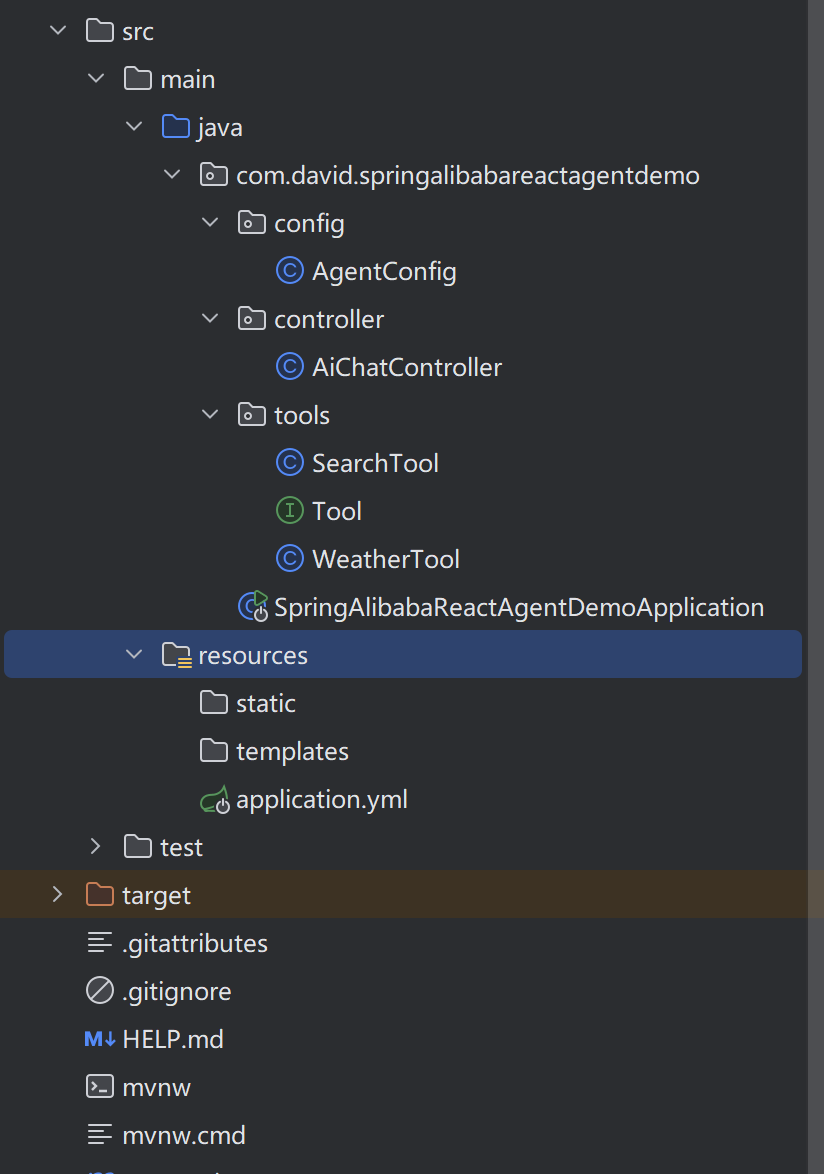
代码结构:
详细代码
1.pom.xml
<?xml version="1.0" encoding="UTF-8"?>
<project xmlns="http://maven.apache.org/POM/4.0.0" xmlns:xsi="http://www.w3.org/2001/XMLSchema-instance"
         xsi:schemaLocation="http://maven.apache.org/POM/4.0.0 https://maven.apache.org/xsd/maven-4.0.0.xsd">
    <modelVersion>4.0.0</modelVersion>

    <parent>
        <groupId>org.springframework.boot</groupId>
        <artifactId>spring-boot-starter-parent</artifactId>
        <version>3.2.12</version>
        <relativePath/>
    </parent>

    <groupId>com.david</groupId>
    <artifactId>spring-alibaba-react-agent</artifactId>
    <version>0.0.1-SNAPSHOT</version>
    <name>spring-alibaba-react-agent</name>

    <properties>
        <java.version>17</java.version>
        <spring-ai.version>1.0.0-M4</spring-ai.version>
        <jackson.version>2.17.0</jackson.version>
    </properties>

    <dependencies>
        <dependency>
            <groupId>org.springframework.boot</groupId>
            <artifactId>spring-boot-starter-web</artifactId>
        </dependency>

        <!-- Spring AI Alibaba Agent Framework -->
        <dependency>
            <groupId>com.alibaba.cloud.ai</groupId>
            <artifactId>spring-ai-alibaba-agent-framework</artifactId>
            <version>1.1.2.0</version>
        </dependency>

        <dependency>
            <groupId>com.alibaba.cloud.ai</groupId>
            <artifactId>spring-ai-alibaba-starter-dashscope</artifactId>
            <version>1.1.2.0</version>
        </dependency>
        <dependency>
            <groupId>junit</groupId>
            <artifactId>junit</artifactId>
            <version>4.13.2</version>
            <scope>test</scope>
        </dependency>

    </dependencies>
    <dependencyManagement>
        <dependencies>
            <dependency>
                <groupId>com.fasterxml.jackson</groupId>
                <artifactId>jackson-bom</artifactId>
                <version>${jackson.version}</version>
                <type>pom</type>
                <scope>import</scope>
            </dependency>
        </dependencies>
    </dependencyManagement>

    <repositories>
        <repository>
            <id>spring-milestones</id>
            <name>Spring Milestones</name>
            <url>https://repo.spring.io/milestone</url>
            <snapshots>
                <enabled>false</enabled>
            </snapshots>
        </repository>
    </repositories>
    <build>
        <plugins>
            <plugin>
                <groupId>org.springframework.boot</groupId>
                <artifactId>spring-boot-maven-plugin</artifactId>
            </plugin>
        </plugins>
    </build>

</project>
2.application.yml
spring:
  ai:
    dashscope:
      api-key: sk-xxxxxx #这里是阿里百炼api-key
3.工具类接口,Tool.java
package com.david.springalibabareactagentdemo.tools;

import org.springframework.ai.chat.model.ToolContext;
import org.springframework.ai.tool.ToolCallback;

import java.util.function.BiFunction;

public interface Tool<I, O> extends BiFunction<I, ToolContext, O> {

    ToolCallback toolCallback();

}
4.,搜索天气工具, WeatherTool.java
package com.david.springalibabareactagentdemo.tools;

import com.fasterxml.jackson.annotation.JsonClassDescription;
import com.fasterxml.jackson.annotation.JsonProperty;
import com.fasterxml.jackson.annotation.JsonPropertyDescription;
import org.slf4j.Logger;
import org.slf4j.LoggerFactory;
import org.springframework.ai.chat.model.ToolContext;
import org.springframework.ai.tool.ToolCallback;
import org.springframework.ai.tool.function.FunctionToolCallback;
import org.springframework.http.HttpEntity;
import org.springframework.http.HttpHeaders;
import org.springframework.http.MediaType;
import org.springframework.http.ResponseEntity;
import org.springframework.web.client.RestTemplate;

import java.util.HashMap;
import java.util.List;
import java.util.Map;

/**
 * 天气工具
 */
public class WeatherTool implements Tool<WeatherTool.Request, String> {

    private static final Logger log = LoggerFactory.getLogger(WeatherTool.class);

    private final RestTemplate restTemplate = new RestTemplate();

    private static final String QIANFAN_API_URL = "https://qianfan.baidubce.com/v2/ai_search/web_search";
    private static final String API_KEY = "百度千帆api-key";

    @Override
    public ToolCallback toolCallback() {
        return FunctionToolCallback.builder("weather_tool", this)
                .description("联网实时查询城市天气信息")
                .inputType(Request.class)
                .build();
    }

    @Override
  public String apply(Request request, ToolContext context) {
        log.info("weather request city: {}", request.city());
        HttpHeaders headers = new HttpHeaders();
        headers.setContentType(MediaType.APPLICATION_JSON);
        headers.setBearerAuth(API_KEY);

        Map<String, Object> requestBody = new HashMap<>();

        Map<String, String> message = new HashMap<>();
        message.put("content", request.city() + "天气");
        message.put("role", "user");
        requestBody.put("messages", List.of(message));

        requestBody.put("search_source", "baidu_search_v2");

        Map<String, Object> resourceFilter = new HashMap<>();
        resourceFilter.put("type", "web");
        resourceFilter.put("top_k", 3);
        requestBody.put("resource_type_filter", List.of(resourceFilter));

        Map<String, Object> siteMatch = new HashMap<>();
        siteMatch.put("site", List.of("www.weather.com.cn"));
        Map<String, Object> searchFilter = new HashMap<>();
        searchFilter.put("match", siteMatch);
        requestBody.put("search_filter", searchFilter);

//        requestBody.put("search_recency_filter", "year");

        HttpEntity<Map<String, Object>> r = new HttpEntity<>(requestBody, headers);

        try {
            ResponseEntity<String> response = restTemplate.postForEntity(
                    QIANFAN_API_URL,
                    r,
                    String.class
            );
            String responseBody = response.getBody();
            log.info("weather response: {}", responseBody);
            return "搜索结果: " + responseBody;
        } catch (Exception e) {
            return "搜索请求失败: " + e.getMessage();
        }
  }

  @JsonClassDescription("天气查询请求")
    public record Request(
            @JsonProperty(value = "城市", required = true)
            @JsonPropertyDescription("城市名称,例如:北京")
            String city
    ) {}

}
5.web搜索工具, SearchTool.java
package com.david.springalibabareactagentdemo.tools;

import com.fasterxml.jackson.annotation.JsonClassDescription;
import com.fasterxml.jackson.annotation.JsonProperty;
import com.fasterxml.jackson.annotation.JsonPropertyDescription;
import org.slf4j.Logger;
import org.slf4j.LoggerFactory;
import org.springframework.ai.chat.model.ToolContext;
import org.springframework.ai.tool.ToolCallback;
import org.springframework.ai.tool.function.FunctionToolCallback;
import org.springframework.http.HttpEntity;
import org.springframework.http.HttpHeaders;
import org.springframework.http.MediaType;
import org.springframework.http.ResponseEntity;
import org.springframework.web.client.RestTemplate;

import java.util.HashMap;
import java.util.List;
import java.util.Map;

/**
 * 搜索工具
 */
public class SearchTool implements Tool<SearchTool.Request, String> {

    private static final Logger log = LoggerFactory.getLogger(SearchTool.class);

    private final RestTemplate restTemplate = new RestTemplate();

    private static final String QIANFAN_API_URL = "https://qianfan.baidubce.com/v2/ai_search/web_search";
    private static final String API_KEY = "百度千帆api-key";

    @Override
    public ToolCallback toolCallback() {
        return FunctionToolCallback.builder("search_tool", this)
                .description("联网搜索全网实时信息")
                .inputType(Request.class)
                .build();
    }

    @Override
  public String apply(Request request, ToolContext context) {
        log.info("web search request query: {}", request.query());
        HttpHeaders headers = new HttpHeaders();
        headers.setContentType(MediaType.APPLICATION_JSON);
        headers.setBearerAuth(API_KEY);

        Map<String, Object> requestBody = new HashMap<>();

        Map<String, String> message = new HashMap<>();
        message.put("content", request.query());
        message.put("role", "user");
        requestBody.put("messages", List.of(message));

        requestBody.put("search_source", "baidu_search_v2");

        Map<String, Object> resourceFilter = new HashMap<>();
        resourceFilter.put("type", "web");
        resourceFilter.put("top_k", 5);
        requestBody.put("resource_type_filter", List.of(resourceFilter));

        HttpEntity<Map<String, Object>> r = new HttpEntity<>(requestBody, headers);

        try {
            ResponseEntity<String> response = restTemplate.postForEntity(
                    QIANFAN_API_URL,
                    r,
                    String.class
            );
            String responseBody = response.getBody();
            log.info("search response: {}", responseBody);
            return "搜索结果: " + responseBody;
        } catch (Exception e) {
            return "搜索请求失败: " + e.getMessage();
        }
  }

  @JsonClassDescription("搜索请求")
    public record Request(
            @JsonProperty(value = "需要搜索的问题", required = true)
            @JsonPropertyDescription("需要搜索的问题")
            String query
    ) {}

}
6.Agent配置类, AgentConfig.java
package com.david.springalibabareactagentdemo.config;

import com.alibaba.cloud.ai.dashscope.api.DashScopeApi;
import com.alibaba.cloud.ai.dashscope.chat.DashScopeChatModel;
import com.alibaba.cloud.ai.dashscope.chat.DashScopeChatOptions;
import com.alibaba.cloud.ai.graph.agent.ReactAgent;
import com.alibaba.cloud.ai.graph.checkpoint.savers.MemorySaver;
import com.david.springalibabareactagentdemo.tools.SearchTool;
import com.david.springalibabareactagentdemo.tools.WeatherTool;
import okhttp3.OkHttpClient;
import org.springframework.ai.chat.model.ChatModel;
import org.springframework.beans.factory.annotation.Value;
import org.springframework.context.annotation.Bean;
import org.springframework.context.annotation.Configuration;

import java.util.concurrent.TimeUnit;

@Configuration
public class AgentConfig {

    @Value("${spring.ai.dashscope.api-key}")
    private String apiKey;

    @Bean
    public ReactAgent reactAgent() {
        // 1. 初始化 DashScope API
        DashScopeApi dashScopeApi = DashScopeApi.builder()
                .apiKey(apiKey)
                .build();

        // 2. 创建 ChatModel
        ChatModel chatModel = DashScopeChatModel.builder()
                .dashScopeApi(dashScopeApi)
                .build();

        // 3. 构建React Agent
        return ReactAgent.builder()
                .name("ai_agent")
                .model(chatModel)
                .tools(new WeatherTool().toolCallback(), new SearchTool().toolCallback())
                .systemPrompt("""
                        你是一个博学的智能聊天助手,必须调用工具获取信息,不能编造答案。
                        调用工具后,根据结果回答用户。
                        """)
                // 添加对话记忆,可以选择数据库和redis,这里使用内存记忆
                .saver(new MemorySaver())
                .build();
    }

}
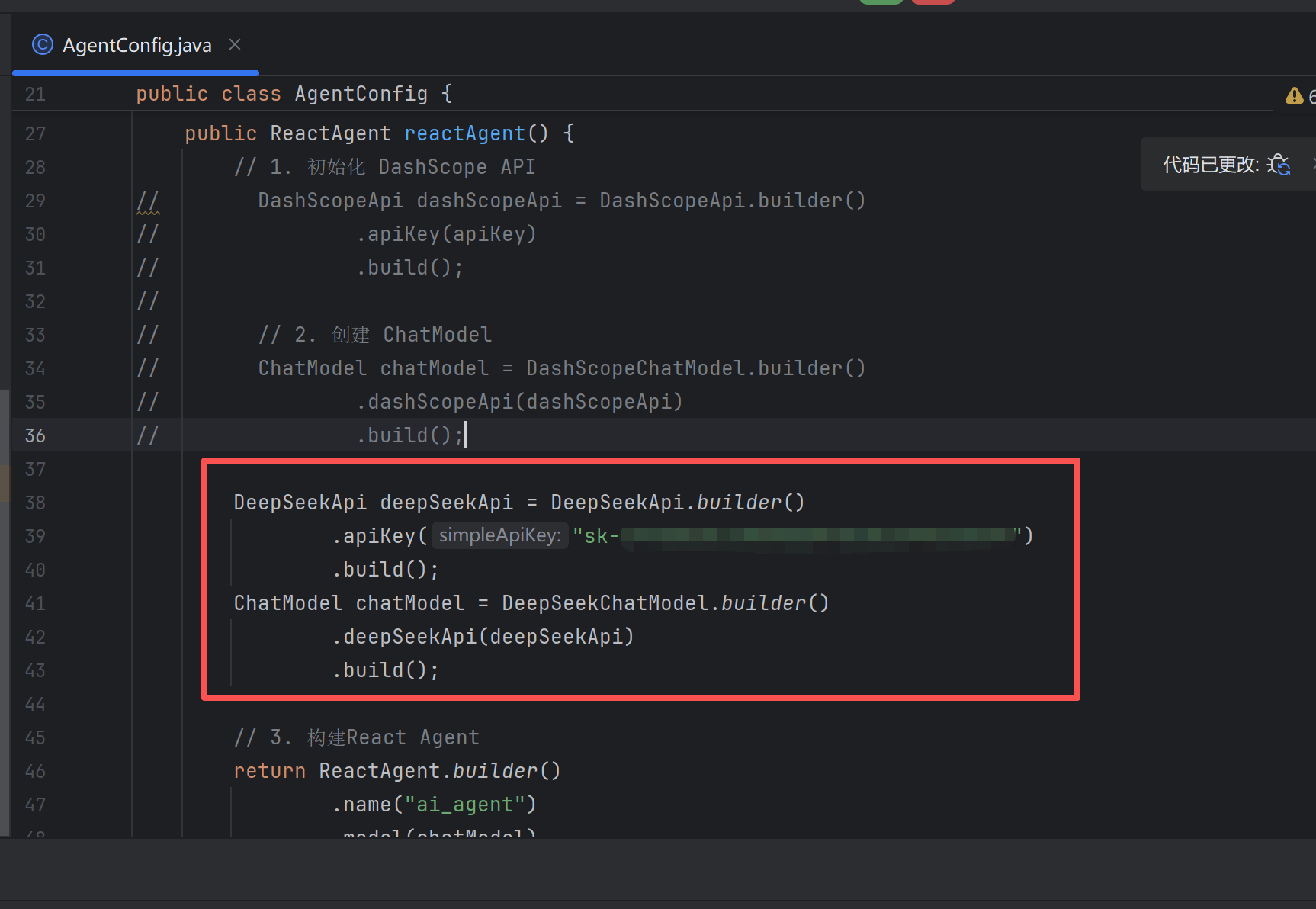
这里也可以改为deepSeek的模型
7.web对话接口, AiChatController.java
package com.david.springalibabareactagentdemo.controller;

import com.alibaba.cloud.ai.graph.RunnableConfig;
import com.alibaba.cloud.ai.graph.agent.ReactAgent;
import com.alibaba.cloud.ai.graph.exception.GraphRunnerException;
import org.springframework.ai.chat.messages.AssistantMessage;
import org.springframework.beans.factory.annotation.Autowired;
import org.springframework.web.bind.annotation.RequestMapping;
import org.springframework.web.bind.annotation.RequestParam;
import org.springframework.web.bind.annotation.RestController;

@RestController
@RequestMapping("/ai")
public class AiChatController {
    @Autowired
    ReactAgent reactAgent;

    @RequestMapping("/test")
    public String test() {
        return "test";
    }

    // 阻塞式响应
    @RequestMapping("/chat")
    public String chat(@RequestParam(value = "sessionId") String sessionId, @RequestParam(value = "message") String message) throws GraphRunnerException {
        RunnableConfig config = RunnableConfig.builder()
                // 设置会话标识
                .threadId(sessionId)
                .build();

        AssistantMessage response = reactAgent.call(message, config);
//        System.out.println(response.getText());
        return response.getText();
    }

    // 流式响应
    @RequestMapping(value = "/streamChat", produces = "text/event-stream; charset=utf-8")
    public Flux<String> streamChat(@RequestParam(value = "sessionId") String sessionId, @RequestParam(value = "message") String message) throws GraphRunnerException {
        RunnableConfig config = RunnableConfig.builder()
                // 设置会话标识
                .threadId(sessionId)
                .addMetadata("sessionId", sessionId)
                .build();

        return reactAgent.streamMessages(message, config)
                .map(Content::getText)
                .map(text -> "{\"text\":\"" + text + "\"}");
    }

}
启动服务进行测试
1.入参sessionId是作为记忆对话唯一标识,先问下"杭州5月10日天气怎么样"

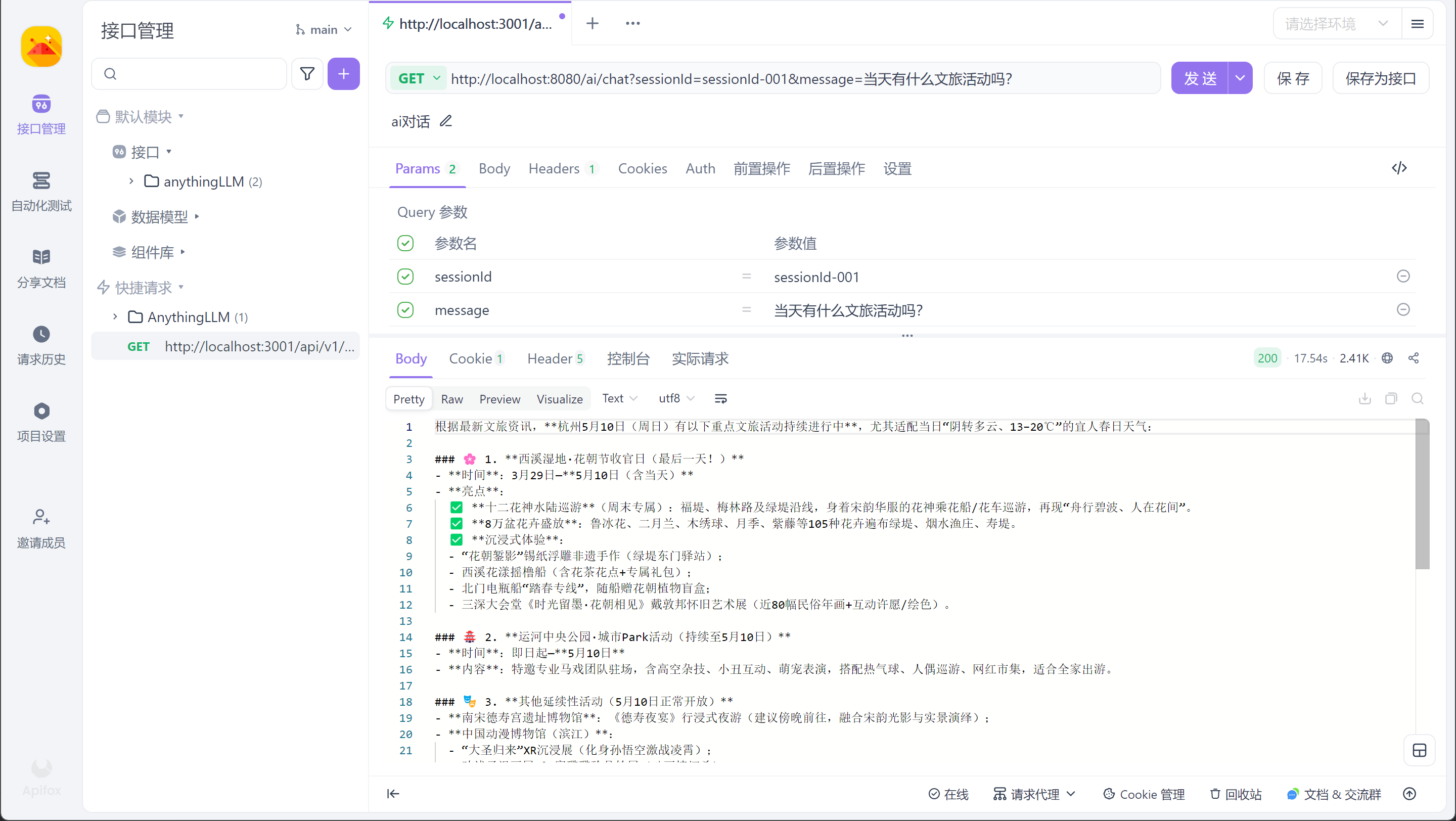
2.在问"当天文旅有什么活动吗?", 这里可以看到输出"当天"是5月10号
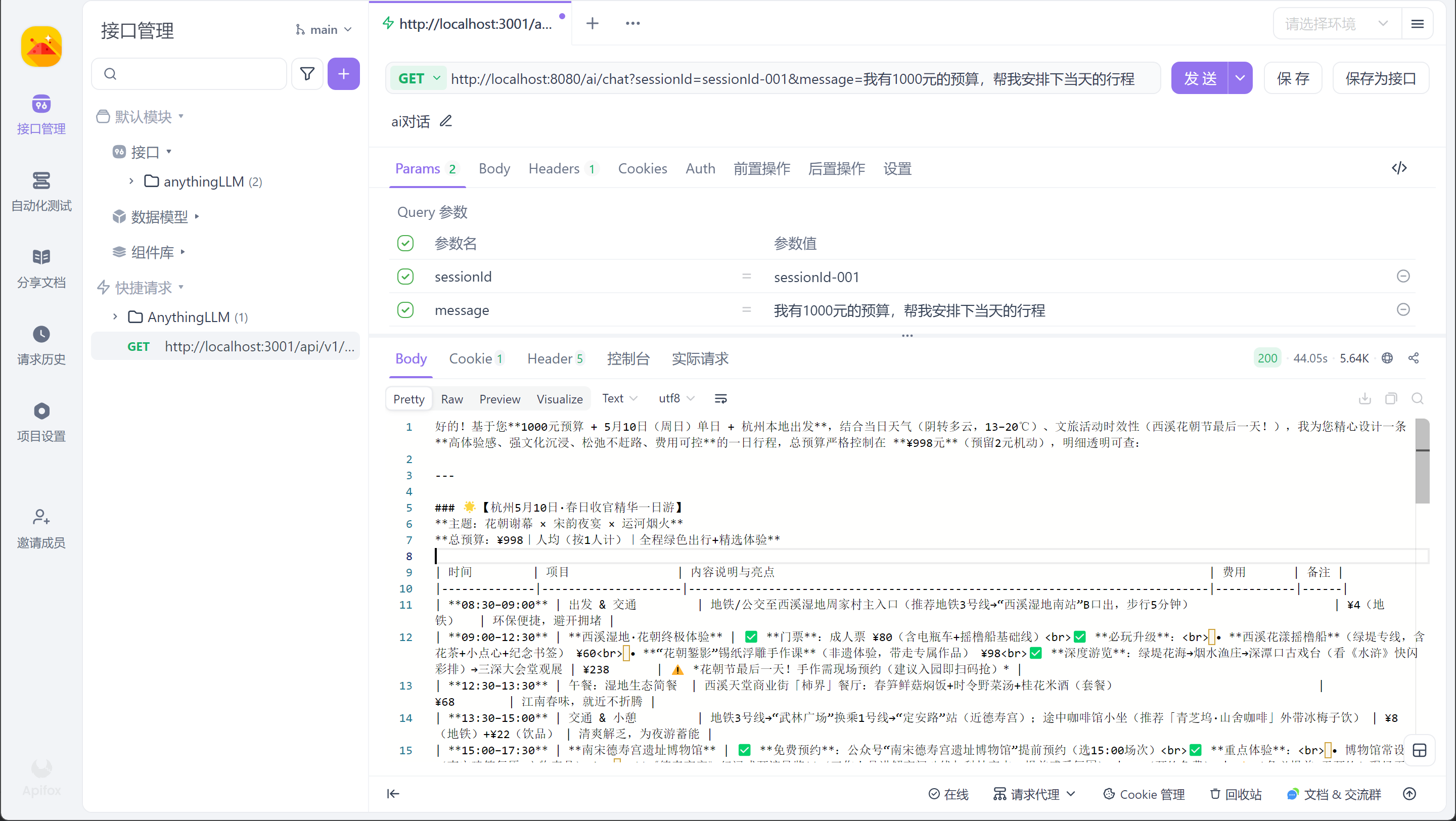
3.在接着问"我有1000元的预算,帮我安排下5月10日杭州的文旅活动行程吗",输出的时间也是5月10号
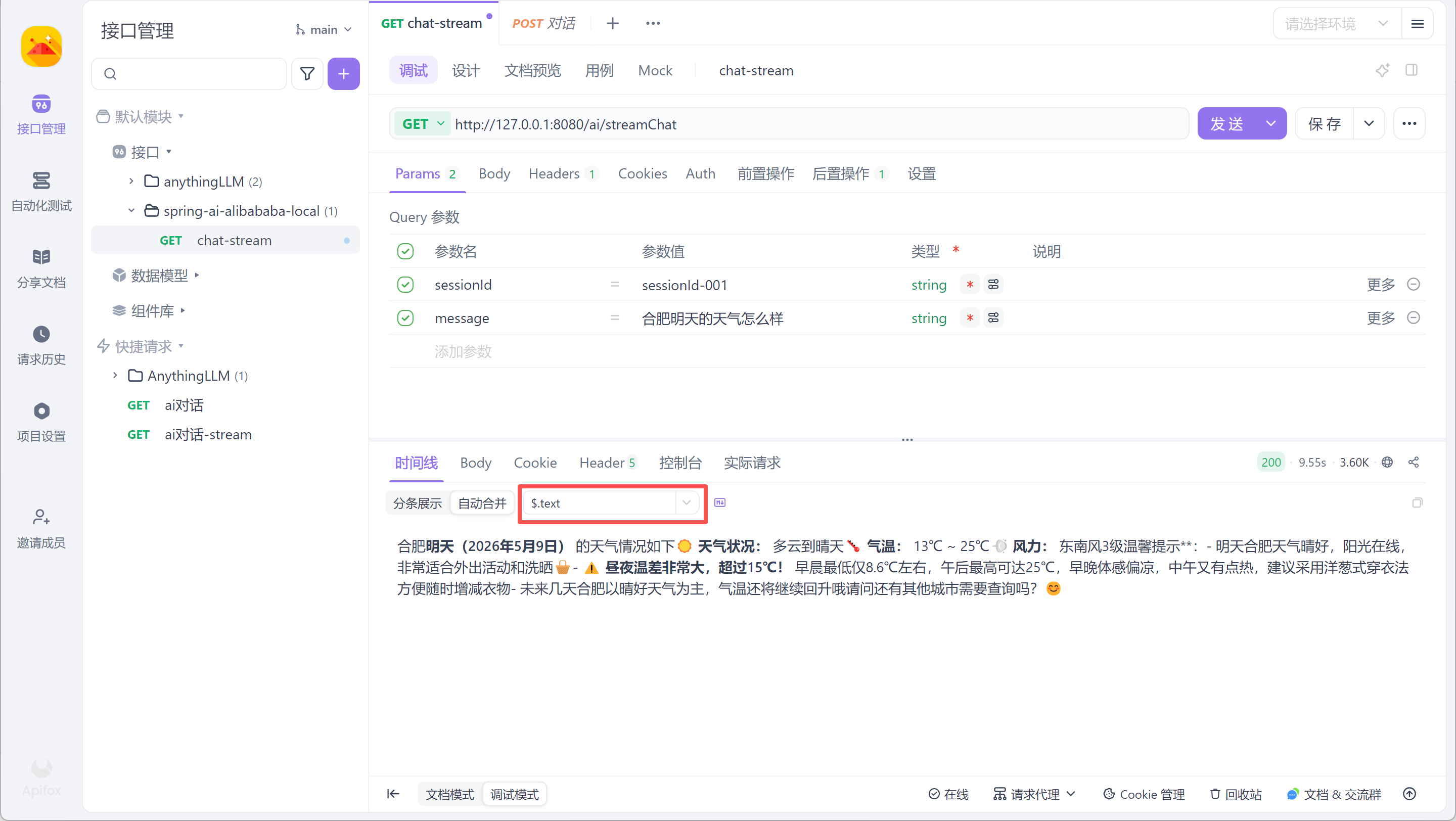
使用流式响应需要在apifox上配置一下
遇到的问题:
1.使用自动注入ChatModel会出现超时问题,在application.yml里面配置了read-timeout也无法生效,所以上面代码改为了自己创建一个ChatModel.