在应用层协议设计中,如何让结构化数据在网络上「乖乖传递」(不会多读或者少读)?
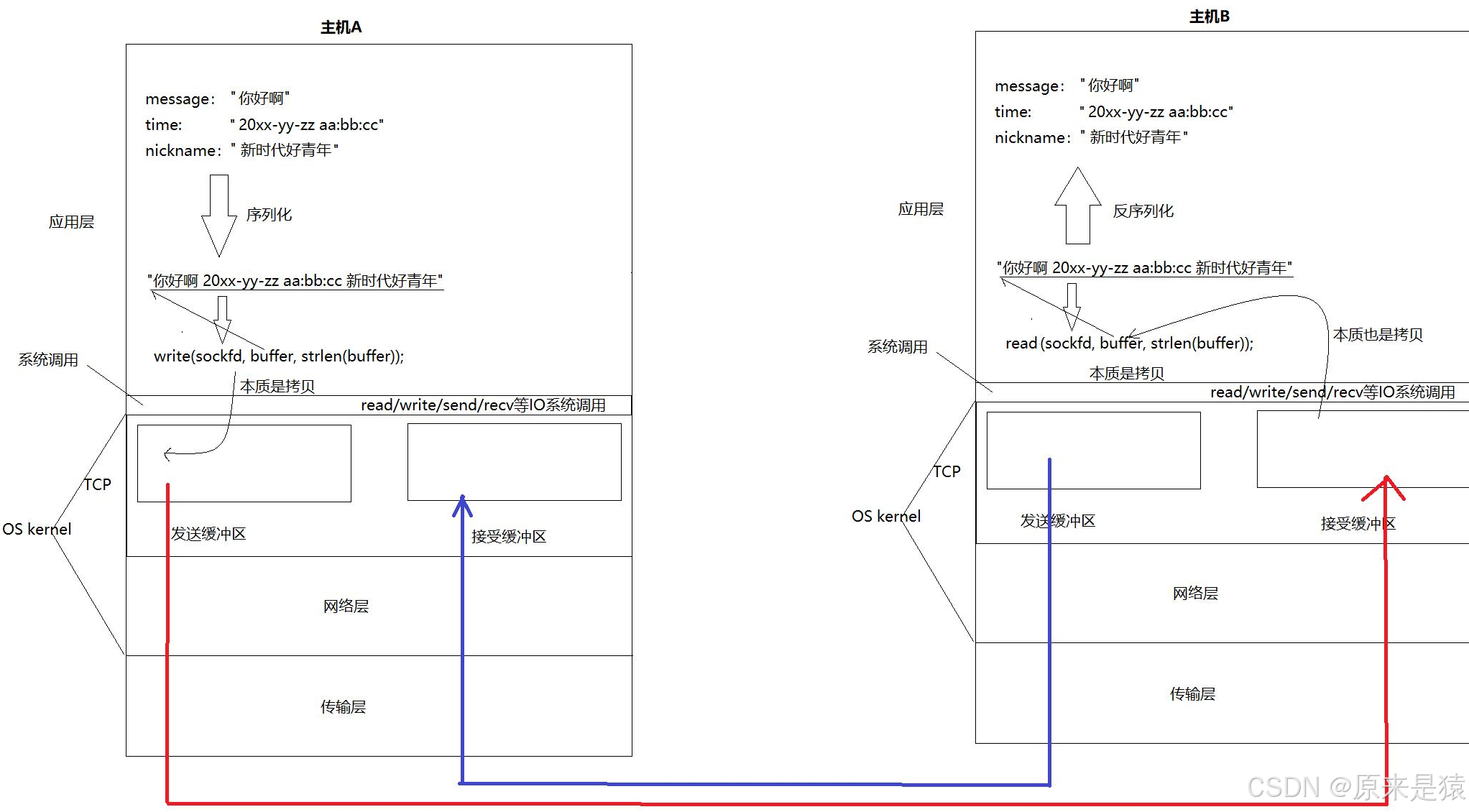
一、为什么需要序列化?
当我们用 socket 发送数据时,send 和 recv 操作的是一串 字节流(字符串)。
但我们的程序里处理的是 结构化的数据,比如一个计算器请求:
int x = 10;
int y = 20;
char op = '+';
问题来了:怎么把 10、20、'+' 这三个东西打包成一个字符串发出去?对方收到后又怎么还原成原来的三个数据?
这就需要 序列化 和 反序列化。
| 术语 | 含义 |
|---|---|
| 序列化 (Serialize) | 将内存中的结构化数据 → 转换成字符串 / 字节流 |
| 反序列化 (Deserialize) | 将字符串 / 字节流 → 还原成内存中的结构化数据 |
常见的序列化方案有:JSON、XML、Protobuf、自定义格式(如 "10+20")等。
本文我们使用 JSON 格式,借助 C++ 的 jsoncpp 库来完成。
二、Jsoncpp 简介与安装
什么是 Jsoncpp?
Jsoncpp 是一个跨平台的 C++ 库,用于处理 JSON 数据。
它提供了:
读写 JSON 的简单 API
支持 JSON 标准中的所有类型(对象、数组、字符串、数字、布尔值、null)
详细的错误提示(解析出错时告诉你第几行第几个字符)
安装
Ubuntu / Debian
sudo apt-get install libjsoncpp-devCentOS / RHEL
sudo yum install jsoncpp-devel编译时链接
g++ your_code.cpp -ljsoncpp三、JSON 序列化:把对象变成字符串
我们先用一个简单的例子:把一个人的名字和性别存成 JSON 字符串。
方法一:toStyledString()
#include <iostream>
#include <string>
#include <jsoncpp/json/json.h>

int main() {
    Json::Value root;
    root["name"] = "joe";
    root["sex"]  = "男";

    std::string s = root.toStyledString();
    std::cout << s << std::endl;
    return 0;
}输出(格式化,带缩进):
{
   "name" : "joe",
   "sex" : "男"
}
✅ 优点:输出美观,便于调试
❌ 缺点:多出了空格和换行,占用带宽稍多
方法二:Json::FastWriter
#include <iostream>
#include <string>
#include <jsoncpp/json/json.h>

int main() {
    Json::Value root;
    root["name"] = "joe";
    root["sex"]  = "男";

    Json::FastWriter writer;
    std::string s = writer.write(root);
    std::cout << s << std::endl;
    return 0;
}输出(无额外空格换行):
{"name":"joe","sex":"男"}
✅ 优点:体积小,传输快
✅ 常用在网络通信中
方法三:Json::StyledWriter
Json::StyledWriter writer;
std::string s = writer.write(root);
输出结果和 toStyledString() 几乎一样,适合写日志或配置文件。
方法四:Json::StreamWriter
如果你需要自定义缩进、换行符等,可以使用 StreamWriterBuilder:
#include <sstream>
#include <memory>
#include <jsoncpp/json/json.h>

int main() {
    Json::Value root;
    root["name"] = "joe";
    root["sex"]  = "男";

    Json::StreamWriterBuilder builder;
    std::unique_ptr<Json::StreamWriter> writer(builder.newStreamWriter());
    std::stringstream ss;
    writer->write(root, &ss);
    std::cout << ss.str() << std::endl;
    return 0;
}这种方式最灵活,但日常开发中用 FastWriter 就足够了。
四、JSON 反序列化:把字符串变回对象
反序列化是将序列化后的数据冲重新 转化为原来的 数据结构或对象。
假设我们收到了一个 JSON 字符串:
{"name":"张三","age":30,"city":"北京"}我们想把它还原成 C++ 中的数据。
使用 Json::Reader ------ 最常用
#include <iostream>
#include <string>
#include <jsoncpp/json/json.h>

int main() {
    std::string json_string = R"({"name":"张三","age":30,"city":"北京"})";

    Json::Reader reader;
    Json::Value root;

    bool ok = reader.parse(json_string, root);
    if (!ok) {
        std::cout << "解析失败:" << reader.getFormattedErrorMessage() << std::endl;
        return 1;
    }

    std::string name = root["name"].asString();
    int age = root["age"].asInt();
    std::string city = root["city"].asString();

    std::cout << "姓名:" << name << "\n年龄:" << age << "\n城市:" << city << std::endl;
    return 0;
}输出:
姓名:张三
年龄:30
城市:北京
要点:
reader.parse()返回true表示解析成功用
root["key"]访问成员,然后调用.asInt(),.asString()等转换成 C++ 类型如果 key 不存在,会返回一个 null 值,不会崩溃
错误处理很重要:
解析 JSON 时一定要检查返回值,否则一旦格式错误,程序可能异常。
reader.getFormattedErrorMessage() 会给出具体位置,非常方便调试。
五、Json::Value 常用操作大集合
Json::Value 是 jsoncpp 的核心类,**它可以表示任意 JSON 类型。**下面列出最常用的操作。
1. 类型检查(判断一个 Value 到底是什么类型)
| 方法 | 说明 |
|---|---|
isNull() |
是否是 null |
isBool() |
是否是布尔值 |
isInt() / isInt64() |
是否是整数(64位) |
isUInt() / isUInt64() |
是否是无符号整数 |
isDouble() |
是否是浮点数 |
isString() |
是否是字符串 |
isArray() |
是否是数组 |
isObject() |
是否是对象(键值对集合) |
Json::Value v;
v["count"] = 100;
if (v["count"].isInt()) {
    std::cout << "count is int" << std::endl;
}
2. 赋值与类型转换
| 方法 | 说明 |
|---|---|
operator=(bool) / operator=(int) / ... |
直接赋值 |
asBool() |
转成 bool |
asInt() / asInt64() |
转成整数 |
asUInt() / asUInt64() |
转成无符号整数 |
asDouble() |
转成 double |
asString() |
转成 std::string |
⚠️ 注意:如果实际存储的类型不匹配(比如对字符串调用 asInt()),可能会得到 0 或触发未定义行为,务必先用 isXXX() 检查。
3. 数组操作
| 方法 | 说明 |
|---|---|
size() |
数组元素个数 |
empty() |
是否为空数组 |
resize(n) |
调整数组大小 |
clear() |
清空数组 |
append(value) |
在末尾添加元素 |
operator[](index) |
通过下标访问(可修改) |
Json::Value arr;
arr.append(10);
arr.append(20);
arr[1] = 25;   // 修改第二个元素
std::cout << arr.size();  // 2
4. 对象操作
| 方法 | 说明 |
|---|---|
size() |
对象中键值对的数量 |
empty() |
是否为空对象 |
clear() |
删除所有键值对 |
operator[](key) |
通过 key 访问(自动创建不存在的 key) |
for (auto it = root.begin(); it != root.end(); ++it) {
    std::string key = it.key().asString();
    Json::Value value = *it;
    // ...
}
六、实战:网络计算器协议(基于 JSON)
现在我们把上面的知识串起来,动手实现一个简单的 网络版计算器协议。
协议设计
-
客户端发送一个 JSON 对象,包含三个字段:
x、y、op -
服务器计算后,返回一个 JSON 对象,包含:
result(计算结果)和code(状态码,0 表示成功)// 保证发送的时候一定是json串,但是并不能保证json串的完整系
// 进一步 -> 有效载荷长度(content_len) + json串
// 50\r\n{"x":10, "y":20, "oper":"+"}\r\n
class Request
{
public:
Request() {}
Request(int x, int y, char oper) : _x(x), _y(y), _oper(oper)
{
}
std::string Serialize()
{
std::string s;
Json::Value root;
root["x"] = _x;
root["y"] = _y;
root["oper"] = _oper; //Json::FastWriter writer; std::string s = writer.write(root); return s; } //{"x":10,"y":20,"oper":'+'} bool Deserialize(std::string &in) { Json::Value root; Json::Reader reader; bool ok = reader.parse(in, root); if (ok) { _x = root["x"].asInt(); _y = root["y"].asInt(); _oper = root["oper"].asInt(); } return ok; } ~Request() {}private:
int _x;
int _y;
char _oper; // + - * / % --》 _x _oper _y ---》 10 + 20
};// server -> client
class Response
{
public:
Response() {}
Response(int result, int code) : _result(result), _code(code)
{
}
std::string Serialize()
{
Json::Value root;
root["result"] = _result;
root["code"] = _code;Json::FastWriter writer; return writer.write(root); } bool Deserialize(std::string &in) { Json::Value root; Json::Reader reader; bool ok = reader.parse(in, root); if (ok) { _result = root["result"].asInt(); _code = root["code"].asInt(); } return ok; } ~Response() {}private:
int _result; // 运算结果,无法区分清楚应答是计算结果,还是异常值
int _code; // 0:sucess , 1,2,3,4->不同的运算异常的情况
};
七、注意事项与最佳实践
-
粘包处理
实际使用 TCP 时,必须自己处理 粘包。常见做法是:
-
固定长度
-
使用分隔符(如
\r\n) -
在报文前面加上长度字段
Jsoncpp 不负责粘包,你需要自己实现
Encode/Decode函数。 -
-
错误检查
解析 JSON 时永远检查
parse()的返回值。 -
性能
FastWriter比StyledWriter快,网络通信中优先使用FastWriter。 -
版本问题
不同版本的 jsoncpp API 有差异(比如旧版使用
Json::Reader,新版推荐Json::CharReader或parseFromStream)。本文以最常用的老 API 为例,稳定可靠。 -
内存管理
Json::Value内部使用引用计数,可以像普通变量一样拷贝,不用担心内存泄漏。