1、小白必须看,别问为啥没测试集:
原图存放在leftImg8bit文件夹中,精细标注的数据存放在gtFine (gt : ground truth) 文件夹中 。
其中训练集共2975张(train),验证集500张(val),都是有相应的标签的。
测试集(test)只给了原图,没有给标签,官方用于线上评估大家提交的代码(防止有人用test集训练刷指标)。
注释不公开 ,但为方便起见,包含"ego vehicle"和整改边界"out of roi", 。
有1525张。因此,实际使用中可以用validation集做test使用。
常用8个类别提取:
classes = 'car', 'person', 'rider', 'truck', 'bus', 'train', 'motorcycle', 'bicycle'。
2、下载gtfine,转YOLO:
数据集链接:
通过网盘分享的文件:cityscapes
链接: https://pan.baidu.com/s/1a8wZbWPoE6vyJdf7jNmOhA?pwd=32sm 提取码: 32sm
--来自百度网盘超级会员v5的分享
借鉴此文这里,然后改了一下目录结构,后期更方便YOLO整理
python
import json
import os


# 类别列表和类别字典
all_classes = ['car', 'person', 'rider', 'truck', 'bus', 'train', 'motorcycle', 'bicycle']
class_dict = {'car': 0, 'person': 1, 'rider': 2, 'truck': 3, 'bus': 4, 'train': 5, 'motorcycle': 6, 'bicycle': 7}

# 根目录
rootdir = r'D:\BaiduNetdiskDownload\gtFine\val'

# 输出目录
output_rootdir = r'D:\BaiduNetdiskDownload\gtFine\valtxt'


def position(pos):
    x = [point[0] for point in pos]
    y = [point[1] for point in pos]
    x_min = min(x)
    x_max = max(x)
    y_min = min(y)
    y_max = max(y)
    return float(x_min), float(x_max), float(y_min), float(y_max)


def convert(size, box):
    dw = 1. / size[0]
    dh = 1. / size[1]
    x = (box[0] + box[1]) / 2.0
    y = (box[2] + box[3]) / 2.0
    w = box[1] - box[0]
    h = box[3] - box[2]
    return x * dw, y * dh, w * dw, h * dh


def convert_annotation(json_id, city_name):
    json_file_path = os.path.join(rootdir, city_name, '%s.json' % json_id)
    out_file_path = os.path.join(output_rootdir, '%s.txt' % json_id)

    if not os.path.exists(os.path.dirname(out_file_path)):
        os.makedirs(os.path.dirname(out_file_path))

    with open(json_file_path, 'r') as load_f:
        load_dict = json.load(load_f)

    w = load_dict['imgWidth']
    h = load_dict['imgHeight']
    objects = load_dict['objects']

    with open(out_file_path, 'w') as out_file:
        for obj in objects:
            labels = obj['label']
            print(labels)
            if labels in class_dict:
                pos = obj['polygon']
                b = position(pos)
                bb = convert((w, h), b)
                cls_id = class_dict[labels]
                out_file.write(str(cls_id) + " " + " ".join([str(a) for a in bb]) + '\n')


def jsons_id(rootdir):
    a = []
    for parent, dirnames, filenames in os.walk(rootdir):
        for filename in filenames:
            if filename.endswith('.json'):
                filename_without_ext = os.path.splitext(filename)[0]
                a.append(filename_without_ext)
    return a


# 获取所有子目录
subdirs = [d for d in os.listdir(rootdir) if os.path.isdir(os.path.join(rootdir, d))]
# print(subdirs)
# ['aachen', 'bochum', 'bremen', 'cologne', 'darmstadt', 'dusseldorf', 'erfurt', 'hamburg', 'hanover', 'jena',
# 'krefeld', 'monchengladbach', 'strasbourg', 'stuttgart', 'tubingen', 'ulm', 'weimar', 'zurich']

# 为每个子目录生成YOLO格式的标注文件
for subdir in subdirs:
    names = jsons_id(os.path.join(rootdir, subdir))
    for json_id in names:
        convert_annotation(json_id, subdir)

3、组织YOLO格式
3.1图片挪动脚本
原来的图片是以不同城市分布的,现在把train、val、test统一挪动到不同的images里面
python
import json
import os
import shutil

# 根目录
rootdir = r'D:\BaiduNetdiskDownload\leftImg8bit\test'

# 输出目录
output_rootdir = r'D:\BaiduNetdiskDownload\Cityscape\test\images'
if not os.path.exists(output_rootdir):
    os.makedirs(output_rootdir)


def convert_annotation(json_id, city_name):
    in_file_path = os.path.join(rootdir, city_name, '%s.png' % json_id)
    out_file_path = os.path.join(output_rootdir, '%s.png' % json_id)

    shutil.copy(in_file_path, out_file_path)


def img_id(rootdir):
    a = []
    for parent, dirnames, filenames in os.walk(rootdir):
        for filename in filenames:
            if filename.endswith('.png'):
                filename_without_ext = os.path.splitext(filename)[0]
                a.append(filename_without_ext)
    return a


# 获取所有子目录
subdirs = [d for d in os.listdir(rootdir) if os.path.isdir(os.path.join(rootdir, d))]
# print(subdirs)
# ['aachen', 'bochum', 'bremen', 'cologne', 'darmstadt', 'dusseldorf', 'erfurt', 'hamburg', 'hanover', 'jena',
# 'krefeld', 'monchengladbach', 'strasbourg', 'stuttgart', 'tubingen', 'ulm', 'weimar', 'zurich']

# 为每个子目录生成YOLO格式的标注文件
for subdir in subdirs:
    names = img_id(os.path.join(rootdir, subdir))
    for json_id in names:
        convert_annotation(json_id, subdir)
3.2统一txt和images的名称:
记得改路径,运行2次即可
python
import os
import glob
#
pattern = r"D:\BaiduNetdiskDownload\Cityscape\val\labels\*_gtFine_polygons.txt"
for old_path in glob.glob(pattern):
    dir_name = os.path.dirname(old_path)
    base = os.path.basename(old_path)
    new_base = base.replace("_gtFine_polygons", "")
    new_path = os.path.join(dir_name, new_base)
    os.rename(old_path, new_path)
    print(f"重命名: {old_path} -> {new_path}")

pattern = r"D:\BaiduNetdiskDownload\Cityscape\train\images\*_leftImg8bit.png"
for old_path in glob.glob(pattern):
    dir_name = os.path.dirname(old_path)
    base = os.path.basename(old_path)
    new_base = base.replace("_leftImg8bit", "")
    new_path = os.path.join(dir_name, new_base)
    os.rename(old_path, new_path)
    print(f"重命名: {old_path} -> {new_path}")
3.3可视化
输入png以及txt的路径
python
import cv2
import argparse
import os


def read_labels(label_path):
    """
    读取YOLO格式的标签文件,返回目标检测框和类别
    :param label_path: 标签文件路径
    :return: list of [class_id, x_center, y_center, width, height]
    """
    boxes = []
    with open(label_path, 'r') as f:
        for line in f.readlines():
            class_id, x_center, y_center, width, height = map(float, line.strip().split())
            boxes.append([class_id, x_center, y_center, width, height])
    return boxes


def draw_boxes(image_path, boxes, class_names):
    """
    在图像上绘制检测框和类别
    :param image_path: 图像路径
    :param boxes: 检测框列表
    :param class_names: 类别名称列表
    """
    image = cv2.imread(image_path)
    height, width, _ = image.shape

    for box in boxes:
        class_id, x_center, y_center, width_ratio, height_ratio = box
        x_center = int(x_center * width)
        y_center = int(y_center * height)
        box_width = int(width_ratio * width)
        box_height = int(height_ratio * height)

        # 计算左上角和右下角坐标
        x1 = int(x_center - box_width / 2)
        y1 = int(y_center - box_height / 2)
        x2 = int(x_center + box_width / 2)
        y2 = int(y_center + box_height / 2)

        # 绘制矩形框
        cv2.rectangle(image, (x1, y1), (x2, y2), (0, 255, 0), 2)
        # 添加类别名称
        class_name = class_names[int(class_id)]
        cv2.putText(image, class_name, (x1, y1 - 10), cv2.FONT_HERSHEY_SIMPLEX, 0.5, (0, 255, 0), 2)

    # 显示图像
    cv2.imwrite('res.jpg',image)
    cv2.imshow("Image with Bounding Boxes", image)
    key = cv2.waitKey(0) & 0xFF  # 等待按键事件

    # 如果按下 'q' 键,关闭窗口并退出程序
    if key == ord('q'):
        cv2.destroyAllWindows()


def main(image_path, label_path, class_names):
    """
    主函数,处理单个图像和标签
    :param image_path: 图像路径
    :param label_path: 标签路径
    :param class_names: 类别名称列表
    """
    if not os.path.exists(image_path):
        print(f"Error: Image file {image_path} does not exist.")
        return

    if not os.path.exists(label_path):
        print(f"Error: Label file {label_path} does not exist.")
        return

    boxes = read_labels(label_path)
    draw_boxes(image_path, boxes, class_names)


if __name__ == "__main__":

    image=r"D:\BaiduNetdiskDownload\Cityscape\train\images\aachen_000000_000019.png"

    label=r"D:\BaiduNetdiskDownload\Cityscape\train\labels\aachen_000000_000019.txt"

    # 类别名称列表,根据实际情况修改
    class_names = ['car', 'person', 'rider', 'truck', 'bus', 'train', 'motorcycle', 'bicycle']


    main(image,label, class_names)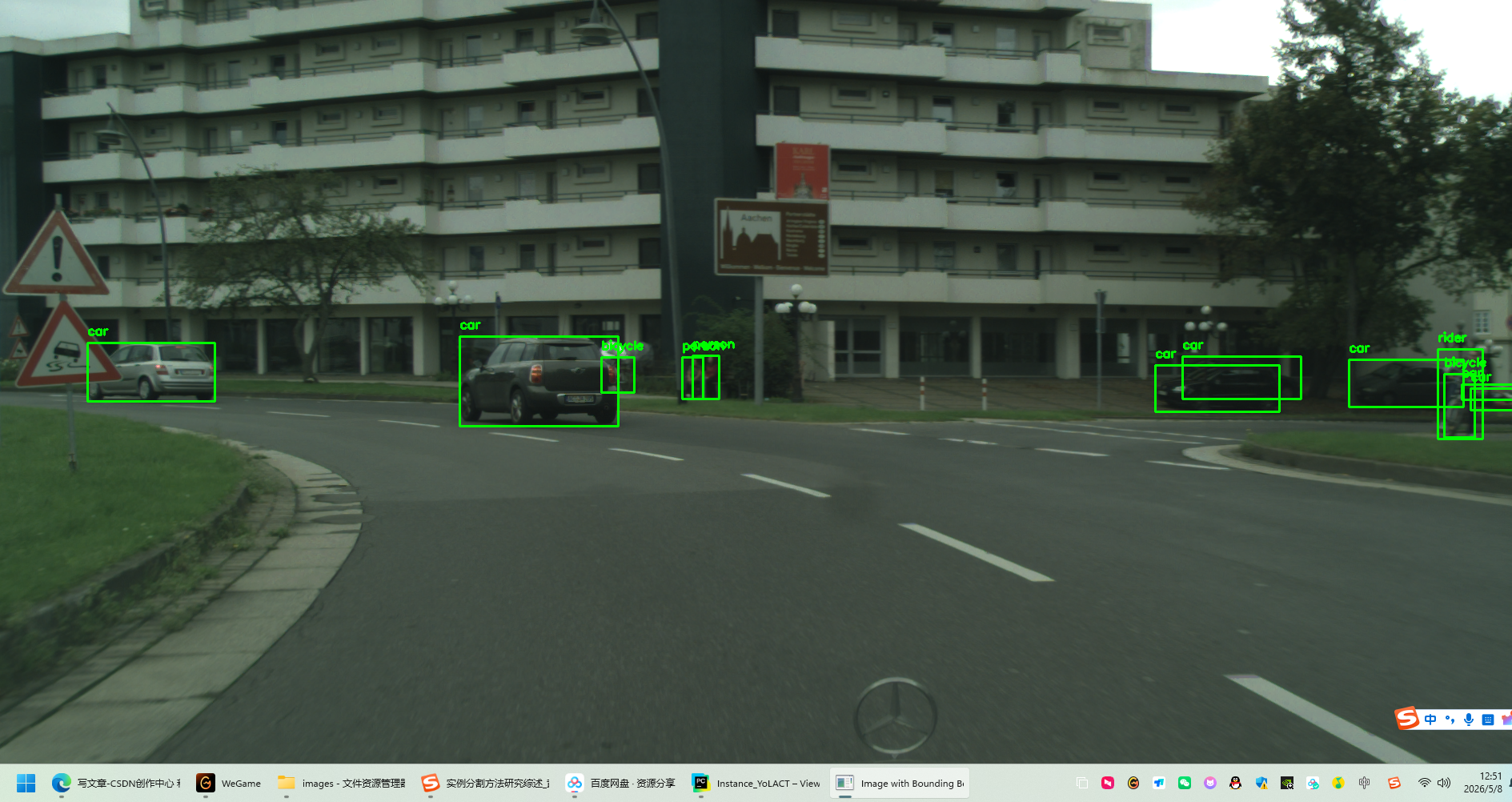
3.4写yaml相对路径文件(提高可移植性)
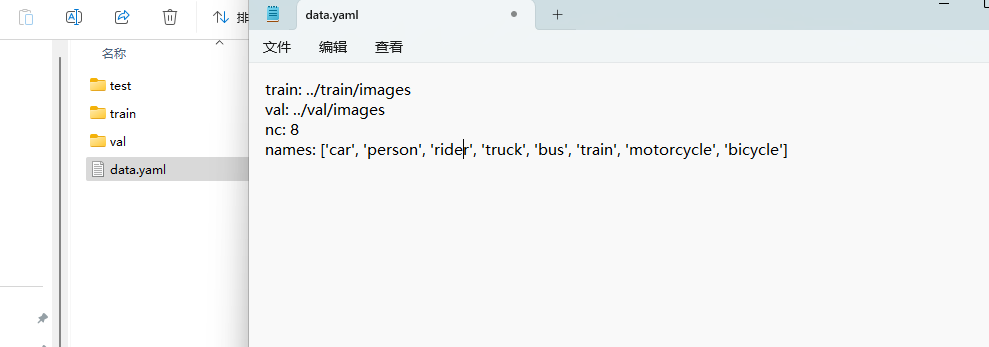
因为test没有这8类的信息,所以test的labels是空的
4、训练
简单训练一下:
python
from ultralytics import YOLO
if __name__ == "__main__":

    mode = YOLO()
    mode.train(data = r'D:\BaiduNetdiskDownload\Cityscape\data.yaml',epochs = 5,batch = 4)
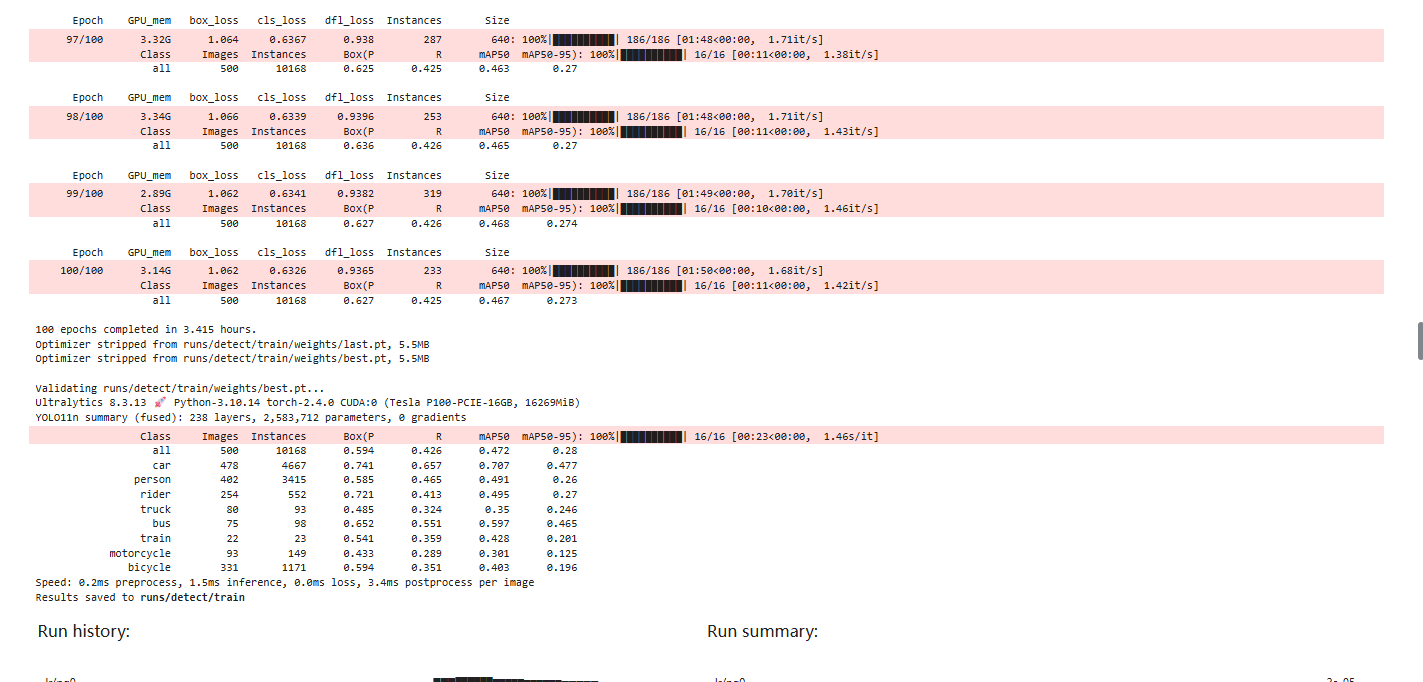
YOLOv11n 100轮的结果,map50可到47左右