一、🦌 DeerFlow 2.0
DeerFlow 2.0 是由字节开源的 Super Agent Harness 框架,具备任务规划执行、子智能体、沙箱隔离机制、持久化记忆、Skills 扩展、MCP集成等能力,让 AI 真正能动手干活,而不只是聊天。相比于 1.0 版本(属于Deep Research框架),2.0 采用了完全重写,与 1.0 没有共用代码。
DeerFlow 2.0 底层基于 LangChain 和 LangGraph 构建,通过 LangGraph Server 提供智能体运行服务,通过 Fast API 暴露 RESTful 接口,并且还提供了嵌入式 Python 客户端,允许在其他 Python 程序中直接使用依赖的方式加载和使用 DeerFlow 2.0 的能力。
Github 地址:https://github.com/bytedance/deer-flow
官方示例地址:https://deerflow.tech/
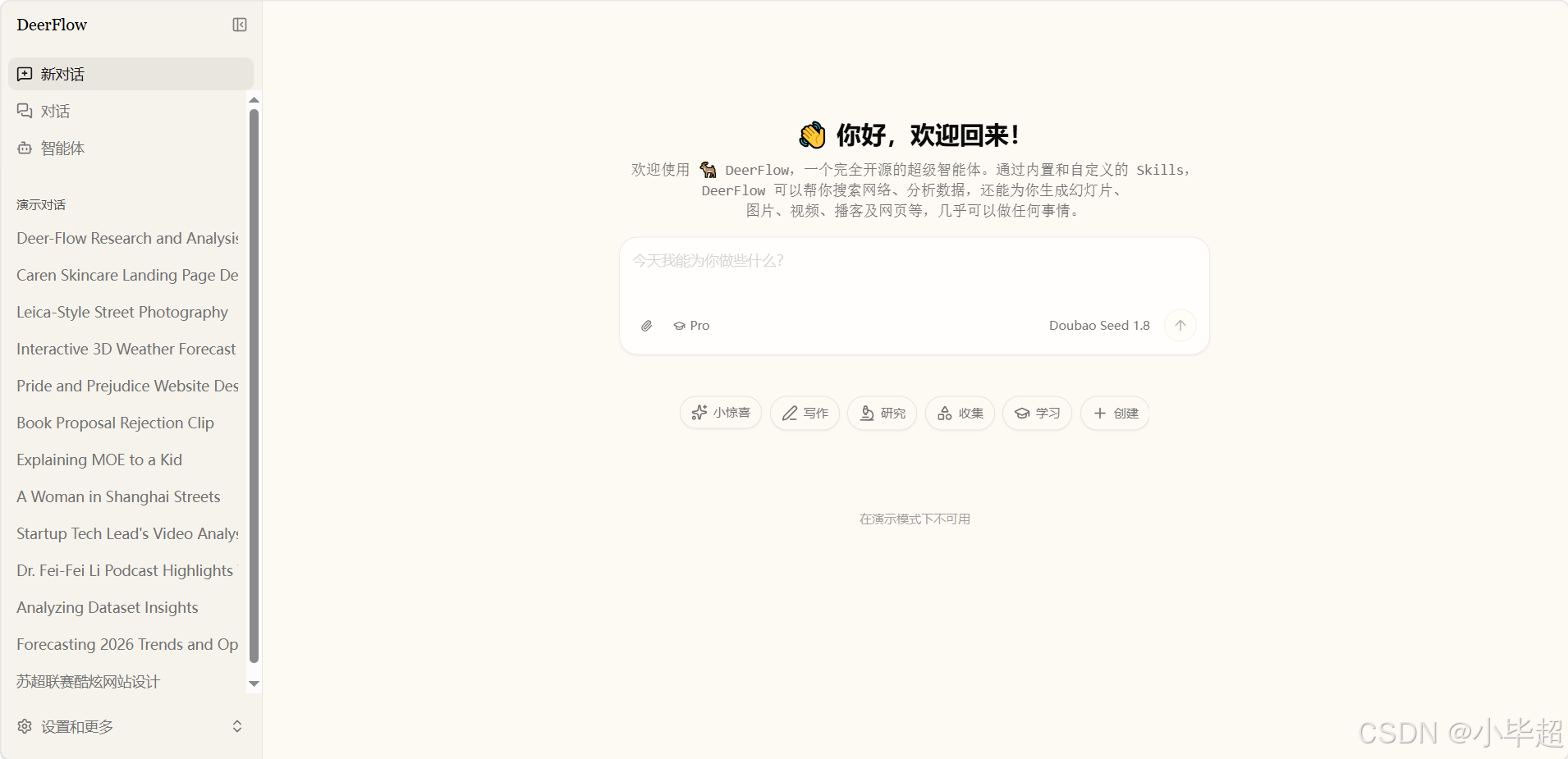
本文主要针对后端智能体的设计思路和源码进行解读。由于源码设计的逻辑非常多,下面主要从这几个方面进行讲述
- 如何启动运行或
Debug智能体。 - 源码解读前置知识介绍(
LangChain&LangGraph)。 - 智能体创建过程源码解读。
- 长期记忆设计源码解读。
二、启动运行调试智能体
拉取项目源码:
bash
git clone https://github.com/bytedance/deer-flow使用 uv 创建 python 环境以及拉取依赖:
bash
cd deer-flow/backend
uv sync
修改配置,首先将 config.example.yaml 重命名为 config.yaml,主要修改模型的连接。然后将 .env.example 重命为 .env 修改搜索API_KEY,比如 TAVILY_API_KEY 。
配置好后就可以启动 LangGraph Server
bash
uv run langgraph dev --no-browser --allow-blocking --host 0.0.0.0 --port 2024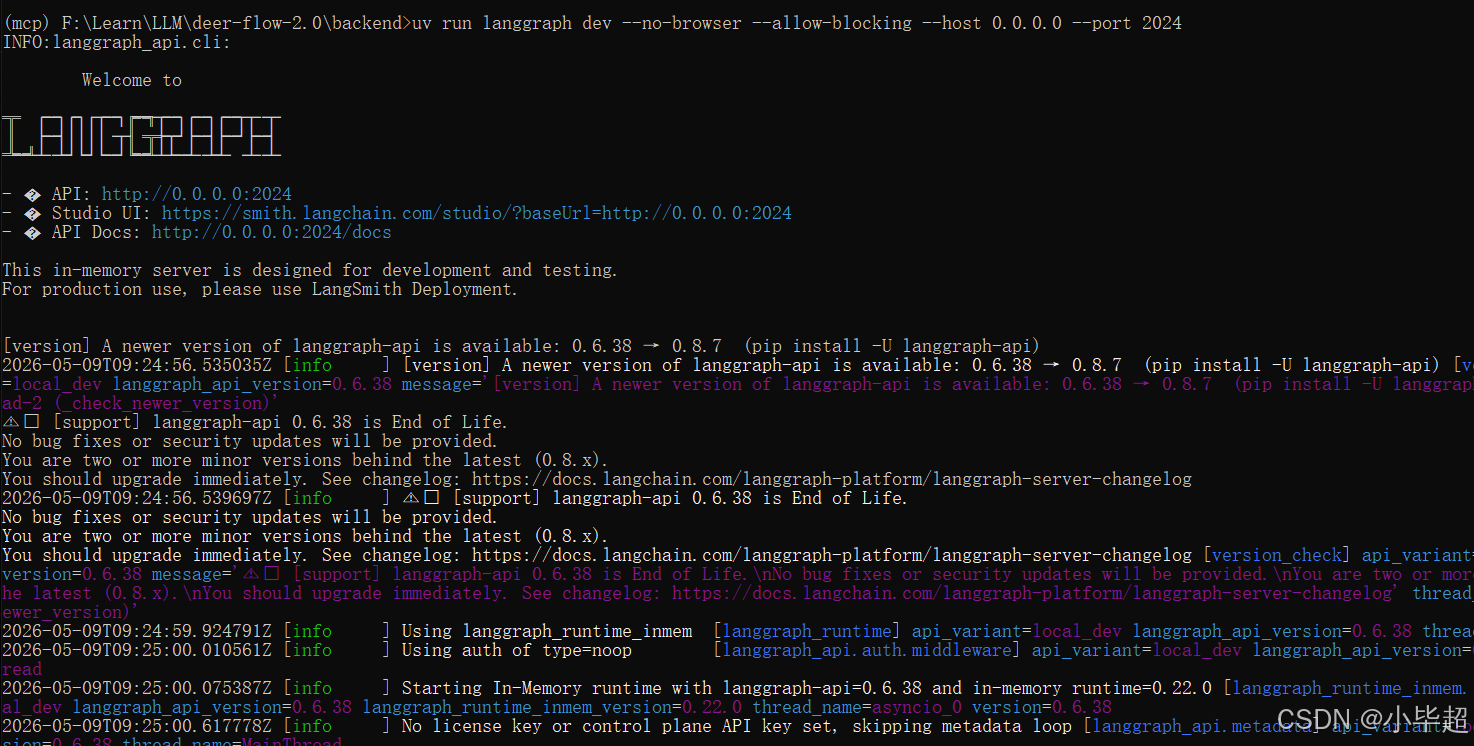
如果使用 PyCharm IDE 调试,可以这样配置并Debug运行:
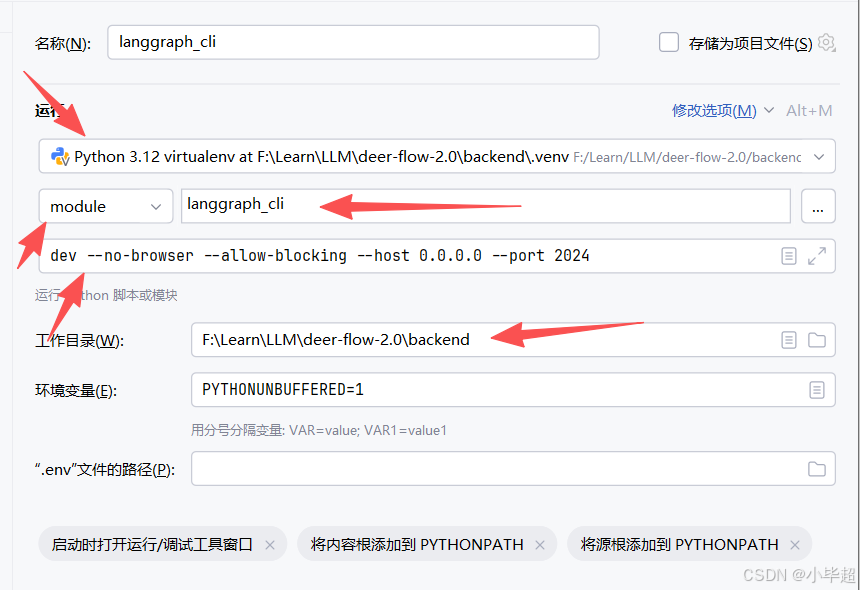
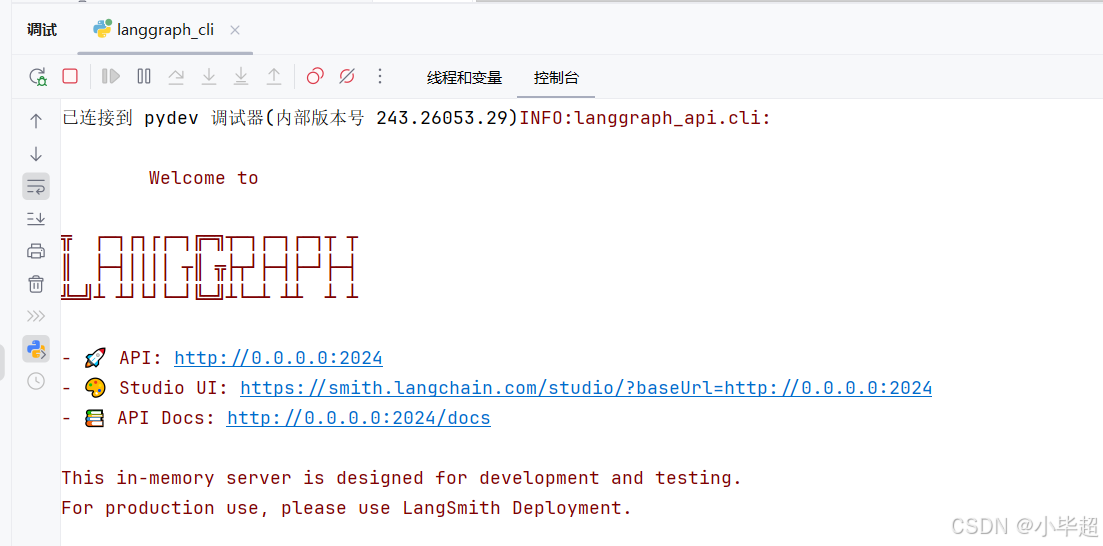
由于这里主要对智能体端的设计思路和源码进行解读,就不启动前端和 Fast API 服务了,那怎么调用智能体呢?这里我提供一个 LangGraph Client 端的调用示例,作为触发入口:
python
from langgraph_sdk import get_client
import asyncio

LANGGRAPH_URL = "http://localhost:2024"
ASSISTANT_ID = "lead_agent"  # 对应 langgraph.json 中注册的 graph 名称

async def main():
    client = get_client(url=LANGGRAPH_URL)
    thread = await client.threads.create()
    thread_id = thread["thread_id"]
    print(f"[thread_id] {thread_id}")
    # 同步调用
    result = await client.runs.wait(
        thread_id,
        ASSISTANT_ID,
        input={
            "messages": [
                {"role": "user", "content": "介绍一下小毕超技术博主"}
            ]
        },
        config={"configurable": {
            "thinking_enabled": False,  # 关闭扩展思考,根据配置的模型定义
            "is_plan_mode": False,
            "subagent_enabled": False,
            "thread_id": thread_id,
        }},
    )
    # 从 state 中取最后一条 AI 消息
    messages = result.get("messages", [])
    for msg in reversed(messages):
        if msg.get("type") == "ai" and msg.get("content"):
            print(f"[assistant] {msg['content']}")
            break

if __name__ == "__main__":
    asyncio.run(main())
运行回答:
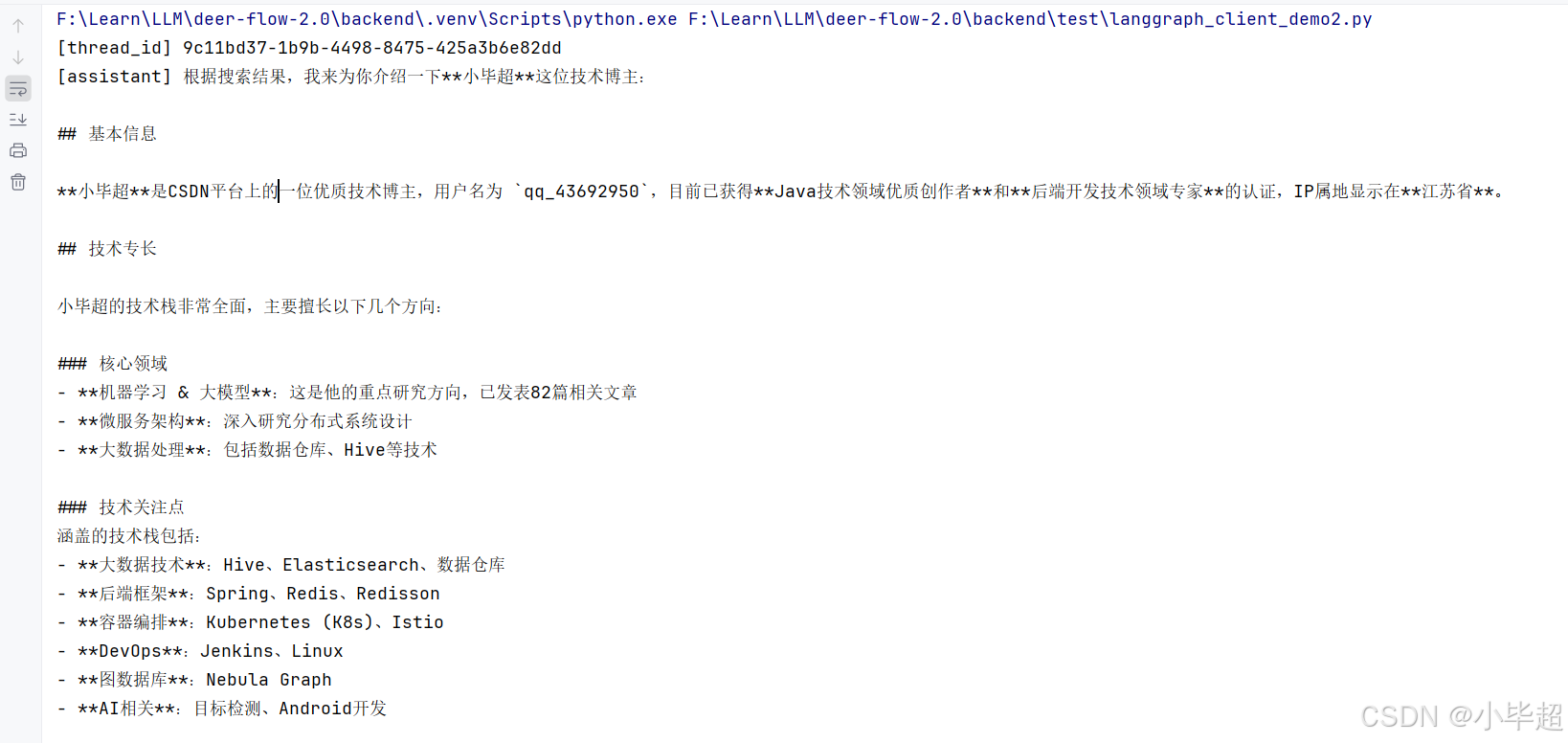
三、源码解读前置知识(LangChain、 LangGraph)
上面如果已经成功启动了智能体服务,那下面在理解 DeerFlow 2.0 源码之前,还需先了解下 LangChain 和 LangGraph 的几个概念用法,这里主要做简单的介绍说明,更详细的使用方式可以参考LangChain的官方文档。但如果你已经对 LangChain 和 LangGraph 有所了解了,可以直接跳过该章节!
3.1 Middleware
官方文档:https://docs.langchain.com/oss/python/langchain/middleware/custom
AgentMiddleware 是 LangChain 提供的钩子机制,类似 AOP,允许在智能体执行的关键节点注入自定义逻辑,而无需修改智能体图本身。
在 DeerFlow 2.0 中几乎所有核心关键功能都采用了 Middleware 机制进行的实现,如 MemoryMiddleware 长期记忆、SummarizationMiddleware 上下文压缩、TodoListMiddleware 任务计划进度追踪、SandboxMiddleware 沙箱操作 等。
Middleware 的主要几个钩子函数如下所示:
python
class AgentMiddleware:
    def before_run(self, state, runtime) -> dict | None:
        """Agent执行前触发(每次 invoke/stream 调用一次)"""

    def after_model(self, state, runtime) -> dict | None:
        """LLM 推理之后触发(每轮工具调用前调用)"""

    def before_tools(self, state, runtime) -> dict | None:
        """工具执行之前触发"""

    def after_agent(self, state, runtime) -> dict | None:
        """Agent 执行结束触发后(最终回复后调用一次)"""
3.2 如何创建 Agent
LangGraph 通过 create_agent 函数可以创建一个带有工具调用能力的标准 ReAct 智能体,例如:
python
from langchain.agents import create_agent

agent = create_agent(
    model=model,            # 任意 LangChain BaseChatModel
    tools=tools,            # 工具列表
    middleware=middlewares,  # 中间件列表
    system_prompt="...",    # 系统提示词
    state_schema=ThreadState,  # 自定义状态 Schema
)

# 调用智能体
result = agent.invoke({"messages": [HumanMessage(content="小毕超是谁...")]})

# 流式调用
for chunk in agent.stream({"messages": [...]}, stream_mode="values"):
    print(chunk)
3.3 LangGraph Server
LangGraph Server 是 LangGraph 提供的一种快速创建 Web 服务的方式,可将任意 Graph 暴露为 http api,而无需手动编写 FastAPI 接口。
需要声明一个 langgraph.json 文件,例如 DeerFlow 2.0 的在 backend 目录下:
官方文档:https://docs.langchain.com/oss/python/langgraph/local-server
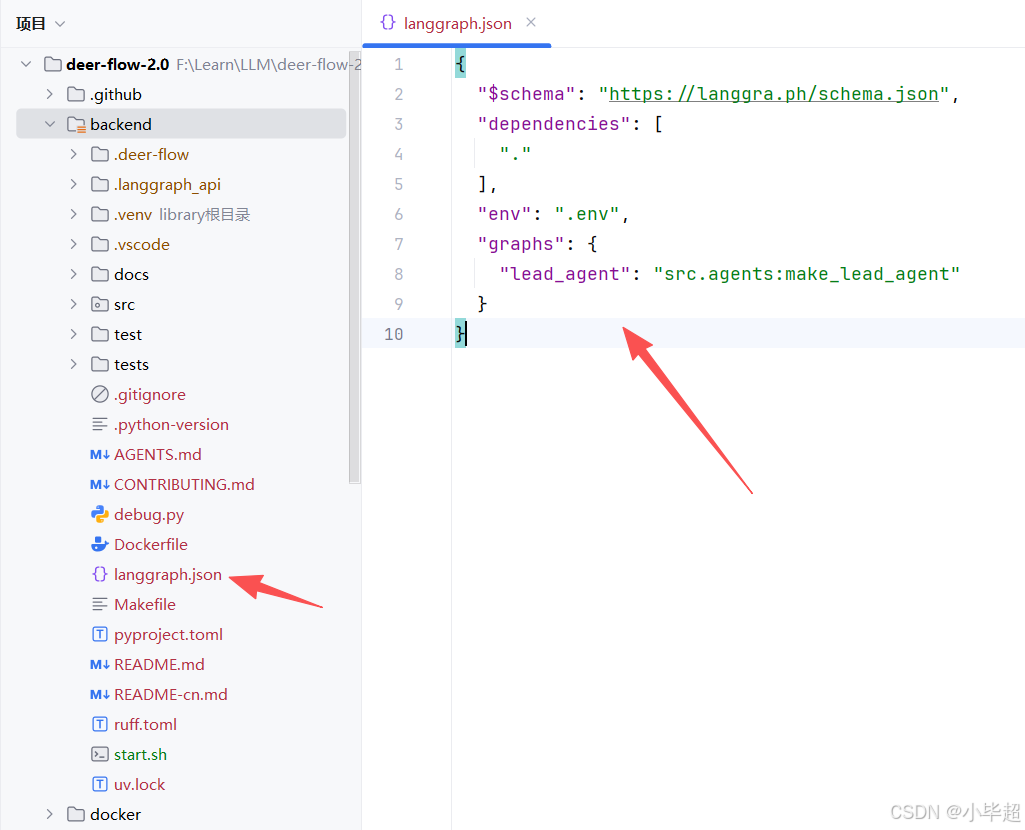
其中 graphs 下面的就是暴露的 Agent 能力,下面源码分析也从 src.agents:make_lead_agent 开始。
如何使用该配置启动服务,在上面第二章已经提到过了,直接使用 langgraph 工具即可启动,例如:
bash
uv run langgraph dev --no-browser --allow-blocking --host 0.0.0.0 --port 2024启动后,服务会暴露一些核心接口,例如:
| 端点 | 功能 |
|---|---|
POST /lead_agent/runs/stream |
流式运行智能体(SSE) |
POST /lead_agent/runs |
同步运行智能体 |
GET /threads/{id}/state |
获取线程状态 |
POST /threads |
创建新会话线程 |
四、智能体创建过程源码解读
整体项目结构概览:
yml
deer-flow-2.0/
├── backend/                        # Python 后端
│   ├── src/
│   │   ├── agents/                 # 智能体核心
│   │   │   ├── lead_agent/         # 主智能体
│   │   │   ├── middlewares/        # 中间件
│   │   │   ├── memory/             # 长期记忆
│   │   │   └── thread_state.py     # 状态 Schema 定义
│   │   ├── models/
│   │   │   └── factory.py          # LLM 工厂函数
│   │   ├── tools/
│   │   │   ├── builtins/           # 内置工具
│   │   │   └── tools.py            # 工具汇聚入口
│   │   ├── sandbox/                # 沙箱抽象层
│   │   │   ├── sandbox.py          # 抽象基类
│   │   │   ├── middleware.py       # SandboxMiddleware
│   │   │   └── local/              # 本地沙箱
│   │   ├── subagents/              # 子智能体
│   │   │   ├── executor.py         # 执行引擎
│   │   │   ├── registry.py         # 子智能体注册表
│   │   │   └── builtins/           # 内置子智能体配置
│   │   ├── config/                 # 配置
│   │   │   ├── app_config.py       # 主配置
│   │   │   ├── model_config.py     # 模型配置
│   │   │   ├── memory_config.py    # 记忆配置
│   │   │   └── ...                 # 其他子配置
│   │   ├── gateway/                #  网关
│   │   │   └── routers/            # 路由
│   │   ├── mcp/                    # MCP 工具缓存
│   │   ├── skills/                 # 技能加载器
│   │   ├── community/              # 第三方集成(Tavily, Jina, Firecrawl 等)
│   │   └── reflection/             # 反射工具
│   ├── tests/                      # 测试
│   └── langgraph.json              # LangGraph Server 注册配置
├── frontend/                       # 前端,采用Next.js
├── skills/                         # 技能文件目录
│   ├── public/                     # 内置技能
│   └── custom/                     # 用户自定义技能
├── config.yaml                     # 主配置文件(从 config.example.yaml 复制)
DeerFlow 2.0 主要采用前后端分离架构,后端由两个独立服务组成,通过 Nginx 统一对外暴露,这一点可以在 docker/docker-compose-dev.yaml 中看到部署过程。用户发起提问,会由 Nginx 转发至 LangGraph Server 接口,整体需要经历如下几个过程:
-
用户发送消息。
-
Nginx路由 →LangGraph Server(port 2024)。 -
LangGraph读取langgraph.json,调用make_lead_agent(config)构建智能体。包括创建LLM实例、构建tools(包括MCP)、组装Middleware、拼接Syetem Prompt。 -
触发
Middleware的before_agent钩子。 -
LLM推理,提示词包括:澄清规则 + 记忆 + 技能 + 子智能体规则等。 -
根据场景选择调用工具(
bash/web_search/task/ask_clarification...),其中如果是task工具,则是派发子智能体,子智能体独立执行 → 返回结果给到主智能体。 -
触发
Middleware的after_agent,如:MemoryMiddleware: 将对话加入记忆更新队列(防抖30s),TitleMiddleware: 首轮完成后异步生成标题等。 -
SSE流式返回给前端。
下面开始从 make_lead_agent 入口进行源码解读:
4.1 make_lead_agent 创建智能体
make_lead_agent 是整个 DeerFlow 后端的核心入口,位于 backend/src/agents/lead_agent/agent.py。它由 LangGraph Server 在每次请求时调用,负责动态构建并返回完整的智能体图实例。
完整源码解读:
python
# ══════════════════════════════════════════════════════════════════════════
# LangGraph Server 注册入口
# ══════════════════════════════════════════════════════════════════════════

def make_lead_agent(config: RunnableConfig):
    """构建并返回 DeerFlow 主智能体实例。

    此函数由 LangGraph Server(通过 langgraph.json 注册)在每次请求时调用,
    也被 DeerFlowClient._ensure_agent 复用(但嵌入模式下直接调用 create_agent)。

    构建流程
    --------
    1. 从 config.configurable 提取运行时参数(thinking / model / plan_mode 等)。
    2. 解析最终使用的模型名(请求覆盖 > 自定义智能体配置 > 全局默认)。
    3. 验证 thinking 兼容性(若模型不支持,降级并记录警告)。
    4. 注入 LangSmith 追踪元数据(agent_name / model_name 等标签)。
    5. 若是 bootstrap 模式(初始化自定义智能体流程),使用最小化提示词 + setup_agent 工具。
    6. 否则构建标准主智能体:model + tools + middleware + system_prompt + state_schema。

    bootstrap 模式
    --------------
    当 is_bootstrap=True 时,智能体拥有额外的 setup_agent 工具,
    用于创建新的自定义智能体配置文件(config.yaml / SOUL.md 等)。
    此模式用于内部初始化流程,不对外暴露。

    Args:
        config: LangGraph 运行时配置,包含所有 configurable 参数。

    Returns:
        完整构建好的 LangGraph 智能体图实例(可调用 stream / invoke)。

    Raises:
        ValueError: 无法解析模型配置,或模型配置缺失时抛出。
    """
    # 延迟导入:避免在模块加载时触发循环依赖
    from src.tools import get_available_tools
    from src.tools.builtins import setup_agent

    # 从 config.configurable 提取运行时参数
    thinking_enabled = config.get("configurable", {}).get("thinking_enabled", True)
    reasoning_effort = config.get("configurable", {}).get("reasoning_effort", None)
    # model_name 和 model 都可以指定模型(兼容两种字段名)
    requested_model_name: str | None = (
        config.get("configurable", {}).get("model_name")
        or config.get("configurable", {}).get("model")
    )
    is_plan_mode = config.get("configurable", {}).get("is_plan_mode", False)
    subagent_enabled = config.get("configurable", {}).get("subagent_enabled", False)
    max_concurrent_subagents = config.get("configurable", {}).get("max_concurrent_subagents", 3)
    is_bootstrap = config.get("configurable", {}).get("is_bootstrap", False)
    agent_name = config.get("configurable", {}).get("agent_name")

    # 解析自定义智能体配置
    # bootstrap 模式不加载 agent_config(避免循环依赖)
    agent_config = load_agent_config(agent_name) if not is_bootstrap else None
    # 模型优先级:自定义智能体专属模型 > 全局默认模型
    agent_model_name = agent_config.model if agent_config and agent_config.model else _resolve_model_name()

    # 最终模型名优先级:请求覆盖 > 智能体配置 > 全局默认
    model_name = requested_model_name or agent_model_name

    # 模型配置验证
    app_config = get_app_config()
    model_config = app_config.get_model_config(model_name) if model_name else None

    if model_config is None:
        raise ValueError(
            "No chat model could be resolved. "
            "Please configure at least one model in config.yaml or provide a valid 'model_name'/'model' in the request."
        )
    # 若请求了 thinking 但模型不支持,静默降级(不抛错,只警告)
    if thinking_enabled and not model_config.supports_thinking:
        logger.warning(
            f"Thinking mode is enabled but model '{model_name}' does not support it; "
            "fallback to non-thinking mode."
        )
        thinking_enabled = False

    # 记录智能体创建日志,便于问题排查
    logger.info(
        "Create Agent(%s) -> thinking_enabled: %s, reasoning_effort: %s, model_name: %s, "
        "is_plan_mode: %s, subagent_enabled: %s, max_concurrent_subagents: %s",
        agent_name or "default",
        thinking_enabled,
        reasoning_effort,
        model_name,
        is_plan_mode,
        subagent_enabled,
        max_concurrent_subagents,
    )

    # 注入 LangSmith 追踪元数据
    # 这些标签会出现在 LangSmith 追踪界面,便于过滤和分析
    if "metadata" not in config:
        config["metadata"] = {}
    config["metadata"].update({
        "agent_name": agent_name or "default",
        "model_name": model_name or "default",
        "thinking_enabled": thinking_enabled,
        "reasoning_effort": reasoning_effort,
        "is_plan_mode": is_plan_mode,
        "subagent_enabled": subagent_enabled,
    })

    # Bootstrap 模式:创建自定义智能体的初始化智能体
    if is_bootstrap:
        # 使用特殊技能集(仅含 "bootstrap")的精简系统提示词
        system_prompt = apply_prompt_template(
            subagent_enabled=subagent_enabled,
            max_concurrent_subagents=max_concurrent_subagents,
            available_skills=set(["bootstrap"]),
        )
        return create_agent(
            model=create_chat_model(name=model_name, thinking_enabled=thinking_enabled),
            # 在标准工具之外额外加入 setup_agent 工具(创建智能体配置的专用工具)
            tools=get_available_tools(model_name=model_name, subagent_enabled=subagent_enabled) + [setup_agent],
            middleware=_build_middlewares(config, model_name=model_name),
            system_prompt=system_prompt,
            state_schema=ThreadState,
        )

    # 标准主智能体构建
    return create_agent(
        # 实例化 LLM(含 thinking 参数、reasoning_effort 等)
        model=create_chat_model(
            name=model_name,
            thinking_enabled=thinking_enabled,
            reasoning_effort=reasoning_effort,
        ),
        # 工具集:根据自定义智能体的 tool_groups 过滤,或使用全部工具
        tools=get_available_tools(
            model_name=model_name,
            groups=agent_config.tool_groups if agent_config else None,
            subagent_enabled=subagent_enabled,
        ),
        # 中间件链:按严格顺序组装,agent_name 影响记忆存储位置
        middleware=_build_middlewares(config, model_name=model_name, agent_name=agent_name),
        # 系统提示词:含记忆、技能列表、子智能体章节、当前日期
        system_prompt=apply_prompt_template(
            subagent_enabled=subagent_enabled,
            max_concurrent_subagents=max_concurrent_subagents,
            agent_name=agent_name,
        ),
        # 状态类型:扩展了 AgentState,添加沙箱、目录、产物等字段
        state_schema=ThreadState,
)该方法,核心主要就两个方面,获取配置信息,创建LangChain智能体。
其中配置方面,app_config 包含了前面配置的信息,以及Client端调用传递的参数,如:模型,长期记忆、沙箱、Skills、Tool 等配置:

最重要的方法莫过于 create_agent 创建智能体了,下面围绕其中几个实现方法进行一一解读,特别是最后一个构建的 System Prompt 内容:
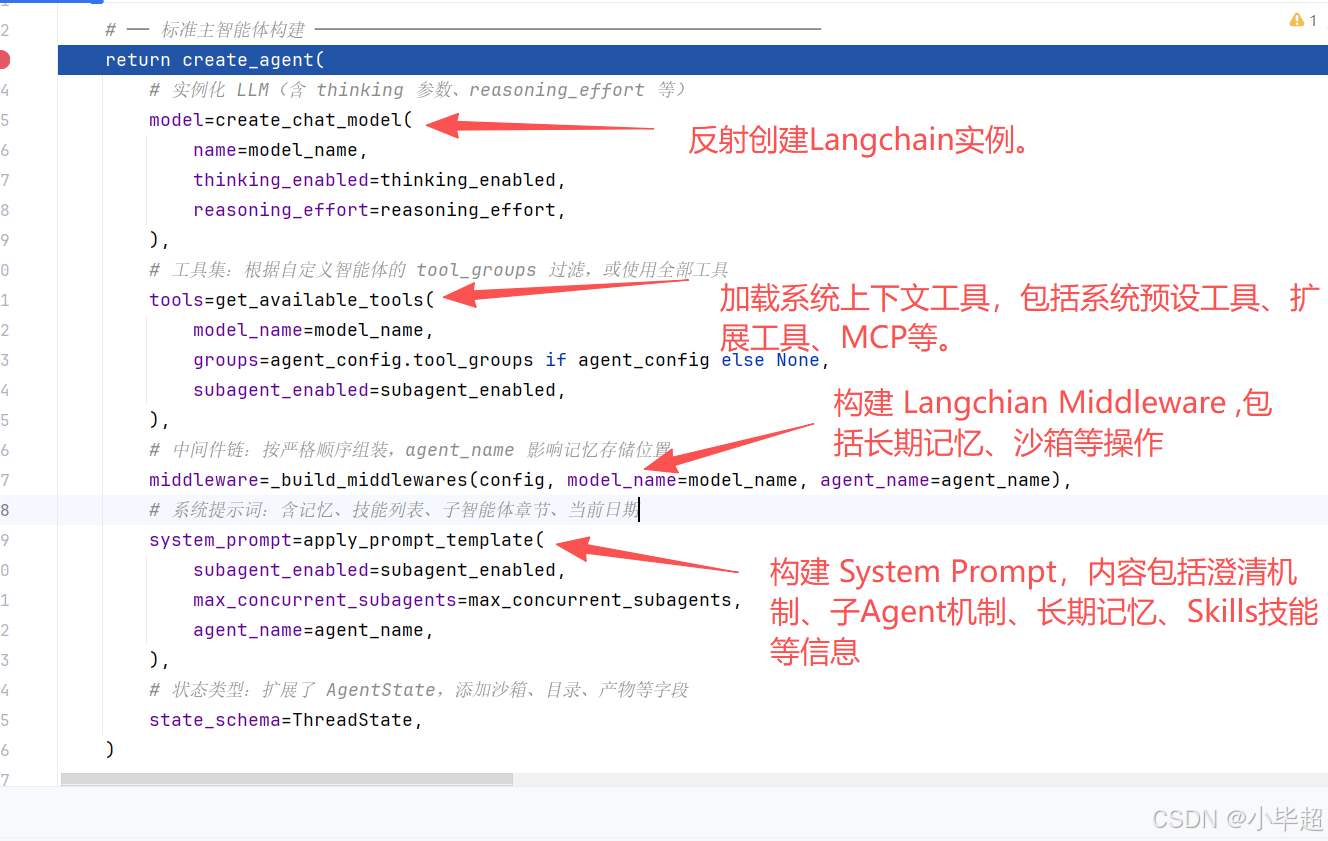
4.2 create_chat_model 创建LLM实例
create_chat_model ,位于 backend/src/models/factory.py,是所有 LLM 实例化的唯一入口。
这里实例化的类型,就是 config.yaml 配置的 models.use :
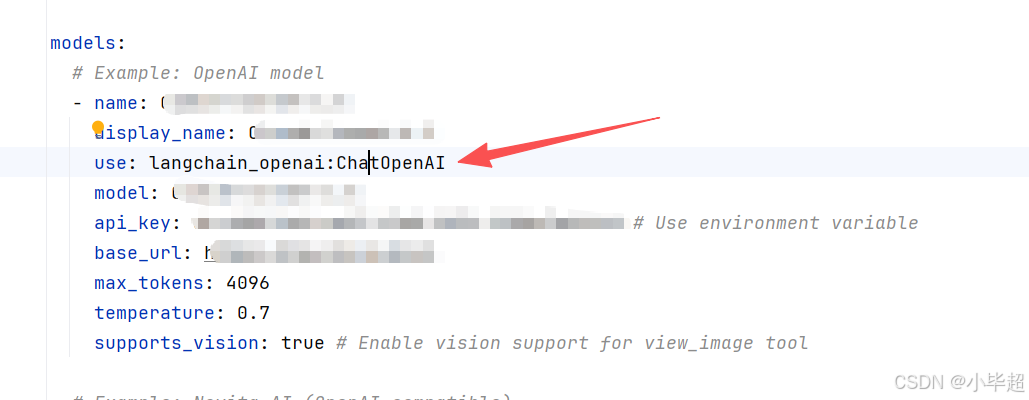
完整的实现过程和解读如下:
python
def create_chat_model(name: str | None = None, thinking_enabled: bool = False, **kwargs) -> BaseChatModel:
    """根据配置创建并返回一个 LangChain ChatModel 实例。

    实例化流程
    ----------
    1. 若 name 为 None,使用 config.yaml 中第一个模型(默认模型)。
    2. 从 AppConfig.models 中找到对应的 ModelConfig。
    3. 通过 resolve_class(model_config.use, BaseChatModel) 动态加载模型类。
    4. model_dump 将 ModelConfig 序列化为 kwargs,排除元数据字段
       (use / name / display_name / supports_thinking 等不应传给 ChatModel 构造函数)。
    5. 若 thinking_enabled=True,将 when_thinking_enabled 中的参数合并到 kwargs。
    6. 若 thinking_enabled=False 且模型曾配置过 thinking(有 extra_body.thinking.type),
       注入 thinking.type="disabled" 和 reasoning_effort="minimal" 以确保关闭。
    7. 若模型不支持 reasoning_effort 参数,注入 reasoning_effort=None 以抑制。
    8. 使用合并后的 kwargs 实例化模型类。
    9. 若启用 LangSmith 追踪,向实例的 callbacks 列表追加 LangChainTracer。

    关于 when_thinking_enabled
    --------------------------
    这是 ModelConfig 的一个特殊字段,存储"启用扩展思考时需要覆盖的参数"。
    例如 Anthropic Claude 的配置:
        when_thinking_enabled:
          extra_body:
            thinking:
              type: enabled
              budget_tokens: 10000

    Args:
        name: 模型名称(与 config.yaml 中 models[].name 对应)。
              为 None 时使用第一个配置的模型。
        thinking_enabled: 是否启用模型的扩展思考(Extended Thinking)功能。
                          仅对 ModelConfig.supports_thinking=True 的模型有效。
        **kwargs: 额外的构造参数,会覆盖 ModelConfig 中的同名参数
                  (如临时指定 temperature / max_tokens 等)。

    Returns:
        实例化并配置好的 LangChain BaseChatModel 子类实例。

    Raises:
        ValueError: 指定的模型名在 config.yaml 中找不到对应配置。
        ValueError: thinking_enabled=True 但模型未设置 supports_thinking=True。
        ImportError: 模型对应的 Python 包未安装(resolve_class 抛出,含安装建议)。
    """
    config = get_app_config()

    # 若未指定模型名,使用配置中��第一个模型(默认模型)
    if name is None:
        name = config.models[0].name

    model_config = config.get_model_config(name)
    if model_config is None:
        raise ValueError(f"Model {name} not found in config") from None

    # 通过反射动态加载模型类
    # model_config.use 格式示例:"langchain_openai:ChatOpenAI"
    # resolve_class 会 import 模块并验证类继承关系
    model_class = resolve_class(model_config.use, BaseChatModel)

    # 将 ModelConfig 序列化为 ChatModel 构造函数的关键字参数
    # exclude_none=True:None 值不传(让 ChatModel 使用其默认值)
    # exclude 集合:排除 DeerFlow 专用的元数据字段,这些字段不是 ChatModel 的参数
    model_settings_from_config = model_config.model_dump(
        exclude_none=True,
        exclude={
            "use",                       # provider 类路径
            "name",                      # DeerFlow 内部模型标识符
            "display_name",              # UI 展示名称
            "description",               # 模型描述
            "supports_thinking",         # DeerFlow 能力标志
            "supports_reasoning_effort", # DeerFlow 能力标志
            "when_thinking_enabled",     # DeerFlow 扩展思考覆盖参数(单独处理)
            "supports_vision",           # DeerFlow 能力标志
        },
    )

    # 扩展思考模式处理
    if thinking_enabled and model_config.when_thinking_enabled is not None:
        if not model_config.supports_thinking:
            raise ValueError(
                f"Model {name} does not support thinking. "
                "Set `supports_thinking` to true in the `config.yaml` to enable thinking."
            ) from None
        # 将 when_thinking_enabled 中的覆盖参数合并到基础配置中
        # (通常包含 extra_body.thinking.type="enabled" 等 provider 专属参数)
        model_settings_from_config.update(model_config.when_thinking_enabled)

    # 若不启用 thinking,但模型配置了 thinking(when_thinking_enabled 有值),
    # 需要显式关闭------否则某些 provider 可能会使用缓存的 thinking 配置
    if (
        not thinking_enabled
        and model_config.when_thinking_enabled
        and model_config.when_thinking_enabled.get("extra_body", {}).get("thinking", {}).get("type")
    ):
        # 明确禁用 thinking,并将 reasoning_effort 设为最低(minimal)以降低成本
        kwargs.update({"extra_body": {"thinking": {"type": "disabled"}}})
        kwargs.update({"reasoning_effort": "minimal"})

    # 若模型不支持 reasoning_effort 参数(如大部分非 o1/o3 系列模型),
    # 注入 None 以覆盖调用方可能传入的值,避免模型构造时出错
    if not model_config.supports_reasoning_effort:
        kwargs.update({"reasoning_effort": None})

    # 实例化:kwargs(调用方覆盖)优先于 model_settings_from_config(配置文件)
    # 注意顺序:**kwargs 放在后面会覆盖 **model_settings_from_config 中的同名参数
    model_instance = model_class(**kwargs, **model_settings_from_config)

    # LangSmith 分布式追踪:若启用,向模型注入追踪回调
    if is_tracing_enabled():
        try:
            from langchain_core.tracers.langchain import LangChainTracer

            tracing_config = get_tracing_config()
            # LangChainTracer 会将每次模型调用的输入输出上传到 LangSmith 平台
            tracer = LangChainTracer(
                project_name=tracing_config.project,
            )
            # 追加到已有 callbacks,不覆盖(保留其他可能存在的回调)
            existing_callbacks = model_instance.callbacks or []
            model_instance.callbacks = [*existing_callbacks, tracer]
            logger.debug(
                f"LangSmith tracing attached to model '{name}' (project='{tracing_config.project}')"
            )
        except Exception as e:
            # 追踪注入失败不应中断主流程,只记录警告
            logger.warning(f"Failed to attach LangSmith tracing to model '{name}': {e}")

    return model_instance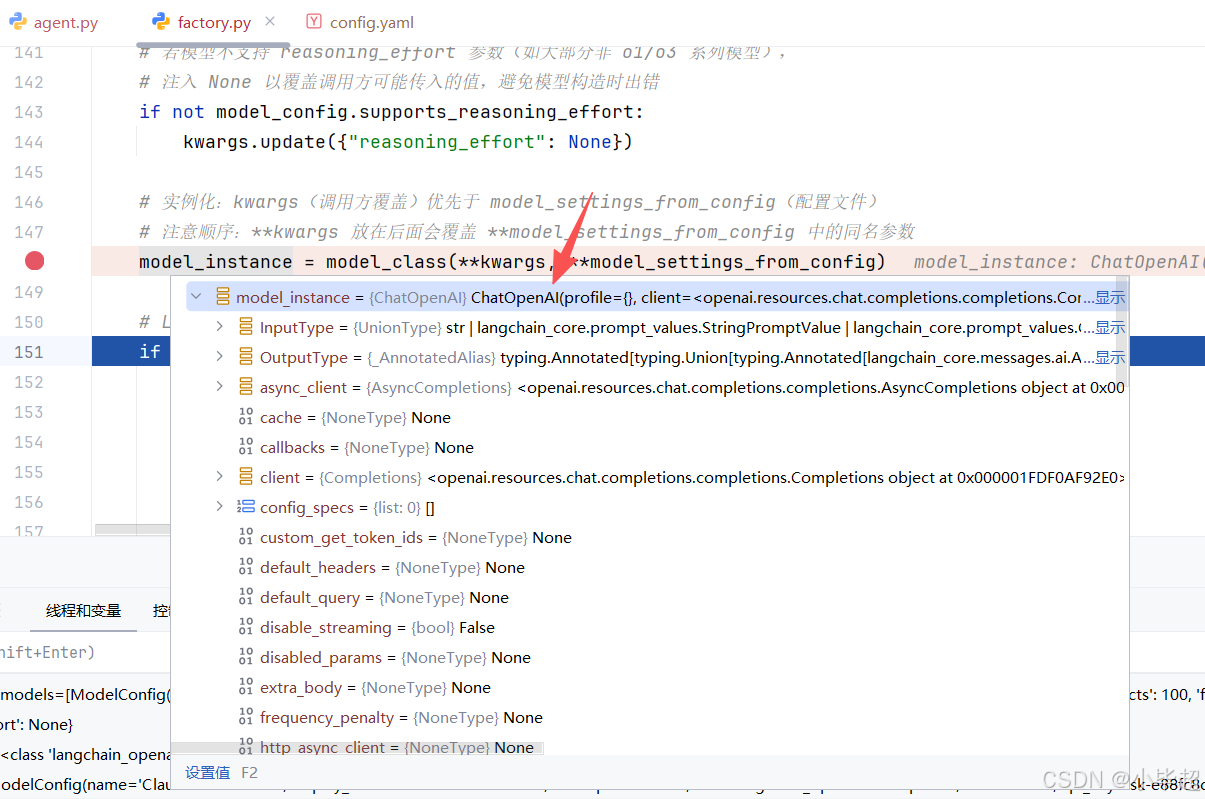
关键设计点:
-
反射加载 :通过
"langchain_openai:ChatOpenAI"这样的字符串动态import模块并获取类,使得添加新provider只需修改config.yaml,无需改代码。 -
when_thinking_enabled覆盖机制 :不同provider的扩展思考参数格式不同,如Anthropic用extra_body.thinking,OpenAI系列用reasoning_effort),通过配置文件中的when_thinking_enabled字段统一管理,工厂函数按需合并。 -
显式关闭 thinking :若模型配置了
thinking但当前请求不需要,必须显式传入thinking.type="disabled",否则某些provider可能使用缓存的thinking配置。
4.3 get_available_tools 获取有效工具集
get_available_tools 位于 backend/src/tools/tools.py,负责将四类来源的工具统一组装:
python
def get_available_tools(
    groups: list[str] | None = None,
    include_mcp: bool = True,
    model_name: str | None = None,
    subagent_enabled: bool = False,
) -> list[BaseTool]:
    """汇聚所有可用工具,返回供智能体使用的完整工具列表。

    组装逻辑(按顺序):
        1. loaded_tools   --- 从 config.yaml 反射加载,按 groups 过滤
        2. builtin_tools  --- BUILTIN_TOOLS 的副本 + 条件工具(task / view_image)
        3. mcp_tools      --- 从 extensions_config.json 懒加载的 MCP 服务器工具

    最终返回:``loaded_tools + builtin_tools + mcp_tools``

    Args:
        groups:
            工具分组过滤列表。None 表示加载所有 config 工具;
            提供列表时,只加载 ToolConfig.group 在 groups 中的工具。
            用于自定义智能体(agent_config.tool_groups)按需裁剪工具集。
        include_mcp:
            是否加载 MCP 服务器工具(默认 True)。
            设为 False 可在 MCP 不可用的场景(如单元测试)中跳过。
        model_name:
            运行时使用的模型名称,用于判断是否注入 view_image_tool。
            为 None 时自动取 config.yaml 第一个模型(默认模型)。
        subagent_enabled:
            是否将 task 工具加入工具集。
            仅在主智能体(lead_agent)开启子智能体委托时设为 True;
            子智能体本身永远传入 False(防止递归嵌套)。

    Returns:
        可直接传入 create_agent(tools=...) 的 BaseTool 实例列表。
    """
    config = get_app_config()

    # 加载 config 定义的工具(反射加载)
    # config.tools 是 ToolConfig 列表,每项含:
    #   use   --- "module.path:tool_variable_name"(模块级工具实例,非类)
    #   group --- 工具所属分组(如 "web" / "file:read" / "bash")
    # resolve_variable 根据路径 import 模块并取出工具实例,
    # 同时用 isinstance(..., BaseTool) 验证类型。
    loaded_tools = [
        resolve_variable(tool.use, BaseTool)
        for tool in config.tools
        if groups is None or tool.group in groups
        # groups=None → 不过滤,加载所有工具
        # groups=["web"] → 只加载 group="web" 的工具(如 tavily_search)
    ]

    # 加载 MCP 工具(懒加载 + mtime 缓存失效)
    # 关键设计:此处直接调用 ExtensionsConfig.from_file() 而非使用
    # config.extensions 缓存。原因:
    #   - LangGraph Server 和 Gateway API 是不同进程
    #   - Gateway API 更新 extensions_config.json 后,LangGraph 进程
    #     的内存缓存(config.extensions)不会自动更新
    #   - 直接从磁盘读取确保每次构建工具集时都能感知到最新配置
    mcp_tools = []
    if include_mcp:
        try:
            from src.config.extensions_config import ExtensionsConfig
            from src.mcp.cache import get_cached_mcp_tools
            # ExtensionsConfig.from_file():每次都从磁盘读取,绕过内存缓存
            extensions_config = ExtensionsConfig.from_file()
            if extensions_config.get_enabled_mcp_servers():
                # get_cached_mcp_tools:
                #   - 首次调用:懒加载,通过线程池运行协程初始化所有 MCP 服务器连接
                #   - 后续调用:直接返回缓存,除非检测到 extensions_config.json的 mtime(文件修改时间)发生变化,则清空缓存重新加载
                mcp_tools = get_cached_mcp_tools()
                if mcp_tools:
                    logger.info(f"Using {len(mcp_tools)} cached MCP tool(s)")
        except ImportError:
            # langchain-mcp-adapters 未安装时静默降级,不阻断主流程
            logger.warning(
                "MCP module not available. "
                "Install 'langchain-mcp-adapters' package to enable MCP tools."
            )
        except Exception as e:
            # MCP 连接失败(如服务器未启动)同样静默降级
            logger.error(f"Failed to get cached MCP tools: {e}")

    # 组装内置工具列表(在副本上操作,避免修改全局常量)
    builtin_tools = BUILTIN_TOOLS.copy()  # 始终包含 present_files + ask_clarification

    # 条件注入子智能体工具
    if subagent_enabled:
        # task 工具:让主智能体可以将子任务委托给后台子智能体并行执行
        builtin_tools.extend(SUBAGENT_TOOLS)
        logger.info("Including subagent tools (task)")

    # 判断是否注入视觉工具
    # model_name 为 None 时,取配置中的第一个模型作为默认
    if model_name is None and config.models:
        model_name = config.models[0].name

    # 仅当运行时模型明确声明 supports_vision=True 时才注入 view_image_tool
    # 原因:视觉模型需要支持 vision API(如 GPT-4V / Claude 3 系列),
    #       向不支持视觉的模型发送图片会导致 API 报错。
    model_config = config.get_model_config(model_name) if model_name else None
    if model_config is not None and model_config.supports_vision:
        # view_image_tool:
        #   读取图片文件 → base64 编码 → 写入 ThreadState.viewed_images。
        #   ViewImageMiddleware 在下一次模型调用前,将 viewed_images 中
        #   的图片 base64 注入到消息内容里,供模型理解图片。
        builtin_tools.append(view_image_tool)
        logger.info(f"Including view_image_tool for model '{model_name}' (supports_vision=True)")

    # 最终合并:config 工具 + 内置工具 + MCP 工具
    return loaded_tools + builtin_tools + mcp_tools
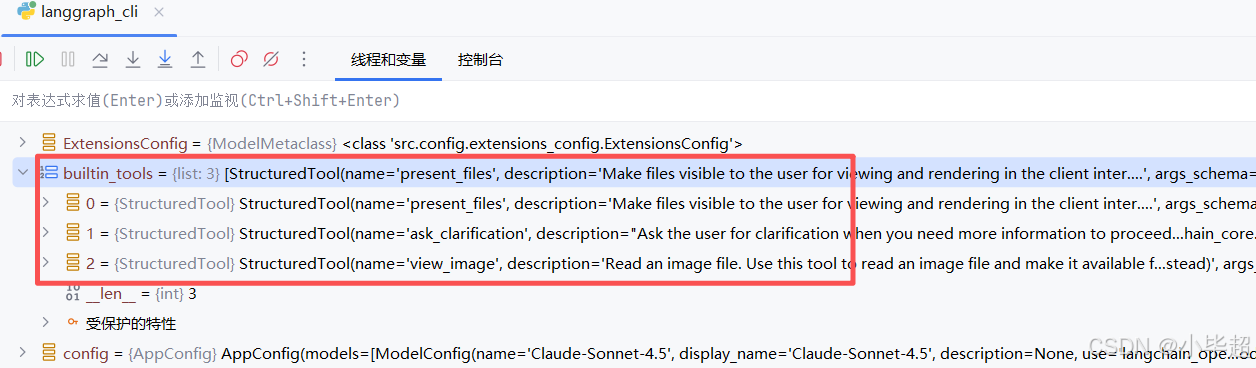
四类工具解释:
| 类型 | 来源 | 说明 |
|---|---|---|
| config 工具 | config.yaml 的 tools[] 列表,反射加载 |
如Tavily 搜索、Jina 抓取、Firecrawl |
| 内置常驻工具 | BUILTIN_TOOLS 全局工具,始终注入 |
如 present_files、ask_clarification |
| MCP 工具 | extensions_config.json 中启用的 MCP 服务器 |
任何支持MCP协议的外部扩展 |
| 场景动态工具 | 其中子智能体工具 仅 subagent_enabled=True 时注入,视觉工具 仅 supports_vision=True 时注入 |
task 和 view_image |
实际加载工具,builtin_tools :
loaded_tools 和 mcp_tools:
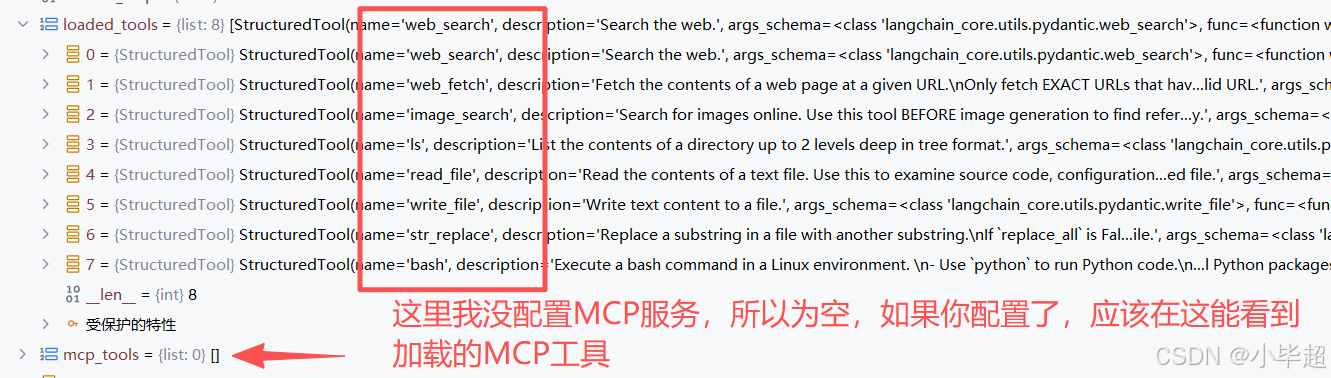
这里补充说明下 MCP 工具的缓存策略:get_cached_mcp_tools 基于 extensions_config.json 的文件修改时间 mtime 判断是否缓存失效。每次调用时检查文件的mtime,若发生变化则清空缓存重新加载所有 MCP 服务器连接。可以解决跨进程配置同步的问题。
4.4 _build_middlewares 构建 AgentMiddlewares 顺序列表
python
def _build_middlewares(config: RunnableConfig, model_name: str | None, agent_name: str | None = None):
    """根据运行时配置组装有序的中间件列表。

    Args:
        config: 运行时配置,用于提取 is_plan_mode / subagent_enabled /
                max_concurrent_subagents 等参数。
        model_name: 已解析的模型名,用于判断是否支持视觉(ViewImageMiddleware)。
        agent_name: 可选的自定义智能体名。若提供,MemoryMiddleware 将使用
                    per-agent 独立的 memory.json,而非全局 memory.json。

    Returns:
        按执行顺序排列的中间件实例列表。
    """
    # 核心中间件(始终存在)
    middlewares = [
        ThreadDataMiddleware(),          # 1. 建立线程目录
        UploadsMiddleware(),             # 2. 检测并注入新上传文件
        SandboxMiddleware(),             # 3. 获取沙箱实例
        DanglingToolCallMiddleware(),    # 4. 修补孤立 tool_call
    ]

    # 可选:摘要化中间件
    # 仅在 config.yaml 的 summarization.enabled=true 时加入
    summarization_middleware = _create_summarization_middleware()
    if summarization_middleware is not None:
        middlewares.append(summarization_middleware)

    # 可选:TodoList 中间件(计划模式)
    # 仅在 RunnableConfig.configurable.is_plan_mode=True 时加入
    is_plan_mode = config.get("configurable", {}).get("is_plan_mode", False)
    todo_list_middleware = _create_todo_list_middleware(is_plan_mode)
    if todo_list_middleware is not None:
        middlewares.append(todo_list_middleware)

    # 标题生成中间件(始终存在)
    middlewares.append(TitleMiddleware())

    # 记忆中间件(始终存在,但 agent_name 影响存储位置)
    # agent_name=None → 全局 memory.json
    # agent_name="xxx" → agents/xxx/memory.json
    middlewares.append(MemoryMiddleware(agent_name=agent_name))

    # 可选:图片注入中间件(视模型能力决定)
    # 只有当运行时模型的 ModelConfig.supports_vision=True 时才加入。
    # 注意:使用已解析的 model_name 而非 config 中的原始值,避免读取到过期缓存。
    app_config = get_app_config()
    model_config = app_config.get_model_config(model_name) if model_name else None
    if model_config is not None and model_config.supports_vision:
        middlewares.append(ViewImageMiddleware())

    # 可选:子智能体并发限制中间件
    # 仅在 subagent_enabled=True 时加入;限制每轮最多 N 个并发 task 调用。
    subagent_enabled = config.get("configurable", {}).get("subagent_enabled", False)
    if subagent_enabled:
        max_concurrent_subagents = config.get("configurable", {}).get("max_concurrent_subagents", 3)
        middlewares.append(SubagentLimitMiddleware(max_concurrent=max_concurrent_subagents))

    # 澄清中间件(始终最后)
    # 必须放在末尾:它在 after_model 阶段拦截 ask_clarification 工具调用,
    # 通过 Command(goto=END) 终止图执行,将问题返还给用户。
    middlewares.append(ClarificationMiddleware())

    return middlewares
各 AgentMiddlewares 作用:
| 中间件 | 钩子 | 职责 |
|---|---|---|
ThreadDataMiddleware |
before_agent |
创建 {base_dir}/threads/{thread_id}/user-data/{workspace,uploads,outputs}/ 目录 |
UploadsMiddleware |
before_agent |
检测本轮新上传文件,注入 <uploaded_files> 消息 |
SandboxMiddleware |
before_agent |
调用 provider.acquire(thread_id) 获取沙箱,写入 state.sandbox.sandbox_id |
DanglingToolCallMiddleware |
before_agent |
扫描历史消息,为孤立的 tool_call 注入占位 ToolMessage |
SummarizationMiddleware |
before_agent |
当 token 数超过阈值时,调用 LLM 压缩 |
TodoListMiddleware |
before_agent |
注入 write_todos 工具和相关系统提示词 |
TitleMiddleware |
after_agent |
首轮对话完成后,调用轻量模型生成会话标题 |
MemoryMiddleware |
after_agent |
长期记忆机制,记忆维护在 memory.json 中 |
ViewImageMiddleware |
before_agent |
将图片,转化为 base64 到注入到消息内容 |
SubagentLimitMiddleware |
after_model |
截断超过 max_concurrent 的子智能体工具调用 |
ClarificationMiddleware |
wrap_tool_call |
拦截 ask_clarification 调用,中断执行 |
4.5 apply_prompt_template 构建系统提示词组装
apply_prompt_template 位于 backend/src/agents/lead_agent/prompt.py,负责将多个动态上下文片段组装成完整的System Prompt:
python
def apply_prompt_template(
    subagent_enabled: bool = False,
    max_concurrent_subagents: int = 3,
    *,
    agent_name: str | None = None,
    available_skills: set[str] | None = None,
) -> str:
    """组装完整的系统提示词字符串。

    这是提示词生成的唯一公开入口,被 make_lead_agent 和
    DeerFlowClient._ensure_agent 调用。

    组装顺序:
        1. _get_memory_context(agent_name) → 记忆上下文(<memory> 标签)
        2. _build_subagent_section(n)      → 子智能体工作流章节(仅 enabled 时)
        3. 子智能体提醒文本                 → 注入 <critical_reminders> 中
        4. 子智能体思考引导                 → 注入 <thinking_style> 中
        5. get_skills_prompt_section()      → 技能列表章节(<skill_system> 标签)
        6. SYSTEM_PROMPT_TEMPLATE.format()  → 所有片段填入主模板
        7. 追加 <current_date>              → 防止模型使用过时的日期认知

    动态内容说明:
        - 记忆上下文:每次构建时从磁盘读取,反映最新记忆状态。
        - 技能列表:从文件系统扫描,反映最新安装/启用状态。
        - 当前日期:datetime.now(),确保智能体时间感知准确。

    Args:
        subagent_enabled: 是否在提示词中注入子智能体工作流章节。
        max_concurrent_subagents: 每轮最大并发子智能体数,用于生成具体的数字提示。
        agent_name: 智能体名称,影响记忆存储位置和 SOUL.md 加载。
        available_skills: 技能名白名单,None 表示显示全部已启用技能。

    Returns:
        完整的系统提示词字符串(末尾含 <current_date> 标签)。
    """
    # 记忆上下文(若未启用或无内容,返回空字符串,不影响模板格式)
    memory_context = _get_memory_context(agent_name)

    # 子智能体章节(仅 subagent_enabled=True 时生成,否则为空字符串)
    n = max_concurrent_subagents
    subagent_section = _build_subagent_section(n) if subagent_enabled else ""

    # 注入 <critical_reminders> 的子智能体提醒
    #    明确说明"编排者"角色和每轮批次限制,加强模型对规则的遵守
    subagent_reminder = (
        "- **Orchestrator Mode**: You are a task orchestrator - decompose complex tasks into parallel sub-tasks. "
        f"**HARD LIMIT: max {n} `task` calls per response.** "
        f"If >{n} sub-tasks, split into sequential batches of ≤{n}. Synthesize after ALL batches complete.\n"
        if subagent_enabled
        else ""
    )

    # 注入 <thinking_style> 的子智能体分解思考引导
    #    在模型开始思考时就提醒它先数清楚子任务数量、规划批次
    subagent_thinking = (
        "- **DECOMPOSITION CHECK: Can this task be broken into 2+ parallel sub-tasks? If YES, COUNT them. "
        f"If count > {n}, you MUST plan batches of ≤{n} and only launch the FIRST batch now. "
        f"NEVER launch more than {n} `task` calls in one response.**\n"
        if subagent_enabled
        else ""
    )

    # 技能列表章节(从文件系统实时扫描,反映当前启用状态)
    skills_section = get_skills_prompt_section(available_skills)

    # 将所有动态片段填入主模板
    prompt = SYSTEM_PROMPT_TEMPLATE.format(
        agent_name=agent_name or "DeerFlow 2.0",  # 默认智能体名称
        soul=get_agent_soul(agent_name),           # 个性文件(可能为空字符串)
        skills_section=skills_section,
        memory_context=memory_context,
        subagent_section=subagent_section,
        subagent_reminder=subagent_reminder,
        subagent_thinking=subagent_thinking,
    )

    # 追加当前日期(动态注入,格式:YYYY-MM-DD, Weekday)
    #    每次构建时都会更新,确保长期运行的进程不会给模型提供过期日期
    return prompt + f"\n<current_date>{datetime.now().strftime('%Y-%m-%d, %A')}</current_date>"
组装的 System Prompt 主要包含以下几点核心内容:
身份定位 :开源超级智能体,具备多能力插件调度。
记忆模块 :自带用户长期画像 + 会话历史,自动感知用户研究偏好。
思考规则 :先拆解任务,信息模糊 / 缺失必须先澄清,禁止自行猜测。
澄清机制 :固定「先澄清→再规划→再执行」流程。
Skills技能 :插件化技能库,按需匹配、渐进式加载各类专业能力。
文件规范 :固定上传 / 临时 / 输出目录,统一文件管理与产出标准。
全局约束:统一应答风格、引用格式、语言匹配、流程兜底规则。
其中长期记忆,通过 _get_memory_context 获取,本质是获取 memory.json 中的记忆数据,逻辑如下:
python
def _get_memory_context(agent_name: str | None = None) -> str:
    """从 memory.json 读取记忆数据,格式化为可注入提示词的字符串。

    注入条件:
        config.yaml 中 memory.enabled=True 且 memory.injection_enabled=True。

    注入内容(来自 format_memory_for_injection):
        - 用户上下文(workContext / personalContext / topOfMind)
        - 历史摘要(recentMonths / earlierContext)
        - 总 token 数受 max_injection_tokens 限制(默认 2000)
        注意:facts 字段不注入,仅供 MemoryUpdater 更新逻辑使用。

    Args:
        agent_name: 若提供,加载 per-agent 记忆(agents/{name}/memory.json);
                    否则加载全局记忆(memory.json)。

    Returns:
        格式化的 <memory>...</memory> 字符串,或空字符串(若未启用或无内容)。
    """
    try:
        from src.agents.memory import format_memory_for_injection, get_memory_data
        from src.config.memory_config import get_memory_config

        config = get_memory_config()
        # 双重开关:enabled 控制记忆更新,injection_enabled 控制记忆注入
        if not config.enabled or not config.injection_enabled:
            return ""

        memory_data = get_memory_data(agent_name)
        # format_memory_for_injection 将记忆数据格式化为文本,并截断到 token 限制
        memory_content = format_memory_for_injection(memory_data, max_tokens=config.max_injection_tokens)

        if not memory_content.strip():
            return ""

        return f"""<memory>
{memory_content}
</memory>
"""
    except Exception as e:
        # 记忆加载失败不应阻断主流程,静默降级(返回空字符串)
        print(f"Failed to load memory context: {e}")
        return ""
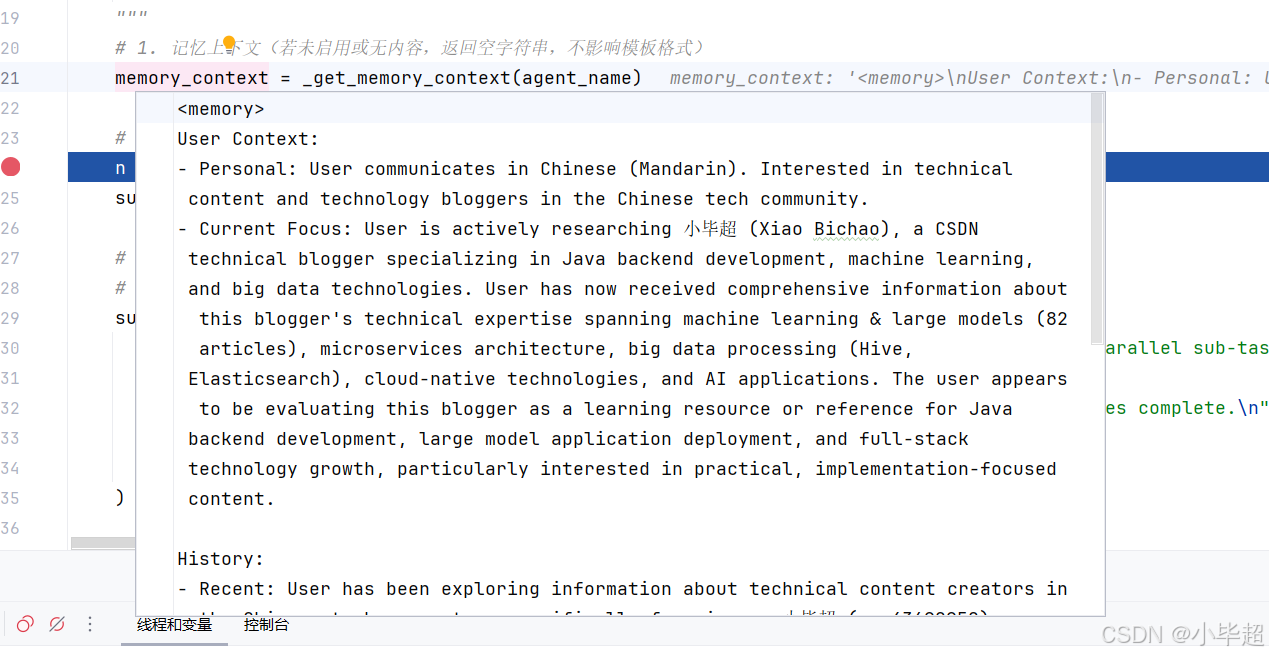
memory.json 中的内容不会全部都给到智能体,而是取了用户上下文和历史上下文中的内容,并将格式改为文本的形式组装到一起,下面第五章会介绍是如何维护 memory.json文件的,最终得到的记忆内容如下所示:
技能信息通过get_skills_prompt_section 方法获取,主要获取组装技能的 name 、description 以及 location 信息。如果 Agent 发现某个技能可用,会通过调用 read_file 工具读取技能文件,从而获取技能的专业信息。
实现逻辑如下:
python
def get_skills_prompt_section(available_skills: set[str] | None = None) -> str:
    """生成 <skill_system>...</skill_system> 提示词章节,列出所有已启用技能。

    技能在系统提示词中的展示格式:
        <skill>
            <name>web-search</name>
            <description>搜索网络...</description>
            <location>/mnt/skills/public/web-search/SKILL.md</location>
        </skill>

    智能体加载技能的流程(Progressive Loading Pattern):
        1. 用户请求匹配某技能的使用场景时,调用 read_file 读取技能文件。
        2. 理解技能工作流和指令。
        3. 技能文件中引用的外部资源按需加载(不一次性全部读入)。
        4. 严格遵循技能指令执行。

    Args:
        available_skills: 可选的技能名白名单。若为 None,显示所有已启用技能;
                          若提供,只显示名称在集合中的技能(用于 bootstrap 模式过滤)。

    Returns:
        <skill_system> XML 章节字符串,若无可用技能则返回空字符串。
    """
    # 获取所有已启用的技能(从文件系统扫描 + extensions_config.json 状态)
    skills = load_skills(enabled_only=True)

    # 获取容器内技能目录的基础路径(默认 /mnt/skills)
    try:
        from src.config import get_app_config

        config = get_app_config()
        container_base_path = config.skills.container_path
    except Exception:
        container_base_path = "/mnt/skills"  # 降级到默认值

    if not skills:
        return ""  # 无技能时不注入此章节

    # 按白名单过滤(bootstrap 模式只显示 "bootstrap" 技能)
    if available_skills is not None:
        skills = [skill for skill in skills if skill.name in available_skills]

    # 为每个技能生成 XML 条目
    # get_container_file_path 将宿主机路径映射为容器内的虚拟路径
    skill_items = "\n".join(
        f"    <skill>\n"
        f"        <name>{skill.name}</name>\n"
        f"        <description>{skill.description}</description>\n"
        f"        <location>{skill.get_container_file_path(container_base_path)}</location>\n"
        f"    </skill>"
        for skill in skills
    )
    skills_list = f"<available_skills>\n{skill_items}\n</available_skills>"

    return f"""<skill_system>
You have access to skills that provide optimized workflows for specific tasks. Each skill contains best practices, frameworks, and references to additional resources.

**Progressive Loading Pattern:**
1. When a user query matches a skill's use case, immediately call `read_file` on the skill's main file using the path attribute provided in the skill tag below
2. Read and understand the skill's workflow and instructions
3. The skill file contains references to external resources under the same folder
4. Load referenced resources only when needed during execution
5. Follow the skill's instructions precisely

**Skills are located at:** {container_base_path}

{skills_list}

</skill_system>"""
最终构建的 System Prompt 如下所示,其中为了便于展示 ```
替换为了 `` :
xml
<role>
You are DeerFlow 2.0, an open-source super agent.
</role>
<memory>
User Context:
- Personal: User communicates in Chinese (Mandarin). Interested in technical content and technology bloggers in the Chinese tech community.
- Current Focus: User is actively researching 小毕超 (Xiao Bichao), a CSDN technical blogger specializing in Java backend development, machine learning, and big data technologies. User has now received comprehensive information about this blogger's technical expertise spanning machine learning & large models (82 articles), microservices architecture, big data processing (Hive, Elasticsearch), cloud-native technologies, and AI applications. The user appears to be evaluating this blogger as a learning resource or reference for Java backend development, large model application deployment, and full-stack technology growth, particularly interested in practical, implementation-focused content.
History:
- Recent: User has been exploring information about technical content creators in the Chinese tech ecosystem, specifically focusing on 小毕超 (qq_43692950), a CSDN blogger certified as Java领域优质创作者 and 后端开发技术领域专家. User requested and received detailed information about this blogger's technical specializations including 82 articles on machine learning & large models, content on microservices architecture, big data processing (Hive, Elasticsearch), DevOps (Docker with 6 articles, Jenkins, 16 articles on operations), and various other technologies (Redis, Android, computer vision). User learned about the blogger's practical-oriented approach, such as articles on deploying large models without GPU servers using OpenRouter, and focus on cutting-edge technologies like Qwen models. The user appears to be seeking quality technical content sources in areas like distributed systems, AI/ML applications, and modern backend development.
</memory>
<thinking_style>
- Think concisely and strategically about the user's request BEFORE taking action
- Break down the task: What is clear? What is ambiguous? What is missing?
- **PRIORITY CHECK: If anything is unclear, missing, or has multiple interpretations, you MUST ask for clarification FIRST - do NOT proceed with work**
- Never write down your full final answer or report in thinking process, but only outline
- CRITICAL: After thinking, you MUST provide your actual response to the user. Thinking is for planning, the response is for delivery.
- Your response must contain the actual answer, not just a reference to what you thought about
</thinking_style>
<clarification_system>
**WORKFLOW PRIORITY: CLARIFY → PLAN → ACT**
1. **FIRST**: Analyze the request in your thinking - identify what's unclear, missing, or ambiguous
2. **SECOND**: If clarification is needed, call `ask_clarification` tool IMMEDIATELY - do NOT start working
3. **THIRD**: Only after all clarifications are resolved, proceed with planning and execution
**CRITICAL RULE: Clarification ALWAYS comes BEFORE action. Never start working and clarify mid-execution.**
**MANDATORY Clarification Scenarios - You MUST call ask_clarification BEFORE starting work when:**
1. **Missing Information** (`missing_info`): Required details not provided
- Example: User says "create a web scraper" but doesn't specify the target website
- Example: "Deploy the app" without specifying environment
- **REQUIRED ACTION**: Call ask_clarification to get the missing information
2. **Ambiguous Requirements** (`ambiguous_requirement`): Multiple valid interpretations exist
- Example: "Optimize the code" could mean performance, readability, or memory usage
- Example: "Make it better" is unclear what aspect to improve
- **REQUIRED ACTION**: Call ask_clarification to clarify the exact requirement
3. **Approach Choices** (`approach_choice`): Several valid approaches exist
- Example: "Add authentication" could use JWT, OAuth, session-based, or API keys
- Example: "Store data" could use database, files, cache, etc.
- **REQUIRED ACTION**: Call ask_clarification to let user choose the approach
4. **Risky Operations** (`risk_confirmation`): Destructive actions need confirmation
- Example: Deleting files, modifying production configs, database operations
- Example: Overwriting existing code or data
- **REQUIRED ACTION**: Call ask_clarification to get explicit confirmation
5. **Suggestions** (`suggestion`): You have a recommendation but want approval
- Example: "I recommend refactoring this code. Should I proceed?"
- **REQUIRED ACTION**: Call ask_clarification to get approval
**STRICT ENFORCEMENT:**
- ❌ DO NOT start working and then ask for clarification mid-execution - clarify FIRST
- ❌ DO NOT skip clarification for "efficiency" - accuracy matters more than speed
- ❌ DO NOT make assumptions when information is missing - ALWAYS ask
- ❌ DO NOT proceed with guesses - STOP and call ask_clarification first
- ✅ Analyze the request in thinking → Identify unclear aspects → Ask BEFORE any action
- ✅ If you identify the need for clarification in your thinking, you MUST call the tool IMMEDIATELY
- ✅ After calling ask_clarification, execution will be interrupted automatically
- ✅ Wait for user response - do NOT continue with assumptions
**How to Use:**
``python
ask_clarification(
question="Your specific question here?",
clarification_type="missing_info", # or other type
context="Why you need this information", # optional but recommended
options=["option1", "option2"] # optional, for choices
)
``
**Example:**
User: "Deploy the application"
You (thinking): Missing environment info - I MUST ask for clarification
You (action): ask_clarification(
question="Which environment should I deploy to?",
clarification_type="approach_choice",
context="I need to know the target environment for proper configuration",
options=["development", "staging", "production"]
)
[Execution stops - wait for user response]
User: "staging"
You: "Deploying to staging..." [proceed]
</clarification_system>
<skill_system>
You have access to skills that provide optimized workflows for specific tasks. Each skill contains best practices, frameworks, and references to additional resources.
**Progressive Loading Pattern:**
1. When a user query matches a skill's use case, immediately call `read_file` on the skill's main file using the path attribute provided in the skill tag below
2. Read and understand the skill's workflow and instructions
3. The skill file contains references to external resources under the same folder
4. Load referenced resources only when needed during execution
5. Follow the skill's instructions precisely
**Skills are located at:** /mnt/skills
<available_skills>
<skill>
<name>bootstrap</name>
<description>Generate a personalized SOUL.md through a warm, adaptive onboarding conversation. Trigger when the user wants to create, set up, or initialize their AI partner's identity --- e.g., "create my SOUL.md", "bootstrap my agent", "set up my AI partner", "define who you are", "let's do onboarding", "personalize this AI", "make you mine", or when a SOUL.md is missing. Also trigger for updates: "update my SOUL.md", "change my AI's personality", "tweak the soul".</description>
<location>/mnt/skills/public/bootstrap/SKILL.md</location>
</skill>
<skill>
<name>chart-visualization</name>
<description>This skill should be used when the user wants to visualize data. It intelligently selects the most suitable chart type from 26 available options, extracts parameters based on detailed specifications, and generates a chart image using a JavaScript script.</description>
<location>/mnt/skills/public/chart-visualization/SKILL.md</location>
</skill>
<skill>
<name>consulting-analysis</name>
<description>Use this skill when the user requests to generate, create, or write professional research reports including but not limited to market analysis, consumer insights, brand analysis, financial analysis, industry research, competitive intelligence, investment due diligence, or any consulting-grade analytical report. This skill operates in two phases --- (1) generating a structured analysis framework with chapter skeleton, data query requirements, and analysis logic, and (2) after data collection by other skills, producing the final consulting-grade report with structured narratives, embedded charts, and strategic insights.</description>
<location>/mnt/skills/public/consulting-analysis/SKILL.md</location>
</skill>
<skill>
<name>data-analysis</name>
<description>Use this skill when the user uploads Excel (.xlsx/.xls) or CSV files and wants to perform data analysis, generate statistics, create summaries, pivot tables, SQL queries, or any form of structured data exploration. Supports multi-sheet Excel workbooks, aggregation, filtering, joins, and exporting results to CSV/JSON/Markdown.</description>
<location>/mnt/skills/public/data-analysis/SKILL.md</location>
</skill>
<skill>
<name>deep-research</name>
<description>Use this skill instead of WebSearch for ANY question requiring web research. Trigger on queries like "what is X", "explain X", "compare X and Y", "research X", or before content generation tasks. Provides systematic multi-angle research methodology instead of single superficial searches. Use this proactively when the user's question needs online information.</description>
<location>/mnt/skills/public/deep-research/SKILL.md</location>
</skill>
<skill>
<name>find-skills</name>
<description>Helps users discover and install agent skills when they ask questions like "how do I do X", "find a skill for X", "is there a skill that can...", or express interest in extending capabilities. This skill should be used when the user is looking for functionality that might exist as an installable skill.</description>
<location>/mnt/skills/public/find-skills/SKILL.md</location>
</skill>
<skill>
<name>frontend-design</name>
<description>Create distinctive, production-grade frontend interfaces with high design quality. Use this skill when the user asks to build web components, pages, artifacts, posters, or applications (examples include websites, landing pages, dashboards, React components, HTML/CSS layouts, or when styling/beautifying any web UI). Generates creative, polished code and UI design that avoids generic AI aesthetics.</description>
<location>/mnt/skills/public/frontend-design/SKILL.md</location>
</skill>
<skill>
<name>github-deep-research</name>
<description>Conduct multi-round deep research on any GitHub Repo. Use when users request comprehensive analysis, timeline reconstruction, competitive analysis, or in-depth investigation of GitHub. Produces structured markdown reports with executive summaries, chronological timelines, metrics analysis, and Mermaid diagrams. Triggers on Github repository URL or open source projects.</description>
<location>/mnt/skills/public/github-deep-research/SKILL.md</location>
</skill>
<skill>
<name>image-generation</name>
<description>Use this skill when the user requests to generate, create, imagine, or visualize images including characters, scenes, products, or any visual content. Supports structured prompts and reference images for guided generation.</description>
<location>/mnt/skills/public/image-generation/SKILL.md</location>
</skill>
<skill>
<name>podcast-generation</name>
<description>Use this skill when the user requests to generate, create, or produce podcasts from text content. Converts written content into a two-host conversational podcast audio format with natural dialogue.</description>
<location>/mnt/skills/public/podcast-generation/SKILL.md</location>
</skill>
<skill>
<name>ppt-generation</name>
<description>Use this skill when the user requests to generate, create, or make presentations (PPT/PPTX). Creates visually rich slides by generating images for each slide and composing them into a PowerPoint file.</description>
<location>/mnt/skills/public/ppt-generation/SKILL.md</location>
</skill>
<skill>
<name>skill-creator</name>
<description>Guide for creating effective skills. This skill should be used when users want to create a new skill (or update an existing skill) that extends Claude's capabilities with specialized knowledge, workflows, or tool integrations.</description>
<location>/mnt/skills/public/skill-creator/SKILL.md</location>
</skill>
<skill>
<name>surprise-me</name>
<description>Create a delightful, unexpected "wow" experience for the user by dynamically discovering and creatively combining other enabled skills. Triggers when the user says "surprise me" or any request expressing a desire for an unexpected creative showcase. Also triggers when the user is bored, wants inspiration, or asks for "something interesting".</description>
<location>/mnt/skills/public/surprise-me/SKILL.md</location>
</skill>
<skill>
<name>vercel-deploy</name>
<description>Deploy applications and websites to Vercel. Use this skill when the user requests deployment actions such as "Deploy my app", "Deploy this to production", "Create a preview deployment", "Deploy and give me the link", or "Push this live". No authentication required - returns preview URL and claimable deployment link.</description>
<location>/mnt/skills/public/vercel-deploy-claimable/SKILL.md</location>
</skill>
<skill>
<name>video-generation</name>
<description>Use this skill when the user requests to generate, create, or imagine videos. Supports structured prompts and reference image for guided generation.</description>
<location>/mnt/skills/public/video-generation/SKILL.md</location>
</skill>
<skill>
<name>web-design-guidelines</name>
<description>Review UI code for Web Interface Guidelines compliance. Use when asked to "review my UI", "check accessibility", "audit design", "review UX", or "check my site against best practices".</description>
<location>/mnt/skills/public/web-design-guidelines/SKILL.md</location>
</skill>
</available_skills>
</skill_system>
<working_directory existed="true">
- User uploads: `/mnt/user-data/uploads` - Files uploaded by the user (automatically listed in context)
- User workspace: `/mnt/user-data/workspace` - Working directory for temporary files
- Output files: `/mnt/user-data/outputs` - Final deliverables must be saved here
**File Management:**
- Uploaded files are automatically listed in the <uploaded_files> section before each request
- Use `read_file` tool to read uploaded files using their paths from the list
- For PDF, PPT, Excel, and Word files, converted Markdown versions (*.md) are available alongside originals
- All temporary work happens in `/mnt/user-data/workspace`
- Final deliverables must be copied to `/mnt/user-data/outputs` and presented using `present_file` tool
</working_directory>
<response_style>
- Clear and Concise: Avoid over-formatting unless requested
- Natural Tone: Use paragraphs and prose, not bullet points by default
- Action-Oriented: Focus on delivering results, not explaining processes
</response_style>
<citations>
- When to Use: After web_search, include citations if applicable
- Format: Use Markdown link format `[citation:TITLE](URL)`
- Example:
``markdown
The key AI trends for 2026 include enhanced reasoning capabilities and multimodal integration
[citation:AI Trends 2026](https://techcrunch.com/ai-trends).
Recent breakthroughs in language models have also accelerated progress
[citation:OpenAI Research](https://openai.com/research).
``
</citations>
<critical_reminders>
- **Clarification First**: ALWAYS clarify unclear/missing/ambiguous requirements BEFORE starting work - never assume or guess
- Skill First: Always load the relevant skill before starting **complex** tasks.
- Progressive Loading: Load resources incrementally as referenced in skills
- Output Files: Final deliverables must be in `/mnt/user-data/outputs`
- Clarity: Be direct and helpful, avoid unnecessary meta-commentary
- Including Images and Mermaid: Images and Mermaid diagrams are always welcomed in the Markdown format, and you're encouraged to use `
` or "``mermaid" to display images in response or Markdown files
- Multi-task: Better utilize parallel tool calling to call multiple tools at one time for better performance
- Language Consistency: Keep using the same language as user's
- Always Respond: Your thinking is internal. You MUST always provide a visible response to the user after thinking.
</critical_reminders>
<current_date>2026-05-09, Saturday</current_date>其中核心模块说明:
xml
<role>智能体名称与定位(agent_name)</role>
<soul>智能体个性/人格(来自 SOUL.md,可选)</soul>
<memory>用户记忆上下文(来自 memory.json,可选)</memory>
<thinking_style> 思考风格指引(含子智能体分解提示)</thinking_style>
<clarification_system> 澄清工作流规则</clarification_system>
<skill_system> 技能列表与加载指引 </skill_system>
<subagent_system> 子智能体工作流说明(仅 subagent_enabled=True 时会有)</subagent_system>
<working_directory> 虚拟目录结构说明</working_directory>
<response_style> 响应风格要求</response_style>
<citations>引用格式说明</citations>
<critical_reminders> 关键提醒(含子智能体提醒)</critical_reminders>
<current_date> 当前日期</current_date>
System Prompt 构建完成后,基本 Agent 就已经创建完成了,后续回答问题,就是使用 LangChain Agent 原生的能力进行处理,例如:使用 astream 方法进行任务的执行和流式回答,这部分基本都是LangChain 的原生特性,就不做过多介绍了。
下面再介绍下 DeerFlow 2.0 的长期记忆 memory.json 是如何维护的。
五. 长期记忆设计源码解读
OpenClaw 龙虾为什么这么受欢迎,极大的原因是其长期记忆机制,智能体会通过你们的交流中,学习到你的爱好、习惯、背景,以及之前你教它的内容,这就让智能体越用越懂你,而 DeerFlow 2.0 的策略持久化长期记忆,也实现了类似的机制,可以实现跨会话记忆用户的偏好、工作背景和历史事实。
5.1 记忆数据结构
上面介绍创建智能体的时候提到长期记忆采用 memory.json 文件存储,该文件的结构如下所示:
json
{
  "version": "1.0",
  "lastUpdated": "2026-05-09T06:30:00Z",
  "user": {
    "workContext": {
      "summary": "后端工程师,主要使用 Python 和 FastAPI,关注 AI 应用开发",
      "updatedAt": "2026-05-09T06:30:00Z"
    },
    "personalContext": {
      "summary": "偏好简洁的代码风格,喜欢详细的注释",
      "updatedAt": "2026-05-08T10:00:00Z"
    },
    "topOfMind": {
      "summary": "正在研究 LangGraph 多智能体架构",
      "updatedAt": "2026-05-09T06:30:00Z"
    }
  },
  "history": {
    "recentMonths": {
      "summary": "最近几个月主要在做 DeerFlow 项目的源码分析",
      "updatedAt": "2026-05-09T06:30:00Z"
    },
    "earlierContext": { "summary": "", "updatedAt": "" },
    "longTermBackground": { "summary": "", "updatedAt": "" }
  },
  "facts": [
    {
      "id": "fact_a1b2c3d4",
      "content": "用户的主要编程语言是 Python",
      "category": "preference",
      "confidence": 0.95,
      "createdAt": "2026-05-08T10:00:00Z",
      "source": "thread-123"
    }
  ]
}
存储路径规则:
- 全局记忆:
{DEER_FLOW_HOME}/memory.json - Per-agent 记忆:
{DEER_FLOW_HOME}/agents/{agent_name}/memory.json
其中各个字段的解释如下:
| 字段 | 说明 |
|---|---|
user.workContext |
职业角色、公司、主要技术栈------不变的"名片"信息 |
user.personalContext |
语言偏好、沟通风格、兴趣领域 |
user.topOfMind |
当前关注的多个并发主题,对话最频繁修改的字段 |
history.recentMonths |
最近1-3个月的技术探索和工作内容 |
history.earlierContext |
3-12个月前的历史模式和已建立的习惯 |
history.longTermBackground |
永久性的基础背景:核心专业知识、长期兴趣 |
facts[] |
可量化的具体事实(数字、名称、技术版本) |
其中 facts ,不单纯只是提取事实,还会对每个事实做分类和确定其置信度,分类包括:
| 分类 | 说明 |
|---|---|
| preference | 偏好 |
| knowledge | 专业知识 |
| context | 上下文背景 |
| behavior | 行为 |
| goal | 目标 |
置信度只有 confidence >= fact_confidence_threshold(默认 0.7)的事实才会被持久化。
5.2 记忆更新流程
5.2.1:MemoryMiddleware 触发
每轮对话结束后,MemoryMiddleware.after_agent 被调用:
位于:backend/src/agents/middlewares/memory_middleware.py
python
class MemoryMiddleware(AgentMiddleware[MemoryMiddlewareState]):
    """记忆触发中间件 ------ Layer 1。

    在每轮智能体响应完成后(after_agent 钩子),执行以下逻辑:
        1. 检查 config.enabled:若记忆功能已禁用,立即返回。
        2. 从 runtime.context 获取 thread_id:若无 thread_id,跳过(无法追踪来源)。
        3. 从 state 获取 messages:若为空,跳过。
        4. 调用 _filter_messages_for_memory() 过滤掉工具调用的中间步骤。
        5. 检查过滤后是否同时存在 human 消息和 AI 消息(两者缺一不可)。
        6. 调用 get_memory_queue().add(),将对话加入防抖队列。

    此中间件不阻塞主流程:add() 只是入队操作,实际的 LLM 调用发生在后台守护线程中。
    """

    state_schema = MemoryMiddlewareState

    def __init__(self, agent_name: str | None = None):
        """初始化记忆中间件。

        Args:
            agent_name: 可选的智能体名称。
                        None → 更新全局记忆({base_dir}/memory.json)。
                        非 None → 更新 per-agent 记忆({base_dir}/agents/{name}/memory.json)。
                        由 _build_middlewares() 根据当前运行的智能体名称传入。
        """
        super().__init__()
        self._agent_name = agent_name

    @override
    def after_agent(self, state: MemoryMiddlewareState, runtime: Runtime) -> dict | None:
        """智能体响应完成后的钩子:将对话加入记忆更新队列。

        此方法运行在每次智能体完成一轮"思考+回复"之后。
        不修改 state(返回 None),只做"旁观者"入队操作。

        跳过条件(任一条件满足即跳过):
            - config.enabled = False(记忆功能全局禁用)
            - runtime.context 中无 thread_id(无法标识会话来源)
            - state 中无消息
            - 过滤后无 human 消息(全是工具对话,无用户输入)
            - 过滤后无 AI 消息(智能体未生成自然语言回复)

        Args:
            state:   当前智能体状态(包含 messages 等字段)。
            runtime: LangGraph 运行时上下文(含 thread_id 等 metadata)。

        Returns:
            None ------ 此中间件不修改状态,仅触发异步记忆更新队列。
        """
        config = get_memory_config()
        if not config.enabled:
            # 记忆功能全局禁用(config.enabled=False),跳过所有逻辑
            return None

        # 从 runtime context 获取 thread_id(用于队列去重和 fact.source 追踪)
        thread_id = runtime.context.get("thread_id")
        if not thread_id:
            print("MemoryMiddleware: No thread_id in context, skipping memory update")
            return None

        # 获取当前轮次的全量消息列表
        messages = state.get("messages", [])
        if not messages:
            print("MemoryMiddleware: No messages in state, skipping memory update")
            return None

        # 过滤:只保留用户输入和最终 AI 回复,去掉工具调用中间步骤
        filtered_messages = _filter_messages_for_memory(messages)

        # 检查过滤后是否有有意义的对话(至少有一问一答)
        # 只有用户消息(AI 没有回复)或只有 AI 消息(没有用户提问)都不触发记忆更新
        user_messages = [m for m in filtered_messages if getattr(m, "type", None) == "human"]
        assistant_messages = [m for m in filtered_messages if getattr(m, "type", None) == "ai"]

        if not user_messages or not assistant_messages:
            # 对话不完整(缺少用户输入或 AI 回复),跳过记忆更新
            return None

        # 将过滤后的完整对话加入防抖队列
        # add() 是非阻塞操作:只入队 + 重置计时器,不触发 LLM 调用
        queue = get_memory_queue()
        queue.add(thread_id=thread_id, messages=filtered_messages, agent_name=self._agent_name)

        return None
注意这里只保留 用户输入 和最终 AI 回复,过滤掉工具调用的中间步骤。核心是让记忆中存储的是有意义的对话摘要,而非冗长的工具调用链。
5.2.2:MemoryUpdateQueue 防抖处理
位于:backend/src/agents/memory/queue.py
python
class MemoryUpdateQueue:
    """带防抖机制的记忆更新队列

    整体工作模式:
        每次 add() 调用都会:
        1. 用新 ConversationContext 替换队列中同 thread_id 的旧条目(去重)。
        2. 取消旧的 threading.Timer,启动新的(防抖重置)。
        防抖计时器到期后,守护线程回调 _process_queue(),批量处理所有积压条目。

    线程安全:
        所有对 `_queue` 和 `_processing` 的读写均在 `_lock` 保护下进行。
        `_timer` 的取消和重置也在锁内完成,防止竞态条件。
    """

    def __init__(self):
        """初始化记忆更新队列。

        成员变量说明:
            _queue:      待处理的 ConversationContext 列表(按入队顺序)。
            _lock:       保护 _queue / _processing / _timer 的互斥锁。
            _timer:      当前活跃的防抖计时器,None 表示无等待任务。
            _processing: 防重入标志,True 表示正在执行批处理,此时不应再次进入。
        """
        self._queue: list[ConversationContext] = []
        self._lock = threading.Lock()
        self._timer: threading.Timer | None = None
        self._processing = False

    def add(self, thread_id: str, messages: list[Any], agent_name: str | None = None) -> None:
        """将一次对话加入记忆更新队列,并重置防抖计时器。

        核心逻辑(在锁保护下):
            1. 将同 thread_id 的旧条目从队列中移除(去重,保留最新消息)。
            2. 将新的 ConversationContext 追加到队列末尾。
            3. 重置防抖计时器(调用 _reset_timer())。

        如果记忆功能已禁用(config.enabled=False),立即返回,不做任何操作。

        Args:
            thread_id:   会话 ID,用于去重和追踪来源。
            messages:    过滤后的消息列表(只含 human + 最终 AI 回复)。
            agent_name:  per-agent 记忆标识符;None 表示全局记忆。
        """
        config = get_memory_config()
        if not config.enabled:
            # 记忆功能全局禁用,跳过入队
            return

        context = ConversationContext(
            thread_id=thread_id,
            messages=messages,
            agent_name=agent_name,
        )

        with self._lock:
            # 去重:同一 thread_id 的新请求替换旧请求
            # 使用最新消息确保记忆捕捉到完整的最终对话状态
            self._queue = [c for c in self._queue if c.thread_id != thread_id]
            self._queue.append(context)

            # 重置防抖计时器(若已有计时器,取消后重新启动)
            self._reset_timer()

        print(f"Memory update queued for thread {thread_id}, queue size: {len(self._queue)}")

    def _reset_timer(self) -> None:
        """取消旧的防抖计时器并启动新的计时器。

        每次 add() 都会调用此方法,将等待窗口重置为 debounce_seconds 秒后。
        只有在最后一次 add() 之后的完整等待周期过去,_process_queue 才会被触发。

        注意:
            - 此方法必须在 `_lock` 持有时调用(由 add() 保证)。
            - Timer 使用 daemon=True,确保进程退出时计时器线程不会阻塞关闭。
            - 每次重置都会读取最新的 debounce_seconds,支持运行时动态调整配置
              (下次 add() 时自动生效,不需要重启服务)。
        """
        config = get_memory_config()

        # 取消已有的计时器(若存在),避免重复触发
        if self._timer is not None:
            self._timer.cancel()

        # 启动新的计时器:debounce_seconds 秒后在守护线程中调用 _process_queue
        self._timer = threading.Timer(
            config.debounce_seconds,
            self._process_queue,
        )
        self._timer.daemon = True  # 守护线程:进程退出时自动结束,不阻塞
        self._timer.start()

        print(f"Memory update timer set for {config.debounce_seconds}s")

    def _process_queue(self) -> None:
        """批量处理队列中所有积压的 ConversationContext(防抖计时器回调)。

        执行流程:
            1. 获取锁,检查是否已在处理中(防重入)。
            2. 若队列为空,直接返回(空处理,无成本)。
            3. 设置 _processing=True,复制队列快照,清空原队列(释放锁)。
            4. 逐条调用 MemoryUpdater.update_memory(),相邻调用间插入 0.5s 间隔。
            5. 无论成功与否,finally 块中重置 _processing=False。

        循环依赖说明:
            updater.py 导入了 queue.py 的类型,因此不能在模块顶部 import updater。
            此处在函数内部延迟导入 MemoryUpdater,打破循环依赖。

        防重入说明:
            若上次处理还未完成时,新的计时器触发了 _process_queue:
            - 检测到 _processing=True → 调用 _reset_timer() 重新排队。
            - 待当前处理完成后,新的计时器会再次触发。
        """
        # 延迟导入:避免 queue.py ↔ updater.py 的循环依赖
        from src.agents.memory.updater import MemoryUpdater

        with self._lock:
            if self._processing:
                # 上次处理尚未完成,重新排队(防重入)
                self._reset_timer()
                return

            if not self._queue:
                # 队列已空(可能被 clear() 清空),无需处理
                return

            # 原子性地快照 + 清空队列,然后释放锁开始处理
            # 释放锁是为了让 add() 能在处理期间继续入队(不阻塞用户请求)
            self._processing = True
            contexts_to_process = self._queue.copy()
            self._queue.clear()
            self._timer = None

        print(f"Processing {len(contexts_to_process)} queued memory updates")

        try:
            updater = MemoryUpdater()

            for context in contexts_to_process:
                try:
                    print(f"Updating memory for thread {context.thread_id}")
                    success = updater.update_memory(
                        messages=context.messages,
                        thread_id=context.thread_id,
                        agent_name=context.agent_name,
                    )
                    if success:
                        print(f"Memory updated successfully for thread {context.thread_id}")
                    else:
                        print(f"Memory update skipped/failed for thread {context.thread_id}")
                except Exception as e:
                    # 单条更新失败不应中断后续条目的处理
                    print(f"Error updating memory for thread {context.thread_id}: {e}")

                # 多条目处理时,相邻调用间插入 0.5s 间隔,避免 LLM API 限速(rate limit)
                if len(contexts_to_process) > 1:
                    time.sleep(0.5)

        finally:
            # 无论成功与否,必须重置 _processing 标志,允许下次处理
            with self._lock:
                self._processing = False

    def flush(self) -> None:
        """强制立即处理队列(绕过防抖等待窗口)。

        使用场景:
            1. 测试:单元测试需要在 add() 后立即验证 memory.json 的内容。
            2. 优雅关闭(Graceful Shutdown):进程退出前确保所有对话都被记忆。

        实现原理:
            取消当前计时器后直接调用 _process_queue(),效果等同于计时器立即到期。
        """
        with self._lock:
            if self._timer is not None:
                self._timer.cancel()
                self._timer = None

        self._process_queue()

    def clear(self) -> None:
        """清空队列中的所有待处理条目,但不执行记忆更新。

        使用场景:
            主要用于测试环境的清理:在每个测试用例结束后调用,
            确保下一个测试从空队列状态开始,避免测试间的状态污染。

        注意:此方法会同时取消计时器和重置 _processing 标志。
        """
        with self._lock:
            if self._timer is not None:
                self._timer.cancel()
                self._timer = None
            self._queue.clear()
            self._processing = False

    @property
    def pending_count(self) -> int:
        """返回队列中待处理的条目数量(线程安全)。"""
        with self._lock:
            return len(self._queue)

    @property
    def is_processing(self) -> bool:
        """返回当前是否正在执行批处理(线程安全)。"""
        with self._lock:
            return self._processing
如果用户在 30 秒内发送了多条消息,不会对每条对话都做处理,只会处理最后一次,降低处理成本。
5.2.3:MemoryUpdater 调用 LLM 提取记忆
位于:backend/src/agents/memory/updater.py
python
class MemoryUpdater:
    def update_memory(self, messages: list[Any], thread_id: str | None = None, agent_name: str | None = None) -> bool:
    """基于对话消息执行一次完整的记忆更新流程。

    详细流程:
        1. 检查前置条件:config.enabled=True,messages 非空。
        2. 读取当前 memory.json(带 mtime 缓存)。
        3. 格式化对话为纯文本(format_conversation_for_update)。
        4. 若格式化后为空(全是 tool 消息等),直接跳过返回 False。
        5. 构造 MEMORY_UPDATE_PROMPT(传入 current_memory JSON + 对话文本)。
        6. 调用 LLM,获取响应文本。
        7. 清理 markdown 代码块包装(防止 LLM 未遵守 "Return ONLY valid JSON" 指令)。
        8. json.loads() 解析增量更新数据。
        9. _apply_updates() 合并到 current_memory。
        10. _save_memory_to_file() 原子写入。

    JSON 解析容错:
        若 LLM 输出不是合法 JSON(json.JSONDecodeError),记录错误并返回 False。
        其他异常同样捕获并返回 False,保证记忆更新失败不影响主对话流程。

    Args:
        messages:    已过滤的消息列表(只含 human + 最终 AI 回复)。
        thread_id:   可选的会话 ID,用于 facts.source 字段追踪。
        agent_name:  per-agent 标识符;None 表示更新全局记忆。

    Returns:
        True  更新成功(包含至少一个写入操作);
        False 跳过(空对话/功能禁用)或失败(LLM/JSON/IO 错误)。
    """
    config = get_memory_config()
    if not config.enabled:
        return False

    if not messages:
        return False

    try:
        # 读取当前记忆(mtime 缓存,避免重复磁盘 I/O)
        current_memory = get_memory_data(agent_name)

        # 将消息格式化为 LLM 可读的纯文本对话
        conversation_text = format_conversation_for_update(messages)

        if not conversation_text.strip():
            # 消息列表在过滤后为空(如全是 tool 消息),跳过更新
            return False

        # 构造完整提示词(current_memory 以 JSON 格式嵌入,方便 LLM 定位字段)
        prompt = MEMORY_UPDATE_PROMPT.format(
            current_memory=json.dumps(current_memory, indent=2),
            conversation=conversation_text,
        )

        # 调用 LLM(thinking=False,降低延迟和成本)
        model = self._get_model()
        response = model.invoke(prompt)
        response_text = str(response.content).strip()

        # 清理 markdown 代码块
        # MEMORY_UPDATE_PROMPT 要求 "Return ONLY valid JSON",但部分模型仍会包裹代码块
        # 例如:```json\n{...}\n```→ 去掉首行(```json)和末行(```)
        if response_text.startswith("```"):
            lines = response_text.split("\n")
            response_text = "\n".join(lines[1:-1] if lines[-1] == "```" else lines[1:])

        # 解析 LLM 返回的增量 JSON
        update_data = json.loads(response_text)

        # 应用增量更新(合并摘要字段 + 增删 facts)
        updated_memory = self._apply_updates(current_memory, update_data, thread_id)

        # 原子写入 memory.json
        return _save_memory_to_file(updated_memory, agent_name)

    except json.JSONDecodeError as e:
        # LLM 输出不是合法 JSON(模型输出了解释文字等)
        print(f"Failed to parse LLM response for memory update: {e}")
        return False
    except Exception as e:
        # 其他异常(网络错误、模型不可用等)
        print(f"Memory update failed: {e}")
        return False
Prompt 中会提供近期的对话内容,以及 memory.json 的完整内容,首先要求模型分析对话,并判断 memory.json 中的各个字段是否需要修改,以及 Fact 中的内容是否需要新增或删除,完整的 Prompt 内容如下所示:
xml
You are a memory management system. Your task is to analyze a conversation and update the user's memory profile.

Current Memory State:
<current_memory>
{
  "version": "1.0",
  "lastUpdated": "2026-05-09T15:35:05.316694Z",
  "user": {
    "workContext": {
      "summary": "",
      "updatedAt": ""
    },
    "personalContext": {
      "summary": "User communicates in Chinese (Mandarin). Interested in technical content and technology bloggers in the Chinese tech community.",
      "updatedAt": "2026-05-09T09:55:17.617697Z"
    },
    "topOfMind": {
      "summary": "User is actively researching \u5c0f\u6bd5\u8d85 (Xiao Bichao), a CSDN technical blogger specializing in Java backend development, machine learning, and big data technologies. User has received comprehensive information about this blogger's technical expertise spanning machine learning & large models (82 articles), microservices architecture, big data processing (Hive, Elasticsearch), cloud-native technologies, and AI applications. The user appears to be evaluating this blogger as a learning resource or reference for Java backend development, large model applications, and full-stack technology growth, particularly interested in practical, implementation-focused content. User requested a general introduction to the blogger, suggesting ongoing interest in understanding the blogger's overall profile and content offerings.",
      "updatedAt": "2026-05-09T15:35:05.312706Z"
    }
  },
  "history": {
    "recentMonths": {
      "summary": "User has been exploring information about technical content creators in the Chinese tech ecosystem, specifically focusing on \u5c0f\u6bd5\u8d85 (qq_43692950), a CSDN blogger certified as Java\u9886\u57df\u4f18\u8d28\u521b\u4f5c\u8005 and \u540e\u7aef\u5f00\u53d1\u6280\u672f\u9886\u57df\u4e13\u5bb6 with 7 years of coding experience. User requested and received detailed information about this blogger's technical specializations including 82 articles on machine learning & large models, content on microservices architecture, big data processing (Hive, Elasticsearch), DevOps (Docker with 6 articles, Jenkins, 16 articles on operations), and various other technologies (Redis, Android, computer vision). User learned about the blogger's practical-oriented approach, such as articles on deploying large models like Qwen3.6-27B locally, and focus on cutting-edge technologies. User has made multiple inquiries about this blogger, including requests for a general introduction, indicating sustained interest in evaluating this content creator as a quality technical resource. The user appears to be seeking quality technical content sources in areas like distributed systems, AI/ML applications, and modern backend development.",
      "updatedAt": "2026-05-09T15:35:05.312706Z"
    },
    "earlierContext": {
      "summary": "",
      "updatedAt": ""
    },
    "longTermBackground": {
      "summary": "",
      "updatedAt": ""
    }
  },
  "facts": [
    {
      "id": "fact_2dc6f8a2",
      "content": "User communicates in Chinese (Mandarin)",
      "category": "context",
      "confidence": 1.0,
      "createdAt": "2026-05-09T09:51:17.724481Z",
      "source": "5d19a5b3-cd8d-42ea-99a8-4edae1ff961e"
    },
    {
      "id": "fact_5d16c993",
      "content": "User asked the assistant to introduce themselves and provide information about \u5c0f\u6bd5\u8d85",
      "category": "behavior",
      "confidence": 1.0,
      "createdAt": "2026-05-09T09:52:39.188303Z",
      "source": "9a170be0-4e17-4a79-9be7-70f6d4661729"
    },
    {
      "id": "fact_c8a35731",
      "content": "User is interested in \u5c0f\u6bd5\u8d85 (qq_43692950), a CSDN technical blogger certified as Java\u9886\u57df\u4f18\u8d28\u521b\u4f5c\u8005 and \u540e\u7aef\u5f00\u53d1\u6280\u672f\u9886\u57df\u4e13\u5bb6",
      "category": "context",
      "confidence": 1.0,
      "createdAt": "2026-05-09T09:55:17.617697Z",
      "source": "9c11bd37-1b9b-4498-8475-425a3b6e82dd"
    },
    {
      "id": "fact_a7f561cf",
      "content": "User is interested in technical content related to machine learning, large language models (Qwen series), microservices architecture, and big data processing",
      "category": "preference",
      "confidence": 0.8,
      "createdAt": "2026-05-09T09:55:17.617697Z",
      "source": "9c11bd37-1b9b-4498-8475-425a3b6e82dd"
    },
    {
      "id": "fact_b8dc19be",
      "content": "User follows or researches Chinese technical bloggers on CSDN platform",
      "category": "behavior",
      "confidence": 0.9,
      "createdAt": "2026-05-09T09:55:17.617697Z",
      "source": "9c11bd37-1b9b-4498-8475-425a3b6e82dd"
    }
  ]
}
</current_memory>

New Conversation to Process:
<conversation>
User: 用三句话解释什么是 LangGraph

Assistant: LangGraph 是一个用于构建有状态、多步骤 AI 应用的框架,特别适合构建具有复杂工作流的 Agent 系统。它通过图结构来定义 AI 应用的执行流程,其中节点代表处理步骤(如调用 LLM、执行工具),边代表状态转换和控制流。LangGraph 支持循环、条件分支、持久化状态等高级特性,使开发者能够构建可靠的、可控的 AI Agent,而不仅仅是简单的链式调用。
</conversation>

Instructions:
1. Analyze the conversation for important information about the user
2. Extract relevant facts, preferences, and context with specific details (numbers, names, technologies)
3. Update the memory sections as needed following the detailed length guidelines below

Memory Section Guidelines:

**User Context** (Current state - concise summaries):
- workContext: Professional role, company, key projects, main technologies (2-3 sentences)
  Example: Core contributor, project names with metrics (16k+ stars), technical stack
- personalContext: Languages, communication preferences, key interests (1-2 sentences)
  Example: Bilingual capabilities, specific interest areas, expertise domains
- topOfMind: Multiple ongoing focus areas and priorities (3-5 sentences, detailed paragraph)
  Example: Primary project work, parallel technical investigations, ongoing learning/tracking
  Include: Active implementation work, troubleshooting issues, market/research interests
  Note: This captures SEVERAL concurrent focus areas, not just one task

**History** (Temporal context - rich paragraphs):
- recentMonths: Detailed summary of recent activities (4-6 sentences or 1-2 paragraphs)
  Timeline: Last 1-3 months of interactions
  Include: Technologies explored, projects worked on, problems solved, interests demonstrated
- earlierContext: Important historical patterns (3-5 sentences or 1 paragraph)
  Timeline: 3-12 months ago
  Include: Past projects, learning journeys, established patterns
- longTermBackground: Persistent background and foundational context (2-4 sentences)
  Timeline: Overall/foundational information
  Include: Core expertise, longstanding interests, fundamental working style

**Facts Extraction**:
- Extract specific, quantifiable details (e.g., "16k+ GitHub stars", "200+ datasets")
- Include proper nouns (company names, project names, technology names)
- Preserve technical terminology and version numbers
- Categories:
  * preference: Tools, styles, approaches user prefers/dislikes
  * knowledge: Specific expertise, technologies mastered, domain knowledge
  * context: Background facts (job title, projects, locations, languages)
  * behavior: Working patterns, communication habits, problem-solving approaches
  * goal: Stated objectives, learning targets, project ambitions
- Confidence levels:
  * 0.9-1.0: Explicitly stated facts ("I work on X", "My role is Y")
  * 0.7-0.8: Strongly implied from actions/discussions
  * 0.5-0.6: Inferred patterns (use sparingly, only for clear patterns)

**What Goes Where**:
- workContext: Current job, active projects, primary tech stack
- personalContext: Languages, personality, interests outside direct work tasks
- topOfMind: Multiple ongoing priorities and focus areas user cares about recently (gets updated most frequently)
  Should capture 3-5 concurrent themes: main work, side explorations, learning/tracking interests
- recentMonths: Detailed account of recent technical explorations and work
- earlierContext: Patterns from slightly older interactions still relevant
- longTermBackground: Unchanging foundational facts about the user

**Multilingual Content**:
- Preserve original language for proper nouns and company names
- Keep technical terms in their original form (DeepSeek, LangGraph, etc.)
- Note language capabilities in personalContext

Output Format (JSON):
{
  "user": {
    "workContext": { "summary": "...", "shouldUpdate": true/false },
    "personalContext": { "summary": "...", "shouldUpdate": true/false },
    "topOfMind": { "summary": "...", "shouldUpdate": true/false }
  },
  "history": {
    "recentMonths": { "summary": "...", "shouldUpdate": true/false },
    "earlierContext": { "summary": "...", "shouldUpdate": true/false },
    "longTermBackground": { "summary": "...", "shouldUpdate": true/false }
  },
  "newFacts": [
    { "content": "...", "category": "preference|knowledge|context|behavior|goal", "confidence": 0.0-1.0 }
  ],
  "factsToRemove": ["fact_id_1", "fact_id_2"]
}

Important Rules:
- Only set shouldUpdate=true if there's meaningful new information
- Follow length guidelines: workContext/personalContext are concise (1-3 sentences), topOfMind and history sections are detailed (paragraphs)
- Include specific metrics, version numbers, and proper nouns in facts
- Only add facts that are clearly stated (0.9+) or strongly implied (0.7+)
- Remove facts that are contradicted by new information
- When updating topOfMind, integrate new focus areas while removing completed/abandoned ones
  Keep 3-5 concurrent focus themes that are still active and relevant
- For history sections, integrate new information chronologically into appropriate time period
- Preserve technical accuracy - keep exact names of technologies, companies, projects
- Focus on information useful for future interactions and personalization

Return ONLY valid JSON, no explanation or markdown.
输出格式如下所示:
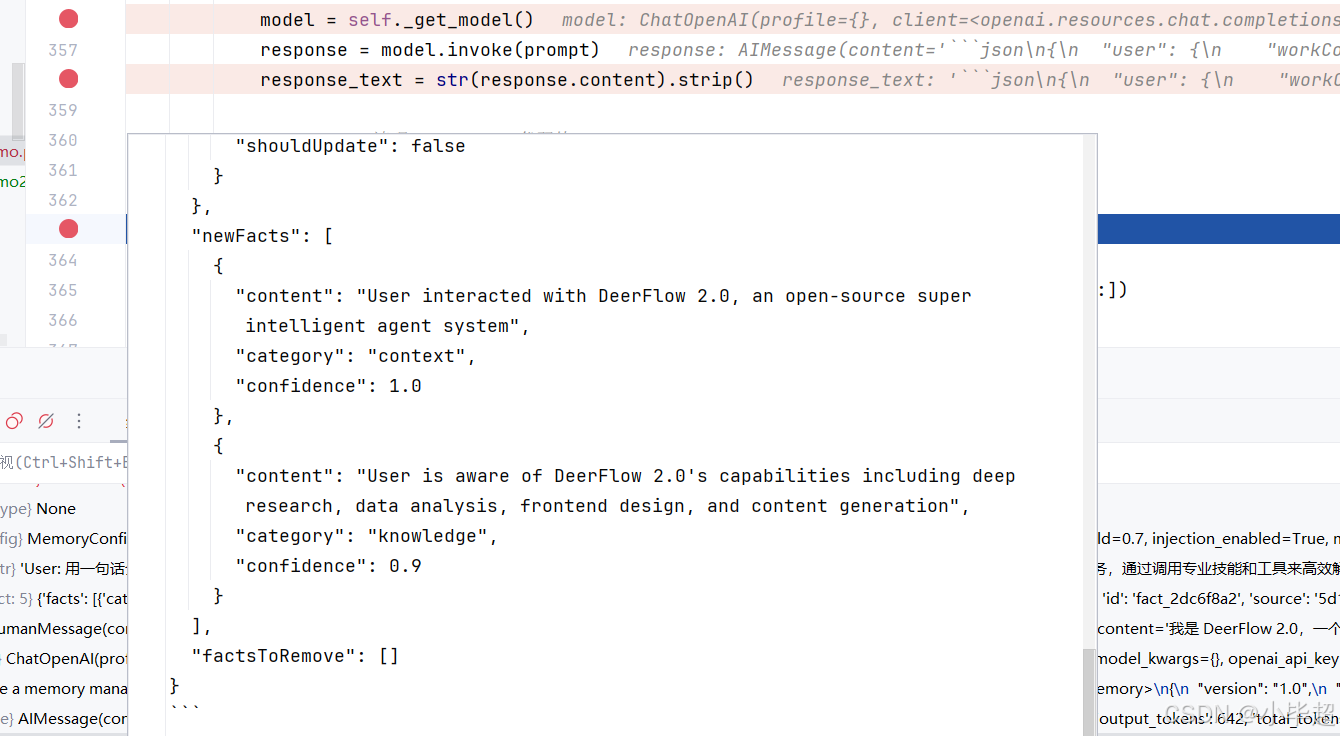
完整的内容:
json
{
  "user": {
    "workContext": {
      "summary": "",
      "shouldUpdate": false
    },
    "personalContext": {
      "summary": "User communicates in Chinese (Mandarin). Interested in technical content and technology bloggers in the Chinese tech community.",
      "shouldUpdate": false
    },
    "topOfMind": {
      "summary": "User is actively researching 小毕超 (Xiao Bichao), a CSDN technical blogger specializing in Java backend development, machine learning, and big data technologies. User has received comprehensive information about this blogger's technical expertise spanning machine learning & large models (82 articles), microservices architecture, big data processing (Hive, Elasticsearch), cloud-native technologies, and AI applications. The user appears to be evaluating this blogger as a learning resource or reference for Java backend development, large model applications, and full-stack technology growth, particularly interested in practical, implementation-focused content. User requested a general introduction to the blogger, suggesting ongoing interest in understanding the blogger's overall profile and content offerings.",
      "shouldUpdate": false
    }
  },
  "history": {
    "recentMonths": {
      "summary": "User has been exploring information about technical content creators in the Chinese tech ecosystem, specifically focusing on 小毕超 (qq_43692950), a CSDN blogger certified as Java领域优质创作者 and 后端开发技术领域专家 with 7 years of coding experience. User requested and received detailed information about this blogger's technical specializations including 82 articles on machine learning & large models, content on microservices architecture, big data processing (Hive, Elasticsearch), DevOps (Docker with 6 articles, Jenkins, 16 articles on operations), and various other technologies (Redis, Android, computer vision). User learned about the blogger's practical-oriented approach, such as articles on deploying large models like Qwen3.6-27B locally, and focus on cutting-edge technologies. User has made multiple inquiries about this blogger, including requests for a general introduction, indicating sustained interest in evaluating this content creator as a quality technical resource. The user appears to be seeking quality technical content sources in areas like distributed systems, AI/ML applications, and modern backend development.",
      "shouldUpdate": false
    },
    "earlierContext": {
      "summary": "",
      "shouldUpdate": false
    },
    "longTermBackground": {
      "summary": "",
      "shouldUpdate": false
    }
  },
  "newFacts": [
    {
      "content": "User interacted with DeerFlow 2.0, an open-source super intelligent agent system",
      "category": "context",
      "confidence": 1.0
    },
    {
      "content": "User is aware of DeerFlow 2.0's capabilities including deep research, data analysis, frontend design, and content generation",
      "category": "knowledge",
      "confidence": 0.9
    }
  ],
  "factsToRemove": []
}
其中用户上下文和历史上下文中的字段,不一定每次都会更新,事实 Fact的更新频次最高。
5.2.4:MemoryUpdater _apply_updates 更新记忆
上面 LLM 更新记忆内容后,由 _apply_updates 更新记忆:
python
def _apply_updates(
    self,
    current_memory: dict[str, Any],
    update_data: dict[str, Any],
    thread_id: str | None = None,
) -> dict[str, Any]:
    """将 LLM 返回的增量更新合并到当前记忆数据中。

    处理三类更新:
    1. 摘要字段更新(shouldUpdate=True 时覆写 summary + updatedAt):
           user.workContext / user.personalContext / user.topOfMind
           history.recentMonths / history.earlierContext / history.longTermBackground
       只有 section_data.shouldUpdate=True 且 summary 非空时才更新,
       防止 LLM 将 shouldUpdate=False 的字段清空。

    2. 事实删除(factsToRemove 列表):
           按 fact.id 过滤,将指定 ID 的事实从 facts 列表中移除。
           用于处理"矛盾信息"(如"用户之前用 Vue,现在转 React")。

    3. 新事实添加(newFacts 列表,带置信度过滤):
           只有 confidence >= fact_confidence_threshold(默认 0.7)的事实才入库。
           每个事实分配 UUID 前 8 位作为 ID(足够唯一性 + 可读性)。
           source 字段记录来源 thread_id,便于追溯。

    4. Facts 容量管理(超出 max_facts 时):
           按 confidence 降序排序,保留前 max_facts 条。
           低置信度事实被淘汰,确保记忆库质量。

    Args:
        current_memory: 当前记忆字典(会被原地修改)。
        update_data:    LLM 输出的增量更新 JSON(已解析为 dict)。
        thread_id:      来源 thread_id,写入新 fact 的 source 字段。

    Returns:
        更新后的记忆字典(与 current_memory 相同对象)。
    """
    config = get_memory_config()
    now = datetime.utcnow().isoformat() + "Z"

    # 更新 user 三个摘要字段
    user_updates = update_data.get("user", {})
    for section in ["workContext", "personalContext", "topOfMind"]:
        section_data = user_updates.get(section, {})
        # 双重条件:shouldUpdate=True 且 summary 非空(防止 LLM 误传空字符串)
        if section_data.get("shouldUpdate") and section_data.get("summary"):
            current_memory["user"][section] = {
                "summary": section_data["summary"],
                "updatedAt": now,
            }

    # 更新 history 三个摘要字段
    history_updates = update_data.get("history", {})
    for section in ["recentMonths", "earlierContext", "longTermBackground"]:
        section_data = history_updates.get(section, {})
        if section_data.get("shouldUpdate") and section_data.get("summary"):
            current_memory["history"][section] = {
                "summary": section_data["summary"],
                "updatedAt": now,
            }

    # 删除被标记为过时的 facts
    # LLM 在发现矛盾信息时,应将旧 fact 的 id 放入 factsToRemove
    facts_to_remove = set(update_data.get("factsToRemove", []))
    if facts_to_remove:
        current_memory["facts"] = [
            f for f in current_memory.get("facts", [])
            if f.get("id") not in facts_to_remove
        ]

    # 添加新 facts(带置信度过滤)
    new_facts = update_data.get("newFacts", [])
    for fact in new_facts:
        confidence = fact.get("confidence", 0.5)
        # 只有置信度 >= 阈值(默认 0.7)的事实才持久化
        # 0.9+ = 用户明确陈述;0.7-0.8 = 强烈暗示;0.5-0.6 = 推断(被过滤)
        if confidence >= config.fact_confidence_threshold:
            fact_entry = {
                "id": f"fact_{uuid.uuid4().hex[:8]}",  # 8 位 hex 前缀,够唯一且可读
                "content": fact.get("content", ""),
                "category": fact.get("category", "context"),  # 默认归类为 context
                "confidence": confidence,
                "createdAt": now,
                "source": thread_id or "unknown",  # 记录来源 thread,便于追溯
            }
            current_memory["facts"].append(fact_entry)

    # Facts 容量管理:超出 max_facts 时淘汰低置信度事实
    if len(current_memory["facts"]) > config.max_facts:
        # 按置信度降序排序,保留 top max_facts 条(质量优先)
        current_memory["facts"] = sorted(
            current_memory["facts"],
            key=lambda f: f.get("confidence", 0),
            reverse=True,
        )[: config.max_facts]

    return current_memory
5.3 _get_memory_context 记忆注入系统提示词
上面在解读创建智能体的过程中,有简单介绍了下 _get_memory_context 方法,获取记忆内容,现在再看 _get_memory_context 方法,是不是更好理解了。
_get_memory_context 内部调用 format_memory_for_injection 将 memory.json 数据格式化为纯文本,只注入摘要文本字段 ,不注入 facts 列表,并且记忆的长度也会通过 tiktoken 精确计数,超出 max_injection_tokens的话则按比例截断。
format_memory_for_injection() 的实现逻辑如下:
python
def format_memory_for_injection(memory_data: dict[str, Any], max_tokens: int = 2000) -> str:
    """将 memory.json 数据格式化为可注入系统提示词的纯文本摘要。

    调用方(lead_agent/prompt.py 的 _get_memory_context)会将返回值包裹在
    <memory>...</memory> XML 标签中,插入系统提示词的固定位置。

    内容选择策略(注意:facts 字段不注入)
    ----------------------------------------
    注入的是"人类可读的摘要文本",而非结构化 facts 列表:
    - user.workContext    → "Work: ..."
    - user.personalContext → "Personal: ..."
    - user.topOfMind     → "Current Focus: ..."
    - history.recentMonths → "Recent: ..."
    - history.earlierContext → "Earlier: ..."
    facts 是供 LLM 更新逻辑(MemoryUpdater)使用的内部数据库,
    注入系统提示词的目的是让模型了解用户背景,摘要文本更自然、更易理解。

    Token 截断机制
    --------------
    使用 tiktoken 精确计数,超出 max_tokens 时按"字符/token 比例"估算截断位置:
        target_chars = max_tokens * (len(result) / token_count) * 0.95
    0.95 系数留 5% 余量,避免截断点恰好落在多字节字符中间。

    Args:
        memory_data: memory.json 的完整解析字典(或空字典)。
        max_tokens:  注入内容的 token 上限,由 MemoryConfig.max_injection_tokens 控制(默认 2000)。

    Returns:
        格式化后的多行文本,供 _get_memory_context() 包装成 <memory> 标签。
        若 memory_data 为空或所有字段均无内容,返回空字符串。
    """
    if not memory_data:
        return ""

    sections = []

    # User Context 三字段
    user_data = memory_data.get("user", {})
    if user_data:
        user_sections = []

        work_ctx = user_data.get("workContext", {})
        if work_ctx.get("summary"):
            user_sections.append(f"Work: {work_ctx['summary']}")

        personal_ctx = user_data.get("personalContext", {})
        if personal_ctx.get("summary"):
            user_sections.append(f"Personal: {personal_ctx['summary']}")

        top_of_mind = user_data.get("topOfMind", {})
        if top_of_mind.get("summary"):
            user_sections.append(f"Current Focus: {top_of_mind['summary']}")

        if user_sections:
            sections.append("User Context:\n" + "\n".join(f"- {s}" for s in user_sections))

    # History 三字段(只注入 recentMonths + earlierContext,longTermBackground 省略)
    history_data = memory_data.get("history", {})
    if history_data:
        history_sections = []

        recent = history_data.get("recentMonths", {})
        if recent.get("summary"):
            history_sections.append(f"Recent: {recent['summary']}")

        earlier = history_data.get("earlierContext", {})
        if earlier.get("summary"):
            history_sections.append(f"Earlier: {earlier['summary']}")

        if history_sections:
            sections.append("History:\n" + "\n".join(f"- {s}" for s in history_sections))

    if not sections:
        return ""

    result = "\n\n".join(sections)

    # Token 预算检查与截断
    token_count = _count_tokens(result)
    if token_count > max_tokens:
        # 根据"字符数/token 数"比率反推目标字符数,0.95 系数留出安全余量
        char_per_token = len(result) / token_count
        target_chars = int(max_tokens * char_per_token * 0.95)
        result = result[:target_chars] + "\n..."

    return result
六、总结
DeerFlow 2.0 是一个设计优秀的 Super Agent Harness 框架,没有复杂的设计也没有花里花哨的封装,而是采用大家都很熟悉的 LangChain、LangGraph 框架,非常值得深入学习和探索!