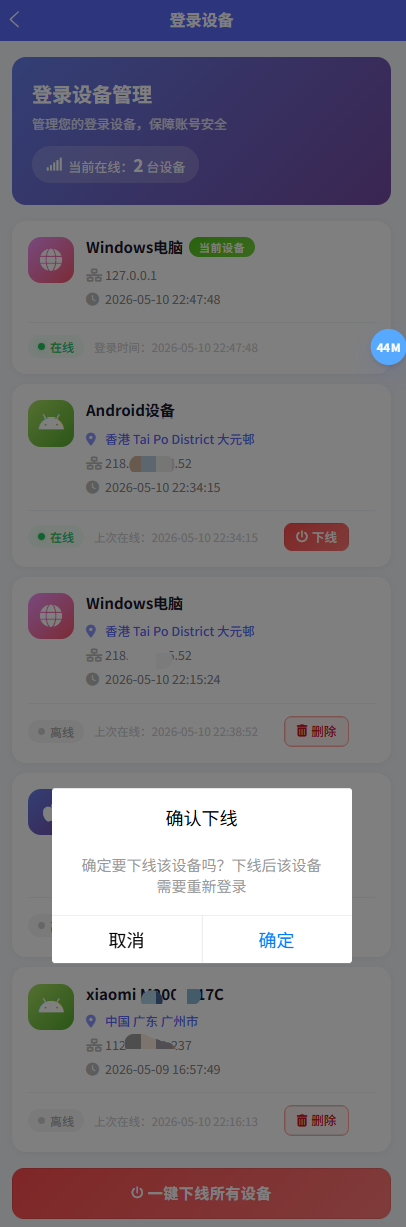
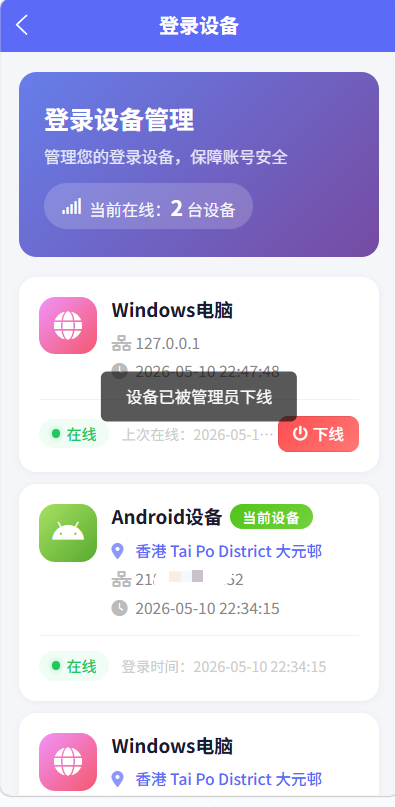
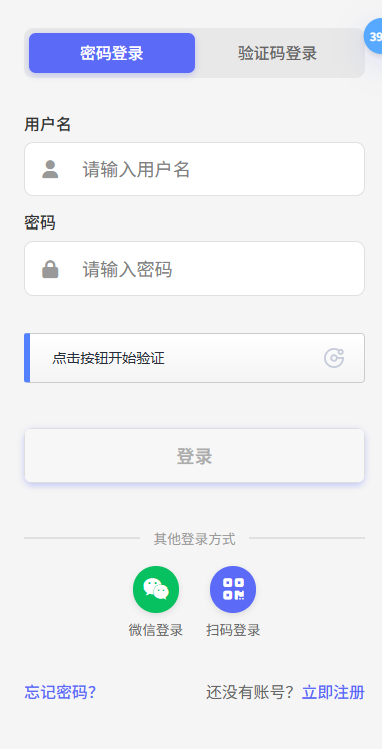
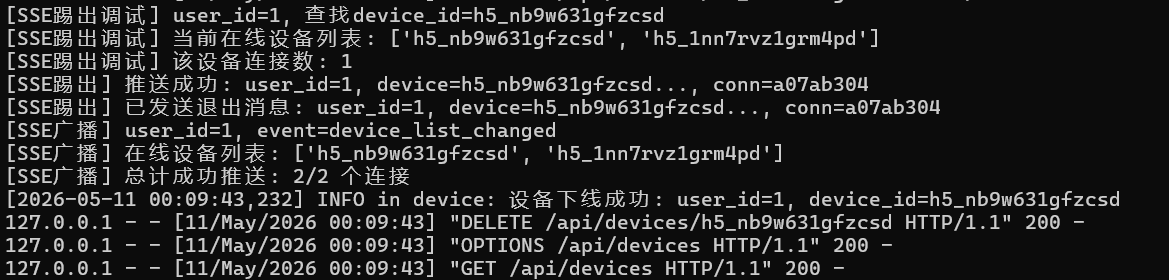
踢人下线效果
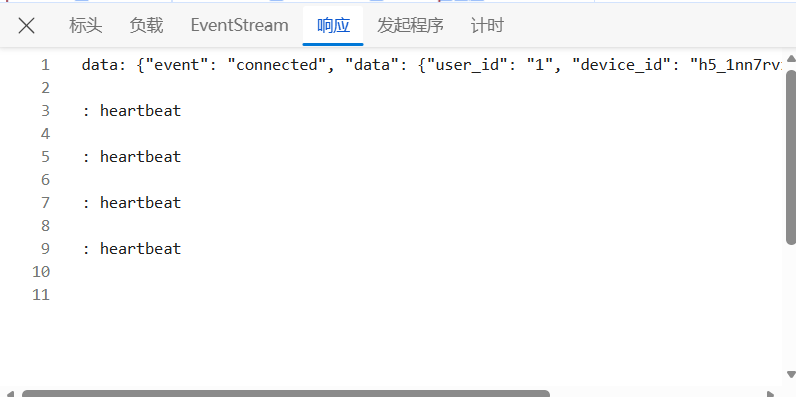
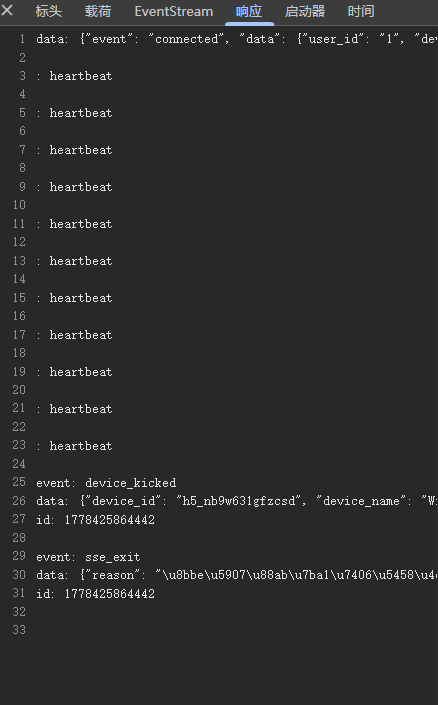
1. SSE 推送功能完整架构
1.1 整体架构图
数据存储
后端层
前端层
POST /sse/set-cookie
GET /sse/subscribe
验证token+device_id
注册连接
推送事件
消费消息
30s轮询
App.vue - 应用入口
SSEClient 客户端
Cookie设置模块
fetch+ReadableStream
轮询降级模块
路由层 routes/sse.py
SSE管理器 utils/sse.py
消息队列 queue.Queue
连接状态字典 _connections
Cookie验证模块
内存连接池
设备黑名单
数据库 user_login_device
1.2 前端 SSE 连接建立流程
SSEManager /sse/subscribe /sse/set-cookie SSEClient App.vue SSEManager /sse/subscribe /sse/set-cookie SSEClient App.vue loop 每30秒 connect(callback) 检查token是否存在 检查是否重复连接 POST {token, device_id} 设置HttpOnly Cookie GET /sse/subscribe register(user_id, device_id) 返回 (queue, conn_id) 返回 EventStream 派发 connected 事件 启动心跳检测 : heartbeat 更新 lastHeartbeatTime
1.3 前端核心实现代码
文件 : sse.js
js
class SSEClient {
    constructor() {
        this.eventSource = null;
        this.reconnectTimer = null;
        this.pollingTimer = null;
        this.isMiniProgram = false;
        this.reconnectAttempts = 0;
        this.maxReconnectAttempts = 5;
        this.reconnectDelay = 3000;
        this.onDeviceKicked = null;
        this.heartbeatTimer = null;
        this.lastHeartbeatTime = null;
        this.isConnected = false;
        this.isConnecting = false;
        this._abortController = null;
    }

    async connect(onDeviceKicked) {
        this.onDeviceKicked = onDeviceKicked;
        const token = getToken();
        if (!token) return;

        if (this.eventSource && this.eventSource.readyState === 1) return;
        if (this.isConnecting) return;

        this.isConnecting = true;

        // #ifdef H5
        const cookieSet = await this.setupCookie();
        if (cookieSet) {
            this.startSSE();
        } else {
            this.isConnecting = false;
        }
        return;
        // #endif

        // #ifdef MP-WEIXIN
        this.isMiniProgram = true;
        this.startPolling();
        this.isConnecting = false;
        return;
        // #endif
    }

    async setupCookie() {
        const token = getToken();
        if (!token) return false;

        const deviceInfo = getDeviceInfo();
        const baseURL = getBaseURL();

        try {
            const response = await uni.request({
                url: `${baseURL}/sse/set-cookie`,
                method: 'POST',
                header: { 'Content-Type': 'application/json' },
                data: {
                    token: token,
                    device_id: deviceInfo.device_id
                },
                withCredentials: true
            });

            return response.statusCode === 200;
        } catch (e) {
            console.error('SSE Cookie设置异常', e);
            return false;
        }
    }

    startSSE() {
        if (this.eventSource && this.eventSource.readyState !== 2) {
            this.eventSource.close();
            this.eventSource = null;
            this.stopHeartbeat();
        }

        const baseURL = getBaseURL();
        const url = `${baseURL}/sse/subscribe`;

        const controller = new AbortController();
        this._abortController = controller;

        const esWrapper = {
            readyState: 0,
            _listeners: {},
            close() {
                this.readyState = 2;
                controller.abort();
            },
            addEventListener(event, handler) {
                if (!this._listeners[event]) this._listeners[event] = [];
                this._listeners[event].push(handler);
            },
            _emit(event, data) {
                (this._listeners[event] || []).forEach(h => h(data));
            }
        };

        this.eventSource = esWrapper;
        esWrapper.readyState = 0;

        fetch(url, {
            method: 'GET',
            headers: { 'Accept': 'text/event-stream' },
            credentials: 'include',
            signal: controller.signal
        }).then(response => {
            if (!response.ok) throw new Error(`HTTP ${response.status}`);

            esWrapper.readyState = 1;
            this.reconnectAttempts = 0;
            this.isConnected = true;
            this.isConnecting = false;
            this.startHeartbeat();

            const reader = response.body.getReader();
            const decoder = new TextDecoder();
            let buffer = '';

            const readStream = () => {
                reader.read().then(({ done, value }) => {
                    if (done) {
                        this._handleError(esWrapper);
                        return;
                    }

                    this.lastHeartbeatTime = Date.now();
                    buffer += decoder.decode(value, { stream: true });

                    const lines = buffer.split('\n');
                    buffer = lines.pop() || '';

                    let currentEvent = null;
                    let currentData = '';

                    for (const line of lines) {
                        if (line.startsWith('event:')) {
                            currentEvent = line.slice(6).trim();
                        } else if (line.startsWith('data:')) {
                            currentData += line.slice(5).trim();
                        } else if (line === '' && currentData) {
                            const eventName = currentEvent || 'message';
                            try {
                                esWrapper._emit(eventName, { data: currentData });
                                this._dispatchSSEEvent(eventName, currentData);
                            } catch (e) {
                                console.error('SSE事件派发异常', e);
                            }
                            currentEvent = null;
                            currentData = '';
                        } else if (line.startsWith(':')) {
                            // 服务端心跳注释
                        }
                    }

                    readStream();
                }).catch(err => {
                    if (err.name === 'AbortError') return;
                    this._handleError(esWrapper);
                    this.isConnecting = false;
                });
            };

            readStream();
        }).catch(err => {
            if (err.name === 'AbortError') return;
            this._handleError(esWrapper);
            this.isConnecting = false;
        });
    }

    _dispatchSSEEvent(eventName, rawData) {
        if (eventName === 'connected') {
            console.log('SSE连接成功', rawData);
        } else if (eventName === 'device_kicked') {
            console.log('设备被下线', rawData);
            try { this.handleDeviceKicked(JSON.parse(rawData)); } catch {}
        } else if (eventName === 'device_list_changed') {
            console.log('设备列表变化', rawData);
            try {
                uni.$emit('device-list-changed', JSON.parse(rawData));
            } catch {}
        } else if (eventName === 'error') {
            console.error('SSE服务端错误', rawData);
        }
    }

    startHeartbeat() {
        this.lastHeartbeatTime = Date.now();
        this.heartbeatTimer = setInterval(() => {
            const now = Date.now();
            const timeSinceLastHeartbeat = now - this.lastHeartbeatTime;

            if (timeSinceLastHeartbeat > 60000) {
                console.log('SSE心跳超时,连接可能已断开');
                if (this.eventSource) {
                    this.eventSource.close();
                    this.eventSource = null;
                }
                this.scheduleReconnect();
            }
        }, 30000);
    }

    handleDeviceKicked(data) {
        clearAuth();
        uni.removeStorageSync('device_id');
        uni.removeStorageSync('ip_info');
        uni.removeStorageSync('ip_info_time');

        this.disconnect();

        uni.showToast({
            title: data.reason || '您的设备已被下线',
            icon: 'none',
            duration: 2000
        });

        setTimeout(() => {
            uni.reLaunch({
                url: '/pages/auth/login'
            });
        }, 2000);

        if (this.onDeviceKicked) {
            this.onDeviceKicked(data);
        }
    }

    scheduleReconnect() {
        if (this.reconnectAttempts >= this.maxReconnectAttempts) return;

        this.reconnectAttempts++;
        const delay = this.reconnectDelay * this.reconnectAttempts;

        this.reconnectTimer = setTimeout(async () => {
            const newToken = getToken();
            if (!newToken) {
                this.disconnect();
                return;
            }
            const cookieSet = await this.setupCookie();
            if (cookieSet) {
                this.startSSE();
            } else {
                this.isConnecting = false;
            }
        }, delay);
    }

    disconnect() {
        this.isConnected = false;
        this.isConnecting = false;
        this.stopHeartbeat();

        if (this.eventSource) {
            this.eventSource.close();
            this.eventSource = null;
        }

        if (this._abortController) {
            this._abortController.abort();
            this._abortController = null;
        }

        if (this.pollingTimer) {
            clearInterval(this.pollingTimer);
            this.pollingTimer = null;
        }

        if (this.reconnectTimer) {
            clearTimeout(this.reconnectTimer);
            this.reconnectTimer = null;
        }

        this.reconnectAttempts = 0;
    }
}

export const sseClient = new SSEClient();
1.4 后端 SSE 服务端实现
文件 : routes/sse.py
python
@sse_bp.route('/subscribe', methods=['GET', 'OPTIONS'])
def subscribe():
    """SSE订阅端点"""
    if request.method == 'OPTIONS':
        response = Response('', status=204)
        response.headers['Access-Control-Allow-Origin'] = request.headers.get('Origin', 'http://localhost:5173')
        response.headers['Access-Control-Allow-Credentials'] = 'true'
        return response

    # 优先从Cookie获取token
    token = request.cookies.get('sse_token')
    if not token:
        auth_header = request.headers.get('Authorization', '')
        if auth_header.startswith('Bearer '):
            token = auth_header[7:]

    # 获取device_id
    device_id = request.cookies.get('sse_device_id') or request.headers.get('X-Device-Id')

    if not token or not device_id:
        return Response(
            f"data: {json.dumps({'event': 'error', 'data': {'msg': '缺少认证信息'}})}\n\n",
            mimetype='text/event-stream'
        )

    # 验证token
    try:
        decoded = decode_token(token)
        user_id = decoded.get('sub')
        if not user_id:
            return Response(
                f"data: {json.dumps({'event': 'error', 'data': {'msg': '无效的Token'}})}\n\n",
                mimetype='text/event-stream'
            )
    except Exception as e:
        return Response(
            f"data: {json.dumps({'event': 'error', 'data': {'msg': 'Token验证失败'}})}\n\n",
            mimetype='text/event-stream'
        )

    # 注册SSE连接
    q, conn_id = sse_manager.register(user_id, device_id)

    def event_stream():
        try:
            yield f"data: {json.dumps({'event': 'connected', 'data': {'user_id': user_id, 'device_id': device_id, 'conn_id': conn_id}})}\n\n"
            sse_manager.heartbeat(user_id, device_id, conn_id)

            cleanup_counter = 0
            while True:
                try:
                    message = q.get(timeout=30)
                    if message.get('event') == '__exit__':
                        break
                    sse_manager.heartbeat(user_id, device_id, conn_id)
                    yield f"event: {message['event']}\ndata: {json.dumps(message['data'])}\nid: {int(time.time() * 1000)}\n\n"
                except queue.Empty:
                    sse_manager.heartbeat(user_id, device_id, conn_id)
                    yield ": heartbeat\n\n"

                cleanup_counter += 1
                if cleanup_counter >= 10:
                    cleaned = sse_manager.cleanup_stale_connections()
                    if cleaned > 0:
                        current_app.logger.info(f"SSE僵尸清理完成: 清理{cleaned}个")
                    cleanup_counter = 0
        except GeneratorExit:
            pass
        finally:
            sse_manager.unregister(user_id, device_id, conn_id)

    return Response(
        stream_with_context(event_stream()),
        mimetype='text/event-stream',
        headers={
            'Cache-Control': 'no-cache',
            'X-Accel-Buffering': 'no',
            'Connection': 'keep-alive',
            'Access-Control-Allow-Origin': request.headers.get('Origin', 'http://localhost:5173'),
            'Access-Control-Allow-Credentials': 'true'
        }
    )
1.5 SSE 连接管理器
文件 : utils/sse.py
python
class SSEManager:
    """SSE连接管理器"""

    def __init__(self):
        # 存储结构: {user_id: {device_id: {conn_id: {'queue': q, 'created_at': ts, 'last_active': ts}}}}
        self._connections = {}
        self._lock = threading.Lock()

    def register(self, user_id, device_id):
        """注册SSE连接,返回 (消息队列, 连接ID)"""
        user_id = str(user_id)
        conn_id = str(uuid.uuid4())[:8]
        now = _time.time()

        with self._lock:
            if user_id not in self._connections:
                self._connections[user_id] = {}
            if device_id not in self._connections[user_id]:
                self._connections[user_id][device_id] = {}

            device_conns = self._connections[user_id][device_id]

            # 超出单设备最大连接数,自动清理最老的连接
            if len(device_conns) >= MAX_CONNECTIONS_PER_DEVICE:
                oldest_conn_id = min(device_conns.keys(),
                    key=lambda cid: device_conns[cid]['created_at'])
                del device_conns[oldest_conn_id]

            q = queue.Queue()
            device_conns[conn_id] = {
                'queue': q,
                'created_at': now,
                'last_active': now
            }
            return q, conn_id

    def unregister(self, user_id, device_id, conn_id=None):
        """注销SSE连接"""
        user_id = str(user_id)
        with self._lock:
            if user_id not in self._connections:
                return
            if device_id not in self._connections[user_id]:
                return

            if conn_id:
                self._connections[user_id][device_id].pop(conn_id, None)
            else:
                self._connections[user_id][device_id].clear()

            if not self._connections[user_id][device_id]:
                del self._connections[user_id][device_id]
            if not self._connections[user_id]:
                del self._connections[user_id]

    def push(self, user_id, device_id, event_type, data):
        """向指定设备的所有连接推送消息"""
        user_id = str(user_id)
        with self._lock:
            device_conns = self._connections.get(user_id, {}).get(device_id, {}).copy()

        if not device_conns:
            return False

        success = False
        for conn_id, conn_info in device_conns.items():
            try:
                q = conn_info['queue']
                message = {
                    'event': event_type,
                    'data': data,
                    'timestamp': get_now().strftime('%Y-%m-%d %H:%M:%S')
                }
                q.put_nowait(message)
                self.heartbeat(user_id, device_id, conn_id)
                success = True
            except queue.Full:
                pass

        return success

    def push_to_all_devices(self, user_id, event_type, data):
        """向用户所有设备的所有连接推送消息"""
        user_id = str(user_id)
        with self._lock:
            user_connections = self._connections.get(user_id, {}).copy()

        if not user_connections:
            return 0

        success_count = 0
        total_conns = 0
        for device_id, device_conns in user_connections.items():
            for conn_id, conn_info in device_conns.items():
                total_conns += 1
                try:
                    q = conn_info['queue']
                    message = {
                        'event': event_type,
                        'data': data,
                        'timestamp': get_now().strftime('%Y-%m-%d %H:%M:%S')
                    }
                    q.put_nowait(message)
                    self.heartbeat(user_id, device_id, conn_id)
                    success_count += 1
                except queue.Full:
                    pass

        return success_count

    def kick_device(self, user_id, device_id, event_type, data):
        """踢出设备的所有连接:推送消息后发送退出信号"""
        user_id = str(user_id)
        with self._lock:
            device_conns = self._connections.get(user_id, {}).get(device_id, {}).copy()

        if not device_conns:
            return False

        success = False
        for conn_id, conn_info in device_conns.items():
            try:
                q = conn_info['queue']
                # 先推送下线事件
                message = {
                    'event': event_type,
                    'data': data,
                    'timestamp': get_now().strftime('%Y-%m-%d %H:%M:%S')
                }
                q.put_nowait(message)

                # 发送退出消息,让生成器主动断开
                exit_message = {
                    'event': 'sse_exit',
                    'data': {'reason': '设备被管理员下线'},
                    'timestamp': get_now().strftime('%Y-%m-%d %H:%M:%S')
                }
                q.put_nowait(exit_message)
                success = True
            except queue.Full:
                pass

        return success

    def cleanup_stale_connections(self):
        """清理所有僵尸连接"""
        now = _time.time()
        cleaned = 0

        with self._lock:
            to_remove = []

            for user_id, devices in list(self._connections.items()):
                for device_id, conns in list(devices.items()):
                    for conn_id, conn_info in list(conns.items()):
                        last_active = conn_info.get('last_active', conn_info['created_at'])
                        if now - last_active > STALE_CONNECTION_TIMEOUT:
                            to_remove.append((user_id, device_id, conn_id))

            for user_id, device_id, conn_id in to_remove:
                self._connections[user_id][device_id].pop(conn_id, None)
                cleaned += 1

            for user_id, devices in list(self._connections.items()):
                for device_id in list(devices.keys()):
                    if not devices[device_id]:
                        del devices[device_id]
                if not devices:
                    del self._connections[user_id]

        return cleaned
2. 用户强制下线功能分析
2.1 强制下线流程图
被踢设备B SSE管理器 数据库 后端API 管理员设备A 被踢设备B SSE管理器 数据库 后端API 管理员设备A DELETE /devices/{device_id} 查询设备记录 返回设备信息 kick_device(user_id, device_id, 'device_kicked', data) 查找设备的所有SSE连接 推送 device_kicked 事件 推送 sse_exit 事件 清空本地认证信息 显示下线提示 跳转登录页 更新设备状态 is_online=0 push_to_all_devices('device_list_changed') 推送设备列表变化事件 刷新设备列表
2.2 后端下线核心逻辑
文件 : routes/device.py
python
def _kick_device(device, reason='设备已被管理员下线'):
    """下线设备并触发黑名单+SSE推送"""
    # 1. 先写入黑名单缓存(阻止设备重新连接)
    device_blacklist.add(device.device_id, time.time())

    # 2. 通过SSE推送下线事件到指定设备,并关闭连接
    push_success = sse_manager.kick_device(device.user_id, device.device_id, 'device_kicked', {
        'device_id': device.device_id,
        'device_name': device.device_name,
        'reason': reason,
        'timestamp': get_now().strftime('%Y-%m-%d %H:%M:%S')
    })

    # 3. 等待短暂时间确保消息被消费
    if push_success:
        time.sleep(0.1)

    # 4. 最后修改数据库状态
    device.is_online = 0
    device.last_online_time = get_now()
    device.token = None


@device_bp.route('/devices/<device_id>', methods=['DELETE'])
@jwt_required()
def offline_device(device_id):
    """下线指定设备"""
    user_id = get_jwt_identity()

    try:
        device = UserLoginDevice.query.filter_by(
            user_id=user_id,
            device_id=device_id
        ).first()

        if not device:
            return jsonify({"msg": "设备不存在"}), 404

        _kick_device(device, '设备已被管理员下线')
        db.session.commit()

        # 通知该用户其他在线设备刷新列表
        sse_manager.push_to_all_devices(
            user_id, 'device_list_changed',
            {'device_id': device_id, 'action': 'offline'}
        )

        return jsonify({"msg": "设备已下线"})
    except Exception as e:
        db.session.rollback()
        return jsonify({"msg": "设备下线失败"}), 500


@device_bp.route('/devices/offline-all', methods=['POST'])
@jwt_required()
def offline_all_devices():
    """一键下线所有设备"""
    user_id = get_jwt_identity()
    current_device_id = request.headers.get('X-Device-Id')

    try:
        devices = UserLoginDevice.query.filter_by(user_id=user_id).all()

        count = 0
        for device in devices:
            if device.device_id != current_device_id:
                _kick_device(device, '设备已被管理员下线')
                count += 1

        db.session.commit()

        sse_manager.push_to_all_devices(
            user_id, 'device_list_changed',
            {'action': 'offline_all', 'count': count}
        )

        return jsonify({
            "msg": f"已成功下线 {count} 台设备",
            "count": count
        })
    except Exception as e:
        db.session.rollback()
        return jsonify({"msg": "一键下线失败"}), 500
2.3 前端设备管理页面
文件 : pages/profile/device-manage.vue
vue
<template>
    <view class="device-container">
        <view class="device-header">
            <text class="header-title">登录设备管理</text>
            <text class="header-desc">管理您的登录设备,保障账号安全</text>
            <view class="online-count">
                <text class="count-icon fa-solid fa-signal"></text>
                <text class="count-text">当前在线:<text class="count-number">{{ onlineCount }}</text> 台设备</text>
            </view>
        </view>

        <view class="device-list">
            <view v-for="device in deviceList" :key="device.device_id" class="device-card">
                <view class="device-info">
                    <view class="device-icon-wrapper" :class="getDeviceIconClass(device.device_type)">
                        <text class="device-icon" :class="getDeviceIcon(device.device_type)"></text>
                    </view>
                    <view class="device-detail">
                        <view class="device-name-row">
                            <text class="device-name">{{ device.device_name }}</text>
                            <text v-if="device.is_current" class="current-badge">当前设备</text>
                        </view>
                        <view class="device-meta">
                            <text v-if="device.login_address" class="meta-item meta-item-address">
                                <text class="meta-icon fa-solid fa-location-dot"></text>
                                <text class="meta-text">{{ device.login_address }}</text>
                            </text>
                            <text class="meta-item">
                                <text class="meta-icon fa-solid fa-clock"></text>
                                <text class="meta-text">{{ device.login_time }}</text>
                            </text>
                        </view>
                    </view>
                </view>

                <view class="device-actions-bar">
                    <view class="status-section">
                        <template v-if="device.is_current">
                            <view class="status-tag status-tag--online">
                                <view class="status-dot status-dot-online"></view>
                                <text>在线</text>
                            </view>
                        </template>
                        <template v-else-if="device.is_online === 1">
                            <view class="status-tag status-tag--online">
                                <view class="status-dot status-dot-online"></view>
                                <text>在线</text>
                            </view>
                            <button class="action-btn action-btn--danger" @click="handleOffline(device.device_id)">
                                <text class="btn-icon fa-solid fa-power-off"></text>
                                <text>下线</text>
                            </button>
                        </template>
                        <template v-else>
                            <view class="status-tag status-tag--offline">
                                <view class="status-dot status-dot-offline"></view>
                                <text>离线</text>
                            </view>
                            <button class="action-btn action-btn--ghost-danger" @click="handleDelete(device.device_id)">
                                <text class="btn-icon fa-solid fa-trash-can"></text>
                                <text>删除</text>
                            </button>
                        </template>
                    </view>
                </view>
            </view>
        </view>

        <view class="footer-actions">
            <button class="offline-all-btn" @click="handleOfflineAll">
                <text class="btn-icon fa-solid fa-power-off"></text>
                <text>一键下线所有设备</text>
            </button>
        </view>
    </view>
</template>

<script setup>
import { ref, computed } from 'vue';
import { onShow, onHide } from '@dcloudio/uni-app';
import { deviceApi } from '../../apis';

const deviceList = ref([]);
const loading = ref(true);

const onlineCount = computed(() => {
    return deviceList.value.filter(device => device.is_online === 1).length;
});

onShow(async () => {
    await loadDeviceList();
    uni.$on('device-list-changed', handleDeviceListChanged);
});

onHide(() => {
    uni.$off('device-list-changed', handleDeviceListChanged);
});

const handleDeviceListChanged = (data) => {
    console.log('收到设备列表变化通知:', data);
    loadDeviceList();
};

const loadDeviceList = async () => {
    try {
        loading.value = true;
        const res = await deviceApi.getDeviceList();
        deviceList.value = res.data || [];
    } catch (error) {
        uni.showToast({ title: error.msg || '获取设备列表失败', icon: 'none' });
    } finally {
        loading.value = false;
    }
};

const handleOffline = (deviceId) => {
    uni.showModal({
        title: '确认下线',
        content: '确定要下线该设备吗?下线后该设备需要重新登录',
        success: async (res) => {
            if (res.confirm) {
                try {
                    await deviceApi.offlineDevice(deviceId);
                    uni.showToast({ title: '设备已下线', icon: 'success' });
                    await loadDeviceList();
                } catch (error) {
                    uni.showToast({ title: error.msg || '下线失败', icon: 'none' });
                }
            }
        }
    });
};

const handleOfflineAll = () => {
    uni.showModal({
        title: '确认下线所有设备',
        content: '确定要下线所有设备吗?当前设备不会下线',
        success: async (res) => {
            if (res.confirm) {
                try {
                    const result = await deviceApi.offlineAllDevices();
                    uni.showToast({ title: result.msg || '已下线所有设备', icon: 'success' });
                    await loadDeviceList();
                } catch (error) {
                    uni.showToast({ title: error.msg || '下线失败', icon: 'none' });
                }
            }
        }
    });
};

const getDeviceIcon = (deviceType) => {
    const iconMap = {
        'android': 'fa-brands fa-android',
        'ios': 'fa-brands fa-apple',
        'h5': 'fa-solid fa-globe',
        'pc': 'fa-solid fa-desktop',
        'mini': 'fa-brands fa-weixin',
        'app': 'fa-solid fa-mobile-screen'
    };
    return iconMap[deviceType] || 'fa-solid fa-laptop';
};
</script>
3. 登录/登出通知功能分析
3.1 登录通知流程图
其他在线设备 SSE管理器 数据库 后端API 新登录设备 其他在线设备 SSE管理器 数据库 后端API 新登录设备 POST /login {username, password, device_id} 验证用户名密码 生成JWT token 保存设备信息 (is_online=1) push_to_all_devices('device_list_changed', {action: 'login'}) 推送设备列表变化事件 触发 device-list-changed 事件 刷新设备列表 返回 access_token 保存token 初始化SSE连接
3.2 后端登录接口实现
文件 : routes/auth.py
python
@auth_bp.route('/login', methods=['POST'])
def login():
    """用户登录(用户名密码或手机号验证码)"""
    data = request.get_json()
    login_type = data.get('type', 'password')

    device_id = data.get('device_id')
    device_name = data.get('device_name', '未知设备')
    device_type = data.get('device_type', 'h5')
    public_ip = data.get('public_ip')
    login_address = data.get('login_address')

    if login_type == 'password':
        username = data.get('username')
        password = data.get('password')

        user = User.query.filter_by(username=username).first()

        if user and check_password_hash(user.password_hash, password):
            if not user.is_active:
                return jsonify({"msg": "账号未激活,请先验证您的邮箱", "need_verification": True}), 403

            # 生成JWT token,包含device_id
            access_token = create_access_token(
                identity=str(user.id),
                additional_claims={'device_id': device_id}
            )

            # 保存设备信息
            save_device_info(user.id, device_id, device_name, device_type, access_token, public_ip, login_address)

            # 通知该用户其他在线设备刷新设备列表
            sse_manager.push_to_all_devices(
                user.id, 'device_list_changed',
                {'device_id': device_id, 'device_name': device_name, 'action': 'login'}
            )

            return jsonify({
                "access_token": access_token,
                "user_id": user.id,
                "username": user.username
            })

        return jsonify({"msg": "用户名或密码错误"}), 401


def save_device_info(user_id, device_id, device_name, device_type, token, public_ip=None, login_address=None):
    """保存或更新设备信息"""
    try:
        device = UserLoginDevice.query.filter_by(user_id=user_id, device_id=device_id).first()

        login_ip = public_ip or get_client_ip()
        final_address = login_address or get_ip_location(login_ip)

        expire_time = get_now() + timedelta(seconds=current_app.config.get('JWT_ACCESS_TOKEN_EXPIRES', 86400))

        if device:
            device.login_ip = login_ip
            device.login_address = final_address
            device.login_time = get_now()
            device.expire_time = expire_time
            device.is_online = 1
            device.token = token
            device.device_name = device_name
            device.device_type = device_type
        else:
            device = UserLoginDevice(
                user_id=user_id,
                device_id=device_id,
                device_name=device_name,
                device_type=device_type,
                login_ip=login_ip,
                login_address=final_address,
                login_time=get_now(),
                expire_time=expire_time,
                is_online=1,
                token=token
            )
            db.session.add(device)

        db.session.commit()

        # 登录成功后,从黑名单中移除该设备
        device_blacklist.remove(device_id)
    except Exception as e:
        db.session.rollback()
3.3 登出通知流程
其他在线设备 SSE管理器 数据库 后端API 当前设备 其他在线设备 SSE管理器 数据库 后端API 当前设备 POST /logout {X-Device-Id} 查询当前设备记录 返回设备信息 更新设备状态 is_online=0 清空token push_to_all_devices('device_list_changed', {action: 'logout'}) 推送设备列表变化事件 刷新设备列表 返回 "退出登录成功" 清空本地认证信息 跳转登录页
3.4 后端登出接口
python
@device_bp.route('/logout', methods=['POST'])
@jwt_required()
def logout():
    """退出登录(下线当前设备)"""
    user_id = get_jwt_identity()

    try:
        current_device_id = request.headers.get('X-Device-Id')

        if not current_device_id:
            return jsonify({"msg": "设备ID不能为空"}), 400

        device = UserLoginDevice.query.filter_by(
            user_id=user_id,
            device_id=current_device_id
        ).first()

        if device:
            device.is_online = 0
            device.last_online_time = get_now()
            device.token = None
            db.session.commit()

            # 通知该用户其他在线设备刷新列表
            sse_manager.push_to_all_devices(
                user_id, 'device_list_changed',
                {'device_id': current_device_id, 'action': 'logout'}
            )
        else:
            current_app.logger.warning(f"未找到设备记录: user_id={user_id}, device_id={current_device_id}")

        return jsonify({"msg": "退出登录成功"})
    except Exception as e:
        db.session.rollback()
        return jsonify({"msg": "退出登录失败"}), 500
4. 数据模型与状态管理
4.1 设备数据模型
文件 : models/user_login_device.py
python
class UserLoginDevice(db.Model):
    """用户登录设备表"""
    __tablename__ = 'user_login_device'

    id = db.Column(db.Integer, primary_key=True, autoincrement=True)
    user_id = db.Column(db.Integer, db.ForeignKey('user.id'), nullable=False, index=True)
    device_id = db.Column(db.String(128), nullable=False, index=True)
    device_name = db.Column(db.String(128), nullable=False)
    device_type = db.Column(db.String(32), nullable=False)
    login_ip = db.Column(db.String(64))
    login_address = db.Column(db.String(256))
    login_time = db.Column(db.DateTime, default=get_now, nullable=False)
    last_online_time = db.Column(db.DateTime)
    expire_time = db.Column(db.DateTime)
    is_online = db.Column(db.Integer, default=1, nullable=False)
    token = db.Column(db.Text)
    created_at = db.Column(db.DateTime, default=get_now, nullable=False)
    updated_at = db.Column(db.DateTime, default=get_now, onupdate=get_now, nullable=False)
4.2 设备状态流转图
初始状态
登录成功
主动登出
被管理员下线
Token过期
SSE断开超时
重新登录
离线
在线
4.3 SSE 连接状态图
开始连接
连接成功
连接失败
收到心跳
收到 sse_exit
心跳超时
客户端主动断开
自动重连
达到最大重连次数
CONNECTING
OPEN
CLOSED
5.核心配置参数表
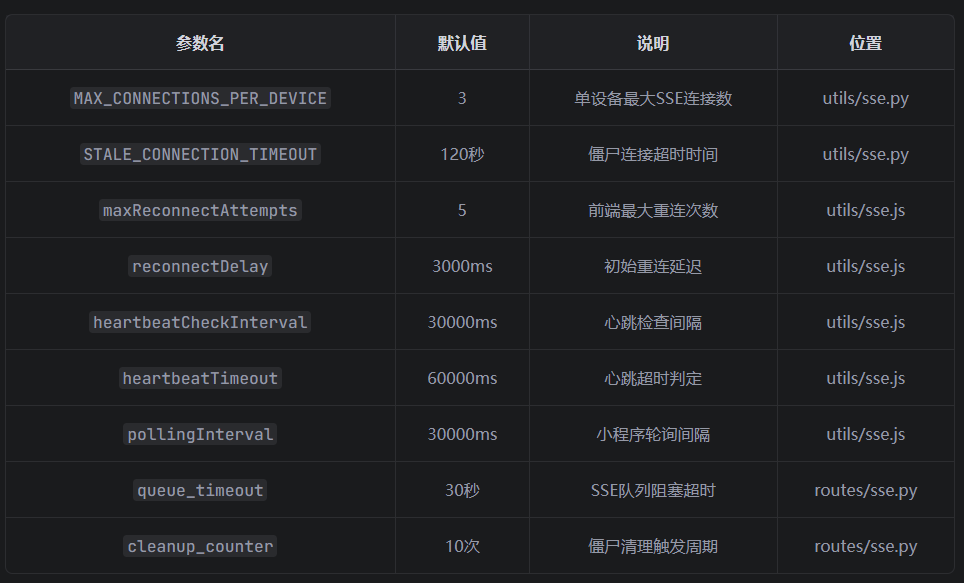
6. 事件类型完整对照表
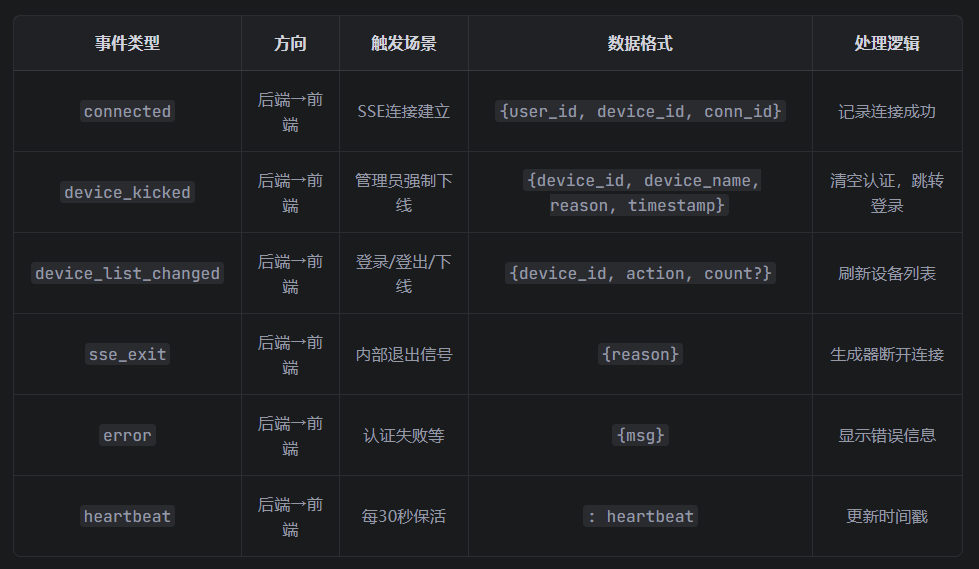
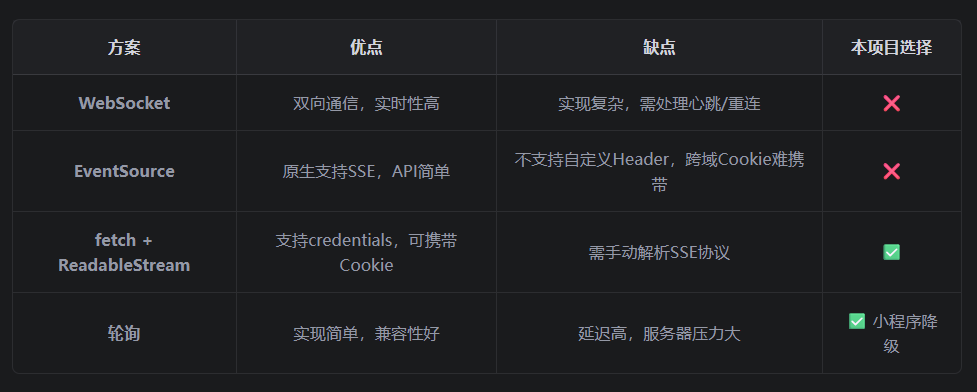
7. 技术选型对比
8. 潜在问题与改进建议
8.1 当前存在的问题
-
device_id 一致性风险
- 登录时: data.get('device_id')
- SSE时: cookies.get('sse_device_id')
- 如果前端两次传入不一致,会导致下线失败
-
消息可靠性
- 使用内存队列,服务重启后消息丢失
- 被踢设备如果SSE已断开,无法收到下线通知
-
竞态条件
- 黑名单写入与SSE推送非原子操作
- 可能出现设备被踢后重新连接成功的情况
8.2 改进建议
1.增加 device_id 一致性校验
python
# 在 subscribe 函数中
jwt_device_id = decoded.get('device_id')
cookie_device_id = request.cookies.get('sse_device_id')

if jwt_device_id and cookie_device_id and jwt_device_id != cookie_device_id:
    current_app.logger.error(f"设备ID不匹配!jwt={jwt_device_id}, cookie={cookie_device_id}")
2.使用 Redis 做消息队列
- 确保服务重启后消息不丢失
- 支持离线消息补发
3.原子化下线操作
python
# 先清SSE队列,再写黑名单,最后更新数据库
with db.session.begin():
    sse_manager.kick_device(...)
    device_blacklist.add(...)
    device.is_online = 0
4.增加下线补偿机制
- 被踢设备下次请求时检查黑名单
- 如果在黑名单中,强制登出
9. 完整数据流图
强制下线流程
SSE连接流程
用户登录流程
是
否
用户输入账号密码
前端生成device_id
POST /login
验证成功?
生成JWT token
保存设备信息到DB
SSE广播 device_list_changed
其他设备刷新列表
返回错误
App启动
检查token存在
POST /sse/set-cookie
GET /sse/subscribe
注册SSE连接
返回EventStream
派发connected事件
启动心跳检测
管理员点击下线
DELETE /devices/id
写入黑名单
SSE推送 device_kicked
被踢设备清空认证
跳转登录页
更新DB is_online=0
SSE广播 device_list_changed
其他设备刷新列表