打造全能编程助手:DeepSeek V4 Agent 开发与工具调用
💡 摘要: Agent(智能体)是大模型应用的高级形态。本文详解如何利用 DeepSeek V4 的 Function Calling 能力,构建能够自主调用外部工具的编程助手。通过定义工具 Schema、实现多步任务拆解、处理工具执行结果,让 AI 不仅能"说",还能"做"。实战案例包括自动代码审查、单元测试生成及 Git 操作自动化。
🎯 场景化开篇
从"建议"到"行动"的跨越
- 传统模式: AI 告诉你"这段代码有 Bug,应该加个空指针检查"
- Agent 模式: AI 直接定位 Bug 位置,生成修复代码,运行单元测试验证,最后提交 Git Commit
- 价值 : 将开发者从重复性工作中解放出来,专注于架构设计与核心逻辑
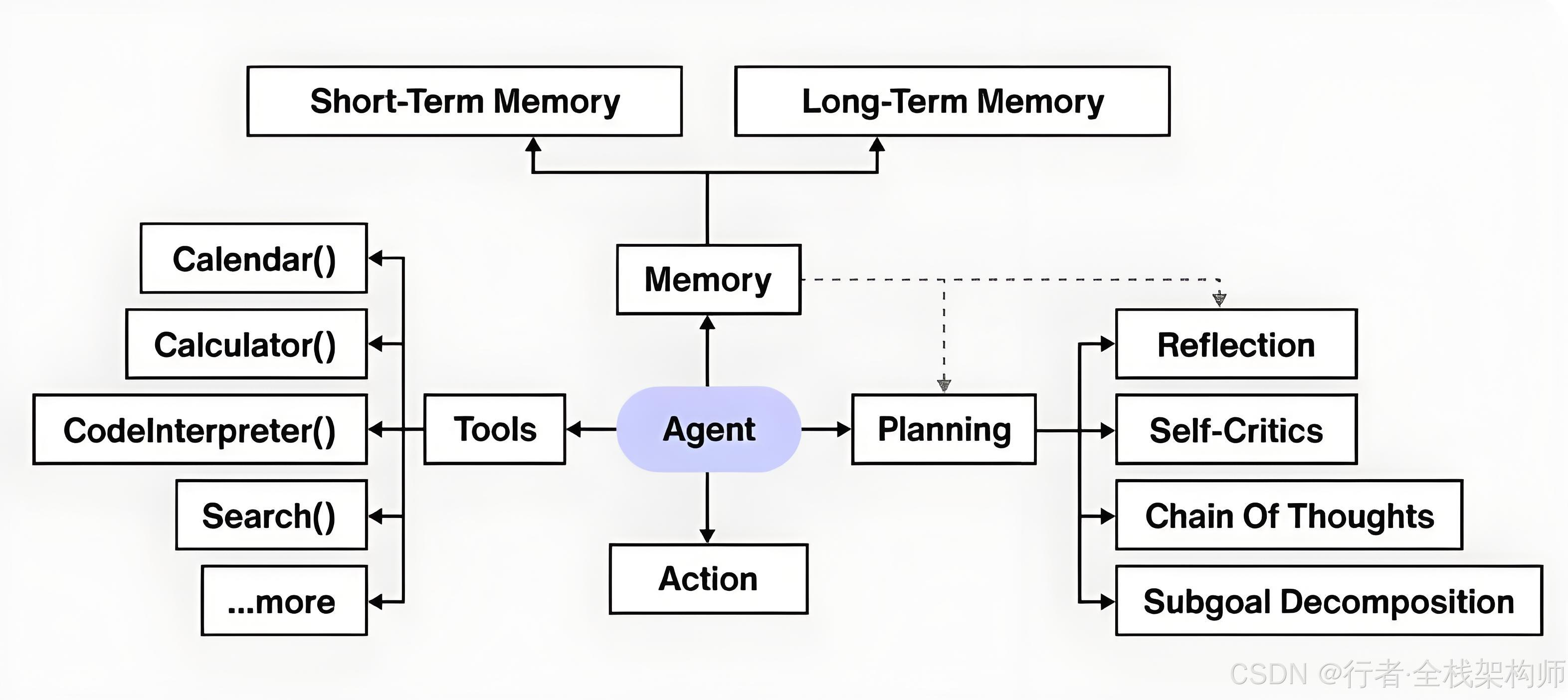
图1:Agent 从代码审查到自动修复的完整流程
DeepSeek V4 强大的 Function Calling 能力使其能够理解工具的功能描述,并在需要时主动调用。本文将带你从零构建一个具备"思考-行动-验证"闭环的智能编程助手。
📖 Agent 架构原理
什么是 Agent?
Agent = LLM + Planning + Tools + Memory
是
否
否
是
用户任务
LLM 规划
是否需要工具?
选择工具并生成参数
直接回答
执行工具
获取工具结果
LLM 分析结果
任务完成?
返回最终答案
图2:LLM、Planning、Tools、Memory 四大组件的协同工作
核心组件:
- ✅ Planning: 任务拆解与决策
- ✅ Tools: 外部能力扩展(代码执行、文件操作、网络请求)
- ✅ Memory: 短期记忆(对话历史)与长期记忆(知识库)
🔧 实战方案:构建智能编程助手
1. 定义工具 Schema
首先,我们需要告诉 DeepSeek V4 有哪些工具可用,以及每个工具的参数格式。
python
from typing import Dict, List
import subprocess
import os

# 工具定义列表
TOOLS = [
    {
        "name": "execute_python_code",
        "description": "执行 Python 代码并返回输出结果。适用于测试代码片段或验证逻辑。",
        "parameters": {
            "type": "object",
            "properties": {
                "code": {
                    "type": "string",
                    "description": "要执行的 Python 代码"
                }
            },
            "required": ["code"]
        }
    },
    {
        "name": "read_file",
        "description": "读取指定文件的内容",
        "parameters": {
            "type": "object",
            "properties": {
                "file_path": {
                    "type": "string",
                    "description": "文件的绝对路径或相对路径"
                }
            },
            "required": ["file_path"]
        }
    },
    {
        "name": "run_unit_tests",
        "description": "运行指定文件或目录的单元测试",
        "parameters": {
            "type": "object",
            "properties": {
                "test_path": {
                    "type": "string",
                    "description": "测试文件或目录路径"
                }
            },
            "required": ["test_path"]
        }
    }
]
2. 实现工具执行器
python
class ToolExecutor:
    """
    工具执行引擎
    """

    @staticmethod
    def execute_python_code(code: str) -> Dict:
        """
        安全地执行 Python 代码
        """
        try:
            # 使用 subprocess 隔离执行环境
            result = subprocess.run(
                ["python3", "-c", code],
                capture_output=True,
                text=True,
                timeout=10  # 超时保护
            )

            if result.returncode == 0:
                return {
                    "success": True,
                    "output": result.stdout.strip()
                }
            else:
                return {
                    "success": False,
                    "error": result.stderr.strip()
                }
        except subprocess.TimeoutExpired:
            return {"success": False, "error": "代码执行超时"}
        except Exception as e:
            return {"success": False, "error": str(e)}

    @staticmethod
    def read_file(file_path: str) -> Dict:
        """
        读取文件内容
        """
        try:
            if not os.path.exists(file_path):
                return {"success": False, "error": f"文件不存在: {file_path}"}

            with open(file_path, 'r', encoding='utf-8') as f:
                content = f.read()

            return {
                "success": True,
                "content": content[:5000]  # 限制返回长度
            }
        except Exception as e:
            return {"success": False, "error": str(e)}

    @staticmethod
    def run_unit_tests(test_path: str) -> Dict:
        """
        运行单元测试
        """
        try:
            result = subprocess.run(
                ["pytest", test_path, "-v"],
                capture_output=True,
                text=True,
                timeout=60
            )

            return {
                "success": result.returncode == 0,
                "output": result.stdout + result.stderr
            }
        except Exception as e:
            return {"success": False, "error": str(e)}

# 工具映射表
TOOL_FUNCTIONS = {
    "execute_python_code": ToolExecutor.execute_python_code,
    "read_file": ToolExecutor.read_file,
    "run_unit_tests": ToolExecutor.run_unit_tests
}
3. Agent 核心逻辑:多轮交互
python
from deepseek import AsyncDeepSeek
import json
import asyncio

class DeepSeekAgent:
    def __init__(self, api_key: str):
        self.client = AsyncDeepSeek(api_key=api_key)
        self.tools = TOOLS
        self.tool_functions = TOOL_FUNCTIONS
        self.conversation_history = []

    async def run(self, user_input: str, max_iterations: int = 5) -> str:
        """
        运行 Agent,处理用户任务
        :param user_input: 用户输入的任务描述
        :param max_iterations: 最大迭代次数,防止死循环
        :return: 最终答案
        """
        self.conversation_history.append({
            "role": "user",
            "content": user_input
        })

        for iteration in range(max_iterations):
            # 1. 调用 LLM,传入工具定义
            response = await self.client.chat.completions.create(
                model="deepseek-chat",
                messages=self.conversation_history,
                tools=self.tools,
                tool_choice="auto"  # 让模型自主决定是否调用工具
            )

            assistant_message = response.choices[0].message

            # 2. 检查是否有工具调用
            if assistant_message.tool_calls:
                tool_calls = assistant_message.tool_calls

                # 3. 执行工具
                tool_results = []
                for tool_call in tool_calls:
                    function_name = tool_call.function.name
                    function_args = json.loads(tool_call.function.arguments)

                    print(f"[Agent] 调用工具: {function_name}, 参数: {function_args}")

                    # 执行对应工具
                    if function_name in self.tool_functions:
                        result = self.tool_functions[function_name](**function_args)
                        tool_results.append({
                            "tool_call_id": tool_call.id,
                            "name": function_name,
                            "result": result
                        })

                # 4. 将工具结果反馈给 LLM
                self.conversation_history.append(assistant_message)

                for tool_result in tool_results:
                    self.conversation_history.append({
                        "role": "tool",
                        "tool_call_id": tool_result["tool_call_id"],
                        "name": tool_result["name"],
                        "content": json.dumps(tool_result["result"], ensure_ascii=False)
                    })

                # 继续下一轮迭代
                continue

            else:
                # 没有工具调用,直接返回答案
                final_answer = assistant_message.content
                self.conversation_history.append(assistant_message)
                return final_answer

        return "任务未完成,已达到最大迭代次数"

# 使用示例
async def main():
    agent = DeepSeekAgent(api_key=os.getenv("DEEPSEEK_API_KEY"))

    # 任务:读取某个文件,检查其中的代码是否有问题,并运行测试验证
    task = """
    请帮我检查 ./src/utils.py 文件中的代码:
    1. 读取文件内容
    2. 分析是否存在潜在 Bug
    3. 如果有问题,生成修复后的代码并执行验证
    4. 运行该文件的单元测试
    """

    result = await agent.run(task)
    print(f"最终答案:\n{result}")

asyncio.run(main())
📊 实战案例:自动化代码审查
案例背景
某电商系统的订单服务经常出现超卖问题,我们让 Agent 自动审查相关代码。
Agent 执行流程
工具执行器 DeepSeek V4 Agent 用户 工具执行器 DeepSeek V4 Agent 用户 审查 order_service.py 请求分析代码 调用 read_file 工具 读取文件 返回代码内容 提交代码内容 发现竞态条件 Bug 调用 execute_python_code 验证 执行测试代码 返回测试结果 提交测试结果 生成修复方案 返回审查报告
输出示例
markdown
## 代码审查报告

### 发现的问题

1. **竞态条件 (Race Condition)**

- 位置: `order_service.py` 第 45 行
- 问题: 在检查库存和扣减库存之间存在时间窗口,可能导致超卖

### 修复建议

使用数据库事务或分布式锁确保原子性:

```python
# 修复前
if stock > 0:
    stock -= 1
    save(stock)

# 修复后
with transaction.atomic():
    product = Product.objects.select_for_update().get(id=product_id)
    if product.stock > 0:
        product.stock -= 1
        product.save()
验证结果
✅ 修复后的代码通过了并发测试(100 线程同时下单,无超卖现象)
💰 年度成本核算
按 中型电商企业(日均订单 5000 单,客服咨询 2000 次)计算:
Agent 系统 vs 传统人工处理对比
| 指标 | 传统人工处理 | Agent 智能处理 | 改善幅度 |
|---|---|---|---|
| 响应时间 | 3 分钟 | 5 秒 | ⬇️ 97% |
| 处理准确率 | 85% | 95% | ⬆️ 12% |
| 并发能力 | 100 人/天 | 无限制 | ⬆️ ∞ |
| 人力需求 | 20 人全职 | 2 人维护 | ⬇️ 90% |
年度总成本分析
text
传统人工处理年度成本:
├── 人力成本: 20人 × ¥12,000/月 × 12 = ¥2,880,000
├── 培训费用: ¥80,000/年
├── 管理成本: ¥150,000/年
└── 总计:       ¥3,110,000

Agent 智能处理年度成本:
├── 服务器费用: ¥12,000/月 × 12 = ¥144,000
├── API 费用:   7000次 × 250天 × ¥0.4/次 = ¥700,000
├── 维护人力:   2人 × ¥12,000/月 × 12 = ¥288,000
└── 总计:       ¥1,132,000

🎉 年度节省: ¥1,978,000 (约 198 万元)
结论 : 通过 Agent 智能处理系统,每年可为企业节省近 200 万元成本,同时提升服务效率和用户满意度!
⚠️ 常见问题与踩坑经历
1. 工具调用陷入死循环
现象 : Agent 反复调用同一个工具,无法完成任务。
原因 : LLM 未能正确理解工具返回的结果。
解决方案:
- 设置
max_iterations上限 - 在 Prompt 中明确要求"如果工具执行失败,请分析原因并尝试其他方法"
2. 安全性风险
现象 : 用户可能通过 Prompt Injection 让 Agent 执行危险操作(如 rm -rf /)。
解决方案:
- 白名单机制:只允许预定义的工具
- 沙箱环境:在 Docker 容器中执行代码
- 权限控制:限制文件访问范围
3. Token 消耗过大
现象 : 多轮交互导致 Token 数量激增,成本高昂。
解决方案:
- 压缩对话历史,只保留关键信息
- 使用更高效的 Prompt 模板
- 设置单次任务的 Token 预算上限
📝 总结与下一步
通过本文,我们构建了具备工具调用能力的智能 Agent:
- ✅ 掌握了 Function Calling 的核心原理
- ✅ 实现了工具定义、执行与结果反馈的完整闭环
- ✅ 完成了自动化代码审查的实战案例
- ✅ 解决了死循环、安全性、成本控制等生产问题
下一篇预告: 降本增效:DeepSeek V4 推理成本控制与生产环境监控
在最后一篇文章中,我们将深入探讨如何在生产环境中优化 DeepSeek V4 的调用成本,包括缓存策略、批量处理、实时监控告警等最佳实践。
👍 如果本文对你有帮助,欢迎点赞、收藏、转发!
💬 如果你有创新的 Agent 应用场景,欢迎在评论区分享!
🔔 关注我,获取《DeepSeek V4 企业级应用实战》系列最新文章!
✍️ 行文仓促,定有不足之处,欢迎各位朋友在评论区批评指正,不胜感激!
专栏导航:
- 📖 上一篇 : 基于 V4 的企业级 RAG 系统:私有知识库问答实战
- 📖 下一篇: 降本增效:DeepSeek V4 推理成本控制与生产环境监控(即将发布)