本文是灶台导航项目专栏的第六篇,分享烹饪导航页的核心功能实现。
一、功能概述
烹饪导航页是产品的差异化亮点------像地图导航一样,分步骤引导用户完成烹饪。主要功能:
- 步骤展示:图文结合(图片资料展示没有导入,目前只实现文字指导),清晰指导
- 定时器:每步可设置计时提醒
- 语音播报:解放双手
- 多菜品切换:支持同时烹饪多道菜(时间统筹算法-----初步版本并不实现)
二、页面结构
如果是ai生成的菜谱在顶部提示用户。
html
<!-- pages/cook/cook.wxml -->
<page-header title="烹饪导航" showBack="{{true}}" statusBarHeight="{{statusBarHeight}}">
  <view slot="right">
    <text class="timer-display">{{timerDisplay}}</text>
  </view>
</page-header>

<view class="cook-page">
  <!-- 菜品切换 -->
  <view class="recipe-tabs" wx:if="{{recipes.length > 1}}">
    <view wx:for="{{recipes}}" wx:key="_id"
          class="tab-item {{currentRecipeIndex === index ? 'active' : ''}}"
          bindtap="switchRecipe" data-index="{{index}}">
      {{item.name}}
    </view>
  </view>

  <!-- 步骤进度 -->
  <view class="progress-bar">
    <view class="progress-fill" style="width: {{progress}}%"></view>
    <text class="progress-text">步骤 {{currentStepIndex + 1}} / {{totalSteps}}</text>
  </view>

  <!-- 当前步骤 -->
  <view class="step-content">
    <view class="step-title">{{currentStep.description}}</view>

    <!-- 步骤图片 -->
    <image wx:if="{{currentStep.image}}" src="{{currentStep.image}}" class="step-image" />

    <!-- 小贴士 -->
    <view wx:if="{{currentStep.tips}}" class="step-tips">
      <text class="tips-icon">💡</text>
      <text class="tips-text">{{currentStep.tips}}</text>
    </view>

    <!-- 预计时间 -->
    <view wx:if="{{currentStep.duration}}" class="step-duration">
      预计耗时:{{currentStep.duration}}秒
    </view>
  </view>

  <!-- 定时器控制 -->
  <view class="timer-control" wx:if="{{currentStep.duration > 0}}">
    <view class="timer-circle">
      <text class="timer-seconds">{{remainingSeconds}}</text>
      <text class="timer-label">秒</text>
    </view>
    <view class="timer-btns">
      <button wx:if="{{!timerRunning}}" class="timer-btn start" bindtap="startTimer">开始计时</button>
      <button wx:if="{{timerRunning}}" class="timer-btn pause" bindtap="pauseTimer">暂停</button>
      <button wx:if="{{timerRunning}}" class="timer-btn resume" bindtap="resumeTimer">继续</button>
    </view>
  </view>

  <!-- 操作按钮 -->
  <view class="action-btns safe-area-bottom">
    <button class="btn-prev" bindtap="prevStep" disabled="{{currentStepIndex === 0}}">上一步</button>
    <button class="btn-next" bindtap="nextStep">
      {{currentStepIndex === totalSteps - 1 ? '完成烹饪' : '下一步'}}
    </button>
  </view>
</view>
页面效果如图:
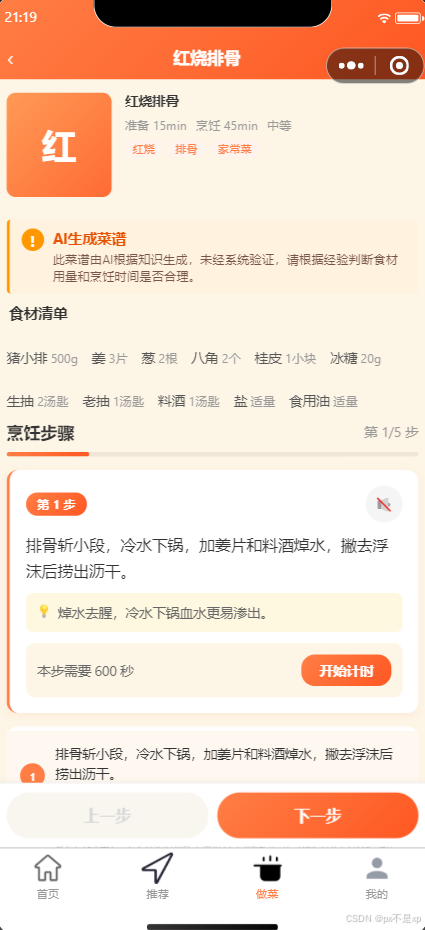
三、核心逻辑实现
3.1 页面初始化
javascript
// pages/cook/cook.js
Page({
  data: {
    recipes: [],
    currentRecipeIndex: 0,
    currentStepIndex: 0,
    timerRunning: false,
    remainingSeconds: 0,
    timerInterval: null,
    statusBarHeight: 0
  },

  onLoad(options) {
    const { recipeIds } = options
    this.loadRecipes(recipeIds.split(','))

    // 获取状态栏高度
    const app = getApp()
    this.setData({ statusBarHeight: app.globalData.statusBarHeight })
  },

  async loadRecipes(recipeIds) {
    const recipes = []
    for (const id of recipeIds) {
      const recipe = await callFunction('getRecipeDetail', { recipeId: id })
      recipes.push(recipe)
    }
    this.setData({
      recipes,
      totalSteps: recipes[0].steps.length,
      currentStep: recipes[0].steps[0]
    })
  },

  onUnload() {
    // 清理定时器
    if (this.data.timerInterval) {
      clearInterval(this.data.timerInterval)
    }
  }
})
3.2 步骤切换
javascript
// 上一步
prevStep() {
  if (this.data.currentStepIndex > 0) {
    this.goToStep(this.data.currentStepIndex - 1)
  }
},

// 下一步
nextStep() {
  const { currentStepIndex, totalSteps } = this.data
  if (currentStepIndex < totalSteps - 1) {
    this.goToStep(currentStepIndex + 1)
  } else {
    this.completeCooking()
  }
},

// 跳转到指定步骤
goToStep(index) {
  this.pauseTimer() // 切换步骤时暂停定时器

  const recipe = this.data.recipes[this.data.currentRecipeIndex]
  const step = recipe.steps[index]

  this.setData({
    currentStepIndex: index,
    currentStep: step,
    remainingSeconds: step.duration || 0,
    progress: ((index + 1) / recipe.steps.length) * 100
  })

  // 语音播报当前步骤
  this.speakStep(step.description)
}
3.3 定时器实现
javascript
// 开始计时
startTimer() {
  const duration = this.data.currentStep.duration
  this.setData({
    timerRunning: true,
    remainingSeconds: duration
  })

  this.data.timerInterval = setInterval(() => {
    const seconds = this.data.remainingSeconds - 1
    this.setData({ remainingSeconds: seconds })

    if (seconds <= 0) {
      this.timerComplete()
    }
  }, 1000)
},

// 暂停计时
pauseTimer() {
  if (this.data.timerInterval) {
    clearInterval(this.data.timerInterval)
    this.setData({ timerRunning: false })
  }
},

// 继续计时
resumeTimer() {
  if (this.data.remainingSeconds > 0) {
    this.setData({ timerRunning: true })
    this.data.timerInterval = setInterval(() => {
      const seconds = this.data.remainingSeconds - 1
      this.setData({ remainingSeconds: seconds })

      if (seconds <= 0) {
        this.timerComplete()
      }
    }, 1000)
  }
},

// 计时完成
timerComplete() {
  clearInterval(this.data.timerInterval)
  this.setData({ timerRunning: false })

  // 震动提醒
  wx.vibrateLong()

  // 弹窗提示
  wx.showModal({
    title: '时间到!',
    content: '当前步骤已完成,可以进行下一步了',
    showCancel: false
  })
}
四、语音播报
4.1 文字转语音(TTS)
使用微信同声传译插件:
javascript
const plugin = requirePlugin('WechatSI')
const ttsManager = plugin.textToSpeech

// 播报步骤
speakStep(text) {
  ttsManager speak({
    content: text,
    success: () => console.log('播报成功'),
    fail: (err) => console.error('播报失败:', err)
  })
}
4.2 后台播放
使用微信内置播放器,支持后台播放:
javascript
const innerAudioContext = wx.createInnerAudioContext()

// 播放语音
speakStep(text) {
  const url = this.getTTSUrl(text)
  innerAudioContext.src = url
  innerAudioContext.play()
}

// 获取TTS音频URL
getTTSUrl(text) {
  return `https://tts.tencentcloudapi.com/speak?text=${encodeURIComponent(text)}`
}
五、多菜品切换
javascript
// 切换菜品
switchRecipe(e) {
  const index = e.currentTarget.dataset.index
  this.setData({
    currentRecipeIndex: index,
    currentStepIndex: 0,
    currentStep: this.data.recipes[index].steps[0],
    progress: 0
  })
}

// 计算总进度
getTotalProgress() {
  const { recipes, currentRecipeIndex, currentStepIndex } = this.data
  const completedSteps = recipes.slice(0, currentRecipeIndex)
    .reduce((sum, r) => sum + r.steps.length, 0)
  const totalSteps = recipes.reduce((sum, r) => sum + r.steps.length, 0)
  return ((completedSteps + currentStepIndex + 1) / totalSteps) * 100
}
六、踩坑记录
问题1:定时器暂停后秒数重置
现象 :暂停定时器后,remainingSeconds变成0
解决:分离暂停状态和秒数状态
javascript
// 错误写法
this.setData({ timerRunning: false, remainingSeconds: 0 })

// 正确写法
this.setData({ timerRunning: false })
// remainingSeconds保持不变
问题2:页面卸载后定时器仍在运行
现象 :退出页面后,定时器继续运行
解决:在onUnload中清理
javascript
onUnload() {
  if (this.data.timerInterval) {
    clearInterval(this.data.timerInterval)
  }
  innerAudioContext.stop()
}
问题3:双导航栏问题
现象 :自定义导航栏和系统导航栏同时出现
解决 :在cook.json中设置"navigationStyle": "custom"
json
// pages/cook/cook.json
{
  "navigationStyle": "custom",
  "usingComponents": {}
}
七、完成烹饪
javascript
completeCooking() {
  wx.showModal({
    title: '烹饪完成!',
    content: '恭喜你完成本次烹饪,是否保存到历史记录?',
    confirmText: '保存',
    cancelText: '不保存',
    success: (res) => {
      if (res.confirm) {
        this.saveHistory()
      }
      wx.navigateBack()
    }
  })
}

async saveHistory() {
  const recipeIds = this.data.recipes.map(r => r._id).join(',')
  await callFunction('userProfile', {
    action: 'saveHistory',
    data: { recipeIds }
  })
}
完成烹饪这里也遇到了一点小问题,主要是忘记设置完成烹饪后页面操作,一开始只是提示用户给菜谱评分。但是从用户体验角度来看应该将数据清空并回到首页,标识这个菜已经做完了。
只需要新增 _finishAllCooking() 方法:
停止所有计时器和语音
重置全部页面数据(菜谱列表、步骤、定时器、统筹方案、评分等)
显示"烹饪完成,辛苦了!"提示
1.5秒后 switchTab 回到首页
项目地址 :Gitee/ZaoTaiNavigation
团队名称 :倒灶了队
更新时间:2026年5月