文章目录
- 一、线程池
-
- 1、⽇志
- 2、线程池设计
- 3、线程安全的单例模式
-
- 1)什么是单例模式
- 2)单例模式的特点
- [3)饿汉 & 懒汉模式](#3)饿汉 & 懒汉模式)
- 4)饿汉式单例
- 5)懒汉式单例
- 6)懒汉式单例(线程安全版)
- 4、单例式线程池
- 二、线程安全和可重⼊问题
- 三、常⻅锁概念
- 四、STL、智能指针的线程安全
- 五、其他常⻅的各种锁
一、线程池
1、⽇志
- 日志: 日志是记录程序运行事件的文件,用于监控状态、排查错误、定位问题 。
- 必备字段: 时间戳、日志等级、日志内容
- 可选字段: 文件名 / 行号、进程 ID、线程 ID、
- 常用日志库: spdlog、glog、Boost.Log、Log4cxx
- 实现方式: 基于策略模式自己实现自定义日志。
1)Mutex.hpp
cpp
#pragma once
#include <iostream>
#include <pthread.h>

namespace MutexModule
{
    // 互斥锁封装类
    class Mutex
    {
    public:
        // 初始化锁
        Mutex()
        {
            pthread_mutex_init(&_mutex, nullptr);
        }

        // 加锁
        void Lock()
        {
            int n = pthread_mutex_lock(&_mutex);
        }

        // 解锁
        void Unlock()
        {
            int n = pthread_mutex_unlock(&_mutex);
        }

        // 获取锁指针
        pthread_mutex_t *Get()
        {
            return &_mutex;
        }

        // 销毁锁
        ~Mutex()
        {
            pthread_mutex_destroy(&_mutex);
        }

    private:
        pthread_mutex_t _mutex; // 原生互斥锁对象
    };

    // RAII 自动锁
    class LockGuard
    {
    public:
        LockGuard(Mutex &mutex)
            : _mutex(mutex)
        {
            _mutex.Lock();
        }

        ~LockGuard()
        {
            _mutex.Unlock();
        }

    private:
        Mutex &_mutex;
    };
}
2)Log.hpp
cpp
#pragma once
#include <iostream>
#include <cstdio>
#include <string>
#include <filesystem>
#include <fstream>
#include <sstream>
#include <memory>
#include <ctime>
#include <sys/types.h>
#include <unistd.h>
#include "Mutex.hpp"

namespace LogModule
{
    using namespace MutexModule;

    const std::string gsep = "\r\n";

    // 日志策略基类(接口)
    class LogStrategy
    {
    public:
        ~LogStrategy() = default;
        virtual void SyncLog(const std::string &message) = 0;
    };

    // 控制台日志输出(线程安全)
    class ConsoleLogStrategy : public LogStrategy
    {
    public:
        void SyncLog(const std::string &message) override
        {
            LockGuard lockguard(_mutex);
            std::cout << message << gsep;
        }

        ~ConsoleLogStrategy() {}

    private:
        Mutex _mutex;
    };

    const std::string defaultpath = "./log/"; //   /var/log
    const std::string defaultfile = "my.log";

    // 文件日志输出(自动建目录、线程安全)
    class FileLogStrategy : public LogStrategy
    {
    public:
        FileLogStrategy(const std::string &path = defaultpath, const std::string &file = defaultfile)
            : _path(path), _file(file)
        {
            LockGuard lockguard(_mutex);
            if (std::filesystem::exists(_path))
                return;

            try
            {
                std::filesystem::create_directories(_path);
            }
            catch (const std::filesystem::filesystem_error &e)
            {
                std::cerr << e.what() << std::endl;
            }
        }

        // 追加写入日志文件
        void SyncLog(const std::string &message) override
        {
            LockGuard lockguard(_mutex);
            std::string filename = _path + (_path.back() == '/' ? "" : "/") + _file;
            std::ofstream out(filename, std::ios::app);
            if (!out.is_open())
                return;

            out << message << gsep;
            out.close();
        }

    private:
        std::string _path;
        std::string _file;
        Mutex _mutex;
    };

    // 日志等级类
    enum class LogLevel
    {
        DEBUG,
        INFO,
        WARNING,
        ERROR,
        FATAL
    };

    // 日志等级转字符串
    std::string LevelStr(LogLevel level)
    {
        switch (level)
        {
        case LogLevel::DEBUG:
            return "DEBUG";
        case LogLevel::INFO:
            return "INFO";
        case LogLevel::WARNING:
            return "WARNING";
        case LogLevel::ERROR:
            return "ERROR";
        case LogLevel::FATAL:
            return "FATAL";
        default:
            return "UNKNOWN";
        }
    }

    // 获取格式化时间字符串(线程安全)
    std::string GetTimeStamp()
    {
        time_t curr = time(nullptr);
        struct tm curr_tm; // 出参
        localtime_r(&curr, &curr_tm);
        char buf[128]; // 出参
        snprintf(buf, sizeof(buf), "%4d-%02d-%02d %02d:%02d:%02d",
                 curr_tm.tm_year + 1900,
                 curr_tm.tm_mon + 1,
                 curr_tm.tm_mday,
                 curr_tm.tm_hour,
                 curr_tm.tm_min,
                 curr_tm.tm_sec);
        return buf;
    }

    // 日志核心管理类
    class Logger
    {
    public:
        Logger()
        {
            EnableConsoleLogStrategy();
        }

        // 切换为文件输出
        void EnableFileLogStrategy()
        {
            _fflush_strategy = std::make_unique<FileLogStrategy>();
        }

        // 切换为控制台输出
        void EnableConsoleLogStrategy()
        {
            _fflush_strategy = std::make_unique<ConsoleLogStrategy>();
        }

        // 日志消息构造: 负责拼接内容, 析构时自动输出
        class LogMessage
        {
        public:
            // 构造日志头部(时间、等级、进程ID、文件名、行号)
            LogMessage(LogLevel level, std::string src_name, int line_number, Logger &logger)
                :  _logger(logger)
            {
                std::stringstream ss;
                ss << "[" << GetTimeStamp() << "] "
                   << "[" << LevelStr(level) << "] "
                   << "[" << getpid() << "] "
                   << "[" << src_name << "] "
                   << "[" << line_number << "] - ";
                _loginfo = ss.str();
            }

            // 流方式拼接日志内容
            template <typename T>
            LogMessage &operator<<(const T &info)
            {
                std::stringstream ss;
                ss << info;
                _loginfo += ss.str();
                return *this;
            }

            // 析构自动输出日志
            ~LogMessage()
            {
                if (_logger._fflush_strategy)
                {
                    _logger._fflush_strategy->SyncLog(_loginfo);
                }
            }

        private:
            std::string _loginfo;
            Logger &_logger;
        };

        // 仿函数接口, 创建日志消息
        LogMessage operator()(LogLevel level, std::string name, int line)
        {
            return LogMessage(level, name, line, *this);
        }

    private:
        std::unique_ptr<LogStrategy> _fflush_strategy;
    };

    Logger logger;

// 简化调用宏
#define LOG(level) logger(level, __FILE__, __LINE__)
#define Enable_Console_Log_Strategy() logger.EnableConsoleLogStrategy()
#define Enable_File_Log_Strategy() logger.EnableFileLogStrategy()
}
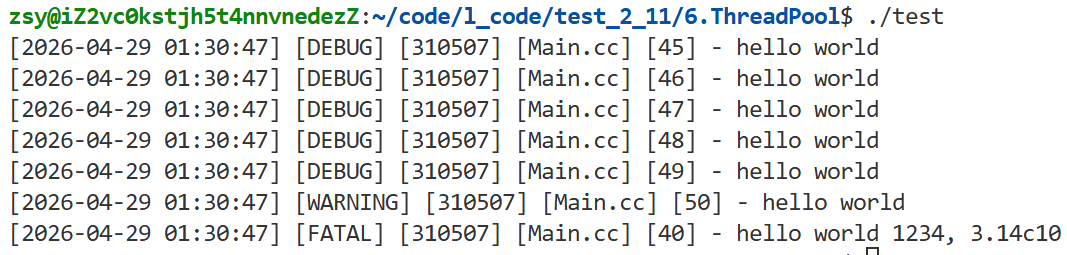
测试样例:
cpp
#include <iostream>
#include "Log.hpp"

using namespace LogModule;

void fun()
{
    int a = 10;
    LOG(LogLevel::FATAL) << "hello world " << 1234 << ", 3.14" << 'c' << a;
}

int main()
{
    LOG(LogLevel::DEBUG) << "hello world";
    LOG(LogLevel::DEBUG) << "hello world";
    LOG(LogLevel::DEBUG) << "hello world";
    LOG(LogLevel::DEBUG) << "hello world";
    LOG(LogLevel::DEBUG) << "hello world";
    LOG(LogLevel::WARNING) << "hello world";
    fun();
    return 0;
}
结果:
2、线程池设计
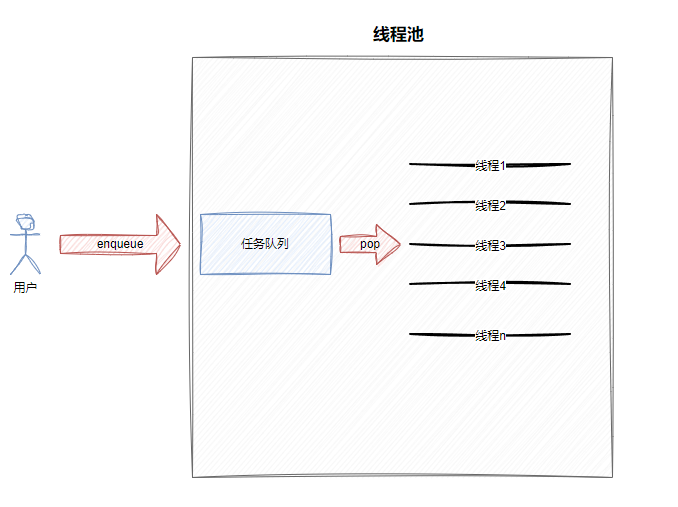
线程池是一种线程复用模式,核心是预先创建一批线程,等待执行任务,避免频繁创建 / 销毁线程的开销,提升系统性能与稳定性。
核心作用
- 减少短任务频繁创建销毁线程的成本
- 控制线程数量,避免系统资源耗尽
- 提高响应速度,任务无需等待线程创建
典型应用场景
- 大量短任务并发(如 Web 服务器处理请求)
- 对响应速度要求高的服务
- 应对突发性请求,避免线程数量暴涨
常见类型
- 固定线程池:线程数量固定,循环从任务队列取任务执行
- 浮动线程池:可根据任务量动态增减线程数量
这里采用固定线程池
3、线程安全的单例模式
1)什么是单例模式
保证类全局仅有一个实例对象的设计模式
2)单例模式的特点
部分业务场景只需要唯一对象,如全局资源管理、超大内存数据统一管控,避免重复创建消耗资源。
3)饿汉 & 懒汉模式
- 饿汉模式: 程序启动时直接创建实例,提前初始化,后续直接使用。
- 懒汉模式: 延迟加载,用到时才创建实例,优化程序启动速度,多线程下需要保证线程安全。
4)饿汉式单例
- 程序加载时直接初始化全局唯一对象,天然线程安全。
通过模板包装,保证进程内该类仅有一个实例。
cpp
template <typename T>
class Singleton {
    static T data;
public:
    static T* GetInstance() {
        return &data;
    }
};
5)懒汉式单例
- 延时加载,调用时才创建对象。
cpp
template <typename T>
class Singleton {
    static T* inst;
public:
    static T* GetInstance() {
        if (inst == nullptr)
            inst = new T();
        return inst;
    }
};- 缺陷: 线程不安全。首次并发调用时,可能重复创建多个实例。
6)懒汉式单例(线程安全版)
- 双检查锁 + volatile 实现高性能线程安全单例
cpp
template <typename T>
class Singleton {
    static volatile T* inst;
    static std::mutex mtx;
public:
    static T* GetInstance() {
        if (inst == nullptr) {
            std::lock_guard<std::mutex> lock(mtx);
            if (inst == nullptr) {
                inst = new T();
            }
        }
        return inst;
    }
};
要点:
- 双重检查: 外层判断提升性能,内层判断保证安全
- 互斥锁: 确保多线程下只创建一次实例
- volatile: 防止编译器指令重排,避免空指针问题
4、单例式线程池
1)Mutex.hpp
cpp
#pragma once
#include <iostream>
#include <pthread.h>

namespace MutexModule
{
    // 互斥锁封装类
    class Mutex
    {
    public:
        // 初始化锁
        Mutex()
        {
            pthread_mutex_init(&_mutex, nullptr);
        }

        // 加锁
        void Lock()
        {
            int n = pthread_mutex_lock(&_mutex);
        }

        // 解锁
        void Unlock()
        {
            int n = pthread_mutex_unlock(&_mutex);
        }

        // 获取锁指针
        pthread_mutex_t *Get()
        {
            return &_mutex;
        }

        // 销毁锁
        ~Mutex()
        {
            pthread_mutex_destroy(&_mutex);
        }

    private:
        pthread_mutex_t _mutex; // 原生互斥锁对象
    };

    // RAII 自动锁
    class LockGuard
    {
    public:
        LockGuard(Mutex &mutex)
            : _mutex(mutex)
        {
            _mutex.Lock();
        }

        ~LockGuard()
        {
            _mutex.Unlock();
        }

    private:
        Mutex &_mutex;
    };
}
2)Log.hpp
cpp
#pragma once
#include <iostream>
#include <cstdio>
#include <string>
#include <filesystem>
#include <fstream>
#include <sstream>
#include <memory>
#include <ctime>
#include <sys/types.h>
#include <unistd.h>
#include "Mutex.hpp"

namespace LogModule
{
    using namespace MutexModule;

    const std::string gsep = "\r\n";

    // 日志策略基类(接口)
    class LogStrategy
    {
    public:
        ~LogStrategy() = default;
        virtual void SyncLog(const std::string &message) = 0;
    };

    // 控制台日志输出(线程安全)
    class ConsoleLogStrategy : public LogStrategy
    {
    public:
        void SyncLog(const std::string &message) override
        {
            LockGuard lockguard(_mutex);
            std::cout << message << gsep;
        }

        ~ConsoleLogStrategy() {}

    private:
        Mutex _mutex;
    };

    const std::string defaultpath = "./log/"; //   /var/log
    const std::string defaultfile = "my.log";

    // 文件日志输出(自动建目录、线程安全)
    class FileLogStrategy : public LogStrategy
    {
    public:
        FileLogStrategy(const std::string &path = defaultpath, const std::string &file = defaultfile)
            : _path(path), _file(file)
        {
            LockGuard lockguard(_mutex);
            if (std::filesystem::exists(_path))
                return;

            try
            {
                std::filesystem::create_directories(_path);
            }
            catch (const std::filesystem::filesystem_error &e)
            {
                std::cerr << e.what() << std::endl;
            }
        }

        // 追加写入日志文件
        void SyncLog(const std::string &message) override
        {
            LockGuard lockguard(_mutex);
            std::string filename = _path + (_path.back() == '/' ? "" : "/") + _file;
            std::ofstream out(filename, std::ios::app);
            if (!out.is_open())
                return;

            out << message << gsep;
            out.close();
        }

    private:
        std::string _path;
        std::string _file;
        Mutex _mutex;
    };

    // 日志等级类
    enum class LogLevel
    {
        DEBUG,
        INFO,
        WARNING,
        ERROR,
        FATAL
    };

    // 日志等级转字符串
    std::string LevelStr(LogLevel level)
    {
        switch (level)
        {
        case LogLevel::DEBUG:
            return "DEBUG";
        case LogLevel::INFO:
            return "INFO";
        case LogLevel::WARNING:
            return "WARNING";
        case LogLevel::ERROR:
            return "ERROR";
        case LogLevel::FATAL:
            return "FATAL";
        default:
            return "UNKNOWN";
        }
    }

    // 获取格式化时间字符串(线程安全)
    std::string GetTimeStamp()
    {
        time_t curr = time(nullptr);
        struct tm curr_tm; // 出参
        localtime_r(&curr, &curr_tm);
        char buf[128]; // 出参
        snprintf(buf, sizeof(buf), "%4d-%02d-%02d %02d:%02d:%02d",
                 curr_tm.tm_year + 1900,
                 curr_tm.tm_mon + 1,
                 curr_tm.tm_mday,
                 curr_tm.tm_hour,
                 curr_tm.tm_min,
                 curr_tm.tm_sec);
        return buf;
    }

    // 日志核心管理类
    class Logger
    {
    public:
        Logger()
        {
            EnableConsoleLogStrategy();
        }

        // 切换为文件输出
        void EnableFileLogStrategy()
        {
            _fflush_strategy = std::make_unique<FileLogStrategy>();
        }

        // 切换为控制台输出
        void EnableConsoleLogStrategy()
        {
            _fflush_strategy = std::make_unique<ConsoleLogStrategy>();
        }

        // 日志消息构造: 负责拼接内容, 析构时自动输出
        class LogMessage
        {
        public:
            // 构造日志头部(时间、等级、进程ID、文件名、行号)
            LogMessage(LogLevel level, std::string src_name, int line_number, Logger &logger)
                :  _logger(logger)
            {
                std::stringstream ss;
                ss << "[" << GetTimeStamp() << "] "
                   << "[" << LevelStr(level) << "] "
                   << "[" << getpid() << "] "
                   << "[" << src_name << "] "
                   << "[" << line_number << "] - ";
                _loginfo = ss.str();
            }

            // 流方式拼接日志内容
            template <typename T>
            LogMessage &operator<<(const T &info)
            {
                std::stringstream ss;
                ss << info;
                _loginfo += ss.str();
                return *this;
            }

            // 析构自动输出日志
            ~LogMessage()
            {
                if (_logger._fflush_strategy)
                {
                    _logger._fflush_strategy->SyncLog(_loginfo);
                }
            }

        private:
            std::string _loginfo;
            Logger &_logger;
        };

        // 仿函数接口, 创建日志消息
        LogMessage operator()(LogLevel level, std::string name, int line)
        {
            return LogMessage(level, name, line, *this);
        }

    private:
        std::unique_ptr<LogStrategy> _fflush_strategy;
    };

    Logger logger;

// 简化调用宏
#define LOG(level) logger(level, __FILE__, __LINE__)
#define Enable_Console_Log_Strategy() logger.EnableConsoleLogStrategy()
#define Enable_File_Log_Strategy() logger.EnableFileLogStrategy()
}
3)Cond.hpp
cpp
#pragma once

#include <iostream>
#include <pthread.h>
#include "Mutex.hpp"

using namespace MutexModule;

namespace CondModule
{
    // 条件变量封装
    class Cond
    {
    public:
        Cond()
        {
            pthread_cond_init(&_cond, nullptr);
        }

        // 等待: 阻塞并释放锁
        void Wait(Mutex &mutex)
        {
            int n = pthread_cond_wait(&_cond, mutex.Get());
        }

        // 唤醒一个等待线程
        void Signal()
        {
            int n = pthread_cond_signal(&_cond);
        }

        // 唤醒所有等待线程
        void Broadcast()
        {
            int n = pthread_cond_broadcast(&_cond);
        }

        ~Cond()
        {
            pthread_cond_destroy(&_cond);
        }
    private:
        pthread_cond_t _cond; // 底层条件变量
    };
}
4)ThreadPool.hpp
cpp
#pragma once

#include <iostream>
#include <vector>
#include <queue>
#include "Log.hpp"
#include "Thread.hpp"
#include "Cond.hpp"
#include "Mutex.hpp"

namespace ThreadPoolModule
{
    using namespace LogModule;
    using namespace ThreadModule;
    using namespace CondModule;
    using namespace MutexModule;

    const int gnum = 5;

    template <typename T>
    class ThreadPool
    {
    private:
        // 唤醒所有休眠线程
        void WakeUpAllThread()
        {
            {
                LockGuard lockguard(_mutex);
                if (_sleepernum)
                    _cond.Broadcast();
                LOG(LogLevel::INFO) << "唤醒所有休眠线程";
            }
        }

        // 唤醒一个休眠线程
        void WakeUpOne()
        {
            _cond.Signal();
            LOG(LogLevel::INFO) << "唤醒一个休眠线程";
        }

        // 构造: 创建指定数量的线程
        ThreadPool(int num = gnum)
            : _num(num),
              _isrunning(false),
              _sleepernum(0)
        {
            for (int i = 0; i < num; i++)
            {
                _threads.emplace_back([this]()
                                      { HandlerTask(); });
            }
        }

        // 启动线程池
        void Start()
        {
            if (_isrunning)
                return;

            _isrunning = true;
            for (auto &thread : _threads)
            {
                thread.Start();
                LOG(LogLevel::INFO) << "start new thread success: " << thread.Name();
            }
        }

    public:
        // 禁用拷贝与赋值
        ThreadPool(const ThreadPool<T> &) = delete;
        ThreadPool<T> &operator=(const ThreadPool<T> &) = delete;

        // 获取单例实例
        static ThreadPool<T> *GetInstance()
        {
            if (inc == nullptr)
            {
                LockGuard lockguard(_lock);
                LOG(LogLevel::DEBUG) << "获取单例...";
                if (inc == nullptr)
                {
                    LOG(LogLevel::DEBUG) << "首次使用单例,创建之...";
                    inc = new ThreadPool<T>();
                    inc->Start();
                }
            }
            return inc;
        }

        // 停止线程池
        void Stop()
        {
            if (!_isrunning)
                return;

            _isrunning = false;
            WakeUpAllThread();
        }

        // 等待所有线程退出
        void Join()
        {
            for (auto &thread : _threads)
            {
                thread.Join();
            }
        }

        // 线程处理任务
        void HandlerTask()
        {
            char name[128]; // 出参
            pthread_getname_np(pthread_self(), name, sizeof(name));

            while (true)
            {
                T t;
                {
                    LockGuard lockguard(_mutex);

                    // 任务队列为空, 等待任务
                    while (_taskq.empty() && _isrunning)
                    {
                        _sleepernum++;
                        _cond.Wait(_mutex); // 释放锁并休眠,被唤醒后重新获取锁
                        _sleepernum--;
                    }

                     // 线程退出条件
                    if (!_isrunning && _taskq.empty())
                    {
                        LOG(LogLevel::INFO) << name << " 退出了, 线程池退出&&任务队列为空";
                        break;
                    }

                    // 取出任务
                    t = _taskq.front();
                    _taskq.pop();
                }

                // 执行任务
                t();
            }
        }

        // 任务入队
        bool Enqueue(const T &in)
        {
            if (_isrunning)
            {
                {
                    LockGuard lockguard(_mutex);
                    _taskq.push(in);
                }

                // 所有线程都在休眠, 唤醒一个
                if (_threads.size() == _sleepernum)
                    WakeUpOne();

                return true;
            }
            return false;
        }

        ~ThreadPool() = default;

    private:
        std::vector<Thread> _threads; // 线程数组
        int _num;                     // 线程数量
        std::queue<T> _taskq;         // 任务队列
        Cond _cond;                   // 条件变量
        Mutex _mutex;                 // 互斥锁

        bool _isrunning; // 运行状态
        int _sleepernum; // 休眠线程数

        static ThreadPool<T> *inc; // 单例指针
        static Mutex _lock;        // 单例创建锁
    };

    // 静态成员初始化
    template <typename T>
    ThreadPool<T> *ThreadPool<T>::inc = nullptr;

    template <typename T>
    Mutex ThreadPool<T>::_lock;
}
5)Task.hpp
cpp
#pragma once

#include <iostream>
#include <unistd.h>
#include <functional>

// 无参无返回值任务类型
using task_t = std::function<void()>;

// 下载任务
void Download()
{
    std::cout << "下载任务执行..." << std::endl;
    sleep(3);
}

// 计算任务(两数相加)
class Task
{
public:
    Task() {}
    Task(int x, int y) : _x(x), _y(y) {}

    // 执行任务
    void Execute() { _result = _x + _y; }

    int X() { return _x; }
    int Y() { return _y; }
    int Result() { return _result; }

private:
    int _x;
    int _y;
    int _result;
};6)Main.cc
cpp
#include"Log.hpp"
#include"ThreadPool.hpp"
#include"Task.hpp"

#include<memory>

using namespace LogModule;
using namespace ThreadPoolModule;

int main()
{
    // 开启控制台日志
    Enable_Console_Log_Strategy();

    // 提交10个下载任务
    int count= 10;
    while(count)
    {
        sleep(1);
        ThreadPool<task_t>::GetInstance()->Enqueue(Download);
        count--;
    }

    // 停止并等待线程池
    ThreadPool<task_t>::GetInstance()->Stop();
    ThreadPool<task_t>::GetInstance()->Join();

    return 0;
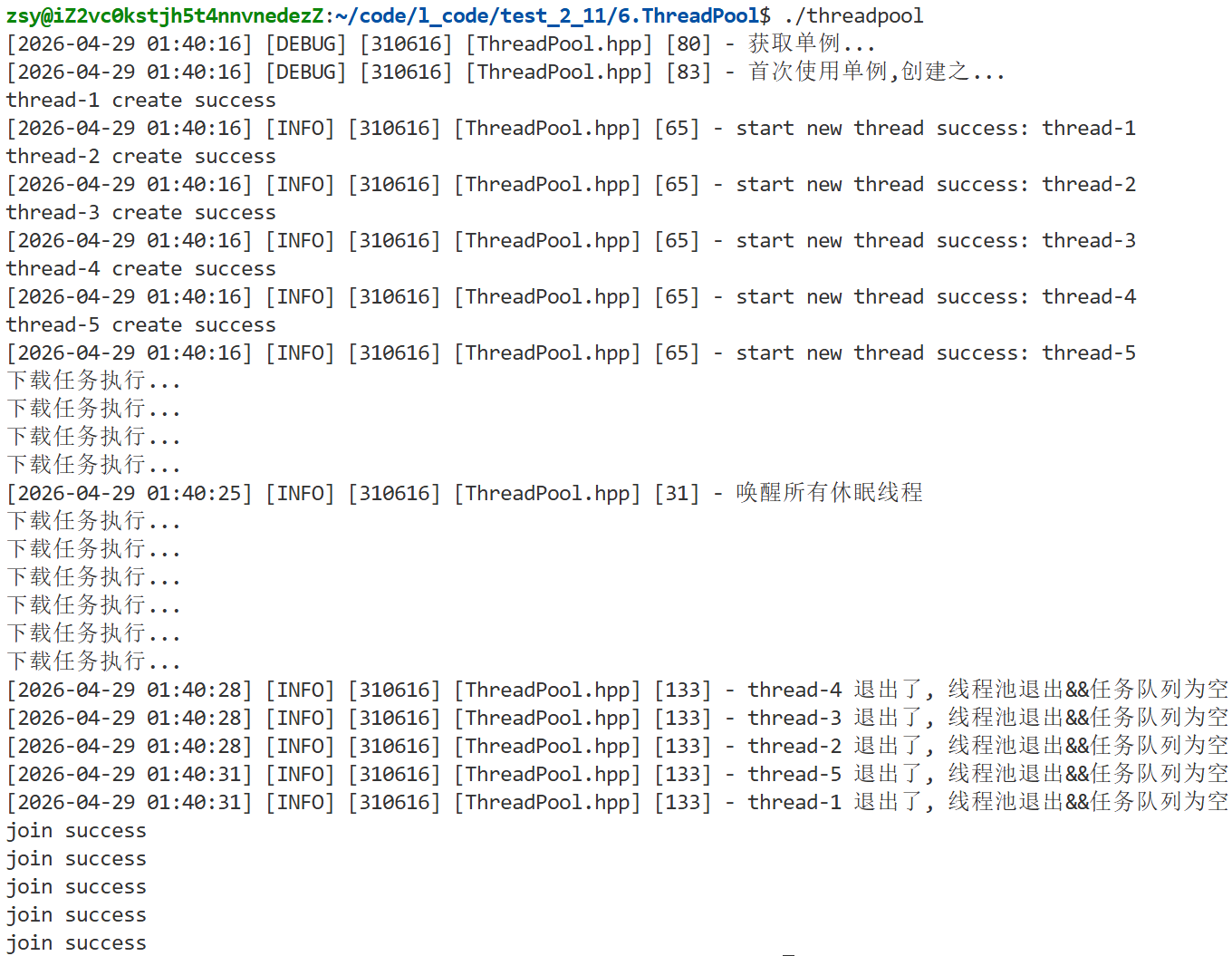
}
二、线程安全和可重⼊问题
1、概念
线程安全
- 多线程并发访问共享资源,执行结果正确、互不冲突。
- 无锁操作全局 / 静态变量,大概率线程不安全;仅只读共享数据一般安全。
可重入
- 函数未执行完毕时,被再次调用仍能正常运行、结果无误,即为可重入函数。
- 重入分为:多线程重入、信号触发重入。
2、常见场景
不安全 / 不可重入
- 操作无锁的全局、静态变量
- 调用
malloc/free、标准 IO、线程不安全接口 - 依赖函数内部状态、返回静态变量指针
安全 / 可重入
- 只用局部变量,不使用全局 / 静态变量
- 共享资源加锁保护、仅只读共享数据
- 不调用不可重入函数,数据由调用者传入
3、联系与区别
联系
- 可重入函数一定线程安全
- 不可重入函数,多线程并发易出安全问题
- 含无锁全局变量的函数,既不安全也不可重入
区别
- 可重入:描述函数本身能否重复嵌套调用
- 线程安全:描述多线程并发访问共享资源的合法性
- 加锁可实现线程安全,但可能造成不可重入、引发死锁
不考虑信号场景时,二者日常开发可近似等同。
三、常⻅锁概念
1、死锁
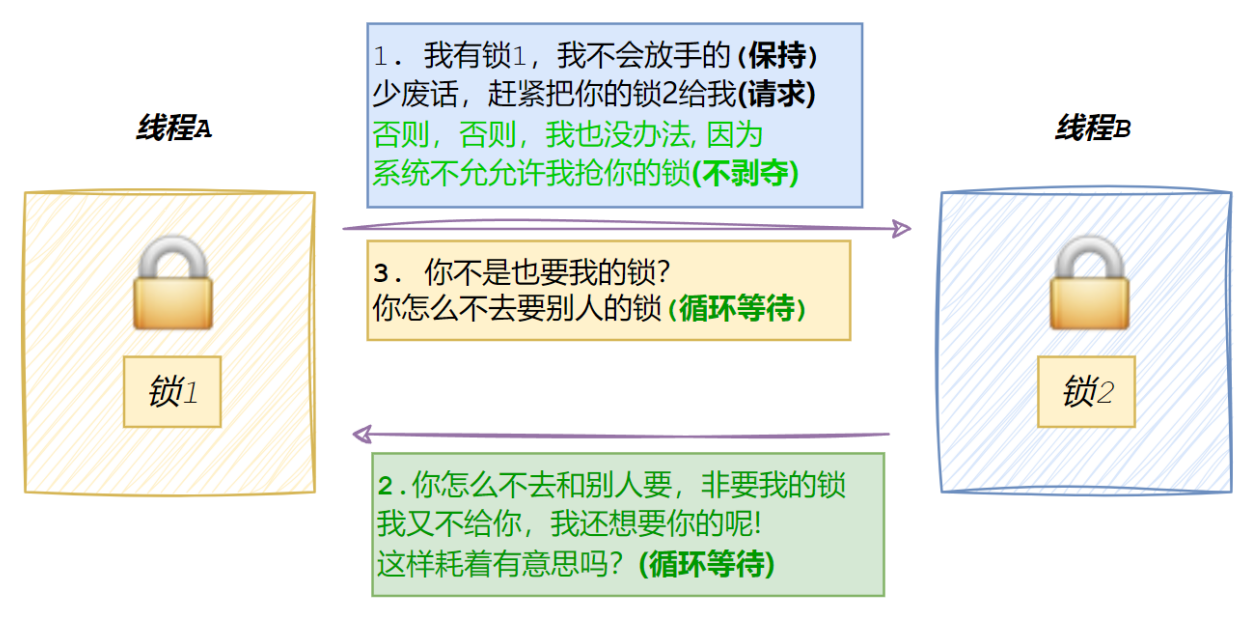
- 死锁 是指一组线程 / 进程都持有资源不释放,同时又申请对方持有的资源,导致所有线程永久等待、无法继续执行的状态。
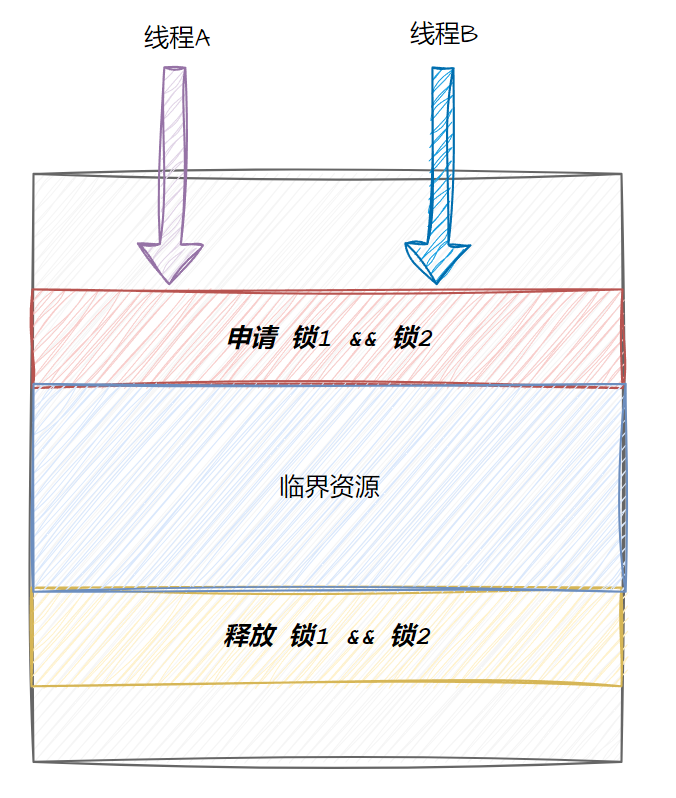
以线程 A、B 申请锁 1 和锁 2 为例:
线程 A 持有锁 1,申请锁 2
线程 B 持有锁 2,申请锁 1
双方都不释放自己的锁,也永远拿不到对方的锁,最终陷入永久阻塞。
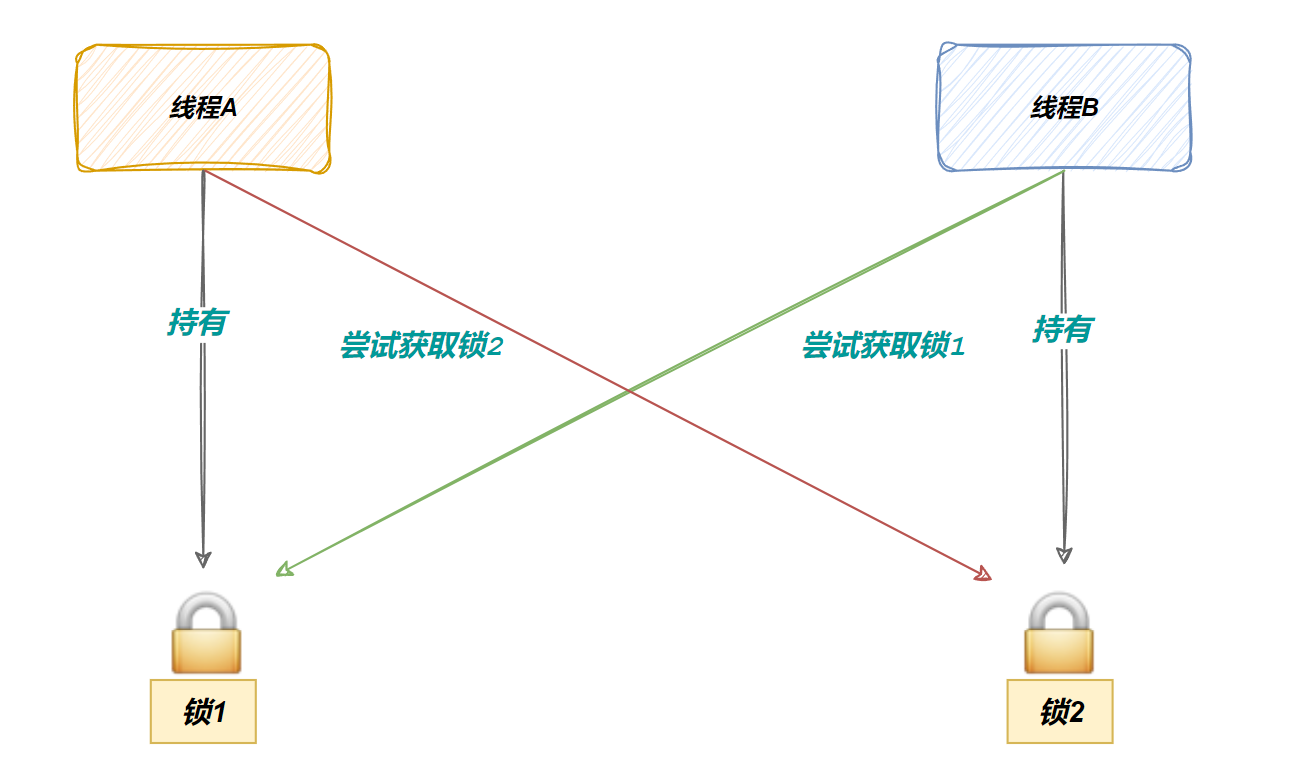
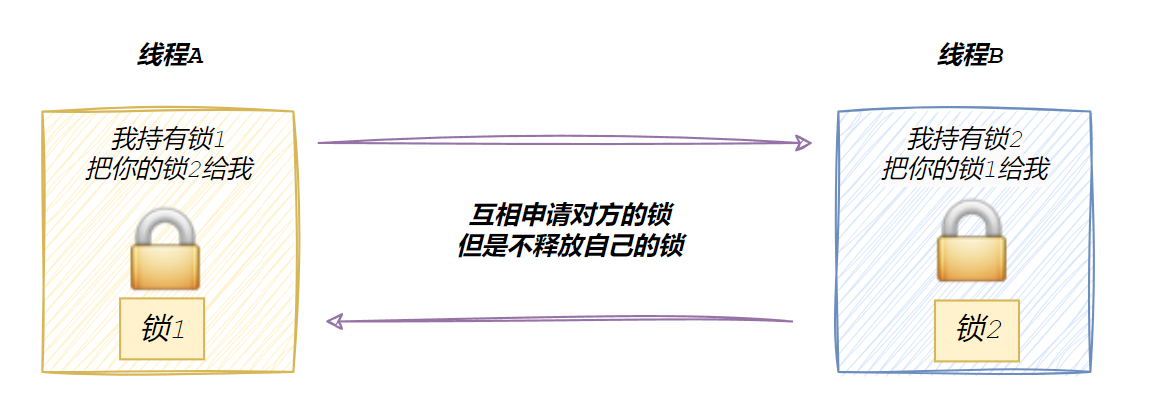
- 根本原因: 申请多把锁时,锁的获取顺序不一致。
- 预防关键: 统一锁的申请顺序,比如所有线程都先申请锁 1,再申请锁 2,避免循环等待。
2、死锁四个必要条件
死锁发生必须同时满足以下四个条件,缺一不可:
-
互斥条件: 资源同一时间只能被一个线程占用。
-
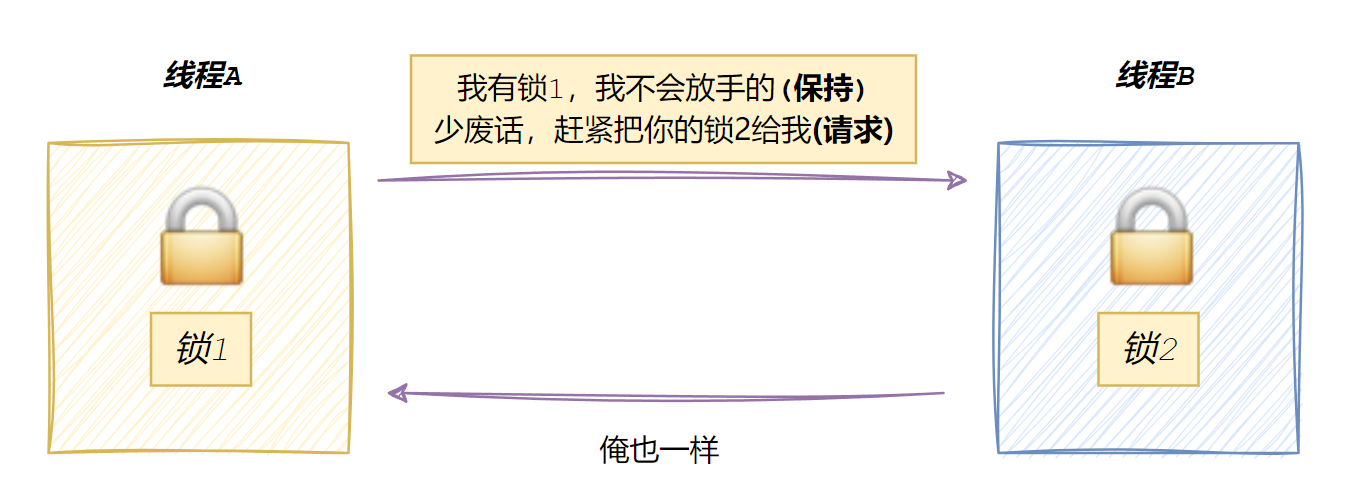
请求与保持: 线程持有资源不释放,同时又请求其他线程持有的资源。
-
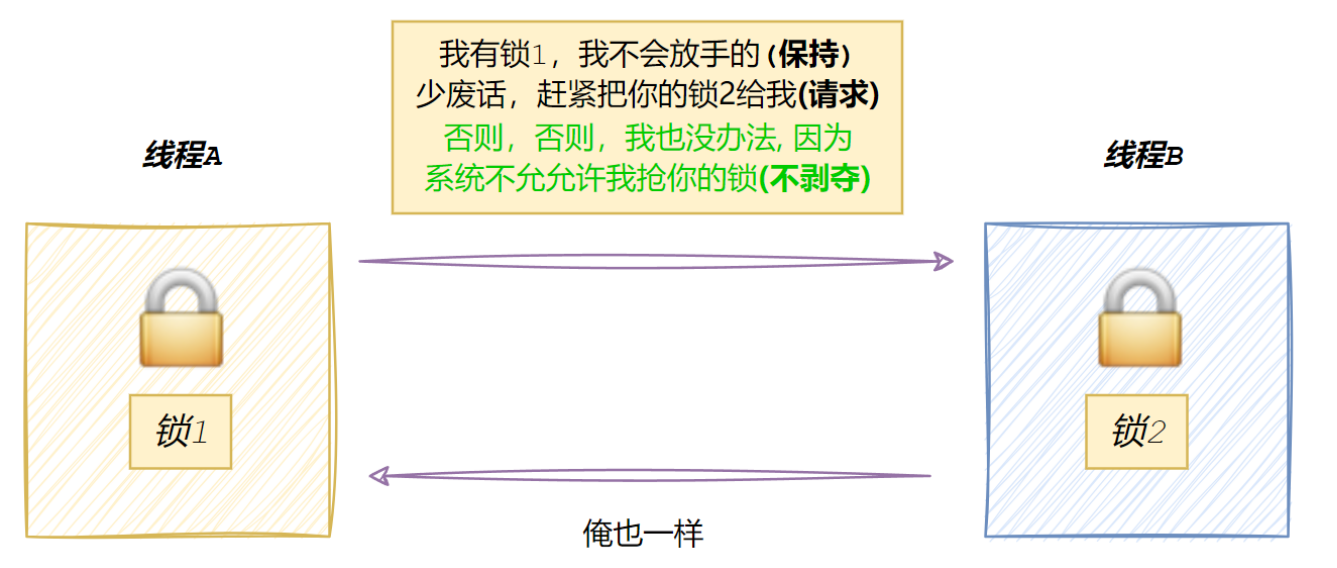
不可剥夺: 资源只能由持有者主动释放,其他线程不能强行抢占。
-
循环等待: 线程之间形成循环依赖,A 等 B 的资源,B 等 A 的资源,陷入死循环等待。
3、避免死锁
核心: 破坏死锁任意一个必要条件,重点破坏循环等待
避免死锁的常用方法:
- 统一加锁顺序: 所有线程按固定顺序申请锁
- 一次性分配资源: 同时获取所有需要的锁
- 锁超时机制: 申请失败自动放弃,防止死等
- 确保锁正常释放: 用 RAII(智能锁)自动解锁
代码示例:
cpp
#include <iostream>
#include <mutex>
#include <thread>
#include <vector>

// 共享资源 + 互斥锁
int shared_resource1 = 0;
int shared_resource2 = 0;
std::mutex mtx1, mtx2;

// 访问两个共享资源
void access_shared_resources()
{
    // 安全写法:一次性锁定多个锁
    // std::unique_lock<std::mutex> lock1(mtx1, std::defer_lock);
    // std::unique_lock<std::mutex> lock2(mtx2, std::defer_lock);
    // std::lock(lock1, lock2);

    int cnt = 100000;
    while (cnt--)
    {
        ++shared_resource1;
        ++shared_resource2;
    }
}

// 多线程并发访问
void simulate_concurrent_access()
{
    std::vector<std::thread> threads;
    for (int i = 0; i < 10; ++i)
    {
        // 10个线程
        threads.emplace_back(access_shared_resources);
    }

    for (auto &thread : threads)
    {
        thread.join();
    }

    std::cout << "Shared Resource 1: " << shared_resource1 << std::endl;
    std::cout << "Shared Resource 2: " << shared_resource2 << std::endl;
}

int main()
{
    simulate_concurrent_access();

    return 0;
}
不一次申请:

一次申请:

运行结果分析:
- 不安全(分步加锁): 数据错乱、数值不一致
- 安全(一次性申请): 数据正确、结果稳定
结论:
- 一次性申请所有需要的锁 → 破坏循环等待 → 无死锁
- 使用 RAII 锁(lock_guard/unique_lock) → 保证锁一定会释放
4、避免死锁算法
- 死锁检测算法: 定期检测系统是否出现死锁,若存在则通过终止线程、回收资源解除死锁。
- 银行家算法: 预先判断资源分配是否安全,只允许安全分配,从源头规避死锁。
四、STL、智能指针的线程安全
1、STL容器的线程安全问题
- STL 容器默认非线程安全。
- 设计初衷追求极致性能,加锁会严重损耗效率;且不同容器加锁策略不同,统一加锁不现实。
- 多线程并发读写时,需开发者手动加锁保证安全。
2、智能指针的线程安全问题
unique_ptr: 无线程安全问题,仅在当前作用域内使用,不共享。
shared_ptr: 引用计数的增减是原子操作(CAS),线程安全。但指向的对象本身读写不安全,多线程访问仍需加锁保护
五、其他常⻅的各种锁
- 悲观锁: 访问数据先加锁,强制阻塞其他线程,防止并发修改。
- 乐观锁: 默认无并发冲突,不加锁;更新时校验数据,依靠版本号、CAS保证安全。
- CAS: 比对旧值,一致则更新,不一致就循环重试,属于自旋操作。
- 自旋锁: 锁竞争时循环等待,不释放 CPU,适合代码执行快的场景。
- 读写锁: 读共享、写独占,适配多读少写场景,提升并发效率。