一、架构概述
OpenMetadata 由以下核心组件构成:
-
Java 后端
:Dropwizard REST API,默认端口
8585 -
Python Ingestion
:75+ 数据源连接器,通过
metadataCLI 运行 -
Airflow
:Workflow 编排,负责触发 ingestion 任务
-
数据库
:MySQL / PostgreSQL(存储元数据)
-
搜索
:Elasticsearch / OpenSearch
在 Windows 开发环境下,推荐的部署方式为:
bash
Java 后端 (Windows:8585)

Python Ingestion (WSL2 Ubuntu)

目标数据库 (Windows 或远程)
二、WSL2 环境搭建
2.1 安装 WSL2
以管理员身份打开 PowerShell:
bash
wsl --install

# 安装完成后重启电脑

# 重启后设置 Ubuntu 用户名和密码
如果已有旧版 WSL,升级到 WSL2:
bash
wsl --set-default-version 2重要 :代码必须放在 WSL 文件系统内(
~/下),不能放在/mnt/c/、/mnt/e/等 Windows 挂载目录下。Windows NTFS 文件系统不支持 Unix 文件权限操作,会导致Operation not permitted错误。
2.2 安装系统依赖
打开 Ubuntu 终端,安装所有必要的系统级依赖:
bash
sudo
 apt update &&
sudo
 apt upgrade -y


# Python 3.11 及虚拟环境支持

sudo
 apt install -y python3.11 python3.11-venv python3.11-dev


# 编译工具和常用库

sudo
 apt install -y \

  build-essential \

  git \

  make \

  pkg-config \

  default-libmysqlclient-dev \

  libssl-dev \

  libffi-dev \

  libpq-dev \

  libkrb5-dev


# Java(ANTLR4 依赖)

sudo
 apt install -y default-jre
2.3 克隆代码库
bash
# 放在 WSL 文件系统内(home 目录),不要放在 /mnt/ 下

cd
 ~

git
clone
 https://github.com/open-metadata/OpenMetadata.git

cd
 OpenMetadata
三、Python 虚拟环境与依赖安装
3.1 创建并激活虚拟环境
OpenMetadata 支持 Python 3.10 和 3.11,推荐 3.11:
bash
cd
 ~/OpenMetadata/ingestion

python3.11 -m venv
env

source

env
/bin/activate

python --version
# 确认是 3.11.x每次打开新终端都需要重新激活:
source ~/OpenMetadata/ingestion/env/bin/activate
3.2 安装 Python 依赖
不要直接运行 make install_dev_env ,因为其中的 cx_Oracle 在 Python 3.11 上有兼容问题。手动执行等价命令,跳过 cx_Oracle:
bash
cd
 ~/OpenMetadata/ingestion


# 升级 pip 和 setuptools

pip install --upgrade pip
"setuptools<81"


# 安装 nox

pip install nox


# 跳过 cx_Oracle(除非需要 Oracle 连接器)

# 直接安装核心依赖

python -m pip install -e
".[dev, test-unit]"
关于
cx_Oracle:这是 Oracle 数据库连接器的依赖,在 Python 3.11 上编译时会报ModuleNotFoundError: No module named 'pkg_resources'。如果不需要 Oracle 连接器,跳过即可,不影响其他所有连接器。
关于mysqlclient编译失败 :如果报pkg-config: not found或Can not find valid pkg-config name,说明缺少系统依赖,按 2.2 节安装系统依赖后重试。
3.3 安装 ANTLR4 CLI
ANTLR4 用于生成 FQN(Fully Qualified Name)解析器,ingestion 运行时必须:
bash
# 回到项目根目录

cd
 ~/OpenMetadata


# 安装 ANTLR4(需要 sudo,写入 /usr/local/bin)

sudo
 make install_antlr_cli


# 验证

antlr4
3.4 生成 Pydantic 模型
metadata.generated 模块是从 JSON Schema 自动生成的,必须执行此步骤 ,否则运行时会报 ModuleNotFoundError: No module named 'metadata.generated':
bash
# 在项目根目录执行(不是 ingestion/ 子目录)

cd
 ~/OpenMetadata

source
 ingestion/env/bin/activate


make generate
make generate 依次执行:
-
删除旧的
ingestion/src/metadata/generated/目录 -
运行
scripts/datamodel_generation.py生成 Pydantic 模型 -
运行
make py_antlr生成 Python FQN 解析器 -
运行
make js_antlr生成前端 FQN 解析器 -
运行
make install重新安装包
注意 :每次 JSON Schema 变更后都需要重新执行
make generate。
3.5 验证安装
bash
source
 ~/OpenMetadata/ingestion/env/bin/activate

metadata --
help

# 应该显示帮助信息,而不是报错


# 验证加载的是源码目录(editable 安装)

python -c
"import metadata; print(metadata.__file__)"

# 期望输出:~/OpenMetadata/ingestion/src/metadata/__init__.py
如果输出的是 site-packages/metadata/__init__.py,说明有旧版本覆盖了 editable 安装,需要重新安装:
bash
pip uninstall openmetadata-ingestion -y

python -m pip install -e
".[dev, test-unit]"
四、启动 ingestion
4.1 支持的子命令
|
命令
|
用途
|
| --- | --- |
| metadata ingest -c config.yaml |
元数据采集
|
| metadata profile -c config.yaml |
数据 Profiling
|
| metadata test -c config.yaml |
数据质量测试
|
| metadata usage -c config.yaml |
查询使用量
|
| metadata lineage -c config.yaml |
血缘关系
|
4.2 创建配置文件
以 MySQL 为例,在/opt/ingestion下创建 mysql_ingest.yaml:
bash
source:


type:
mysql

serviceName:
my_mysql_service

serviceConnection:


config:


type:
Mysql


username:
root


authType:


password:
"123456"

# 正确:嵌套在 authType 下


hostPort:
localhost:3306

sourceConfig:


config:


type:
DatabaseMetadata


sink:

type:
metadata-rest

config:
 {}


workflowConfig:

loggerLevel:
INFO

openMetadataServerConfig:


hostPort:
"http://localhost:8585/api"

# Java 后端地址(Windows 上)


authProvider:
openmetadata


securityConfig:


jwtToken:
"eyJraWQiOiJHYjM4OWEtOWY3Ni1nZGpzLWE5MmotMDI0MmJrOTQzNTYiLCJhbGciOiJSUzI1NiIsInR5cCI6IkpXVCJ9.eyJpc3MiOiJvcGVuLW1ldGFkYXRhLm9yZyIsInN1YiI6ImluZ2VzdGlvbi1ib3QiLCJyb2xlcyI6WyJJbmdlc3Rpb25Cb3RSb2xlIl0sImVtYWlsIjoiaW5nZXN0aW9uLWJvdEBvcGVuLW1ldGFkYXRhLm9yZyIsImlzQm90Ijp0cnVlLCJ0b2tlblR5cGUiOiJCT1QiLCJ1c2VybmFtZSI6ImluZ2VzdGlvbi1ib3QiLCJwcmVmZXJyZWRfdXNlcm5hbWUiOiJpbmdlc3Rpb24tYm90IiwiaWF0IjoxNzY3NjIwMDc3LCJleHAiOm51bGx9.MNty7iGV1zsguZyYXnRTmDnRVkY2meqqYpokdJTfh_Z1w_-TCrP4DzQ9N6OZiaU7l0KQiBxGfSu84jWV-PX1E6-yq4w7AGgN45S9P0M2mRITFZl4aEmrMywFs8WL91Rug-EtoivpNtbDBReiZy4WvsnqfaA3OMkb6y3lIB0pkY8oNArUTjcGNqpKspU45HUgCSrNEn9w28ovfa6ip4qBDhS26ehgY7xsNUANxGDB1OaWJCBnoCemOoplf99i1qU8SJVMbwO38xFaj0iJD5_V0h-EAEQK6773P1XX-bOZNVwxyH0e9BOJAoEU3DjZFATlKMQBBx2UbEnbUfCVWKoWJQ"
JWT Token 获取:OpenMetadata UI → Settings → Bots → ingestion-bot → Token
4.3 运行
bash
source
 ~/OpenMetadata/ingestion/env/bin/activate

metadata ingest -c /opt/ingestion/mysql_ingest.yaml


# 调试模式(详细日志)

metadata --debug ingest -c /opt/ingestion/mysql_ingest.yaml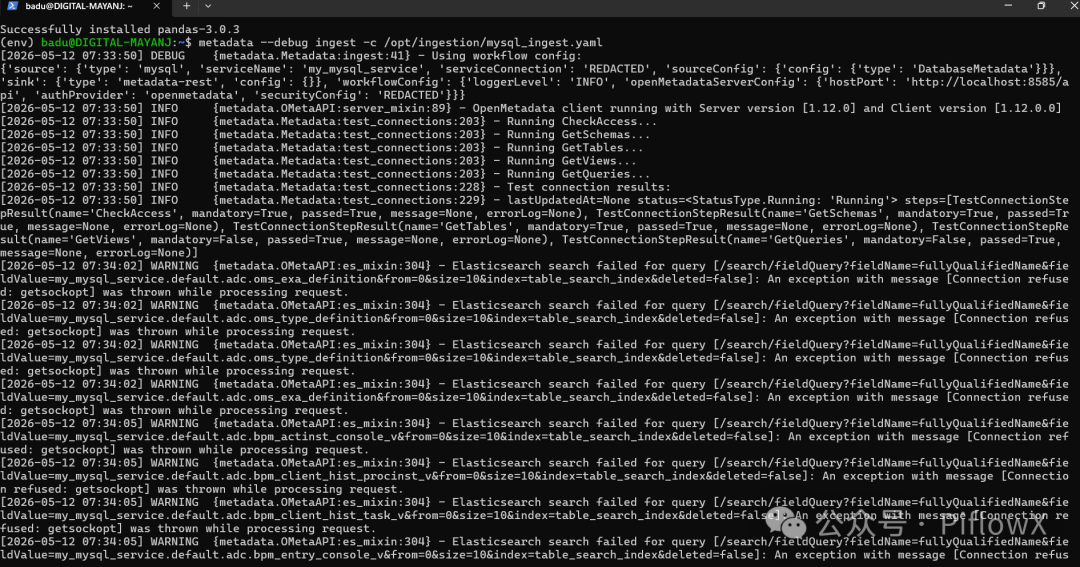
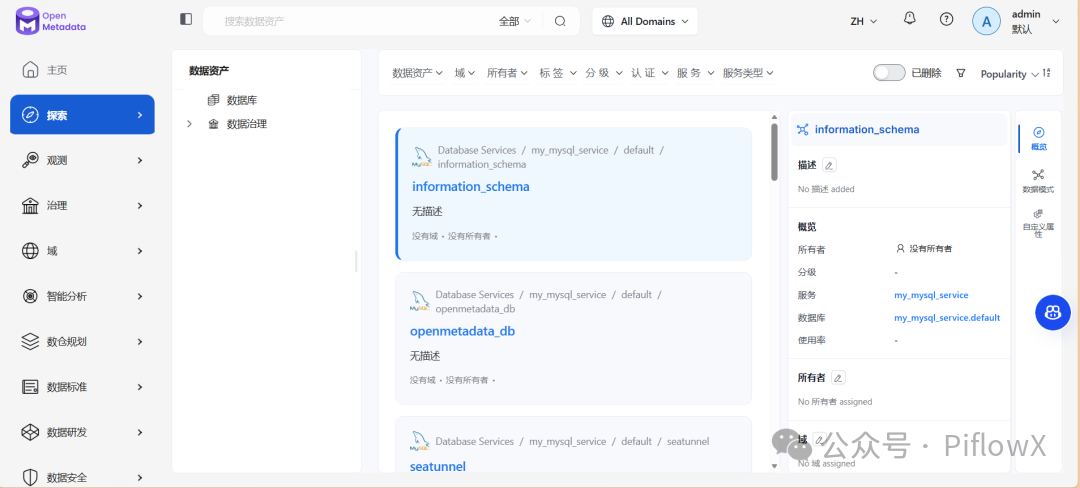
4.4 WSL 访问 Windows Java 后端的网络配置
WSL2 默认支持 localhost 转发到 Windows,所以 http://localhost:8585/api 通常直接可用。
如果 localhost 不通,获取 Windows 主机 IP:
bash
cat
 /etc/resolv.conf | grep nameserver | awk
'{print $2}'

# 输出类似 172.x.x.x
然后在配置文件中使用该 IP:
bash
workflowConfig:


openMetadataServerConfig:


hostPort:

"http://172.x.x.x:8585/api"
如果还是无法解决,参考以下方案:
在Windows的资源管理器的地址栏输入 %UserProfile%,即可打开当前用户的主目录,创建文件:.wslconfig
bash
[wsl2]

memory
=
4
GB
# 分配给 WSL 2 的内存大小

processors
=
2

# 分配给 WSL 2 的 CPU 核心数

localhostForwarding
=
true

# 是否启用 localhost 转发


[experimental]

autoMemoryReclaim
=gradual
# 开启自动回收内存,可在 gradual, dropcache, disabled 之间选择

networkingMode
=mirrored
# 开启镜像网络

dnsTunneling
=
true

# 开启 DNS Tunneling

firewall
=
true

# 开启 Windows 防火墙

autoProxy
=
true

# 开启自动同步代理

sparseVhd
=
true

# 开启自动释放 WSL2 虚拟硬盘空间
五、ingestion 内部启动流程
5.1 CLI 入口
metadata 命令由 pyproject.toml 注册,指向 metadata.cmd:metadata:
bash
metadata ingest -c config.yaml

    └── metadata.cmd:metadata()

            └── RUN_PATH_METHODS["ingest"](path)

                    └── run_ingest(config_path)

                            ├── load_config_file(config_path)

                            ├── MetadataWorkflow.create(config_dict)

                            └── execute_workflow(workflow, config_dict)

                                    ├── workflow.execute()

                                    ├── workflow.stop()

                                    └── workflow.raise_from_status()
5.2 Workflow 初始化
bash
BaseWorkflow.__init__()

    ├── 创建 OpenMetadata 客户端(ometa,连接 Java 后端)

    ├── 设置日志级别

    ├── set_ingestion_pipeline_status(running)

    └── post_init()

            └── set_steps()

                    ├── source = _get_source()   # 动态 import 对应 connector

                    └── steps = (sink,)
5.3 execute() 执行流程
bash
execute()

    ├── timer.trigger()          # 启动定时状态报告

    ├── execute_internal()

    │       for record in source.run():

    │           for step in steps:

    │               step.run(record)   # Source → Processor → Sink

    │       bulk_sink.run()            # 如有 BulkSink

    ├── raise_from_status_internal()

    └── finally:

            ├── set_ingestion_pipeline_status(success/failed)

            ├── stop()

            └── print_status()
六、数据库连接测试(Test Connection)交互流程
6.1 完整调用链
bash
浏览器(UI)

  │ 1. POST /v1/automations/workflows          创建 Workflow

  │ 2. POST /v1/automations/workflows/trigger/{id}  触发

  ▼

Java 后端 (Windows:8585)

  │ 3. POST /run_automation                    转发给 Airflow

  ▼

Airflow / Pipeline Service

  │ 4. 调用 automations/runner.py → execute()

  ▼

ingestion (WSL)

  ├─ 5. GET  /v1/services/testConnectionDefinitions/name/{name}

  │         ← 从 Java 后端获取测试步骤定义

  ├─ 6. 直连目标数据库执行各测试步骤

  │         ← 不经过 Java 后端

  └─ 7. PATCH /v1/automations/workflows/{id}

            ← 每步执行后将结果回写 Java 后端
6.2 各步骤代码对应
步骤 1-2:UI 触发
步骤 3:Java 后端转发给 Airflow
步骤 4:Airflow 接收并执行
步骤 5:ingestion 获取测试步骤定义
FQN 格式为 {service_type}.testConnectionDefinition,例如 Mysql.testConnectionDefinition。
步骤 6-7:执行测试并回写结果
七、TestConnectionDefinitionResource.getByName 执行流程
GET /v1/services/testConnectionDefinitions/name/{name} 端点:
bash
getByName(uriInfo, name, securityContext, fieldsParam, include)

    └── EntityResource.getByNameInternal(...)

            ├── 1. 权限检查(Authorizer)

            ├── 2. 解析 Fields(fieldsParam → Fields 对象)

            └── 3. repository.getByName(uriInfo, name, fields, include)

                    └── testConnectionDefinitionDAO 查询数据库
FQN 格式由 Repository 定义为 {name}.testConnectionDefinition:
测试步骤定义数据在服务启动时从 seed data JSON 文件加载(路径匹配 .*json/data/testConnections/.*\.json$):
八、常见问题速查
|
错误信息
|
原因
|
解决方案
|
| --- | --- | --- |
| Operation not permitted |
代码在 /mnt/ Windows 目录下
|
迁移到 ~/ WSL 文件系统
|
| No module named 'pkg_resources' |
cx_Oracle 编译问题
|
跳过 cx_Oracle,手动执行安装命令
|
| pkg-config: not found |
缺少系统依赖
| sudo apt install pkg-config default-libmysqlclient-dev |
| No module named 'metadata.generated' |
未运行代码生成
|
在项目根目录执行 make generate
|
| antlr4: not found |
未安装 ANTLR4
| sudo apt install default-jre && sudo make install_antlr_cli |
| No module named 'cachetools' |
加载了旧版 site-packages
| pip uninstall openmetadata-ingestion -y && pip install -e ".[dev, test-unit]" |
Citations
File: CLAUDE.md (L12-18)
bash
-

**Backend**
: Java 21 + Dropwizard REST API framework, multi-module Maven project

-

**Frontend**
: React + TypeScript, built with Webpack and Yarn; component library via
`openmetadata-ui-core-components`
 (Tailwind CSS v4 with
`tw:`
 prefix, react-aria-components foundation)

-

**Ingestion**
: Python 3.10-3.11 with Pydantic 2.x, 75+ data source connectors

-

**Database**
: MySQL (default) or PostgreSQL with Flyway migrations

-

**Search**
: Elasticsearch 7.17+ or OpenSearch 2.6+ for metadata discovery

-

**Infrastructure**
: Apache Airflow for workflow orchestration
File: CLAUDE.md (L22-35)
bash
### Python Virtual Environment (REQUIRED)


**You MUST activate the Python venv before any Python work.**
 OpenMetadata supports Python 3.10-3.11; 3.11 is recommended.


```bash# First-time setup (creates venv at repo root):# python3.11 -m venv env# ALWAYS activate before running Python, make generate, make install_dev, etc:source env/bin/activate# Verify:python --version   # Should show Python 3.10.x or 3.11.x
bash
**File:** ingestion/Makefile (L16-21)

```text

.PHONY: install_dev_env

install_dev_env:  ## Install all dependencies for development (in edit mode)

    pip install --upgrade pip "setuptools<81"

    pip install nox

    pip install --no-build-isolation "cx_Oracle>=8.3.0,<9"

    python -m pip install -e "$(INGESTION_DIR)[all-dev-env, dev, test-unit]"
File: Makefile (L52-60)
bash
.PHONY: generate

generate:  ## Generate the pydantic models from the JSON Schemas to the ingestion module

    @echo "Running Datamodel Code Generator"

    @echo "Make sure to first run the install_dev recipe"

    rm -rf ingestion/src/metadata/generated

    mkdir -p ingestion/src/metadata/generated

    python scripts/datamodel_generation.py

    $(MAKE) py_antlr js_antlr

    $(MAKE) install
File: Makefile (L62-66)
bash
.PHONY: install_antlr_cli

install_antlr_cli:  ## Install antlr CLI locally

    echo '#!/usr/bin/java -jar' > /usr/local/bin/antlr4

    curl https://www.antlr.org/download/antlr-4.9.2-complete.jar >> /usr/local/bin/antlr4

    chmod 755 /usr/local/bin/antlr4
File: ingestion/src/metadata/cmd.py (L46-68)
bash
class

MetadataCommands
(
Enum
):

    INGEST =
"ingest"

    INGEST_DBT =
"ingest-dbt"

    USAGE =
"usage"

    PROFILE =
"profile"

    TEST =
"test"

    WEBHOOK =
"webhook"

    LINEAGE =
"lineage"

    APP =
"app"

    AUTO_CLASSIFICATION =
"classify"

    SCAFFOLD_CONNECTOR =
"scaffold-connector"


RUN_PATH_METHODS = {

    MetadataCommands.INGEST.value: run_ingest,

    MetadataCommands.INGEST_DBT.value: run_ingest_dbt,

    MetadataCommands.USAGE.value: run_usage,

    MetadataCommands.LINEAGE.value: run_lineage,

    MetadataCommands.PROFILE.value: run_profiler,

    MetadataCommands.TEST.value: run_test,

    MetadataCommands.APP.value: run_app,

    MetadataCommands.AUTO_CLASSIFICATION.value: run_classification,

}
File: ingestion/pyproject.toml (L36-37)
bash
[project.scripts]

metadata = "metadata.cmd:metadata"
File: ingestion/src/metadata/workflow/base.py (L91-144)
bash
def

__init__
(

        self,

        config:
Union
[
Any
,
Dict
],

        workflow_config: WorkflowConfig,

        service_type: ServiceType,

        output_handler: WorkflowOutputHandler = WorkflowOutputHandler(),


):


"""        Disabling pylint to wait for workflow reimplementation as a topology        """


self
.output_handler = output_handler


self
.config = config


self
.workflow_config = workflow_config


self
.service_type = service_type


self
._timer:
Optional
[RepeatedTimer] =
None


self
._ingestion_pipeline:
Optional
[IngestionPipeline] =
None


self
._start_ts = datetime_to_ts(datetime.now())


# Execution time tracking is always enabled for workflows regardless of the log level


self
._execution_time_tracker = ExecutionTimeTracker(enabled=
True
)


        set_loggers_level(
self
.workflow_config.loggerLevel.value)


# We create the ometa client at the workflow level and pass it to the steps


self
.metadata = create_ometa_client(


self
.workflow_config.openMetadataServerConfig

        )


# Setup streamable logging if configured


if
 (


self
.config.ingestionPipelineFQN


and
self
.config.pipelineRunId


and
self
.config.enableStreamableLogs

        ):

            setup_streamable_logging_for_workflow(

                metadata=
self
.metadata,

                pipeline_fqn=
self
.config.ingestionPipelineFQN,

                run_id=
self
.config.pipelineRunId,

                log_level=
self
.workflow_config.loggerLevel.value,

                enable_streaming=
True
,

            )


self
._log_workflow_execution_info()


# Set run context for operation metrics tracking

        OperationMetricsState().set_run_context(

            run_id=
str
(
self
.config.pipelineRunId.root)


if
self
.config.pipelineRunId


else
None
,

            pipeline_fqn=
self
.config.ingestionPipelineFQN,

        )


self
.set_ingestion_pipeline_status(state=PipelineState.running)


self
.post_init()
File: ingestion/src/metadata/workflow/ingestion.py (L110-136)
bash
def

execute_internal
(
self
):


"""        Internal execution that needs to be filled        by each ingestion workflow.        Pass each record from the source down the pipeline:        Source -> (Processor) -> Sink        or Source -> (Processor) -> Stage -> BulkSink        Note how the Source class needs to be an Iterator. Specifically,        we are defining Sources as Generators.        """


for
 record
in
self
.source.run():

            processed_record = record


for
 step
in
self
.steps:


# We only process the records for these Step types


if
 processed_record
is
not
None
and
isinstance
(

                    step, (Processor, Stage, Sink)

                ):

                    processed_record = step.run(processed_record)


# Try to pick up the BulkSink and execute it, if needed

        bulk_sink =
next
(

            (step
for
 step
in
self
.steps
if
isinstance
(step, BulkSink)),
None

        )


if
 bulk_sink:

            bulk_sink.run()
File: openmetadata-ui/src/main/resources/ui/src/components/common/TestConnection/TestConnection.tsx (L290-317)
bash
const

createWorkflowData
:
CreateWorkflow
 = {


name
:
getTestConnectionName
(connectionType),


workflowType
:
WorkflowType
.
TestConnection
,


request
: {


connection
: {
config
: rest },

          serviceType,

          connectionType,

          serviceName,

          ...(ingestionRunnerValue && {


ingestionRunner
: ingestionRunnerValue,

          }),

        },

      };


// fetch the connection steps for current connectionType


await
fetchConnectionDefinition
();


setProgress
(
TEST_CONNECTION_PROGRESS_PERCENTAGE
.
TEN
);


// create the workflow


const
 response =
await
addWorkflow
(createWorkflowData, controller.
signal
);


setCurrentWorkflow
(response);


setProgress
(
TEST_CONNECTION_PROGRESS_PERCENTAGE
.
TWENTY
);


// trigger the workflow


const
 status =
await
triggerWorkflowById
(response.
id
, controller.
signal
);
File: openmetadata-service/src/main/java/org/openmetadata/service/resources/automations/WorkflowResource.java (L373-390)
bash
public
 PipelineServiceClientResponse
runAutomationsWorkflow
(


@Context
 UriInfo uriInfo,


@Parameter(description = "Id of the Workflow", schema = @Schema(type = "UUID"))


@PathParam("id")

          UUID id,


@Context
 SecurityContext securityContext)
 {

    EntityUtil.
Fields
fields
=
 getFields(FIELD_OWNERS);


Workflow
workflow
=
 repository.get(uriInfo, id, fields);

    workflow.setOpenMetadataServerConnection(


new
OpenMetadataConnectionBuilder
(openMetadataApplicationConfig).build());


/*     We will send the encrypted Workflow to the Pipeline Service Client     It will be fetched from the API from there, since we are     decrypting on GET based on user auth. The ingestion-bot will then     be able to pick up the right data.    */


return
 pipelineServiceClient.runAutomationsWorkflow(workflow);

  }
File: openmetadata-airflow-apis/openmetadata_managed_apis/api/routes/run_automation.py (L59-85)
bash
def

run_automation
() -> Response:


"""        Given a WorkflowSource Schema, create the engine        and test the connection        """


        json_request = request.get_json(cache=
False
)


try
:

            automation_workflow = parse_automation_workflow_gracefully(

                config_dict=json_request

            )


# we need to instantiate the secret manager in case secrets are passed

            SecretsManagerFactory(

                automation_workflow.openMetadataServerConnection.secretsManagerProvider,

                automation_workflow.openMetadataServerConnection.secretsManagerLoader,

            )


# Should this be triggered async?

            execute(automation_workflow)


return
 ApiResponse.success(

                {


"message"
:
f"Workflow [{escape(automation_workflow.name)}] has been triggered."

                }

            )
File: ingestion/src/metadata/ingestion/connections/test_connections.py (L125-157)
bash
for
 step
in
 steps:


try
:

                logger.info(
f"Running {step.name}..."
)

                step.function()

                test_connection_result.steps.append(

                    TestConnectionStepResult(

                        name=step.name,

                        mandatory=step.mandatory,

                        passed=
True
,

                    )

                )


except
 Exception
as
 err:

                logger.debug(traceback.format_exc())

                logger.warning(
f"{step.name}-{err}"
)

                test_connection_result.steps.append(

                    TestConnectionStepResult(

                        name=step.name,

                        mandatory=step.mandatory,

                        passed=
False
,

                        message=step.error_message,

                        errorLog=
str
(err),

                    )

                )


if
 step.short_circuit:


# break the workflow if the step is a short circuit step


break


            test_connection_result.lastUpdatedAt = Timestamp(


int
(datetime.now().timestamp() *
1000
)

            )

            metadata.patch_automation_workflow_response(

                automation_workflow, test_connection_result, WorkflowStatus.Running

            )
File: ingestion/src/metadata/ingestion/connections/test_connections.py (L263-268)
bash
    test_connection_def_fqn = service_type +
".testConnectionDefinition"


    test_connection_definition: TestConnectionDefinition = metadata.get_by_name(

        entity=TestConnectionDefinition,

        fqn=test_connection_def_fqn,

    )
File: openmetadata-service/src/main/java/org/openmetadata/service/resources/services/connections/TestConnectionDefinitionResource.java (L60-71)
bash
public

void
initialize
(OpenMetadataApplicationConfig config)
throws
 IOException {

    List<TestConnectionDefinition> testConnectionDefinitions =

        repository.getEntitiesFromSeedData(
".*json/data/testConnections/.*\\.json$"
);


for
 (TestConnectionDefinition testConnectionDefinition : testConnectionDefinitions) {

      repository.prepareInternal(testConnectionDefinition,
true
);

      testConnectionDefinition.setId(UUID.randomUUID());

      testConnectionDefinition.setUpdatedBy(ADMIN_USER_NAME);

      testConnectionDefinition.setUpdatedAt(System.currentTimeMillis());

      repository.createOrUpdate(
null
, testConnectionDefinition, ADMIN_USER_NAME);

    }

  }
File: openmetadata-service/src/main/java/org/openmetadata/service/resources/services/connections/TestConnectionDefinitionResource.java (L183-219)
bash
@GET

@Path("/name/{name}")

@Operation(      operationId = "getTestConnectionDefinitionByName",      summary = "Get a test connection definition by name",      description = "Get a test connection definition by `name`.",      responses = {        @ApiResponse(            responseCode = "200",            description = "The test connection definition",            content =                @Content(                    mediaType = "application/json",                    schema = @Schema(implementation = TestConnectionDefinition.class))),        @ApiResponse(            responseCode = "404",            description = "Test Connection Definition for instance {name} is not found")      })

public
 TestConnectionDefinition
getByName
(


@Context
 UriInfo uriInfo,


@Parameter(description = "Name of the test definition", schema = @Schema(type = "string"))


@PathParam("name")

          String name,


@Context
 SecurityContext securityContext,


@Parameter(              description = "Fields requested in the returned resource",              schema = @Schema(type = "string", example = FIELDS))


@QueryParam("fields")

          String fieldsParam,


@Parameter(              description = "Include all, deleted, or non-deleted entities.",              schema = @Schema(implementation = Include.class))


@QueryParam("include")


@DefaultValue("non-deleted")

          Include include)
 {


return
 getByNameInternal(uriInfo, securityContext, name, fieldsParam, include);

  }
File: openmetadata-service/src/main/java/org/openmetadata/service/jdbi3/TestConnectionDefinitionRepository.java (L38-40)
bash
public

void

setFullyQualifiedName
(TestConnectionDefinition entity)
 {

    entity.setFullyQualifiedName(entity.getName() +
".testConnectionDefinition"
);

  }
注:此文章用于交流学习,内容根据deepwiki生成,如有纰漏,敬请谅解!