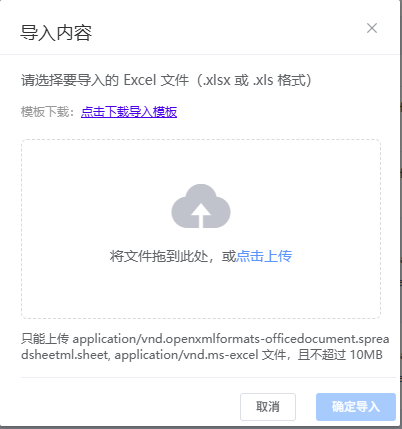
针对上传文件组件进行封装:
javascript
<!-- 公共导入组件 -->
<template>
  <el-dialog
    :title="title"
    :visible.sync="visible"
    width="400px"
    :show-footer="false"
    @close="handleClose"
  >
    <div class="import-content">
        <div class="import-tip">
          <p>{{ tipText }}</p>
          <p v-if="templateUrl" style="font-size: 12px; color: #999; margin-top: 10px;">
            模板下载:<a href="javascript:void(0)" @click="downloadTemplate">点击下载导入模板</a>
          </p>
        </div>
      <div class="upload-area">
        <el-upload
          class="upload-demo"
          drag
          action
          :auto-upload="false"
          :show-file-list="false"
          :on-change="handleFileChange"
          :accept="acceptTypes"
        >
          <i class="el-icon-upload"></i>
          <div class="el-upload__text">
            将文件拖到此处,或<em>点击上传</em>
          </div>
          <div class="el-upload__tip" slot="tip">
            只能上传 {{ acceptTypes.join(', ') }} 文件,且不超过 10MB
          </div>
        </el-upload>
      </div>
      <div v-if="uploadFile" class="file-info">
        <span class="file-name">{{ uploadFile.name }}</span>
        <el-button size="mini" type="text" @click="clearFile">移除</el-button>
      </div>
      <div class="import-buttons">
        <el-button @click="handleClose" size="mini">取消</el-button>
        <el-button type="primary" @click="handleSubmit" :disabled="!uploadFile" size="mini">确定导入</el-button>
      </div>
    </div>
  </el-dialog>
</template>

<script>
export default {
  name: 'commonImport',
  props: {
    visible: {
      type: Boolean,
      default: false
    },
    title: {
      type: String,
      default: '导入数据'
    },
    tipText: {
      type: String,
      default: '请选择要导入的 Excel 文件(.xlsx 或 .xls 格式)'
    },
    langType: {
      type: String,
      default: 'zh'
    },
    // 模板下载地址
    templateUrl: {
      type: String,
      default: ''
    },
    // 允许的文件类型,默认为 xlsx, xls
    acceptTypes: {
      type: Array,
      default: () => ['application/vnd.openxmlformats-officedocument.spreadsheetml.sheet', 'application/vnd.ms-excel']
    }
  },
  data() {
    return {
      uploadFile: null
    }
  },
  methods: {
    // 选择文件
    handleFileChange(file) {
      // 验证文件类型
      const isAllowedType = this.acceptTypes.includes(file.raw.type);
      if (!isAllowedType) {
        this.$message.error('请选择正确的文件类型');
        return;
      }
      // 只有默认的 Excel 类型才限制大小
      const defaultExcelTypes = ['application/vnd.openxmlformats-officedocument.spreadsheetml.sheet', 'application/vnd.ms-excel'];
      const isDefaultExcel = defaultExcelTypes.every(type => this.acceptTypes.includes(type));
      if (isDefaultExcel) {
        const isLt10M = file.raw.size / 1024 / 1024 < 10;
        if (!isLt10M) {
          this.$message.error('文件大小不能超过 10MB');
          return;
        }
      }
      this.uploadFile = file.raw;
    },
    // 清除文件
    clearFile() {
      this.uploadFile = null;
    },
    // 下载模板
    downloadTemplate() {
      if (this.templateUrl) {
        window.location.href = this.templateUrl;
      } else {
        this.$message.warning('暂未提供导入模板');
      }
    },
    // 提交导入
    handleSubmit() {
      if (!this.uploadFile) {
        this.$message.warning('请选择要导入的文件');
        return;
      }

      const formData = new FormData();
      formData.append('file', this.uploadFile);
      formData.append('langType', this.langType);

      // 触发导入事件,由父组件处理实际的导入逻辑
      this.$emit('submit', formData);
    },
    // 关闭对话框
    handleClose() {
      this.uploadFile = null;
      this.$emit('close');
    },
    // 获取当前选中的文件(供父组件调用)
    getFile() {
      return this.uploadFile;
    },
    // 手动清除文件(供父组件调用)
    resetFile() {
      this.uploadFile = null;
    }
  }
};
</script>
<style>
.el-dialog__body {
    padding: 0px 3px 4px 20px;
    color: #606266;
    font-size: 14px;
    word-break: break-all;
}
</style>
<style scoped>
.import-content {
  padding: 1px;
}

.import-tip {
  margin-bottom: 20px;
}

.upload-area {
  margin-bottom: 15px;
}

.file-info {
  display: flex;
  justify-content: space-between;
  align-items: center;
  padding: 10px;
  background: #f5f7fa;
  border-radius: 4px;
  margin-bottom: 15px;
}

.file-name {
  font-size: 14px;
  color: #606266;
}

.import-buttons {
  display: flex;
  justify-content: flex-end;
  gap: 10px;
  padding-top: 15px;
  border-top: 1px solid #ebeef5;
}
</style>
引用方式:
javascript
<!-- 导入组件 -->
    <common-import
      :visible="importDialogVisible"
      title="导入分类"
      :lang-type="langType"
      :template-url="templateUrl"
      @submit="handleImportSubmit"
      @close="handleImportCancel"
    ></common-import>

    <!-- 导入压缩包组件 -->
    <common-import
      :visible="importZipDialogVisible"
      title="导入压缩包"
      tip-text="请选择要导入的压缩包文件(.zip 格式)"
      :lang-type="langType"
      :accept-types="['application/zip', 'application/x-zip-compressed', 'application/octet-stream']"
      @submit="handleImportZipSubmit"
      @close="handleImportZipCancel"
    ></common-import>
    // 提交导入压缩包(接收公共组件传来的 formData)
    handleImportZipSubmit(formData) {
      this.$confirm('确定要导入这个压缩包吗?', '提示', {
        confirmButtonText: '确定',
        cancelButtonText: '取消',
        type: 'warning'
      }).then(() => {
        importZip(formData).then(res => {
          if (res.code === 200) {
            this.$message.success('导入成功');
            this.handleImportZipCancel();
            this.getCategoryTree();
          } else {
            this.$message.error(res.msg || '导入失败');
          }
        }).catch(() => {
          this.$message.error('导入失败,请稍后重试');
        });
      }).catch(() => {
      });
    },