一、问题复盘:从报错到根因定位
1. 初始问题:MySQL 官方源安装超时
执行命令 yum -y install https://repo.mysql.com//mysql80-community-release-el7-7.noarch.rpm 时,反复报错:
bash
[root@iZ0jlgpxxeb31ngiadjy9gZ java]#  yum -y install https://repo.mysql.com//mysql80-community-release-el7-7.noarch.rpm
Last metadata expiration check: 4:13:36 ago on Wed 13 May 2026 07:44:59 AM CST.
[MIRROR] mysql80-community-release-el7-7.noarch.rpm: Curl error (28): Timeout was reached for https://repo.mysql.com/mysql80-community-release-el7-7.noarch.rpm [Connection timed out after 30000 milliseconds]
[MIRROR] mysql80-community-release-el7-7.noarch.rpm: Curl error (28): Timeout was reached for https://repo.mysql.com/mysql80-community-release-el7-7.noarch.rpm [Connection timed out after 30000 milliseconds]
[MIRROR] mysql80-community-release-el7-7.noarch.rpm: Curl error (28): Timeout was reached for https://repo.mysql.com/mysql80-community-release-el7-7.noarch.rpm [Connection timed out after 30001 milliseconds]
[MIRROR] mysql80-community-release-el7-7.noarch.rpm: Curl error (28): Timeout was reached for https://repo.mysql.com/mysql80-community-release-el7-7.noarch.rpm [Connection timed out after 30000 milliseconds]
[FAILED] mysql80-community-release-el7-7.noarch.rpm: Curl error (28): Timeout was reached for https://repo.mysql.com/mysql80-community-release-el7-7.noarch.rpm [Connection timed out after 30000 milliseconds]
Curl error (28): Timeout was reached for https://repo.mysql.com/mysql80-community-release-el7-7.noarch.rpm [Connection timed out after 30000 milliseconds]
[root@iZ0jlgpxxeb31ngiadjy9gZ java]#
二、分步解决方案:从排查到安装
测试域名解析与连接
bash
ping repo.mysql.com
curl -v https://repo.mysql.com
如果无法 ping 通,说明服务器无法访问该域名,优先使用国内源。

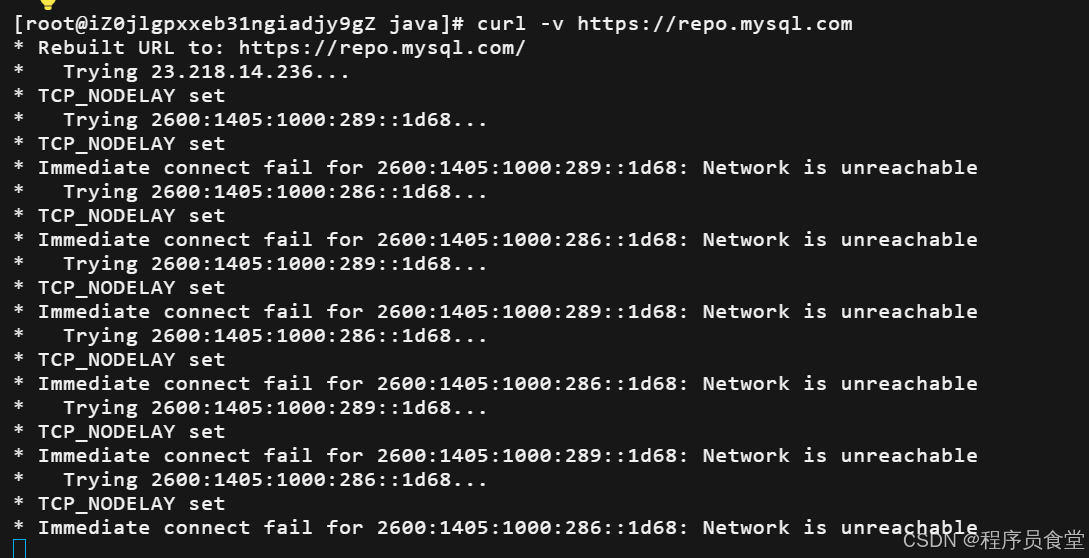
失败了
使用阿里云镜像源(最稳定)
直接替换为国内镜像,彻底解决超时问题:
清理之前失败的安装
bash
yum remove -y mysql80-community-release-el7-7.noarch

rm -rf /etc/yum.repos.d/mysql-community*
配置阿里云 MySQL 8.0 源
bash
cat > /etc/yum.repos.d/mysql-community.repo << EOF
[mysql80-community]
name=MySQL 8.0 Community Server
baseurl=https://mirrors.aliyun.com/mysql/yum/mysql80-community/el/7/x86_64/
enabled=1
gpgcheck=1
gpgkey=https://mirrors.aliyun.com/mysql/RPM-GPG-KEY-mysql-2022
EOF
导入 GPG 密钥并刷新缓存
bash
rpm --import https://mirrors.aliyun.com/mysql/RPM-GPG-KEY-mysql-2022

yum clean all && yum makecache