JDBC概念
JDBC:Java Database Connectivity,意为Java数据库连接。
JDBC是Java提供的一组独立于任何数据库管理系统的API。
Java提供接口规范,由各个数据库厂商提供接口的实现,厂商提供的实现类封装成jar文件,也就是我们俗称的数据库驱动jar包。
学习JDBC,充分体现了面向接口编程的好处,程序员只关心标准和规范,而无需关注实现过程。
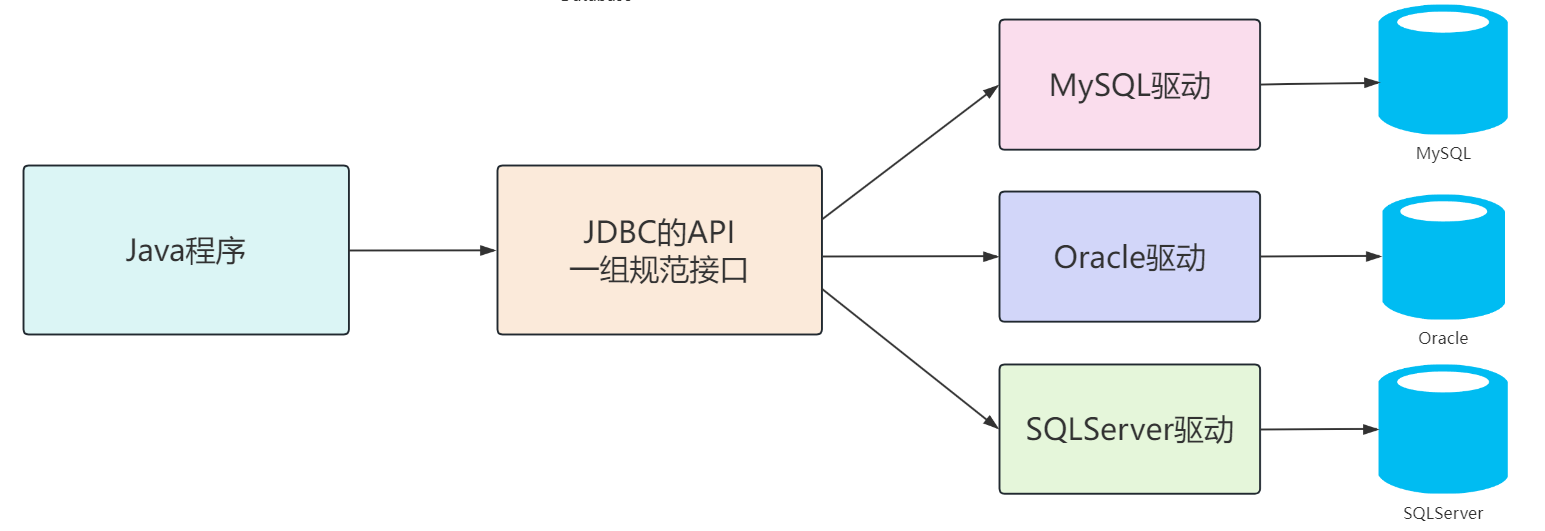
JDBC的核心组成
接口规范:
为了项目代码的可移植性,可维护性,SUN公司从最初就制定了Java程序连接各种数据库的统一接口规范。这样的话,不管是连接哪一种DBMS软件,Java代码可以保持一致性。
接口存储在java.sql基础接口和javax.sql扩展接口包下。
实现规范:
因为各个数据库厂商的DBMS软件各有不同,那么各自的内部如何通过SQL实现增、删、改、查等操作管理数据,只有这个数据库厂商自己更清楚,因此把接口规范的实现交给各个数据库厂商自己实现。
厂商将实现内容和过程封装成jar文件,我们程序员只需要将jar文件引入到项目中集成即可,就可以开发调用实现过程操作数据库了。
快速入门
SQL
sql
CREATE DATABASE atguigu;

use atguigu;

create table t_emp
(
    emp_id     int auto_increment comment '员工编号' primary key,
    emp_name   varchar(100)  not null comment '员工姓名',
    emp_salary double(10, 5) not null comment '员工薪资',
    emp_age    int           not null comment '员工年龄'
);

insert into t_emp (emp_name,emp_salary,emp_age)
values  ('andy', 777.77, 32),
        ('大风哥', 666.66, 41),
        ('康师傅',111, 23),
        ('Gavin',123, 26),
        ('小鱼儿', 123, 28);
Java
java
public class JDBCQuick {
    public static void main(String[] args) throws Exception {
        //1.注册驱动
//        Class.forName("com.mysql.cj.jdbc.Driver");
//        DriverManager.registerDriver(new Driver());

        //2.获取连接对象
        String url = "jdbc:mysql:///atguigu";
        String username = "root";
        String password = "atguigu";
        Connection connection = DriverManager.getConnection(url, username, password);

        //3.获取执行SQL语句的对象
        Statement statement = connection.createStatement();


        //4.编写SQL语句,并执行,接受返回的结果集
        String sql = "SELECT emp_id,emp_name,emp_salary,emp_age FROM t_emp";
        ResultSet resultSet = statement.executeQuery(sql);

        //5.处理结果:遍历resultSet结果集
        while(resultSet.next()){
            int empId = resultSet.getInt("emp_id");
            String empName = resultSet.getString("emp_name");
            double empSalary = resultSet.getDouble("emp_salary");
            int empAge = resultSet.getInt("emp_age");
            System.out.println(empId+"\t"+empName+"\t"+empSalary+"\t"+empAge);
        }

        //6.释放资源(先开后关原则)
        resultSet.close();
        statement.close();
        connection.close();
    }
}-
注册驱动【依赖的驱动类,进行安装】
-
获取连接【Connection建立连接】
-
创建发送SQL语句对象【Connection创建发送SQL语句的Statement】
-
发送SQL语句,并获取返回结果【Statement 发送sql语句到数据库并且取得返回结果】
-
结果集解析【结果集解析,将查询结果解析出来】
-
资源关闭【释放ResultSet、Statement 、Connection】
核心API理解
注册驱动
java
Class.forName("com.mysql.cj.jdbc.Driver");通过类加载的方式加载驱动,加载驱动程序的目的是为了注册驱动程序,使得 JDBC API 能够识别并与特定的数据库进行交互。
Connection
Connection接口是JDBC API的接口,用于建立与数据库的通信通道。换而言之,Connection对象不为空,则代表一次数据库连接。
java
- URL:jdbc:mysql://localhost:3306/atguigu
    - jdbc:mysql://IP地址:端口号/数据库名称?参数键值对1&参数键值对2
Connection 接口提供了 commit 和 rollback 方法,用于提交事务和回滚事务。
在使用JDBC技术时,必须要先获取Connection对象,在使用完毕后,要释放资源,避免资源占用浪费及泄漏。
Statement
Statement接口是JDBC API的接口,Statement 接口用于执行 SQL 语句并与数据库进行交互。通过 Statement 对象,可以向数据库发送 SQL 语句并获取执行结果。
结果可以是一个或多个结果。
增删改:受影响行数单个结果。(0或大于0的数字)
查询:单行单列、多行多列、单行多列等结果。
但是Statement 接口在执行SQL语句时,会产生SQL注入攻击问题:
当使用 Statement 执行动态构建的 SQL 查询时,往往需要将查询条件与 SQL 语句拼接在一起,直接将参数和SQL语句一并生成,让SQL的查询条件始终为true得到结果。
java
//输入[abc' or '1'='1]

System.out.println("请输入员工姓名:");
Scanner scanner = new Scanner(System.in);
String name = scanner.nextLine();


String sql = "SELECT emp_id,emp_name,emp_salary,emp_age FROM t_emp WHERE emp_name ='"+name+"'";
ResultSet resultSet = statement.executeQuery(sql);
PreparedStatement
PreparedStatement是 Statement 接口的子接口,用于执行预编译的 SQL 查询
自动将输入的特殊字符进行转义成为普通字符,然后在最外面加上单引号
java
Connection connection = DriverManager.getConnection("jdbc:mysql:///atguigu", "root", "atguigu");

PreparedStatement preparedStatement = connection.prepareStatement("SELECT emp_id,emp_name,emp_salary,emp_age FROM t_emp WHERE emp_name = ?");

System.out.println("请输入员工姓名:");
Scanner scanner = new Scanner(System.in);
String name = scanner.nextLine();

preparedStatement.setString(1, name);//序号从1开始
ResultSet resultSet = preparedStatement.executeQuery();
sql
SELECT emp_id,emp_name,emp_salary,emp_age FROM t_emp
WHERE emp_name = 'abc' or '1' ='1'

SELECT emp_id,emp_name,emp_salary,emp_age FROM t_emp
WHERE emp_name = 'abc\' or \'1\'=\'1'
ResultSet
ResultSet是 JDBC API 中的一个接口,用于表示从数据库中执行查询语句所返回的结果集。
ResultSet可以使用 next() 方法将游标移动到结果集的下一行,逐行遍历数据库查询的结果,返回值为boolean类型,true代表有下一行结果,false则代表没有。
可以通过getXxx的方法获取单列的数据,该方法为重载方法,支持索引和列名进行获取。
基于PreparedStatement实现CRUD
查询单行单列
java
public void testQuerySingleRowAndCol() throws SQLException {
        //1.注册驱动 (可以省略)

        //2.获取连接
        Connection connection = DriverManager.getConnection("jdbc:mysql:///atguigu", "root", "atguigu");

        //3.预编译SQL语句得到PreparedStatement对象
        PreparedStatement preparedStatement = connection.prepareStatement("SELECT COUNT(*) as count FROM t_emp");

        //4.执行SQL语句,获取结果
        ResultSet resultSet = preparedStatement.executeQuery();

        //5.处理结果(如果自己明确一定只有一个结果,那么resultSet最少要做一次next的判断,才能拿到我们要的列的结果)
        if(resultSet.next()){
            int count = resultSet.getInt("count");
            System.out.println(count);
        }

        //6.释放资源
        resultSet.close();
        preparedStatement.close();
        connection.close();
    }
注:明确一定只有一个结果,那么resultSet最少要做一次next的判断,才能拿到我们要的列的结果
查询单行多列
java
public void testQuerySingleRow()throws Exception{
        //1.注册驱动

        //2.获取连接
        Connection connection = DriverManager.getConnection("jdbc:mysql:///atguigu", "root", "atguigu");

        //3.预编译SQL语句获得PreparedStatement对象
        PreparedStatement preparedStatement = connection.prepareStatement("SELECT emp_id,emp_name,emp_salary,emp_age FROM t_emp WHERE emp_id = ?");

        //4.为占位符赋值,然后执行,并接受结果
        preparedStatement.setInt(1,5);
        ResultSet resultSet = preparedStatement.executeQuery();

        //5.处理结果
        while(resultSet.next()){
            int empId = resultSet.getInt("emp_id");
            String empName = resultSet.getString("emp_name");
            double empSalary = resultSet.getDouble("emp_salary");
            int empAge = resultSet.getInt("emp_age");

            System.out.println(empId+"\t"+empName+"\t"+empSalary+"\t"+empAge);
        }

        //6.资源释放
        resultSet.close();
        preparedStatement.close();
        connection.close();
    }
查询多行多列
java
public void testQueryMoreRow()throws Exception{
        Connection connection = DriverManager.getConnection("jdbc:mysql:///atguigu", "root", "atguigu");

        PreparedStatement preparedStatement = connection.prepareStatement("SELECT emp_id,emp_name,emp_salary,emp_age FROM t_emp WHERE emp_age > ?");

        //为占位符赋值,执行SQL语句,接受结果
        preparedStatement.setInt(1, 25);
        ResultSet resultSet = preparedStatement.executeQuery();

        while(resultSet.next()){
            int empId = resultSet.getInt("emp_id");
            String empName = resultSet.getString("emp_name");
            double empSalary = resultSet.getDouble("emp_salary");
            int empAge = resultSet.getInt("emp_age");

            System.out.println(empId+"\t"+empName+"\t"+empSalary+"\t"+empAge);
        }

        resultSet.close();
        preparedStatement.close();
        connection.close();
    }
新增
java
public void testInsert() throws SQLException {
        Connection connection = DriverManager.getConnection("jdbc:mysql:///atguigu", "root", "atguigu");

        PreparedStatement preparedStatement = connection.prepareStatement("INSERT INTO t_emp(emp_name,emp_salary,emp_age) VALUES (?,?,?)");

        preparedStatement.setString(1, "rose");
        preparedStatement.setDouble(2,345.67);
        preparedStatement.setInt(3,28);

        int result = preparedStatement.executeUpdate();

        //根据受影响行数,做判断,得到成功或失败
        if(result > 0){
            System.out.println("成功!");
        }else{
            System.out.println("失败!");
        }

        preparedStatement.close();
        connection.close();

    }
修改
java
public void testUpdate() throws SQLException {
        Connection connection = DriverManager.getConnection("jdbc:mysql:///atguigu", "root", "atguigu");

        PreparedStatement preparedStatement = connection.prepareStatement("UPDATE t_emp SET emp_salary = ? WHERE emp_id = ?");

        preparedStatement.setDouble(1, 888.88);
        preparedStatement.setInt(2, 6);

        int result = preparedStatement.executeUpdate();

        if(result > 0){
            System.out.println("成功!");
        }else{
            System.out.println("失败!");
        }

        preparedStatement.close();
        connection.close();
    }
删除
java
public void testDelete() throws SQLException {
        Connection connection = DriverManager.getConnection("jdbc:mysql://localhost:3306/atguigu", "root", "atguigu");

        PreparedStatement preparedStatement = connection.prepareStatement("DELETE FROM t_emp WHERE emp_id = ?");

        preparedStatement.setDouble(1, 6);

        int result = preparedStatement.executeUpdate();

        if(result > 0){
            System.out.println("成功!");
        }else{
            System.out.println("失败!");
        }

        preparedStatement.close();
        connection.close();
    }
细节
1、资源管理:在使用JDBC的相关资源时,使用完毕后,要及时关闭这些资源以释放数据库服务器资源和避免内存泄漏是很重要的。
2、SQL语法QLSyntaxErrorException:SQL语句有错误,检查SQL语句;连接数据库的URL中,数据库名称编写错误
3、SQL参数SQLException:在使用预编译SQL语句时,如果有?占位符,要为每一个占位符赋值
4、SQL用户名或密码错误
4、通信异常CommunicationsException::在连接数据库的URL中,如果IP或端口写错了