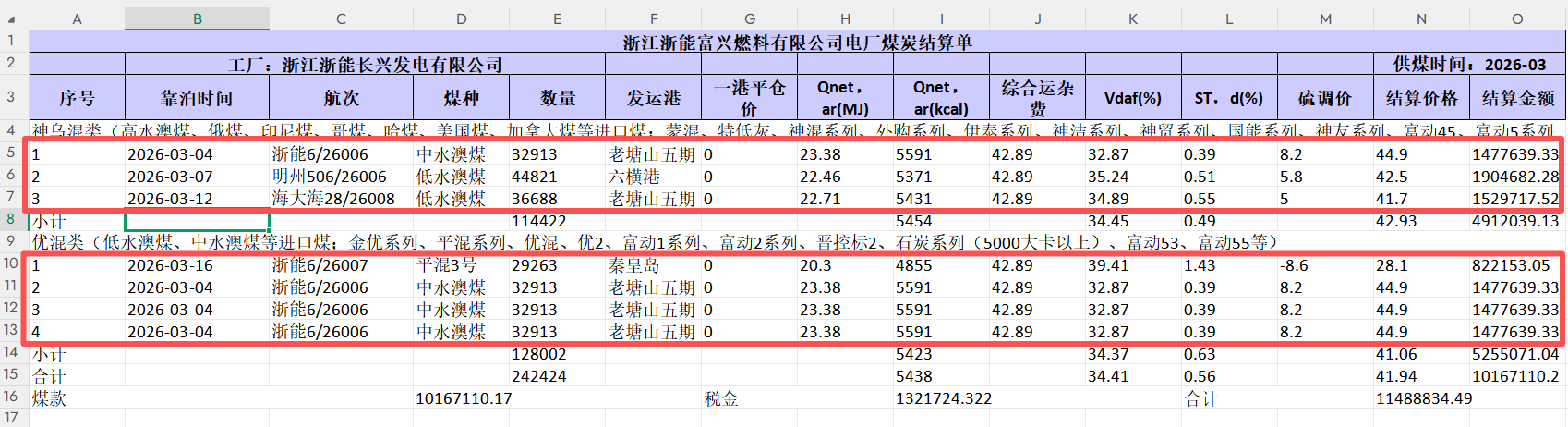
1. 导入excel
需要将红框中的数据解析、保存数据库
2. controller
java
    @Operation(summary = "电厂煤炭结算单:导入")
    @PostMapping("/importData")
    public ApiResult importData(@ModelAttribute SaleQuery query, @RequestParam("file") MultipartFile file) throws Exception {
        saleDetailService.importData(query,file);
        return ApiResult.success();
    }
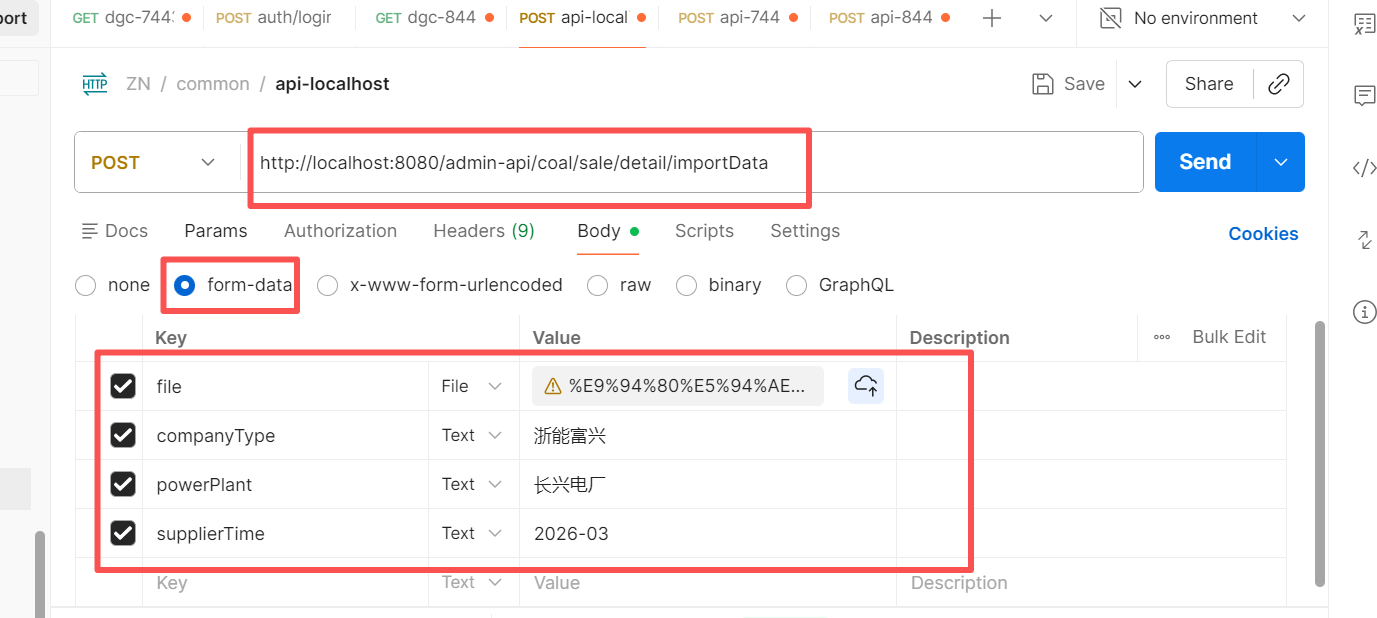
入参:
service
java
    /**
     * 1. 读取 excel
     * 2. 读取 工厂煤种类型数据-找到煤种的uuid;
     * 3. 读取 煤种下面的详情数据 List;
     * 4. 根据 uuid 更新 详情数据 List;
     */
    @Override
    public void importData(SaleQuery query, MultipartFile file) throws Exception {
        SaleDetailUploadUtil util = new SaleDetailUploadUtil(query, file);
        util.upload();
    }
3. 实现类 SaleDetailUploadUtil
java
import com.fhs.common.spring.SpringContextUtil;
import com.lenovo.ics.module.system.controller.iba.sale.entity.CoalSalePowerPlantDesc;
import com.lenovo.ics.module.system.controller.iba.sale.entity.CoalSaleSettlement;
import com.lenovo.ics.module.system.controller.iba.sale.mapper.CoalSalePowerPlantDescMapper;
import com.lenovo.ics.module.system.controller.iba.sale.mapper.CoalSaleSettlementMapper;
import com.lenovo.ics.module.system.controller.iba.sale.query.SaleQuery;
import com.lenovo.ics.module.system.util.ExcelReadUtil;
import org.jetbrains.annotations.NotNull;
import org.springframework.web.multipart.MultipartFile;

import java.util.*;
import java.util.stream.Collectors;

/**
 * @author leiming5
 * @description SaleDetailQueryUtil
 * @date 2026/5/9-18:04
 * Copyright 2026 Lenovo SSG West Region Service Solution Group
 */
public class SaleDetailUploadUtil {
    // import
    SaleQuery query;
    MultipartFile file;
    CoalSalePowerPlantDescMapper coalSalePowerPlantDescMapper;
    CoalSaleSettlementMapper coalSaleSettlementMapper;

    // local
    LinkedList<LinkedList<String>> linkedLists;

    public SaleDetailUploadUtil(SaleQuery query, MultipartFile file) {
        this.query = query;
        this.file = file;
        this.coalSalePowerPlantDescMapper = SpringContextUtil.getBeanByClass(CoalSalePowerPlantDescMapper.class);
        this.coalSaleSettlementMapper = SpringContextUtil.getBeanByClass(CoalSaleSettlementMapper.class);
    }

    public void upload() throws Exception {
        linkedLists = ExcelReadUtil.readExcel(file);
        List<CoalSalePowerPlantDesc> plantDescs = getCategoryDescFromDB();
        List<CoalSaleSettlement> settlements = getSettlementVOS(plantDescs);
        updateByUuid(settlements);
    }

    private List<CoalSalePowerPlantDesc> getCategoryDescFromDB() {
        List<String> descList = getCategoryDesc();
        List<CoalSalePowerPlantDesc> categoryList = coalSalePowerPlantDescMapper.selectByQueryAndDesc(query, descList);
        return categoryList;
    }

    /**
     * 获取 神乌混类、优混类、大混类 开头的数据
     */
    private List<String> getCategoryDesc() {
        List<String> list = new ArrayList<>();
        for (LinkedList<String> linkedList : linkedLists) {
            String value = linkedList.get(0);
            if (value.startsWith("神乌混类") || value.startsWith("优混类") || value.startsWith("大混类")) {
                list.add(value);
            }
        }
        return list;
    }

    /**
     * 1. 解析excel 数据为 desc-List<CoalSaleSettlement>
     * 2. 根据 desc 找到 uuid
     * 3. 根据 uuid 更新 settlement
     */
    private List<CoalSaleSettlement> getSettlementVOS(List<CoalSalePowerPlantDesc> plantDescs) {
        Map<String, List<CoalSaleSettlement>> descMap = readFromxx();
        Map<String, String> descUuidMap = plantDescs.stream().collect(Collectors.toMap(CoalSalePowerPlantDesc::getDescription, CoalSalePowerPlantDesc::getUuid));
        List<CoalSaleSettlement> list = setUuidToCategory(descUuidMap, descMap);
        return list;
    }

    /**
     * 1. 获取 神乌混类、优混类、大混类 开头的数据的 下标
     * 2. 获取对应的数据列 Map
     * 3. 转化数据
     */
    private Map<String, List<CoalSaleSettlement>> readFromxx() {
        List<Integer> indexList = getIndexList();
        Map<String, List<LinkedList<String>>> listMap = getDataMap(indexList);
        Map<String, List<CoalSaleSettlement>> dataMap = transferxx2(listMap);
        return dataMap;
    }

    private List<Integer> getIndexList() {
        List<Integer> list = new ArrayList<>();
        for (int i = 0; i < linkedLists.size(); i++) {
            String value = getCategoryByRowIndex(i);
            if (value.startsWith("神乌混类") || value.startsWith("优混类") || value.startsWith("大混类")) {
                list.add(i);
            }
        }
        return list;
    }

    private Map<String, List<LinkedList<String>>> getDataMap(List<Integer> categoryIndexList) {
        Map<String, List<LinkedList<String>>> listMap = new HashMap<>();
        int lastDataIndex = linkedLists.size() - 3;

        for (int i = 0; i < categoryIndexList.size(); i++) {
            List<LinkedList<String>> list = getSectorList(categoryIndexList, i, lastDataIndex);
            String value = getCategoryByRowIndex(categoryIndexList.get(i));
            listMap.put(value, list);
        }
        return listMap;
    }

    private String getCategoryByRowIndex(int i) {
        LinkedList<String> linkedList = linkedLists.get(i);
        String value = linkedList.get(0);
        return value;
    }

    private @NotNull List<LinkedList<String>> getSectorList(List<Integer> categoryIndexList, int i, int lastDataIndex) {
        int startIndex = categoryIndexList.get(i) + 1;
        int endIndex = lastDataIndex;
        if (i != categoryIndexList.size() - 1) {
            endIndex = categoryIndexList.get(i + 1) - 1;
        }
        return linkedLists.subList(startIndex, endIndex);
    }

    private Map<String, List<CoalSaleSettlement>> transferxx2(Map<String, List<LinkedList<String>>> listMap) {
        Map<String, List<CoalSaleSettlement>> map = new HashMap<>();
        for (Map.Entry<String, List<LinkedList<String>>> entry : listMap.entrySet()) {
            String key = entry.getKey();
            List<CoalSaleSettlement> list = CoalSaleSettlement.transferList(entry.getValue());
            map.put(key, list);
        }
        return map;
    }

    private List<CoalSaleSettlement> setUuidToCategory(Map<String, String> descUuidMap, Map<String, List<CoalSaleSettlement>> descMap) {
        List<CoalSaleSettlement> list = new ArrayList<>();
        for (Map.Entry<String, List<CoalSaleSettlement>> entry : descMap.entrySet()) {
            String key = entry.getKey();
            String uuid = descUuidMap.get(key);
            List<CoalSaleSettlement> coalSaleSettlements = entry.getValue();
            for (CoalSaleSettlement coalSaleSettlement : coalSaleSettlements) {
                coalSaleSettlement.setUuid(uuid);
                coalSaleSettlement.setCompanyType(query.getCompanyType());
                list.add(coalSaleSettlement);
            }
        }
        return list;
    }

    private void updateByUuid(List<CoalSaleSettlement> settlements) {
        coalSaleSettlementMapper.deleteByQuery(query);
        coalSaleSettlementMapper.insertBatch(settlements);
    }

}
4. 工具类 ExcelReadUtil
java
import com.google.common.collect.Lists;
import com.xxx.ics.framework.common.util.date.DateUtils;
import com.xxx.ics.framework.web.core.handler.BusinessException;
import org.apache.commons.lang3.StringUtils;
import org.apache.poi.openxml4j.util.ZipSecureFile;
import org.apache.poi.ss.usermodel.*;
import org.apache.poi.xssf.usermodel.XSSFRow;
import org.apache.poi.xssf.usermodel.XSSFSheet;
import org.apache.poi.xssf.usermodel.XSSFWorkbook;
import org.springframework.stereotype.Component;
import org.springframework.web.multipart.MultipartFile;

import java.io.ByteArrayInputStream;
import java.io.InputStream;
import java.math.BigDecimal;
import java.text.DecimalFormat;
import java.util.Date;
import java.util.LinkedList;
import java.util.Objects;

/**
 * @description: ExcelReadUtil
 * @author: leiming5
 * @date: 2021-02-02 16:45
 */
@Component
public class ExcelReadUtil {
    private static final DecimalFormat decimalFormat = new DecimalFormat("####################.######"); // 整数20位, 小数11位

    /**
     * 读取 Excel,返回 LinkedList<LinkedList<String>>
     * 外层:行;内层:单元格字符串
     */
    public static LinkedList<LinkedList<String>> readExcel(MultipartFile file) throws Exception {
        LinkedList<LinkedList<String>> result = new LinkedList<>();
        InputStream inputStream = file.getInputStream();

        // 自动识别 xls / xlsx
        Workbook workbook = WorkbookFactory.create(inputStream);
        // 读取第一个 sheet
        Sheet sheet = workbook.getSheetAt(0);

        if (sheet == null) {
            workbook.close();
            inputStream.close();
            return result;
        }

        // 遍历行(跳过表头可自己改)
        for (int rowIndex = 0; rowIndex <= sheet.getLastRowNum(); rowIndex++) {
            Row row = sheet.getRow(rowIndex);
            if (row == null) continue;

            LinkedList<String> rowData = new LinkedList<>();
            // 遍历单元格
            for (int colIndex = 0; colIndex < row.getLastCellNum(); colIndex++) {
                Cell cell = row.getCell(colIndex);
                // 统一转字符串(支持数字、日期、布尔、空值)
                String cellValue = getCellValue(cell);
                rowData.add(cellValue);
            }
            result.add(rowData);
        }

        // 关闭流
        workbook.close();
        inputStream.close();

        return result;
    }


    private void getValueFromCell(LinkedList<String> list, Cell cell) {
        Object object = getCell(cell);

        String item;
        if (object instanceof Double) {
            item = new BigDecimal(String.valueOf(object)).stripTrailingZeros().toPlainString();
        } else if (object instanceof String) {
            item = String.valueOf(object).trim();
        } else {
            cell.setCellType(CellType.STRING);
            item = cell.getStringCellValue();
            if (item != null) {
                item = item.trim();
            }
        }

        list.add(item);
    }
    private static String getCellValue(Cell cell) {
        Object object = getCell(cell);

        String item;
        if (object instanceof Double) {
            item = new BigDecimal(String.valueOf(object)).stripTrailingZeros().toPlainString();
        } else if (object instanceof String) {
            item = String.valueOf(object).trim();
        } else {
            cell.setCellType(CellType.STRING);
            item = cell.getStringCellValue();
            if (item != null) {
                item = item.trim();
            }
        }

        return item;
    }
    /**
     * 读取单元格的值(Object)
     *
     * <br> http://poi.apache.org/components/spreadsheet/quick-guide.html
     */
    public static Object getCell(Cell cell) {
        if (cell == null) {
            return null;
        }

        Object obj = null;
        switch (cell.getCellType()) {
            case STRING:
                obj = excelTrim(cell.getRichStringCellValue().getString());
                break;
            case NUMERIC:
                obj = getNumeric(cell);
                break;
            case BOOLEAN:
                obj = cell.getBooleanCellValue();
                break;
            case FORMULA:
                //公式的取公式的值
                try {
                    FormulaEvaluator evaluator = cell.getSheet().getWorkbook().getCreationHelper().createFormulaEvaluator();
                    CellValue cellValue = evaluator.evaluate(cell);
                    switch (cellValue.getCellType()) {
                        case BOOLEAN:
                            obj = cell.getBooleanCellValue();
                            break;
                        case NUMERIC:
                            obj = getNumeric(cell);
                            break;
                        case STRING:
                            obj = excelTrim(cell.getStringCellValue());
                            break;
                        case BLANK:
                        case ERROR:
                        default:
                            obj = null;
                    }
                } catch (Exception e) {
                    obj = cell.getCellFormula();
                }
                break;
            default:
                obj = null;
        }

        return obj;
    }

    private static Object getNumeric(Cell cell) {
        Object obj;
        if (DateUtil.isCellDateFormatted(cell)) {
            obj = cell.getDateCellValue();

            // 20190312
            if (obj != null) {
                Date date = (Date) obj;
                obj = DateUtils.toString(date, DateUtils.yyyMMMdd);
            }

        } else {
            // 20190715 解决Excel中输入1 --> 读取到1.0的问题
            obj = decimalFormat.format(cell.getNumericCellValue());
        }
        return obj;
    }

    /**
     * Excel中的空格是160, 仅仅用Java的String的trim方法无法去除空格, 因此编写此方法
     *
     * @see String#trim()
     */
    public static String excelTrim(String str) {
        if (str == null) return null;

        char[] value = str.toCharArray();
        int len = value.length;
        int st = 0;
        char[] val = value;    /* avoid getfield opcode */

        while ((st < len) && (val[st] <= ' ' || val[st] == (char) 160)) {
            st++;
        }
        while ((st < len) && (val[len - 1] <= ' ' || val[len - 1] == (char) 160)) {
            len--;
        }

        // 20190703 由于在数据校验的时候, 每个非空校验都要做null和""的判断, 麻烦, 此处将空白单元格直接处理为null返回
        String result = ((st > 0) || (len < value.length)) ? str.substring(st, len) : str;
        return "".equals(result) ? null : result;
    }

    /**
     * xlsx版本
     *
     * @param bytes    要读取Excel的文件流
     * @param startRow 从那一行开始读
     * @author dxl
     */
    public LinkedList<LinkedList<String>> getExcelXlsx(byte[] bytes, int startRow) throws Exception {

        if (bytes == null || bytes.length == 0) {
            throw new BusinessException("Excel file can not be empty!");
        }
        //最后返回数据的集合
        LinkedList<LinkedList<String>> flagList = Lists.newLinkedList();

        // 延迟解析比率,excel过大会报错(Zip bomb detected! The file would exceed the max. ratio of compressed file size to the size of the expanded data.)
        ZipSecureFile.setMinInflateRatio(-1.0d);
        //获取Excel工作表
        XSSFWorkbook workbook = new XSSFWorkbook(new ByteArrayInputStream(bytes));

        //获取第一个工作表
        XSSFSheet sheetAt = workbook.getSheetAt(0);

        //拿到工作表中的索引循环
        for (int i = startRow; i <= sheetAt.getLastRowNum(); i++) {
            //拿到每一行
            XSSFRow row = sheetAt.getRow(i);
            if (row != null) {

                //创建封装行数据 集合 下面cell 循环一次那么就有一行数据
                LinkedList<String> list = new LinkedList<>();

                //每一个单元格
                for (int j = 0; j < row.getLastCellNum(); j++) {
                    Cell cell = row.getCell(j, Row.MissingCellPolicy.RETURN_NULL_AND_BLANK);
                    if (Objects.isNull(cell)) {
                        list.add("");
                        continue;
                    }

                    getValueFromCell(list, cell);
                }
                flagList.add(list);
            }
        }

        return emptyListFilter(flagList);
    }

    /**
     * 清除空行(所有cell 都是null或"")
     *
     * @param flagList 源
     * @return 没有空行的结果
     * @author leiming5
     */
    private LinkedList<LinkedList<String>> emptyListFilter(LinkedList<LinkedList<String>> flagList) {

        LinkedList<LinkedList<String>> result = new LinkedList<>();
        for (LinkedList<String> strings : flagList) {

            StringBuilder sb = new StringBuilder();
            for (String item : strings) {
                sb.append(item);
            }

            if (StringUtils.isBlank(sb.toString())) {
                continue;
            }
            result.add(strings);
        }

        return result;
    }
}