文章目录
-
- 1、EasyPOI简介
- 2、注解方式导出
-
- [2.1. 修改实体类,添加注解](#2.1. 修改实体类,添加注解)
- [2.2. UserController添加方法](#2.2. UserController添加方法)
- [2.3. UserService实现方法](#2.3. UserService实现方法)
- [2.4. 实现类](#2.4. 实现类)
- 3、注解方式导入
-
- 3.1.修改实体类,表明哪些需要导入
- [3.2. UserController添加方法](#3.2. UserController添加方法)
- [3.3. UserService实现方法](#3.3. UserService实现方法)
- [3.4. 实现类](#3.4. 实现类)
- 4、模板方式导出数据
- 5、导出CSV
1、EasyPOI简介
上几篇文章都介绍poi在导出导出excel、导出csv、word的功能,用起来感觉代码有点过于繁琐,目前开发市场上流行一种简化POI开发的类库:easyPOI。从名称上就能发现就是为了简化开发。
Excel的快速导入导出,Excel模板导出,Word模板导出,可以仅仅5行代码就可以完成Excel的导入导出,修改导出格式简单粗暴,快速有效。
Easypoi需要熟悉Poi的操作,它是为简化poi的开发,使用模板更便捷。
为谁而开发?
Easypoi的目标不是替代poi,而是让一个不懂导入导出的快速使用poi完成Excel和word的各种操作,而不是看很多api才可以完成这样工作。
再次强调一下easyPOI完全替代不了POI!
需要的依赖
把项目中的poi的依赖去除
xml
    <dependency>
        <groupId>cn.afterturn</groupId>
        <artifactId>easypoi-base</artifactId>
        <version>4.1.0</version>
    </dependency>
    <dependency>
        <groupId>cn.afterturn</groupId>
        <artifactId>easypoi-web</artifactId>
        <version>4.1.0</version>
    </dependency>
    <dependency>
        <groupId>cn.afterturn</groupId>
        <artifactId>easypoi-annotation</artifactId>
        <version>4.1.0</version>
    </dependency>
或SpringBoot
xml
		<dependency>
			<groupId>cn.afterturn</groupId>
			<artifactId>easypoi-spring-boot-starter</artifactId>
			<version>4.4.0</version>
		</dependency>
2、注解方式导出
2.1. 修改实体类,添加注解
其中主要用到的注解是@Excel注解,更详细的说明请看这里 (按住ctrl点击)
此处注意必须要有空构造函数,否则会报错"对象创建错误"
java
package com.tigerhhzz.pojo;
import cn.afterturn.easypoi.excel.annotation.Excel;
import cn.afterturn.easypoi.excel.annotation.ExcelCollection;
import com.baomidou.mybatisplus.annotation.IdType;
import com.baomidou.mybatisplus.annotation.TableField;
import com.baomidou.mybatisplus.annotation.TableId;
import com.baomidou.mybatisplus.annotation.TableName;
import com.fasterxml.jackson.annotation.JsonFormat;
import lombok.Data;

import java.util.Date;
import java.util.List;

/**
 * 员工
 * @author Administrator
 */
@Data
@TableName(value="tb_user")
public class User {

    @TableId(value = "id",type = IdType.AUTO)
    @Excel(name = "编号", orderNum = "0", width = 5)
    private Long id;         //主键
    @Excel(name = "员工名", orderNum = "1", width = 15,isImportField="true")
    private String userName; //员工名
    @Excel(name = "手机号", orderNum = "2", width = 15,isImportField="true")
    private String phone;    //手机号
    @Excel(name = "省份名", orderNum = "3", width = 15,isImportField="true")
    private String province; //省份名
    @Excel(name = "城市名", orderNum = "4", width = 15,isImportField="true")
    private String city;     //城市名
    @Excel(name = "工资", orderNum = "5", width = 10,type = 10,isImportField="true") //type=10表示会导出数字
    private Integer salary;   // 工资
    @JsonFormat(pattern="yyyy-MM-dd")
    @Excel(name = "入职日期",  format = "yyyy-MM-dd",orderNum = "6", width = 15,isImportField="true")
    private Date hireDate; // 入职日期
    private String deptId;   //部门id
    @Excel(name = "出生日期",  format = "yyyy-MM-dd",orderNum = "7", width = 15,isImportField="true")
    private Date birthday; //出生日期
    @Excel(name = "照片", orderNum = "10",width = 15,type = 2,isImportField="true",savePath = "F:\\idea-project\\easypoi-demo\\src\\main\\resources\\static\\user_photos")
    private String photo;    //一寸照片
    @Excel(name = "现在居住地址", orderNum = "9", width = 30,isImportField="true")
    private String address;  //现在居住地址

    //映射一对多关系
    @TableField(exist = false) //非数据库字段
    @ExcelCollection(name = "资源列表", orderNum = "5")
    private List<Resource> resourceList; //办公用品

    public List<Resource> getResources() {
        return resourceList;
    }

    public void setResources(List<Resource> resources) {
        this.resourceList = resources;
    }

}
2.2. UserController添加方法
java
    @GetMapping(value = "/downLoadUserInfoWithEastPOI",name = "导出用户详细信息-使用EasyPoi")
    public void downLoadUserInfoWithEastPOI(Long id,HttpServletRequest request,HttpServletResponse response) throws Exception{
        userService.downLoadUserInfoWithEastPOI(id,request,response);
    }
2.3. UserService实现方法
java
void downLoadXlsxWithEayPoi(HttpServletResponse response) throws Exception;2.4. 实现类
java
 @Override
    public void downLoadUserInfoWithEastPOI(Long id, HttpServletRequest request, HttpServletResponse response) throws Exception {
        //        获取模板的路径
        File rootPath = new File(ResourceUtils.getURL("classpath:").getPath()); //SpringBoot项目获取根目录的方式
        File templatePath = new File(rootPath.getAbsolutePath(),"/excel_template/userInfoEasyPoi.xlsx");
        // 读取模板文件
        TemplateExportParams params = new TemplateExportParams(templatePath.getPath(),true);
        //        查询用户,转成map
        User user = userMapper.selectById(id);
        Map<String, Object> map = EntityUtils.entityToMap(user);
        ImageEntity userImage = new ImageEntity();

        userImage.setType(ImageEntity.URL); // 设置类型为URL

//        userImage.setHeight(64); //测试发现 这里设置了长度和宽度在合并后的单元格中没有作用
//        userImage.setWidth(380);
        userImage.setRowspan(5);//向下合并三行
        userImage.setColspan(3);//向右合并两列
//        userImage.setData(ImageConverter.jpgToBytes(rootPath+user.getPhoto()));
        userImage.setUrl(user.getPhoto());
        map.put("photo", userImage);
        Workbook workbook = ExcelExportUtil.exportExcel(params, map);

        //            导出的文件名称
        String filename="用户详细信息数据.xlsx";
        //            设置文件的打开方式和mime类型
        ServletOutputStream outputStream = response.getOutputStream();
        response.setHeader( "Content-Disposition", "attachment;filename="  + new String(filename.getBytes(),"ISO8859-1"));
        response.setContentType("application/vnd.openxmlformats-officedocument.spreadsheetml.sheet");
        workbook.write(outputStream);
    }
3、注解方式导入
有导出就应该有导入,Excel导入时需要的参数类ImportParams常用设置说明
- 读取指定的sheet 比如要读取上传得第二个sheet 那么需要把startSheetIndex = 1 就可以了
- 读取几个sheet 比如读取前2个sheet,那么 sheetNum=2 就可以了
- 读取第二个到第五个sheet 设置 startSheetIndex = 1 然后sheetNum = 4
- 读取全部的sheet sheetNum 设置大点就可以了
- 保存Excel 设置 needVerfiy = true,默认保存的路径为upload/excelUpload/Test/yyyyMMddHHmss 保存名称上传时间五位随机数 如果自定义路径 修改下saveUrl 就可以了,同时saveUrl也是图片上传时候的保存的路径
- 判断一个Excel是不是合法的Excel importFields 设置下值,就是表示表头必须至少包含的字段,如果缺一个就是不合法的excel,不导入
- 图片的导入
有图片的导出就有图片的导入,导入的配置和导出是一样的,但是需要设置保存路径 1.设置保存路径saveUrl 默认为"upload/excelUpload" 可以手动修改 ImportParams 修改下就可以了
3.1.修改实体类,表明哪些需要导入
java
package com.tigerhhzz.pojo;
import cn.afterturn.easypoi.excel.annotation.Excel;
import cn.afterturn.easypoi.excel.annotation.ExcelCollection;
import com.baomidou.mybatisplus.annotation.IdType;
import com.baomidou.mybatisplus.annotation.TableField;
import com.baomidou.mybatisplus.annotation.TableId;
import com.baomidou.mybatisplus.annotation.TableName;
import com.fasterxml.jackson.annotation.JsonFormat;
import lombok.Data;

import java.util.Date;
import java.util.List;

/**
 * 员工
 * @author Administrator
 */
@Data
@TableName(value="tb_user")
public class User {

    @TableId(value = "id",type = IdType.AUTO)
    @Excel(name = "编号", orderNum = "0", width = 5)
    private Long id;         //主键
    @Excel(name = "员工名", orderNum = "1", width = 15,isImportField="true")
    private String userName; //员工名
    @Excel(name = "手机号", orderNum = "2", width = 15,isImportField="true")
    private String phone;    //手机号
    @Excel(name = "省份名", orderNum = "3", width = 15,isImportField="true")
    private String province; //省份名
    @Excel(name = "城市名", orderNum = "4", width = 15,isImportField="true")
    private String city;     //城市名
    @Excel(name = "工资", orderNum = "5", width = 10,type = 10,isImportField="true") //type=10表示会导出数字
    private Integer salary;   // 工资
    @JsonFormat(pattern="yyyy-MM-dd")
    @Excel(name = "入职日期",  format = "yyyy-MM-dd",orderNum = "6", width = 15,isImportField="true")
    private Date hireDate; // 入职日期
    private String deptId;   //部门id
    @Excel(name = "出生日期",  format = "yyyy-MM-dd",orderNum = "7", width = 15,isImportField="true")
    private Date birthday; //出生日期
    @Excel(name = "照片", orderNum = "10",width = 15,type = 2,isImportField="true",savePath = "F:\\idea-project\\easypoi-demo\\src\\main\\resources\\static\\user_photos")
    private String photo;    //一寸照片
    @Excel(name = "现在居住地址", orderNum = "9", width = 30,isImportField="true")
    private String address;  //现在居住地址

    //映射一对多关系
    @TableField(exist = false) //非数据库字段
    @ExcelCollection(name = "资源列表", orderNum = "5")
    private List<Resource> resourceList; //办公用品

    public List<Resource> getResources() {
        return resourceList;
    }

    public void setResources(List<Resource> resources) {
        this.resourceList = resources;
    }

}
3.2. UserController添加方法
java
    @PostMapping(value = "/uploadExcelbyEasyPoi", name = "上传用户数据byEasyPoi")
    public void uploadExcelbyEasyPoi(MultipartFile file)  throws Exception{
        userService.uploadExcelbyEasyPoi(file);
    }
3.3. UserService实现方法
java
void uploadExcelbyEasyPoi(MultipartFile file) throws Exception;3.4. 实现类
java
 @Override
    public void uploadExcelbyEasyPoi(MultipartFile file) throws Exception {
        ImportParams importParams = new ImportParams();
        importParams.setTitleRows(1); //有多少行的标题
        importParams.setHeadRows(2);//有多少行的头
        List<User> userList = ExcelImportUtil.importExcel(file.getInputStream(),User.class,importParams);

        System.out.println(userList);
        for (User user : userList) {
            user.setId(null);
            userMapper.insert(user);
        }
    }
4、模板方式导出数据
模板是处理复杂Excel的简单方法,复杂的Excel样式,可以用Excel直接编辑,完美的避开了代码编写样式的雷区,同时指令的支持,也提了模板的有效性。
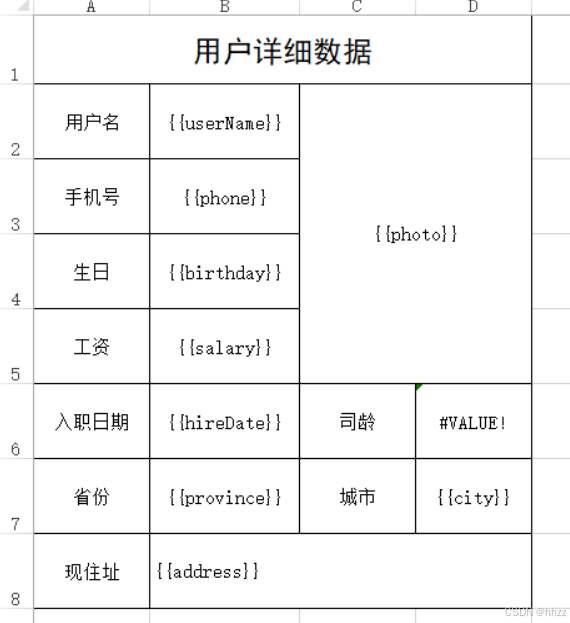
采用的写法是{{}}代表表达式,然后根据表达式里面的数据取值
- 关于样式问题
easypoi不会改变excel原有的样式
-
需求:导出用户的详细信息,这个功能我们做过,今天我们使用easyPOI的方式再做一次
-
制作模板
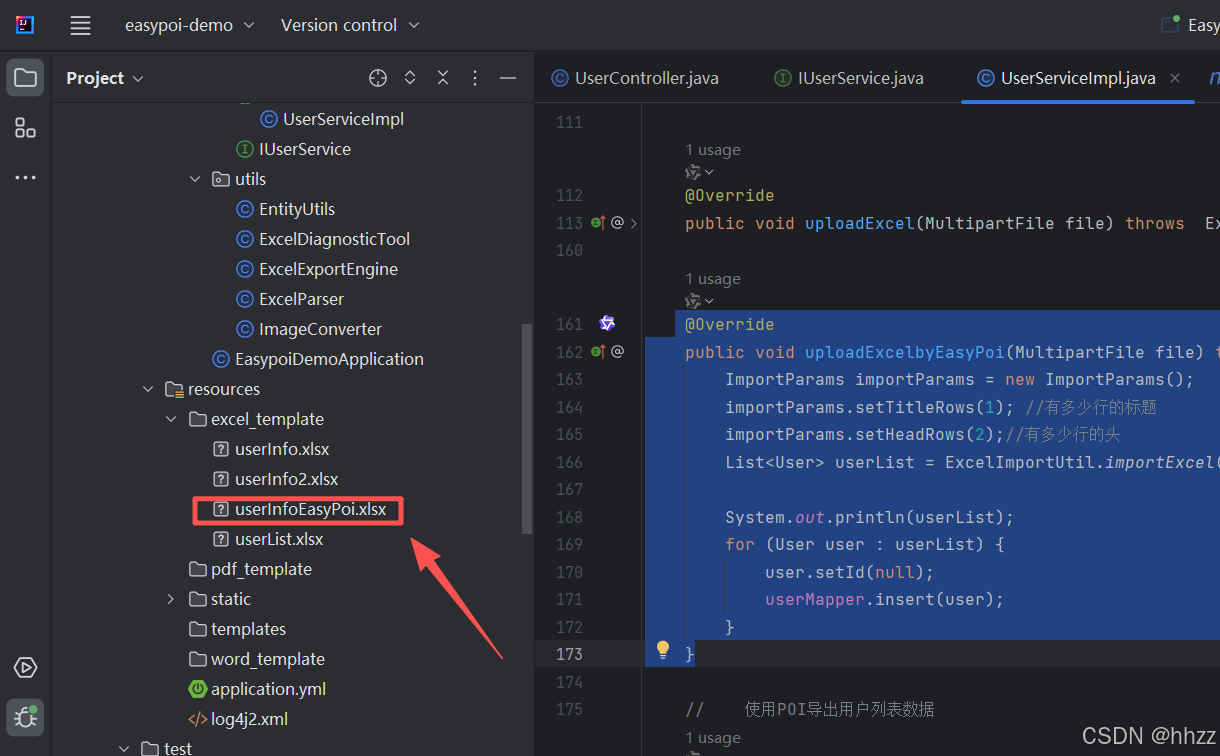
这个模板和我们做的userInfo2.xlsx模板一样,只是这个变量使用了{{}}包起来了
- 第二步:放到项目中
- 第三步:改写UserController中导出用户信息的方法
java
    @GetMapping(value = "/downLoadUserInfoWithEastPOI",name = "导出用户详细信息-使用EasyPoi")
    public void downLoadUserInfoWithEastPOI(Long id,HttpServletRequest request,HttpServletResponse response) throws Exception{
        userService.downLoadUserInfoWithEastPOI(id,request,response);
}- 第四步:完成UserService中的方法
java
void downLoadUserInfoWithEastPOI(Long id, HttpServletRequest request, HttpServletResponse response) throws Exception;- 第五步:实现类方法
java
 @Override
    public void downLoadUserInfoWithEastPOI(Long id, HttpServletRequest request, HttpServletResponse response) throws Exception {
        //        获取模板的路径
        File rootPath = new File(ResourceUtils.getURL("classpath:").getPath()); //SpringBoot项目获取根目录的方式
        File templatePath = new File(rootPath.getAbsolutePath(),"/excel_template/userInfoEasyPoi.xlsx");
        // 读取模板文件
        TemplateExportParams params = new TemplateExportParams(templatePath.getPath(),true);
        //        查询用户,转成map
        User user = userMapper.selectById(id);
        Map<String, Object> map = EntityUtils.entityToMap(user);
        ImageEntity userImage = new ImageEntity();

        userImage.setType(ImageEntity.URL); // 设置类型为URL

//        userImage.setHeight(64); //测试发现 这里设置了长度和宽度在合并后的单元格中没有作用
//        userImage.setWidth(380);
        userImage.setRowspan(5);//向下合并三行
        userImage.setColspan(3);//向右合并两列
//        userImage.setData(ImageConverter.jpgToBytes(rootPath+user.getPhoto()));
        userImage.setUrl(user.getPhoto());
        map.put("photo", userImage);
        Workbook workbook = ExcelExportUtil.exportExcel(params, map);

        //            导出的文件名称
        String filename="用户详细信息数据.xlsx";
        //            设置文件的打开方式和mime类型
        ServletOutputStream outputStream = response.getOutputStream();
        response.setHeader( "Content-Disposition", "attachment;filename="  + new String(filename.getBytes(),"ISO8859-1"));
        response.setContentType("application/vnd.openxmlformats-officedocument.spreadsheetml.sheet");
        workbook.write(outputStream);
    }
5、导出CSV
csv的导出基本上和excel的导出一致,大体参数也是一致的
CsvExportParams 的参数描述如下:
| 属性 | 类型 | 默认值 | 功能 |
|---|---|---|---|
| encoding | String | UTF8 | 文件编码 |
| spiltMark | String | , | 分隔符 |
| textMark | String | " | 字符串识别,可以去掉,需要前后一致 |
| titleRows | int | 0 | 表格头,忽略 |
| headRows | int | 1 | 标题 |
| exclusions | String\[\] | 0 | 忽略的字段 |
需求:改写之前使用OpenCSV导出csv文件
第一步:修改UserController方法
java
@GetMapping(value = "/downLoadCSV",name = "导出用户数据到CSV文件中")
public void downLoadCSV(HttpServletResponse response) throws Exception{
    //        userService.downLoadCSV(response);
    userService.downLoadCSVWithEasyPOI(response);
}
第二步:完成UserService方法
java
public void downLoadCSVWithEasyPOI(HttpServletResponse response) throws Exception {
        ServletOutputStream outputStream = response.getOutputStream();
//            文件名
        String filename="百万数据.csv";
//            设置两个头 一个是文件的打开方式 一个是mime类型
        response.setHeader( "Content-Disposition", "attachment;filename="  + new String(filename.getBytes(),"ISO8859-1"));
        response.setContentType("application/csv");
//            创建一个用来写入到csv文件中的writer
        CsvExportParams params = new CsvExportParams();
//        设置忽略的列
        params.setExclusions(new String[]{"照片"}); //这里写表头 中文
        List<User> list = userMapper.selectAll();
        CsvExportUtil.exportCsv(params, User.class, list, outputStream);
    }
说明:从上述的代码中你会发现,如果需要导出几百万数据时不可能全部加载到一个List中的,所以easyPOI的方式导出csv是支持不了太大的数据量的,如果导出几百万条数据还是得选择OpenCSV方式导出。

"人的一生会经历很多痛苦,但回头想想,都是传奇"。