文章目录
-
- 1、需求
- 2、导入依赖
- 3、模板指令
- 4、制作模板
- 5、代码实现
-
- 5.1、UserController
- 5.2、IUserService
- 5.3、UserServiceImpl
- 6、导出结果
在Java开发中,使用EasyPOI导出Word合同文档是一种高效且灵活的解决方案。通过模板驱动的方式,开发者可以轻松地将动态数据填充到预设的Word模板中,生成格式规范的合同文件 。这种方法特别适合需要批量生成标准化合同、协议或报告的场景。
1、需求
使用easyPOI方式导出合同word文档。
前几篇文章,我们注重讲了使用EasyPoi操作Excel文件的详细流程,使用Word模板和Excel模板用法基本一致,支持的标签也是一致的,仅仅**支持07版本的word**也是只能生成后缀是docx的文档,本文我们就拿docx做导出功能,
2、导入依赖
版本兼容性
确保使用EasyPOI 4.3.0及以上版本,旧版本可能不支持多图片循环导出等高级功能。同时注意Spring Boot版本与EasyPOI的兼容性:
xml
		<dependency>
			<groupId>cn.afterturn</groupId>
			<artifactId>easypoi-spring-boot-starter</artifactId>
			<version>4.4.0</version>
		</dependency>
3、模板指令
EasyPOI提供了丰富的模板指令,可以处理各种复杂的合同导出需求。掌握这些指令能让你的合同文档更加灵活和强大。
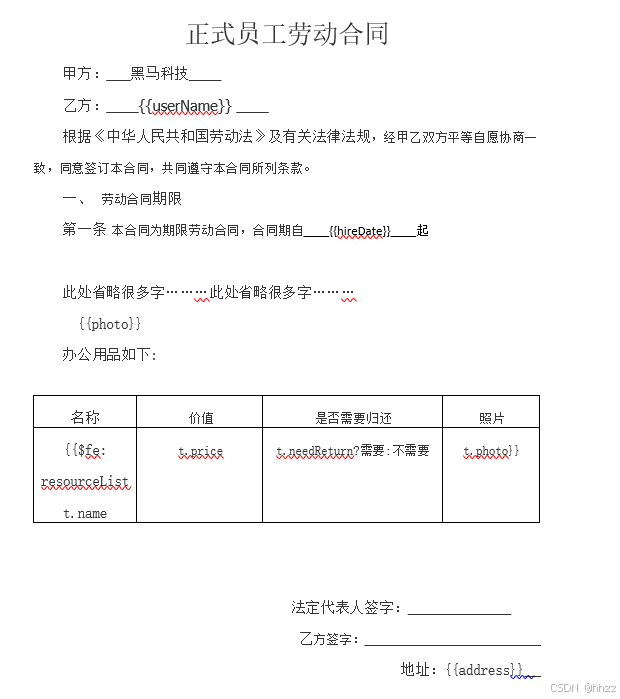
下面列举下EasyPoi支持的指令以及作用,最主要的就是各种fe的用法:
bash
三元运算 {{test ? obj:obj2}}
n: 表示 这个cell是数值类型 {{n:}}
le: 代表长度{{le:()}} 在if/else 运用{{le:() > 8 ? obj1 : obj2}}
fd: 格式化时间 {{fd:(obj;yyyy-MM-dd)}}
fn: 格式化数字 {{fn:(obj;###.00)}}
fe: 遍历数据,创建row
!fe: 遍历数据不创建row
$fe: 下移插入,把当前行,下面的行全部下移.size()行,然后插入
#fe: 横向遍历
v_fe: 横向遍历值
!if: 删除当前列 {{!if:(test)}}
单引号表示常量值 '' 比如'1' 那么输出的就是 1
&NULL& 空格
&INDEX& 表示循环中的序号,自动添加
]] 换行符 多行遍历导出
sum: 统计数据| 指令 | 功能描述 | 合同应用示例 |
|---|---|---|
| {{fe:resourceList }} | 遍历列表数据创建行 | 合同条款列表、附件清单 |
| {{fd:date;yyyy-MM-dd}} | 格式化日期 | 合同签署日期、生效日期 |
| {{fn:amount;.00}} | 格式化数字 | 合同金额、违约金计算 |
| {{if:condition}} | 条件判断显示/隐藏 | 可选条款、特殊约定 |
| {{}} | 换行符 | 多行地址、条款换行 |
对于复杂的合同表格,可以使用{{fe:tableData}}指令动态生成多行数据。例如在合同附件清单中,可以通过遍历List数据自动生成表格行,每行包含附件名称、编号、页数等信息。
4、制作模板
- 根据上述的指令要求,我们制作模板如下:
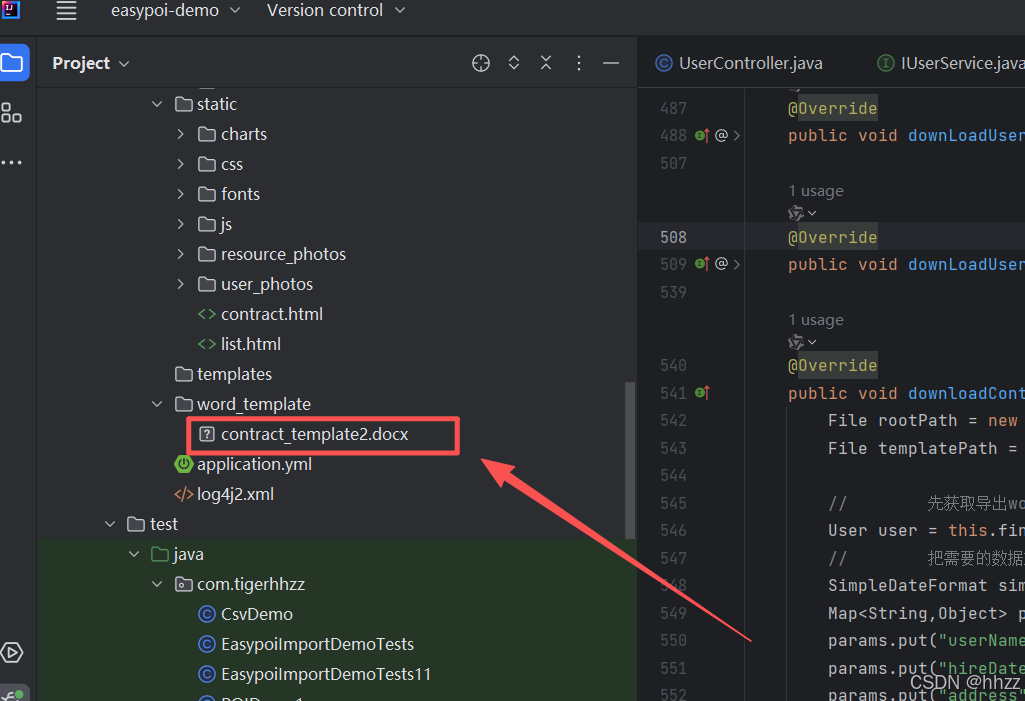
- 把制作好的模板放入到项目中
5、代码实现
5.1、UserController
修改原来的导出合同的方法:
java
    @GetMapping(value = "/downloadContract",name = "导出用户合同")
    public void downloadContract(Long id,HttpServletResponse response) throws Exception{
//        userService.downloadContract(id,response);
        userService.downloadContractWithEasyPOI(id,response);
    }
5.2、IUserService
java
void downloadContractWithEasyPOI(Long id, HttpServletResponse response) throws Exception;5.3、UserServiceImpl
java
    @Override
    public void downloadContractWithEasyPOI(Long id, HttpServletResponse response) throws Exception {
        File rootPath = new File(ResourceUtils.getURL("classpath:").getPath()); //SpringBoot项目获取根目录的方式
        File templatePath = new File(rootPath.getAbsolutePath(),"/word_template/contract_template2.docx");

        //        先获取导出word需要的数据
        User user = this.findById(id);
        //        把需要的数据放到map中,方便替换
        SimpleDateFormat simpleDateFormat = new SimpleDateFormat("yyyy-MM-dd");
        Map<String,Object> params = new HashMap<String,Object>();
        params.put("userName",user.getUserName());
        params.put("hireDate",simpleDateFormat.format(user.getHireDate()));
        params.put("address",user.getAddress());

        //        下面是表格中需要的数据
        List<Map> resourceList = new ArrayList<>();
        Map<String,Object> map = null;
        for (Resource resource : user.getResourceList()) {
            map = new HashMap<String,Object>();
            map.put("name",resource.getName());
            map.put("price",resource.getPrice());
            map.put("needReturn",resource.getNeedReturn());
            ImageEntity image = new ImageEntity();
            image.setHeight(64);
            image.setWidth(72);
            image.setUrl(rootPath.getPath()+"\\static"+resource.getPhoto());
            map.put("photo",image);
            resourceList.add(map);
        }
        //        把组建好的表格需要的数据放到大map中
        params.put("resourceList",resourceList);
        //        根据模板+数据 导出文档
        XWPFDocument xwpfDocument = WordExportUtil.exportWord07(templatePath.getPath(), params);
        String filename=user.getUserName()+"_合同.docx";
        //            设置文件的打开方式和mime类型
        ServletOutputStream outputStream = response.getOutputStream();
        response.setHeader( "Content-Disposition", "attachment;filename="  + new String(filename.getBytes(),"ISO8859-1"));
        response.setContentType("application/vnd.openxmlformats-officedocument.wordprocessingml.document");
        xwpfDocument.write(outputStream);
    }
其中findById方法代码如下:
java
    @Override
    public User findById(Long id) throws Exception {
        User user = userMapper.selectById(id);

        List<Resource> resources = resourceMapper.selectList(
                new QueryWrapper<Resource>().in("user_id", id));

        user.setResourceList(resources);

        return user;
    }
6、导出结果
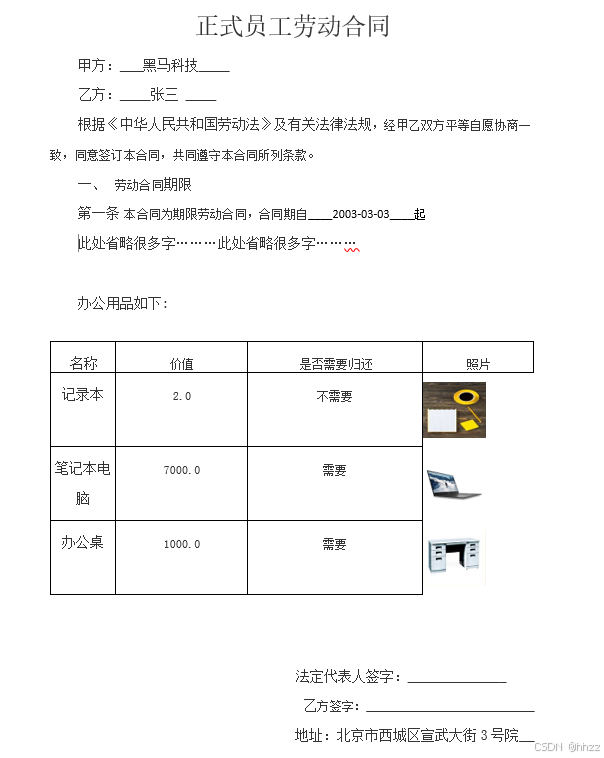
说明:
- 使用.docx格式:模板必须保存为.docx格式(Word 2007+),不支持旧的.doc格式;
- 占位符格式:严格使用{{变量名}}格式,前后不能有空格;
- 复杂表格处理:对于动态行表格,在模板中只需设计一行,EasyPOI会自动复制并填充数据;
- 图片导出:如果需要导出合同中的公司logo或签名图片,使用ImageEntity类进行配置。
"人的一生会经历很多痛苦,但回头想想,都是传奇"。