更多 C++ 文章见《修远之路(C++集萃)》专栏
JsonCpp 是一个基于 Tagged Union 实现的轻量级 C++ JSON 序列化/反序列化库,专注于易用性与可维护性。提供直观的 DOM 风格 API,支持注释保留,零外部依赖,MIT 许可证
| 能力 | 适用场景 | 不适用场景 |
|---|---|---|
| DOM 风格 API | 配置文件读写、RPC 数据交换、中小型 JSON 文档 | 流式处理超大 JSON(GB 级) |
| 注释保留 | 用户配置文件、需要人工审阅的 JSON | 机器间通信、性能敏感场景 |
| 类型安全 | 编译期类型检查、防御性编程 | 动态类型语言绑定 |
| 零拷贝优化 | 静态字符串字面量作为 key | 频繁修改的动态字符串 |
| 内存安全 | 敏感数据处理(密码、密钥) | 普通应用(性能优先) |
框架与执行流程
整体框架:
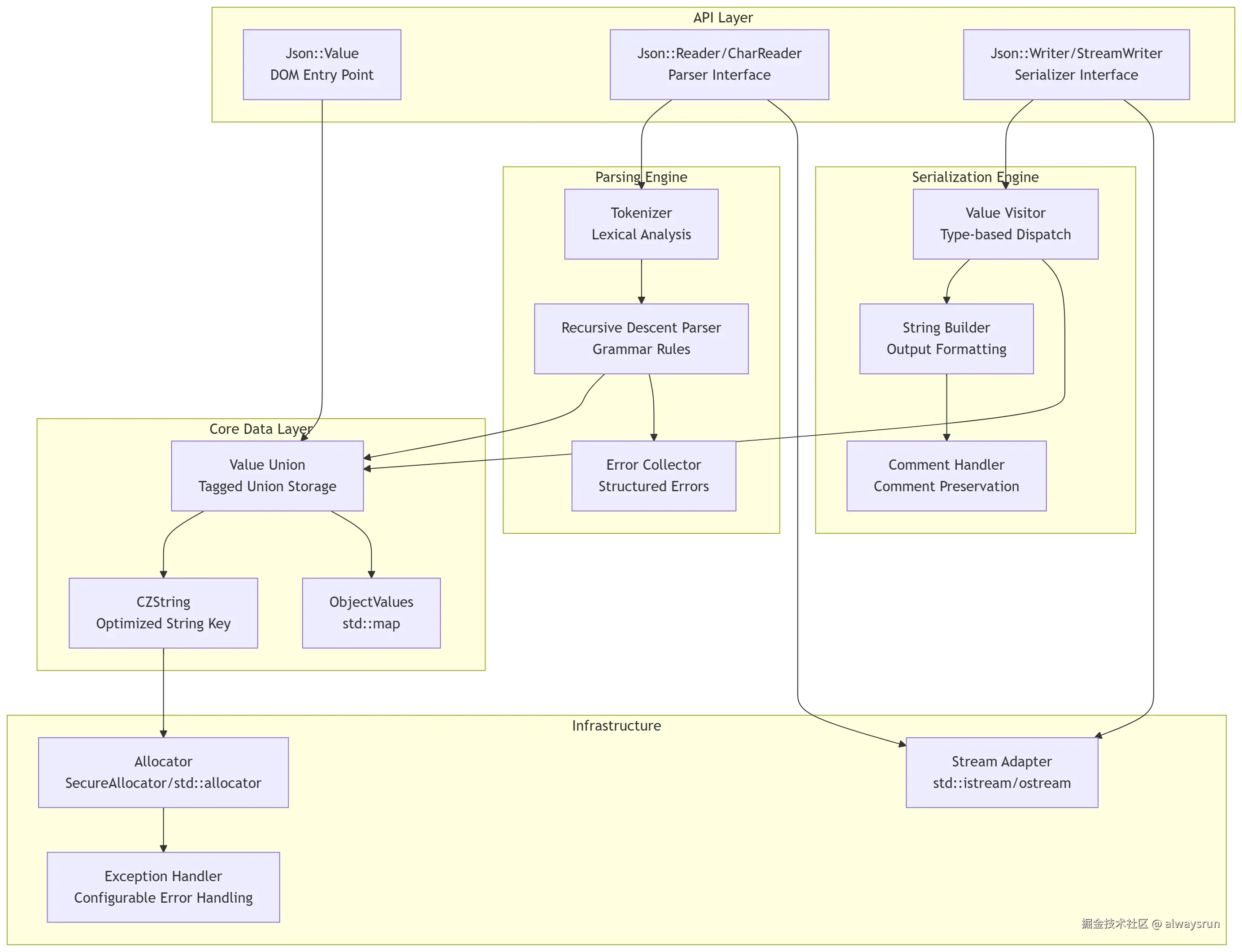
核心执行时序(解析流程):
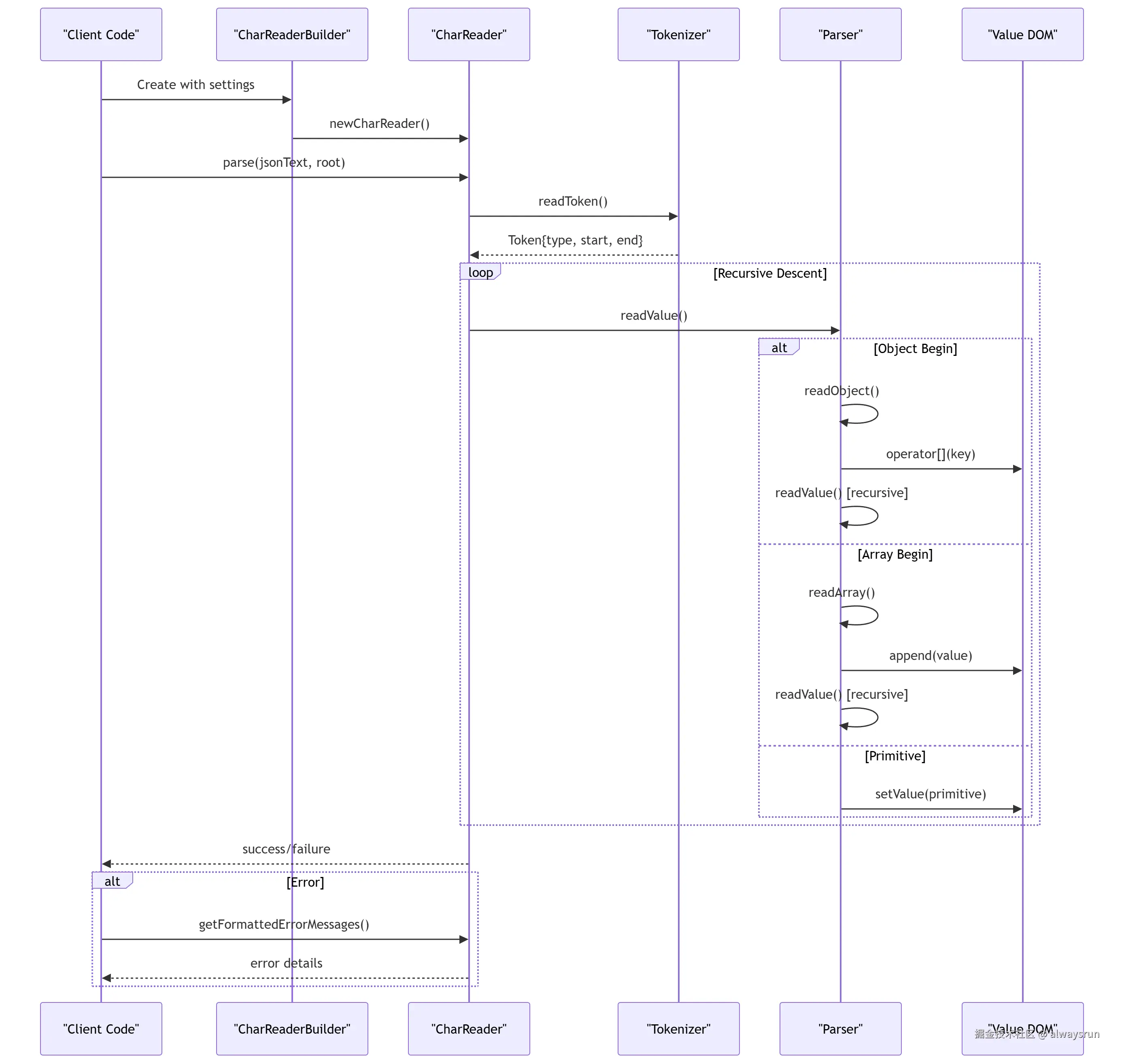
核心结构
源码地图:
css
jsoncpp-1.9.6/
├── include/json/
│   ├── value.h          [核心] Value 类定义,Tagged Union 接口
│   ├── reader.h         [核心] CharReader/Builder,解析器接口
│   ├── writer.h         [核心] StreamWriter/Builder,序列化器接口
│   ├── allocator.h      [关键] SecureAllocator,安全内存管理
│   └── config.h         [基础] 类型定义,平台适配
└── src/lib_json/
    ├── json_value.cpp   [核心] Value 实现,CZString 实现
    ├── json_reader.cpp  [核心] 解析器实现,递归下降解析
    └── json_writer.cpp  [核心] 序列化器实现,格式化输出
Tagged Union 存储模型
Value:JSON 值的内存表示与操作
- 使用 Tagged Union 实现多类型存储
- 统一的数据模型,隔离解析与序列化
arduino
class Value {
private:
    union ValueHolder {
        Int int_;
        UInt uint_;
        double real_;
        char* string_;
        bool bool_;
        ObjectValues* map_;  // for array/object
    } value_;

    ValueType type_;  // Tag field
    // ... comments, offsets
};
优势:
- 内存紧凑:单个 Value 对象固定大小(约 24-32 字节)
- 类型安全:运行时类型检查,避免未定义行为
- 零开销:无虚函数表,无动态分发
代价:
- Object/Array 需要堆分配(
new ObjectValues) - 类型转换需运行时检查(switch-case)
字符串存储优化:CZString
CZString优化的字符串键存储:
- 实现三种字符串存储策略
- 减少字符串拷贝,支持零拷贝优化
- 在分配字符串内存时,在实际字符串内容的前面多分配 4 个字节,存储字符串的长度;可直接获取长度,避免遍历计算
- 指针所有权的转移:定义了移动构造函数和移动赋值运算符;对象在
std::map中发生重排或作为右值传递时,可直接"窃取"原对象的cstr_指针和union数据,将原对象置;完全避免了底层字符串数据的物理拷贝。
arduino
class CZString {
    enum DuplicationPolicy {
        noDuplication = 0,      // Static string (zero-copy)
        duplicate,              // Heap-allocated copy
        duplicateOnCopy         // Copy-on-write (deferred)
    };

    char const* cstr_;
    union {
        ArrayIndex index_;      // For array indexing
        struct {
            unsigned policy_ : 2;
            unsigned length_ : 30;  // Max 1GB string
        } storage_;
    };
};
注释保留机制
JsonCpp 在 Value 中存储三种位置的注释:
- 配置文件可读性高,支持人工编辑
- 内存开销增加,解析性能下降约 10-15%
c
class Value {
    struct CommentInfo {
        char* comment_;
    };
    std::unique_ptr<CommentInfo[]> comments_;  // [Before, AfterSameLine, After]
};
解析时收集:
scss
if (collectComments_ && !commentsBefore_.empty()) {
    currentValue().setComment(commentsBefore_, commentBefore);
}
序列化时输出:
scss
if (value.hasComment(commentBefore)) {
    *sout_ << value.getComment(commentBefore) << "\n";
}
错误处理策略
JsonCpp 提供可配置的错误处理:
c
#if JSON_USE_EXCEPTION
    throw RuntimeError(msg);
#else
    std::cerr << msg << std::endl;
    abort();
#endif
结构化错误报告:
arduino
struct StructuredError {
    ptrdiff_t offset_start;  // Error location in document
    ptrdiff_t offset_limit;
    String message;
};
安全内存分配器
可选的 SecureAllocator 实现敏感数据保护:
- 防止敏感数据残留(密码、密钥)
- 性能下降约 5-10%(内存清零开销)
arduino
template<typename T>
class SecureAllocator {
    void deallocate(pointer p, size_type n) {
        memset_s(p, n * sizeof(T), 0, n * sizeof(T));  // Secure wipe
        ::operator delete(p);
    }
};
常用 API
常用 API 表格:
| API 类别 | 核心方法 | 参数说明 | 返回值 |
|---|---|---|---|
| Value 构造 | Value(ValueType type) |
nullValue/arrayValue/objectValue | Value 对象 |
| 类型检查 | bool isString() const |
无 | true/false |
| 类型转换 | String asString() const |
无 | 字符串值 |
| 数组操作 | Value& append(const Value&) |
要追加的值 | 引用 |
| 对象访问 | Value& operator[](const char* key) |
键名 | 值引用 |
| 安全访问 | Value get(key, default) const |
键名、默认值 | 值副本 |
| 解析 | bool parse(text, root, comments) |
JSON 文本、输出根、是否保留注释 | 成功/失败 |
| 序列化 | String write(root) |
Value 对象 | JSON 字符串 |
| 迭代器 | iterator begin()/end() |
无 | 迭代器 |
使用样例:
c
#include <json/json.h>
#include <fstream>
#include <iostream>

class ConfigManager {
public:
    bool loadConfig(const std::string& filepath) {
        std::ifstream configFile(filepath);
        if (!configFile.is_open()) {
            std::cerr << "[ERROR] Failed to open config file: " << filepath << std::endl;
            return false;
        }

        Json::CharReaderBuilder builder;
        builder["collectComments"] = true;  // Preserve comments
        builder["allowComments"] = true;    // Allow // and /* */ comments

        Json::Value root;
        std::string errors;

        if (!Json::parseFromStream(builder, configFile, &root, &errors)) {
            std::cerr << "[ERROR] JSON parse error: " << errors << std::endl;
            return false;
        }

        if (!validateConfig(root)) {
            std::cerr << "[ERROR] Invalid configuration structure" << std::endl;
            return false;
        }

        config_ = std::move(root);
        return true;
    }

    bool saveConfig(const std::string& filepath) {
        std::ofstream configFile(filepath);
        if (!configFile.is_open()) {
            std::cerr << "[ERROR] Failed to create config file: " << filepath << std::endl;
            return false;
        }

        Json::StreamWriterBuilder builder;
        builder["commentStyle"] = "All";        // Preserve comments
        builder["indentation"] = "    ";        // 4-space indentation
        builder["enableYAMLCompatibility"] = true;  // YAML-friendly

        std::unique_ptr<Json::StreamWriter> writer(builder.newStreamWriter());
        if (writer->write(config_, &configFile) != 0) {
            std::cerr << "[ERROR] Failed to write config" << std::endl;
            return false;
        }

        return true;
    }

    int getServerPort() const {
        return config_.get("server", Json::Value())
                     .get("port", 8080)  // Default port
                     .asInt();
    }

    std::string getDatabaseHost() const {
        const Json::Value& db = config_.get("database", Json::Value());
        return db.get("host", "localhost").asString();
    }

    std::vector<std::string> getAllowedOrigins() const {
        std::vector<std::string> origins;
        const Json::Value& cors = config_.get("cors", Json::Value());
        const Json::Value& allowList = cors.get("allowed_origins", Json::arrayValue);

        for (const auto& origin : allowList) {
            origins.push_back(origin.asString());
        }

        return origins;
    }

    void setServerPort(int port) {
        config_["server"]["port"] = port;
    }

private:
    bool validateConfig(const Json::Value& root) {
        if (!root.isObject()) {
            std::cerr << "[VALIDATION] Root must be an object" << std::endl;
            return false;
        }

        if (root.isMember("server")) {
            const Json::Value& server = root["server"];
            if (!server.isObject()) {
                std::cerr << "[VALIDATION] 'server' must be an object" << std::endl;
                return false;
            }
            if (server.isMember("port")) {
                if (!server["port"].isInt()) {
                    std::cerr << "[VALIDATION] 'server.port' must be an integer" << std::endl;
                    return false;
                }
                int port = server["port"].asInt();
                if (port < 1 || port > 65535) {
                    std::cerr << "[VALIDATION] 'server.port' out of range [1, 65535]" << std::endl;
                    return false;
                }
            }
        }

        return true;
    }

    Json::Value config_;
};

int main() {
    ConfigManager configMgr;

    // Create sample config
    Json::Value sampleConfig;
    sampleConfig["server"]["port"] = 9000;
    sampleConfig["server"]["host"] = "0.0.0.0";
    sampleConfig["database"]["host"] = "db.example.com";
    sampleConfig["database"]["port"] = 5432;
    sampleConfig["database"]["name"] = "production";
    sampleConfig["cors"]["allowed_origins"].append("https://example.com");
    sampleConfig["cors"]["allowed_origins"].append("https://api.example.com");

    // Add comment
    sampleConfig["server"].setComment("// Server configuration", Json::commentBefore);

    configMgr.config_ = sampleConfig;

    if (configMgr.saveConfig("config.json")) {
        std::cout << "[INFO] Config saved successfully" << std::endl;
    }

    if (configMgr.loadConfig("config.json")) {
        std::cout << "[INFO] Server port: " << configMgr.getServerPort() << std::endl;
        std::cout << "[INFO] Database host: " << configMgr.getDatabaseHost() << std::endl;

        auto origins = configMgr.getAllowedOrigins();
        std::cout << "[INFO] Allowed origins (" << origins.size() << "):" << std::endl;
        for (const auto& origin : origins) {
            std::cout << "  - " << origin << std::endl;
        }
    }

    return 0;
}
性能相关参数
c
// 1. Disable comments for performance-critical paths
Json::CharReaderBuilder builder;
builder["collectComments"] = false;  // ~15% faster parsing

// 2. Use FastWriter for minimal serialization
Json::FastWriter fastWriter;
std::string compact = fastWriter.write(value);  // No indentation

// 3. Reserve array capacity
Json::Value array(Json::arrayValue);
for (int i = 0; i < 10000; ++i) {
    array.append(i);  // Automatic resizing
}

// 4. Use StaticString for constant keys
static const Json::StaticString ID_KEY("id");
object[ID_KEY] = 123;  // Zero-copy key insertion