在日常业务中,数据查询往往依赖技术人员编写 SQL,沟通成本高、响应慢。本文将带你用 Python + LangChain + MySQL 实现一个"自然语言转 SQL"的智能查询系统------用户只需要说人话,AI 自动分析意图、生成 SQL、查询数据库并返回结果。
一、技术架构
用户输入自然语言
       ↓
  LangChain SQL Agent
       ↓
  LLM(通义千问 Qwen)分析意图 → 生成 SQL
       ↓
  MySQL 数据库执行 SQL
       ↓
  LLM 组织自然语言回答 → 返回给用户
核心技术栈:
| 组件 | 说明 |
|---|---|
| Python 3.14 | 运行环境 |
| LangChain 1.2.17 | Agent 框架,提供 SQL Agent 能力 |
| 通义千问(Qwen) | 通过 OpenAI 兼容接口调用的大语言模型 |
| Flask | Web 后端,提供 API 服务 |
| MySQL | 业务数据库 |
| 前端 HTML/JS | 可视化交互界面 |
二、数据库设计
以电商场景为例,设计 4 张核心表:
sql
-- 商品表
CREATE TABLE products (
    id INT PRIMARY KEY AUTO_INCREMENT,
    name VARCHAR(100) NOT NULL COMMENT '商品名称',
    category VARCHAR(50) NOT NULL COMMENT '分类',
    price DECIMAL(10,2) NOT NULL COMMENT '售价',
    stock INT NOT NULL DEFAULT 0 COMMENT '库存',
    status TINYINT NOT NULL DEFAULT 1 COMMENT '1上架 0下架',
    created_at DATETIME NOT NULL DEFAULT CURRENT_TIMESTAMP
);

-- 客户表
CREATE TABLE customers (
    id INT PRIMARY KEY AUTO_INCREMENT,
    name VARCHAR(50) NOT NULL COMMENT '姓名',
    phone VARCHAR(20) NOT NULL COMMENT '手机号',
    city VARCHAR(50) NOT NULL COMMENT '城市',
    level VARCHAR(20) NOT NULL DEFAULT '普通' COMMENT '等级',
    created_at DATETIME NOT NULL DEFAULT CURRENT_TIMESTAMP
);

-- 订单表
CREATE TABLE orders (
    id INT PRIMARY KEY AUTO_INCREMENT,
    order_no VARCHAR(32) NOT NULL UNIQUE COMMENT '订单编号',
    customer_id INT NOT NULL,
    total_amount DECIMAL(10,2) NOT NULL COMMENT '订单总额',
    status VARCHAR(20) NOT NULL DEFAULT '待付款',
    created_at DATETIME NOT NULL DEFAULT CURRENT_TIMESTAMP,
    FOREIGN KEY (customer_id) REFERENCES customers(id)
);

-- 订单明细表
CREATE TABLE order_items (
    id INT PRIMARY KEY AUTO_INCREMENT,
    order_id INT NOT NULL,
    product_id INT NOT NULL,
    quantity INT NOT NULL COMMENT '购买数量',
    unit_price DECIMAL(10,2) NOT NULL COMMENT '单价',
    FOREIGN KEY (order_id) REFERENCES orders(id),
    FOREIGN KEY (product_id) REFERENCES products(id)
);
插入了模拟数据:20 个商品(手机、笔记本、平板、耳机、手表)、15 个客户(分布在北京、上海、广州等城市)、30 条订单、31 条订单明细。
init_ecommerce.sql
sql
-- =====================================================
-- 电商平台模拟数据 - 适用于 pytosql 数据库
-- 使用方式: mysql -u root -p pytosql < init_ecommerce.sql
-- =====================================================

SET NAMES utf8mb4;
SET FOREIGN_KEY_CHECKS = 0;

-- ==================== 删除旧表 ====================
DROP TABLE IF EXISTS order_items;
DROP TABLE IF EXISTS orders;
DROP TABLE IF EXISTS products;
DROP TABLE IF EXISTS customers;

-- ==================== 商品表 ====================
CREATE TABLE products (
    id INT PRIMARY KEY AUTO_INCREMENT,
    name VARCHAR(100) NOT NULL COMMENT '商品名称',
    category VARCHAR(50) NOT NULL COMMENT '分类',
    price DECIMAL(10,2) NOT NULL COMMENT '售价',
    stock INT NOT NULL DEFAULT 0 COMMENT '库存',
    status TINYINT NOT NULL DEFAULT 1 COMMENT '1上架 0下架',
    created_at DATETIME NOT NULL DEFAULT CURRENT_TIMESTAMP
) ENGINE=InnoDB DEFAULT CHARSET=utf8mb4 COMMENT='商品表';

INSERT INTO products (name, category, price, stock, status, created_at) VALUES
-- 手机
('iPhone 16 Pro Max',       '手机', 9999.00,  45, 1, '2025-01-05'),
('iPhone 16',                '手机', 6999.00,  60, 1, '2025-01-05'),
('华为 Mate 70 Pro',         '手机', 6499.00,  30, 1, '2025-01-10'),
('小米 15 Pro',              '手机', 4999.00,  80, 1, '2025-01-12'),
('OPPO Find X8',             '手机', 4299.00,   5, 1, '2025-02-01'),
-- 笔记本
('MacBook Pro 14 M4',       '笔记本', 14999.00, 25, 1, '2025-01-08'),
('MacBook Air 15 M3',       '笔记本', 10499.00, 40, 1, '2025-01-08'),
('华为 MateBook X Pro',     '笔记本', 11999.00, 15, 1, '2025-01-15'),
('联想 ThinkPad X1 Carbon', '笔记本', 9999.00,   8, 1, '2025-02-10'),
-- 平板
('iPad Pro 13 M4',           '平板', 8999.00,  35, 1, '2025-01-20'),
('iPad Air M3',              '平板', 4799.00,  50, 1, '2025-01-20'),
('华为 MatePad Pro 13.2',    '平板', 5699.00,  20, 1, '2025-02-05'),
-- 耳机
('AirPods Pro 3',            '耳机', 1899.00, 100, 1, '2025-01-15'),
('AirPods 4',                '耳机',  999.00, 120, 1, '2025-01-15'),
('华为 FreeBuds Pro 4',      '耳机', 1499.00,   3, 1, '2025-02-01'),
('索尼 WH-1000XM6',         '耳机', 2699.00,  18, 1, '2025-03-01'),
-- 手表
('Apple Watch Ultra 3',      '手表', 5999.00,  22, 1, '2025-01-25'),
('Apple Watch S10',          '手表', 2999.00,  55, 1, '2025-01-25'),
('华为 Watch GT 5 Pro',      '手表', 2488.00,   6, 1, '2025-02-15'),
('小米 Watch S4',            '手表',  999.00,  70, 0, '2025-03-10');

-- ==================== 客户表 ====================
CREATE TABLE customers (
    id INT PRIMARY KEY AUTO_INCREMENT,
    name VARCHAR(50) NOT NULL COMMENT '姓名',
    phone VARCHAR(20) NOT NULL COMMENT '手机号',
    city VARCHAR(50) NOT NULL COMMENT '城市',
    level VARCHAR(20) NOT NULL DEFAULT '普通' COMMENT '等级:普通/银卡/金卡/钻石',
    created_at DATETIME NOT NULL DEFAULT CURRENT_TIMESTAMP
) ENGINE=InnoDB DEFAULT CHARSET=utf8mb4 COMMENT='客户表';

INSERT INTO customers (name, phone, city, level, created_at) VALUES
('张伟', '13800001001', '北京', '钻石', '2024-06-10'),
('李娜', '13800001002', '上海', '金卡', '2024-07-15'),
('王强', '13800001003', '广州', '银卡', '2024-08-20'),
('刘洋', '13800001004', '深圳', '钻石', '2024-06-25'),
('陈静', '13800001005', '杭州', '金卡', '2024-09-01'),
('杨磊', '13800001006', '北京', '银卡', '2024-10-05'),
('赵敏', '13800001007', '上海', '普通', '2024-11-12'),
('黄海', '13800001008', '成都', '金卡', '2024-08-18'),
('周芳', '13800001009', '深圳', '银卡', '2024-12-01'),
('吴刚', '13800001010', '杭州', '普通', '2025-01-10'),
('徐丽', '13800001011', '北京', '金卡', '2024-07-22'),
('孙鹏', '13800001012', '广州', '普通', '2025-02-05'),
('马超', '13800001013', '成都', '银卡', '2024-09-30'),
('朱琳', '13800001014', '上海', '钻石', '2024-06-05'),
('胡军', '13800001015', '北京', '普通', '2025-03-01');

-- ==================== 订单表 ====================
CREATE TABLE orders (
    id INT PRIMARY KEY AUTO_INCREMENT,
    order_no VARCHAR(32) NOT NULL UNIQUE COMMENT '订单编号',
    customer_id INT NOT NULL COMMENT '客户ID',
    total_amount DECIMAL(10,2) NOT NULL COMMENT '订单总额',
    status VARCHAR(20) NOT NULL DEFAULT '待付款' COMMENT '状态',
    created_at DATETIME NOT NULL DEFAULT CURRENT_TIMESTAMP,
    FOREIGN KEY (customer_id) REFERENCES customers(id)
) ENGINE=InnoDB DEFAULT CHARSET=utf8mb4 COMMENT='订单表';

INSERT INTO orders (order_no, customer_id, total_amount, status, created_at) VALUES
('ORD20250101001',  1, 14999.00, '已完成', '2025-01-03 10:23:45'),
('ORD20250101002',  2,  6999.00, '已完成', '2025-01-05 14:30:12'),
('ORD20250101003',  4,  9999.00, '已完成', '2025-01-07 09:15:33'),
('ORD20250101004', 14, 16998.00, '已完成', '2025-01-08 16:45:00'),
('ORD20250101005',  5,  1899.00, '已完成', '2025-01-10 11:20:30'),
('ORD20250101006',  1,  8999.00, '已完成', '2025-01-12 08:50:22'),
('ORD20250101007',  3,  4999.00, '已完成', '2025-01-15 13:10:55'),
('ORD20250101008',  8, 11999.00, '已完成', '2025-01-18 17:30:18'),
('ORD20250201001',  6,  2699.00, '已完成', '2025-02-02 10:05:44'),
('ORD20250201002', 11,  5699.00, '已完成', '2025-02-05 15:22:10'),
('ORD20250201003',  2,   999.00, '已完成', '2025-02-08 09:40:33'),
('ORD20250201004',  9, 14999.00, '已完成', '2025-02-10 14:55:28'),
('ORD20250201005',  1,  2999.00, '已完成', '2025-02-12 11:18:45'),
('ORD20250201006',  7,  4299.00, '已发货', '2025-02-15 16:30:00'),
('ORD20250201007',  4,  5999.00, '已完成', '2025-02-18 08:10:22'),
('ORD20250301001',  5,  4799.00, '已完成', '2025-03-01 10:45:30'),
('ORD20250301002', 10,  9999.00, '已付款', '2025-03-03 13:20:15'),
('ORD20250301003', 14, 10499.00, '已完成', '2025-03-05 09:00:00'),
('ORD20250301004',  1,  6499.00, '已发货', '2025-03-08 17:35:42'),
('ORD20250301005',  3,  1899.00, '已完成', '2025-03-10 11:50:18'),
('ORD20250301006',  8,  4799.00, '已完成', '2025-03-12 14:10:33'),
('ORD20250301007', 13,  1499.00, '已取消', '2025-03-15 16:25:50'),
('ORD20250401001',  2,  9999.00, '已付款', '2025-04-01 10:30:00'),
('ORD20250401002',  6,  5999.00, '已付款', '2025-04-05 15:45:22'),
('ORD20250401003', 11,  8999.00, '待付款', '2025-04-08 09:20:10'),
('ORD20250401004', 15,   999.00, '待付款', '2025-04-10 13:00:55'),
('ORD20250401005',  1,  2699.00, '待付款', '2025-04-12 17:15:30'),
('ORD20250401006',  9, 14999.00, '已付款', '2025-04-15 10:40:18'),
('ORD20250401007',  4,  4299.00, '已付款', '2025-04-18 14:55:42'),
('ORD20250401008', 12,   999.00, '已取消', '2025-04-20 11:10:05');

-- ==================== 订单明细表 ====================
CREATE TABLE order_items (
    id INT PRIMARY KEY AUTO_INCREMENT,
    order_id INT NOT NULL COMMENT '订单ID',
    product_id INT NOT NULL COMMENT '商品ID',
    quantity INT NOT NULL COMMENT '购买数量',
    unit_price DECIMAL(10,2) NOT NULL COMMENT '单价',
    FOREIGN KEY (order_id) REFERENCES orders(id),
    FOREIGN KEY (product_id) REFERENCES products(id)
) ENGINE=InnoDB DEFAULT CHARSET=utf8mb4 COMMENT='订单明细表';

INSERT INTO order_items (order_id, product_id, quantity, unit_price) VALUES
( 1,  6, 1, 14999.00),  -- 张伟 - MacBook Pro 14 M4
( 2,  2, 1,  6999.00),  -- 李娜 - iPhone 16
( 3,  9, 1,  9999.00),  -- 刘洋 - ThinkPad X1 Carbon
( 4,  1, 1,  9999.00),  -- 朱琳 - iPhone 16 Pro Max
( 4, 13, 1,  1899.00),  -- 朱琳 - AirPods Pro 3
( 5, 13, 1,  1899.00),  -- 陈静 - AirPods Pro 3
( 6, 10, 1,  8999.00),  -- 张伟 - iPad Pro 13 M4
( 7,  4, 1,  4999.00),  -- 王强 - 小米 15 Pro
( 8,  8, 1, 11999.00),  -- 黄海 - MateBook X Pro
( 9, 16, 1,  2699.00),  -- 杨磊 - 索尼 WH-1000XM6
(10, 12, 1,  5699.00),  -- 徐丽 - MatePad Pro 13.2
(11, 14, 1,   999.00),  -- 李娜 - AirPods 4
(12,  6, 1, 14999.00),  -- 周芳 - MacBook Pro 14 M4
(13, 18, 1,  2999.00),  -- 张伟 - Apple Watch S10
(14,  5, 1,  4299.00),  -- 赵敏 - OPPO Find X8
(15, 17, 1,  5999.00),  -- 刘洋 - Apple Watch Ultra 3
(16, 11, 1,  4799.00),  -- 陈静 - iPad Air M3
(17,  9, 1,  9999.00),  -- 吴刚 - ThinkPad X1 Carbon
(18,  7, 1, 10499.00),  -- 朱琳 - MacBook Air 15 M3
(19,  3, 1,  6499.00),  -- 张伟 - 华为 Mate 70 Pro
(20, 13, 1,  1899.00),  -- 王强 - AirPods Pro 3
(21, 11, 1,  4799.00),  -- 黄海 - iPad Air M3
(22, 15, 1,  1499.00),  -- 马超 - 华为 FreeBuds Pro 4(已取消)
(23,  9, 1,  9999.00),  -- 李娜 - ThinkPad X1 Carbon
(24, 17, 1,  5999.00),  -- 杨磊 - Apple Watch Ultra 3
(25, 10, 1,  8999.00),  -- 徐丽 - iPad Pro 13 M4
(26, 14, 1,   999.00),  -- 胡军 - AirPods 4
(27, 16, 1,  2699.00),  -- 张伟 - 索尼 WH-1000XM6
(28,  6, 1, 14999.00),  -- 周芳 - MacBook Pro 14 M4
(29,  5, 1,  4299.00),  -- 刘洋 - OPPO Find X8
(30, 14, 1,   999.00);  -- 孙鹏 - AirPods 4(已取消)

SET FOREIGN_KEY_CHECKS = 1;
三、核心代码实现
3.1 连接数据库 + 创建 SQL Agent
python
from langchain_community.utilities import SQLDatabase
from langchain_community.agent_toolkits import SQLDatabaseToolkit, create_sql_agent
from langchain_openai import ChatOpenAI

# 连接数据库
db = SQLDatabase.from_uri(
    "mysql+pymysql://root:password@localhost:3306/pytosql?charset=utf8mb4",
    sample_rows_in_table_info=3  # 让 Agent 看到每张表的前 3 行样本数据
)

# 创建 LLM(使用通义千问)
llm = ChatOpenAI(
    model="qwen-plus",
    openai_api_key="your-api-key",
    openai_api_base="https://dashscope.aliyuncs.com/compatible-mode/v1",
)

# 创建 SQL Agent
toolkit = SQLDatabaseToolkit(db=db, llm=llm)
agent = create_sql_agent(
    llm=llm,
    toolkit=toolkit,
    agent_type="openai-tools",
    verbose=False,
    agent_handle_parsing_errors=True,
    prefix=(
        "你是一个智能助手,同时具备电商数据分析能力。\n"
        "无论用户输入什么内容,你必须始终使用中文回答。\n\n"
        "## 工作方式\n"
        "1. 首先判断用户输入是否与数据库查询相关\n"
        "2. 如果与数据查询相关:生成 SQL 查询数据库并用中文回答\n"
        "3. 如果与数据查询无关:直接给出有针对性的中文回答\n\n"
        "## 注意事项\n"
        "- 只查询数据,不要执行 INSERT、UPDATE、DELETE\n"
        "- 回答时附带关键数据\n"
        "- 金额单位为人民币(元)\n"
    ),
)
关键点解析:
SQLDatabase是 LangChain 提供的数据库连接封装,能自动读取表结构信息sample_rows_in_table_info=3让 Agent 能看到每张表的样本数据,帮助它更好地理解数据内容agent_type="openai-tools"适用于 OpenAI 兼容 API(通义千问也支持)prefix是系统提示词,定义了 Agent 的行为规则
3.2 Agent 执行流程
# 用户提问
result = agent.invoke({"input": "销量最高的商品是什么?"})

# 获取回答
answer = result["output"]
当用户输入后,Agent 内部会自动执行以下步骤:
1. 调用 sql_db_list_tables → 查看有哪些表
2. 调用 sql_db_schema     → 查看相关表的结构
3. 调用 sql_db_query_checker → 检查生成的 SQL 是否正确
4. 调用 sql_db_query       → 执行 SQL 获取结果
5. LLM 组织自然语言回答
实际生成的 SQL:
sql
SELECT p.name, SUM(oi.quantity) AS total_quantity FROM order_items oi JOIN products p ON oi.product_id = p.id GROUP BY p.id, p.name ORDER BY total_quantity DESC LIMIT 1数据库查询:
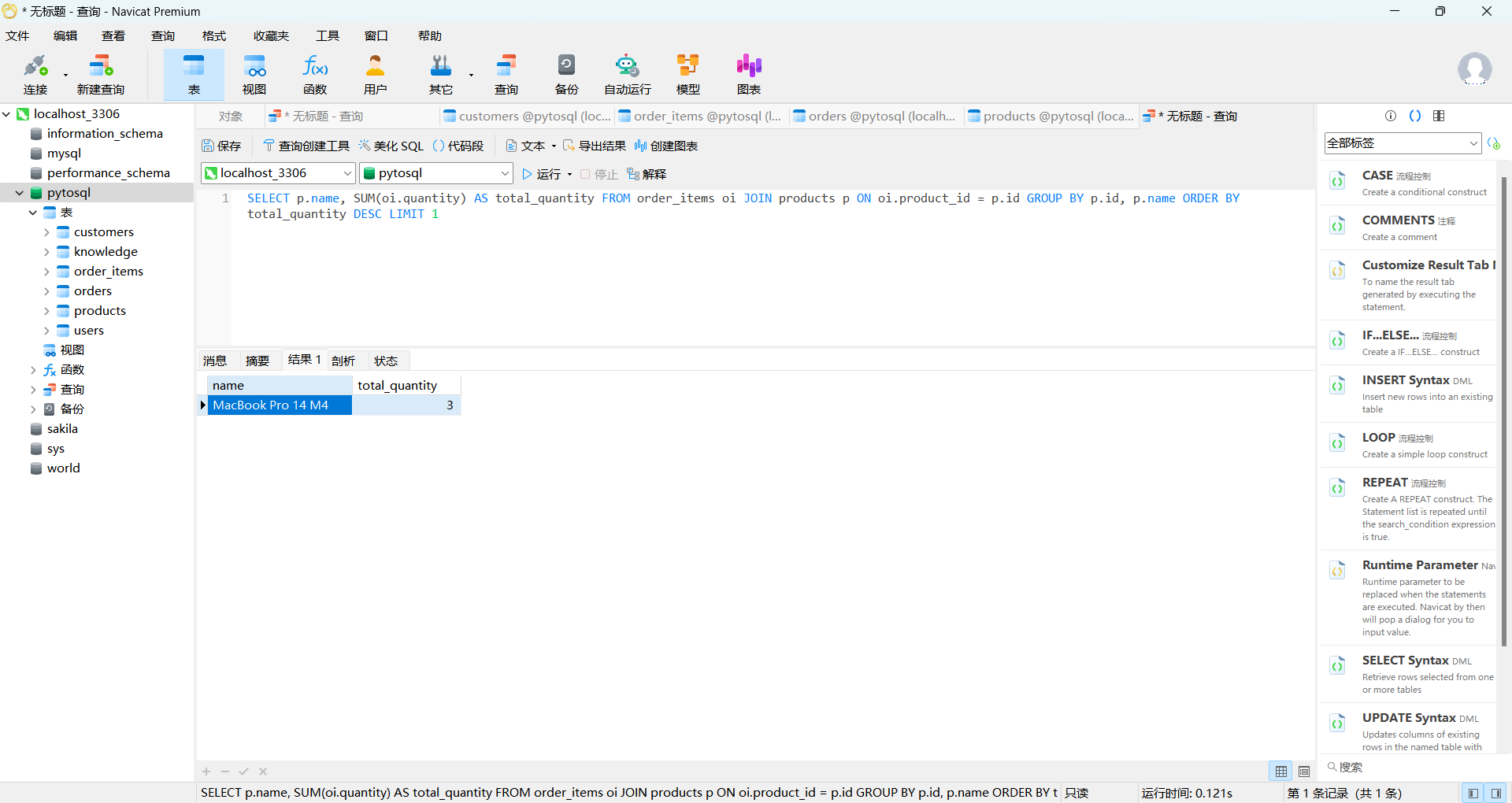
返回结果:MacBook Pro 14 M4,售出 3 台。
3.3 后端 API(Flask)
python
@app.route("/api/sql-agent", methods=["POST"])
def sql_agent_query():
    question = request.json.get("question", "").strip()
    if not question:
        return jsonify({"code": 400, "msg": "问题不能为空"})

    agent = get_sql_agent()
    result = agent.invoke({"input": question})
    return jsonify({
        "code": 200,
        "answer": result["output"],
        "question": question,
    })
3.4 前端交互界面
前端通过 Tab 切换实现多模式并存,SQL 查询界面包含:
- 快捷问题按钮(点击即问)
- 聊天式交互
- AI 回答支持 Markdown 渲染(代码块、表格、列表)
python
async function sendSqlMessage() {
    const question = sqlInput.value.trim();
    const res = await axios.post('/api/sql-agent', { question });
    if (res.data.code === 200) {
        addMessage(sqlContainer, 'ai', res.data.answer);
    }
}
四、完整代码
sql_agent.py
python
"""
Text-to-SQL 电商智能查询助手

用户输入自然语言问题,AI 自动生成 SQL 查询数据库并返回结果。
"""
import sys
import os

sys.path.insert(0, os.path.join(os.path.dirname(__file__), ".."))

from langchain_community.utilities import SQLDatabase
from langchain_community.agent_toolkits import SQLDatabaseToolkit, create_sql_agent
from chat_qwen import create_chat_model
from config import DB_CONFIG

# 构建 SQLAlchemy URI
DB_URI = (
    f"mysql+pymysql://{DB_CONFIG['user']}:{DB_CONFIG['password']}"
    f"@{DB_CONFIG['host']}:{DB_CONFIG['port']}/{DB_CONFIG['database']}?charset={DB_CONFIG['charset']}"
)


def main():
    print("正在连接数据库...")
    db = SQLDatabase.from_uri(DB_URI, sample_rows_in_table_info=3)

    llm = create_chat_model()
    toolkit = SQLDatabaseToolkit(db=db, llm=llm)

    print("正在初始化 SQL Agent...")
    agent = create_sql_agent(
        llm=llm,
        toolkit=toolkit,
        agent_type="openai-tools",
        verbose=True,
        agent_handle_parsing_errors=True,
        prefix=(
            "你是一个智能助手,同时具备电商数据分析能力。\n"
            "无论用户输入什么内容,你必须始终使用中文回答。\n\n"
            "## 工作方式\n"
            "1. 首先判断用户输入是否与数据库查询相关(商品、客户、订单、销售等数据问题)\n"
            "2. 如果与数据查询相关:生成正确的 SQL 查询数据库,并用中文清晰地回答,附带关键数据\n"
            "3. 如果与数据查询无关(如闲聊、常识问题、打招呼、情绪表达等):直接根据用户输入的内容给出有针对性的中文回答,不要调用数据库工具,不要说「我只能查询数据」\n\n"
            "## 数据查询注意事项\n"
            "- 只查询数据,不要执行 INSERT、UPDATE、DELETE 等修改操作\n"
            "- 回答时附带查询到的关键数据,不要只给一句话结论\n"
            "- 金额单位为人民币(元)\n"
        ),
    )

    print("=" * 60)
    print("  电商智能查询助手 (输入 'quit' 退出)")
    print("  你可以问我关于商品、客户、订单的任何数据问题")
    print("=" * 60)

    while True:
        user_input = input("\n你: ").strip()
        if not user_input:
            continue
        if user_input.lower() == "quit":
            print("再见!")
            break

        try:
            response = agent.invoke({"input": user_input})
            print(f"\nAI: {response['output']}")
        except Exception as e:
            print(f"\n出错了: {e}")


if __name__ == "__main__":
    main()
server.py
python
# ==================== SQL Agent API ====================

DB_CONFIG_RAW = {
    "host": os.getenv("DB_HOST", "localhost"),
    "port": int(os.getenv("DB_PORT", 3306)),
    "user": os.getenv("DB_USER", "root"),
    "password": os.getenv("DB_PASSWORD", "08056674"),
    "database": os.getenv("DB_NAME", "pytosql"),
    "charset": os.getenv("DB_CHARSET", "utf8mb4"),
}

DB_URI = (
    f"mysql+pymysql://{DB_CONFIG_RAW['user']}:{DB_CONFIG_RAW['password']}"
    f"@{DB_CONFIG_RAW['host']}:{DB_CONFIG_RAW['port']}/{DB_CONFIG_RAW['database']}"
    f"?charset={DB_CONFIG_RAW['charset']}"
)

# 全局 SQL Agent 实例(延迟初始化)
_sql_agent = None


def get_sql_agent():
    global _sql_agent
    if _sql_agent is None:
        db = SQLDatabase.from_uri(DB_URI, sample_rows_in_table_info=3)

        # 包装 db.run,在 VSCode 终端打印执行的 SQL
        _original_run = db.run
        def _logged_run(command, fetch="all", include_columns=False, *, parameters=None, execution_options=None):
            if isinstance(command, str) and any(
                kw in command.upper() for kw in ["SELECT", "SHOW", "DESCRIBE"]
            ):
                import sys
                print(f"\n{'='*60}\n[SQL] {command.strip()}\n{'='*60}", file=sys.stderr, flush=True)
            return _original_run(command, fetch=fetch, include_columns=include_columns, parameters=parameters, execution_options=execution_options)
        db.run = _logged_run

        llm = get_chat_model()
        toolkit = SQLDatabaseToolkit(db=db, llm=llm)
        _sql_agent = create_sql_agent(
            llm=llm,
            toolkit=toolkit,
            agent_type="openai-tools",
            verbose=False,
            agent_handle_parsing_errors=True,
            prefix=(
                "你是一个智能助手,同时具备电商数据分析能力。\n"
                "无论用户输入什么内容,你必须始终使用中文回答。\n\n"
                "## 工作方式\n"
                "1. 首先判断用户输入是否与数据库查询相关(商品、客户、订单、销售等数据问题)\n"
                "2. 如果与数据查询相关:生成正确的 SQL 查询数据库,并用中文清晰地回答,附带关键数据\n"
                "3. 如果与数据查询无关(如闲聊、常识问题、打招呼、情绪表达等):直接根据用户输入的内容给出有针对性的中文回答,不要调用数据库工具,不要说「我只能查询数据」\n\n"
                "## 数据查询注意事项\n"
                "- 只查询数据,不要执行 INSERT、UPDATE、DELETE 等修改操作\n"
                "- 回答时附带查询到的关键数据,不要只给一句话结论\n"
                "- 金额单位为人民币(元)\n"
            ),
        )
    return _sql_agent


@app.route("/api/sql-agent", methods=["POST"])
def sql_agent_query():
    """SQL Agent 自然语言查询"""
    data = request.json
    question = data.get("question", "").strip()

    if not question:
        return jsonify({"code": 400, "msg": "问题不能为空"})

    try:
        agent = get_sql_agent()
        result = agent.invoke({"input": question})
        return jsonify({
            "code": 200,
            "answer": result["output"],
            "question": question,
        })
    except Exception as e:
        return jsonify({"code": 500, "msg": str(e)})


if __name__ == "__main__":
    # 启动时自动构建向量索引
    print("正在构建向量索引...")
    build_vector_store()
    print("聊天机器人服务启动: http://127.0.0.1:5000")
    app.run(debug=True, port=5000, use_reloader=False)
index.html
python
<!DOCTYPE html>
<html lang="zh-CN">
<head>
<meta charset="UTF-8">
<meta name="viewport" content="width=device-width, initial-scale=1.0">
<title>AI 智能助手</title>
<script src="https://cdn.jsdelivr.net/npm/axios/dist/axios.min.js"></script>
<script src="https://cdn.jsdelivr.net/npm/marked/marked.min.js"></script>
<style>
* { margin: 0; padding: 0; box-sizing: border-box; }
body {
font-family: -apple-system, BlinkMacSystemFont, "Segoe UI", Roboto, sans-serif;
background: #f0f2f5;
height: 100vh;
display: flex;
flex-direction: column;
}
/* ========== 顶部栏 ========== */
.header {
background: linear-gradient(135deg, #667eea 0%, #764ba2 100%);
color: #fff;
padding: 0 24px;
display: flex;
align-items: center;
justify-content: space-between;
box-shadow: 0 2px 8px rgba(0,0,0,0.15);
height: 56px;
}
.header h1 { font-size: 20px; font-weight: 600; }
.header-actions { display: flex; gap: 8px; align-items: center; }
/* Tab 切换 */
.tab-bar {
display: flex;
gap: 0;
height: 100%;
align-items: stretch;
}
.tab-btn {
background: transparent;
border: none;
color: rgba(255,255,255,0.7);
padding: 0 20px;
cursor: pointer;
font-size: 15px;
position: relative;
transition: color 0.2s;
}
.tab-btn:hover { color: #fff; }
.tab-btn.active { color: #fff; }
.tab-btn.active::after {
content: '';
position: absolute;
bottom: 0; left: 20px; right: 20px;
height: 3px;
background: #fff;
border-radius: 3px 3px 0 0;
}
.header-right { display: flex; gap: 8px; align-items: center; }
.header-right label {
display: flex; align-items: center; gap: 6px;
font-size: 13px; cursor: pointer;
background: rgba(255,255,255,0.15);
padding: 6px 12px; border-radius: 6px;
}
.header-right label input { accent-color: #764ba2; }
.header-right button {
background: rgba(255,255,255,0.2);
border: 1px solid rgba(255,255,255,0.4);
color: #fff;
padding: 6px 16px;
border-radius: 6px;
cursor: pointer;
font-size: 14px;
transition: background 0.2s;
}
.header-right button:hover { background: rgba(255,255,255,0.35); }
/* ========== 主体 ========== */
.main-layout {
flex: 1;
display: flex;
overflow: hidden;
}
/* 页面切换 */
.page { display: none; flex: 1; flex-direction: column; overflow: hidden; min-height: 0; }
.page.active { display: flex; }
/* ========== 聊天区域(通用) ========== */
.chat-area {
flex: 1;
display: flex;
flex-direction: column;
min-height: 0;
}
.chat-container {
flex: 1;
overflow-y: auto;
padding: 20px;
max-width: 900px;
width: 100%;
margin: 0 auto;
}
.message {
display: flex;
margin-bottom: 16px;
animation: fadeIn 0.3s ease;
}
@keyframes fadeIn {
from { opacity: 0; transform: translateY(8px); }
to { opacity: 1; transform: translateY(0); }
}
.message.user { justify-content: flex-end; }
.message.ai { justify-content: flex-start; }
.avatar {
width: 36px;
height: 36px;
border-radius: 50%;
display: flex;
align-items: center;
justify-content: center;
font-size: 16px;
flex-shrink: 0;
}
.message.user .avatar { background: #667eea; color: #fff; margin-left: 10px; order: 2; }
.message.ai .avatar { background: #e8e8e8; color: #555; margin-right: 10px; }
.bubble {
max-width: 75%;
padding: 12px 16px;
border-radius: 12px;
line-height: 1.6;
font-size: 15px;
word-break: break-word;
}
.message.user .bubble {
background: linear-gradient(135deg, #667eea, #764ba2);
color: #fff;
border-bottom-right-radius: 4px;
}
.message.ai .bubble {
background: #fff;
color: #333;
border-bottom-left-radius: 4px;
box-shadow: 0 1px 4px rgba(0,0,0,0.08);
}
.message.ai .bubble p { margin: 0.4em 0; }
.message.ai .bubble pre {
background: #1e1e1e;
color: #d4d4d4;
padding: 12px;
border-radius: 6px;
overflow-x: auto;
margin: 8px 0;
font-size: 13px;
}
.message.ai .bubble code {
background: #f0f0f0;
padding: 2px 6px;
border-radius: 3px;
font-size: 13px;
}
.message.ai .bubble pre code { background: none; padding: 0; }
.message.ai .bubble ul, .message.ai .bubble ol {
padding-left: 24px;
margin: 0.4em 0;
}
.message.ai .bubble li { margin: 2px 0; }
/* 加载动画 */
.typing-indicator { display: flex; gap: 4px; padding: 4px 0; }
.typing-indicator span {
width: 8px; height: 8px;
background: #999;
border-radius: 50%;
animation: bounce 1.4s infinite;
}
.typing-indicator span:nth-child(2) { animation-delay: 0.2s; }
.typing-indicator span:nth-child(3) { animation-delay: 0.4s; }
@keyframes bounce {
0%, 60%, 100% { transform: translateY(0); }
30% { transform: translateY(-6px); }
}
/* 输入区域 */
.input-area {
background: #fff;
padding: 16px 20px;
border-top: 1px solid #e0e0e0;
box-shadow: 0 -2px 8px rgba(0,0,0,0.05);
}
.input-wrapper {
max-width: 900px;
margin: 0 auto;
display: flex;
gap: 12px;
}
.input-wrapper textarea {
flex: 1;
padding: 12px 16px;
border: 1px solid #ddd;
border-radius: 10px;
font-size: 15px;
resize: none;
outline: none;
font-family: inherit;
transition: border-color 0.2s;
min-height: 46px;
max-height: 120px;
}
.input-wrapper textarea:focus { border-color: #667eea; }
.input-wrapper button {
background: linear-gradient(135deg, #667eea, #764ba2);
color: #fff;
border: none;
padding: 12px 24px;
border-radius: 10px;
font-size: 15px;
cursor: pointer;
transition: opacity 0.2s;
white-space: nowrap;
}
.input-wrapper button:hover { opacity: 0.9; }
.input-wrapper button:disabled { opacity: 0.5; cursor: not-allowed; }
/* ========== 知识库侧边栏 ========== */
.sidebar-overlay {
display: none;
position: fixed;
inset: 0;
background: rgba(0,0,0,0.3);
z-index: 100;
}
.sidebar-overlay.open { display: block; }
.sidebar {
position: fixed;
top: 0; right: -480px;
width: 460px;
height: 100vh;
background: #fff;
box-shadow: -4px 0 20px rgba(0,0,0,0.1);
z-index: 101;
display: flex;
flex-direction: column;
transition: right 0.3s ease;
}
.sidebar.open { right: 0; }
.sidebar-header {
padding: 16px 20px;
border-bottom: 1px solid #e0e0e0;
display: flex;
align-items: center;
justify-content: space-between;
}
.sidebar-header h2 { font-size: 18px; }
.sidebar-header button {
background: none; border: none;
font-size: 22px; cursor: pointer;
color: #999; padding: 4px 8px;
}
.sidebar-header button:hover { color: #333; }
.sidebar-body {
flex: 1;
overflow-y: auto;
padding: 16px 20px;
}
.add-form {
background: #f8f9fa;
border-radius: 10px;
padding: 16px;
margin-bottom: 20px;
}
.add-form h3 { font-size: 15px; margin-bottom: 12px; color: #555; }
.add-form input, .add-form textarea, .add-form select {
width: 100%;
padding: 10px 12px;
border: 1px solid #ddd;
border-radius: 6px;
font-size: 14px;
font-family: inherit;
margin-bottom: 10px;
outline: none;
}
.add-form input:focus, .add-form textarea:focus { border-color: #667eea; }
.add-form textarea { resize: vertical; min-height: 60px; }
.add-form .form-actions { display: flex; gap: 8px; }
.add-form .btn-add {
background: linear-gradient(135deg, #667eea, #764ba2);
color: #fff; border: none;
padding: 8px 20px; border-radius: 6px;
cursor: pointer; font-size: 14px;
}
.add-form .btn-add:hover { opacity: 0.9; }
.knowledge-item {
background: #fff;
border: 1px solid #eee;
border-radius: 8px;
padding: 12px;
margin-bottom: 10px;
}
.knowledge-item .ki-header {
display: flex; justify-content: space-between; align-items: center;
margin-bottom: 6px;
}
.knowledge-item .ki-category {
font-size: 12px;
background: #667eea;
color: #fff;
padding: 2px 8px;
border-radius: 10px;
}
.knowledge-item .ki-delete {
background: none; border: none;
color: #e74c3c; cursor: pointer;
font-size: 13px;
}
.knowledge-item .ki-delete:hover { text-decoration: underline; }
.knowledge-item .ki-question {
font-size: 14px; font-weight: 600; color: #333;
margin-bottom: 4px;
}
.knowledge-item .ki-answer {
font-size: 13px; color: #666; line-height: 1.5;
max-height: 60px; overflow: hidden;
}
.empty-tip {
text-align: center; color: #999; padding: 40px 0; font-size: 14px;
}
/* 回答中的图片 */
.bubble-images {
display: flex;
flex-wrap: wrap;
gap: 8px;
margin-top: 10px;
}
.bubble-images img {
max-width: 280px;
max-height: 200px;
border-radius: 8px;
object-fit: cover;
cursor: pointer;
transition: transform 0.2s;
}
.bubble-images img:hover { transform: scale(1.03); }
/* ========== SQL Agent 专属样式 ========== */
.sql-welcome {
text-align: center;
padding: 40px 20px;
color: #888;
}
.sql-welcome h3 {
font-size: 18px;
color: #555;
margin-bottom: 16px;
}
.sql-examples {
display: flex;
flex-wrap: wrap;
gap: 10px;
justify-content: center;
margin-top: 20px;
}
.sql-examples button {
background: #fff;
border: 1px solid #ddd;
padding: 10px 18px;
border-radius: 20px;
font-size: 14px;
cursor: pointer;
transition: all 0.2s;
color: #555;
}
.sql-examples button:hover {
border-color: #667eea;
color: #667eea;
box-shadow: 0 2px 8px rgba(102,126,234,0.15);
}
/* SQL Agent 气泡中的思考/SQL 区块 */
.sql-block {
margin: 8px 0;
border-radius: 8px;
overflow: hidden;
}
.sql-block-header {
background: #f0f2f5;
padding: 6px 12px;
font-size: 12px;
color: #888;
display: flex;
align-items: center;
gap: 6px;
}
.sql-block pre {
margin: 0 !important;
border-radius: 0 !important;
}
</style>
</head>
<body>
<!-- ========== 顶部栏 ========== -->
<div class="header">
<div class="tab-bar">
<button class="tab-btn active" onclick="switchTab('rag')">RAG 知识检索</button>
<button class="tab-btn" onclick="switchTab('sql')">SQL 智能查询</button>
</div>
<div class="header-right" id="ragActions">
<label>
<input type="checkbox" id="ragToggle" checked> 知识检索
</label>
<button onclick="toggleSidebar()">知识库管理</button>
<button onclick="newRagSession()">新对话</button>
</div>
<div class="header-right" id="sqlActions" style="display:none;">
<button onclick="clearSqlChat()">清空对话</button>
</div>
</div>
<!-- ========== 主体 ========== -->
<div class="main-layout">
<!-- RAG 页面 -->
<div class="page active" id="pageRag">
<div class="chat-area">
<div class="chat-container" id="ragContainer">
<div class="message ai">
<div class="avatar">AI</div>
<div class="bubble">你好!我是RAG知识检索助手。你可以向我提问,我会从知识库中检索相关信息并回答。点击右上角「知识库管理」可以管理知识数据。</div>
</div>
</div>
<div class="input-area">
<div class="input-wrapper">
<textarea id="ragInput" placeholder="输入消息,按 Enter 发送..." rows="1"
oninput="autoResize(this)"></textarea>
<button id="ragSendBtn" onclick="sendRagMessage()">发送</button>
</div>
</div>
</div>
</div>
<!-- SQL Agent 页面 -->
<div class="page" id="pageSql">
<div class="chat-area">
<div class="chat-container" id="sqlContainer">
<div class="sql-welcome">
<h3>SQL 智能查询助手</h3>
<p>用自然语言提问,我会自动分析并查询数据库</p>
<div class="sql-examples">
<button onclick="askSql('目前有多少个客户?')">有多少客户?</button>
<button onclick="askSql('销量最高的商品是什么?')">销量最高的商品</button>
<button onclick="askSql('每个城市的客户数量')">各城市客户数</button>
<button onclick="askSql('2025年3月的总销售额是多少?')">月度销售额</button>
<button onclick="askSql('库存不足10件的商品有哪些?')">库存不足的商品</button>
<button onclick="askSql('消费金额最高的前3名客户')">消费排行</button>
</div>
</div>
</div>
<div class="input-area">
<div class="input-wrapper">
<textarea id="sqlInput" placeholder="输入你的数据问题,按 Enter 发送..." rows="1"
oninput="autoResize(this)"></textarea>
<button id="sqlSendBtn" onclick="sendSqlMessage()">查询</button>
</div>
</div>
</div>
</div>
</div>
<!-- 知识库侧边栏 -->
<div class="sidebar-overlay" id="sidebarOverlay" onclick="toggleSidebar()"></div>
<div class="sidebar" id="sidebar">
<div class="sidebar-header">
<h2>知识库管理</h2>
<button onclick="toggleSidebar()">×</button>
</div>
<div class="sidebar-body">
<div class="add-form">
<h3>添加新知识</h3>
<input type="text" id="addQuestion" placeholder="问题 / 关键词描述">
<textarea id="addAnswer" placeholder="知识内容 / 答案" rows="3"></textarea>
<input type="text" id="addCategory" placeholder="分类(如:汽车、手机)" value="汽车">
<div class="form-actions">
<button class="btn-add" onclick="submitKnowledge()">添加</button>
</div>
</div>
<div id="knowledgeList"></div>
</div>
</div>
<script>
// ========== Tab 切换 ==========
function switchTab(tab) {
document.querySelectorAll('.tab-btn').forEach(b => b.classList.remove('active'));
document.querySelectorAll('.page').forEach(p => p.classList.remove('active'));
if (tab === 'rag') {
document.querySelector('.tab-btn:nth-child(1)').classList.add('active');
document.getElementById('pageRag').classList.add('active');
document.getElementById('ragActions').style.display = 'flex';
document.getElementById('sqlActions').style.display = 'none';
} else {
document.querySelector('.tab-btn:nth-child(2)').classList.add('active');
document.getElementById('pageSql').classList.add('active');
document.getElementById('ragActions').style.display = 'none';
document.getElementById('sqlActions').style.display = 'flex';
}
}
// ========== 通用工具 ==========
function autoResize(el) {
el.style.height = 'auto';
el.style.height = Math.min(el.scrollHeight, 120) + 'px';
}
function scrollToBottom(container) {
container.scrollTop = container.scrollHeight;
}
function addMessage(container, role, content, images = []) {
const div = document.createElement('div');
div.className = `message ${role}`;
const avatar = document.createElement('div');
avatar.className = 'avatar';
avatar.textContent = role === 'user' ? '我' : 'AI';
const bubble = document.createElement('div');
bubble.className = 'bubble';
bubble.innerHTML = role === 'ai' ? marked.parse(content) : content;
if (images && images.length > 0) {
const imgBox = document.createElement('div');
imgBox.className = 'bubble-images';
images.forEach(url => {
const img = document.createElement('img');
img.src = url;
img.alt = '知识配图';
img.onerror = function() { this.style.display = 'none'; };
imgBox.appendChild(img);
});
bubble.appendChild(imgBox);
}
div.appendChild(avatar);
div.appendChild(bubble);
container.appendChild(div);
scrollToBottom(container);
return bubble;
}
function addTypingIndicator(container) {
const div = document.createElement('div');
div.className = 'message ai';
div.id = 'typing';
div.innerHTML = `
<div class="avatar">AI</div>
<div class="bubble"><div class="typing-indicator"><span></span><span></span><span></span></div></div>
`;
container.appendChild(div);
scrollToBottom(container);
}
function removeTypingIndicator() {
const el = document.getElementById('typing');
if (el) el.remove();
}
// ========== RAG 聊天 ==========
let ragSessionId = null;
const ragContainer = document.getElementById('ragContainer');
const ragInput = document.getElementById('ragInput');
const ragSendBtn = document.getElementById('ragSendBtn');
ragInput.addEventListener('keydown', (e) => {
if (e.key === 'Enter' && !e.shiftKey) {
e.preventDefault();
sendRagMessage();
}
});
async function sendRagMessage() {
const message = ragInput.value.trim();
if (!message) return;
ragInput.value = '';
ragInput.style.height = 'auto';
ragSendBtn.disabled = true;
const useRag = document.getElementById('ragToggle').checked;
addMessage(ragContainer, 'user', message);
addTypingIndicator(ragContainer);
try {
const res = await axios.post('/api/chat', {
message,
session_id: ragSessionId,
use_rag: useRag
});
removeTypingIndicator();
ragSessionId = res.data.session_id;
addMessage(ragContainer, 'ai', res.data.reply, res.data.images || []);
} catch (err) {
removeTypingIndicator();
const errMsg = err.response?.data?.error || '请求失败,请重试';
addMessage(ragContainer, 'ai', `出错了: ${errMsg}`);
} finally {
ragSendBtn.disabled = false;
ragInput.focus();
}
}
async function newRagSession() {
try {
const res = await axios.post('/api/new-session');
ragSessionId = res.data.session_id;
ragContainer.innerHTML = '';
const mode = document.getElementById('ragToggle').checked ? '知识检索' : '普通对话';
addMessage(ragContainer, 'ai', `新对话已开始(当前模式:${mode})。有什么可以帮你的吗?`);
} catch (err) {
alert('创建新对话失败');
}
}
// ========== SQL Agent 聊天 ==========
const sqlContainer = document.getElementById('sqlContainer');
const sqlInput = document.getElementById('sqlInput');
const sqlSendBtn = document.getElementById('sqlSendBtn');
sqlInput.addEventListener('keydown', (e) => {
if (e.key === 'Enter' && !e.shiftKey) {
e.preventDefault();
sendSqlMessage();
}
});
function askSql(question) {
sqlInput.value = question;
sendSqlMessage();
}
async function sendSqlMessage() {
const question = sqlInput.value.trim();
if (!question) return;
sqlInput.value = '';
sqlInput.style.height = 'auto';
sqlSendBtn.disabled = true;
addMessage(sqlContainer, 'user', question);
addTypingIndicator(sqlContainer);
try {
const res = await axios.post('/api/sql-agent', { question });
removeTypingIndicator();
if (res.data.code === 200) {
addMessage(sqlContainer, 'ai', res.data.answer);
} else {
addMessage(sqlContainer, 'ai', `查询失败: ${res.data.msg}`);
}
} catch (err) {
removeTypingIndicator();
const errMsg = err.response?.data?.msg || '请求失败,请重试';
addMessage(sqlContainer, 'ai', `出错了: ${errMsg}`);
} finally {
sqlSendBtn.disabled = false;
sqlInput.focus();
}
}
function clearSqlChat() {
sqlContainer.innerHTML = `
<div class="sql-welcome">
<h3>SQL 智能查询助手</h3>
<p>用自然语言提问,我会自动分析并查询数据库</p>
<div class="sql-examples">
<button onclick="askSql('目前有多少个客户?')">有多少客户?</button>
<button onclick="askSql('销量最高的商品是什么?')">销量最高的商品</button>
<button onclick="askSql('每个城市的客户数量')">各城市客户数</button>
<button onclick="askSql('2025年3月的总销售额是多少?')">月度销售额</button>
<button onclick="askSql('库存不足10件的商品有哪些?')">库存不足的商品</button>
<button onclick="askSql('消费金额最高的前3名客户')">消费排行</button>
</div>
</div>
`;
}
// ========== 知识库管理 ==========
function toggleSidebar() {
document.getElementById('sidebar').classList.toggle('open');
document.getElementById('sidebarOverlay').classList.toggle('open');
loadKnowledgeList();
}
async function loadKnowledgeList() {
try {
const res = await axios.get('/api/knowledge');
const list = res.data.data || [];
const container = document.getElementById('knowledgeList');
if (list.length === 0) {
container.innerHTML = '<div class="empty-tip">暂无知识数据</div>';
return;
}
container.innerHTML = list.map(item => `
<div class="knowledge-item">
<div class="ki-header">
<span class="ki-category">${item.category}</span>
<button class="ki-delete" onclick="deleteKnowledge(${item.id})">删除</button>
</div>
<div class="ki-question">${item.question}</div>
<div class="ki-answer">${item.answer}</div>
</div>
`).join('');
} catch (err) {
console.error('加载知识列表失败', err);
}
}
async function submitKnowledge() {
const question = document.getElementById('addQuestion').value.trim();
const answer = document.getElementById('addAnswer').value.trim();
const category = document.getElementById('addCategory').value.trim();
if (!question || !answer) {
alert('问题和答案不能为空');
return;
}
try {
await axios.post('/api/knowledge', { question, answer, category });
document.getElementById('addQuestion').value = '';
document.getElementById('addAnswer').value = '';
alert('添加成功,向量索引已更新');
loadKnowledgeList();
} catch (err) {
alert('添加失败: ' + (err.response?.data?.msg || err.message));
}
}
async function deleteKnowledge(id) {
if (!confirm('确定删除该条知识吗?')) return;
try {
await axios.delete(`/api/knowledge/${id}`);
alert('删除成功');
loadKnowledgeList();
} catch (err) {
alert('删除失败');
}
}
// 页面加载时创建 RAG 会话
newRagSession();
</script>
</body>
</html>五、运行效果展示
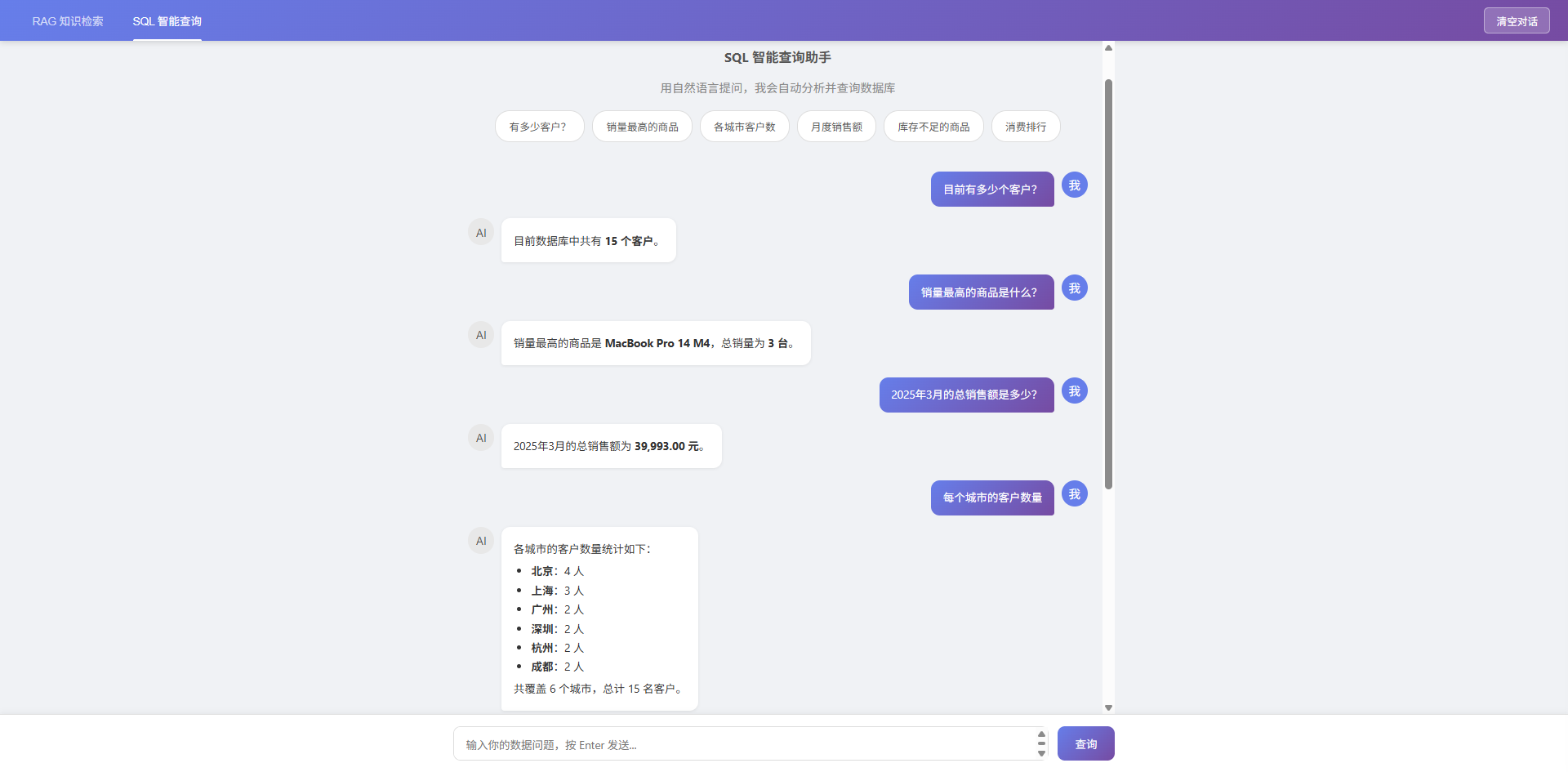
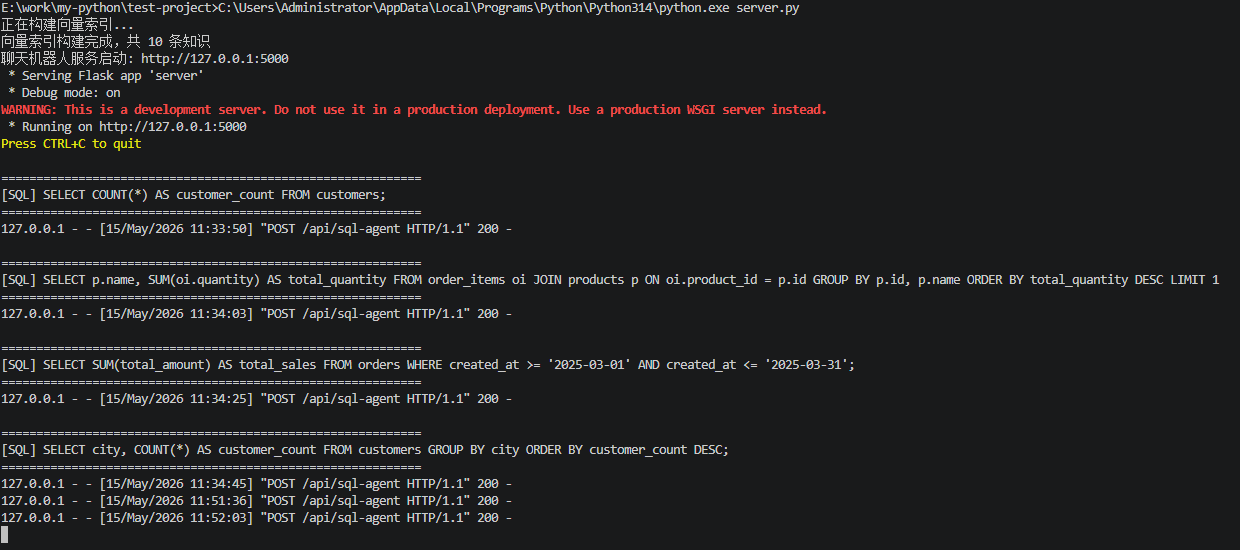
数据查询类:
| 用户输入 | 生成的 SQL | AI 回答 |
|---|---|---|
| 有多少客户? | SELECT COUNT(*) AS customer_count FROM customers; |
目前数据库中共有 15 个客户。 |
| 销量最高的商品? | SELECT p.name, SUM(oi.quantity) AS total_quantity FROM order_items oi JOIN products p ON oi.product_id = p.id GROUP BY p.id, p.name ORDER BY total_quantity DESC LIMIT 1 |
销量最高的商品是 MacBook Pro 14 M4 ,总销量为 3 台。 |
| 2025年3月总销售额? | SELECT SUM(total_amount) AS total_sales FROM orders WHERE created_at >= '2025-03-01' AND created_at <= '2025-03-31'; |
2025年3月的总销售额为 39,993.00 元。 |
| 每个城市有多少客户? | SELECT city, COUNT(*) AS customer_count FROM customers GROUP BY city ORDER BY customer_count DESC; |
各城市的客户数量统计如下: * 北京:4 人 * 上海:3 人 * 广州:2 人 * 深圳:2 人 * 杭州:2 人 * 成都:2 人 共覆盖 6 个城市,总计 15 名客户。 |
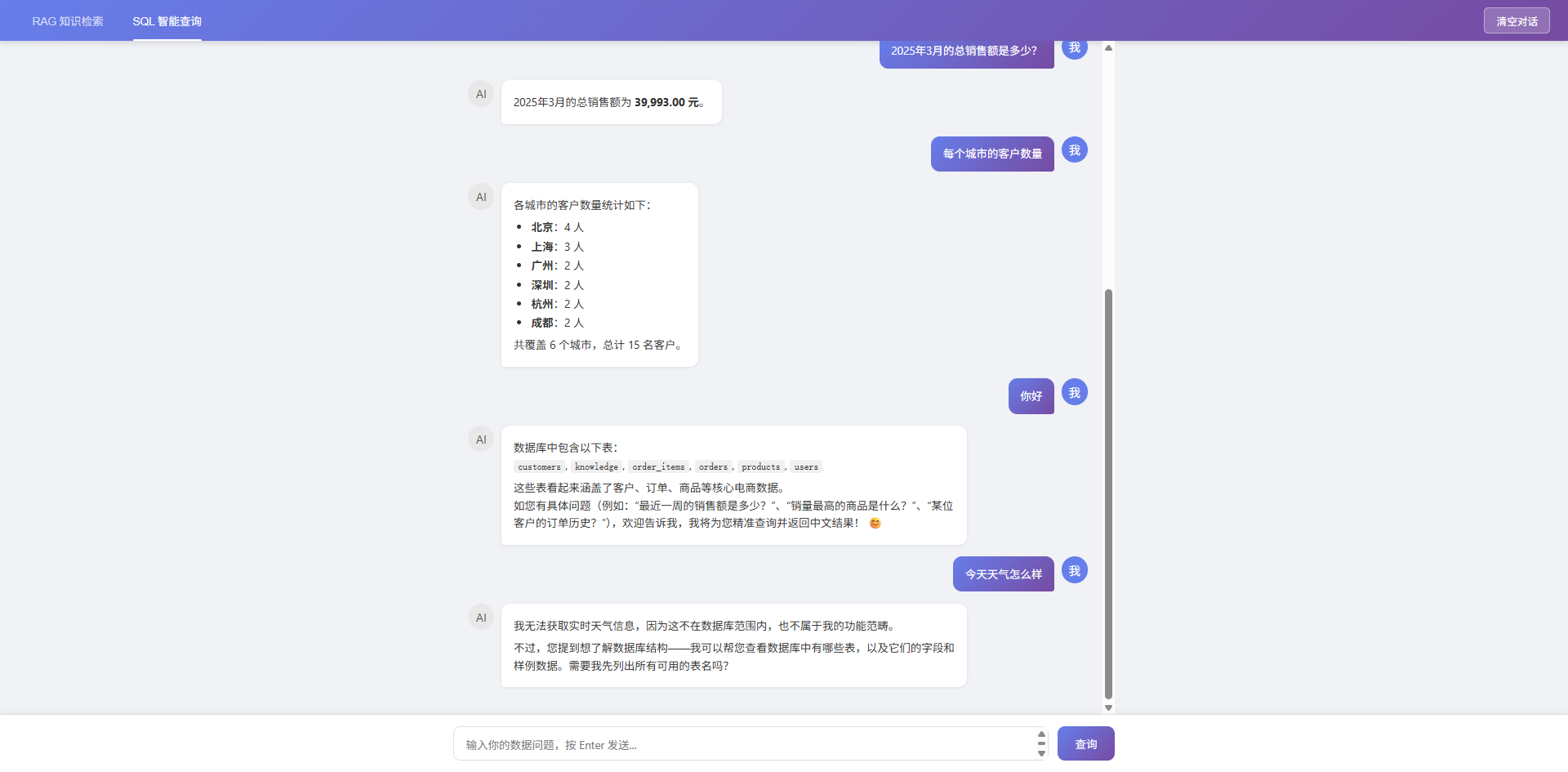
非查询类(闲聊):
| 用户输入 | AI 回答 |
|---|---|
| 你好 | 数据库中包含以下表: customers, knowledge, order_items, orders, products, users 这些表看起来涵盖了客户、订单、商品等核心电商数据。 如您有具体问题(例如:"最近一周的销售额是多少?"、"销量最高的商品是什么?"、"某位客户的订单历史?"),欢迎告诉我,我将为您精准查询并返回中文结果! 😊 |
| 今天天气怎么样 | 我无法获取实时天气信息,因为这不在数据库范围内,也不属于我的功能范畴。 不过,您提到想了解数据库结构------我可以帮您查看数据库中有哪些表,以及它们的字段和样例数据。需要我先列出所有可用的表名吗? |
六、总结
通过 LangChain 的 SQL Agent 能力,我们用不到 100 行核心代码就实现了一个完整的"自然语言转 SQL 查询"系统。用户无需了解 SQL 语法,只需用日常语言描述需求,AI 即可自动完成"理解意图 → 生成 SQL → 查询数据 → 组织回答"的全流程。