mvn配置
<parent>
    <groupId>org.springframework.boot</groupId>
    <artifactId>spring-boot-starter-parent</artifactId>
    <version>3.2.0</version>
    <relativePath/>
<!--    <scope>import</scope>-->
  </parent>

  <!-- Spring Boot Neo4j Starter -->
    <dependency>
      <groupId>org.springframework.boot</groupId>
      <artifactId>spring-boot-starter-data-neo4j</artifactId>
    </dependency>

    <!-- Neo4j Java Driver (通常由starter自动引入,但可显式声明版本) -->
    <dependency>
      <groupId>org.neo4j.driver</groupId>
      <artifactId>neo4j-java-driver</artifactId>
      <version>5.15.0</version>
    </dependency>

    <!-- OpenCSV 用于解析CSV文件 -->
    <dependency>
      <groupId>com.opencsv</groupId>
      <artifactId>opencsv</artifactId>
      <version>5.8</version>
    </dependency>
编写config配置类
import org.neo4j.driver.AuthTokens;
import org.neo4j.driver.Driver;
import org.neo4j.driver.GraphDatabase;
import org.springframework.beans.factory.annotation.Value;
import org.springframework.context.annotation.Bean;
import org.springframework.context.annotation.Configuration;

@Configuration
public class Neo4jConfig {
    @Value("${spring.neo4j.uri}")
    private String uri;

    @Value("${spring.neo4j.authentication.username}")
    private String username;

    @Value("${spring.neo4j.authentication.password}")
    private String password;

    @Bean
    public Driver neo4jDriver(){
        return GraphDatabase.driver(uri, AuthTokens.basic(username,password));
    }
}yml里进行对应配置spring:
neo4j:
uri: bolt://localhost:7687
authentication:
username: neo4j
password: yourpassword重点service逻辑编写增删改查
@Service
public class Neo4jService {

    @Autowired
    private Driver driver;

    @Value("${app.neo4j.csv.path}")
    private String csvPath;

    public void importRelations(String csvFileName){
       List<RelationDto> relations = readCsv(csvFileName,RelationDto.class);
        System.out.println(relations.size()+"条");

        try(Session session = driver.session()){
            int count = 0;
            for(RelationDto relation:relations){
//                执行cypher创建
                session.run(
                        "MATCH (a {id: $startId})"+
                                "MATCH (b {id:$endId})"+
                                "CREATE (a)-[r:"+
                                relation.getType()+
                                " ]->(b)",
                        parameters(
                               "startId",relation.getSTART_ID(),
                               "endId",relation.getEND_ID()
                        )
                );
                count++;
                //
                if(count % 100 == 0){
                    System.out.println("已经导入"+count+" 条关系");
                }
            }

            System.out.println("导入完成"+count+"条");
        }

    }

    private <T> List<T> readCsv(String filename, Class<T> targetClass){
        String fullPath = csvPath+filename;
        try(FileReader reader = new FileReader(fullPath)){
            return new CsvToBeanBuilder<T>(reader)
                    .withType(targetClass)
                    .withIgnoreLeadingWhiteSpace(true)
                    .build().parse();

        } catch (FileNotFoundException e) {
            throw new RuntimeException(e);
        } catch (IOException e) {
            throw new RuntimeException(e);
        }
    }

    public void importNodes(String csvFileName){
        List<NodeDto> nodeCsv = readCsv(csvFileName,NodeDto.class);
        try(Session session=driver.session()){
            for(NodeDto node:nodeCsv){
                session.run(
                        "CREATE (n:" + node.getLabel() + " {id: $id, name: $name})",
                        parameters("id", node.getId(), "name", node.getName())
                );
            }
            System.out.println("节点导入完成!共 " + nodeCsv.size() + " 个节点");

        }
    }

    public void clear(){
        try(Session session = driver.session()){
            session.run("MATCH (n) DETACH DELETE n");
        }
    }

}
其中dto分别是NodeDto和RelationDto
@Getter
@Setter
public class NodeDto {
    @CsvBindByName(column = ":ID")
    private Long id;

    @CsvBindByName(column = "name")
    private String name;

    @CsvBindByName(column = ":LABEL")
    private String label;

}

@Getter
@Setter
public class RelationDto {
    @CsvBindByName(column = ":START_ID")
    private Long START_ID;

    @CsvBindByName(column = ":END_ID")
    private Long END_ID;

    @CsvBindByName(column = ":TYPE")
    private String type;

}
csv文件分别是 node.csv
:ID,name,:LABEL
1,威胁告警,Module
2,告警优化,Module
3,大客户名单,Module
4,封禁IP管理,Module
5,安全运营工单,Module
6,业务/测试加白工单,Module
7,大客户申请工单,Module
8,筛选框搜索,Requirement
9,新建,Requirement
10,导入,Requirement
11,导出,Requirement
12,详情,Requirement
13,编辑,Requirement
14,复制,Requirement
15,删除,Requirement
16,停止,Requirement
17,列表展示,Requirement
18,一键同步,Requirement
19,只总行人员-运营维护人员可编辑,Requirement
20,总行-安全运营二线可编辑,Requirement
relation.csv
:START_ID,:END_ID,:TYPE
2,8,belong
2,9,belong
2,10,belong
2,11,belong
2,12,belong
2,14,belong
2,15,belong
2,16,belong
2,17,belong
2,19,belong
3,8,belong
3,9,belong
3,10,belong
3,11,belong
3,15,belong
3,17,belong
3,18,belong
3,19,belong
3,20,belong
3,12,belong
3,13,belong
controller层调用
@RestController
@RequestMapping("/neo4j")
public class Neo4jController {

   @Autowired
   private Neo4jService neo4jService;

   @PostMapping("/import")
    public String importData(){
       try{
           neo4jService.clear();
           neo4jService.importNodes("node.csv");
           neo4jService.importRelations("relation.csv");
           return "导入成功";
       }catch (Exception e){
           System.out.println(e.getMessage());
           return "导入失败";
       }
   }
}
docker拉取并启动neo4j
docker pull:latest

docker run -d --name neo4j -p 7474:7474 -p 7687:7687 -e NEO4J_AUTH=neo4j/yourpassword neo4j:latest注意password要大于8位数 强密码
docker ps filter的用法
docker ps --filter "name=neo4j"neo4j浏览器访问方式
http://localhost:7474/browser/
报错
The client is unauthorized due to authentication failure.
注意看看自己config文件里的@Value写法对不对
图查看方式
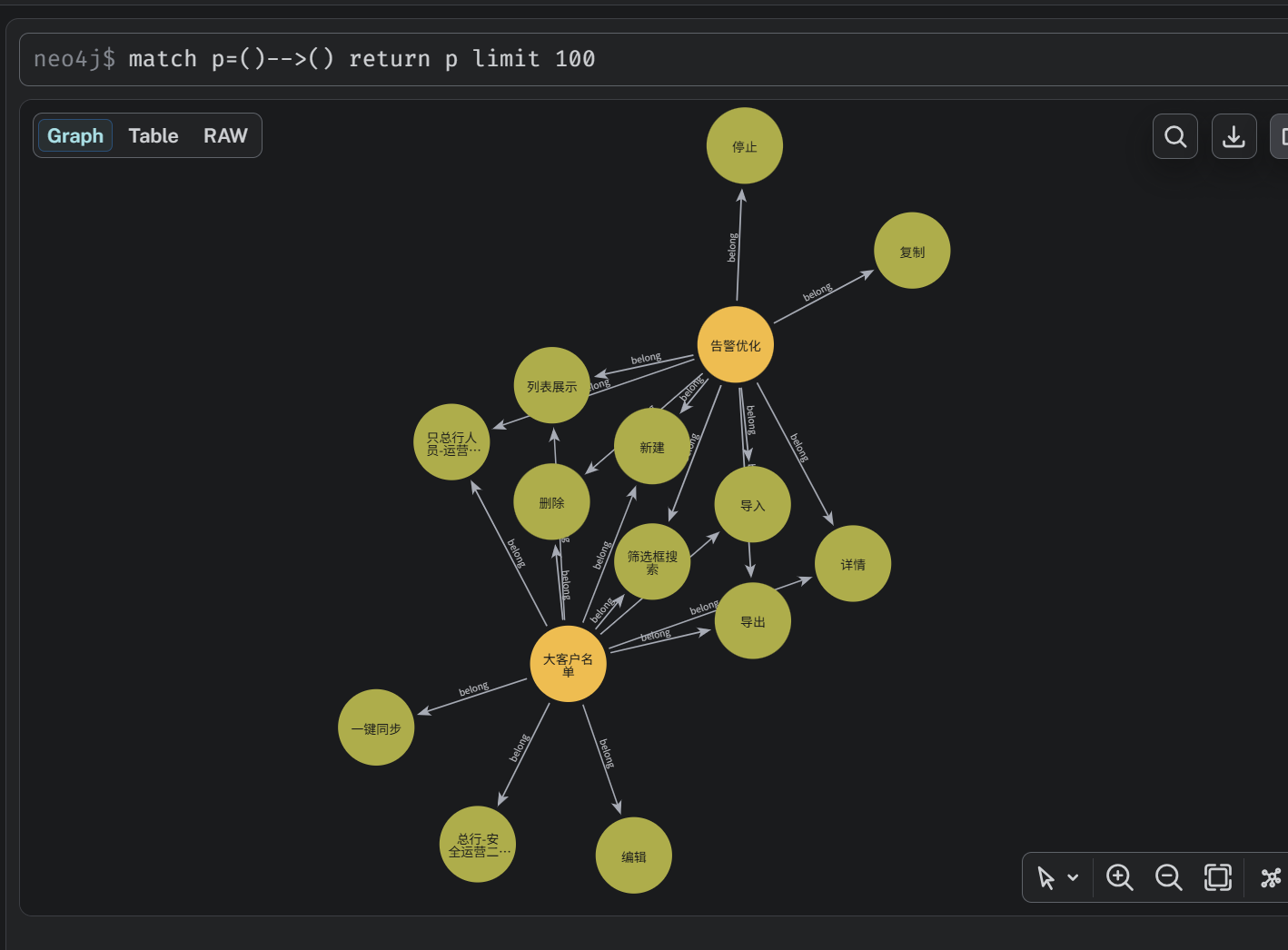
match p=()-->() return p limit 100