文章目录
引言
知识库系统的运营离不开两类数据:用户在问什么(热词分析)、系统在做什么(操作日志)。前者帮助优化知识库内容,后者用于审计和排障。
本项目用一套巧妙的设计同时解决了这两个问题:通过 AOP 自动收集对话日志,再用定时任务对日志做中文分词统计,自动产出热词数据。本篇将完整拆解这条链路。
设计说明
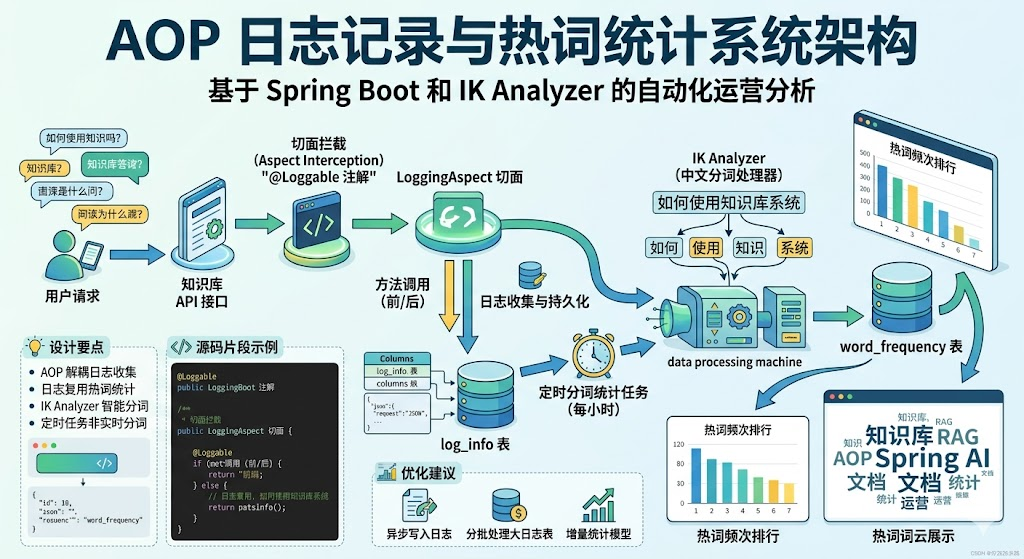
整体架构
Java
@Loggable 注解
    ↓
LoggingAspect 切面
    ↓
log_info 表(请求参数、方法名、类名、时间)
    ↓
TaskJobScheduled(每小时定时任务)
    ↓
IK Analyzer 中文分词
    ↓
word_frequency 表(热词频次)
    ↓
WordFrequencyController(前端展示)
    ↓
Redis 缓存(5分钟 TTL)
设计要点
为什么用 AOP 而不是手动埋点?
手动埋点意味着每个对话接口都要写一遍 logService.save(...),代码冗余且容易遗漏。AOP 通过注解 + 切面的组合,让日志记录与业务逻辑完全解耦。新增接口时只需要加一个 @Loggable 注解即可。
为什么用日志而不是直接监听对话?
直接监听对话需要订阅 ChatClient 的事件流,实现复杂且耦合。利用已有的日志数据做二次分析,是一种"零成本"的数据复用------日志本来就要存的,顺便拿来做热词分析。
为什么用 IK Analyzer 而不是简单 split?
中文不像英文有空格分词。split(" ") 对中文完全无效,需要专门的中文分词器。IK Analyzer 是 Java 生态最经典的中文分词工具,支持智能分词和最细粒度分词两种模式。
为什么定时任务而不是实时分词?
实时分词会拖慢对话响应。定时任务每小时跑一次,对线上业务零影响,且分词结果对热度分析的实时性要求并不高。
原理方案
自定义注解 + 切面
@Loggable 是一个自定义注解:
java
@Target(ElementType.METHOD)
@Retention(RetentionPolicy.RUNTIME)
public @interface Loggable {
    String value() default "";  // 可选,指定要记录的参数名
}
LoggingAspect 是对应的切面:
java
@Aspect
@Component
public class LoggingAspect {

    @Pointcut("@annotation(loggable)")
    public void loggableMethods(Loggable loggable) {}

    @Before(value = "loggableMethods(loggable)", argNames = "joinPoint,loggable")
    public void logBefore(JoinPoint joinPoint, Loggable loggable) {
        // 收集方法名、类名、时间、参数
        // 持久化到 log_info 表
    }
}
日志表结构
sql
CREATE TABLE `log_info` (
    `id` BIGINT NOT NULL AUTO_INCREMENT,
    `method_name` VARCHAR(255) COMMENT '方法名',
    `class_name` VARCHAR(255) COMMENT '类目',
    `request_time` DATE COMMENT '请求时间戳',
    `request_params` TEXT COMMENT '请求参数',
    `response` TEXT COMMENT '响应结果',
    PRIMARY KEY (`id`)
);
request_params 存的是 JSON 序列化后的参数,热词统计就是基于这个字段。
定时分词流程
java
@Scheduled(cron = "0 0 * * * ?")  // 每小时整点
public void taskJob() {
    // 1. 清缓存
    redisTemplate.delete("wordFrequencyList");

    // 2. 加载已有热词到 Map
    List<WordFrequency> existing = wordFrequencyService.list();
    Map<String, List<WordFrequency>> existingMap = existing.stream()
            .collect(Collectors.groupingBy(WordFrequency::getWord));

    // 3. 拼接所有日志的 request_params
    StringBuilder text = new StringBuilder();
    for (LogInfo log : logInfoService.list()) {
        text.append(log.getRequestParams());
    }

    // 4. IK 分词
    IKSegmenter segmenter = new IKSegmenter(new StringReader(text.toString()), true);

    // 5. 统计:新词新增,旧词频次+1
    while ((lexeme = segmenter.next()) != null) {
        if (existingMap.containsKey(word)) {
            // 频次+1
        } else {
            // 新增
        }
    }

    // 6. 批量写库
    wordFrequencyService.saveBatch(newWords);
    wordFrequencyService.saveOrUpdateBatch(updateWords);
}
源码解析
自定义注解 Loggable
java
@Target(ElementType.METHOD)
@Retention(RetentionPolicy.RUNTIME)
public @interface Loggable {
    String value() default "";
}
注解的 value 参数支持指定要记录的参数名,如:
java
@Loggable("message")
public Flux<String> chat(@RequestParam String message, @RequestParam String prompt) { ... }
切面会只记录 message 参数,不记录 prompt,避免日志冗余。
LoggingAspect 切面完整实现
java
@Aspect
@Component
public class LoggingAspect {

    @Autowired
    private LogInfoService logInfoService;

    @Pointcut("@annotation(loggable)")
    public void loggableMethods(com.xushu.rag.annotation.Loggable loggable) {}

    @Before(value = "loggableMethods(loggable)", argNames = "joinPoint,loggable")
    public void logBefore(JoinPoint joinPoint, Loggable loggable) {
        LogInfo logInfo = new LogInfo();
        logInfo.setMethodName(joinPoint.getSignature().getName());
        logInfo.setClassName(joinPoint.getTarget().getClass().getName());
        logInfo.setRequestTime(new Date());

        Object[] args = joinPoint.getArgs();

        // 是否指定了具体的参数名
        if (loggable.value() != null && loggable.value().length() > 0) {
            MethodSignature signature = (MethodSignature) joinPoint.getSignature();
            String[] parameterNames = signature.getParameterNames();

            Map<String, Object> selectedParams = new HashMap<>();
            List<String> targetParams = Arrays.asList(loggable.value());

            if (parameterNames != null) {
                for (int i = 0; i < parameterNames.length; i++) {
                    if (targetParams.contains(parameterNames[i])) {
                        selectedParams.put(parameterNames[i], args[i]);
                    }
                }
            }
            logInfo.setRequestParams(selectedParams.toString());
        } else {
            // 没有指定参数名时,记录所有参数
            logInfo.setRequestParams(Arrays.toString(args));
        }

        logInfoService.save(logInfo);
    }
}
关键技术点:
@Pointcut("@annotation(loggable)")------ 通过注解参数化绑定的方式,让切面能接收到具体的注解实例MethodSignature.getParameterNames()------ 获取方法参数名,需要编译时保留参数名信息(-parameters标志)- 筛选参数:通过参数名匹配,只记录注解中指定的参数
在对话接口上挂注解
java
@GetMapping(value = "/stream")
@Loggable("message")  // 只记录 message 参数
public Flux<String> streamRagChat(@RequestParam String message, @RequestParam String prompt) {
    // ...
}

@PostMapping(value = "/rag")
@Loggable  // 记录所有参数
public Flux<String> generatePost(@RequestParam String message) {
    // ...
}
零侵入,业务代码完全感知不到日志的存在。
日志查询接口
java
@RestController
@RequestMapping(ApplicationConstant.API_VERSION + "/log")
public class LogInfoController {

    @Autowired
    private LogInfoService logInfoService;

    @Operation(summary = "分页查询日志信息")
    @GetMapping("/page")
    public BaseResponse<IPage<LogInfo>> getLogInfoPage(
            @RequestParam int page, @RequestParam int size,
            @RequestParam(required = false) String methodName,
            @RequestParam(required = false) String className,
            @RequestParam(required = false) String requestParams) {
        Page<LogInfo> pageParam = new Page<>(page, size);
        QueryWrapper<LogInfo> queryWrapper = new QueryWrapper<>();
        if (methodName != null) queryWrapper.like("method_name", methodName);
        if (className != null) queryWrapper.like("class_name", className);
        if (requestParams != null) queryWrapper.like("request_params", requestParams);
        Page<LogInfo> result = logInfoService.page(pageParam, queryWrapper);
        result.setTotal(result.getRecords().size());
        return ResultUtils.success(result);
    }

    @Operation(summary = "批量删除日志")
    @PostMapping("/batch")
    public BaseResponse deleteLogInfos() {
        boolean result = logInfoService.remove(null);
        return result ? ResultUtils.success("删除成功") : ResultUtils.error("删除失败");
    }
}
支持按方法名、类名、参数关键字模糊查询,便于排障。
定时任务完整实现
java
@Component("taskJob")
@Slf4j
public class TaskJobScheduled {

    @Autowired
    private LogInfoService logInfoService;
    @Autowired
    private WordFrequencyService wordFrequencyService;
    @Autowired
    private RedisTemplate<String, Object> redisTemplate;

    /**
     * cron 表达式: 0 0 * * * ?
     * 每小时的0分0秒执行
     */
    @Scheduled(cron = "0 0 * * * ?")
    public void taskJob() {
        log.info("分词器定时任务开始执行");

        // 1. 清空 Redis 缓存
        redisTemplate.delete("wordFrequencyList");

        // 2. 加载已有热词
        List<WordFrequency> wordFrequencies = wordFrequencyService.list();
        Map<String, List<WordFrequency>> collectMap = wordFrequencies.stream()
                .collect(Collectors.groupingBy(WordFrequency::getWord));

        // 3. 拼接所有日志参数
        StringBuilder text = new StringBuilder();
        List<LogInfo> list = logInfoService.list((Wrapper<LogInfo>) null);
        for (LogInfo logInfo : list) {
            text.append(logInfo.getRequestParams());
        }
        String result = text.toString();

        // 4. IK 分词与统计
        Map<String, WordFrequency> newMap = new HashMap<>();
        try (StringReader reader = new StringReader(result)) {
            IKSegmenter segment = new IKSegmenter(reader, true);  // true: 智能分词
            Lexeme lexeme;
            List<WordFrequency> wordFrequencyList = new ArrayList<>();
            List<WordFrequency> updateList = new ArrayList<>();

            while ((lexeme = segment.next()) != null) {
                // 过滤单字
                if (lexeme.getLength() <= 1) continue;
                // 过滤超长字符(可能是 URL、UUID 等噪音)
                if (lexeme.getLength() >= 10) continue;

                String word = lexeme.getLexemeText();

                if (!collectMap.containsKey(word)) {
                    // 新词
                    if (newMap.containsKey(word)) {
                        // 已经统计过的新词,频次+1
                        WordFrequency wf = newMap.get(word);
                        wf.setCountNum(wf.getCountNum() + 1);
                    } else {
                        // 第一次出现的新词
                        WordFrequency wf = new WordFrequency();
                        wf.setWord(word);
                        wf.setCountNum(1);
                        wf.setBusinessType("log");
                        wf.setCreateTime(new Date());
                        wf.setUpdateTime(new Date());
                        wordFrequencyList.add(wf);
                        newMap.put(word, wf);
                    }
                } else {
                    // 已存在的旧词,频次+1
                    WordFrequency wf = collectMap.get(word).get(0);
                    wf.setCountNum(wf.getCountNum() + 1);
                    wf.setUpdateTime(new Date());
                    updateList.add(wf);
                }
            }

            // 5. 批量持久化
            wordFrequencyService.saveBatch(wordFrequencyList);
            wordFrequencyService.saveOrUpdateBatch(updateList);

        } catch (IOException e) {
            e.printStackTrace();
        }
    }
}
几个值得注意的细节:
new IKSegmenter(reader, true)------ 第二个参数useSmart,true 表示智能分词(粒度较粗),false 表示最细粒度分词- 过滤策略 :
- 长度 ≤ 1 的字("的"、"是"等)没有统计意义
- 长度 ≥ 10 的字符串通常是 URL、UUID、英文长串,过滤掉
- 新词去重 :
newMap用于在本轮分词中临时记录新词,避免同一新词被重复 INSERT - 批量操作 :
saveBatch和saveOrUpdateBatch比逐条操作快几十倍
启用定时任务
需要在主类上加 @EnableScheduling:
java
@SpringBootApplication
@EnableScheduling
public class XushuRagAiApplication {
    public static void main(String[] args) {
        SpringApplication.run(XushuRagAiApplication.class, args);
    }
}
热词查询接口(含 Redis 缓存)
java
@GetMapping("/getList")
public BaseResponse<Object> getList() throws JsonProcessingException {
    String cacheKey = "wordFrequencyList";
    String cachedListStr = (String) redisTemplate.opsForValue().get(cacheKey);

    if (cachedListStr != null) {
        try {
            Object cachedList = objectMapper.readValue(cachedListStr, List.class);
            log.info("从 Redis 缓存中获取数据");
            return ResultUtils.success(cachedList);
        } catch (Exception e) {
            log.error("Redis 缓存解析失败", e);
        }
    }

    Object dataList = wordFrequencyService.list();
    String dataListJson = objectMapper.writeValueAsString(dataList);
    redisTemplate.opsForValue().set(cacheKey, dataListJson);
    redisTemplate.expire(cacheKey, 5, TimeUnit.MINUTES);

    return ResultUtils.success(dataList);
}
缓存策略:
- 5 分钟 TTL,避免数据库被频繁查询
- 定时任务执行时主动清除缓存,保证数据新鲜
- 缓存解析失败时降级到数据库,不影响业务
验证结果
触发日志记录
调用任意带 @Loggable 注解的接口:
GET /api/v1/chat/stream?message=Spring AI怎么用查询日志表:
sql
SELECT * FROM log_info ORDER BY id DESC LIMIT 1;id | method_name | class_name | request_time | request_params
---|----------------|-------------------------|--------------|----------------
42 | streamRagChat | com...ChatController | 2026-05-14 | {message=Spring AI怎么用}手动触发定时任务
为方便测试,可以在 Controller 中暴露手动触发接口:
java
@Autowired
private TaskJobScheduled taskJobScheduled;

@PostMapping("/triggerTask")
public BaseResponse trigger() {
    taskJobScheduled.taskJob();
    return ResultUtils.success("已触发");
}
执行后查询热词表:
sql
SELECT * FROM word_frequency ORDER BY count_num DESC LIMIT 10;id | word | count_num | business_type
---|------------|-----------|---------------
1 | spring | 23 | log
2 | 知识库 | 18 | log
3 | rag | 15 | log
4 | 文档 | 12 | log
...前端展示
热词数据可以用来生成词云:
javascript
// 前端拉取数据
const data = await fetch('/api/v1/frequency/getList');
// 渲染词云
new WordCloud(canvas, { list: data.map(w => [w.word, w.countNum]) });
优化建议
异步日志写入
logInfoService.save(logInfo) 是同步操作,会阻塞请求。可以改成异步:
java
@Async
public void saveAsync(LogInfo logInfo) {
    logInfoService.save(logInfo);
}
或者用消息队列(RabbitMQ、Kafka)做缓冲。
分批处理大日志表
定时任务每次都 list() 全表,日志多了之后会 OOM。改进方案:
java
// 只统计最近 1 小时的日志
QueryWrapper<LogInfo> qw = new QueryWrapper<>();
qw.gt("request_time", DateUtils.addHours(new Date(), -1));
List<LogInfo> list = logInfoService.list(qw);
或者分页处理:
java
int page = 1;
while (true) {
    Page<LogInfo> pageData = logInfoService.page(new Page<>(page, 1000));
    if (pageData.getRecords().isEmpty()) break;
    process(pageData.getRecords());
    page++;
}
增量统计
目前每次都全量重算。可以引入"上次处理时间戳":
sql
-- 增加字段
ALTER TABLE log_info ADD COLUMN processed BOOLEAN DEFAULT FALSE;

-- 只处理未处理的
SELECT * FROM log_info WHERE processed = FALSE;

-- 处理完更新
UPDATE log_info SET processed = TRUE WHERE id IN (...);
自定义停用词表
IK 默认会过滤一些停用词,但中文场景往往需要扩展。可以在 classpath 下添加 stopword.dic:
的
是
在
我们
然后
IK 会自动加载并过滤。
日志归档
log_info 表会快速膨胀。建议:
- 按月分表
- 历史数据归档到 ClickHouse 或 ES
- MySQL 只保留近 7 天数据
小结
本篇用一个巧妙的"日志 → 分词 → 统计"链路实现了热词分析:
@Loggable+ AOP 切面,零侵入收集对话日志- IK Analyzer 处理中文分词
@Scheduled定时任务每小时统计一次- Redis 缓存提升查询性能
- 配合前端可以做词云、热度排行等可视化
下一篇将进入身份认证领域,看看 JWT 是如何在这个系统中保障接口安全的。
