这个架构意思是单向数据流,View → Intent → ViewModel → Model → View , 界面由State 状态对象决定显示成什么样,状态是只读的,只能新建,不能修改。每次更新列表,需要给新的数据,数据对象的引用变了触发页面刷新。 写个显示武侠人物的demo测试下。
libs.versions.toml:
bash
[versions]
agp = "9.0.1"
coreKtx = "1.18.0"
junit = "4.13.2"
junitVersion = "1.3.0"
espressoCore = "3.7.0"
lifecycleRuntimeKtx = "2.10.0"
activityCompose = "1.13.0"
kotlin = "2.0.21"
composeBom = "2024.09.00"

# MVI 依赖
lifecycle = "2.10.0"
coroutines = "1.7.3"
recyclerview = "1.3.2"
swiperefreshlayout = "1.1.0"

appcompat = "1.7.0"
material = "1.12.0"

[libraries]
androidx-core-ktx = { group = "androidx.core", name = "core-ktx", version.ref = "coreKtx" }
junit = { group = "junit", name = "junit", version.ref = "junit" }
androidx-junit = { group = "androidx.test.ext", name = "junit", version.ref = "junitVersion" }
androidx-espresso-core = { group = "androidx.test.espresso", name = "espresso-core", version.ref = "espressoCore" }
androidx-lifecycle-runtime-ktx = { group = "androidx.lifecycle", name = "lifecycle-runtime-ktx", version.ref = "lifecycleRuntimeKtx" }
androidx-activity-compose = { group = "androidx.activity", name = "activity-compose", version.ref = "activityCompose" }
androidx-compose-bom = { group = "androidx.compose", name = "compose-bom", version.ref = "composeBom" }
androidx-compose-ui = { group = "androidx.compose.ui", name = "ui" }
androidx-compose-ui-graphics = { group = "androidx.compose.ui", name = "ui-graphics" }
androidx-compose-ui-tooling = { group = "androidx.compose.ui", name = "ui-tooling" }
androidx-compose-ui-tooling-preview = { group = "androidx.compose.ui", name = "ui-tooling-preview" }
androidx-compose-ui-test-manifest = { group = "androidx.compose.ui", name = "ui-test-manifest" }
androidx-compose-ui-test-junit4 = { group = "androidx.compose.ui", name = "ui-test-junit4" }
androidx-compose-material3 = { group = "androidx.compose.material3", name = "material3" }

# MVI 依赖
androidx-lifecycle-viewmodel-ktx = { group = "androidx.lifecycle", name = "lifecycle-viewmodel-ktx", version.ref = "lifecycle" }
kotlinx-coroutines-android = { group = "org.jetbrains.kotlinx", name = "kotlinx-coroutines-android", version.ref = "coroutines" }
androidx-recyclerview = { group = "androidx.recyclerview", name = "recyclerview", version.ref = "recyclerview" }
androidx-swiperefreshlayout = { group = "androidx.swiperefreshlayout", name = "swiperefreshlayout", version.ref = "swiperefreshlayout" }

androidx-appcompat = { group = "androidx.appcompat", name = "appcompat", version.ref = "appcompat" }
androidx-material = { group = "com.google.android.material", name = "material", version.ref = "material" }

[plugins]
android-application = { id = "com.android.application", version.ref = "agp" }
kotlin-compose = { id = "org.jetbrains.kotlin.plugin.compose", version.ref = "kotlin" }
app/build.gradle.kts:
Groovy
plugins {
    alias(libs.plugins.android.application)
    alias(libs.plugins.kotlin.compose)
}

android {
    namespace = "com.example.testmvi"
    compileSdk = 36

    defaultConfig {
        applicationId = "com.example.testmvi"
        minSdk = 29
        targetSdk = 36
        versionCode = 1
        versionName = "1.0"

        testInstrumentationRunner = "androidx.test.runner.AndroidJUnitRunner"
    }

    buildTypes {
        release {
            isMinifyEnabled = false
            proguardFiles(
                getDefaultProguardFile("proguard-android-optimize.txt"),
                "proguard-rules.pro"
            )
        }
    }
    compileOptions {
        sourceCompatibility = JavaVersion.VERSION_11
        targetCompatibility = JavaVersion.VERSION_11
    }
    buildFeatures {
        viewBinding = true
    }
}

dependencies {
    implementation(libs.androidx.core.ktx)
    implementation(libs.androidx.appcompat)
    implementation(libs.androidx.material)

    // Compose 可以保留
    implementation(libs.androidx.lifecycle.runtime.ktx)
    implementation(libs.androidx.activity.compose)
    implementation(platform(libs.androidx.compose.bom))
    implementation(libs.androidx.compose.ui)
    implementation(libs.androidx.compose.ui.graphics)
    implementation(libs.androidx.compose.ui.tooling.preview)
    implementation(libs.androidx.compose.material3)

    // MVI核心依赖
    implementation(libs.androidx.lifecycle.viewmodel.ktx)
    implementation(libs.kotlinx.coroutines.android)
    implementation(libs.androidx.recyclerview)
    implementation(libs.androidx.swiperefreshlayout)

    testImplementation(libs.junit)
    androidTestImplementation(libs.androidx.junit)
    androidTestImplementation(libs.androidx.espresso.core)
}
武侠人物Hero:
Kotlin
package com.example.testmvi

data class Hero(
    val id: Int,
    val name: String,
    val skill: String,
    val sect: String
)
意图HeroIntent:
Kotlin
package com.example.testmvi

/**
 * 意图。用户想干什么,全部定义成意图
 */
sealed class HeroIntent {
    object LoadHeroes : HeroIntent()
    object RefreshHeroes : HeroIntent()
}
状态HeroState:
Kotlin
package com.example.testmvi

/**
 * 意图。用户想干什么,全部定义成意图
 */
sealed class HeroIntent {
    object LoadHeroes : HeroIntent()
    object RefreshHeroes : HeroIntent()
}
HeroViewModel:
Kotlin
package com.example.testmvi

import androidx.lifecycle.ViewModel
import androidx.lifecycle.viewModelScope
import kotlinx.coroutines.delay
import kotlinx.coroutines.flow.MutableStateFlow
import kotlinx.coroutines.flow.StateFlow
import kotlinx.coroutines.flow.update
import kotlinx.coroutines.launch

/**
 * 处理逻辑, 即根据意图 → 更新状态
 */
class HeroViewModel : ViewModel() {
    private val _state = MutableStateFlow(HeroState())
    val state: StateFlow<HeroState> = _state

    /**
     * 接收 Intent → 处理逻辑 → 更新 State
     */
    fun handleIntent(intent: HeroIntent) {
        when (intent) {
            HeroIntent.LoadHeroes -> loadHeroes()
            HeroIntent.RefreshHeroes -> loadHeroes()
        }
    }

    private fun loadHeroes() { // 不访问网络,就在主线程执行了。
        _state.update { it.copy(isLoading = true) } // 什么语法?

        viewModelScope.launch {
            delay(1000)

            val heroes = listOf(
                Hero(1, "郭靖", "降龙十八掌", "丐帮"),
                Hero(2, "杨过", "黯然销魂掌", "古墓派"),
                Hero(3, "张无忌", "乾坤大挪移", "明教"),
                Hero(4, "乔峰", "降龙十八掌", "丐帮"),
                Hero(5, "令狐冲", "独孤九剑", "华山派"),
                Hero(6, "灭绝师太", "峨眉剑法", "峨眉")
            )

            _state.update {
                it.copy(
                    isLoading = false,
                    heroes = heroes,
                    error = null
                )
            }
        }
    }
}
HeroAdapter:
Kotlin
package com.example.testmvi

import android.view.LayoutInflater
import android.view.ViewGroup
import androidx.recyclerview.widget.DiffUtil
import androidx.recyclerview.widget.ListAdapter
import androidx.recyclerview.widget.RecyclerView
import com.example.testmvi.databinding.ItemHeroBinding

class HeroAdapter : ListAdapter<Hero, HeroAdapter.HeroViewHolder>(HeroDiffCallback()) {

    inner class HeroViewHolder(private val binding: ItemHeroBinding) : RecyclerView.ViewHolder(binding.root) {
        fun bind(hero: Hero) {
            binding.tvName.text = hero.name
            binding.tvSkill.text = "武功:${hero.skill}"
            binding.tvSect.text = "门派:${hero.sect}"
        }
    }

    override fun onCreateViewHolder(parent: ViewGroup, viewType: Int): HeroViewHolder {
        val binding = ItemHeroBinding.inflate(LayoutInflater.from(parent.context), parent, false)
        return HeroViewHolder(binding)
    }

    override fun onBindViewHolder(holder: HeroViewHolder, position: Int) {
        holder.bind(getItem(position))
    }

    class HeroDiffCallback : DiffUtil.ItemCallback<Hero>() {
        override fun areItemsTheSame(oldItem: Hero, newItem: Hero): Boolean {
            return oldItem.id == newItem.id
        }

        override fun areContentsTheSame(oldItem: Hero, newItem: Hero): Boolean {
            return oldItem == newItem
        }
    }
}
MainActivity:
Kotlin
package com.example.testmvi

import androidx.appcompat.app.AppCompatActivity
import android.os.Bundle
import android.widget.Toast
import androidx.lifecycle.lifecycleScope
import androidx.recyclerview.widget.LinearLayoutManager
import com.example.testmvi.databinding.ActivityMainBinding
import kotlinx.coroutines.launch

class MainActivity : AppCompatActivity() {
    private lateinit var binding: ActivityMainBinding
    private lateinit var viewModel: HeroViewModel
    private lateinit var adapter: HeroAdapter

    override fun onCreate(savedInstanceState: Bundle?) {
        super.onCreate(savedInstanceState)
        binding = ActivityMainBinding.inflate(layoutInflater)
        setContentView(binding.root)

        initList()
        viewModel = HeroViewModel()

        observeState()

        viewModel.handleIntent(HeroIntent.LoadHeroes)

        binding.refreshLayout.setOnRefreshListener {
            viewModel.handleIntent(HeroIntent.RefreshHeroes)
        }
    }

    private fun initList() {
        adapter = HeroAdapter()
        binding.rvHeroes.layoutManager = LinearLayoutManager(this)
        binding.rvHeroes.adapter = adapter
    }

    private fun observeState() {
        lifecycleScope.launch {
            viewModel.state.collect { state ->
                binding.refreshLayout.isRefreshing = state.isLoading
                state.error?.let { Toast.makeText(this@MainActivity, it, Toast.LENGTH_SHORT).show() }
                adapter.submitList(state.heroes)
            }
        }
    }
}
activity_main.xml:
XML
<?xml version="1.0" encoding="utf-8"?>
<androidx.swiperefreshlayout.widget.SwipeRefreshLayout
    xmlns:android="http://schemas.android.com/apk/res/android"
    android:id="@+id/refreshLayout"
    android:layout_width="match_parent"
    android:layout_height="match_parent">

    <androidx.recyclerview.widget.RecyclerView
        android:id="@+id/rvHeroes"
        android:layout_width="match_parent"
        android:layout_height="match_parent"/>

</androidx.swiperefreshlayout.widget.SwipeRefreshLayout>
item_hero.xml:
XML
<?xml version="1.0" encoding="utf-8"?>
<LinearLayout
    xmlns:android="http://schemas.android.com/apk/res/android"
    android:layout_width="match_parent"
    android:layout_height="wrap_content"
    android:orientation="vertical"
    android:padding="16dp">

    <TextView
        android:id="@+id/tvName"
        android:layout_width="wrap_content"
        android:layout_height="wrap_content"
        android:textSize="20sp"
        android:textStyle="bold"/>

    <TextView
        android:id="@+id/tvSkill"
        android:layout_width="wrap_content"
        android:layout_height="wrap_content"
        android:textSize="16sp"
        android:layout_marginTop="4dp"/>

    <TextView
        android:id="@+id/tvSect"
        android:layout_width="wrap_content"
        android:layout_height="wrap_content"
        android:textSize="14sp"
        android:textColor="#666"/>

</LinearLayout>
执行:
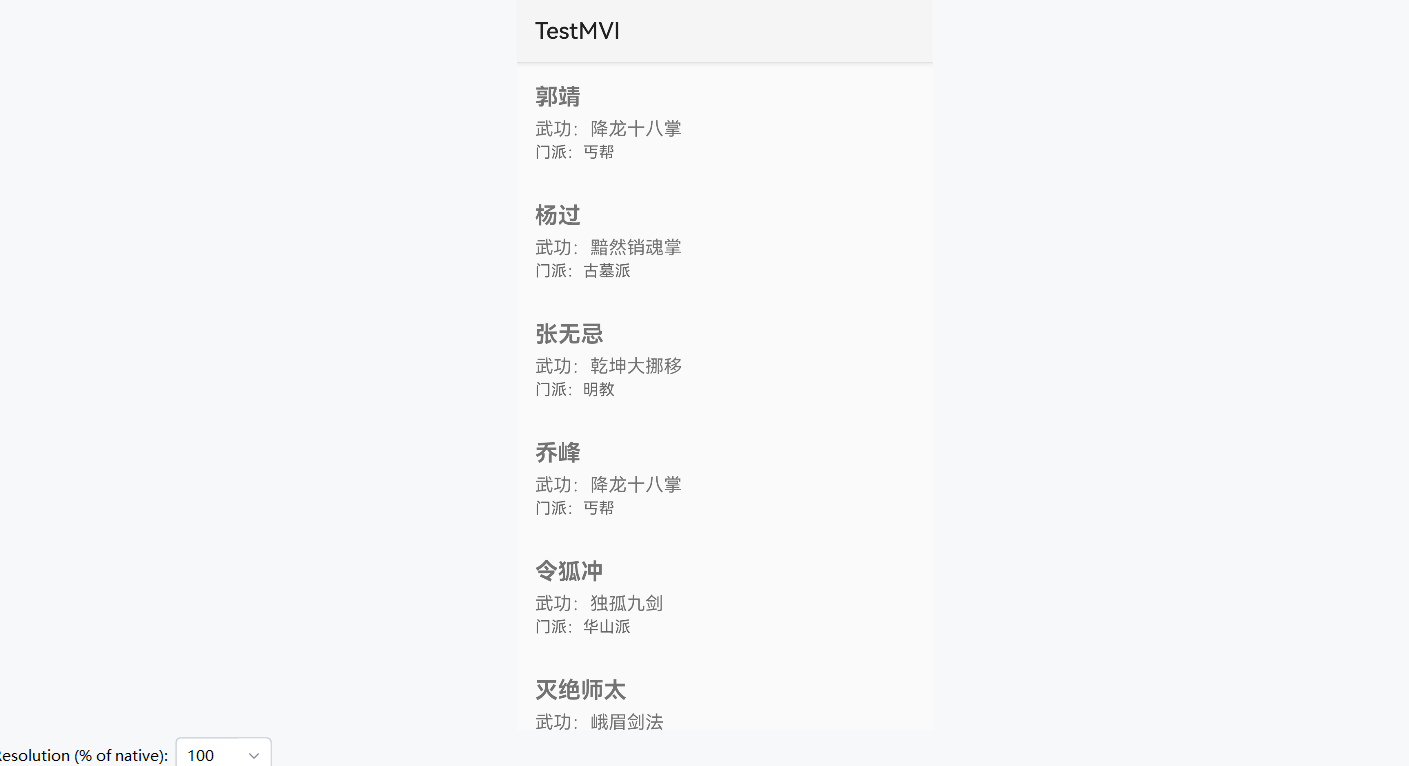
下拉刷新:
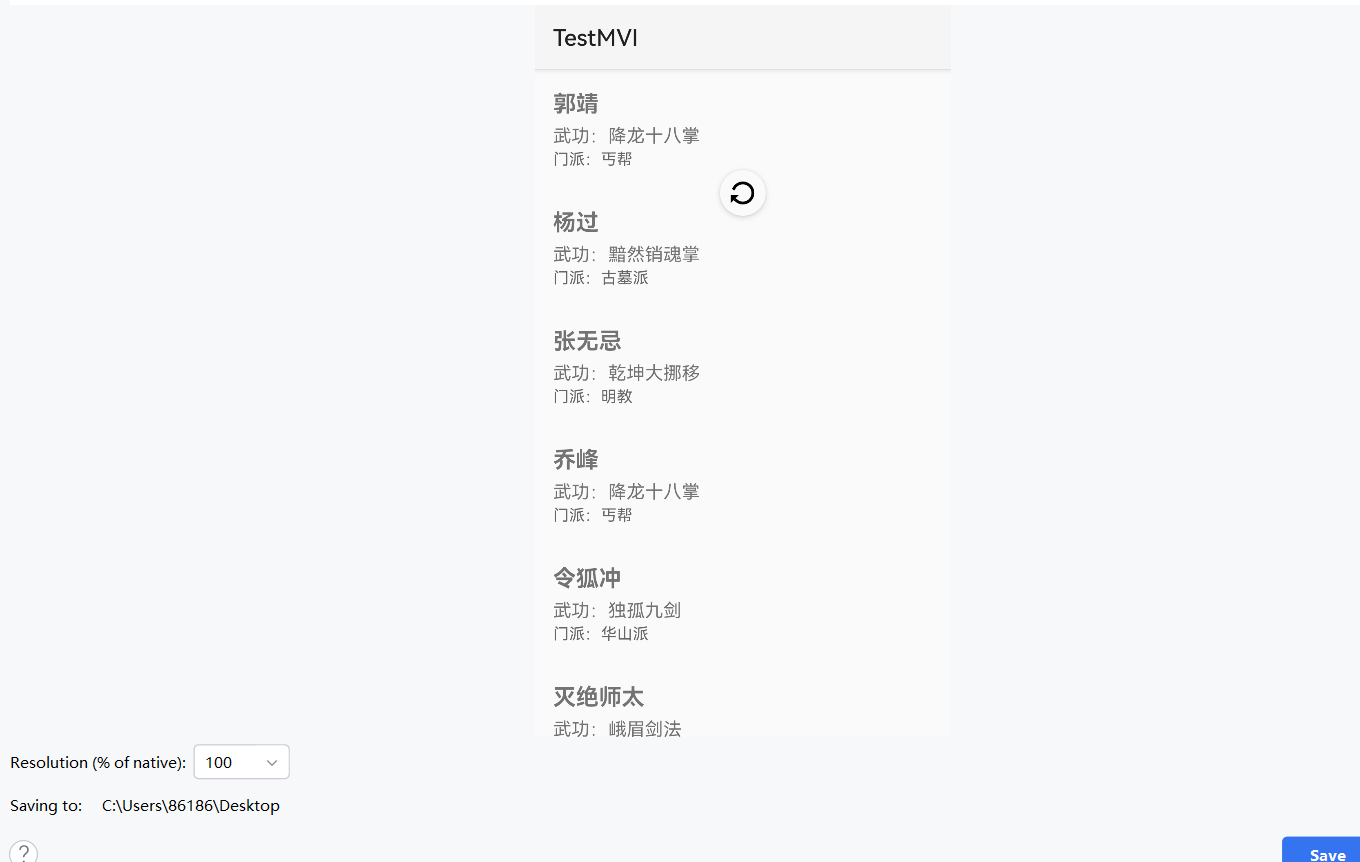
ok.