javascript
<template>
	<view class="voice-container">
		<!-- 语音消息列表 -->
		<scroll-view class="message-list" scroll-y :scroll-top="scrollTop" scroll-with-animation>
			<view v-for="(msg, idx) in messages" :key="msg.id" class="message-item">
				<view class="voice-bubble" :class="{ self: msg.self }" @click="togglePlay(msg)">
					<view class="bubble-icon">🎤</view>
					<view class="bubble-duration">{{ msg.duration }}"</view>
					<view v-if="msg.playing" class="wave-animation">
						<view class="wave-bar"></view>
						<view class="wave-bar"></view>
						<view class="wave-bar"></view>
					</view>
				</view>
			</view>
		</scroll-view>

		<!-- 底部录音区 -->
		<view class="record-footer">
			<!-- 录音提示浮层 -->
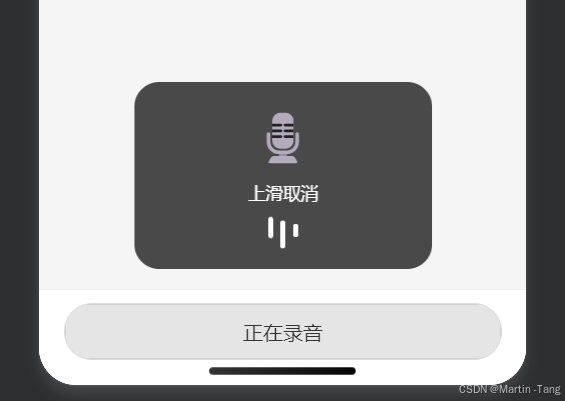
			<view  :style="isShow === false?'display: none !important;':''" class="record-tip" :class="{ cancel: cancelActive }">
				<view class="tip-icon">{{ cancelActive ? '↖️' : '🎙️' }}</view>
				<view class="tip-text">{{ cancelActive ? '松手取消发送' : '上滑取消' }}</view>
				<view v-if="!cancelActive" class="tip-wave">
					<view></view>
					<view></view>
					<view></view>
				</view>
			</view>

			<!-- 按住说话按钮 -->
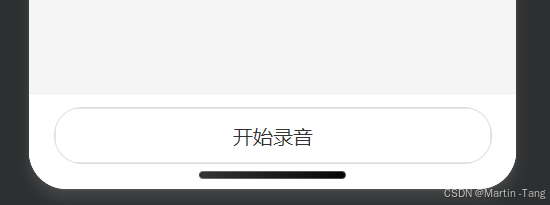
			<button class="record-btn" :class="{ active: recording }" @touchstart="startRecord"
				@touchmove="handleTouchMove" @touchend="stopRecord" @touchcancel="onTouchCancel">
				{{ txt }}
			</button>
		</view>
	</view>
</template>

<script>
	export default {
		data() {
			return {
				recording: false,
				recorderManager: null,
				startTime: 0,
				duration: null,
				txt: '开始录音',
				hasRecordAuth: false, // 新增:记录授权状态
				isShow: false,
				longPressThreshold: 130, // 长按阈值(毫秒)
				pressTimer: null, // 用于长按的定时器
			};
		},
		onReady(){
			this.isShow = false
		},
		onLoad() {
			// 初始化录音管理器
			this.recorderManager = uni.getRecorderManager();
			this.recorderManager.onStop((res) => {
				this.recording = false;
				console.log('录音文件临时路径:', res.tempFilePath);
				// uni.showToast({
				// 	title: '录音完成',
				// 	icon: 'success'
				// });
			});
			this.recorderManager.onError((res) => {
				console.log("2222cuowu")
			})

			// 提前检查并请求录音权限
			this.checkAndRequestRecordPermission();
		},
		methods: {
			// 提前检查并请求权限(页面加载时调用一次)
			checkAndRequestRecordPermission() {
				uni.getSetting({
					success: (res) => {
						if (res.authSetting['scope.record']) {
							this.hasRecordAuth = true;
						} else {
							// 未授权,主动请求
							uni.authorize({
								scope: 'scope.record',
								success: () => {
									this.hasRecordAuth = true;
								},
								fail: () => {
									// 用户拒绝,后续点击按钮时引导开启
									this.hasRecordAuth = false;
								}
							});
						}
					}
				});
			},

			// 按钮 touchstart 回调(同步执行)
			startRecord() {
				if (!this.hasRecordAuth) {
					// 未授权时提示并引导
					uni.showModal({
						title: '提示',
						content: '需要录音权限,是否去设置中开启?',
						success: (modalRes) => {
							if (modalRes.confirm) uni.openSetting();
						}
					});
					return;
				}
				// 已有权限,立即开始录音(同步调用)
				this.beginRecording();
			},

			beginRecording() {
				if (this.recording) return;
				this.startTime = Date.now();
				this.duration = null;
				this.recording = true;
				this.txt = '正在录音';
				this.startTime = Date.now();
				// 可选:设置一个长按定时器,达到阈值后立即触发长按逻辑(如果需要在按住中途就反馈)
				this.pressTimer = setTimeout(() => {
					console.log("长按执行方法")
					// 开始录音
					this.recorderManager.start({
						duration: 60000,
						sampleRate: 16000,
						numberOfChannels: 1,
						format: 'mp3'
					});
					this.isShow = true
				}, this.longPressThreshold);
			},

			stopRecord() {
				// 如果没有在录音,则直接返回,避免调用 stop 产生错误
				if (!this.recording) return;
				// 清除长按定时器(防止松开后还执行长按逻辑)
				if (this.pressTimer) {
					clearTimeout(this.pressTimer);
					this.pressTimer = null;
				}
				this.isShow = false
				this.recorderManager.stop();
				this.recording = false;
				this.txt = '开始录音'

			},

			onTouchCancel(e) {
				this.startTime = 0;
				console.log('按压被取消');
			},
			// 手指移动(判断上滑取消)
			handleTouchMove(e) {
				if (!this.recording) return;
				const currentY = e.touches[0].clientY;
				const deltaY = this.touchStartY - currentY; // 向上滑动为正
				if (deltaY > this.slideThreshold && !this.cancelActive) {
					this.cancelActive = true;
					uni.vibrateShort(); // 进入取消区震动提醒
				} else if (deltaY <= this.slideThreshold && this.cancelActive) {
					this.cancelActive = false;
					uni.vibrateShort();
				}
			},
		}
	}
</script>
<style scoped>
	.voice-container {
		display: flex;
		flex-direction: column;
		height: 100vh;
		background-color: #f5f5f5;
		position: relative;
	}

	/* 消息列表 */
	.message-list {
		flex: 1;
		padding: 20rpx 30rpx;
		box-sizing: border-box;
	}

	.message-item {
		margin: 20rpx 0;
		display: flex;
		justify-content: flex-start;
	}

	.voice-bubble {
		display: inline-flex;
		align-items: center;
		background-color: #fff;
		border-radius: 20rpx;
		padding: 20rpx 30rpx;
		max-width: 70%;
		box-shadow: 0 2rpx 6rpx rgba(0, 0, 0, 0.1);
		transition: all 0.1s;
	}

	.voice-bubble.self {
		background-color: #95ec69;
		margin-left: auto;
		flex-direction: row-reverse;
	}

	.bubble-icon {
		font-size: 40rpx;
		margin-right: 20rpx;
	}

	.voice-bubble.self .bubble-icon {
		margin-right: 0;
		margin-left: 20rpx;
	}

	.bubble-duration {
		font-size: 28rpx;
		font-weight: bold;
	}

	.wave-animation {
		display: flex;
		align-items: center;
		margin-left: 20rpx;
	}

	.voice-bubble.self .wave-animation {
		margin-left: 0;
		margin-right: 20rpx;
	}

	.wave-bar {
		width: 4rpx;
		height: 16rpx;
		background-color: #333;
		margin: 0 2rpx;
		animation: wave 0.8s infinite ease-in-out;
	}

	.wave-bar:nth-child(2) {
		animation-delay: 0.2s;
		height: 24rpx;
	}

	.wave-bar:nth-child(3) {
		animation-delay: 0.4s;
		height: 20rpx;
	}

	@keyframes wave {

		0%,
		100% {
			transform: scaleY(0.5);
			opacity: 0.4;
		}

		50% {
			transform: scaleY(1);
			opacity: 1;
		}
	}

	/* 底部录音区 */
	.record-footer {
		padding: 20rpx 40rpx 40rpx;
		background-color: #fff;
		border-top: 1rpx solid #eee;
		position: relative;
	}

	.record-btn {
		background-color: #fff;
		border: 1rpx solid #ddd;
		border-radius: 100rpx;
		height: 90rpx;
		line-height: 90rpx;
		font-size: 32rpx;
		color: #333;
		transition: all 0.1s;
	}

	.record-btn.active {
		background-color: #e5e5e5;
		/* transform: scale(0.98); */
	}

	.record-tip {
		position: fixed;
		bottom: 180rpx;
		left: 50%;
		transform: translateX(-50%);
		width: 400rpx;
		background-color: rgba(0, 0, 0, 0.7);
		border-radius: 40rpx;
		padding: 30rpx;
		display: flex;
		flex-direction: column;
		align-items: center;
		color: white;
		z-index: 1000;
		backdrop-filter: blur(10px);
		transition: all 0.2s;
	}

	.record-tip.cancel {
		background-color: rgba(255, 0, 0, 0.7);
	}

	.tip-icon {
		font-size: 80rpx;
		margin-bottom: 20rpx;
	}

	.tip-text {
		font-size: 28rpx;
	}

	.tip-wave {
		display: flex;
		margin-top: 20rpx;
	}

	.tip-wave view {
		width: 8rpx;
		height: 30rpx;
		background-color: white;
		margin: 0 6rpx;
		border-radius: 4rpx;
		animation: tip-wave-anim 0.6s infinite alternate;
	}

	.tip-wave view:nth-child(2) {
		animation-delay: 0.2s;
		height: 50rpx;
	}

	.tip-wave view:nth-child(3) {
		animation-delay: 0.4s;
		height: 40rpx;
	}

	@keyframes tip-wave-anim {
		from {
			transform: scaleY(0.5);
		}

		to {
			transform: scaleY(1.2);
		}
	}
</style>