1. 概述
Envoy 的 CSRF 保护过滤器提供了一种简单而有效的方法来防止跨站点请求伪造攻击。它通过验证请求的 Origin 或 Referer 头部与目标 origin 匹配来实现保护,并提供了灵活的配置选项,包括:
-
运行时配置,可动态启用/禁用功能
-
影子模式,用于测试保护策略
-
附加受信任源配置,增强了保护的灵活性
-
详细的统计信息,帮助监控和识别潜在的攻击
该过滤器的设计简洁而高效,仅对修改方法请求进行验证,减少了不必要的处理。它与其他 Envoy 过滤器集成良好,并提供了与外部授权系统配合使用的支持。
通过正确配置 CSRF 保护过滤器,您可以显著提高应用程序的安全性,防止恶意网站利用用户的身份信息执行未经授权的操作。
2. 解决的问题
CSRF 保护过滤器主要解决以下问题:
2.1 防止跨站点请求伪造攻击
-
验证请求的来源是否与目标 origin 匹配
-
确保修改方法(如 POST、PUT、DELETE、PATCH)请求来自受信任的源
-
防止恶意网站通过用户浏览器发送未经授权的请求
2.2 灵活的配置选项
-
支持运行时配置,可在不重启 Envoy 的情况下启用或禁用功能
-
提供影子模式(Shadow Mode),用于测试保护策略而不影响实际流量
-
允许配置附加的受信任源,增加了保护的灵活性
2.3 性能优化
-
仅对修改方法请求进行验证,减少了不必要的处理
-
使用 StringMatcher 实现高效的 origin 匹配
-
与其他 Envoy 过滤器集成良好
2.4 详细的统计信息
-
提供关于请求验证结果的详细统计数据
-
帮助监控和识别潜在的 CSRF 攻击
-
支持日志记录和调试
3. 架构设计
3.1 核心组件架构
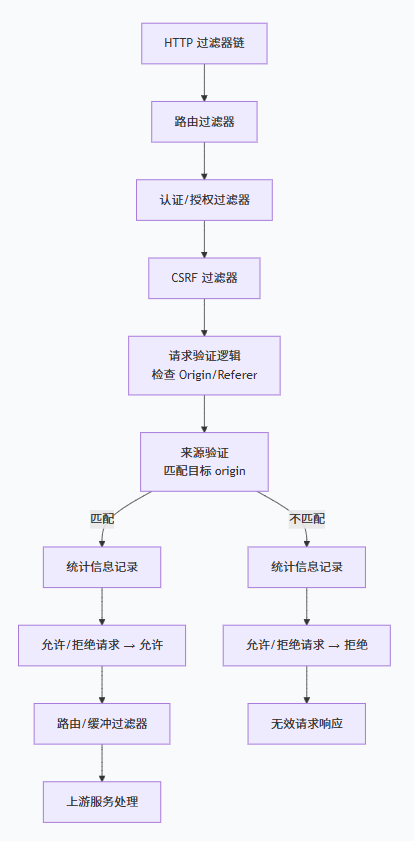
3.2 类图
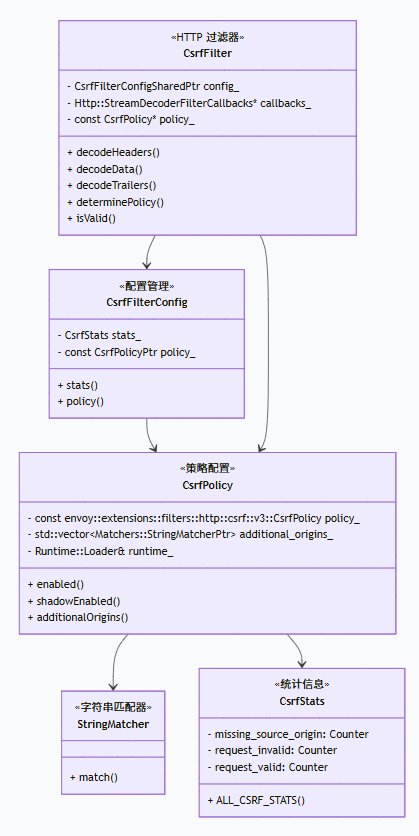
4. 配置用例
4.1 基础配置
bash
http_filters:- name: envoy.filters.http.csrf typed_config: "@type": type.googleapis.com/envoy.extensions.filters.http.csrf.v3.CsrfPolicy filter_enabled: runtime_key: "csrf.enabled" default_value: numerator: 100 denominator: HUNDRED shadow_enabled: runtime_key: "csrf.shadow_enabled" default_value: numerator: 0 denominator: HUNDRED additional_origins: - exact: "https://trusted-domain1.com" - exact: "https://trusted-domain2.com"4.2 运行时配置
makefile
layered_runtime: layers: - name: static_layer static_layer: csrf: enabled: numerator: 100 denominator: HUNDRED shadow_enabled: numerator: 50 denominator: HUNDRED4.3 按路由配置
css
route_config: name: local_route virtual_hosts: - name: backend domains: ["*"] routes: - match: { prefix: "/public" } route: { cluster: backend } - match: { prefix: "/private" } route: { cluster: backend } typed_per_filter_config: envoy.filters.http.csrf: "@type": type.googleapis.com/envoy.extensions.filters.http.csrf.v3.CsrfPolicy filter_enabled: runtime_key: "csrf.private.enabled" default_value: numerator: 100 denominator: HUNDRED additional_origins: - exact: "https://private-trusted.com"4.4 高级配置
swift
http_filters:- name: envoy.filters.http.csrf typed_config: "@type": type.googleapis.com/envoy.extensions.filters.http.csrf.v3.CsrfPolicy filter_enabled: runtime_key: "csrf.enabled" default_value: numerator: 100 denominator: HUNDRED shadow_enabled: runtime_key: "csrf.shadow_enabled" default_value: numerator: 50 denominator: HUNDRED additional_origins: - exact: "https://trusted-domain.com" - prefix: "https://*.trusted-domain.com" - regex: "^https://.*\\.trusted-domain\\.com$"5. 工作流程分析
5.1 过滤器执行流程
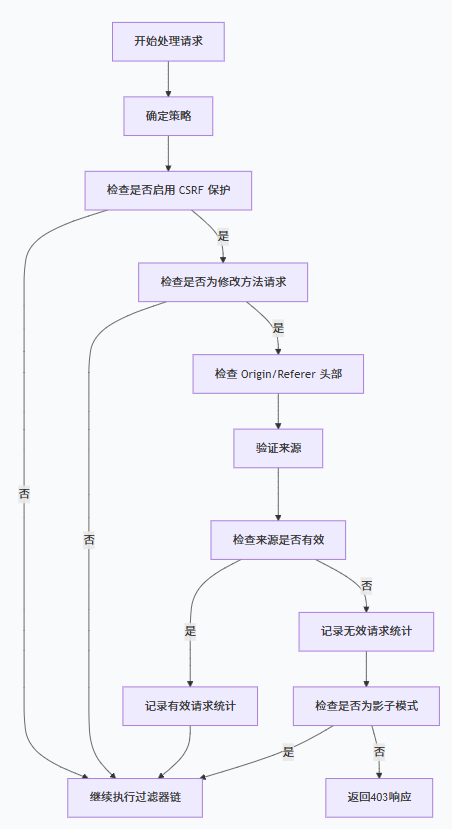
5.2 CSRF 保护交互流程
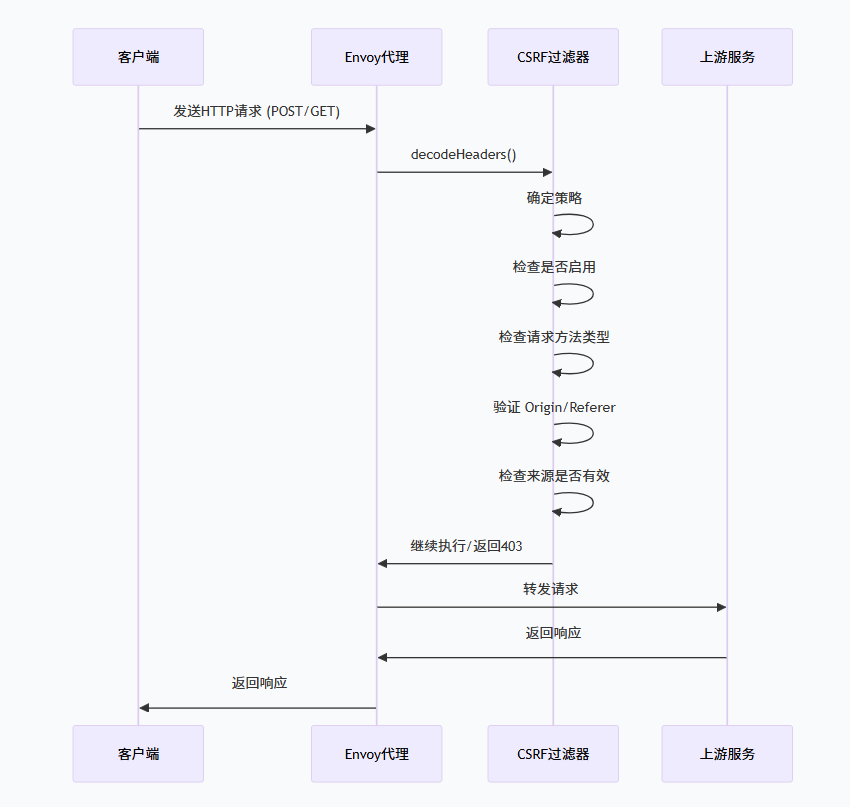
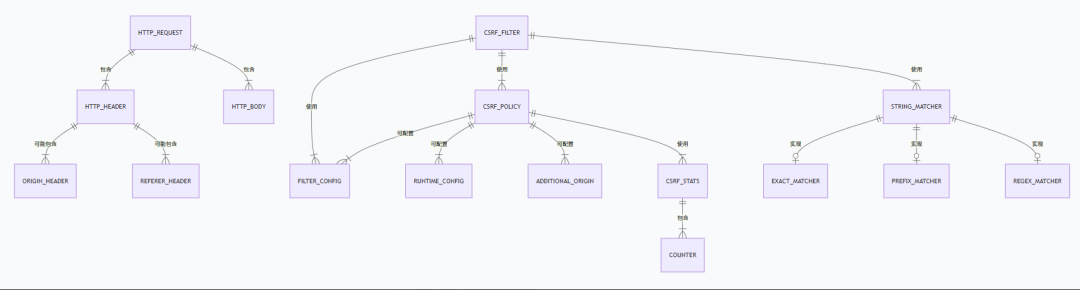
6. 代码实现 ER 图
7. 最佳实践
7.1 基本防护策略
bash
http_filters:- name: envoy.filters.http.csrf typed_config: "@type": type.googleapis.com/envoy.extensions.filters.http.csrf.v3.CsrfPolicy filter_enabled: runtime_key: "csrf.enabled" default_value: numerator: 100 denominator: HUNDRED additional_origins: - exact: "https://your-trusted-domain.com"7.2 影子模式配置
bash
http_filters:- name: envoy.filters.http.csrf typed_config: "@type": type.googleapis.com/envoy.extensions.filters.http.csrf.v3.CsrfPolicy filter_enabled: runtime_key: "csrf.enabled" default_value: numerator: 0 denominator: HUNDRED shadow_enabled: runtime_key: "csrf.shadow_enabled" default_value: numerator: 100 denominator: HUNDRED7.3 高级 origin 匹配
swift
http_filters:- name: envoy.filters.http.csrf typed_config: "@type": type.googleapis.com/envoy.extensions.filters.http.csrf.v3.CsrfPolicy additional_origins: - exact: "https://api.your-domain.com" - prefix: "https://*.your-domain.com" - regex: "^https://.*\\.your-domain\\.com$"7.4 结合认证使用
bash
http_filters:- name: envoy.filters.http.jwt_authn typed_config: # 认证配置...- name: envoy.filters.http.csrf typed_config: "@type": type.googleapis.com/envoy.extensions.filters.http.csrf.v3.CsrfPolicy filter_enabled: runtime_key: "csrf.enabled" default_value: numerator: 100 denominator: HUNDRED additional_origins: - exact: "https://your-trusted-domain.com"8. 代码实现细节
8.1 方法验证逻辑
cpp
bool isModifyMethod(const Http::RequestHeaderMap& headers) { const absl::string_view method_type = headers.getMethodValue(); if (method_type.empty()) { return false; } const auto& method_values = Http::Headers::get().MethodValues; return (method_type == method_values.Post || method_type == method_values.Put || method_type == method_values.Delete || method_type == method_values.Patch);}8.2 来源验证逻辑
cpp
std::string sourceOriginValue(const Http::RequestHeaderMap& headers) {  const auto origin = hostAndPort(headers.getInlineValue(origin_handle.handle()));  if (!origin.empty()) {    return origin;  }  return hostAndPort(headers.getInlineValue(referer_handle.handle()));}
std::string targetOriginValue(const Http::RequestHeaderMap& headers) {  const auto host_value = headers.getHostValue();
  if (host_value.empty()) {    return EMPTY_STRING;  }
  const auto absolute_url = fmt::format(      "{}://{}", headers.Scheme() != nullptr ? headers.getSchemeValue() : "http", host_value);  return hostAndPort(absolute_url);}
bool CsrfFilter::isValid(const absl::string_view source_origin, Http::RequestHeaderMap& headers) {  const auto target_origin = targetOriginValue(headers);  if (source_origin == target_origin) {    return true;  }
  for (const auto& additional_origin : policy_->additionalOrigins()) {    if (additional_origin->match(source_origin)) {      return true;    }  }
  return false;}
8.3 策略决策逻辑
php
void CsrfFilter::determinePolicy() {  const CsrfPolicy* policy =      Http::Utility::resolveMostSpecificPerFilterConfig<CsrfPolicy>(callbacks_);  if (policy != nullptr) {    policy_ = policy;  } else {    policy_ = config_->policy();  }}
Http::FilterHeadersStatus CsrfFilter::decodeHeaders(Http::RequestHeaderMap& headers, bool) {  determinePolicy();
  if (!policy_->enabled() && !policy_->shadowEnabled()) {    return Http::FilterHeadersStatus::Continue;  }
  if (!isModifyMethod(headers)) {    return Http::FilterHeadersStatus::Continue;  }
  bool is_valid = true;  const auto source_origin = sourceOriginValue(headers);  if (source_origin.empty()) {    is_valid = false;    config_->stats().missing_source_origin_.inc();  }
  if (!isValid(source_origin, headers)) {    is_valid = false;    config_->stats().request_invalid_.inc();  }
  if (is_valid == true) {    config_->stats().request_valid_.inc();    return Http::FilterHeadersStatus::Continue;  }
  if (policy_->shadowEnabled() && !policy_->enabled()) {    return Http::FilterHeadersStatus::Continue;  }
  callbacks_->sendLocalReply(Http::Code::Forbidden, "Invalid origin", nullptr, absl::nullopt,                             RcDetails::get().OriginMismatch);  return Http::FilterHeadersStatus::StopIteration;}