一、进程优先级与查杀机制
1. Android 的进程状态管理
Android 使用 OOM_ADJ (Out Of Memory Adjustment)来评估进程优先级:
// 系统定义的优先级值(数值越大,优先级越低,越容易被杀)
static final int FOREGROUND_ADJ = 0;      // 前台进程
static final int VISIBLE_ADJ = 2;          // 可见进程
static final int SERVICE_ADJ = 5;          // 服务进程
static final int BACKGROUND_ADJ = 7;       // 后台进程
static final int EMPTY_ADJ = 15;           // 空进程(最容易被杀)
2. 系统查杀策略
当系统内存不足时,会按照以下顺序查杀进程:
优先级顺序(从高到低,即从难杀到易杀):
    1. 前台进程(Foreground)
    2. 可见进程(Visible)
    3. 服务进程(Service)
    4. 后台进程(Background)
    5. 空进程(Empty)
二、降低进程优先级的方法
方法一:设置较低的线程优先级
// 在你的应用中降低主线程优先级
public class MyApplication extends Application {

    @Override
    public void onCreate() {
        super.onCreate();

        // 设置较低的线程优先级
        setLowPriority();
    }

    private void setLowPriority() {
        // 设置为后台优先级(值越大,优先级越低)
        android.os.Process.setThreadPriority(android.os.Process.THREAD_PRIORITY_BACKGROUND);

        // 或者设置为最低优先级
        android.os.Process.setThreadPriority(android.os.Process.THREAD_PRIORITY_LOWEST);
    }
}
方法二:调用系统 API 降低进程状态
// 使用 ActivityManager 调整进程状态
public void lowerProcessPriority(Context context) {
    ActivityManager am = (ActivityManager) context.getSystemService(Context.ACTIVITY_SERVICE);

    // 获取当前进程信息
    List<ActivityManager.RunningAppProcessInfo> processes = am.getRunningAppProcesses();

    for (ActivityManager.RunningAppProcessInfo process : processes) {
        if (process.pid == android.os.Process.myPid()) {
            // 设置进程为后台进程
            process.importance = ActivityManager.RunningAppProcessInfo.IMPORTANCE_BACKGROUND;
            break;
        }
    }
}
方法三:停止前台服务
如果你的应用运行着前台服务,可以停止它来降低优先级:
public class MyService extends Service {

    private static final int NOTIFICATION_ID = 10001;

    @Override
    public int onStartCommand(Intent intent, int flags, int startId) {
        // 启动前台服务(高优先级)
        startForeground(NOTIFICATION_ID, createNotification());

        // 在需要降低优先级时停止前台服务
        stopForeground(true);

        return START_NOT_STICKY;  // 不重启
    }

    private Notification createNotification() {
        // 创建通知...
        return new Notification.Builder(this, "channel_id")
            .setContentTitle("Running")
            .setSmallIcon(R.drawable.ic_launcher)
            .build();
    }
}
方法四:使用系统属性
// 通过系统属性设置进程优先级
public void setProcessPriority() {
    try {
        // 设置进程组为后台组
        android.os.Process.setProcessGroup(
            android.os.Process.myPid(),
            android.os.Process.THREAD_GROUP_BACKGROUND
        );

        // 设置调度策略为后台调度
        android.os.Process.setThreadScheduler(
            android.os.Process.myTid(),
            android.os.Process.SCHED_BATCH
        );
    } catch (Exception e) {
        e.printStackTrace();
    }
}
三、主动触发系统查杀
1. 让应用进入后台
// 主动让 Activity 进入后台
public void moveToBackground(Context context) {
    Intent homeIntent = new Intent(Intent.ACTION_MAIN);
    homeIntent.addCategory(Intent.CATEGORY_HOME);
    homeIntent.setFlags(Intent.FLAG_ACTIVITY_NEW_TASK);
    context.startActivity(homeIntent);
}
2. 清空任务栈
// 清空应用的任务栈
public void clearTaskStack(Context context) {
    ActivityManager am = (ActivityManager) context.getSystemService(Context.ACTIVITY_SERVICE);

    // 获取当前应用的任务栈
    List<ActivityManager.AppTask> tasks = am.getAppTasks();

    for (ActivityManager.AppTask task : tasks) {
        task.finishAndRemoveTask();
    }
}
3. 触发系统回收内存
// 请求系统进行内存回收
public void triggerMemoryCleanup(Context context) {
    ActivityManager am = (ActivityManager) context.getSystemService(Context.ACTIVITY_SERVICE);

    // 请求系统清理内存
    am.killBackgroundProcesses(context.getPackageName());

    // 或者调用 garbage collector
    System.gc();
}
四、系统如何决定是否查杀
1. Low Memory Killer(LMK)机制
Android 内核使用 LMK(Low Memory Killer) 来决定何时查杀进程:
LMK 工作流程:
    1. 监控系统内存状态
    2. 当内存低于某个阈值时
    3. 根据 OOM_ADJ 值选择优先级最低的进程
    4. 发送 SIGKILL 信号终止进程
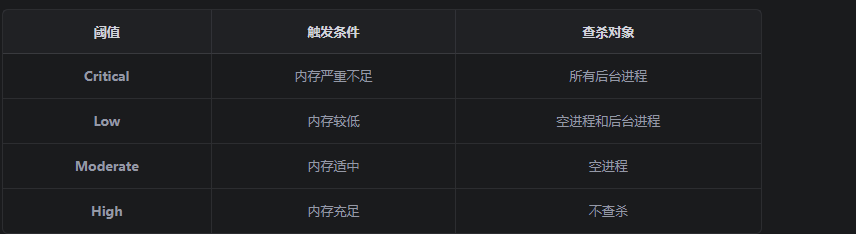
2. 内存阈值配置
LMK 有多个内存阈值,对应不同的查杀策略:
3. 优先级调整后的效果
调整前:
    应用进程 → OOM_ADJ = 0(前台)→ 几乎不会被杀

调整后:
    应用进程 → OOM_ADJ = 15(空进程)→ 最容易被杀
五、完整示例:降低优先级并触发查杀
public class ProcessManager {

    private Context mContext;

    public ProcessManager(Context context) {
        mContext = context;
    }

    /**
     * 降低进程优先级,使其更容易被系统查杀
     */
    public void lowerPriorityAndKill() {
        // 1. 设置线程优先级为最低
        setLowThreadPriority();

        // 2. 停止前台服务(如果有的话)
        stopForegroundService();

        // 3. 让应用进入后台
        moveToBackground();

        // 4. 清空任务栈
        clearTaskStack();

        // 5. 请求系统回收内存
        triggerMemoryCleanup();

        // 6. 主动结束进程(可选)
        // android.os.Process.killProcess(android.os.Process.myPid());
    }

    private void setLowThreadPriority() {
        android.os.Process.setThreadPriority(android.os.Process.THREAD_PRIORITY_LOWEST);
    }

    private void stopForegroundService() {
        // 如果有前台服务,停止它
        mContext.stopService(new Intent(mContext, MyForegroundService.class));
    }

    private void moveToBackground() {
        Intent homeIntent = new Intent(Intent.ACTION_MAIN);
        homeIntent.addCategory(Intent.CATEGORY_HOME);
        homeIntent.setFlags(Intent.FLAG_ACTIVITY_NEW_TASK);
        mContext.startActivity(homeIntent);
    }

    private void clearTaskStack() {
        ActivityManager am = (ActivityManager) mContext.getSystemService(Context.ACTIVITY_SERVICE);
        List<ActivityManager.AppTask> tasks = am.getAppTasks();

        for (ActivityManager.AppTask task : tasks) {
            task.finishAndRemoveTask();
        }
    }

    private void triggerMemoryCleanup() {
        ActivityManager am = (ActivityManager) mContext.getSystemService(Context.ACTIVITY_SERVICE);
        am.killBackgroundProcesses(mContext.getPackageName());
        System.gc();
    }
}
六、总结
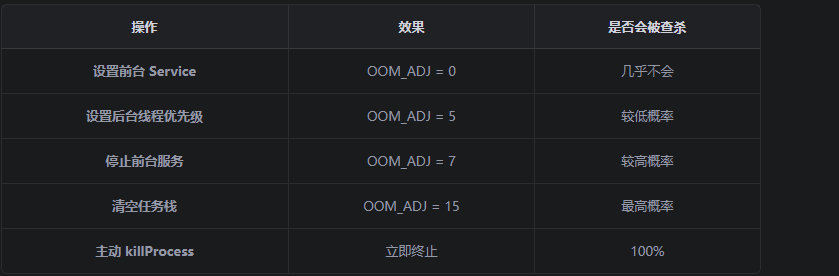
关键要点
- OOM_ADJ 值越大,越容易被杀 :从 0(前台)到 15(空进程)
- 前台服务优先级最高 :必须有通知才能运行
- 后台进程最容易被杀 :系统内存不足时首先清理
- 主动结束进程 :使用 killProcess() 可以直接终止