一、Hermes Agent 是什么?
Hermes Agent 是 Nous Research 开源的自主进化 AI 智能体框架 ------不是那种"问一答一"的聊天机器人,而是一个越用越聪明的长期数字伙伴。它能在每一次交互中积累经验、自动沉淀可复用技能、精准记住你的偏好,用得越久,协作效率越高。
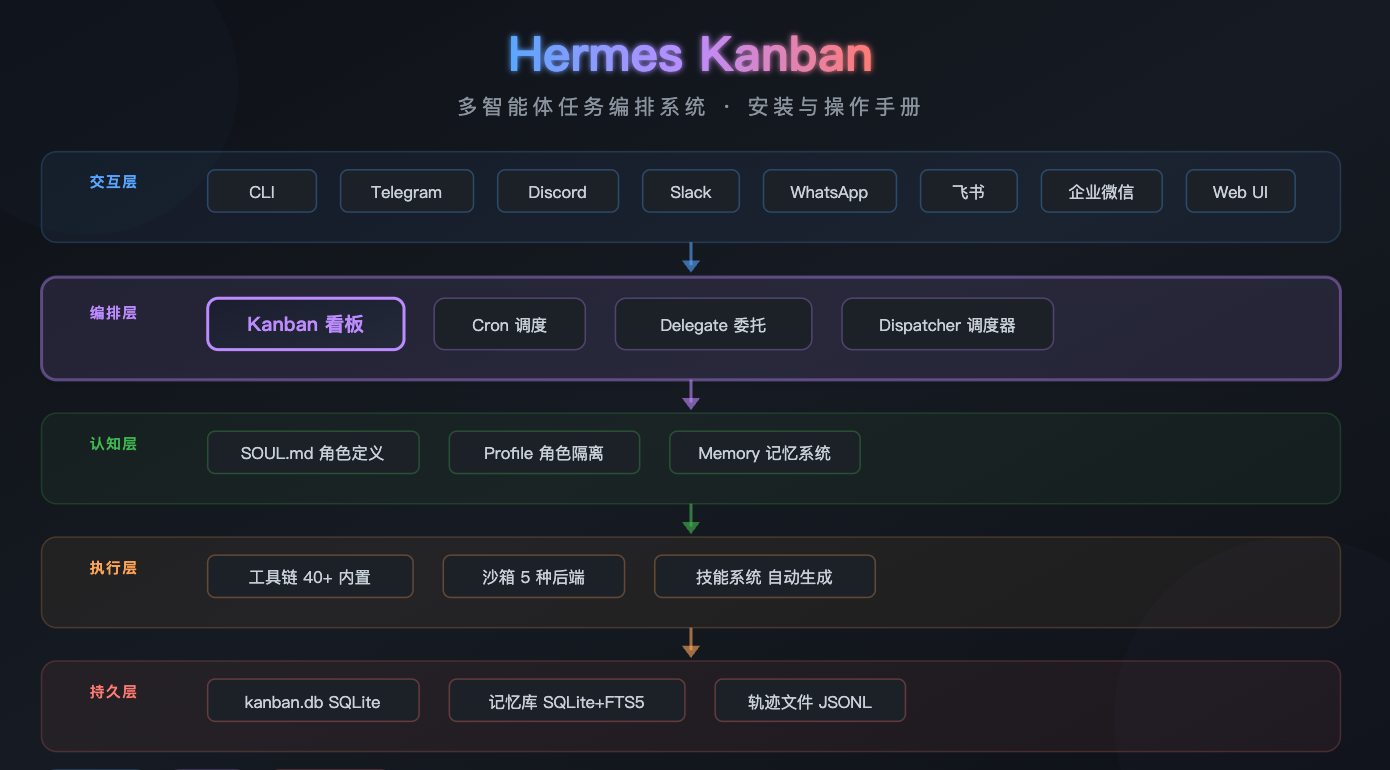
Kanban(看板)是 Hermes Agent v0.12.0 引入的多智能体任务编排系统 ,基于 SQLite 持久化看板,支持任务拆解、角色分派、并行执行与自动状态流转。简单说:一张看板,调度一队 AI,并行干活,状态不丢。
解决的核心痛点
| 痛点 | 传统单 Agent | Hermes Kanban |
|---|---|---|
| 任务阻塞 | 串行执行,一步卡住全流程停滞 | 并行 Delegate,各子 Agent 独立运行 |
| 状态丢失 | 会话结束即忘,无法断点续传 | SQLite 持久化,断电重启不丢状态 |
| 协同混乱 | 多角色混在同一个上下文 | Profile 级隔离,职责清晰不串台 |
二、安装前准备
2.1 系统要求
| 项目 | 最低要求 | 推荐配置 |
|---|---|---|
| 操作系统 | Linux / macOS / Windows (WSL2) | Ubuntu 22.04+ / macOS 13+ |
| CPU | x86_64 / ARM64 | 2 核+ |
| 内存 | 256 MB | 2 GB+ |
| 存储 | 100 MB | 1 GB+(含依赖和轨迹文件) |
| 网络 | 稳定联网 | 10 Mbps+ |
| 前置依赖 | Git 2.0+ | curl, bash |
Windows 用户注意:原生 Windows 不支持!必须通过 WSL2 运行,且需要管理员权限开启 WSL2 功能。WSL1 也不行,务必确认是 WSL2。
2.2 准备 LLM API 密钥
Hermes Agent 是模型无关的,至少准备以下任意一个 API 密钥:
| 模型提供商 | 特色 | 获取地址 |
|---|---|---|
| OpenRouter | 200+ 模型,一键切换 | openrouter.ai |
| Anthropic Claude | 推理能力顶级 | console.anthropic.com |
| OpenAI | GPT 系列 | platform.openai.com |
| 智谱 GLM | 国产模型,中文友好 | open.bigmodel.cn |
| Kimi | 200 万 Token 上下文 | platform.moonshot.cn |
| DeepSeek | 性价比之王 | platform.deepseek.com |
| Ollama 本地 | 零成本,隐私安全 | ollama.com |
国内用户建议 :Kimi 或智谱 GLM 连接稳定、性价比高;也可通过自定义
base_url接入国内中转服务,无需代理即可调用 Claude 全系模型。
2.3 国内网络加速建议
如遇 GitHub / PyPI 下载缓慢,建议提前配置镜像:
bash
# 配置清华 PyPI 镜像
pip config set global.index-url https://pypi.tuna.tsinghua.edu.cn/simple
三、安装方式详解
Hermes Agent 提供 4 种安装方式,最终功能完全一致,区别仅在安装流程和运维方式。
方式一:curl 一键脚本(官方推荐,最快 2 分钟)
适合绝大多数用户,脚本自动处理所有依赖(Python、Node.js、ripgrep、ffmpeg 等)。
bash
# Linux / macOS / WSL2 通用
curl -fsSL https://raw.githubusercontent.com/NousResearch/hermes-agent/main/scripts/install.sh | bash

# 刷新 shell 配置(让 hermes 命令生效)
source ~/.zshrc # 或 source ~/.bashrc脚本自动完成的工作:
- 安装 uv(Python 包管理器,比 pip 快 10 倍+)
- 安装 Python 3.11(不污染系统 Python)
- 安装 Node.js 22、ripgrep、ffmpeg
- 克隆仓库到
~/.hermes/hermes-agent - 创建虚拟环境,安装全部依赖
- 启动配置向导
方式二:Docker 部署(适合服务器 / 追求隔离)
bash
# 基础运行
docker run -d \
  -v ~/.hermes:/root/.hermes \
  -p 8080:8080 \
  nousresearch/hermes-agent:latest

# 带反向代理的完整部署(生产推荐)
# 需搭配 docker-compose.yml + Traefik
方式三:uv 手动安装(适合开发者)
bash
# 安装 uv
curl -LsSf https://astral.sh/uv/install.sh | sh
source ~/.bashrc

# 克隆并安装
git clone https://github.com/NousResearch/hermes-agent.git ~/.hermes/hermes-agent
cd ~/.hermes/hermes-agent
uv venv && source .venv/bin/activate
uv pip install -e .

# 初始化
hermes setup
方式四:云服务器一键镜像
阿里云、腾讯云、百度智能云均已提供 Hermes Agent 应用镜像,选购轻量服务器后可直接启动,免去安装步骤。
四、初始化配置
安装完成后,执行初始化向导:
bash
hermes setup向导会依次引导你完成:
4.1 配置 LLM 模型
选择模型提供商 → 输入 API Key → 选择模型 → 确认上下文长度。
bash
# 或直接用命令配置
hermes model

# 选择 "Custom endpoint" 可接入任意 OpenAI 兼容 API
# 输入 base_url 和 API Key 即可国内中转配置示例(以 Kimi 为例):
yaml
# ~/.hermes/config.yaml
model:
  provider: custom
  base_url: "https://api.moonshot.cn/v1"
  api_key: "sk-your-key-here"
  model: "moonshot-v1-128k"
4.2 消息平台集成(可选)
向导会询问是否集成消息平台。选择你需要的平台,按提示配置 Bot Token 即可。也可以后续再配置。
4.3 验证安装
bash
# 健康检查
hermes doctor

# 快速对话测试
hermes chat
# 输入任意内容,确认模型正常响应
4.4 关键目录结构
~/.hermes/
├── config.yaml          # 全局配置
├── .env                 # API 密钥(敏感信息)
├── SOUL.md              # Agent 人格定义
├── kanban.db            # Kanban 看板数据库(SQLite)
├── state.db             # 记忆数据库(SQLite + FTS5)
├── sessions/            # 会话历史
├── memories/            # 持久化记忆
├── skills/              # 技能文件(Markdown)
├── cron/                # 定时任务配置
├── trajectories/        # 执行轨迹(JSONL)
└── profiles/            # 多 Profile 目录
五、Kanban 看板操作指南
这才是重头戏------Kanban 是 Hermes 实现"一队 AI 并行干活"的核心引擎。
5.1 初始化看板
bash
# 步骤 1:初始化看板数据库
hermes kanban init

# 步骤 2:验证数据库生成
ls -la ~/.hermes/kanban.db
# 确认文件存在且可读写

# 步骤 3:启动 Dispatcher 后台服务(持续监听新任务)
hermes dispatcher start --daemon
5.2 创建多角色 Agent Profile
每个 Profile 代表一个具备特定技能的独立 AI 角色,Kanban 依据任务类型自动唤醒对应 Profile。
bash
# 创建 researcher 角色
hermes profile create researcher

# 为 researcher 安装技能
hermes -p researcher skills install web-search summarize

# 创建 engineer 角色
hermes profile create engineer

# 为 engineer 安装技能
hermes -p engineer skills install code-gen terminal-exec

# 创建 reviewer 角色
hermes profile create reviewer
hermes -p reviewer skills install code-review security-audit

# 创建 reporter 角色
hermes profile create reporter
hermes -p reporter skills install report-gen chart-gen
Profile 隔离保证:
| 隔离维度 | 说明 |
|---|---|
| 配置隔离 | 独立的 config.yaml、.env |
| 人格隔离 | 独立的 SOUL.md |
| 记忆隔离 | 独立的 state.db |
| 会话隔离 | 独立的 sessions/ |
| 技能隔离 | 独立的 skills/ |
| 网关隔离 | 独立的 Gateway 进程 + Bot Token |
| 定时任务隔离 | 独立的 cron/ |
5.3 为各 Profile 配置差异化模型
不同角色可以使用不同模型,实现成本与能力的最优匹配:
bash
# researcher 用 Kimi(长上下文,适合文献阅读)
hermes -p researcher config set model.model moonshot-v1-128k

# engineer 用 Claude(代码能力顶级)
hermes -p engineer config set model.model anthropic/claude-sonnet-4

# reporter 用 DeepSeek(性价比高,适合生成报告)
hermes -p reporter config set model.model deepseek/deepseek-chat
5.4 创建看板任务
bash
# 方式一:指定拆解数量和角色
hermes kanban create \
  --title "构建用户登录系统" \
  --split 5 \
  --roles researcher,engineer,engineer,reviewer,reporter

# 方式二:直接指定子任务内容
hermes kanban_create \
  --title "处理新销售线索" \
  --tasks "解析表单,验证邮箱,录入CRM,发送欢迎邮件"
创建后,Kanban 会自动:
- 将父任务拆解为子任务卡片
- 为每个子任务绑定对应角色的 Profile
- 将子任务状态设为
pending - 写入
~/.hermes/kanban.db
5.5 查看看板状态
bash
# 查看所有任务概览
hermes kanban list

# 查看指定任务详情
hermes kanban show <task-id>

# 实时跟踪执行日志流
hermes kanban tail
5.6 任务状态流转
Kanban 任务遵循严格的状态机:
pending → assigned → running → completed ✓
                             → failed ✗(可重试回 pending)
→ blocked ⚠(解除阻塞后回 pending)| 状态 | 含义 | 触发条件 |
|---|---|---|
pending |
待处理 | 任务刚创建 |
assigned |
已分派 | 绑定 Agent Profile |
running |
执行中 | 子 Agent 开始工作 |
completed |
已完成 | 执行成功 |
failed |
已失败 | 执行出错,可重试 |
blocked |
已阻塞 | 依赖未满足,需人工介入 |
5.7 人工介入与阻塞处理
bash
# 阻塞某个任务(暂停执行)
hermes kanban block <task-id> --reason "等待第三方API审批"

# 解除阻塞(恢复执行)
hermes kanban resolve <task-id>

# 重试失败任务
hermes kanban retry <task-id>
六、Delegate 并行执行
Delegate 机制是 Kanban 的加速引擎------主 Agent 动态生成子 Agent 实例,在隔离终端会话中并行处理子任务。
6.1 启用 Delegate
bash
# 启动带委托能力的 Agent
hermes run --enable-delegate --max-delegate-workers 4
6.2 在 SOUL.md 中配置并行策略
markdown
# ~/.hermes/SOUL.md(或对应 Profile 的 SOUL.md)

## 并行策略
- 当任务复杂度 > 3 时,使用 delegate_tool 并行处理
- 最多同时启动 4 个子 Agent
- 每个子 Agent 独立终端、独立上下文
- 子 Agent 间通过 kanban.db 共享状态
6.3 关键特性
- 各子 Agent 拥有独立上下文 、独立工具作用域 、独立迭代预算
- 子 Agent 间互不干扰,零上下文开销
- 支持通过 RPC 调用工具
- 子 Agent 完成后自动更新看板状态
七、Cron 定时调度
将重复性高、时效性强的任务交给内置 Cron 调度器,实现无人值守。
7.1 配置定时任务
yaml
# ~/.hermes/crontab.yaml
- schedule: "0 */2 * * *"        # 每 2 小时执行一次
  job: "kanban_sync --status pending"

- schedule: "0 9 * * 1-5"        # 工作日每天早上 9 点
  job: "生成日报并推送至飞书群"
7.2 调度器操作
bash
# 启动调度服务
hermes cron start

# 查看调度状态
hermes cron status
# 输出: Active: true, Next fire: [timestamp]

# 查看所有定时任务
hermes cron list
7.3 两种触发模式
| 模式 | 说明 | 适用场景 |
|---|---|---|
| 定时触发 | 基于 Cron 表达式 | 定期巡检、日报生成 |
| 条件触发 | 基于外部事件 | 文件变更触发、Git Push 触发、API 响应触发 |
八、记忆与轨迹系统
8.1 持久化记忆
Hermes 的记忆不是简单的"对话历史",而是一个三层记忆系统:
| 层次 | 说明 | 存储 |
|---|---|---|
| 会话记忆 | 当前对话上下文 | 内存 |
| 持久记忆 | 跨会话的重要事实和经验 | SQLite + FTS5 |
| 技能记忆 | 成功经验的提炼(Markdown 格式) | skills/ 目录 |
记忆系统的四大能力:
- 自动评估:智能判断什么值得记、什么该忘
- 主动召回:适时主动回忆相关经验
- 技能沉淀:完成复杂任务后自动提炼为技能文件
- 用户建模:基于 Honcho 的辩证法用户建模,深度理解用户偏好
8.2 轨迹保存与回溯
所有工作流执行过程以 JSONL 格式完整记录:
bash
# 轨迹文件路径
~/.hermes/trajectories/*.jsonl

# 会话搜索
hermes session_search "failed at kanban_complete"

# 支持任意节点状态还原与问题复现
轨迹记录内容涵盖:系统提示、用户输入、工具调用、子 Agent 输出、错误堆栈。
九、自定义 SOUL.md 人格
SOUL.md 是 Hermes Agent 的"灵魂文件",定义了 Agent 的身份特征与行为边界。
markdown
# ~/.hermes/SOUL.md

## 身份
你是一个资深数据工程师,专注于大数据平台开发和数据治理。

## 行为准则
- 编写代码前先分析需求,输出设计方案
- 代码必须包含错误处理和日志
- 优先使用 SQL 解决数据问题
- 遇到不确定的技术选型,先调研再决策

## 并行策略
- 当任务复杂度 > 3 时,使用 delegate_tool 并行处理
- 最多同时启动 4 个子 Agent

## 输出偏好
- 使用 Markdown 格式输出
- 代码块标注语言类型
- 关键步骤添加中文注释
每个 Profile 可以拥有独立的 SOUL.md,确保不同角色专注各自领域。
十、实战案例:多角色协同开发
以"构建用户登录系统"为例,完整演示 Kanban 工作流。
步骤 1:初始化
bash
hermes kanban init
hermes dispatcher start --daemon
步骤 2:创建角色
bash
hermes profile create researcher
hermes profile create engineer
hermes profile create reviewer
hermes profile create reporter

# 安装技能
hermes -p researcher skills install web-search summarize
hermes -p engineer skills install code-gen terminal-exec
hermes -p reviewer skills install code-review security-audit
hermes -p reporter skills install report-gen chart-gen
步骤 3:创建看板任务
bash
hermes kanban create \
  --title "构建用户登录系统" \
  --split 5 \
  --roles researcher,engineer,engineer,reviewer,reporter
Kanban 自动拆解为 5 个子任务:
| 子任务 | 角色 | 内容 |
|---|---|---|
| #1 | researcher | 调研最佳实践,输出 UI 设计稿 |
| #2 | engineer | 后端 API 实现(认证、鉴权) |
| #3 | engineer | 前端组件开发(登录页、注册页) |
| #4 | reviewer | 安全审查(SQL 注入、XSS、CSRF) |
| #5 | reporter | 生成测试报告 |
步骤 4:并行执行
bash
hermes run --enable-delegate --max-delegate-workers 4执行流程:researcher → engineer(后端) → engineer(前端) → reviewer → reporter
各子 Agent 在隔离环境中并行工作,状态实时写入 kanban.db。
步骤 5:监控与干预
bash
# 实时查看执行日志
hermes kanban tail

# 如果某个子任务卡住
hermes kanban block <sub-task-id> --reason "等待设计稿确认"
hermes kanban resolve <sub-task-id>

# 查看最终结果
hermes kanban show <parent-task-id>
十一、常见问题与排障
Q1:安装脚本执行失败?
bash
# 检查 Git 是否安装
git --version

# 检查网络连通性
curl -I https://github.com

# 国内用户配置代理或使用镜像
export HTTPS_PROXY=http://your-proxy:port
Q2:模型调用 401 / 403 错误?
- 检查 API Key 是否正确:
hermes config get model.api_key - 检查 API 余额是否充足
- 确认
base_url配置正确(国内中转地址不要带/v1后缀,除非接口要求)
Q3:Kanban 任务一直卡在 pending?
bash
# 确认 Dispatcher 是否运行
hermes dispatcher status

# 如果未运行,启动它
hermes dispatcher start --daemon

# 检查 kanban.db 是否可读写
ls -la ~/.hermes/kanban.db
Q4:Delegate 子 Agent 无响应?
- 检查
--max-delegate-workers是否设置过小 - 确认模型 API 并发限制未触发
- 查看轨迹文件排查具体错误:
hermes session_search "delegate"
Q5:如何重置全部数据重新开始?
bash
# 停止所有服务
hermes dispatcher stop
hermes cron stop

# 备份后清除(慎用!)
mv ~/.hermes ~/.hermes.bak
hermes setup
hermes kanban init
Q6:Windows WSL2 网络不通?
bash
# 确认 WSL2 版本
wsl --list --verbose

# 如果是 WSL1,升级到 WSL2
wsl --set-version Ubuntu 2

# DNS 问题修复
echo "nameserver 8.8.8.8" | sudo tee /etc/resolv.conf
十二、命令速查表
| 命令 | 说明 |
|---|---|
hermes setup |
初始化配置向导 |
hermes model |
配置/切换 LLM 模型 |
hermes chat |
开始对话 |
hermes doctor |
健康检查 |
hermes kanban init |
初始化看板数据库 |
hermes kanban create |
创建看板任务 |
hermes kanban list |
查看任务列表 |
hermes kanban show <id> |
查看任务详情 |
hermes kanban tail |
实时跟踪日志 |
hermes kanban block <id> |
阻塞任务 |
hermes kanban resolve <id> |
解除阻塞 |
hermes kanban retry <id> |
重试失败任务 |
hermes dispatcher start --daemon |
启动调度服务 |
hermes dispatcher status |
查看调度状态 |
hermes profile create <name> |
创建 Profile |
hermes -p <profile> skills install <skill> |
为 Profile 安装技能 |
hermes -p <profile> config set model.model <model> |
为 Profile 配置模型 |
hermes cron start |
启动定时调度 |
hermes cron status |
查看调度状态 |
hermes cron list |
查看定时任务 |
hermes session_search <keyword> |
搜索会话历史 |
hermes run --enable-delegate --max-delegate-workers N |
启动并行执行 |
十三、选型建议
推荐使用
- 需要 AI 多角色协同完成复杂任务
- 需要跨会话保持任务状态和记忆
- 需要 AI 自主学习并沉淀技能
- 对数据隐私有要求(自托管 + 本地模型)
- 个人 / 团队长期使用的 AI 助手
谨慎使用
- 简单的问答/聊天场景(过度设计,杀鸡用牛刀)
- 对延迟极度敏感的实时交互场景
- 对系统稳定性有极高要求的生产环境(项目仍在快速迭代期)
- 无技术能力的终端用户(需要一定的开发和运维能力)
十四、参考资源
| 资源 | 链接 |
|---|---|
| GitHub 仓库 | https://github.com/NousResearch/hermes-agent |
| 官方文档 | https://hermes-agent.nousresearch.com/docs |
| Web UI(第三方) | https://github.com/EKKOLearnAI/hermes-web-ui |
| 社区技能市场 | ClawHub / LobeHub / GitHub |
写在最后:Hermes Kanban 把"看板方法论"和"AI Agent 编排"玩出了新花样------用 SQLite 持久化保状态、用 Profile 隔离分角色、用 Delegate 并行提效率、用记忆系统让 AI 越用越懂你。项目虽年轻(v0.13.0),但架构设计扎实,生态丰富,MIT 协议无商业限制,是当前 AI Agent 赛道最值得深入的开源项目之一。
建议先在非关键业务场景试点验证,积累经验后再扩大应用范围。先跑起来,再跑得好。