,不用idea的test配置:
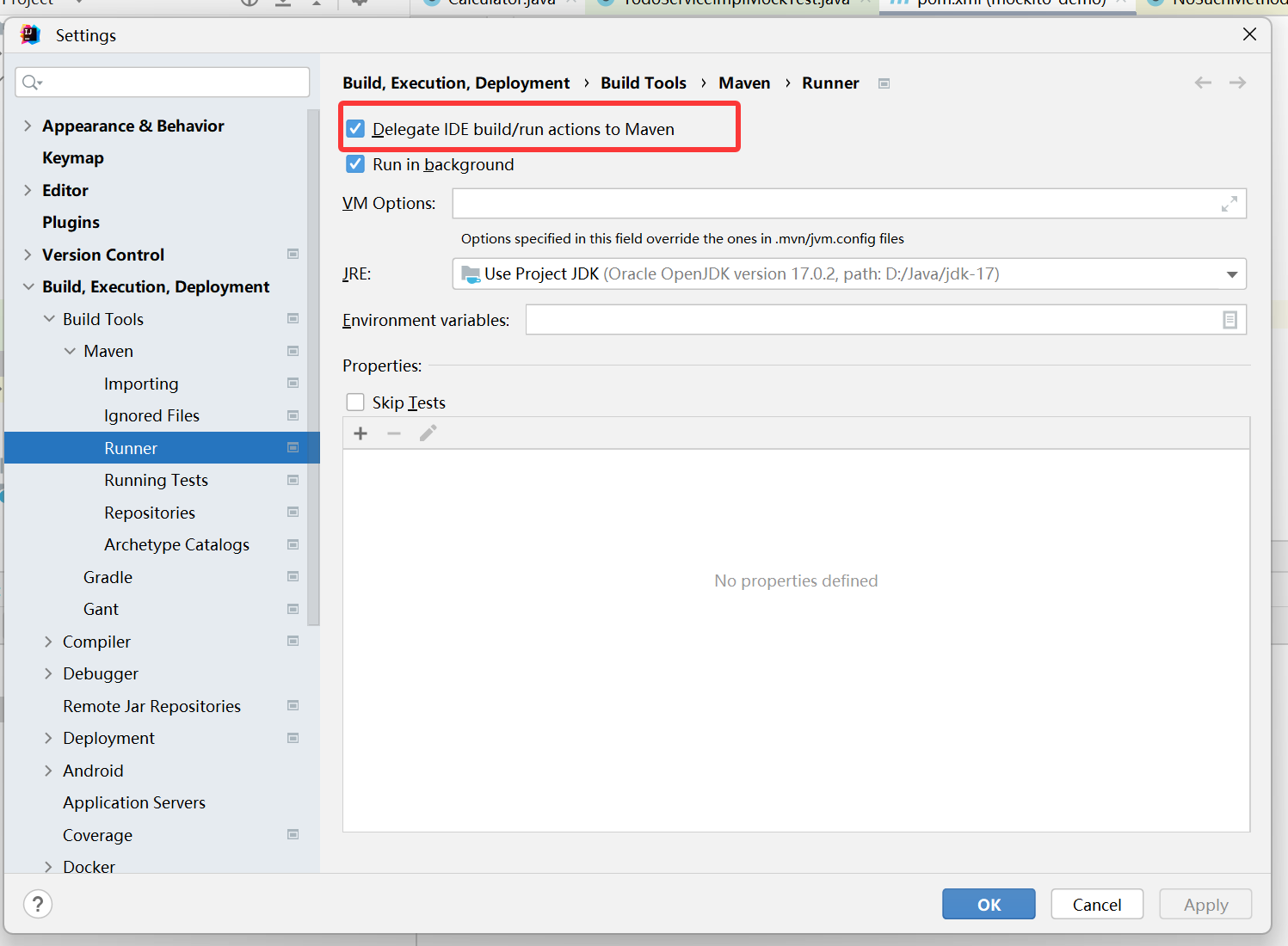
委托给maven!
全部用自己的配置吧
<?xml version="1.0" encoding="UTF-8"?>
<project xmlns="http://maven.apache.org/POM/4.0.0"
         xmlns:xsi="http://www.w3.org/2001/XMLSchema-instance"
         xsi:schemaLocation="http://maven.apache.org/POM/4.0.0
                             http://maven.apache.org/xsd/maven-4.0.0.xsd">

  <modelVersion>4.0.0</modelVersion>

  <groupId>org.example</groupId>
  <artifactId>mockito-demo</artifactId>
  <version>1.0-SNAPSHOT</version>
  <packaging>jar</packaging>

  <name>mockito-demo</name>


  <properties>
    <project.build.sourceEncoding>UTF-8</project.build.sourceEncoding>
    <maven.compiler.source>17</maven.compiler.source>
    <maven.compiler.target>17</maven.compiler.target>
    <junit.version>5.10.2</junit.version>
    <mockito.version>5.18.0</mockito.version>
    <maven-surefire-plugin.version>3.2.5</maven-surefire-plugin.version>
  </properties>

  <dependencyManagement>
    <dependencies>
      <dependency>
        <groupId>org.junit</groupId>
        <artifactId>junit-bom</artifactId>
        <version>${junit.version}</version>
        <type>pom</type>
        <scope>import</scope>
      </dependency>
    </dependencies>
  </dependencyManagement>


  <dependencies>
    <!-- Mockito 核心 -->
    <dependency>
      <groupId>org.mockito</groupId>
      <artifactId>mockito-core</artifactId>
      <version>${mockito.version}</version>
      <scope>test</scope>
    </dependency>

    <!-- Mockito + JUnit 5 集成 -->
    <dependency>
      <groupId>org.mockito</groupId>
      <artifactId>mockito-junit-jupiter</artifactId>
      <version>${mockito.version}</version>
      <scope>test</scope>
    </dependency>

    <!-- JUnit 5 全套 -->
    <dependency>
      <groupId>org.junit.jupiter</groupId>
      <artifactId>junit-jupiter</artifactId>
      <scope>test</scope>
    </dependency>
  </dependencies>

  <!-- 构建插件:Surefire -->
  <build>
    <plugins>
      <plugin>
        <groupId>org.apache.maven.plugins</groupId>
        <artifactId>maven-surefire-plugin</artifactId>
        <version>${maven-surefire-plugin.version}</version>
        <configuration>
          <!-- 提升测试效率,可选 -->
          <forkCount>1</forkCount>
          <reuseForks>true</reuseForks>
        </configuration>
      </plugin>
    </plugins>
  </build>

</project>
当然 最保险是直接命令行执行。
jacoco:
使用非常简单:
XML
     <plugin>
        <groupId>org.jacoco</groupId>
        <artifactId>jacoco-maven-plugin</artifactId>
        <version>0.8.7</version>
        <executions>
          <execution>
            <goals>
              <goal>prepare-agent</goal>
            </goals>
          </execution>
          <!-- attached to Maven test phase -->
          <execution>
            <id>report</id>
            <phase>test</phase>
            <goals>
              <goal>report</goal>
            </goals>
          </execution>
        </executions>
      </plugin>
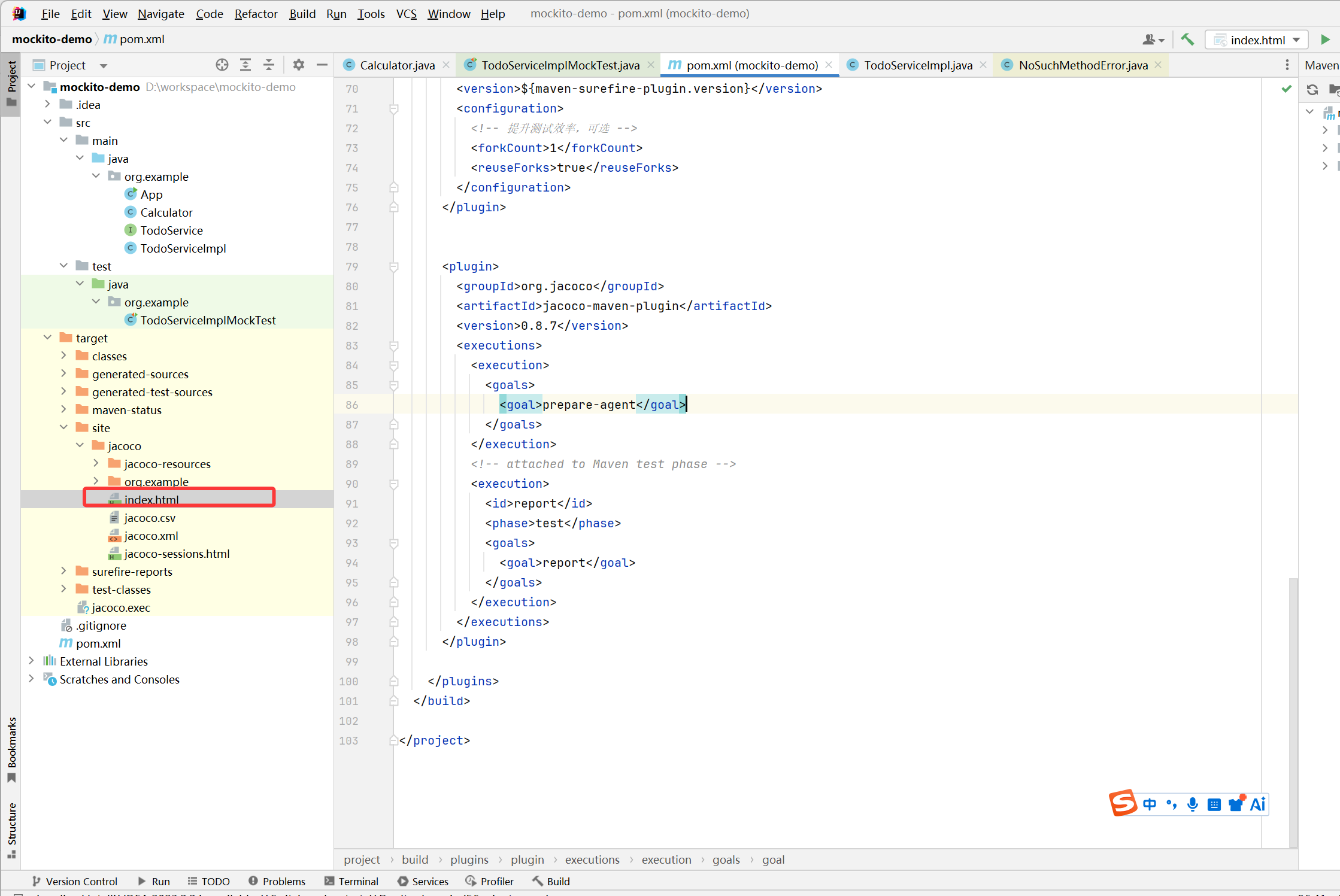
运行test,回自动生成报告:我的报告目录:D:\workspace\mockito-demo\target\site\jacoco
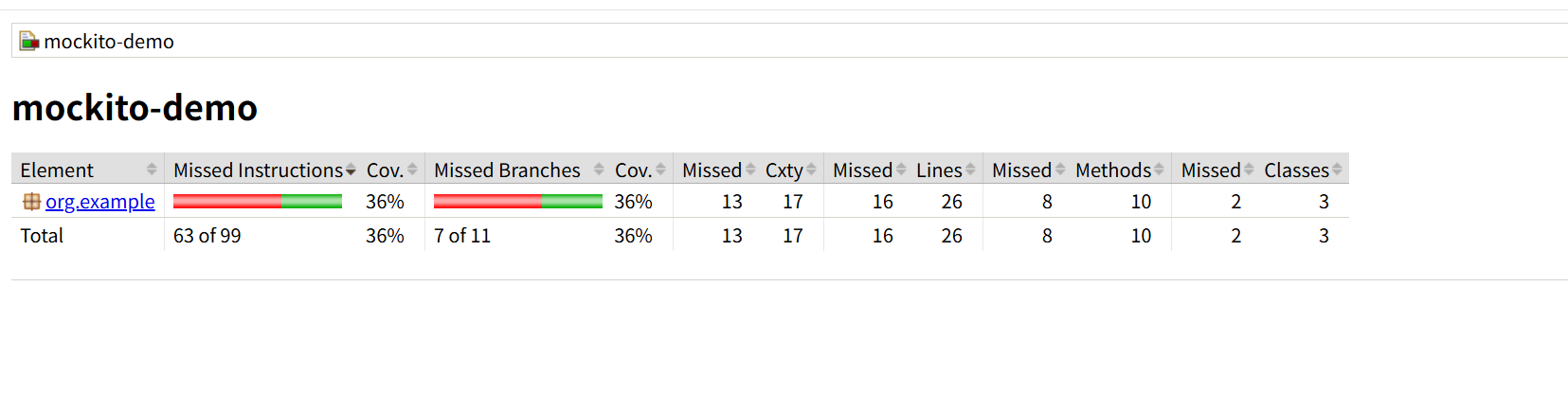
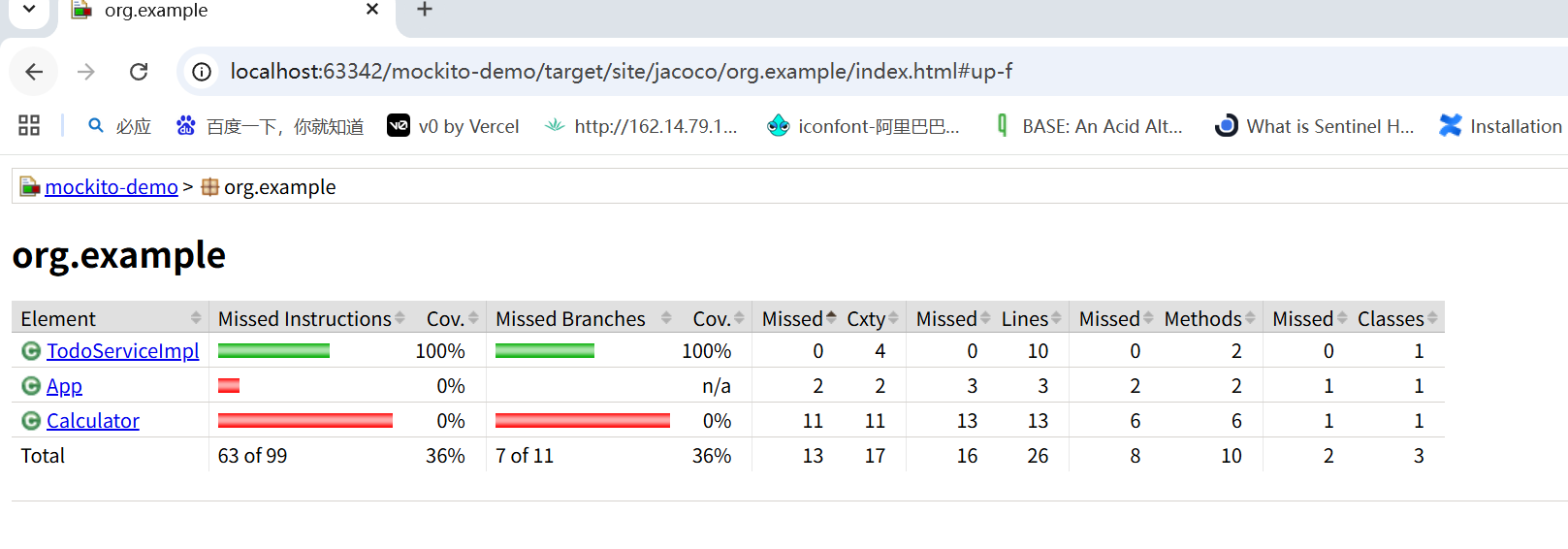
这个 mockito-demo 项目的整体测试覆盖率只有 36% ,不管是代码指令还是分支逻辑,都只跑了三分之一左右,属于非常低的水平,还有大量代码没被测试覆盖到。
二、表头
| 表头 | 大白话解释 | 重点程度 |
|---|---|---|
Element |
被统计的对象(这里是 org.example 包和整个项目 Total) |
- |
Missed Instructions |
没被执行到的 JVM 字节码指令数量 | 高 |
Cov. |
指令覆盖率(已执行指令 / 总指令数) | 高 |
Missed Branches |
没被走到的分支(if/else、for、switch 等判断逻辑)数量 | ⭐⭐⭐ 最高 |
Cov. |
分支覆盖率(已走到的分支 / 总分支数) | ⭐⭐⭐ 最高 |
Missed / Cxty |
没被覆盖的圈复杂度(衡量代码逻辑复杂度) | 中 |
Missed / Lines |
没被执行到的代码行数 | 高 |
Missed / Methods |
没被调用过的方法数量 | 中 |
Missed / Classes |
没被加载 / 调用过的类数量 | 中 |
三、逐行解读数据
Total 代表你整个项目的汇总数据:
1. 指令覆盖率:36%
Missed Instructions: 63 of 99意思是:你项目里一共有 99 条字节码指令 ,测试只跑了99-63=36条,36/99 ≈ 36%- 大白话:你的代码里,只有三分之一的 "最小执行步骤" 被测试跑过了,剩下三分之二根本没走到。
2. 分支覆盖率:36%
Missed Branches: 7 of 11意思是:你项目里一共有 11 个判断分支 (比如 if 的 true 和 false、for 的循环和退出),测试只走到了11-7=4个,4/11 ≈ 36%- 大白话:你的 if/else、循环这些逻辑,大部分分支都没被测试覆盖到,很容易藏 bug。
3. 圈复杂度(Cxty):
Missed / Cxty: 13 / 17意思是:有 17 个逻辑分支点,其中 13 个没被完全覆盖,和分支覆盖率低是对应的。
4. 行覆盖率:
Missed / Lines: 16 / 26意思是:你项目里一共有 26 行有效代码 ,测试只跑了26-16=10行,10/26 ≈ 38%,和前面的 36% 基本对应。
5. 方法覆盖率:
Missed / Methods: 8 / 10意思是:你项目里一共有 10 个方法 ,测试只调用了10-8=2个,2/10=20%,说明大部分方法根本没被测试执行过。
6. 类覆盖率:
Missed / Classes: 2 / 3意思是:你项目里一共有 3 个类 ,测试只加载了3-2=1个,1/3≈33%,说明有 2 个类完全没被测试碰过。
四、这个报告暴露的问题
- 测试用例太少:大部分方法、类、分支都没被调用过,测试根本没覆盖到。
- 分支覆盖严重不足:if/else、循环这些关键逻辑没被测试,就算写了用例,也可能只走了其中一条路。
- 整体覆盖率过低:36% 的覆盖率在工业项目里是不合格的,一般项目至少要到 70% 以上,核心业务甚至要 90%+。