【ROS 入门第一步】Ubuntu 20.04 / 18.04 双版本 ROS1 安装保姆级教程(Noetic & Melodic)
摘要
本文手把手带你在 Ubuntu 20.04 (Focal) 上安装 ROS Noetic ,以及在 Ubuntu 18.04 (Bionic) 上安装 ROS Melodic ,包含换源、密钥、依赖、环境变量、rosdep 初始化以及常见报错的解决办法,附带验证小乌龟示例。
一、写在前面
ROS1 (Robot Operating System 1) 与 Ubuntu 的版本是严格绑定的:
| Ubuntu 版本 | 推荐 ROS1 发行版 | 维护状态 |
|---|---|---|
| Ubuntu 20.04 (Focal) | ROS Noetic Ninjemys | ROS1 最后一个 LTS(EOL: 2025-05) |
| Ubuntu 18.04 (Bionic) | ROS Melodic Morenia | 已 EOL(2023-05),仍广泛使用 |
| Ubuntu 16.04 (Xenial) | ROS Kinetic | 已 EOL |
二、Ubuntu 20.04 安装 ROS Noetic
1. 设置软件源(清华镜像,国内推荐)
bash
sudo sh -c '. /etc/lsb-release && echo "deb https://mirrors.tuna.tsinghua.edu.cn/ros/ubuntu/ $DISTRIB_CODENAME main" > /etc/apt/sources.list.d/ros-latest.list'2. 添加密钥
bash
sudo apt install curl -y
curl -s https://raw.githubusercontent.com/ros/rosdistro/master/ros.asc | sudo apt-key add -
如果上面命令访问 GitHub 失败,可以使用国内镜像:
bash
curl -sSL 'http://packages.ros.org/ros.key' | sudo apt-key add -3. 更新索引并安装
bash
sudo apt update
sudo apt install ros-noetic-desktop-full -y
💡
desktop-full包含 ROS 核心、rqt、rviz、常用机器人库(urdf、kdl)和 2D/3D 模拟器(gazebo、stage)。如果空间紧张,可选
ros-noetic-desktop或最小的ros-noetic-ros-base。
4. 配置环境变量
bash
echo "source /opt/ros/noetic/setup.bash" >> ~/.bashrc
source ~/.bashrc
使用 zsh 用户请改为 ~/.zshrc。
5. 安装构建依赖
bash
sudo apt install python3-rosdep python3-rosinstall python3-rosinstall-generator python3-wstool build-essential -y6. 初始化 rosdep
bash
sudo rosdep init
rosdep update
⚠️
rosdep init / update经常因raw.githubusercontent.com被墙而失败。解决方案见 第四节常见问题。
三、Ubuntu 18.04 安装 ROS Melodic
Melodic 与 Noetic 流程几乎一致,主要差别在于 Python 版本:Melodic 默认 Python 2.7,Noetic 默认 Python 3。
1. 设置软件源
bash
sudo sh -c '. /etc/lsb-release && echo "deb https://mirrors.tuna.tsinghua.edu.cn/ros/ubuntu/ $DISTRIB_CODENAME main" > /etc/apt/sources.list.d/ros-latest.list'2. 添加密钥
bash
sudo apt install curl -y
curl -s https://raw.githubusercontent.com/ros/rosdistro/master/ros.asc | sudo apt-key add -
3. 安装
bash
sudo apt update
sudo apt install ros-melodic-desktop-full -y
4. 环境变量
bash
echo "source /opt/ros/melodic/setup.bash" >> ~/.bashrc
source ~/.bashrc
5. 安装构建依赖(注意是 python- 而不是 python3-)
bash
sudo apt install python-rosdep python-rosinstall python-rosinstall-generator python-wstool build-essential -y6. 初始化 rosdep
bash
sudo rosdep init
rosdep update
四、常见问题与解决方案
❶ sudo rosdep init 报 Website may be down / 连接超时
这是 GitHub raw 被墙导致的。推荐做法:使用 小鱼 ROS 一键安装的 rosdepc:
bash
sudo pip install rosdepc          # Melodic
sudo pip3 install rosdepc         # Noetic
sudo rosdepc init
rosdepc update
或者使用社区维护的离线 yaml(修改 /etc/ros/rosdep/sources.list.d/20-default.list)。
❷ 公钥过期:NO_PUBKEY F42ED6FBAB17C654
bash
sudo apt-key adv --keyserver 'hkp://keyserver.ubuntu.com:80' --recv-key F42ED6FBAB17C654❸ roscore 启动报 command not found
环境变量没生效,重新执行:
bash
source /opt/ros/noetic/setup.bash # 或 melodic五、安装验证:小乌龟示例
打开 三个终端:
bash
# Terminal 1
roscore
bash
# Terminal 2
rosrun turtlesim turtlesim_node
bash
# Terminal 3
rosrun turtlesim turtle_teleop_key
在 Terminal 3 中用方向键控制小乌龟移动,效果如下:
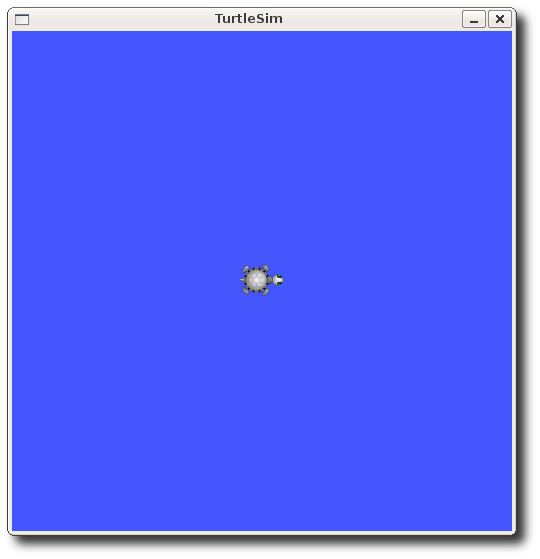
图片来源:ROS Wiki turtlesim 页面 (CC-BY 3.0)
六、写在最后
至此,你已经在 Ubuntu 20.04 / 18.04 上安装好了 ROS1。下一篇我们会带大家创建第一个 catkin workspace 并编写 Hello World 节点。如果对你有帮助,欢迎点赞收藏 ⭐。
参考资料
- ROS Wiki 官方安装文档(Noetic): http://wiki.ros.org/noetic/Installation/Ubuntu
- ROS Wiki 官方安装文档(Melodic): http://wiki.ros.org/melodic/Installation/Ubuntu
- 清华大学开源镜像站 ROS 源说明: https://mirrors.tuna.tsinghua.edu.cn/help/ros/
- 小鱼 ROS rosdepc 项目: https://github.com/fishros/rosdepc
- ROS Distributions 官方维护周期: http://wiki.ros.org/Distributions
图片版权说明
本文 turtlesim 截图来自 ROS Wiki,遵循 CC-BY 3.0 协议。