原生的飞书告警只支持 text 类型,不支持 interactive 卡片,因此无法使用飞书告警。
要使用告警需要修改feishu.js的源码。步骤如下(我这里使用的是源码安装,docker安装的自行研究一下)。
一、下载源码
git clone https://github.com/louislam/uptime-kuma.git二、进入目录
cd ./uptime-kuma/server/notification-providers三、修改feishu.js
javascript
const NotificationProvider = require("./notification-provider");
const axios = require("axios");
const { DOWN, UP } = require("../../src/util");

class Feishu extends NotificationProvider {
    name = "Feishu";

    /**
     * @inheritdoc
     */
    async send(notification, msg, monitorJSON = null, heartbeatJSON = null) {
        const okMsg = "Sent Successfully.";

        try {
            let config = this.getAxiosConfigWithProxy({});
            if (heartbeatJSON == null) {
                let testdata = {
                    msg_type: "text",
                    content: {
                        text: msg,
                    },
                };
                await axios.post(notification.feishuWebHookUrl, testdata, config);
                return okMsg;
            }

            if (heartbeatJSON["status"] === DOWN) {
                let downdata = {
                    msg_type: "interactive",
                    card: {
                        config: {
                            update_multi: false,
                            wide_screen_mode: true,
                        },
                        header: {
                            title: {
                                tag: "plain_text",
                                content: "UptimeKuma Alert: [Down] " + monitorJSON["name"],
                            },
                            template: "red",
                        },
                        elements: [
                            {
                                tag: "div",
                                text: {
                                    tag: "lark_md",
                                    content: getContent(heartbeatJSON),
                                },
                            },
                        ],
                    },
                };
                await axios.post(notification.feishuWebHookUrl, downdata, config);
                return okMsg;
            }

            if (heartbeatJSON["status"] === UP) {
                let updata = {
                    msg_type: "interactive",
                    card: {
                        config: {
                            update_multi: false,
                            wide_screen_mode: true,
                        },
                        header: {
                            title: {
                                tag: "plain_text",
                                content: "UptimeKuma Alert: [UP] " + monitorJSON["name"],
                            },
                            template: "green",
                        },
                        elements: [
                            {
                                tag: "div",
                                text: {
                                    tag: "lark_md",
                                    content: getContent(heartbeatJSON),
                                },
                            },
                        ],
                    },
                };
                await axios.post(notification.feishuWebHookUrl, updata, config);
                return okMsg;
            }
        } catch (error) {
            this.throwGeneralAxiosError(error);
        }
    }
}

/**
 * Get content
 * @param {?object} heartbeatJSON Heartbeat details (For Up/Down only)
 * @returns {string} Return Successful Message
 */
function getContent(heartbeatJSON) {
    return [
        "**Message**: " + heartbeatJSON["msg"],
        "**Ping**: " + (heartbeatJSON["ping"] == null ? "N/A" : heartbeatJSON["ping"] + " ms"),
        `**Time (${heartbeatJSON["timezone"]})**: ${heartbeatJSON["localDateTime"]}`,
    ].join("\n");
}

module.exports = Feishu;
修改内容或者直接替换feishu.js
javascript
const NotificationProvider = require("./notification-provider");
const axios = require("axios");
const { DOWN, UP } = require("../../src/util");

class Feishu extends NotificationProvider {
    name = "Feishu";

    async send(notification, msg, monitorJSON = null, heartbeatJSON = null) {
        const okMsg = "Sent Successfully.";

        try {
            let config = this.getAxiosConfigWithProxy({});

            // 测试消息
            if (heartbeatJSON == null) {
                let testdata = {
                    msg_type: "text",
                    content: {
                        text: msg,
                    },
                };
                await axios.post(notification.feishuWebHookUrl, testdata, config);
                return okMsg;
            }

            // 告警内容(统一用 text 格式)
            let statusText = heartbeatJSON.status === DOWN ? "【异常】" : "【恢复】";
            let title = `UptimeKuma 告警 ${statusText}:${monitorJSON.name}`;
            let msgContent = [
                title,
                "消息:" + heartbeatJSON.msg,
                "Ping:" + (heartbeatJSON.ping ?? "N/A") + "ms",
                "时间:" + heartbeatJSON.localDateTime + " (" + heartbeatJSON.timezone + ")"
            ].join("\n");

            let data = {
                msg_type: "text",
                content: {
                    text: msgContent
                }
            };

            await axios.post(notification.feishuWebHookUrl, data, config);
            return okMsg;

        } catch (error) {
            this.throwGeneralAxiosError(error);
        }
    }
}

module.exports = Feishu;
四、开始构建和安装
1.安装pm2
javascript
npm install pm22.启动项目(要在你下载的目录底下)
javascript
cd uptime-kuma
npm run setup
pm2 start server/server.js --name uptime-kuma
3.访问http:IP:3001(需要配置数据库和默认管理员用户)
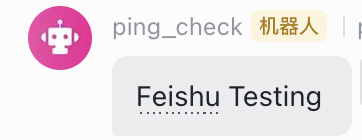
4.之后进行测试一下飞书告警正常提示如下
###写在最后:
飞书的告警最好加密,这里建议使用IP白名单,因为用签名uptime kuma没有选项填入。
另外3001是默认端口如果需要修改为其他的端口可以如下命令
javascript
pm2 stop uptime-kuma

PORT=3005 pm2 start server/server.js --name uptime-kuma

pm2 save
如果是第一次执行
javascript
PORT=3005 pm2 start server/server.js --name uptime-kuma

pm2 save
另外可以查看uptime kuma状态
javascript
pm2 status