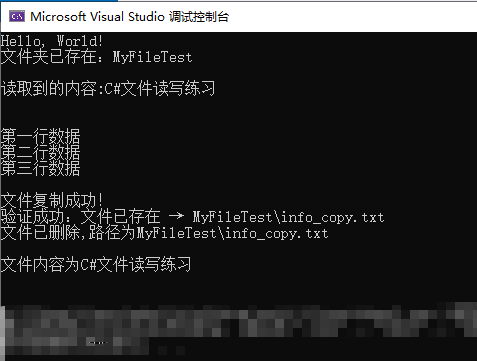
以下练习1-5 , 在主函数 调用即可
FileTest?.Run() , ?为对应的类名
目录
[练习一:基础创建文件夹 + 判断是否存在](#练习一:基础创建文件夹 + 判断是否存在)
[练习三:逐行写入 + 逐行读取](#练习三:逐行写入 + 逐行读取)
[控制台: 输出内容](#控制台: 输出内容)
练习一:基础创建文件夹 + 判断是否存在
需求
定义文件夹名 MyFileTest
判断该文件夹是否存在
不存在则自动创建,存在则控制台打印提示
cs
//练习一 创建文件夹 + 判断是否存在
class FileTest1
{
    public FileTest1()
    {

    }
    public static void Run()
    {
        // 文件夹名称
        string folderName = "MyFileTest";

        // 判断是否存在
        bool exists = Directory.Exists(folderName);
        if(!exists)
        {
            Directory.CreateDirectory(folderName);
            Console.WriteLine("文件夹不存在,已成功创建:" + folderName);
        } else
        {
            Console.WriteLine("文件夹已存在:" + folderName);
        }
    }
}
练习二:文本文件整体读写
需求
在上面创建的文件夹内,新建 info.txt
写入文本内容:C#文件读写练习
读取文件全部内容,并打印到控制台
cs
// 练习二 创建文件, 写入, 读取
class FileTest2
{
    public static void Run()
    {
        // 1. 拼接正确路径:MyFileTest\info.txt
        string folder = "MyFileTest";
        string filePath = Path.Combine(folder, "info.txt");

        // 2. 写入文件(using 自动关闭,最安全)
        // StreamWriter 会自动创建文件
        using (StreamWriter sw = new StreamWriter(filePath))
        {
            sw.WriteLine("C#文件读写练习");
        }

        using (StreamReader sr = new StreamReader(filePath))
        {
            string content = sr.ReadToEnd(); //读取全部内容
            Console.WriteLine("读取到的内容:"+ content);
        }


    }
}
练习三:逐行写入 + 逐行读取
需求
新建 lineData.txt
分行写入三行内容:
plaintext
第一行数据
第二行数据
第三行数据
循环逐行读取每行内容,依次控制台输出
cs
// 练习三 逐行写入+逐行读取
class FileTest3
{
    public static void Run()
    {
        // 拼合路径
        string folder = "MyFileTest";
        string filePath = Path.Combine(folder, "lineData.txt");

        // 写入文件内容
        using (StreamWriter sw = new StreamWriter(filePath))
        {
            sw.WriteLine("第一行数据");
            sw.WriteLine("第二行数据");
            sw.WriteLine("第三行数据");
        }

        // 读取文件数据,逐行
        using (StreamReader sr = new StreamReader(filePath))
        {
            string line;
            while ((line = sr.ReadLine()) != null)
            {
                Console.WriteLine(line);
            }
        }
    }
}
练习四:文件复制与删除
需求
把练习二的info.txt复制一份,命名为info_copy.txt
判断复制后的文件是否存在
最后删除副本文件info_copy.txt
cs
// 练习四 文件赋值与删除
class FileTest4
{
    public static void Run()
    {
        string folder = "MyFileTest";
        string sourceFile = Path.Combine(folder,"info.txt");  // 源文件
        string copyFile = Path.Combine(folder,"info_copy.txt"); // 副本

        // 1. 复制文件(true = 如果已存在就覆盖,不报错)
        File.Copy(sourceFile, copyFile, true);
        Console.WriteLine("文件复制成功!");

        // 2. 判断复制后的文件是否存在
        if (File.Exists(copyFile))
        {
            Console.WriteLine($"验证成功:文件已存在 → {copyFile}");
        }

        File.Delete(copyFile);
        Console.WriteLine($"文件已删除,路径为{copyFile}");
    }
}
练习五:异常防护版文件读取
需求
读取info.txt内容
用 try-catch 捕获文件不存在、读写异常
出错时控制台输出错误提示,正常则打印文本内容
cs
 //练习五:异常防护版文件读取
 class FileTest5
 {
     public static void Run()
     {
         try
         {
             string folder = "MyFileTest";
             string fileName = Path.Combine(folder, "info.txt");  // 源文件

             // 读取文件
             using (StreamReader sr = new StreamReader(fileName))
             {
                 string line;
                 while ((line = sr.ReadLine()) != null)
                 {
                     Console.WriteLine($"文件内容为{line}");
                 }

             }
         }
         catch (Exception ex)
         {
             // 输出具体错误,而不是只说"报错了"
             Console.WriteLine("读取文件失败,原因:" + ex.Message);
         }

     }
 }
控制台: 输出内容