Spring Boot 集成 Hutool 实现图片验证码
- 效果展示
- [添加 Maven 依赖](#添加 Maven 依赖)
- 目录结构
- 前端
-
- [index.html --- 验证码输入页](#index.html — 验证码输入页)
- [success.html --- 验证成功页](#success.html — 验证成功页)
- 后端
-
- [CaptchaController --- 验证码接口](#CaptchaController — 验证码接口)
- [CaptchaProperties --- 配置映射](#CaptchaProperties — 配置映射)
- [application.yml --- 验证码配置](#application.yml — 验证码配置)
效果展示
下面是项目的运行效果截图
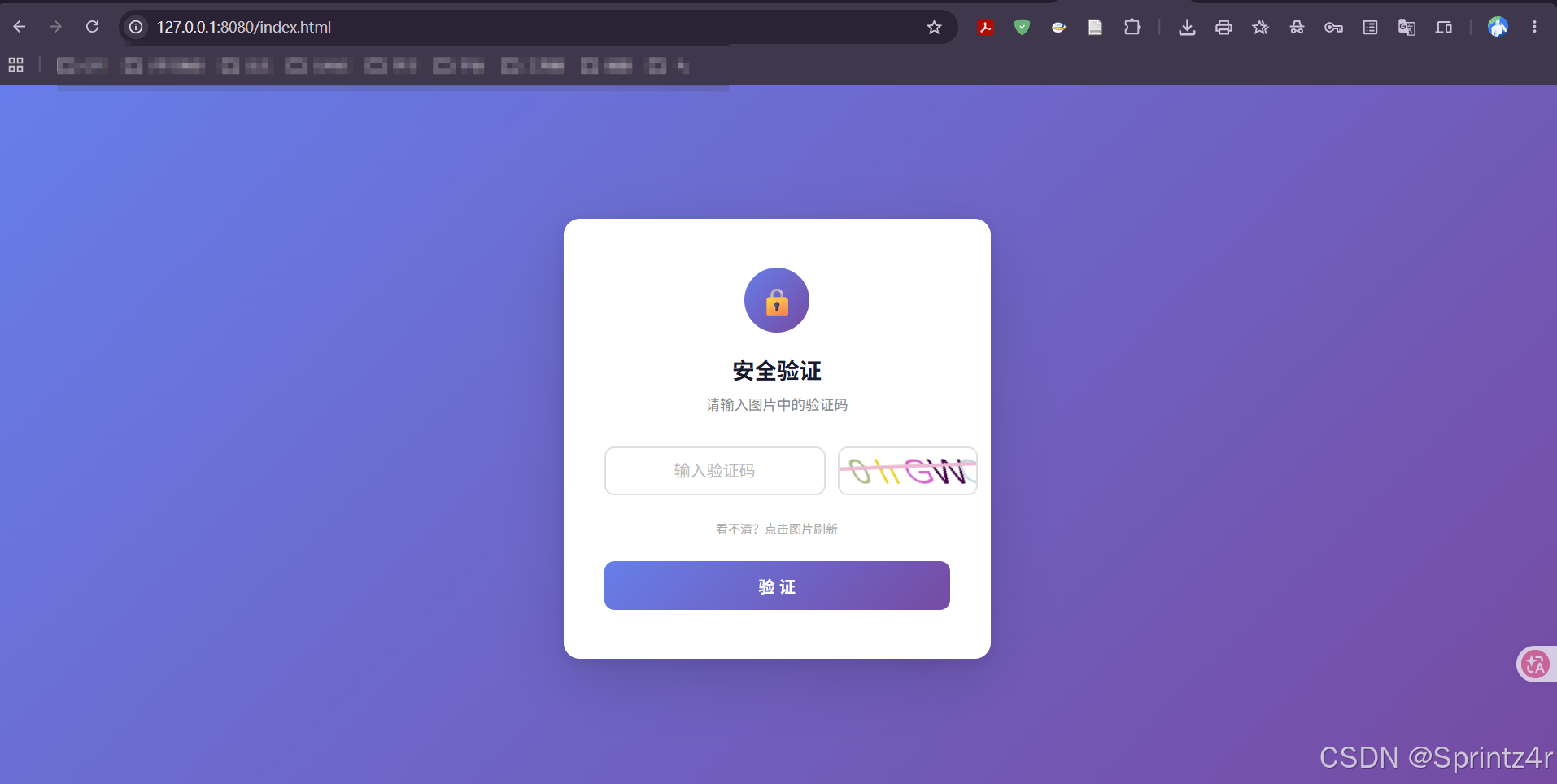
图1:验证码输入页面 --- 用户输入图片中的验证码,点击「验证」提交,点击图片可刷新验证码。
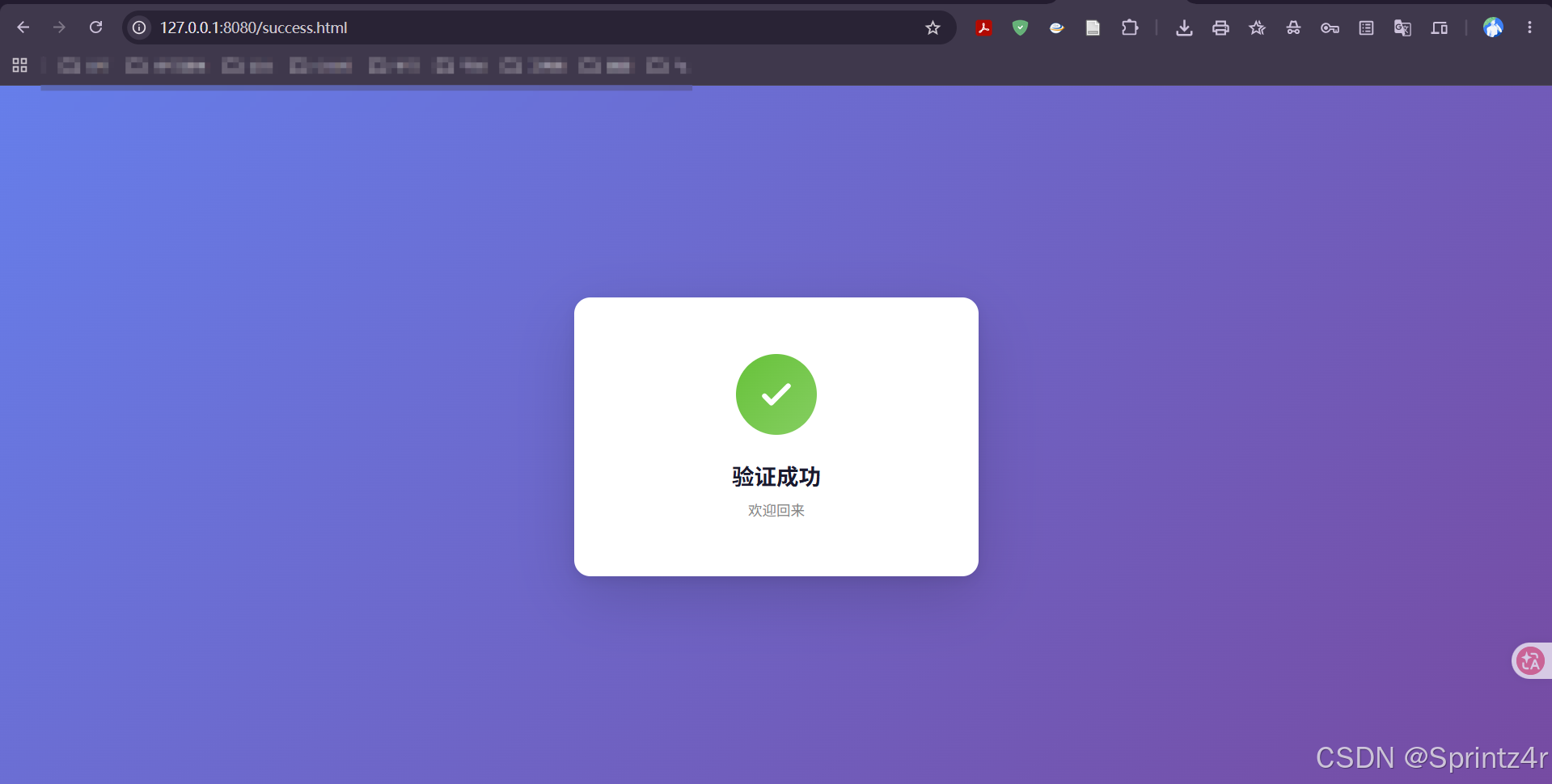
图2:验证成功页面 --- 验证通过后跳转到成功页,展示绿色对勾动画和欢迎文案。
添加 Maven 依赖
在 pom.xml 中添加 Hutool 验证码工具包的依赖:
xml
<dependency>
    <groupId>cn.hutool</groupId>
    <artifactId>hutool-all</artifactId>
    <version>5.8.44</version>
</dependency>
hutool-all 是 Hutool 的全量包,包含了 ShearCaptcha(扭曲干扰验证码生成器)等丰富的工具类。如果希望精简依赖,也可以只引入 hutool-captcha 模块。
目录结构
项目的目录结构遵循标准的 Spring Boot 分层架构,各模块职责清晰,便于维护和扩展。
text
.
├── src
│   └── main
│       ├── java
│       │   └── org
│       │       └── example
│       │           └── springcaptchademo
│       │               ├── controller          # 控制器层,处理 HTTP 请求
│       │               │   └── CaptchaController.java
│       │               ├── model               # 数据模型 / 配置映射
│       │               │   └── CaptchaProperties.java
│       │               └── SpringCaptchaDemoApplication.java  # 应用启动入口
│       └── resources
│           ├── static
│           │   ├── index.html                  # 验证码输入页面
│           │   └── success.html                # 验证成功页面
│           ├── templates                       # 模板目录(本示例未使用)
│           ├── application.properties          # Spring Boot 默认配置
│           └── application.yml                 # 自定义配置(验证码参数等)
各模块说明:
- controller :提供验证码生成(
/captcha/getCaptcha)和校验(/captcha/check)两个 REST 接口。 - model :通过
@ConfigurationProperties将application.yml中的captcha配置映射为 Java 对象,方便统一管理验证码的宽高、session key 等参数。 - static :存放前端静态页面,
index.html是验证码输入页,success.html是验证成功后的跳转页。 - application.yml:集中管理验证码的图片尺寸、session 存储键名等配置,修改配置无需改动代码。
前端
前端包含两个静态页面:index.html(验证码输入页)和 success.html(验证成功页)。页面采用渐变紫色背景 + 白色卡片的设计风格,交互上支持点击图片刷新验证码、回车快捷提交、以及带动画的 Toast 提示。
index.html --- 验证码输入页
用户在此页面输入图片中的验证码,点击「验证」按钮提交。页面包含以下核心交互:
- 验证码图片:点击即可刷新,URL 附加时间戳参数防止浏览器缓存。
- 输入框:字母间距加宽、居中输入,支持回车键快捷提交。
- 提交按钮:点击后置为加载态防止重复提交,验证失败时自动清空输入并刷新验证码。
- Toast 提示:验证成功/失败时从顶部滑入提示,2.2 秒后自动消失。
html
<!DOCTYPE html>
<html lang="zh-CN">
<head>
<meta charset="utf-8">
<meta name="viewport" content="width=device-width, initial-scale=1.0">
<meta http-equiv="Cache-Control" content="no-cache, no-store, must-revalidate" />
<meta http-equiv="Pragma" content="no-cache" />
<meta http-equiv="Expires" content="0" />
<title>验证码</title>
<style>
/* ===== 全局重置 ===== */
* {
margin: 0;
padding: 0;
box-sizing: border-box;
}
/* ===== 页面背景:渐变紫,内容居中 ===== */
body {
min-height: 100vh;
display: flex;
align-items: center;
justify-content: center;
background: linear-gradient(135deg, #667eea 0%, #764ba2 100%);
font-family: -apple-system, BlinkMacSystemFont, "Segoe UI", Roboto, "Helvetica Neue", Arial, sans-serif;
}
/* ===== 主卡片容器 ===== */
.container {
background: #fff;
border-radius: 16px;
padding: 48px 40px;
width: 420px;
box-shadow: 0 20px 60px rgba(0, 0, 0, 0.15), 0 4px 12px rgba(0, 0, 0, 0.08);
text-align: center;
}
/* 顶部锁图标 */
.icon {
width: 64px;
height: 64px;
margin: 0 auto 20px;
background: linear-gradient(135deg, #667eea 0%, #764ba2 100%);
border-radius: 50%;
display: flex;
align-items: center;
justify-content: center;
font-size: 28px;
color: #fff;
}
h1 {
font-size: 22px;
color: #1a1a2e;
margin-bottom: 8px;
font-weight: 600;
}
.subtitle {
font-size: 14px;
color: #888;
margin-bottom: 32px;
}
/* ===== 验证码输入行 ===== */
.captcha-row {
display: flex;
gap: 12px;
margin-bottom: 24px;
}
/* 验证码输入框:字母间距加宽,居中输入 */
#inputCaptcha {
flex: 1;
height: 48px;
padding: 0 10px;
font-size: 16px;
border: 2px solid #e0e0e0;
border-radius: 10px;
outline: none;
transition: border-color 0.25s, box-shadow 0.25s;
letter-spacing: 2px;
text-align: center;
}
#inputCaptcha:focus {
border-color: #667eea;
box-shadow: 0 0 0 3px rgba(102, 126, 234, 0.15);
}
/* placeholder 恢复正常间距 */
#inputCaptcha::placeholder {
letter-spacing: normal;
color: #bbb;
}
/* 验证码图片:点击可刷新 */
#verificationCodeImg {
height: 48px;
border-radius: 10px;
border: 2px solid #e0e0e0;
cursor: pointer;
transition: border-color 0.25s, box-shadow 0.25s;
}
#verificationCodeImg:hover {
border-color: #667eea;
box-shadow: 0 0 0 3px rgba(102, 126, 234, 0.15);
}
.refresh-hint {
font-size: 12px;
color: #aaa;
margin-bottom: 24px;
user-select: none;
}
/* ===== 提交按钮 ===== */
#checkCaptcha {
width: 100%;
height: 48px;
font-size: 16px;
font-weight: 600;
color: #fff;
background: linear-gradient(135deg, #667eea 0%, #764ba2 100%);
border: none;
border-radius: 10px;
cursor: pointer;
transition: opacity 0.25s, transform 0.15s, box-shadow 0.25s;
}
/* 悬浮时上浮 + 投影 */
#checkCaptcha:hover {
box-shadow: 0 6px 20px rgba(102, 126, 234, 0.4);
transform: translateY(-1px);
}
/* 按下时回弹 */
#checkCaptcha:active {
transform: translateY(0);
opacity: 0.9;
}
/* ===== Toast 提示 ===== */
.toast {
position: fixed;
top: 24px;
left: 50%;
/* 默认隐藏在屏幕上方 */
transform: translateX(-50%) translateY(-120px);
padding: 14px 28px;
border-radius: 10px;
color: #fff;
font-size: 14px;
font-weight: 500;
z-index: 999;
transition: transform 0.35s cubic-bezier(0.175, 0.885, 0.32, 1.275);
pointer-events: none;
}
/* 显示时滑入 */
.toast.show {
transform: translateX(-50%) translateY(0);
}
.toast.error {
background: #f56c6c;
box-shadow: 0 6px 20px rgba(245, 108, 108, 0.35);
}
.toast.success {
background: #67c23a;
box-shadow: 0 6px 20px rgba(103, 194, 58, 0.35);
}
</style>
</head>
<body>
<div class="container">
<div class="icon">🔒</div>
<h1>安全验证</h1>
<p class="subtitle">请输入图片中的验证码</p>
<div class="captcha-row">
<input type="text" name="inputCaptcha" id="inputCaptcha" placeholder="输入验证码" maxlength="5" autocomplete="off">
<img id="verificationCodeImg" src="/captcha/getCaptcha" title="看不清?换一张" alt="验证码">
</div>
<p class="refresh-hint">看不清?点击图片刷新</p>
<input type="button" value="验 证" id="checkCaptcha">
</div>
<div class="toast" id="toast"></div>
<script src="https://cdn.bootcdn.net/ajax/libs/jquery/3.6.4/jquery.min.js"></script>
<script>
/**
* 显示 Toast 提示
* @param {string} msg - 提示文本
* @param {string} type - 类型:'error' | 'success'
*/
function showToast(msg, type) {
var $t = $('#toast');
$t.text(msg).attr('class', 'toast ' + type);
// 使用 requestAnimationFrame 确保 class 切换后动画触发
requestAnimationFrame(function () {
$t.addClass('show');
});
// 2.2 秒后自动隐藏
clearTimeout($t.data('_timer'));
$t.data('_timer', setTimeout(function () {
$t.removeClass('show');
}, 2200));
}
// 点击验证码图片刷新:添加时间戳参数防止浏览器缓存
$("#verificationCodeImg").click(function () {
$(this).hide().attr('src', '/captcha/getCaptcha?dt=' + new Date().getTime()).fadeIn(200);
});
// 提交验证
$("#checkCaptcha").click(function () {
var captcha = $.trim($("#inputCaptcha").val());
// 空值校验
if (!captcha) {
showToast('请输入验证码', 'error');
return;
}
var $btn = $(this);
// 按钮置为加载态,防止重复提交
$btn.prop('disabled', true).val('验证中...');
$.ajax({
type: "post",
url: "/captcha/check",
data: {
captcha: captcha
},
success: function (result) {
if (result) {
// 验证成功,跳转到成功页
showToast('验证成功,正在跳转...', 'success');
setTimeout(function () {
location.href = "success.html";
}, 600);
} else {
// 验证失败:清空输入、刷新验证码、恢复按钮
showToast('验证码错误,请重新输入', 'error');
$("#inputCaptcha").val('').focus();
$("#verificationCodeImg").click();
$btn.prop('disabled', false).val('验 证');
}
},
error: function () {
// 网络异常处理
showToast('网络异常,请稍后重试', 'error');
$btn.prop('disabled', false).val('验 证');
}
});
});
// 回车键快捷提交
$("#inputCaptcha").on('keydown', function (e) {
if (e.key === 'Enter') {
$("#checkCaptcha").click();
}
});
</script>
</body>
</html>success.html --- 验证成功页
验证通过后跳转至此页面,展示绿色对勾动画和「验证成功」文案。对勾图标带有弹入动画和一笔画出的描边效果,提升用户体验。
html
<!DOCTYPE html>
<html lang="zh-CN">
<head>
    <meta charset="UTF-8">
    <meta name="viewport" content="width=device-width, initial-scale=1.0">
    <title>验证成功</title>
    <style>
        /* ===== 全局重置 ===== */
        * {
            margin: 0;
            padding: 0;
            box-sizing: border-box;
        }

        /* ===== 页面背景:渐变紫,内容居中 ===== */
        body {
            min-height: 100vh;
            display: flex;
            align-items: center;
            justify-content: center;
            background: linear-gradient(135deg, #667eea 0%, #764ba2 100%);
            font-family: -apple-system, BlinkMacSystemFont, "Segoe UI", Roboto, "Helvetica Neue", Arial, sans-serif;
        }

        /* ===== 主卡片容器 ===== */
        .container {
            background: #fff;
            border-radius: 16px;
            padding: 56px 48px;
            width: 400px;
            box-shadow: 0 20px 60px rgba(0, 0, 0, 0.15), 0 4px 12px rgba(0, 0, 0, 0.08);
            text-align: center;
        }

        /* 对勾图标容器:绿色渐变圆形,带弹入动画 */
        .checkmark {
            width: 80px;
            height: 80px;
            margin: 0 auto 24px;
            background: linear-gradient(135deg, #67c23a 0%, #85ce61 100%);
            border-radius: 50%;
            display: flex;
            align-items: center;
            justify-content: center;
            animation: pop 0.5s cubic-bezier(0.175, 0.885, 0.32, 1.275);
        }

        /* SVG 对勾线条 */
        .checkmark svg {
            width: 40px;
            height: 40px;
            stroke: #fff;
            stroke-width: 3;
            fill: none;
            stroke-linecap: round;
            stroke-linejoin: round;
        }

        /* 对勾描边动画:使用 stroke-dasharray 实现一笔画出的效果 */
        .checkmark svg path {
            stroke-dasharray: 60;
            stroke-dashoffset: 60;
            animation: dash 0.4s 0.3s ease forwards;
        }

        /* 圆形弹入 */
        @keyframes pop {
            0% { transform: scale(0); }
            80% { transform: scale(1.1); }
            100% { transform: scale(1); }
        }

        /* 对勾描边展开 */
        @keyframes dash {
            to { stroke-dashoffset: 0; }
        }

        h1 {
            font-size: 22px;
            color: #1a1a2e;
            margin-bottom: 8px;
            font-weight: 600;
        }

        p {
            font-size: 14px;
            color: #888;
        }
    </style>
</head>
<body>

    <div class="container">
        <div class="checkmark">
            <svg viewBox="0 0 24 24">
                <path d="M5 13l4 4L19 7"/>
            </svg>
        </div>
        <h1>验证成功</h1>
        <p>欢迎回来</p>
    </div>

</body>
</html>
后端
后端基于 Spring Boot 框架,提供验证码生成与校验两个 REST 接口,并通过 @ConfigurationProperties 将验证码参数集中管理,便于维护。
CaptchaController --- 验证码接口
控制器包含两个核心接口:
/captcha/getCaptcha(GET) :生成一张扭曲干扰的验证码图片(使用 Hutool 的ShearCaptcha),将验证码文本和生成时间存入 session,同时设置响应头禁止浏览器缓存图片。/captcha/check(POST):接收用户输入的验证码,从 session 中取出之前存入的文本和生成时间,忽略大小写比对,并校验是否在 30 分钟有效期内。
java
package org.example.springcaptchademo.controller;


import cn.hutool.captcha.CaptchaUtil;
import cn.hutool.captcha.ShearCaptcha;
import jakarta.servlet.http.HttpServletResponse;
import jakarta.servlet.http.HttpSession;
import org.example.springcaptchademo.model.CaptchaProperties;
import org.slf4j.Logger;
import org.slf4j.LoggerFactory;
import org.springframework.beans.factory.annotation.Autowired;
import org.springframework.util.StringUtils;
import org.springframework.web.bind.annotation.RequestMapping;
import org.springframework.web.bind.annotation.RestController;

import java.io.IOException;
import java.util.Date;

/**
 * 验证码接口:生成图片验证码 + 校验用户输入
 */
@RequestMapping("/captcha")
@RestController
public class CaptchaController {

    private static final Logger logger = LoggerFactory.getLogger(CaptchaController.class);

    /** 验证码有效期:30分钟 */
    private static final long VALID_TIME = 30 * 60 * 1000L;

    @Autowired
    private CaptchaProperties captchaProperties;


    /**
     * 生成验证码图片并写入响应流,同时将验证码文本和生成时间存入 session
     */
    @RequestMapping("/getCaptcha")
    public void getCaptcha(HttpSession session, HttpServletResponse response) {
        long start = System.currentTimeMillis();

        // 禁止浏览器缓存验证码图片
        response.setContentType("image/jpeg");
        response.setHeader("Pragma", "No-cache");

        try {
            // 生成扭曲干扰的验证码
            ShearCaptcha captcha = CaptchaUtil.createShearCaptcha(
                    captchaProperties.getWidth(),
                    captchaProperties.getHeight());
            String code = captcha.getCode();

            // 验证码文本和生成时间存入 session,供校验接口比对
            session.setAttribute(captchaProperties.getSession().getKey(), code);
            session.setAttribute(captchaProperties.getSession().getDate(), new Date());

            captcha.write(response.getOutputStream());
        } catch (IOException e) {
            throw new RuntimeException(e);
        }

        long end = System.currentTimeMillis();
        logger.info("getCaptcha cost time: {}ms", end - start);
    }

    /**
     * 校验用户输入的验证码
     *
     * @param captcha 用户输入的验证码
     * @param session HTTP session,从中读取之前存入的验证码和生成时间
     * @return true 验证通过(未过期且忽略大小写匹配),false 验证失败或已过期
     */
    @RequestMapping("/check")
    public boolean check(String captcha, HttpSession session) {
        if (!StringUtils.hasLength(captcha)) {
            return false;
        }

        String code = (String) session.getAttribute(captchaProperties.getSession().getKey());
        Date date = (Date) session.getAttribute(captchaProperties.getSession().getDate());

        // 忽略大小写比对,并校验是否在有效期内
        if (captcha.equalsIgnoreCase(code)
                && date != null
                && System.currentTimeMillis() - date.getTime() < VALID_TIME) {
            return true;
        }
        return false;
    }
}
CaptchaProperties --- 配置映射
通过 @ConfigurationProperties(prefix = "captcha") 将 application.yml 中的 captcha 配置映射为 Java 对象,包含图片宽高和 session 存储键名。修改配置无需改动代码,提升灵活性。
java
package org.example.springcaptchademo.model;
import lombok.Data;
import org.springframework.boot.context.properties.ConfigurationProperties;
import org.springframework.context.annotation.Configuration;

/**
 * 验证码配置,映射 application.yml 中 captcha 前缀的属性
 * <pre>{@code
 * captcha:
 *   width: 150
 *   height: 50
 *   session:
 *     key: captchaCode
 *     date: captchaDate
 * }</pre>
 */
@ConfigurationProperties(prefix = "captcha")
@Configuration
@Data
public class CaptchaProperties {
    /** 验证码图片宽度(像素) */
    private Integer width;
    /** 验证码图片高度(像素) */
    private Integer height;
    /** session 存储相关的 key 名 */
    private Session session;

    @Data
    public static class Session {
        /** session 中存放验证码文本的 key */
        private String key;
        /** session 中存放验证码生成时间的 key */
        private String date;
    }
}
application.yml --- 验证码配置
集中管理验证码的图片尺寸(150×50 像素)和 session 中存储验证码文本、生成时间的 key 名,方便统一调整。
yml
spring:
  application:
    name: spring-captcha-demo
captcha:
  width: 150
  height: 50
  session:
    key: CAPTCHA_SESSION_KEY
    date: CAPTCHA_SESSION_DATE