文章目录
依赖
compose 约束布局,由 androidx.constraintlayout 库维护;不在 compose-bom中,需要单独依赖
[versions]
constraintlayoutCompose = "1.1.1"

[libraries]
androidx-constraintlayout-compose = { group = "androidx.constraintlayout", name = "constraintlayout-compose", version.ref = "constraintlayoutCompose" }
使用步骤
使用约束布局通常分为三步:
- 创建引用:使用 createRefs() 创建多个组件的"引用标识"。
- 分配引用:通过 Modifier.constrainAs(ref) 将引用绑定到具体的Composable 上。
若 多个组件使用相同的 ref,后面的会覆盖前面 - 定义约束:在 constrainAs 的闭包中,使用 linkTo 等方法定义相对关系。
kotlin
@Composable
@Preview(showBackground = true)
fun ConstraintLayoutCase() {
	// 创建引用   解构语法
	val (button, text, line1, line2, barrierRef1, barrierRef2) = createRefs()

	Button(
	    onClick = { },
	    // 绑定引用
	    modifier = Modifier.constrainAs(button) {
	        // 设置约束
	        top.linkTo(parent.top, margin = 66.dp)
	        start.linkTo(parent.start, margin = 16.dp)
	    }
	) {
	    Text("Button")
	}

	Text(
	    text = "Hello Compose",
	    modifier = Modifier.constrainAs(text) {
	        top.linkTo(button.bottom, margin = 16.dp)
	        centerHorizontallyTo(parent) // 横向居中对齐
	    }
	)
}
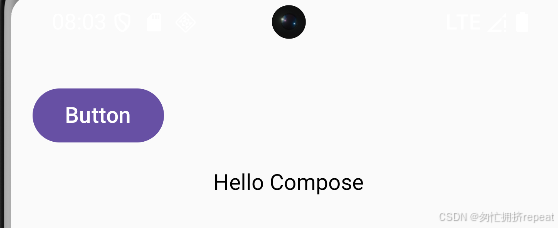
效果:
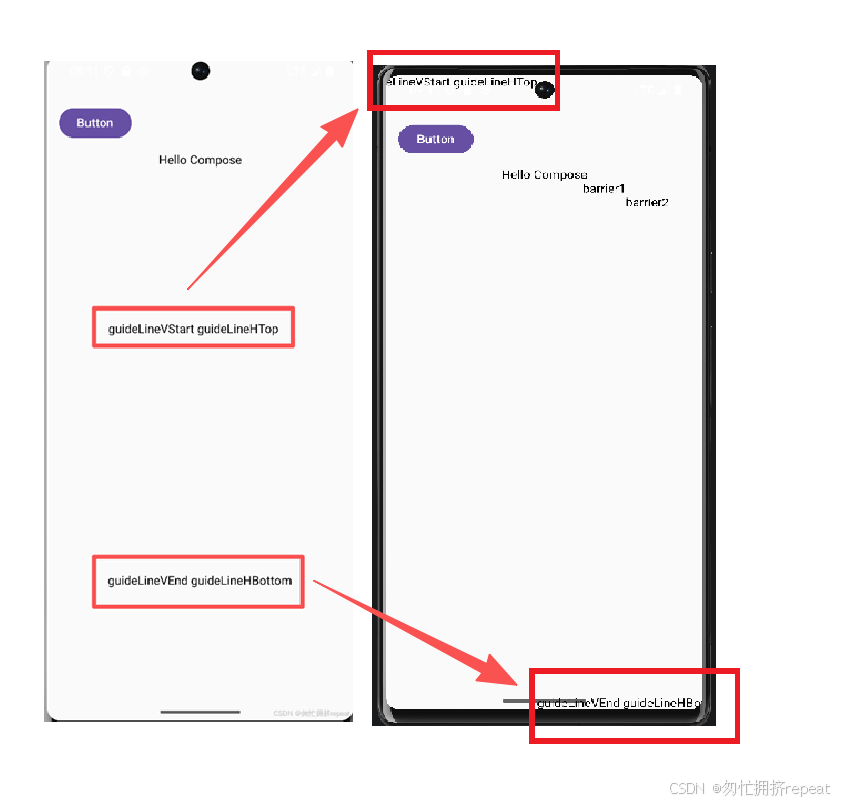
参考线 (Guide Line)
kotlin
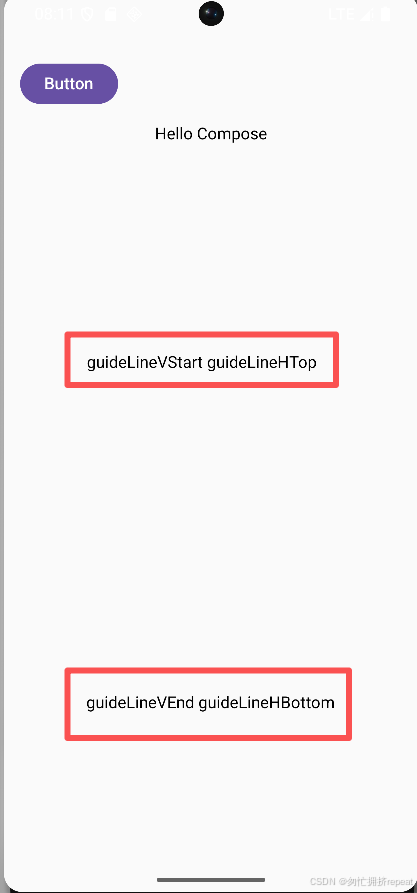
    // 纵向参考线 距 start 20%
    val guideLineVStart = createGuidelineFromStart(0.2f)
    // 纵向参考线 距 end 20%
    val guideLineVEnd = createGuidelineFromEnd(0.2f)
    // 横向参考线 距 top 40%
    val guideLineHTop = createGuidelineFromTop(0.4f)
    // 横向参考线 距 bottom 20%
    val guideLineHBottom = createGuidelineFromBottom(0.2f)
    Text(
        text = "guideLineVStart guideLineHTop",
        modifier = Modifier.constrainAs(line1) {
            start.linkTo(guideLineVStart)
            top.linkTo(guideLineHTop)
        }
    )
    Text(
        text = "guideLineVEnd guideLineHBottom",
        modifier = Modifier.constrainAs(line2) {
            end.linkTo(guideLineVEnd)
            bottom.linkTo(guideLineHBottom)
        }
    )
效果:
屏障 (Barriers)
当多个组件的宽度/高度不固定时,屏障可以动态地根据这些组件中最长/最宽的边界来创建约束
kotlin
    // button+text的 end
    val barrierEnd = createEndBarrier(button, text, margin = 50.dp)
    // button+text的 bottom
    val barrierBottom = createBottomBarrier(button, text, margin = 20.dp)
    Text(
        text = "barrier1",
        modifier = Modifier.constrainAs(barrierRef1) {
            // 当前end 和 目标 barrierEnd 对齐
            end.linkTo(barrierEnd) // 当前end margin ref end 50dp
            // 当前bottom 和 目标 barrierBottom 对齐
            bottom.linkTo(barrierBottom) // 当前bottom margin ref bottom 20dp
        }
    )
    Text(
        text = "barrier2",
        modifier = Modifier.constrainAs(barrierRef2) {
            // 当前start 和 目标 barrierEnd 对齐
            start.linkTo(barrierEnd) // 当前start margin ref end 50dp
            // 当前top 和 目标 barrierBottom 对齐
            top.linkTo(barrierBottom) // 当前top margin ref bottom 20dp
        }
    )
效果:
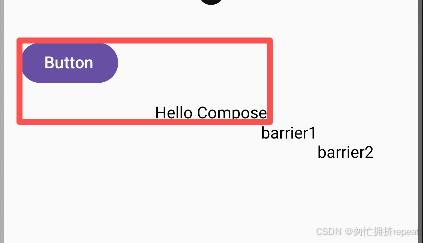
其它两个创建 barrier 约束的方法:createStartBarrier、createTopBarrier
链 (Chain)
"链(Chains)"是一种将多个组件在水平或垂直方向上连接起来,并使它们作为一个整体进行空间分配的机制
kotlin
ConstraintChainCase(this, line1, line2)

@Composable
private fun ConstraintChainCase(scope: ConstraintLayoutScope, vararg refs: LayoutReference) {
    // 横向链,elements的 纵向约束独立生效;横向约束被 横向链覆盖。 效果:一个最左,一个最右
    scope.createHorizontalChain(elements = refs, ChainStyle.SpreadInside)
    // 纵向链,同理 覆盖原有的纵向约束。 效果:一个最上,一个最下。
    // 最终效果叠加:一个最左最上,一个最右最下
    scope.createVerticalChain(elements = refs, chainStyle = ChainStyle.SpreadInside)
}
链的样式
ChainStyle.Packed 聚拢在一起,不留空隙,整体在剩余空间中居中
ChainStyle.Spread 默认。组件散开,所有组件平分剩余空间,且组件之间、组件与边界之间的间隙也是平分的
ChainStyle.SpreadInside 两端对齐,首尾两个组件会贴紧它们各自的约束边界(两头不留空隙),剩下的组件在中间平分空间。
效果:
约束集 (ConstraintSet)
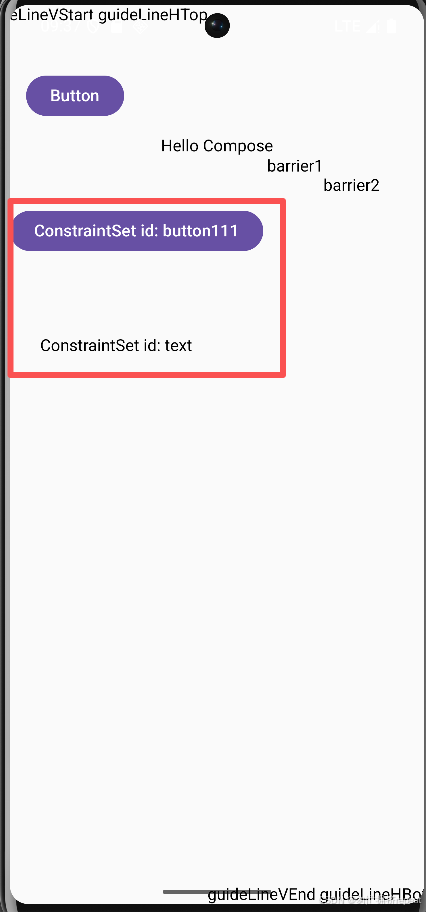
ConstraintSet 的核心作用是实现布局逻辑与 UI 结构的分离(解耦)。
适配 动态切换布局:同一套UI元素,不同的 ConstraintSet
kotlin
ConstraintSetCase()

@Composable
private fun ConstraintSetCase() {
    val constraints = ConstraintSet {
        // 创建一个基于 自定义ID 的布局引用
        val button = createRefFor("button111")
        val text = createRefFor("text111")

        // 指定引用的对应约束
        constrain(button) {
            top.linkTo(parent.top, 200.dp)
        }
        constrain(text) {
            top.linkTo(button.bottom, 80.dp)
            start.linkTo(button.start, 30.dp)
        }
    }
    // 使用约束集
    ConstraintLayout(constraints) {
        Button(
            onClick = {},
            // 通过id,应用约束
            modifier = Modifier.layoutId("button111")
        ) {
            Text("ConstraintSet id: button111")
        }

        Text(
            text = "ConstraintSet id: text111",            modifier = Modifier.layoutId("text111")
        )
    }
}
效果: