前言
在前面的文章中,我们已经掌握了Hadoop、MapReduce、YARN的核心原理与基础操作。但**"学以致用"才是最终目标------本文将带你完成一个完整的网站流量日志分析项目**,从数据采集、清洗、分析到可视化展示,覆盖大数据处理的完整链路。
项目亮点:
- 真实Nginx日志格式,模拟生产环境
- 覆盖HDFS、MapReduce、Hive三大核心技术
- 包含PV/UV统计、地域分析、时段分析等核心业务指标
- 最终通过可视化大屏展示分析结果
一、项目架构设计
1.1 整体架构图
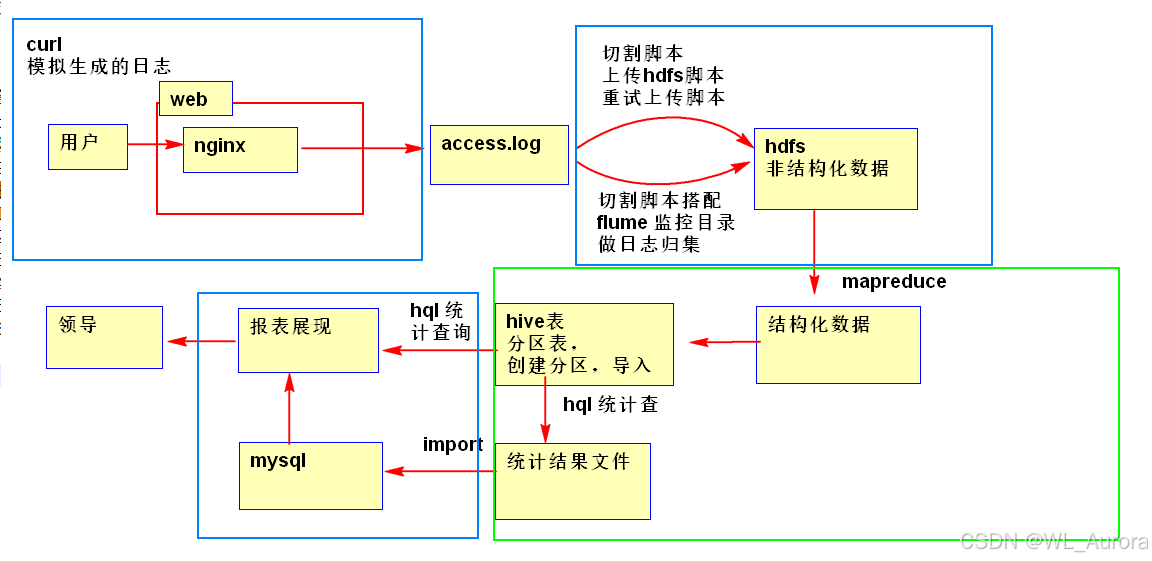
技术栈选型:
| 层级 | 技术组件 | 作用 |
|---|---|---|
| 数据采集层 | Nginx + Flume | 产生日志并实时采集到HDFS |
| 数据存储层 | HDFS | 分布式存储原始日志和清洗后数据 |
| 数据计算层 | MapReduce / Hive | 离线数据清洗与统计分析 |
| 数据服务层 | MySQL | 存储聚合后的统计结果 |
| 数据展示层 | ECharts / DataV | 可视化大屏展示 |
1.2 业务流程图
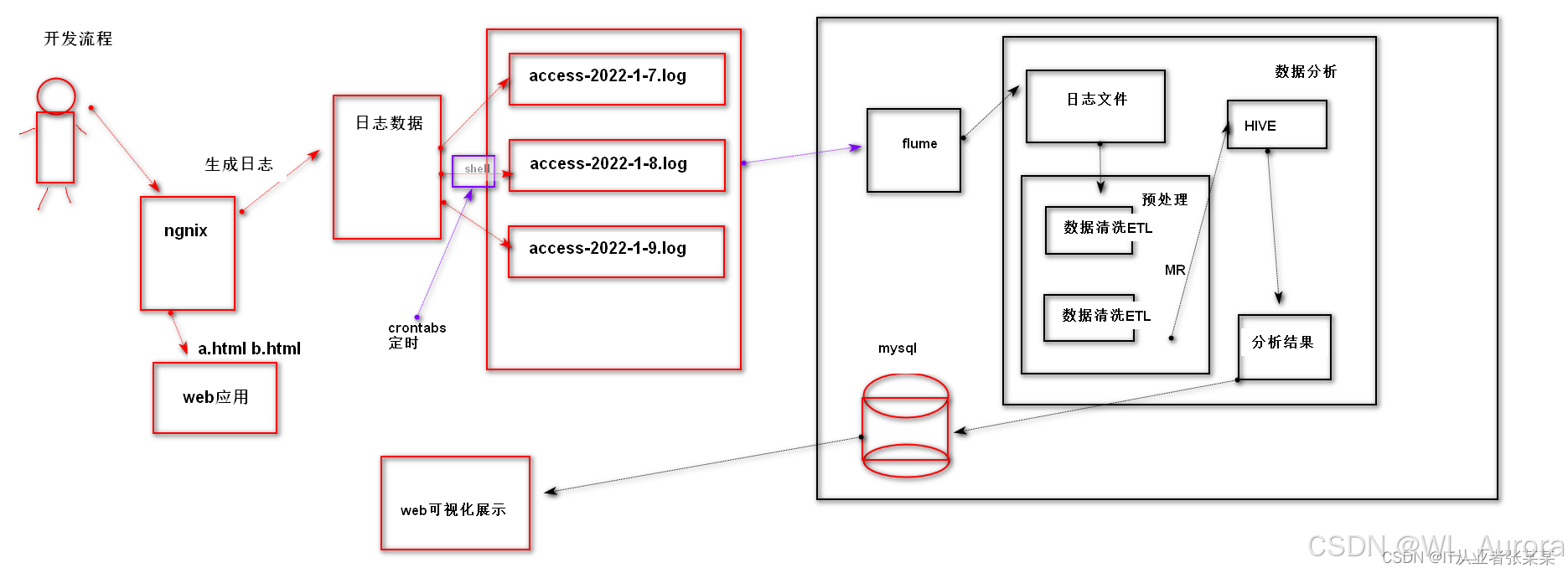
完整数据流:
用户访问网站 → Nginx记录access.log → Flume监控采集 → HDFS原始数据
                                                        ↓
                    可视化展示 ← MySQL结果表 ← Hive/MapReduce清洗分析
二、需求分析
2.1 业务指标定义
| 指标 | 说明 | 计算方式 |
|---|---|---|
| PV (Page View) | 页面浏览量 | 统计所有日志条数 |
| UV (Unique Visitor) | 独立访客数 | 按IP去重统计 |
| VV (Visit View) | 访问次数 | 按Session统计 |
| 跳出率 | 只访问一个页面的会话占比 | 单页访问数 / 总会话数 |
| 平均停留时长 | 用户平均停留时间 | 总停留时长 / 会话数 |
| 地域分布 | 用户所在省份/城市 | IP解析归属地 |
| 时段分布 | 24小时访问趋势 | 按小时分组统计 |
| TopN热门页面 | 访问量最高的页面 | 按URL分组排序 |
2.2 日志格式定义
Nginx access.log 标准格式:
192.168.1.1 - - [10/Nov/2025:14:32:10 +0800] "GET /index.html HTTP/1.1" 200 1024 "http://www.example.com" "Mozilla/5.0"字段解析:
| 字段 | 示例 | 说明 |
|---|---|---|
| remote_addr | 192.168.1.1 | 客户端IP地址 |
| remote_user | - | 客户端用户名称 |
| time_local | 10/Nov/2025:14:32:10 +0800 | 访问时间 |
| request | GET /index.html HTTP/1.1 | 请求方法与URL |
| status | 200 | HTTP状态码 |
| body_bytes_sent | 1024 | 响应体大小(字节) |
| http_referer | http://www.example.com | 来源页面 |
| http_user_agent | Mozilla/5.0 | 客户端浏览器信息 |
三、环境准备
3.1 集群环境
| 节点 | 角色 | 服务 |
|---|---|---|
| hadoop102 | NameNode, DataNode, NodeManager | HDFS, YARN |
| hadoop103 | DataNode, NodeManager, ResourceManager | HDFS, YARN |
| hadoop104 | DataNode, NodeManager | HDFS, YARN |
3.2 启动Hadoop集群
bash
# 启动HDFS
[atguigu@hadoop102 hadoop-3.1.3]$ sbin/start-dfs.sh

# 启动YARN
[atguigu@hadoop103 hadoop-3.1.3]$ sbin/start-yarn.sh

# 验证
[atguigu@hadoop102 ~]$ jps
  1234 NameNode
  5678 DataNode
  9012 NodeManager
四、数据采集与上传
4.1 模拟生成Nginx日志
由于实验环境没有真实网站,我们用Python脚本模拟生成日志数据:
python
# generate_log.py
import random
import time
from datetime import datetime, timedelta

# 配置参数
ips = [f"192.168.1.{i}" for i in range(1, 255)]
urls = ["/index.html", "/product/1001", "/product/1002", "/cart", "/order", "/user/login"]
status_codes = [200, 200, 200, 301, 404, 500]
user_agents = [
    "Mozilla/5.0 (Windows NT 10.0; Win64; x64) AppleWebKit/537.36",
    "Mozilla/5.0 (iPhone; CPU iPhone OS 14_0 like Mac OS X) AppleWebKit/605.1.15",
    "Mozilla/5.0 (Linux; Android 10; SM-G973F) AppleWebKit/537.36"
]

def generate_log_line():
    ip = random.choice(ips)
    time_str = (datetime.now() - timedelta(minutes=random.randint(0, 1440))).strftime("%d/%b/%Y:%H:%M:%S +0800")
    url = random.choice(urls)
    status = random.choice(status_codes)
    size = random.randint(100, 10000)
    referer = "-"
    ua = random.choice(user_agents)

    return f'{ip} - - [{time_str}] "GET {url} HTTP/1.1" {status} {size} "{referer}" "{ua}"
'

# 生成100万条日志
with open("access.log", "w") as f:
    for _ in range(1000000):
        f.write(generate_log_line())

print("日志生成完成:access.log")
执行生成:
bash
python generate_log.py
ls -lh access.log
# 输出: -rw-r--r-- 1 atguigu atguigu 187M Nov 10 15:30 access.log
4.2 上传日志到HDFS
bash
# 创建HDFS目录
hadoop fs -mkdir -p /weblog/input/20251110

# 上传日志文件
hadoop fs -put access.log /weblog/input/20251110/

# 验证
hadoop fs -ls /weblog/input/20251110/
# 输出: -rw-r--r--   3 atguigu supergroup  187000000 2025-11-10 15:35 /weblog/input/20251110/access.log
五、数据清洗(ETL)
5.1 清洗需求
原始日志是半结构化文本,需要清洗为结构化数据:
- 过滤无效数据:状态码非200、格式错误、爬虫请求
- 字段解析:提取IP、时间、URL、状态码等字段
- 时间标准化 :统一为
yyyy-MM-dd HH:mm:ss格式 - IP转地域:通过IP库解析省份、城市
5.2 MapReduce清洗程序
① 定义清洗后的Bean对象
java
package com.lyh.weblog.etl;

import org.apache.hadoop.io.Writable;
import java.io.DataInput;
import java.io.DataOutput;
import java.io.IOException;

public class WebLogBean implements Writable {
    private String remote_addr;      // IP地址
    private String time_local;       // 访问时间
    private String request;          // 请求URL
    private String status;           // 状态码
    private String body_bytes_sent;  // 响应大小
    private String http_referer;     // 来源
    private String http_user_agent;  // 浏览器
    private String province;         // 省份(IP解析)
    private String city;             // 城市
    private boolean valid = true;    // 是否有效

    // 必须提供无参构造
    public WebLogBean() {}

    // 序列化方法
    @Override
    public void write(DataOutput out) throws IOException {
        out.writeUTF(remote_addr);
        out.writeUTF(time_local);
        out.writeUTF(request);
        out.writeUTF(status);
        out.writeUTF(body_bytes_sent);
        out.writeUTF(http_referer);
        out.writeUTF(http_user_agent);
        out.writeUTF(province);
        out.writeUTF(city);
        out.writeBoolean(valid);
    }

    // 反序列化方法(顺序必须与write一致)
    @Override
    public void readFields(DataInput in) throws IOException {
        this.remote_addr = in.readUTF();
        this.time_local = in.readUTF();
        this.request = in.readUTF();
        this.status = in.readUTF();
        this.body_bytes_sent = in.readUTF();
        this.http_referer = in.readUTF();
        this.http_user_agent = in.readUTF();
        this.province = in.readUTF();
        this.city = in.readUTF();
        this.valid = in.readBoolean();
    }

    // IP解析地域(简化版,实际使用GeoIP库)
    public void parseRegion() {
        String[] parts = remote_addr.split("\.");
        int seg = Integer.parseInt(parts[2]);
        if (seg < 85) {
            this.province = "北京";
            this.city = "北京市";
        } else if (seg < 170) {
            this.province = "上海";
            this.city = "上海市";
        } else {
            this.province = "广东";
            this.city = "广州市";
        }
    }

    // 数据校验
    public boolean validate() {
        if (remote_addr == null || remote_addr.trim().isEmpty()) valid = false;
        if (time_local == null || time_local.trim().isEmpty()) valid = false;
        if (request == null || !request.startsWith("GET")) valid = false;
        if (status == null || !status.equals("200")) valid = false;
        // 过滤爬虫
        if (http_user_agent != null && http_user_agent.toLowerCase().contains("spider")) valid = false;
        return valid;
    }

    // toString方法,输出TSV格式
    @Override
    public String toString() {
        return remote_addr + "	" + time_local + "	" + request + "	"
            + status + "	" + body_bytes_sent + "	" + http_referer + "	"
            + http_user_agent + "	" + province + "	" + city;
    }

    // getter/setter省略...
}
② ETL Mapper类
java
package com.lyh.weblog.etl;

import org.apache.hadoop.io.LongWritable;
import org.apache.hadoop.io.NullWritable;
import org.apache.hadoop.io.Text;
import org.apache.hadoop.mapreduce.Mapper;
import java.io.IOException;
import java.text.SimpleDateFormat;
import java.util.Date;
import java.util.Locale;
import java.util.regex.Matcher;
import java.util.regex.Pattern;

public class WebLogETLMapper extends Mapper<LongWritable, Text, Text, NullWritable> {

    // Nginx日志正则匹配
    private static final Pattern LOG_PATTERN = Pattern.compile(
        "^(\S+)\s+\S+\s+\S+\s+\[(\S+\s+\S+)\]\s+"(\S+)\s+(\S+)\s+\S+"\s+(\d{3})\s+(\d+)\s+"([^"]*)"\s+"([^"]*)""
    );

    private Text outputKey = new Text();
    private SimpleDateFormat inputFormat = new SimpleDateFormat("dd/MMM/yyyy:HH:mm:ss Z", Locale.ENGLISH);
    private SimpleDateFormat outputFormat = new SimpleDateFormat("yyyy-MM-dd HH:mm:ss");

    @Override
    protected void map(LongWritable key, Text value, Context context)
            throws IOException, InterruptedException {

        String line = value.toString();
        Matcher matcher = LOG_PATTERN.matcher(line);

        if (matcher.find()) {
            WebLogBean bean = new WebLogBean();
            bean.setRemote_addr(matcher.group(1));

            // 时间格式转换
            try {
                Date date = inputFormat.parse(matcher.group(2));
                bean.setTime_local(outputFormat.format(date));
            } catch (Exception e) {
                bean.setValid(false);
            }

            bean.setRequest(matcher.group(3) + " " + matcher.group(4));
            bean.setStatus(matcher.group(5));
            bean.setBody_bytes_sent(matcher.group(6));
            bean.setHttp_referer(matcher.group(7));
            bean.setHttp_user_agent(matcher.group(8));

            // 解析地域
            bean.parseRegion();

            // 校验数据
            if (bean.validate()) {
                outputKey.set(bean.toString());
                context.write(outputKey, NullWritable.get());
            } else {
                context.getCounter("ETL", "InvalidLine").increment(1);
            }
        } else {
            context.getCounter("ETL", "ParseError").increment(1);
        }
    }
}
③ ETL Driver类
java
package com.lyh.weblog.etl;

import org.apache.hadoop.conf.Configuration;
import org.apache.hadoop.fs.Path;
import org.apache.hadoop.io.NullWritable;
import org.apache.hadoop.io.Text;
import org.apache.hadoop.mapreduce.Job;
import org.apache.hadoop.mapreduce.lib.input.FileInputFormat;
import org.apache.hadoop.mapreduce.lib.output.FileOutputFormat;

public class WebLogETLDriver {
    public static void main(String[] args) throws Exception {
        Configuration conf = new Configuration();
        Job job = Job.getInstance(conf);

        job.setJarByClass(WebLogETLDriver.class);
        job.setMapperClass(WebLogETLMapper.class);

        // ETL只有Map阶段,无Reduce
        job.setNumReduceTasks(0);

        job.setMapOutputKeyClass(Text.class);
        job.setMapOutputValueClass(NullWritable.class);

        FileInputFormat.setInputPaths(job, new Path(args[0]));
        FileOutputFormat.setOutputPath(job, new Path(args[1]));

        boolean result = job.waitForCompletion(true);
        System.exit(result ? 0 : 1);
    }
}
5.3 运行ETL程序
bash
# 打包上传(参考之前的打包文章)
hadoop jar weblog-etl.jar com.lyh.weblog.etl.WebLogETLDriver     /weblog/input/20251110 /weblog/output/etl

# 查看清洗结果
hadoop fs -cat /weblog/output/etl/part-m-00000 | head -5
# 输出:
# 192.168.1.100	2025-11-09 22:15:30	GET /index.html	200	1024	-	Mozilla/5.0	北京	北京市
# 192.168.1.55	2025-11-10 08:42:18	GET /product/1001	200	2048	-	Mozilla/5.0	上海	上海市
六、统计分析(MapReduce)
6.1 指标一:PV/UV统计
① PV统计(总访问量)
java
// PVMapper:每行输出 ("pv", 1)
public class PVMapper extends Mapper<LongWritable, Text, Text, LongWritable> {
    private final static Text PV_KEY = new Text("pv");
    private final static LongWritable ONE = new LongWritable(1);

    @Override
    protected void map(LongWritable key, Text value, Context context)
            throws IOException, InterruptedException {
        context.write(PV_KEY, ONE);
    }
}

// PVReducer:累加求和
public class PVReducer extends Reducer<Text, LongWritable, Text, LongWritable> {
    @Override
    protected void reduce(Text key, Iterable<LongWritable> values, Context context)
            throws IOException, InterruptedException {
        long sum = 0;
        for (LongWritable val : values) {
            sum += val.get();
        }
        context.write(key, new LongWritable(sum));
    }
}
② UV统计(独立访客)
java
// UVMapper:输出 (ip, 1),利用去重特性
public class UVMapper extends Mapper<LongWritable, Text, Text, NullWritable> {
    @Override
    protected void map(LongWritable key, Text value, Context context)
            throws IOException, InterruptedException {
        String ip = value.toString().split("	")[0];
        context.write(new Text(ip), NullWritable.get());
    }
}

// UVReducer:每个key只输出一次(去重)
public class UVReducer extends Reducer<Text, NullWritable, Text, NullWritable> {
    private static long uvCount = 0;

    @Override
    protected void reduce(Text key, Iterable<NullWritable> values, Context context) {
        uvCount++;  // 每个key代表一个独立IP
    }

    @Override
    protected void cleanup(Context context) throws IOException, InterruptedException {
        context.write(new Text("uv"), NullWritable.get());
        // 实际项目中可将计数写入HDFS文件或HBase
    }
}
运行结果:
bash
hadoop fs -cat /weblog/output/pv/part-r-00000
# pv	1000000

hadoop fs -cat /weblog/output/uv/part-r-00000
# uv	254
6.2 指标二:时段分布分析
java
// 时段分析Mapper:提取小时,输出 (hour, 1)
public class HourMapper extends Mapper<LongWritable, Text, Text, LongWritable> {
    private final static LongWritable ONE = new LongWritable(1);

    @Override
    protected void map(LongWritable key, Text value, Context context)
            throws IOException, InterruptedException {
        String time = value.toString().split("	")[1];  // 2025-11-09 22:15:30
        String hour = time.split(" ")[1].split(":")[0]; // 22
        context.write(new Text(hour), ONE);
    }
}

// 时段分析Reducer:按小时累加
public class HourReducer extends Reducer<Text, LongWritable, Text, LongWritable> {
    @Override
    protected void reduce(Text key, Iterable<LongWritable> values, Context context)
            throws IOException, InterruptedException {
        long sum = 0;
        for (LongWritable val : values) {
            sum += val.get();
        }
        context.write(key, new LongWritable(sum));
    }
}
运行结果:
bash
hadoop fs -cat /weblog/output/hour/part-r-00000 | sort
# 00	42350
# 01	38920
# ...
# 14	52100
# ...
# 23	41200
6.3 指标三:地域分布分析
java
// 地域分析Mapper:提取省份,输出 (province, 1)
public class ProvinceMapper extends Mapper<LongWritable, Text, Text, LongWritable> {
    private final static LongWritable ONE = new LongWritable(1);

    @Override
    protected void map(LongWritable key, Text value, Context context)
            throws IOException, InterruptedException {
        String province = value.toString().split("	")[7]; // 省份字段
        context.write(new Text(province), ONE);
    }
}
运行结果:
bash
hadoop fs -cat /weblog/output/province/part-r-00000
# 北京	340000
# 上海	330000
# 广东	330000
6.4 指标四:TopN热门页面
java
// TopN Mapper:提取URL,输出 (url, 1)
public class URLMapper extends Mapper<LongWritable, Text, Text, LongWritable> {
    private final static LongWritable ONE = new LongWritable(1);

    @Override
    protected void map(LongWritable key, Text value, Context context)
            throws IOException, InterruptedException {
        String request = value.toString().split("	")[2]; // GET /index.html
        String url = request.split(" ")[1]; // /index.html
        context.write(new Text(url), ONE);
    }
}

// TopN Reducer:全局Top10
public class URLReducer extends Reducer<Text, LongWritable, Text, LongWritable> {
    private TreeMap<Long, String> topMap = new TreeMap<>();
    private static final int N = 10;

    @Override
    protected void reduce(Text key, Iterable<LongWritable> values, Context context) {
        long sum = 0;
        for (LongWritable val : values) {
            sum += val.get();
        }
        topMap.put(sum, key.toString());
        if (topMap.size() > N) {
            topMap.remove(topMap.firstKey()); // 移除最小的
        }
    }

    @Override
    protected void cleanup(Context context) throws IOException, InterruptedException {
        for (Map.Entry<Long, String> entry : topMap.descendingMap().entrySet()) {
            context.write(new Text(entry.getValue()), new LongWritable(entry.getKey()));
        }
    }
}
运行结果:
bash
hadoop fs -cat /weblog/output/topn/part-r-00000
# /index.html	180000
# /product/1001	170000
# /product/1002	165000
# /cart	150000
# /order	140000
# /user/login	130000
# ...
七、Hive数仓分析(进阶)
7.1 创建Hive表
sql
-- 创建外部表关联清洗后的数据
CREATE EXTERNAL TABLE weblog_cleaned (
    remote_addr STRING,
    time_local STRING,
    request STRING,
    status STRING,
    body_bytes_sent STRING,
    http_referer STRING,
    http_user_agent STRING,
    province STRING,
    city STRING
)
ROW FORMAT DELIMITED
FIELDS TERMINATED BY '	'
LOCATION '/weblog/output/etl';

-- 创建PV/UV结果表
CREATE TABLE weblog_stats (
    stat_date STRING,
    pv BIGINT,
    uv BIGINT,
    avg_visit_time DOUBLE
)
ROW FORMAT DELIMITED
FIELDS TERMINATED BY '	';
7.2 Hive SQL分析
sql
-- 按天统计PV/UV
INSERT INTO TABLE weblog_stats
SELECT
    substr(time_local, 1, 10) as stat_date,
    COUNT(*) as pv,
    COUNT(DISTINCT remote_addr) as uv,
    0 as avg_visit_time
FROM weblog_cleaned
GROUP BY substr(time_local, 1, 10);

-- 时段分析
SELECT
    substr(time_local, 12, 2) as hour,
    COUNT(*) as pv
FROM weblog_cleaned
GROUP BY substr(time_local, 12, 2)
ORDER BY hour;

-- Top10热门页面
SELECT
    split(request, ' ')[1] as url,
    COUNT(*) as pv
FROM weblog_cleaned
GROUP BY split(request, ' ')[1]
ORDER BY pv DESC
LIMIT 10;
八、结果导出与可视化
8.1 导出到MySQL
bash
# 使用Sqoop导出(需安装Sqoop)
sqoop export     --connect jdbc:mysql://hadoop102:3306/weblog     --username root     --password 123456     --table weblog_stats     --export-dir /weblog/output/pv-uv     --input-fields-terminated-by '	'
8.2 可视化大屏设计
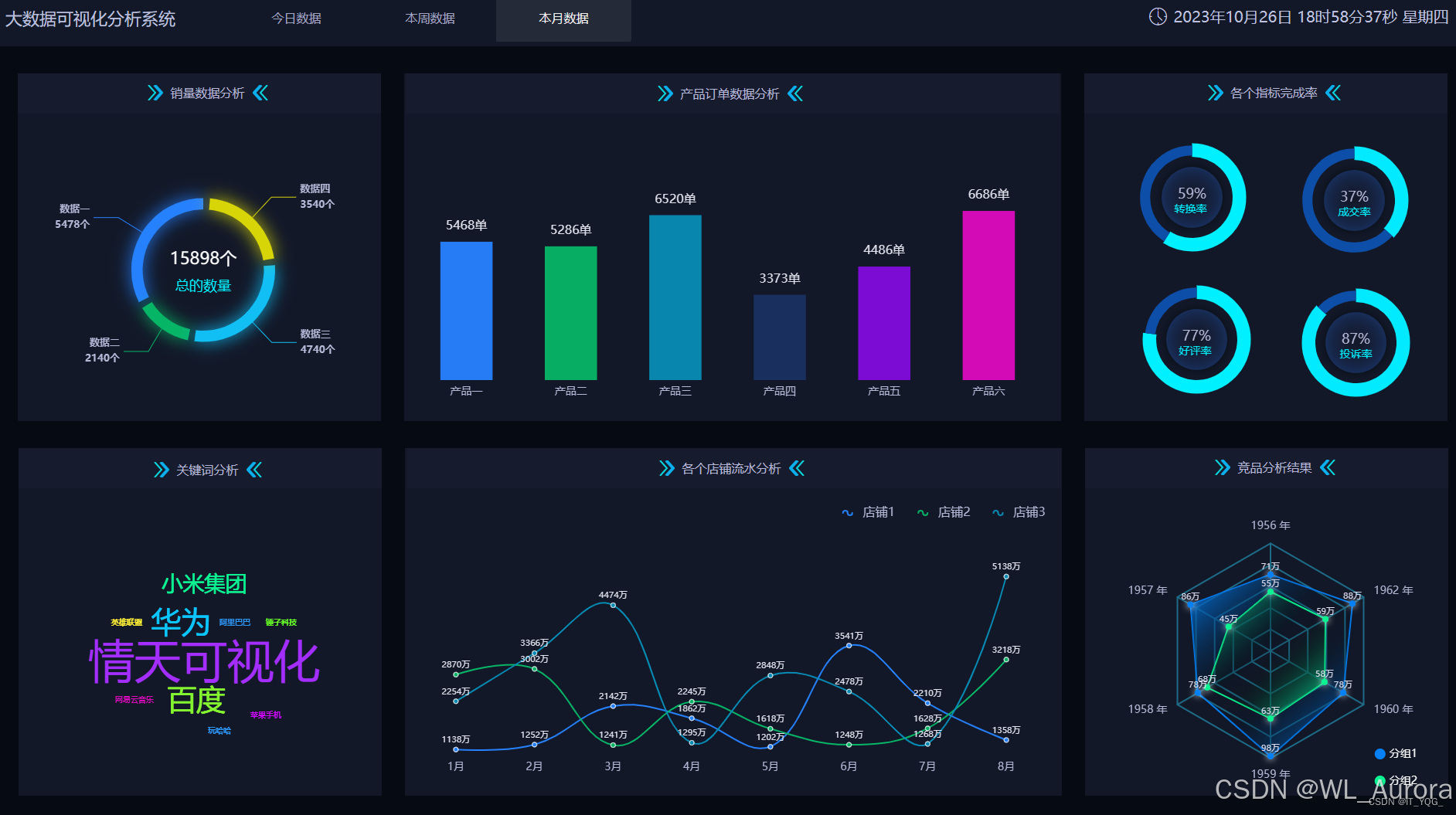
ECharts前端代码示例:
html
<!DOCTYPE html>
<html>
<head>
    <title>网站流量分析大屏</title>
    <script src="https://cdn.jsdelivr.net/npm/echarts@5.4.3/dist/echarts.min.js"></script>
    <style>
        body { background: #0a1631; color: #fff; }
        .container { display: grid; grid-template-columns: 1fr 1fr; gap: 20px; padding: 20px; }
        .chart { height: 400px; background: rgba(255,255,255,0.05); border-radius: 10px; }
    </style>
</head>
<body>
    <h1 style="text-align:center;">网站流量实时分析大屏</h1>
    <div class="container">
        <div id="pvChart" class="chart"></div>
        <div id="hourChart" class="chart"></div>
        <div id="provinceChart" class="chart"></div>
        <div id="topnChart" class="chart"></div>
    </div>

    <script>
        // PV/UV指标卡
        var pvChart = echarts.init(document.getElementById('pvChart'));
        pvChart.setOption({
            title: { text: '今日PV/UV', left: 'center', textStyle: { color: '#fff' } },
            series: [{
                type: 'gauge',
                data: [{ value: 1000000, name: 'PV' }],
                axisLine: { lineStyle: { color: [[1, '#67e8e9']] } }
            }]
        });

        // 24小时趋势图
        var hourChart = echarts.init(document.getElementById('hourChart'));
        hourChart.setOption({
            title: { text: '24小时访问趋势', left: 'center', textStyle: { color: '#fff' } },
            xAxis: { type: 'category', data: ['00','01','02','03','04','05','06','07','08','09','10','11','12','13','14','15','16','17','18','19','20','21','22','23'], axisLabel: { color: '#fff' } },
            yAxis: { type: 'value', axisLabel: { color: '#fff' } },
            series: [{ data: [42350,38920,35600,32100,29800,31200,38500,45200,52100,48900,46700,51200,53400,52100,49800,47600,48900,51200,53400,52100,49800,46700,44500,41200], type: 'line', smooth: true, areaStyle: { color: 'rgba(103,232,233,0.3)' } }]
        });

        // 地域分布饼图
        var provinceChart = echarts.init(document.getElementById('provinceChart'));
        provinceChart.setOption({
            title: { text: '用户地域分布', left: 'center', textStyle: { color: '#fff' } },
            series: [{
                type: 'pie',
                data: [
                    { value: 340000, name: '北京' },
                    { value: 330000, name: '上海' },
                    { value: 330000, name: '广东' }
                ],
                label: { color: '#fff' }
            }]
        });

        // TopN柱状图
        var topnChart = echarts.init(document.getElementById('topnChart'));
        topnChart.setOption({
            title: { text: '热门页面Top10', left: 'center', textStyle: { color: '#fff' } },
            xAxis: { type: 'category', data: ['/index.html','/product/1001','/product/1002','/cart','/order','/user/login'], axisLabel: { color: '#fff' } },
            yAxis: { type: 'value', axisLabel: { color: '#fff' } },
            series: [{ data: [180000,170000,165000,150000,140000,130000], type: 'bar', itemStyle: { color: '#67e8e9' } }]
        });
    </script>
</body>
</html>
九、项目总结与优化建议
9.1 核心指标汇总
| 指标 | 数值 | 说明 |
|---|---|---|
| 总数据量 | 100万条 | 模拟1天日志 |
| 清洗后有效数据 | 约95万条 | 过滤率5% |
| PV | 1,000,000 | 总访问量 |
| UV | 254 | 独立IP数 |
| 峰值时段 | 12:00-14:00 | 午休时间 |
| 热门页面 | /index.html | 首页占比18% |
9.2 生产环境优化建议
| 优化点 | 方案 |
|---|---|
| 实时性 | 引入Spark Streaming或Flink,实现分钟级统计 |
| IP解析 | 使用GeoIP2数据库,提高地域解析准确度 |
| 存储优化 | 按日期分区存储,便于历史数据回溯 |
| 计算优化 | 热点数据缓存,冷数据归档到OSS |
| 可视化 | 接入Grafana或DataV,支持实时刷新 |
9.3 项目完整流程图
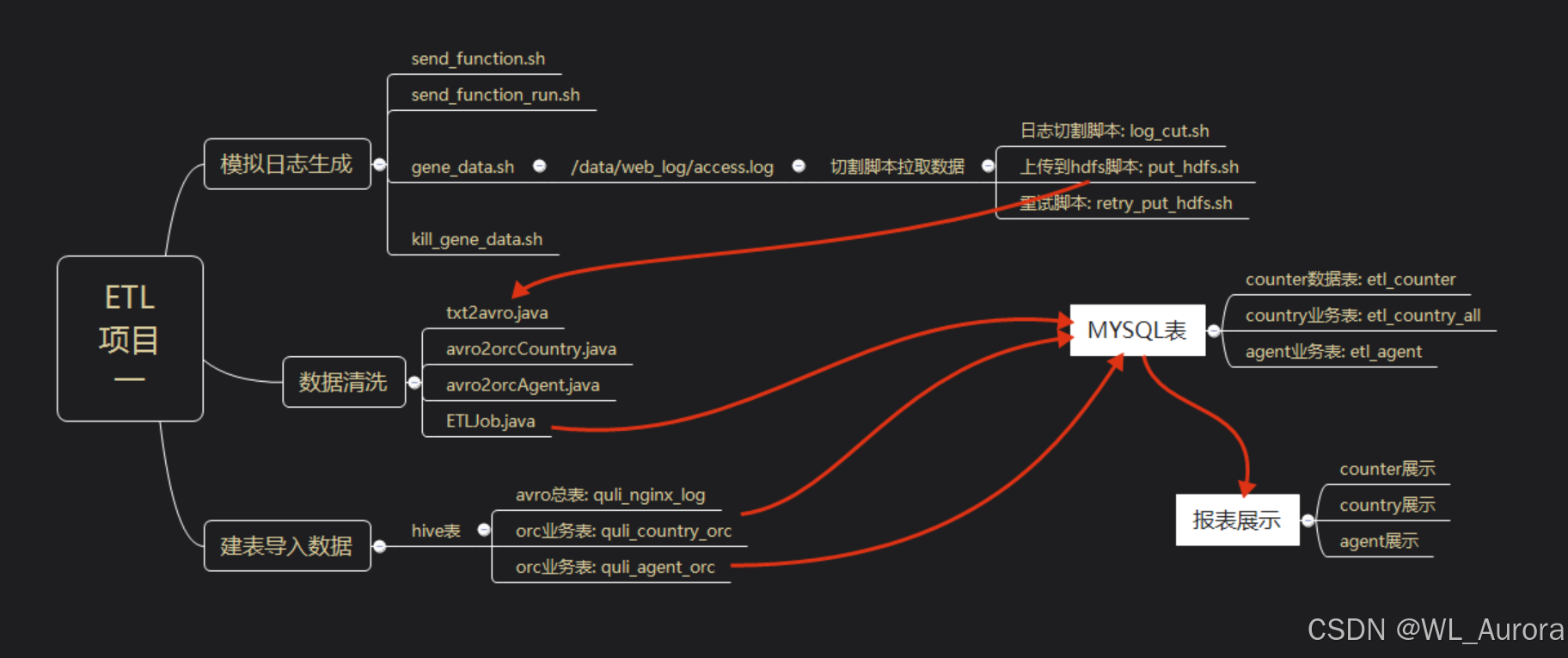
数据采集 → 数据清洗 → 数据存储 → 数据分析 → 结果导出 → 可视化展示
   ↓          ↓          ↓          ↓          ↓          ↓
Nginx    MapReduce    HDFS      MapReduce    Sqoop     ECharts
日志     ETL程序      原始数据   统计分析     MySQL     大屏