课程链接:www.bilibili.com/cheese/play...
代码链接:github.com/buglas/robo...
课程目标
- 创建关节坐标系对象
- 控制关节坐标系的可见性
1-URDF辅助对象概述
URDF辅助对象就是要辅助展示机器人数据的对象。
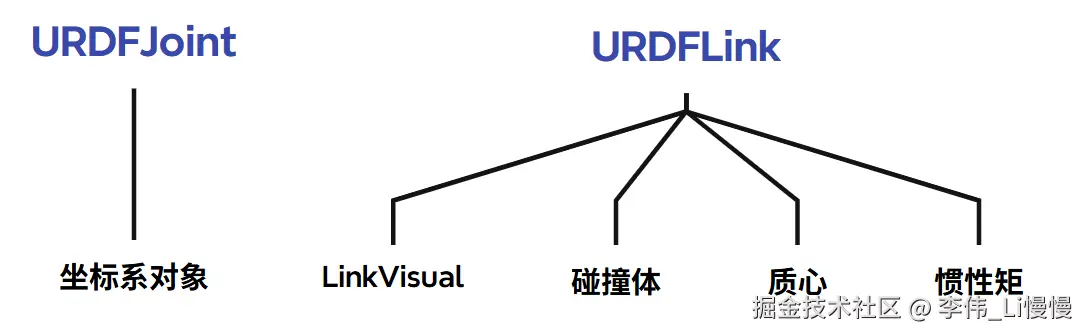
我接下来会创建以下4种辅助对象:
- 坐标系: 的本地坐标系
- 碰撞体:中的
- 质心:中的中的
- 惯性矩:中的中的
坐标系是URDFJoint的子对象,其余的是LinkVisual 的子对象。
2-创建关节坐标系类-JointAxesHelper
关节坐标系就是joint 关节的本地坐标系,所以我们可以创建一个坐标系类JointAxesHelper,然后在joint 中实例化。
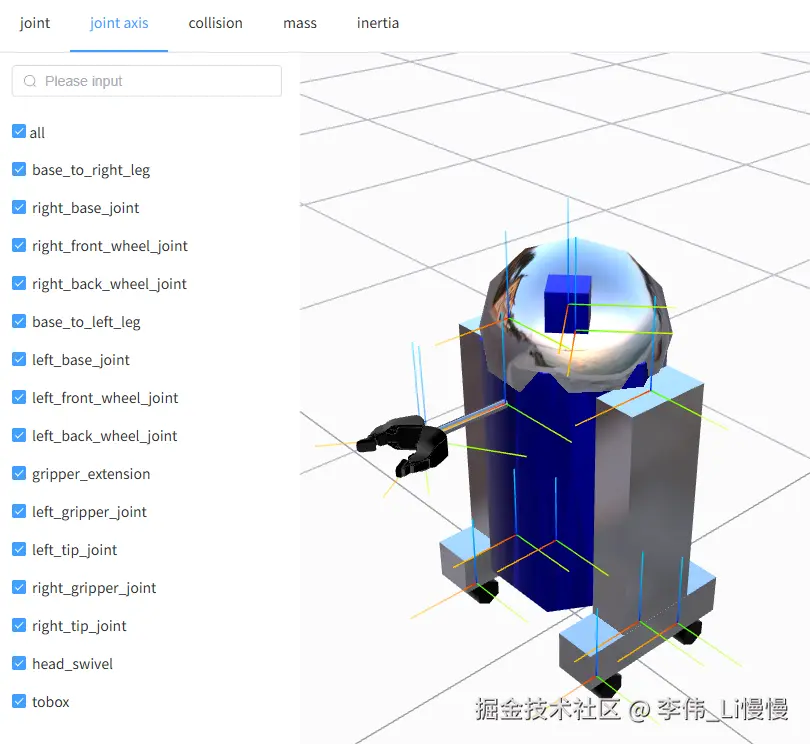
JointAxesHelper类继承自three.js 的LineSegments 对象,其中包含了x、y、z 三条线段。
- src/robot/JointAxesHelper.ts
javascript
import { BufferGeometry, Float32BufferAttribute, LineBasicMaterial, LineSegments } from "three";

// 关节坐标系辅助对象
class JointAxesHelper extends LineSegments {
    constructor( size = 1,material= new LineBasicMaterial( { vertexColors: true, toneMapped: false } ) ) {
    // 顶点
        const vertices = [
            0, 0, 0,    size, 0, 0, // x 轴
            0, 0, 0,    0, size, 0, // y 轴
            0, 0, 0,    0, 0, size  // z 轴
        ];
    // 顶点颜色
        const colors = [
            1, 0, 0,    1, 0.6, 0,  // x 轴渐变色
            0, 1, 0,    0.6, 1, 0,  // y 轴渐变色
            0, 0, 1,    0, 0.6, 1   // z 轴渐变色
        ];

        const geometry = new BufferGeometry();
        geometry.setAttribute( 'position', new Float32BufferAttribute( vertices, 3 ) );
        geometry.setAttribute( 'color', new Float32BufferAttribute( colors, 3 ) );

    // 调用父级构造函数
        super( geometry, material );
    }

  // 清理缓存
    dispose() {
        this.geometry.dispose();
        ('dispose' in this.material)&&this.material.dispose();
    }
}

export { JointAxesHelper };
3-在joint 中添加关节坐标系
在URDFLoader 类中,找到解析joint 的方法-processJoint,在其中实例化JointAxesHelper 对象,然后添加到joint 中。
- src/robot/URDFLoader.ts
php
function processJoint(
  jointNode: Element
) {
  //...
  // mimic节点
  //...
  /* 创建辅助对象-关节坐标系 */
  const axesMat = new LineBasicMaterial({
    vertexColors: true,
    toneMapped: false,
    depthTest: false,
    depthWrite: false,
    fog: false,
  });
  const jointAxisHelper = new JointAxesHelper(0.2, axesMat);
  jointAxisHelper.visible = false;
  Object.assign(jointAxisHelper.userData, {
    isURDFHelper: true,
    helperType: "jointAxisHelper",
  });
  jointObj.add(jointAxisHelper);
  jointAxisMap.set(jointName, jointAxisHelper);

  //...
}
jointAxisHelper.userData 中的isURDFHelper和helperType 属性很重要。
isURDFHelper 可以在鼠标选择模型时,忽略辅助对象。
helperType 可以确定辅助对象的类型。
jointAxisMap 作为关节坐标系的集合对象,可以方便关节坐标系的选择管理。
4-辅助对象控制器
我之前在用表单变换关节的时候,创建过一个URDFFormControl类,作为辅助对象控制器。
在其init 方法中,会将机器人中的辅助对象与form 表单数据相关联。
scss
class URDFFormControl{
  //...

  // 初始化所有集合的内容
  init(robot=this.robot) {
    if(!robot){return}
    const {AllMaps:{value:AllMaps}}=this
    const {userData}  = robot;
    for(let joint of userData.jointMap.values()){
      const {name, userData:{type,value, limit} } = joint;
      if(type=='fixed'){
        continue
      }
      AllMaps.jointMap.eles.push({
        name,
        type,
        value,
        lower: Number(limit.lower.toFixed(4)),
        upper: Number(limit.upper.toFixed(4))
      })
    }
    AllMaps.jointAxisMap.eles = parseHelperEle(userData.jointAxisMap);
    AllMaps.collisionMap.eles = parseHelperEle(userData.collisionMap);
    AllMaps.massMap.eles = parseHelperEle(userData.massMap);
    AllMaps.inertiaMap.eles = parseHelperEle(userData.inertiaMap);
  }

  //...
}
5-控制关节坐标系的可见性
在页面中,可以通过一个checkbox 控制所有坐标系的可见性,也可以单独控制每个坐标系的可见性。
在App.vue 中创建控制坐标系可见性的标签。
ini
<div v-else class="map-ele-row">
  <el-checkbox
    v-model="(item as any).visible"
    @change="(bool:boolean)=>{formControl.setHelperVisible(bool,item.name)}"
  />
  {{ item.name }}
</div>
总结
关节坐标系对象继承自LineSegments 类,LineSegments 中可以包含多条线段。
对于关节坐标系的可见性控制,都是一些比较简单的业务逻辑,尽量在架构的过程中把代码写得漂亮点,提高其可维护性和可阅读性。