文章目录
- 1.图像腐蚀(Erosion)
-
- [1.1 垂直腐蚀](#1.1 垂直腐蚀)
- [1.2 水平腐蚀](#1.2 水平腐蚀)
- [1.3 全方向腐蚀](#1.3 全方向腐蚀)
- [2. 图像的膨胀](#2. 图像的膨胀)
-
- [2.1 垂直膨胀](#2.1 垂直膨胀)
- [2.2 水平膨胀](#2.2 水平膨胀)
- [2.3 全方向膨胀](#2.3 全方向膨胀)
1.图像腐蚀(Erosion)
注意:以下图像处理都是二值图像,所以在进行处理之前需要先将图像进行二值化.
1.1 垂直腐蚀
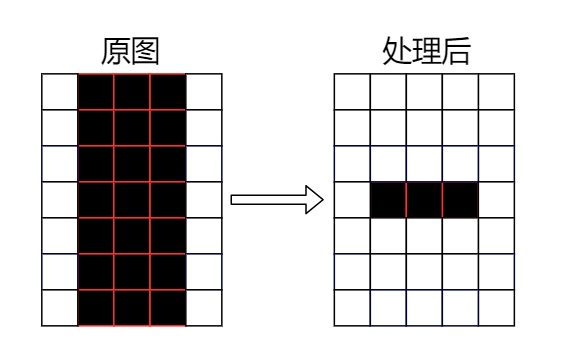
- 算法原理:在前景=0、背景=255 的二值图上,用结构元素扫描每个像素。
若结构元素覆盖窗口内存在任意背景像素 ,输出为背景(255);
只有窗口全部为前景时,输出才为前景(0)。
等价于最小值滤波:output = MIN(window)
如下对应的结构元素为3x1,在遍历每个元素时,会检测它的上,中,下三个像素存不存背景色,如果存在背景色,则把当前像素置为背景色(白色)
- python代码
如下代码代码使用的3x1的窗口,说白了就是把垂直方向上,上下边界各腐蚀3各像素点
python
def erode_vertical(pixels, width, height):
    """
    垂直腐蚀:结构元素为 3×1 竖条 [1,1,1]^T
    对每个像素,检查上、中、下三个位置:
      若有任意背景像素(>128),输出为背景;否则为前景。
    跳过顶行和底行。
    """
    # 初始化目标缓冲区
    dst = bytearray(width * height)

    for y in range(1, height - 1):
        for x in range(width):
            # 先置前景,若 3x1 窗口内有背景则改为背景
            out = 0  # 前景
            for dy in (-1, 0, 1):
                if pixels[(y + dy) * width + x] > 128:
                    out = 255  # 背景
                    break


return dst- 效果图:
垂直方向上,上下边界各腐蚀3各像素
1.2 水平腐蚀
- 检测原理: 结构元素为 1×3 横条 1,1,1 对每个像素,检查左、中、右三个位置。跳过最左列和最右列。
- python代码
说白了就是水平方向上,前景的左右边界各腐蚀3各像素
python
def erode_horizontal(pixels, width, height):
	# pixels:是二值图像的数据
	# 初始化目标缓冲区
    dst = bytearray(width * height)

    for y in range(height):
        for x in range(1, width - 1):
            out = 0
            for dx in (-1, 0, 1):
                if pixels[y * width + (x + dx)] > 128:
                    out = 255
                    break
            dst[y * width + x] = out

return dst- 效果图
说白了就是水平方向上,前景的左右边界各腐蚀3各像素

1.3 全方向腐蚀
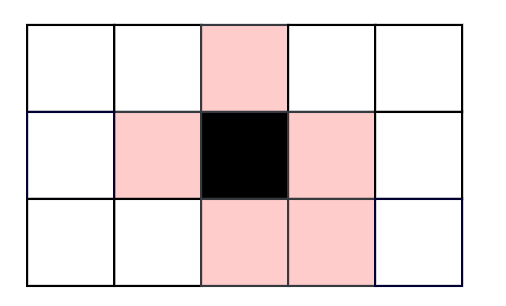
这里它的原理和垂直腐蚀,水平腐蚀有些不同,这里检测区域变为分别检测当前元素的上,下,左,右,右下的像素有没有存在背景颜色的,如果存在,则把当前元素置白.
如下图所示,黑色为当前像素,四周粉色高亮的为要检测的像素,如果周围存在背景色,则把当前像素置白(背景色)
- python代码
python
def erode_full(pixels, width, height):
    """
    全方向腐蚀:使用 3×3 结构元素-这个区域可自定义,在实际使用中,腐蚀效果,用户可自定义。
    这里我们使用如下5各偏移的像素
    # 5 个检查偏移 (dy, dx), 注意这里前面是y轴偏移,后面是x轴偏移
    (+1, 0), (0, -1), (0, +1), (-1, 0), (-1, +1)
    """
    dst = bytearray(width * height)
    # 5 个检查偏移 (dy, dx)
    offsets = [(+1, 0), (0, -1), (0, +1), (-1, 0), (-1, +1)]

    for y in range(1, height - 1):
        for x in range(1, width - 1):
            out = 0
            for dy, dx in offsets:
                if pixels[(y + dy) * width + (x + dx)] > 128: # 存在背景色(白)
                    out = 255
                    break
            dst[y * width + x] = out

return dst- 效果图

2. 图像的膨胀
2.1 垂直膨胀
-
检测原理:
与腐蚀对偶。若结构元素覆盖窗口内存在任意前景像素 ,输出为前景(0);否则为背景(255)。
等价于最大值滤波(在前景=0 约定下为最小值)。
-
python代码
代码比较简单,说白了,就是垂直方向上,上下各边界往外面外扩3个元素.这个用户实际使用时,可自定义.
python
def dilate_vertical(pixels, width, height):
    """
    垂直膨胀:3×1 结构元素。
    窗口内有任意前景像素(<128),输出为前景。
    """
    dst = bytearray(b'\xff' * width * height)  # 初始化为背景

    for y in range(1, height - 1):
        for x in range(width):
            out = 255  # 背景
            for dy in (-1, 0, 1):
                if pixels[(y + dy) * width + x] < 128:
                    out = 0  # 前景
                    break
            dst[y * width + x] = out

return dst- 效果图
如下"日"字的上下变粗了.

2.2 水平膨胀
-
检测原理:
在水平方向上,检测当前元素的在x轴分别偏移(-1, 0, 1)的三个元素是否存在前景像素(0), 如果存在,则把当前像素置为前景0.
-
python代码
说白了,就是水平方向上,左右边界各扩大3个像素,在实际使用时,用户可自定义窗口大小.
python
def dilate_horizontal(pixels, width, height):
    """
    水平膨胀:1×3 结构元素。
    """
    dst = bytearray(b'\xff' * width * height)

    for y in range(height):
        for x in range(1, width - 1):
            out = 255
            for dx in (-1, 0, 1):
                if pixels[y * width + (x + dx)] < 128:
                    out = 0
                    break
            dst[y * width + x] = out

return dst- 效果图
原理就是左右边界各增大3个像素, 如下"日"字的的左右边变宽了.

2.3 全方向膨胀
- 检测原理:
全方向膨胀:与 "全方向腐蚀" 具有相同的结构元素,窗口内有前景,则把当前像素输出前景。 这里的窗口实际使用时,是可以随参传入的,不一定是这几个. - python代码
代码简单,如果窗口内存在前景像素,则 当前像素置为前景(黑色0)
python
def dilate_full(pixels, width, height):
    dst = bytearray(b'\xff' * width * height)
    offsets = [(+1, 0), (0, -1), (0, +1), (-1, 0), (-1, +1)]

    for y in range(1, height - 1):
        for x in range(1, width - 1):
            out = 255
            for dy, dx in offsets:
                if pixels[(y + dy) * width + (x + dx)] < 128:
                    out = 0
                    break
            dst[y * width + x] = out

return dst- 效果图
